
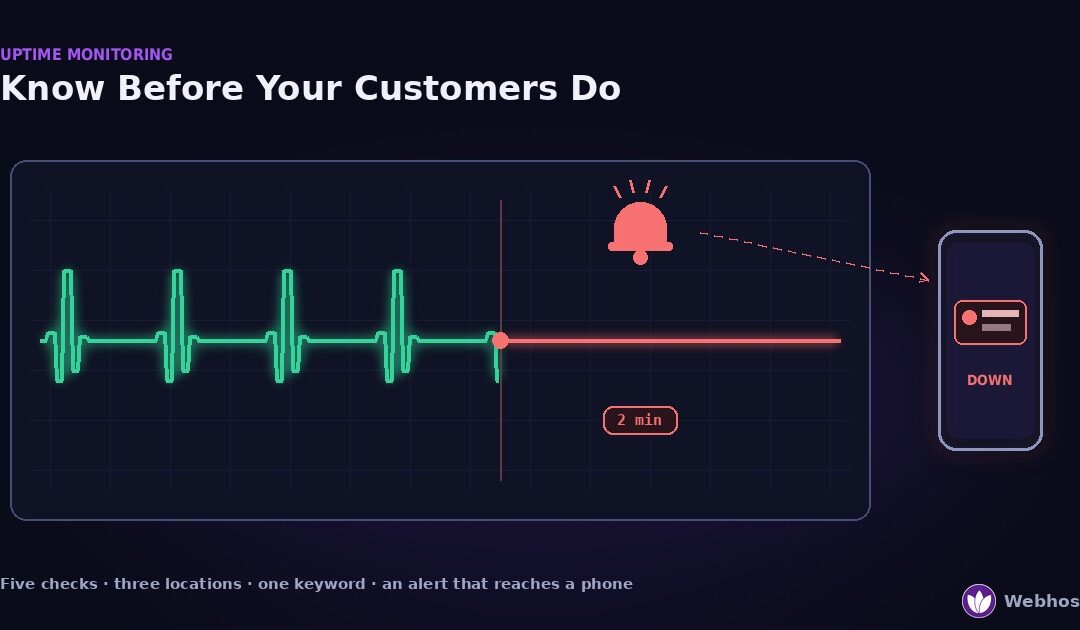
Website uptime monitoring is a service that loads your site from outside on a schedule and alerts you the moment it fails. Done well, it tells you the site is down minutes before a customer does. Done naively — one check, one location, email only — it misses real outages and reports fake ones. This guide covers what to check, how often, from where, and the two blind spots that fool most monitors.
Most guides on this topic are product lists. They compare ten monitoring services and stop there. However, the service matters far less than the setup, because a badly configured monitor on the best service is still blind. So this guide is about the setup.
In addition, it closes a loop. Every other guide in this series ends with the same advice: monitor it. This is the page that explains how.
What Uptime Monitoring Actually Does
An uptime monitor is a robot with a schedule. Every minute or every five, it requests your site from a server somewhere in the world. Then it records what came back, and if the answer is wrong, it alerts you.
That is the whole mechanism. It does not fix anything, and it cannot prevent an outage. What it buys you is time — the gap between the site failing and you knowing, which without a monitor is however long it takes a customer to complain.
Why “99.9% uptime” is less than it sounds
Hosting plans and status pages love percentages. Yet a percentage hides the number that matters, which is how long your site was actually gone. So convert it.
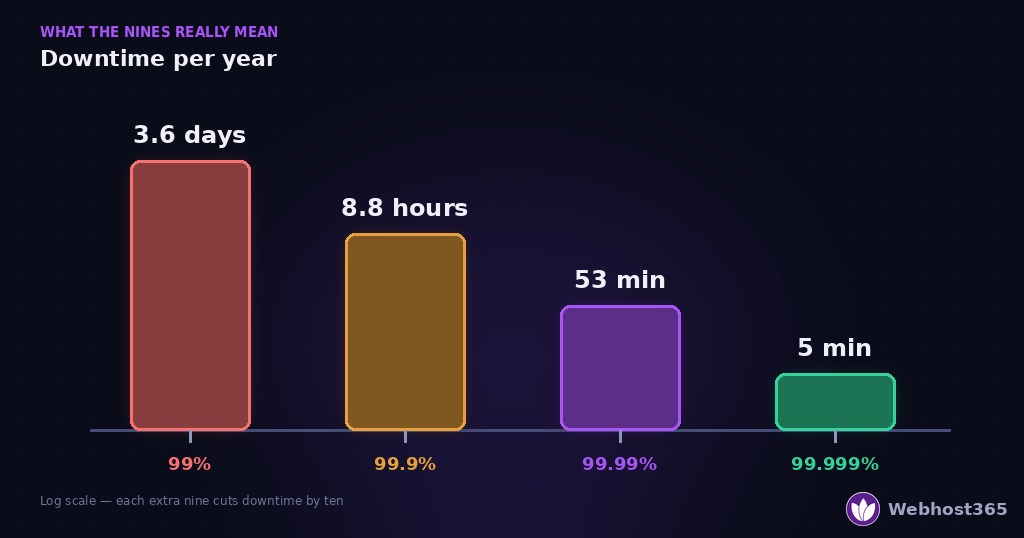
| Uptime | Downtime per year | Downtime per month |
|---|---|---|
| 99% | 3.65 days | 7.3 hours |
| 99.9% | 8.8 hours | 44 minutes |
| 99.95% | 4.4 hours | 22 minutes |
| 99.99% | 53 minutes | 4.4 minutes |
| 99.999% | 5.3 minutes | 26 seconds |
Read the second row again. A host promising 99.9% uptime is promising that your site may be down for nearly nine hours a year, and that is within the agreement. Therefore the percentage tells you what to expect, not what to accept without watching.
What the monitor is really for
Because outages happen even at four nines, the question is never whether your site will go down. It is how fast you find out. A monitor with one-minute checks and a phone alert gives you an outage measured in minutes. A customer email gives you one measured in hours.
That difference is the entire return on monitoring. Everything below is about making sure the alert is real, arrives quickly, and reaches a person who can act.
The Five Things Worth Checking
A monitor that only pings the homepage is the naive setup, and it is the one most people run. In fact, a site can fail in five different ways, and a plain ping catches only one of them. Here is what a useful monitor checks.
1. HTTP status
The basic check. The monitor requests a page and expects a 200. A 500, a 502, a 503, or a timeout means the site is not serving, and the monitor alerts.
That is necessary but not sufficient. As the next section shows, a 200 can arrive with a completely broken page behind it.
2. A keyword on the page
This is the check that separates a real monitor from a ping. Alongside the status code, the monitor looks for a specific phrase that only appears when the page rendered correctly — your company name in the footer, or a heading from the homepage.
If the phrase is missing, the page is wrong even though the server answered. A blank white screen, a database error page, and a maintenance notice all return a 200 on many setups. The keyword check catches all three.
3. SSL certificate expiry
A certificate that expires takes your site down for every visitor, and the server itself stays perfectly healthy. So a status check passes while browsers show a warning. Most monitors can watch the expiry date and alert two weeks ahead.
This check matters more in 2026 than it did last year, because certificates now expire every 200 days and the largest issuer no longer emails reminders. Our SSL error guide explains the change. A monitor is the reminder you set for yourself.
4. DNS and domain expiry
Your site cannot be reached if its name does not resolve. A DNS check confirms that the domain still points at the right address, and it catches the change nobody noticed after a migration. Similarly, a domain-expiry reminder catches the renewal that lapsed — and if one already has, our domain expiration guide covers recovery stage by stage.
Both failures look like a total outage from the outside, while the server hums along. Our site-down diagnosis covers both as causes; the monitor turns them into alerts instead of surprises.
5. Response time
Finally, watch how long the page takes, not just whether it arrives. A site that loads in three seconds today and eight tomorrow is telling you something before it breaks. Set a threshold, and treat a sustained rise as an early warning rather than a curiosity. If the trend is real, our guide to why a website slows down covers the usual causes.
The Two Blind Spots: False Ups and False Downs
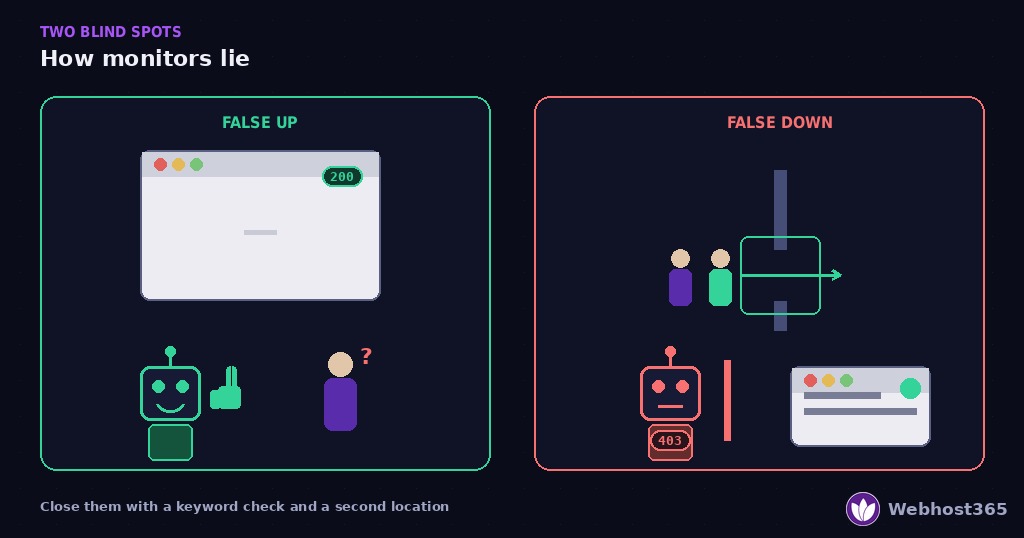
A monitor can be wrong in two directions. It can report the site is fine while visitors see a broken page. Or it can report an outage while the site is working. Both happen constantly with the naive setup, and both have a specific fix.
False ups: the site is broken, the monitor is happy
A false up is the dangerous one, because nothing alerts you. The monitor requests the page, receives HTTP 200, and moves on. Meanwhile, visitors are staring at something wrong.
Four situations produce it, and they are all common.
A blank page. A fatal PHP error with display switched off sends a 200 and an empty body. Our 500 error guide explains why the page goes white. A status check passes; a visitor sees nothing.
An error page that returns 200. Many setups serve the database connection error with a 200 status, because WordPress rendered it as a page. The monitor sees a page. The visitor sees an error.
A CDN serving a dead origin. When the origin server dies, a CDN may keep serving cached copies for minutes or hours. So the monitor, which fetches through the CDN, gets yesterday’s page and a 200. Nobody can log in, check out, or submit a form, and nothing alerts.
Maintenance mode left on. A plugin’s “back soon” page usually returns 200. If you forgot to switch it off after an update, the monitor will not tell you.
False downs: the site is fine, the monitor panics
A false down is less dangerous but more corrosive. After the third alert about an outage that did not happen, people mute the monitor. Then the real outage arrives to a silenced phone.
Three situations produce it.
Your firewall refuses the monitor. Monitors look like bots, because they are bots. A bot rule, a rate limit, or a country block at your CDN refuses the check with a 403, and the monitor reports the site down while every human visitor gets the page. Our 403 guide covers exactly this case.
One location has a network problem. A monitor checking from a single data centre inherits that data centre’s problems. A routing blip between it and your server looks identical to your server being down.
The check is too strict. A response-time threshold set at one second will alert on every busy afternoon. A keyword that appears only on the desktop layout will fail on a mobile-rendered response.
The decoder
| What the monitor said | What was actually true | The check that closes the gap |
|---|---|---|
| Up (200) | Blank white page | Keyword check for a phrase from the rendered page |
| Up (200) | Database error page | Keyword check — the error page lacks your phrase |
| Up (200) | CDN serving a dead origin | A second check that bypasses the CDN and hits the origin directly |
| Up (200) | Maintenance mode left on | Keyword check — the maintenance page lacks your phrase |
| Down (403) | Site working, monitor blocked | Allowlist the monitor’s addresses in your firewall |
| Down (timeout) | Site working, one location blipped | Confirm from a second location before alerting |
| Down (slow) | Site working, threshold too tight | Set thresholds from a week of real data, not a guess |
Two checks close most of the table. A keyword check catches every false up except the CDN case, and a second location catches most false downs. Add the two, and a monitor becomes something you can trust.
How Often, From Where, and How to Be Told
Once the checks are right, three settings decide whether the alert is useful. Each has a sensible default, and each default is wrong for someone.
How often to check
The interval sets your worst-case blindness. A five-minute check means an outage can run five minutes before the first failed request, then another interval before confirmation. That is ten minutes of downtime before anyone knows.
One-minute checks cut that to two or three minutes. For a site that takes orders or logins, the shorter interval is worth it. For a personal blog, five minutes is honest enough. Either way, decide on purpose rather than accepting whichever the free tier hands you.
From where to check
Check from at least three locations on different networks and continents. That is not about global coverage. It is about the false down: when one location fails and two succeed, the site is up and that location is having a bad day.
So configure the monitor to require a failure from two locations before it alerts. Most services call this confirmation or re-check, and it removes nearly every false alarm at the cost of one extra minute of delay.
In addition, keep one location outside your hosting provider’s network. If your host has a regional outage, a monitor inside the same region may go down with it and never report anything.
How to be told
Email is the default alert channel, and email is the wrong one. The mail server may sit on the same box that just failed. Even when it does not, email arrives when you next look, which at 3 a.m. is hours later.
Use push notifications or SMS for the first alert. Then add escalation: if nobody acknowledges within fifteen minutes, alert a second person, or repeat the alert. A monitor that reaches a phone within two minutes is the goal, and a monitor that emails an inbox is a log file.
What to alert on, and what not to
Finally, be selective. Alert immediately on a confirmed HTTP failure, a missing keyword, and a certificate expiring inside fourteen days. Alert daily, not instantly, on response-time drift and domain expiry, because those need a decision rather than a sprint.
That split keeps the urgent channel quiet enough that people still trust it. Because the only monitor that works is the one nobody has muted.
Set It Up in Fifteen Minutes
Everything above becomes one short checklist. Several monitoring services offer a free tier that covers all of it, so the cost is time rather than money. Work through the six steps in order.
The six steps
First, add an HTTP check on the homepage with a one-minute interval if the service allows it, five minutes otherwise. Set at least three check locations on different continents, and require confirmation from a second location before an alert.
Second, add the keyword. Pick a phrase that appears only when the page renders correctly — your company name in the footer works well. The monitor now fails on a blank page, an error page, and a forgotten maintenance screen. As a bonus, it also fails if a hack replaces your homepage, which is one of the signs in our hacked-site guide.
Third, add the SSL expiry check with a fourteen-day warning. Then confirm the date it reports matches the one in your browser’s certificate details.
Fourth, add a domain-expiry reminder — in the monitor if it offers one, otherwise a calendar event thirty days before renewal. Your DNS records deserve a check too: a monitor that resolves your domain from outside catches a broken record before visitors do.
Fifth, allowlist the monitor. Every service publishes the addresses its checks come from. Add them to your firewall and your security plugin, or the first false down will arrive within a day.
Sixth, set the alert channel to push or SMS, with email as a second copy. Add one other person for escalation.
Test it before you trust it
A monitor that has never fired is a hypothesis. So make it fire on purpose. Point a temporary check at a page that does not exist, such as yoursite.com/monitor-test-404, and wait for the alert. If your phone buzzes within two intervals, the chain works. If it does not, fix the channel now, while nothing is wrong.
Then delete the test check. A monitor with a permanent failing check trains everyone to ignore it.
When the Outage Is Not Your Fault
Some of the largest outages of 2026 had nothing to do with the sites they took down. They happened a layer below, at the platforms whole industries depend on. That changes what monitoring is for.
What 2026 looked like
On February 20, 2026, a Cloudflare incident withdrew customers’ routes from the Internet through BGP, and those sites vanished until the routes returned. On May 5, 2026, the .de registry published broken DNSSEC signatures, and millions of German domains became unreachable at once. Cloudflare’s own outage post-mortems document both.
Then, on May 7 and 8, a cooling failure in one Amazon Web Services availability zone in Northern Virginia impaired servers and storage for most of a day. AWS’s post-event summary adds a detail worth remembering: its own monitoring data was delayed during the event, so customers found it difficult to understand the impact on their applications. In other words, even inside the world’s largest cloud, the internal view failed when it mattered most.
None of those failures were caused by the sites that went down. Nothing in their code, plugins, or configuration was wrong. Yet every one of them was down, and the owners who found out first were the ones with a monitor checking from outside.
Three rules that follow
Monitor from outside your provider. A check that runs inside the same network as your server can fail with it. At least one location must sit on a different provider entirely, so an outage at your host still produces an alert.
Keep DNS independent of the host. If your name servers and your web server share a provider, one outage takes both, and even a healthy backup server has no way to be reached. Separate them.
Know your provider’s status page before you need it. When an alert fires, the first question is whether the problem is yours or the platform’s. A status page answers that in one glance, and it tells you whether to start diagnosing or start communicating.
What a platform commits to
Our platform runs at 99.99% uptime, which the table in Section 1 translates to under an hour of downtime a year across the network. That figure is a commitment, not a guarantee against the outages above. The honest version of the promise is this: we monitor from outside too, and when the cause is ours, our support team will tell you so rather than wait for you to ask.
Reading the Numbers: Uptime, MTTR, and SLAs
Once a monitor has run for a month, it produces a number. Most people read the wrong one.
Uptime is half the story
An uptime percentage tells you how much of the month the site was up. It does not tell you whether the downtime was one twelve-hour outage or seventy-two ten-minute blips. Those are very different experiences for a customer, and very different diagnoses for you.
So read the second number: mean time to recovery, the average length of an outage. A site at 99.9% with a recovery time of two minutes has a flaky component. A site at 99.9% with a recovery time of four hours has a host that is slow to respond. The percentage is identical; the fix is not.
How to read a hosting SLA
A service-level agreement states a promised uptime and what you receive if it is missed, usually a credit against the bill. Two things are worth checking before you rely on one.
First, what the SLA excludes. Scheduled maintenance, third-party outages, and attacks are commonly outside it, and those exclusions can cover most real downtime. Second, what the credit is worth: a 10% credit on a small monthly bill does not compensate for an afternoon of lost orders. Treat an SLA as a signal of how seriously a host takes uptime, not as insurance.
Compare hosts on both numbers
When choosing a host, ask for the uptime figure and the typical recovery time, and check both against an independent monitor rather than the host’s own page. Our BOV 365 Challenge exists for exactly that kind of comparison, because we would rather be measured from outside than believed on our word.
Final Thoughts
The whole method fits in one sentence. Five checks, three locations, one keyword, and an alert that reaches a phone.
The five checks cover the ways a site actually fails: status, content, certificate, DNS, and speed. Three locations turn a blip into a non-event and a real outage into a confirmed one. The keyword closes the false ups that a plain ping never sees. And the phone alert closes the gap between the site failing and a human knowing, which is the only gap monitoring can close.
Then test it once, on purpose, so the first alert you receive is not the first time you learn the channel was broken. Because in 2026, when the biggest outages are nobody’s fault, knowing first is the one advantage every site owner can still have.
FAQ
Every minute for a site that takes orders or logins, and every five minutes for a site where a short outage costs little. The interval sets your worst-case blindness: a five-minute check can leave an outage unreported for ten minutes once confirmation is included. Check from at least three locations, and require a second location to confirm a failure before alerting, so one network blip does not wake you up.
About 8.8 hours of downtime a year, or 44 minutes a month. Each extra nine cuts that by ten: 99.99% is 53 minutes a year, 99.999% is about 5 minutes. A percentage sounds reassuring, so always convert it to hours before deciding whether it is acceptable for your site.
Usually because your firewall or security plugin is refusing the monitor’s requests. Monitors are bots, and bot rules, rate limits, and country blocks return a 403 to them while human visitors get the page. Allowlist the monitor’s published IP addresses. The other common cause is a single check location with a network problem, which requiring confirmation from a second location eliminates.
No. A monitor detects an outage and alerts you; it cannot stop one. What it prevents is long downtime, by cutting the gap between the site failing and someone knowing from hours to minutes. Prevention comes from the fixes in the rest of this series — tested backups, staging for updates, verified certificate renewal, and right-sized hosting.
For most sites, yes, provided you configure it properly. The free tiers of several services include HTTP checks, keyword checks, SSL expiry alerts, and multiple locations. What matters more than the price is the setup: a keyword check, three locations with confirmation, allowlisted monitor addresses, and a push or SMS alert rather than email alone.
A short outage does little harm, because search engines retry pages that fail and treat brief errors as temporary. Prolonged or repeated downtime is different: crawlers reduce how often they visit an unreliable site, and pages that return errors for days can drop from the index until they recover. Fast detection through monitoring keeps most outages in the harmless category.