
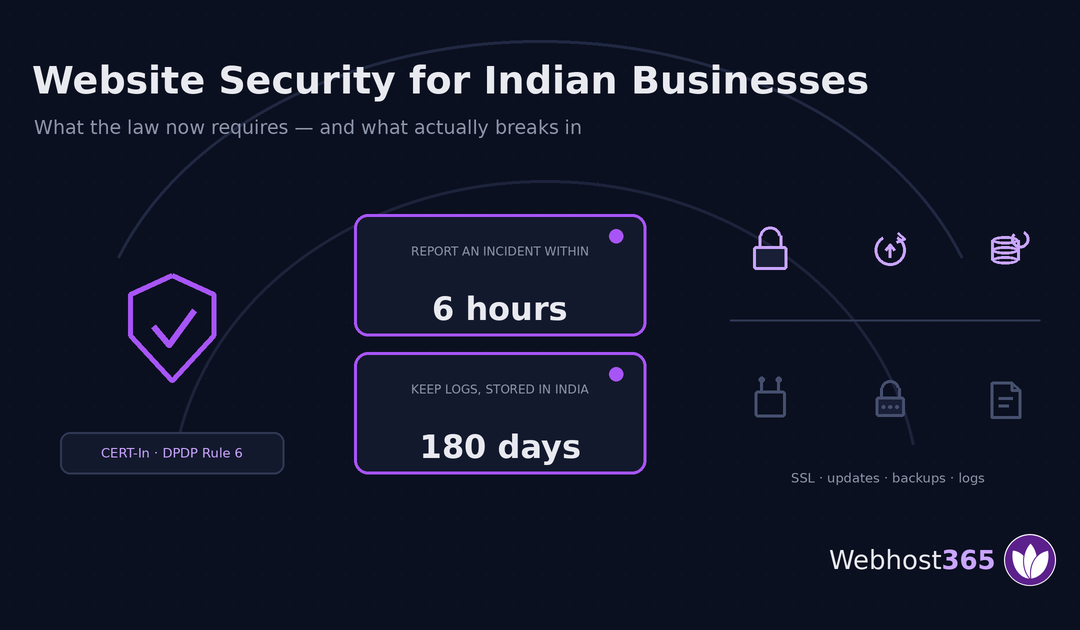
Website security in India is no longer just good practice. Two frameworks now impose specific duties on ordinary businesses: reporting a cyber incident within six hours, and keeping system logs inside India for 180 days. This guide covers what the law requires, what actually breaks into small business websites, and which parts your host handles. It is practical guidance, not legal advice.
What Indian Law Now Requires of Your Website
Most security advice written for Indian businesses could have been written anywhere — use strong passwords, install a plugin, keep backups. It skips the part that is specific to operating here, which is that two separate frameworks now impose concrete, dated obligations.
The CERT-In Directions, 2022 cover incident reporting, logging and timekeeping. The Indian Computer Emergency Response Team issued Direction No. 20(3)/2022-CERT-In on 28 April 2022 under Section 70B(6) of the Information Technology Act, 2000, effective sixty days later. For MSMEs and for certain provider obligations, CERT-In extended the timeline to 25 September 2022. Both dates are long past.
The DPDP Act and its 2025 Rules cover security safeguards for personal data. Rule 6 requires reasonable security safeguards and names what they include. We cover that framework in full in our guide to the DPDP Act and your website; here it matters only as the second reason the controls below are not optional.
Here is everything both frameworks require, mapped to the thing you actually change.
| Requirement | Source | What it means | Where you do it |
|---|---|---|---|
| Report incidents within 6 hours | CERT-In Direction (ii) | Specified cyber incidents reported to CERT-In within six hours of becoming aware | An incident plan written in advance |
| Keep logs 180 days, in India | CERT-In Direction (iv) | ICT system logs enabled, retained on a rolling 180-day basis, stored within Indian jurisdiction | Hosting location and log retention |
| Sync clocks to Indian NTP | CERT-In Direction (i) | All ICT system clocks synchronised to NIC or NPL NTP servers | Server configuration |
| Answer CERT-In requests in 6 hours | CERT-In Direction (iii) | Information requested by CERT-In supplied within the stated window | A named point of contact |
| Encryption in transit | DPDP Rule 6 | HTTPS across the site, certificates that renew | SSL on your hosting |
| Access control | DPDP Rule 6 | Unique accounts, least privilege, removal of leavers | Your CMS and panel |
| Logging and monitoring | DPDP Rule 6 | Logs sufficient to detect unauthorised access | Hosting and application |
| Backups that restore | DPDP Rule 6 | Backups adequate to recover after a breach | Hosting, tested by you |
| Bind your processors | DPDP s.8(2) | Written contract with anyone processing data for you | Your hosting agreement |
Three rows are server configuration. Two are documents you write once. The rest is ordinary hygiene that happens to now have legal weight behind it.
Who the CERT-In Directions actually cover
Wider than most readers assume. The Directions apply to service providers, intermediaries, data centres, body corporate and government organisations — and “body corporate” means companies generally, not a special category of technology firms. If you are a private limited company running a website that processes anything, the working assumption should be that you are covered.
CERT-In has published official FAQs clarifying scope and process, and they are worth ten minutes if you are uncertain about your own position.
Non-compliance is not a civil penalty. Section 70B(7) of the IT Act provides for imprisonment of up to one year, a fine of up to ₹1 lakh, or both. As with the DPDP penalties, that is the statutory maximum rather than the expected outcome for a small business acting in good faith — but it is a criminal provision, which is unusual for a compliance obligation of this kind and worth knowing.
One clarification, because it gets misreported. There is a separate five-year retention requirement for subscriber and customer records, and it applies specifically to data centres, VPS providers, cloud service providers and VPN providers. That is an obligation on companies like us, not on you as a customer. The 180-day log rule is the one that reaches an ordinary business.
The two requirements that are hosting configuration
This is where a security article written by a hosting company can tell you something a law firm’s version cannot.
Clock synchronisation is a server setting. The Directions require ICT system clocks to be synchronised with the NTP servers of the National Informatics Centre or the National Physical Laboratory, or to servers traceable to them. The reason is investigative: if your web server, firewall and database disagree about what time it is, nobody can reconstruct what happened during an incident. On managed hosting this is handled for you. On a VPS or dedicated server it is your chrony or systemd-timesyncd configuration, and it takes one line.
Log retention inside India is a hosting decision, and it is the more interesting of the two. The Directions require logs to be maintained for a rolling 180 days within Indian jurisdiction. Foreign-only log storage does not satisfy it.
That is worth pausing on, because it cuts against a claim we have made carefully elsewhere. Under DPDP there is currently no general data localisation mandate — the government has not notified a restricted-country list, so hosting Indian customer data abroad is not prohibited. But the CERT-In log requirement is a genuine, live localisation obligation, and it has been in force since 2022.
For a business hosting its website outside India, the practical question becomes whether the logs can be retained in India separately from the application. That is possible but fiddly. Hosting on an Indian node removes the question, which is the most defensible reason we can give anyone for choosing one — our Linux VPS offers an Indian node option, and our guide to VPS hosting in India covers the location decision in more depth.
How Websites Actually Get Broken Into
Security writing has a bias towards the dramatic. Zero-days, nation-state actors, sophisticated persistent threats. Almost none of that is how a small business website in India gets compromised.
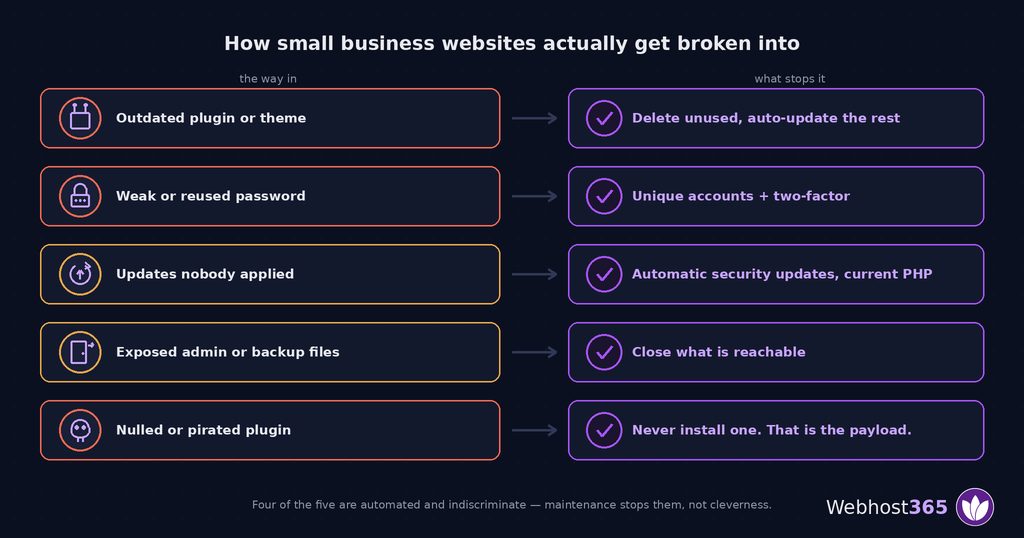
The real causes are dull, repetitive, and almost entirely preventable. Here they are in rough order of how often they turn out to be the answer.
An outdated plugin or theme. Someone publishes a vulnerability, automated scanners start probing every site on the internet for it within hours, and yours is running the version from eighteen months ago. No targeting is involved — you were found by a script that tried a million addresses.
Weak or reused credentials. An admin password that appears in a breach dump from an unrelated service, reused here. Credential-stuffing tools try those combinations against WordPress login pages at scale. This is why two-factor matters more than password complexity.
Updates nobody applied. Distinct from the first point, because this is core software and PHP rather than add-ons. A site running an unsupported PHP version is missing security patches for the language itself.
An exposed admin surface. Login pages, phpMyAdmin, staging copies left public, .git directories served over HTTP, backup files sitting in the web root with guessable names. Anything reachable is being probed.
A nulled or pirated plugin. Paid plugins distributed free on forums frequently carry a backdoor — that is the business model. Installing one is inviting someone in and paying nothing for the privilege.
Notice what is absent: nothing here required skill. Four of the five are automated, indiscriminate, and stopped by maintenance rather than by clever defence.
Why plugins are usually the culprit
A WordPress site is your code plus twenty other people’s code, each maintained by someone with their own standards and their own attention span. Every plugin is a dependency you did not write and cannot audit.
The most effective security decision most site owners can make is not hardening. It is removing. The contact form plugin you replaced but never deleted, the slider from the old theme, the analytics plugin superseded by something else — all still installed, all still executing, all still attack surface.
Deactivated is not removed. A deactivated plugin’s files remain on disk and, depending on the vulnerability, can still be reachable. Delete what you do not use.
The Controls That Matter, in Order
Ordered by risk reduced per hour spent, not by how impressive they sound in a proposal.
HTTPS everywhere, renewing automatically
Encryption in transit is explicitly named in DPDP Rule 6, and it is also the one certificate people forget until it expires and takes the site down with a browser warning.
Get it issued automatically and renewing automatically. Free Let’s Encrypt certificates are included on every plan we sell, and our SSL certificate guide explains what a certificate does and does not protect — which is worth reading, because HTTPS protects data in transit and nothing else. A site can be fully encrypted and completely compromised.
Access control and two-factor
The cheapest control with the highest return, and the one most commonly skipped.
One account per person, never a shared admin login. Give each account the lowest role that lets them do their job — an editor does not need administrator. Remove accounts when people leave, on the day they leave. Turn on two-factor authentication wherever it is available, which makes a stolen password insufficient on its own.
That last point is the whole argument. Credential stuffing works because passwords leak constantly. Two-factor means a leaked password is not enough.
Updates, applied rather than intended
Core, plugins, themes and PHP version. The gap between “we should update” and “we updated” is where most compromises live.
Enable automatic updates for security releases. Test larger updates on a staging copy first if the site earns money — breaking a live store to close a vulnerability is a poor trade when a staging environment costs nothing. Our managed plans include staging for this reason.
Keep PHP current. An end-of-life PHP version receives no security patches, and sites sit on them for years because upgrading felt risky once.
Backups you have actually restored
Everyone has backups. Far fewer have ever restored one, which means far fewer have backups.
Test a restore. Do it once, deliberately, on a staging site. That single exercise reveals the problems — the database that was never included, the backup that has silently failed for four months, the restore that takes six hours you did not have.
Keep them off-site, keep enough history that you can go back past the point of compromise, and remember that backups containing personal data are themselves subject to DPDP retention rules. Our backup strategies guide covers retention and testing properly. Daily backups with thirty-day retention are included on managed plans; on a VPS they are yours to configure.
Logs that exist, and are kept
Both frameworks require logging, and the CERT-In rule is specific: 180 days, inside India.
The practical value is separate from the legal one. Without logs, you cannot answer the questions an incident raises — what was accessed, when, by whom, and whether personal data was involved. You cannot notify the right people, because you do not know who they are. Logs are what turn “we were hacked” into “we know exactly what happened”.
Edge filtering and malware scanning
DDoS filtering at the network edge stops volumetric attacks before they reach your server, which matters because a small server cannot absorb what a botnet can send. L3 to L7 filtering runs at the CDN edge on our plans.
Automated malware scanning and removal is included on managed plans. It is a safety net rather than a strategy — it catches things after they arrive, which is worth having and is not a substitute for the five items above.
Server hardening, if you run the server
On shared or managed hosting this is our job. On a VPS or dedicated server it becomes yours: firewall rules, SSH key authentication rather than passwords, fail2ban, disabled root login, closed ports you are not using. Our guide to securing a Linux VPS walks through the sequence.
That division is worth being explicit about, and we come back to it at the end.
The First Six Hours
Six hours is not long. It is one meeting and a lunch. If you discover a compromise at 9pm on a Friday, the deadline falls at 3am on Saturday.
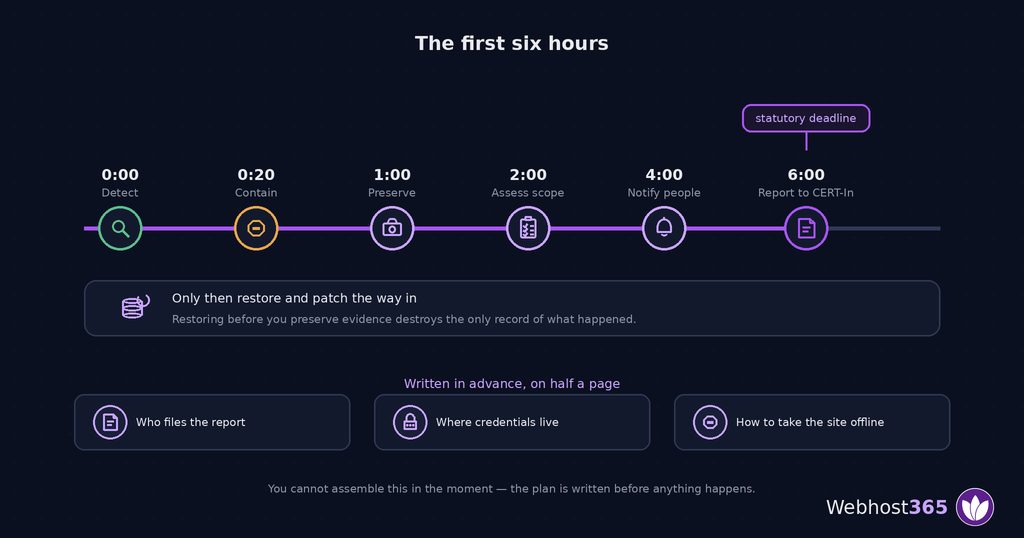
That is the point of this section. You cannot assemble an incident response in the moment — you assemble it now, write it down, and follow it later.
Contain first. Take the site offline or into maintenance mode. Change passwords for hosting, CMS admin, database and any connected service. Revoke API keys and active sessions. Containment beats investigation in the first twenty minutes: stop the bleeding, understand it afterwards.
Preserve evidence before you clean. This is the step people get wrong, and it is irreversible. Take a full snapshot of the site and database as compromised, and copy the logs somewhere separate. If you restore a clean backup first, you have destroyed the only record of what happened — and CERT-In may ask for exactly that record.
Work out the scope. What was accessed, when it started, whether personal data was involved, and whose. Your logs answer these questions or nothing does. If you cannot determine whether customer data was exposed, you have to assume it was, which makes the notification obligation considerably wider.
Report to CERT-In within six hours of becoming aware. Reporting runs through the incident reporting process on cert-in.org.in, and the practical difficulty is never the form — it is that nobody knows who is responsible for filing it at 3am.
Notify affected people under the DPDP framework, describing the breach, its likely consequences, what you have done, and how to contact you. That obligation runs on its own timeline, separate from CERT-In.
Then recover. Restore from a clean backup that predates the compromise, patch whatever let them in, and watch closely for reinfection. Restoring without fixing the entry route means doing this again next week.
What to write down before anything happens
Half a page, updated once a year. It contains:
Who is called first, and their number. Who files the CERT-In report — a named person, not a department. Where the hosting, CMS and DNS credentials are kept, and who can reach them out of hours. Where backups live and how to restore one. How to take the site offline, specifically, including who has the access to do it.
That document is the entire difference between a six-hour deadline being tight and being impossible. It takes twenty minutes to write.
What Your Host Handles and What You Do
Since the DPDP Rules were notified, “secure hosting” and “compliant hosting” have started appearing in Indian hosting marketing. Being precise about what that can honestly mean matters, including for us.
| Your host handles | You handle |
|---|---|
| SSL certificates, issued and renewing | Which plugins and themes you install |
| Server OS patching and hardening | Applying CMS, plugin and theme updates |
| Network and edge DDoS filtering | Who has accounts and what role they hold |
| Account isolation between customers | Passwords and two-factor |
| Backup infrastructure and retention | Testing that a restore actually works |
| Log infrastructure and storage location | Deciding what you keep and for how long |
| NTP synchronisation on managed plans | Your incident response plan |
| A processor relationship under contract | Everything DPDP puts on the Data Fiduciary |
Read the right-hand column. That is where compromises originate — plugins, passwords, people. No hosting plan can secure any of it, because it is not ours to touch.
What a host genuinely gives you is a platform where the infrastructure is not the weak point, and where the pieces the law requires of you are available rather than absent. Our hosting plans include SSL, daily backups on managed tiers, edge filtering and an Indian node option on VPS.
Anyone selling you compliance is selling you something they cannot deliver. If you sell online, the 2026 e-commerce rules add a further set of obligations from 1 January.
Final Thoughts
Website security in India changed quietly. Two frameworks now impose specific duties on ordinary businesses, and a great deal of security advice aimed at Indian readers still does not mention either.
The sequence that actually works, in order of return:
Delete the plugins and themes you do not use. Fix access — unique accounts, least privilege, two-factor, leavers removed. Turn on automatic security updates and keep PHP current. Restore a backup once, deliberately, to prove it works. Confirm logging is enabled, retained for 180 days, and stored in India. Write the half-page incident plan.
That list is a weekend of work for most small businesses, and it addresses the causes of nearly every compromise we see.
This guide is not legal advice. We are a hosting company, and what we can speak to with authority is the infrastructure half — certificates, backups, isolation, logging, server location. Whether and how the CERT-In Directions and the DPDP Rules apply to your specific business, in your sector, is a question for a professional. Where we have cited a Direction or a Rule, check it against the source: the CERT-In Directions and the DPDP Rules, 2025 are both published in full.
If the infrastructure side is what you need, our Noida team can tell you what your current plan already covers.
FAQs
Two frameworks apply. The CERT-In Directions, 2022 require reporting specified cyber incidents within six hours, synchronising system clocks to Indian NTP servers, and maintaining ICT logs for 180 days stored within India. The DPDP Act’s Rule 6 requires reasonable security safeguards including encryption, access control, logging and backups, with those obligations commencing 13 May 2027.
Direction No. 20(3)/2022-CERT-In, issued under Section 70B(6) of the IT Act, requires covered entities to report specified cyber incidents to CERT-In within six hours of becoming aware of them. It applies broadly, including to companies generally, and non-compliance carries criminal liability under Section 70B(7).
Yes, if the CERT-In Directions apply to you. Logs must be maintained for a rolling 180-day period within Indian jurisdiction, and foreign-only log storage does not satisfy that. This is a genuine localisation requirement, unlike DPDP, where no restricted-country list has been notified.
Almost always through an outdated plugin or theme, a weak or reused password, unapplied updates, an exposed admin surface, or a pirated plugin carrying a backdoor. These are automated, indiscriminate attacks found by scanners rather than targeted efforts, and maintenance stops nearly all of them.
No. SSL encrypts data in transit between the visitor and your server, which is necessary and required under DPDP Rule 6. It does nothing about vulnerable plugins, weak passwords or compromised accounts. A site can be fully encrypted and completely compromised.
Partly. A host is responsible for server patching, network security, isolation, SSL and backup infrastructure. You remain responsible for your plugins, passwords, user accounts, update schedule and incident response. Under DPDP the host is a Data Processor and the obligations stay with you as the Data Fiduciary.
The six-hour incident-reporting requirement and 180-day India-based log retention are easy for small businesses to overlook. It would also be useful to include a checklist showing which responsibilities fall to the website owner versus the hosting provider.
The six-hour incident reporting requirement and 180-day India-based log retention rule make it clear that website security is now a compliance issue, not just a hosting preference. The distinction between what a business must manage and what its host handles is especially useful for smaller Indian businesses.