
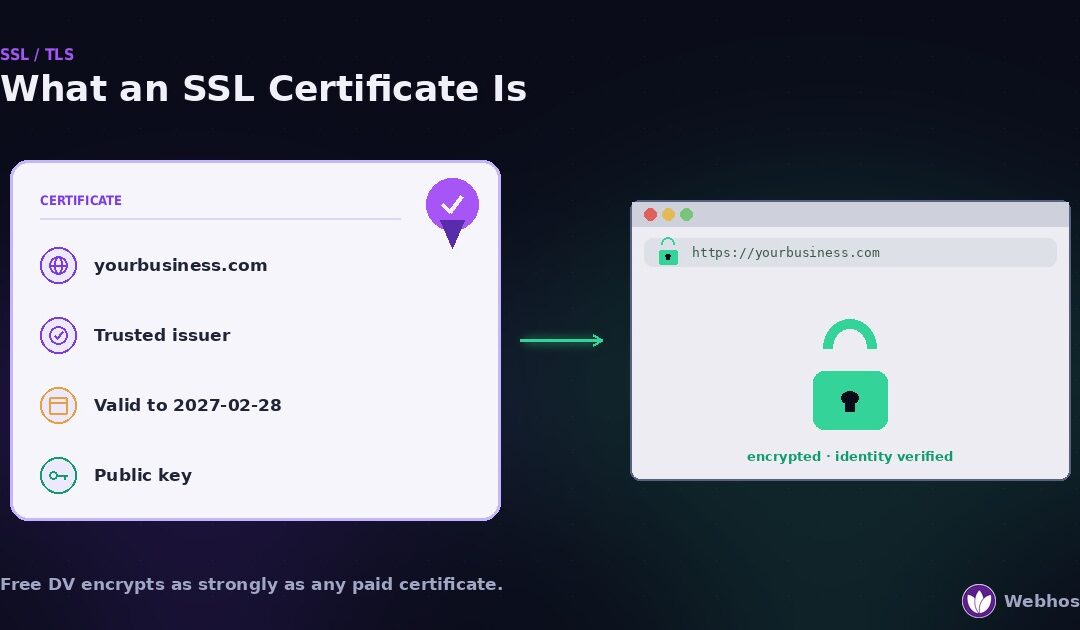
An SSL certificate is a small file that proves a website is who it claims to be and enables the encrypted HTTPS connection behind the padlock. Most sites need the basic domain-validated type, which is free and renews automatically. Paid certificates add identity checks, not stronger encryption. Since March 2026 no certificate lasts more than 200 days, so automatic renewal matters more than price.
Most pages on this subject are written by companies that sell certificates. Therefore they tend to bury one fact: the encryption is identical at every price. A free certificate and a $300 one protect your visitors’ data equally well.
So this guide is written from the hosting side instead. First, what a certificate actually is. Then which type your site needs, what each one really costs, and how to get one free. Finally, the 2026 change that makes renewal, not price, the thing to care about.
What an SSL Certificate Actually Is
Strip away the jargon, and an SSL certificate is a signed statement. It says: this public key belongs to this domain, and a trusted authority checked that. Browsers read that statement before they show a padlock.
The four fields that matter
A certificate contains more than four fields, but four decide whether it works.
The domain names it covers. Called the Subject and the Subject Alternative Names. If the name in the address bar is not in this list, the browser refuses the connection.
The issuer. The certificate authority that signed it. Browsers ship with a list of authorities they trust, so a certificate from anyone else fails.
The validity dates. A start date and an end date. After the end date, the certificate is worthless, however good it was the day before.
The public key. The mathematical half of the pair that lets your server encrypt traffic. The private half stays on your server and is never in the certificate.
When any of those four fails a check, visitors see a warning instead of your site. Our SSL error guide decodes every one of those warnings. This guide covers the other side: getting the certificate right in the first place.
SSL or TLS?
One naming note, because it confuses people. The protocol that actually encrypts the connection today is TLS. SSL was its predecessor, retired years ago for security reasons.
However, the name stuck. Everyone still says “SSL certificate,” from hosting panels to certificate authorities. So we use it here too. If you see “TLS certificate” anywhere, it means the same file.
What It Does for Your Website
A certificate does two jobs at once. Because both are invisible when they work, people underrate them until they stop.
Encryption
With a valid certificate, everything between the visitor’s browser and your server is encrypted. Passwords, card numbers, form entries, and the pages themselves travel as ciphertext. Anyone on the same coffee-shop network, or anywhere between, sees noise.
Without it, all of that travels as plain text. That is why browsers now mark plain HTTP pages as “Not secure” and refuse to autofill passwords on them.
Identity
Encryption alone is not enough. An attacker could encrypt a connection to a fake copy of your site, and the padlock would still appear. So the certificate also proves which server the visitor reached. The browser checks the domain name in the certificate against the one in the address bar, and it checks that a trusted authority signed it.
That check is what makes the padlock mean something. It says: encrypted, and to the real site.
The practical consequences
Beyond security, a certificate now affects how your site performs commercially. Three effects matter most.
First, browsers label HTTP sites as “Not secure” in the address bar, which costs trust before a visitor reads a word. Second, payment providers and many embedded services refuse to work on pages without HTTPS. Third, Google has treated HTTPS as a ranking signal for years, so an insecure site starts slightly behind. Our guide to hosting and SEO covers that side in more detail.
In short, a certificate stopped being optional some time ago. The only real questions left are which type you need and who renews it. The next two sections answer the first one.
Types by Validation: DV, OV, EV
Certificates come in three validation levels. The level describes how much the certificate authority checked before issuing — not how strong the encryption is. That distinction is the whole section, so it is worth stating once plainly: DV, OV, and EV encrypt identically.
Domain Validation (DV)
The authority checks one thing: that you control the domain. You prove it by answering an email, placing a file on the site, or adding a DNS record. Issuance takes minutes and is fully automated.
DV is what nearly every site on the web uses today, and it is what free certificate authorities issue. If your site is a blog, a business site, a store, or an application, DV is almost certainly what you need. The padlock it produces is the same padlock as every other type.
Organization Validation (OV)
Here the authority also verifies that a real organization exists behind the domain. Expect to supply business registration details and wait a day or more while a human checks them. The organization’s legal name then appears inside the certificate.
Inside the certificate is the key phrase. Visitors see it only if they click the padlock and read the details, which almost nobody does. OV exists for organizations that want a verified identity on record, or that face a policy requiring it. It does not make the connection more secure.
Extended Validation (EV)
EV is OV with a stricter identity check and a higher price. For years it also bought something visible: the company’s name in green in the address bar. That is why banks and large brands bought it.
However, that visible reward is gone. In 2019 Chrome moved the EV indicator out of the address bar and into the padlock’s detail panel, and its security team stated in the Chromium documentation that the EV UI “does not protect users as intended.” Firefox followed in the same year. So today an EV certificate looks exactly like a free DV one to the visitor. Buy EV only if a regulator, a partner, or an internal policy requires it.
Which validation level do you need?
For almost everyone: DV. It proves you control the domain, it encrypts fully, it costs nothing, and it renews itself.
Choose OV if you want your organization’s verified name on file in the certificate, or a contract requires it. Choose EV only when a compliance rule names it explicitly. In every other case, the higher levels buy paperwork, not protection.
Types by Coverage: Single, Wildcard, Multi-Domain
Validation is one axis. Coverage is the other: which names does the certificate protect? Getting this wrong produces the “certificate covers the wrong domain” warning, so match it to how your site is built.
The three coverage types
Single-domain. Covers one hostname, and usually its www variant too. Right for a site that lives at one address.
Wildcard. Covers a domain and every subdomain one level down: *.example.com protects shop.example.com and app.example.com. It does not cover the bare example.com unless that name is added too, and it does not cover deeper levels such as api.shop.example.com. Free authorities issue wildcards, but only with DNS validation, because you must prove control of the whole domain.
Multi-domain (SAN). One certificate listing several unrelated names: example.com, example.in, and anotherbrand.com together. Right for one server hosting several sites, or one brand with several extensions. Also free from the automated authorities.
The decoder: which certificate do you actually need?
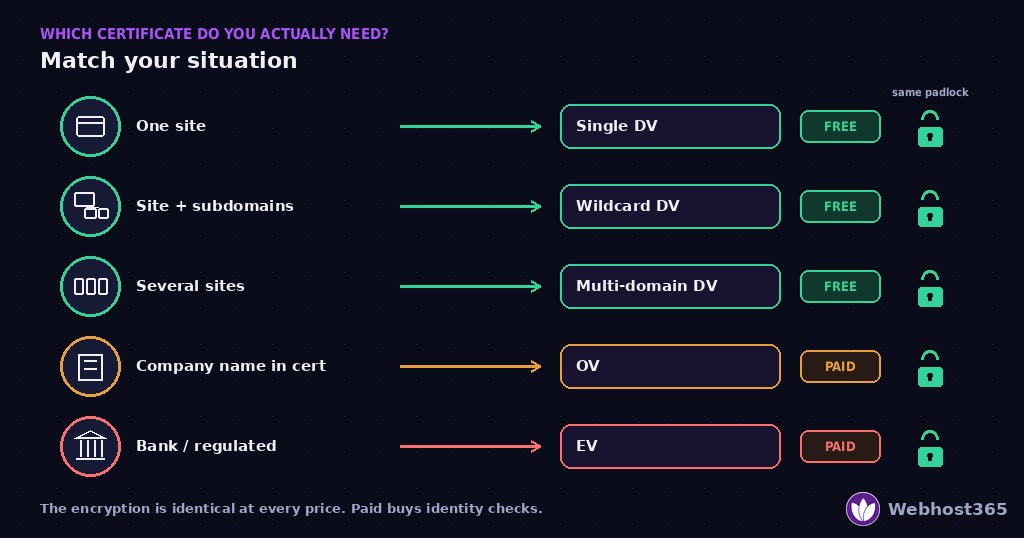
| Your situation | Certificate type | Does free cover it? | What paid would add |
|---|---|---|---|
| One website at one address | Single-domain DV | Yes | Nothing you would notice |
| A site with several subdomains (shop, app, blog) | Wildcard DV | Yes, with DNS validation | Nothing you would notice |
| Several sites or brands on one server | Multi-domain (SAN) DV | Yes | Nothing you would notice |
| A company that wants its legal name inside the certificate | OV, any coverage | No — OV is always paid | Verified organization identity on record |
| A bank, insurer, or public body with a compliance rule naming EV | EV, any coverage | No — EV is always paid | The strictest identity audit; no visible difference to visitors |
| An internal tool on a private network | Free DV via DNS validation, or your own private authority | Yes | — |
Read the third column again. For the first three rows, which describe the large majority of websites, free covers the need completely. Paid certificates only enter the picture when identity validation itself is the requirement.
Two coverage mistakes worth avoiding
First, the www gap. A certificate issued for example.com alone does not cover www.example.com. Most panels add the www automatically; confirm yours did, because the mismatch warning it produces is one of the most common we see.
Second, the new subdomain. You launch app.example.com, but the certificate never included it. On managed hosting the panel usually issues a certificate per subdomain as you add it. On a VPS you request a new certificate that lists the new name, or you switch to a wildcard. Either way, add the certificate before you announce the subdomain, not after the first visitor reports a warning.
If you do hit a mismatch warning, our SSL error guide covers the fix under Cause 2.
What SSL Certificates Cost in 2026
The honest price list is short. Domain-validated certificates are free from several authorities. Organization and extended validation are paid, priced per year by each authority, and the price buys identity checks rather than better protection.
What “free” actually means
Free certificates come from authorities that issue them automatically through a protocol called ACME. Let’s Encrypt is the best-known; Google Trust Services and others also issue free certificates the same way. Your hosting panel, your server software, or your CDN talks to the authority, proves domain control, and installs the result. Nobody fills in a form.
Because the process is automated, the authority’s cost per certificate is close to zero, and so is the price. There is no catch in the encryption. A free DV certificate uses the same algorithms and key sizes as the most expensive certificate on sale.
What paid money buys
Paid certificates do buy real things. They are simply not the things the sales page implies.
Identity validation. A human verifies that your organization exists. This is the entire product in OV and EV.
A warranty. Authorities attach a payout if their validation fails and a relying party loses money. In practice claims are vanishingly rare, but the warranty exists.
A support desk. A phone number and a ticket queue, which matters if you are installing certificates by hand on unusual systems.
A site seal. A badge image to put in your footer. Visitors do not check them, and some security researchers advise against them because they can be copied.
What paid money does not buy
Three things a paid certificate does not provide, no matter what the listing says. It does not encrypt more strongly. It does not rank higher in search, because Google’s signal is HTTPS, not the certificate’s price. It does not load faster. Every one of those claims appears somewhere in the market, and every one is wrong.
So the decision reduces to one question. Do you need a verified organization identity inside the certificate? If yes, pay for OV or EV. If no, and for most sites the answer is no, use a free DV certificate and spend the money elsewhere.
Why the One-Year Certificate No Longer Exists
For most of the web’s history, a paid certificate had one real convenience: you bought it, installed it, and forgot about it for a year or more. That convenience ended in March 2026. Understanding why changes how you should think about certificates from here on.
The industry cut certificate lifetimes
In April 2025 the CA/Browser Forum, the body that sets the rules every browser and certificate authority follows, passed Ballot SC-081v3. It caps how long any publicly trusted certificate can be valid, in three steps.
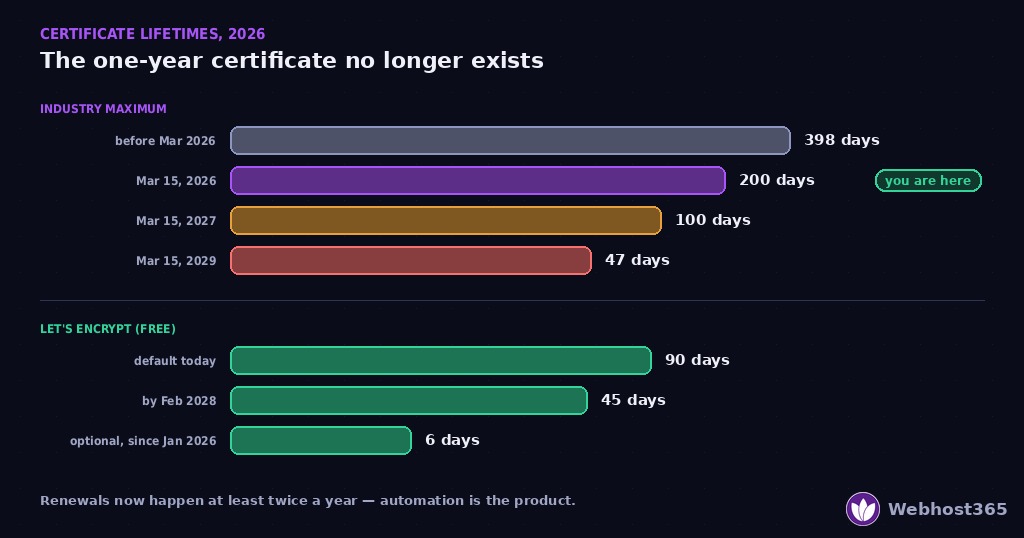
| From | Maximum lifetime | Renewals per year |
|---|---|---|
| Before March 15, 2026 | 398 days | about 1 |
| March 15, 2026 (in force now) | 200 days | about 2 |
| March 15, 2027 | 100 days | about 4 |
| March 15, 2029 | 47 days | about 8 |
The first step is already live. Therefore, as of today, nobody can sell you a certificate that lasts a year. Paid or free, it expires within 200 days, and by 2029 within seven weeks.
Let’s Encrypt has issued 90-day certificates since it launched, so its users have renewed automatically for a decade. Its own certificate lifetime page, updated July 2026, confirms that 90 days remains the default and that it will reduce its maximum to 45 days by February 2028, ahead of the industry’s 2029 deadline.
It has also gone further. Since January 15, 2026, Let’s Encrypt offers optional six-day certificates, valid for 160 hours, for operators who want the smallest possible window if a key is ever compromised. They are opt-in, and the 90-day default stays. The point is not that you need a six-day certificate. The point is that the automation behind it is mature enough to handle one.
What this means for you
The 200-day cap turns certificate management into a scheduling problem, and scheduling problems are what software solves. A paid certificate you install by hand now needs that work twice a year, then four times, then eight. A free certificate issued through ACME renews itself and never asks.
In other words, the real product in 2026 is not the certificate. It is whoever renews it automatically — your hosting panel, your server’s ACME client, or your CDN. Section 7 covers all three, and how to get a free certificate through each.
How to Get an SSL Certificate Free — Three Ways
Free certificates arrive through automation, so the question is which piece of your setup does the automating. There are three answers, and most sites use exactly one of them.
Way 1: Managed hosting issues it for you
On managed hosting the panel requests, installs, and renews the certificate without any action from you. When you add a domain or a subdomain, a certificate follows within minutes. When it approaches expiry, the panel renews it.
This is the right answer for most site owners, because it removes the whole task rather than making it easier. Every Webhost365 hosting plan includes free SSL with automatic renewal on every domain, so a customer here should never install or renew a certificate by hand. If you host elsewhere, check that “free SSL” on the plan means automatic renewal too, not just a first certificate.
Way 2: Certbot on a VPS
On a server you manage, an ACME client does the same job. Certbot is the most common one. It proves domain control, fetches the certificate, configures the web server, and schedules its own renewals.
On a typical Nginx server the whole setup is two commands:
bash
sudo apt install certbot python3-certbot-nginx
sudo certbot --nginx -d example.com -d www.example.com
Certbot installs a timer that renews automatically, but verify it once rather than trusting it:
bash
sudo certbot renew --dry-runA clean dry run means renewal will work. A failing one names the cause, usually DNS or a firewall. Our Linux VPS hardening guide covers the server side alongside the other basics.
Way 3: A CDN issues an edge certificate
If a CDN sits in front of your site, it usually issues and renews a certificate for the public edge automatically. Visitors get a valid padlock from the CDN’s certificate.
However, that covers only the visitor-to-edge hop. The CDN still connects to your origin server, and that hop needs its own valid certificate. An expired origin certificate behind a healthy edge produces a gateway error rather than a browser warning, which is why it belongs in our 502 Bad Gateway guide. So with a CDN, you need Way 1 or Way 2 for the origin as well.
How to Check Yours Is Working
Once a certificate is installed, verify it from the outside. Do this on the day you install it, and again whenever you add a domain, migrate, or change your CDN.
The four fields, read back
Click the padlock in your browser and open the certificate details. Read the same four fields from Section 1.
Covered names. Every hostname your site uses must appear, including the www variant and every subdomain that carries traffic.
Issuer. A recognised authority. If it says your server’s own hostname, the certificate is self-signed and browsers will reject it.
Valid to. A date in the future — and since the 200-day cap, that date should never be more than about six months out.
Chain. Two or three certificates linking yours to a trusted root. Most external SSL checkers report a missing intermediate in plain language.
Test from a device you have not used
Certificates can differ between www and non-www, and browsers cache trust decisions. So always load the site from a phone on mobile data, or from another network, after any change. What that device sees is what your visitors see.
Watch the expiry, not the inbox
Finally, put the expiry date under monitoring rather than relying on reminder emails. Most uptime monitors can check a certificate daily and alert two weeks ahead, and our uptime monitoring guide shows how to set that up with the other checks. Because renewals now happen at least twice a year, a silent failure has twice as many chances to occur, and the monitor is what catches it before a visitor does.
Final Thoughts
Three things to remember. First, an SSL certificate proves identity and enables encryption, and a free domain-validated one does both as strongly as any paid certificate. Second, pay for OV or EV only when a verified organization identity is itself the requirement; otherwise the money buys paperwork. Third, since March 2026 no certificate lasts more than 200 days, so the thing to choose is not the certificate but whoever renews it automatically.
Get that last part right, and certificates become invisible, which is exactly what they should be. Get it wrong, and every renewal is a chance for the warning page. If a renewal does fail, our SSL error guide decodes every message the browser can show — and our support team reads the actual error before replying.
FAQ
Domain-validated certificates are free from several authorities, including Let’s Encrypt, which issue them automatically through the ACME protocol. Most managed hosting plans install and renew them for you at no cost. Paid certificates exist for organization and extended validation, where a human verifies your organization’s identity, but the encryption is identical to a free certificate.
Only if you need a verified organization identity inside the certificate, or a regulator, partner, or policy requires OV or EV. For a blog, business site, store, or application, a free domain-validated certificate provides the same encryption and the same padlock. Paid certificates do not encrypt more strongly, rank higher, or load faster.
Domain Validation (DV) proves you control the domain and issues in minutes, automatically. Organization Validation (OV) adds a human check that a real organization exists, and puts its name inside the certificate. Extended Validation (EV) is a stricter version of that check. All three encrypt identically, and since 2019 browsers show the same padlock for each, so visitors cannot tell them apart.
Only if your site uses several subdomains, such as shop, app, and blog. A wildcard covers every subdomain one level down, and free authorities issue wildcards when you validate by DNS. Note that a wildcard does not cover the bare domain unless it is added, and it does not cover deeper levels such as api.shop.example.com.
At most 200 days, since the CA/Browser Forum’s rule took effect on March 15, 2026. The maximum drops to 100 days in March 2027 and 47 days in March 2029. Let’s Encrypt certificates last 90 days by default, with the authority planning 45 days by February 2028 and an optional six-day certificate already available. In practice, automatic renewal is now essential for every site.
HTTPS is a confirmed Google ranking signal, so a site without a valid certificate starts at a disadvantage, and browsers label it “Not secure,” which costs trust before rankings. However, the type of certificate makes no difference: a free DV certificate provides the same HTTPS as a paid one, so buying a more expensive certificate does not improve rankings.