
When people think about SEO, they think about keywords, content, and backlinks — the visible work. Almost nobody thinks about the server underneath it all, and that blind spot quietly costs rankings. Your web hosting will not rank your site on its own; no search engine gives you a boost for the name of your host. But bad hosting sets a ceiling on how well everything else you do can perform, and a slow or unreliable server can hold back content that would otherwise rank well. Getting the foundation right is one of the most overlooked levers in technical SEO.
This guide is about that foundation. It explains, honestly, how web hosting for SEO actually works — where hosting genuinely influences your rankings and where it does not — and then gives you the specific, actionable levers you can pull to make your hosting an asset rather than a hidden brake. No hype, no promises that a faster server alone will lift you to the top; just the real mechanism and what to do about it.
Does Web Hosting Affect SEO? The Honest Answer
The honest answer has two halves, and you need both to make good decisions.
The first half: hosting is not a direct ranking factor. Google does not rank your pages based on which company hosts them, and there is no setting in your control panel that search engines reward directly. Anyone who tells you that simply buying their hosting will lift your rankings is selling you something. So if you came here hoping for a magic switch, there isn’t one — and any guide claiming otherwise is worth closing.
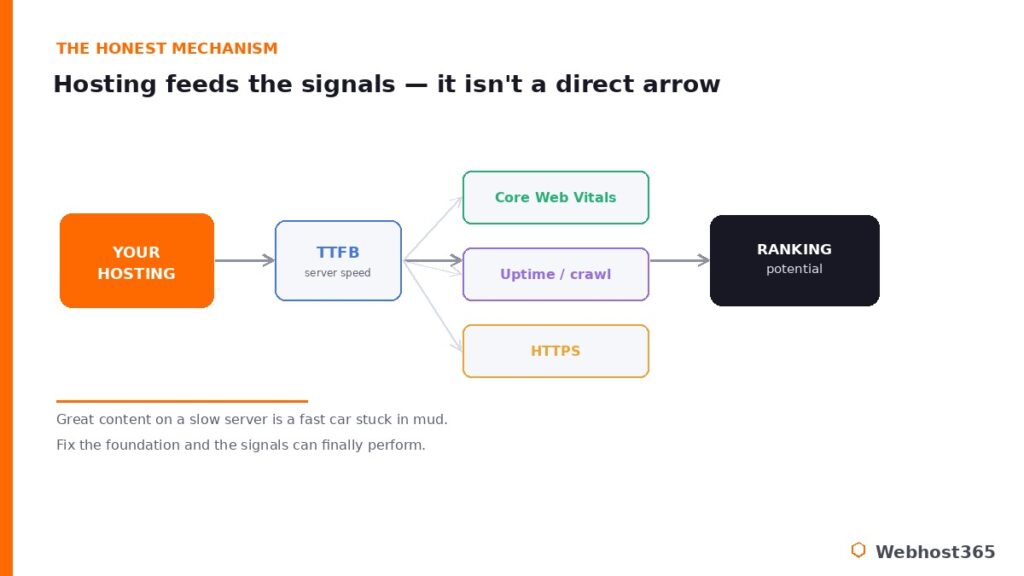
The second half is where it gets useful: hosting decides the inputs to several things that absolutely are ranking signals. How fast your server responds, whether it is online when search engines and visitors arrive, whether it serves your site securely over HTTPS — these are all shaped by your hosting, and all of them feed into how Google evaluates your pages. Page experience, and the Core Web Vitals that make it up, are confirmed parts of Google’s ranking system, and your hosting is the layer that determines whether you can hit them.
The useful way to picture it is this: your hosting is the foundation, and your content is the building. A brilliant building on a weak foundation cannot stand to its full height. Excellent content on a slow, unreliable server is a fast car stuck in mud — all that potential, none of the traction. Optimizing your hosting does not replace good content and good SEO; it removes the hidden ceiling that stops them from working. The rest of this guide walks through exactly where that ceiling comes from and how to lift it.
TTFB: Where Hosting Most Directly Touches SEO
If there is one number where your hosting meets your SEO, it is Time to First Byte. TTFB measures how long it takes, from the moment a browser asks for your page, for the server to send back the very first byte of the response. It is the server’s reaction time, and it is almost entirely a hosting concern rather than a front-end one.
A good TTFB is under roughly 200 milliseconds. When it climbs well above that, it is a strong sign of a hosting problem — an overloaded server, a slice of a crowded shared machine where other accounts are eating the CPU, slow storage, or a server sitting far from your visitors. And here is why it matters so much for SEO: a slow TTFB makes a good Largest Contentful Paint nearly impossible. TTFB is the first domino. The browser cannot start building or painting the page until the server responds, so every millisecond the server dawdles is added directly to the loading time your visitors and Google actually measure. You can optimize images and trim code all day, but if the server takes 800 milliseconds to begin replying, you have already lost the race before it started.
What drives TTFB is mostly your hosting environment. Fast storage matters — modern NVMe drives return data far quicker than the older SSDs or spinning disks still found on budget plans. Dedicated resources matter, because on cheap shared hosting your server’s attention is split among many noisy neighbors, and their traffic spikes become your slow responses. Caching matters enormously, since a cached page can be served in a fraction of the time an uncached one takes to assemble. And proximity matters — a server physically closer to your audience replies faster. If your TTFB is poor, the cause is almost always one of these, and almost always something your hosting choice controls. Our RAM calculator and our WordPress hosting requirements guide help you check whether your server simply has too few resources to respond quickly under load.
Core Web Vitals: The Signals Your Hosting Feeds
Core Web Vitals are the clearest place where server performance turns into a ranking signal. They are a set of three metrics Google uses to measure the real experience of loading and using your page, and they are a confirmed part of its ranking system. They are not the most important factor — content relevance and quality still lead — but they act as a tiebreaker between pages of similar quality, and in competitive niches that tiebreaker decides who wins the position.
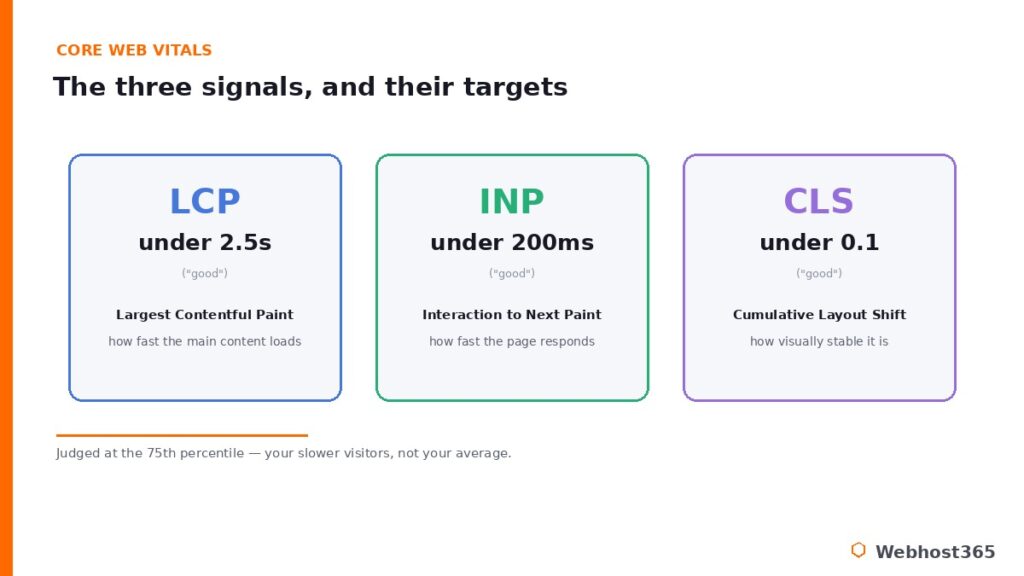
There are three of them, and it is worth knowing the targets:
| Metric | “Good” threshold | What it measures |
|---|---|---|
| LCP (Largest Contentful Paint) | under 2.5 seconds | How fast the main content loads |
| INP (Interaction to Next Paint) | under 200 milliseconds | How quickly the page responds to clicks and taps |
| CLS (Cumulative Layout Shift) | under 0.1 | How visually stable the page is as it loads |
One detail changes how you should think about these: Google judges them at the 75th percentile of your real visitors. That means you are scored on the experience of your slower visitors, not your fastest — it is not enough for the page to feel quick on your own fast laptop and connection. The official guidance and measurement details live at Google’s own web.dev resource, which is the authority worth bookmarking here.
Where does hosting come in? Most directly through LCP. Because LCP cannot happen until the server responds and the content starts arriving, a slow TTFB drags LCP down with it — the first domino again. INP and CLS are more about your front-end code, your JavaScript, and your layout, so hosting influences them less directly. But a fast, well-resourced server with good caching helps the entire chain run smoothly, and a slow one makes every metric harder to hit. Hosting will not single-handedly fix your Core Web Vitals, but poor hosting will reliably sabotage them.
Uptime and Crawlability
Speed gets all the attention, but reliability is an SEO input too, and a quieter one. The logic is simple: if your server is down at the moment Googlebot arrives to crawl your site, it cannot read your pages. They are not indexed, not updated, not ranked on the strength of content the crawler never saw.
Occasional brief outages are survivable, but a pattern of downtime erodes the trust search engines place in your site and can directly cost you visibility. This is also where shared-hosting resource limits become an SEO problem and not just an annoyance: when your account hits its CPU or memory ceiling and starts returning 500 or 503 errors, those errors greet crawlers as well as visitors. Look for a host with a strong uptime track record — 99.9 percent or better is the sensible bar — and understand that reliability is not merely a convenience. It is part of how consistently your site can earn and keep its rankings.
HTTPS, Server Location, and the Smaller Signals
A few more hosting-related factors matter, though it is worth keeping them in proportion — none rivals TTFB or Core Web Vitals.
HTTPS is a confirmed ranking signal, a modest one, and these days it is simply table stakes: browsers flag sites without it, and free certificates mean there is no excuse to run without one. Any decent host includes free SSL, so this is less something to optimize than something to never get wrong. Server location plays a role through latency — a server closer to your audience has a shorter round trip and a faster TTFB — but a content delivery network largely neutralizes raw distance by serving your content from edge locations near each visitor, which is why a good CDN matters more than the data center’s pin on the map.
And on the cheapest shared hosting, the reputation of the IP address you share with other sites can be a minor factor if your neighbors are spammers. These are real, but small. Get HTTPS right, use a CDN, avoid the bargain basement, and you have handled them.
How to Optimize Your Hosting for SEO
Here is the practical part: the levers that actually move TTFB and Core Web Vitals, in rough order of impact. Work down this list and you address the hosting side of your SEO directly.
Start with caching, because it is the single biggest win. Full-page caching serves visitors a pre-built copy of your page instead of assembling it from scratch every time, which collapses both TTFB and LCP for the vast majority of your traffic. Object caching with a tool like Redis handles the dynamic parts a page cache cannot, easing database load for logged-in users and stores. On a LiteSpeed-based host the LSCache layer does much of this automatically, and our guide to Redis object caching for WordPress covers the dynamic side. If you change one thing, change this.
Next, put a CDN in front of your site. A content delivery network serves your images, scripts, and cacheable pages from edge locations close to each visitor, cutting latency worldwide and taking load off your origin server so it responds faster to everything else. Then make sure your storage is fast — NVMe rather than the older drives on budget plans speeds up every database query and file read, and our explainer on NVMe SSD storage covers why it has become the baseline.
After that, confirm your server is not starved of resources; a plan too small for your traffic produces slow responses no matter how well you cache, and our sizing guides help you check. Finally, run a current version of PHP, keep compression and modern protocols enabled, and choose a host with a strong uptime record. Each of these maps to a faster TTFB, a better LCP, or steadier crawlability — the inputs to the signals that rank you.
If your current host cannot deliver these, the fix may be a move rather than a tweak. A faster, better-resourced server typically improves Core Web Vitals measurably, and our guide on migrating from shared hosting to a VPS walks through doing that without downtime.
How to Measure It
You cannot optimize what you do not measure, and the good news is the tools are free and authoritative. Google’s PageSpeed Insights gives you a Core Web Vitals reading for any URL along with specific suggestions, and Search Console’s Core Web Vitals and Page Experience reports show how your real visitors are actually experiencing your site over time. That distinction matters: Search Console uses field data from real Chrome users at the 75th percentile, which is what Google actually ranks on — not the single fast result you might get from one lab test on a good connection. Google’s Search Central documentation explains how page experience fits the bigger picture.
For TTFB specifically, your browser’s developer tools show it under the network panel, and most speed-testing tools report it directly. The right habit is to measure before you make a change and again after, so you can see whether enabling caching or moving to faster hosting actually moved the number. Optimize, measure, repeat — and let the field data, not a single lucky test, tell you the truth.
Conclusion: Hosting Is the Foundation, Not the Magic
Web hosting will not rank your site, and any guide that promises otherwise is not being straight with you. What hosting does is set the ceiling for the signals that genuinely rank you: a fast Time to First Byte, strong Core Web Vitals, reliable uptime, and secure HTTPS. Get the foundation right and your content can finally perform to its full potential; get it wrong and even excellent content stays stuck below the ceiling a slow server imposes. The work is not glamorous, but it is some of the highest-leverage technical SEO available, precisely because so few people bother with it.
The encouraging part is that the levers are clear and mostly come down to choosing hosting built for performance. Every Webhost365 plan ships the SEO-relevant stack by default — NVMe storage, LiteSpeed with LSCache, Bunny CDN across 119 locations, free SSL, and a strong uptime record — so the foundation is fast before you have configured a thing. For most sites that starts at $2.49 a month, and for heavier or higher-traffic workloads a Linux VPS with dedicated resources from $19.99 removes the noisy-neighbor problem entirely. Your renewal price always matches your signup price. Build your SEO on a foundation that helps rather than holds you back.
FAQ: Web Hosting and SEO
Not directly. Google does not rank your site based on who hosts it, and there is no hosting setting it rewards on its own. But hosting controls the inputs to factors that are ranking signals — Time to First Byte, Core Web Vitals, uptime, and HTTPS — so while hosting is not a direct factor, poor hosting can hold your rankings back through those signals.
Yes, significantly. Server speed is measured as Time to First Byte, and a slow TTFB makes it nearly impossible to achieve a good Largest Contentful Paint, one of the Core Web Vitals Google uses as a ranking signal. A fast server is the foundation that lets the rest of your page-speed work actually count.
Aim for under roughly 200 milliseconds. Above that level, TTFB usually points to a hosting problem — an overloaded shared server, slow storage, missing caching, or a server far from your visitors. Because TTFB is the first step in loading a page, improving it benefits every speed metric that follows.
Yes, indirectly but meaningfully. A CDN serves your content from edge locations close to each visitor, which lowers latency and improves Time to First Byte and loading speed worldwide. Faster loading improves Core Web Vitals, and it largely neutralizes the disadvantage of a server being physically far from part of your audience.
Yes. A slow server produces poor Core Web Vitals, frequent downtime stops search engines from crawling your pages, and resource limits that cause errors greet crawlers as well as visitors. None of these is a direct penalty, but together they cap how well your content can rank, which is why poor hosting quietly costs visibility.
It can, when hosting is genuinely the bottleneck. Moving to a faster, better-resourced server typically improves Time to First Byte and Core Web Vitals, and those gains can lift rankings where page experience was holding you back. It will not help if your real problem is thin content or an unoptimized site, so confirm hosting is the limit first.