
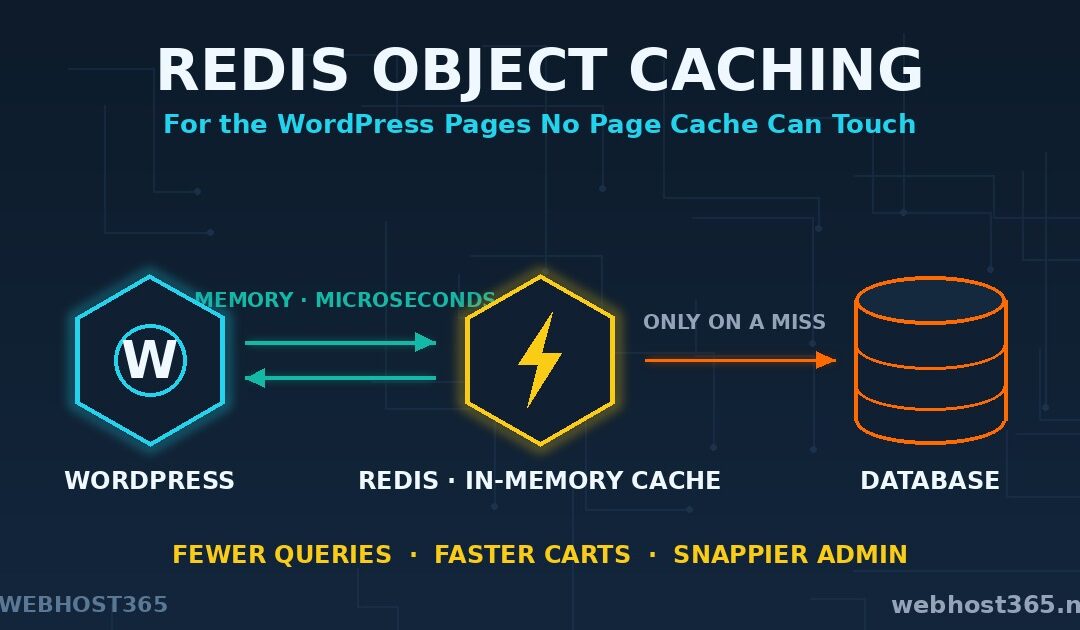
Redis object caching stores the results of your WordPress database queries in memory, so pages that must be built fresh get built fast. It is the speed layer for everything your page cache cannot touch. A page cache already serves your anonymous visitors instantly — the same HTML for everyone, delivered without WordPress doing any work. This article is about everyone else: the logged-in users, the shopping carts, the membership areas, and your own wp-admin, where every screen is personal and nothing can be served from stored HTML.
That distinction is the whole subject. Most WordPress speed advice obsesses over the cached path that is already fast. Redis object caching attacks the uncached path, which is where slow sites actually feel slow. By the end of this guide you will know how it works, whether your site needs it at all, and how to set it up — either with one toggle on our hosting or by hand on your own VPS.
Page Cache vs Object Cache: Two Different Problems
The two caches share a name and almost nothing else. They store different things, at different layers, for different visitors.
A page cache stores finished HTML. When a page has been built once, the cache keeps the complete result and hands it to the next visitor without involving PHP or the database at all. It is spectacularly effective for content that looks the same to everyone — posts, landing pages, product listings for browsing visitors. Whether that cache lives in LiteSpeed, a reverse proxy, or a CDN edge, the principle is identical: serve the crowd a stored copy.
An object cache stores ingredients, not the finished dish. WordPress builds every page from dozens of database queries — options, menus, user data, post lookups. An object cache keeps those query results in memory, so the next page build skips the database and assembles itself from prepared parts. The page is still generated fresh. It is simply generated several times faster.
The dichotomy matters because a meaningful slice of every dynamic site can never be page-cached. A shopping cart is different for every customer. A checkout page contains one person’s order. A member dashboard, a forum reply box, a wp-admin screen — all unique per visitor, all rebuilt on every load, all invisible to the page cache by design. For those pages the only honest optimisation is making the build itself faster, and that is precisely the job Redis object caching does.
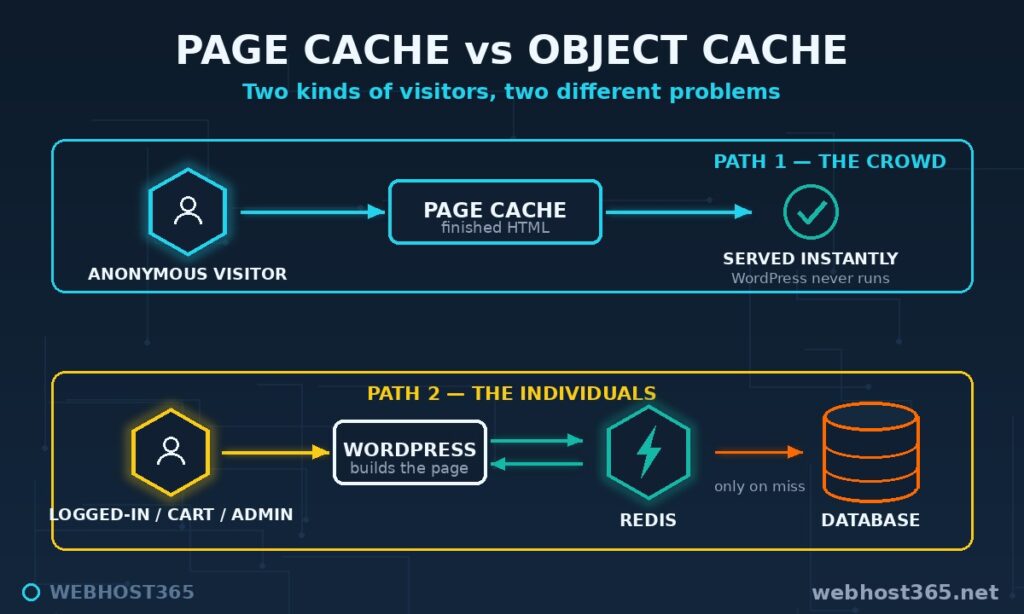
So the two layers are partners, not rivals. Page cache for the crowd. Object cache for the individuals. A well-set-up WordPress site runs both at once, and nothing in this article asks you to switch your page cache off.
How WordPress Object Caching Works
Here is the part most guides skip: WordPress already has an object cache. Every installation, including yours, runs one on every request.
The core class is WP_Object_Cache. Whenever WordPress fetches options, terms, posts, or user data, the result lands in this cache, and any repeat request within the same page load is served from memory instead of hitting MySQL again. It works well. It has one fatal limitation: it is not persistent. The cache lives in PHP’s memory and evaporates the instant the page finishes. The next visitor starts from zero, runs the same queries, caches the same results, and throws them away again.
Persistent object caching fixes exactly this. A small file called a drop-in — object-cache.php in wp-content — replaces the default cache backend with one that talks to an external store. Now cached query results survive between requests. The options your site loads on literally every page get fetched from memory once and reused thousands of times. Transients, which plugins use to stash expensive results like API responses, stop living in the database and move to memory where they belong. Repeated WP_Query lookups, menu structures, widget data — built once, served from the store until something changes.
The external store can be several things, but for WordPress in practice it is nearly always one thing.
What Is Redis?
Redis is an open-source, in-memory key-value store. It keeps data in RAM rather than on disk, which makes reads and writes a matter of microseconds, and it speaks a simple protocol that nearly every programming language and platform supports. Beyond plain key-value storage it understands richer structures — lists, sets, hashes — with fine-grained expiry on every entry.
For WordPress, that profile is a perfect match for the object cache job. Query results are small, read constantly, written occasionally, and entirely disposable — if Redis loses them, WordPress simply rebuilds them from the database. Memory speed where it counts, no drama when it resets. The plugin ecosystem reflects the verdict: the standard drop-in solutions are built Redis-first, and every serious managed WordPress stack ships Redis as its object cache backend. The next section answers the question the setup guides never ask: whether your site will actually feel the difference.
Do You Need Redis Object Caching? The Honest Checklist
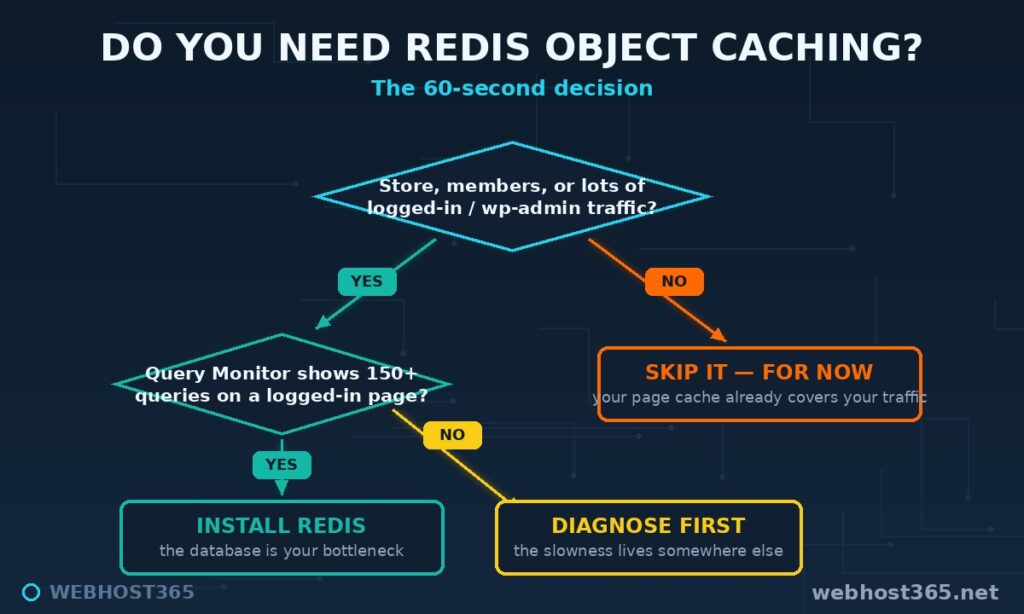
Most guides skip this question entirely and go straight to installation. That is how sites end up running services they never needed. Object caching has a clear profile of sites it transforms and sites it barely touches, so check which one you are before installing anything.
You are a strong candidate if any of these describe your site. you run WooCommerce or any store, where carts and checkouts bypass the page cache by design. You run a membership site, LMS, or forum, where most traffic is logged in. Your wp-admin feels sluggish even though the public site is fast. You use query-heavy plugins — faceted filters, page builders, large menus. Or your hosting dashboard shows the database working hard while PHP sits idle. In every one of those cases, the same expensive queries run over and over, and that repetition is exactly what Redis object caching eliminates.
You can skip it, at least for now, if your site is a mostly-anonymous blog or brochure site with a healthy page cache. When 90%+ of requests are served as cached HTML, the database barely participates in your traffic, and object caching would optimise a path almost nobody travels. If your site is slow in that situation, the cause lives elsewhere — our guide to why your website is slow walks the actual diagnosis.
Not sure which you are? Run the 60-second test. Install Query Monitor, open a page while logged in, and read two numbers: total database queries and total query time. A healthy page sits under 50 queries and a few tens of milliseconds. If you see 150+ queries or query time in the hundreds of milliseconds, you have found your bottleneck, and the rest of this article is for you. Stores should test a cart page specifically — the numbers there are usually the most persuasive, as our WooCommerce hosting guide explains in depth.
Redis vs Memcached
Two persistent backends dominate the conversation, and the comparison is mercifully short.
| Redis | Memcached | |
|---|---|---|
| Stores | Rich data structures | Simple key-value strings |
| Persistence options | Yes | No |
| WordPress plugin support | Excellent, actively developed | Adequate, ageing |
| Tooling and diagnostics | Extensive | Basic |
Both are fast enough that speed will never be your deciding factor. Redis wins on everything around the speed: better WordPress plugin support, richer diagnostics when something misbehaves, and a far larger pool of documentation and answers. Memcached still works fine where it is already installed, but nobody starting fresh in WordPress has a reason to choose it. This article proceeds with Redis, and so does the rest of the industry.
Setup Path A: On Webhost365 Hosting (One Toggle Away)
On our WordPress hosting and shared plans, Redis is built into the DirectAdmin panel and any user can switch it on. No tickets, no root access, no command line.
Log in to DirectAdmin and find the Redis section in your panel. Enable it, and DirectAdmin starts a private Redis instance for your account and displays your connection details. Your instance is yours alone — isolated from other users on the server, with no shared keys and no cross-account access. Note the connection details it shows; you will enter them in the plugin next.
Now connect WordPress through the LiteSpeed Cache plugin you are already running. Go to LiteSpeed Cache → Cache → Object, switch Object Cache to On, and select Redis as the method. Enter the connection details from DirectAdmin — for a same-server Redis, a Unix socket path is the fastest option when shown. Save, and check the connection test on the same screen: a green pass means WordPress is now talking to your Redis instance.
That is the entire setup. One panel toggle, one plugin tab. And to repeat the most important sentence in this article: object caching joins your page cache, it does not replace it. LSCache continues serving anonymous visitors finished HTML, while Redis accelerates everything LSCache cannot touch. Both layers on, always.
Setup Path B: On Your Own VPS
Running WordPress on a Linux VPS 365 instance means installing Redis yourself, which takes about five minutes and three decisions.
Install and start the server:
sudo apt update
sudo apt install -y redis-server
sudo systemctl enable --now redis-server
Then the three decisions, all in /etc/redis/redis.conf. First, confirm Redis listens only on localhost — bind 127.0.0.1 ::1 should already be set, and it is the line that keeps your cache off the public internet. Second, give it a memory ceiling so it can never starve the rest of the server:
maxmemory 256mb
maxmemory-policy allkeys-lru
256MB is generous for a typical WordPress site. The allkeys-lru policy tells Redis to silently discard the least-recently-used entries when full, which is exactly the behaviour a cache should have. Third, restart to apply: sudo systemctl restart redis-server, then verify with redis-cli ping — it answers PONG.
Connect WordPress with the Redis Object Cache plugin by Till Krüss, the standard drop-in used across the industry. Install, activate, and click Enable Object Cache. With Redis on the same machine at the default port, it connects without any configuration. The settings page should show Status: Connected and Drop-in: Valid.
If your setup needs explicit connection details, add them to wp-config.php above the “stop editing” line before enabling:
define( 'WP_REDIS_HOST', '127.0.0.1' );
define( 'WP_REDIS_PORT', 6379 );
define( 'WP_REDIS_DATABASE', 0 );
define( 'WP_REDIS_PREFIX', 'mysite:' );
The prefix line matters the moment a second WordPress site shares this Redis instance — unique prefixes keep each site’s keys separate, a mistake we will revisit in the pitfalls section. With the plugin connected, your VPS now runs the same two-layer caching as our managed stack: page cache in front, Redis behind it, each doing the job the other cannot.
Where Redis Object Caching Earns Its Keep: WooCommerce
If one type of site justifies this entire article, it is the online store. WooCommerce is the cache dichotomy in its purest form.
A store’s catalogue pages cache beautifully — every browsing visitor can see the same product grid, and your page cache serves them instantly. But the pages where money happens are different for every single customer. A cart belongs to one person. A checkout contains one order. An account page shows one history. LiteSpeed Cache knows this and excludes those routes from page caching by default, which is correct behaviour — and it means your most valuable pages are also your slowest, rebuilt from scratch on every load.
That rebuild is query-heavy in exactly the way Redis loves. Cart pages pull product data, pricing rules, tax rates, shipping zones, session data, and customer records — dozens of lookups that barely change between requests. With Redis object caching active, those ingredients come from memory, and the page that decides whether someone completes a purchase assembles in a fraction of the time. Faster checkouts correlate with fewer abandoned carts; this is the rare optimisation that touches revenue directly.
Two care notes for stores. Never be tempted to “fix” slow carts by page-caching them — serving one customer’s cart to another is the worst bug an e-commerce site can have, and object caching is the correct tool precisely because it accelerates without sharing pages. And after large catalogue imports or migrations, flush Redis once so stale product data cannot linger.
How to Verify It Is Actually Working
A green “Connected” badge tells you WordPress can reach Redis. It does not tell you Redis is doing anything useful. We have written before about why dashboards deserve scepticism, and the rule holds here: verify from the ground truth.
Three checks, in increasing depth. First, the hit ratio. Run redis-cli INFO stats and read keyspace_hits against keyspace_misses. After a day of normal traffic, hits should dwarf misses — a site in steady state typically shows 90%+ hits. A ratio near 50/50 means something is flushing your cache constantly, usually an overzealous plugin.
Second, the WP-CLI view: wp redis status confirms the drop-in is active and shows connection details from WordPress’s own perspective. If the plugin page and WP-CLI disagree, trust WP-CLI.
Third, the before/after that matters: Query Monitor on a logged-in page. Note the query count with Redis disabled, enable it, reload twice (the first load populates the cache), and read the count again. The second number should be dramatically lower. That difference, on your site with your plugins, is the only benchmark that counts.
Common Redis Object Caching Mistakes
Five mistakes cover nearly every Redis problem we see, and the first one is a genuine security hole.
Exposing Redis to the internet. Redis ships with no authentication by default — its security model assumes it is only reachable from localhost. Bind it to a public interface and anyone who finds the port can read your cache, write to it, and in older versions escalate to full server compromise. The bind 127.0.0.1 line from our setup, plus a firewall that never opens port 6379, is non-negotiable. If WordPress and Redis must live on different machines, use a private network and a password, never the public internet.
No memory ceiling. Without maxmemory, Redis grows until the operating system starts swapping or kills something. A cache that takes down the server it was meant to speed up is a poor trade. Set the ceiling and the allkeys-lru policy on day one.
Two sites, one Redis, no prefixes. Point two WordPress installs at the same Redis database without unique WP_REDIS_PREFIX values and their keys collide — site A serving site B’s options is a confusing afternoon you can avoid with one line of config.
Expecting faster anonymous pages. Object caching accelerates page generation. Anonymous visitors served by your page cache never trigger generation at all, so their experience does not change. If someone promises Redis will improve your already-cached homepage’s speed, they have confused the two layers this article spent its first half separating.
Flushing as a reflex. redis-cli FLUSHALL empties every cached object and forces your site to rebuild everything from the database at once — on a busy site, that is a self-inflicted traffic spike. Flush after migrations and major imports, not as a daily ritual. A healthy object cache is a warm one.
Redis Object Caching Performance: What to Expect
Honest expectations, because this is where other guides oversell. Redis object caching changes nothing for visitors already served by your page cache — that traffic never touched the database to begin with. The gains live entirely on the dynamic path, and there they are substantial.
On query-heavy dynamic pages, a working object cache typically cuts database queries by 30 to 60 percent, with the query time dropping even more sharply since the surviving queries tend to be the cheap ones. The places you feel it: wp-admin stops dragging, cart and checkout pages turn snappy, logged-in browsing loses its lag, and the database server’s CPU graph visibly relaxes. On a busy store, that last effect compounds — a calmer database handles traffic spikes that previously caused slowdowns.
Measure your own site rather than trusting anyone’s averages, including ours. The Query Monitor before/after from the verification section takes ten minutes and gives you the only numbers that describe your stack, your plugins, and your traffic.
Frequently Asked Questions
No. Page caching stores finished HTML and serves identical pages to anonymous visitors. Redis object caching stores database query results and speeds up the building of dynamic pages that cannot be served from stored HTML. A well-configured site runs both layers together.
Only if your host provides a Redis service, since you cannot install server software on shared hosting yourself. On Webhost365 plans, Redis is available in the DirectAdmin panel and connects through the LiteSpeed Cache plugin in a few clicks.
Redis, for nearly everyone starting today. Both are fast, but Redis has stronger WordPress plugin support, better diagnostics, and a larger ecosystem. Memcached remains fine where it is already running, but offers no advantage for a new setup.
A typical WordPress site runs comfortably with a 256MB ceiling, and even busy WooCommerce stores rarely need more than 512MB for object caching. Set maxmemory with the allkeys-lru eviction policy and Redis will manage itself within whatever budget you give it.
Yes, and stores benefit more than any other site type. Cart, checkout, and account pages cannot be page-cached because they are unique per customer, so the dozens of database queries behind them run on every load. Redis serves those query results from memory, making the store’s most valuable pages its fastest dynamic ones.
Yes. Redis makes page generation faster, but a page cache skips generation entirely for anonymous visitors, which no object cache can match. The two layers solve different problems and belong together.
Yes — everything in the object cache is rebuilt automatically from the database as pages load. The only cost is a temporary spike in database work while the cache rewarms, so flush after migrations or imports rather than routinely.
Conclusion
The two-layer model is the whole lesson: a page cache serves the crowd, and Redis object caching serves the individuals. Your anonymous visitors were already fast. Now your customers in the checkout, your members in their dashboards, and you in your own admin panel get the same treatment — pages built from memory instead of repeated database work.
On our WordPress hosting from $2.49/mo, the whole setup is a DirectAdmin toggle and a plugin tab. On a Linux VPS 365 from $4.99/mo, it is five minutes of terminal work you now know how to do safely. Either way, the slowest pages on your site are the ones making you money — give them the cache layer built for them.