
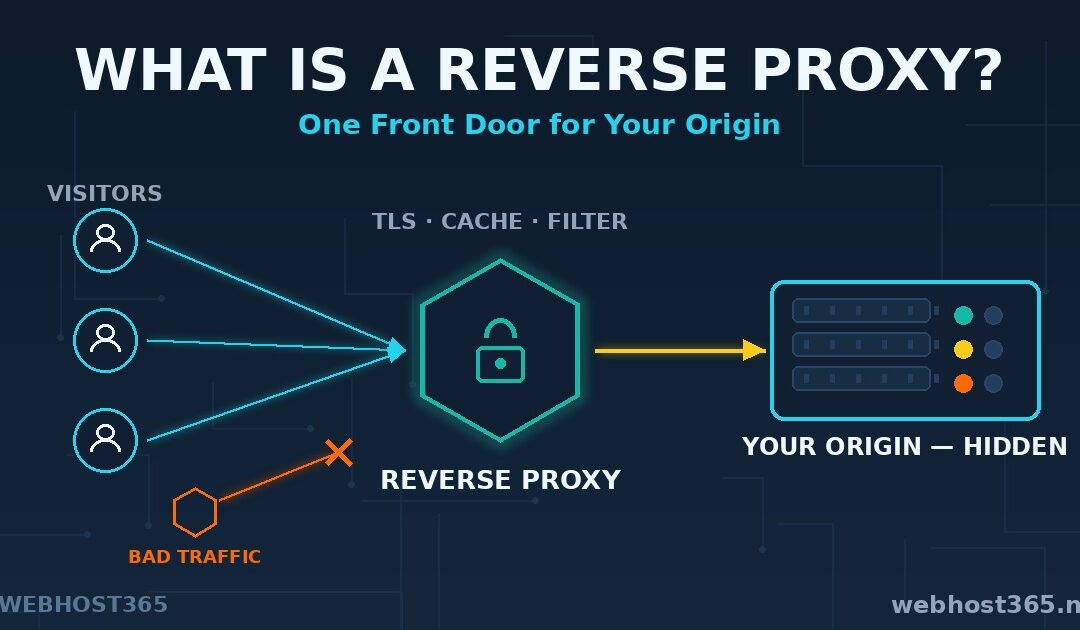
A reverse proxy is a server that sits in front of your website and answers every visitor on its behalf. Browsers never talk to your real server directly. They talk to the reverse proxy, which fetches the response, often speeds it up, and sends it back. That single idea quietly powers most of the fast websites you use every day.
This guide explains the concept properly. You will learn how a reverse proxy works step by step, what it actually does for performance and security, and how it differs from the three things it is constantly confused with: forward proxies, load balancers, and CDNs. We will also show you when your own setup needs one and when it already has one without you knowing.
We write this from production experience. Webhost365 operates reverse proxies in ten cities worldwide as the backbone of Orbit CDN, and our recent MCP server hosting guide put one in front of an AI workload. The patterns in this article are the ones we run every day, not theory.
What Is a Reverse Proxy?
A reverse proxy is a server that receives requests from the internet and forwards them to another server, called the origin, which holds the actual website or application. The visitor only ever sees the proxy. The proxy fetches the answer from the origin, optionally caches or compresses it, and delivers it as if the content were its own.
Think of a front desk at an office building. Visitors never wander the corridors looking for the right person. They state their request at the desk, and the desk handles the routing, the screening, and the delivery of the answer. The person doing the real work stays unseen and uninterrupted. A reverse proxy is that front desk for web traffic.
It helps to be clear about what a reverse proxy is not. and it is not a VPN, which protects a person’s connection rather than a server. It is not automatically a load balancer, although it can become one. And it is not a tool reserved for large platforms. A WordPress site on a LiteSpeed server is already behind one. So is every site on a CDN. The pattern is everywhere once you know how to look for it.
How a Reverse Proxy Works, Step by Step
The full journey of one request makes the concept concrete. Six steps happen in a few milliseconds.
First, DNS points the visitor at the proxy. The domain’s records resolve to the reverse proxy’s IP address, not the origin’s. The origin’s real address stays private.
Second, the proxy terminates TLS. The encrypted HTTPS connection is opened and decrypted at the proxy. Certificates live here, which is why one proxy can hold certificates for hundreds of domains.
Third, the proxy inspects the request. It reads the hostname and path, applies any rules, and decides what to do. Suspicious traffic can be rejected at this point without the origin ever knowing.
Fourth, it checks its cache. If a stored copy of the response exists and is still fresh, the proxy answers instantly. The origin does no work at all. This step is where most of the speed lives.
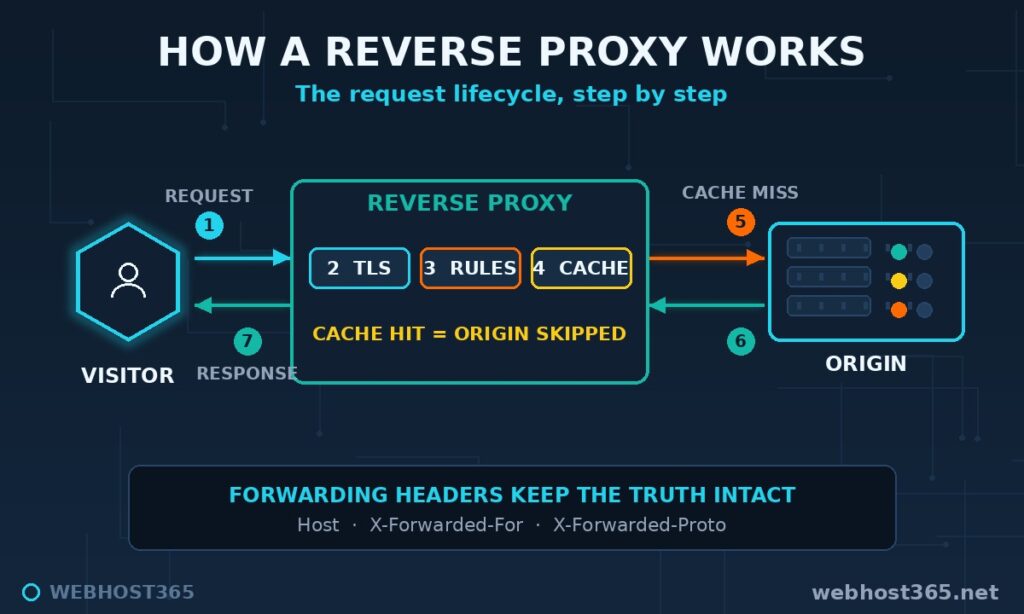
Fifth, on a cache miss, the proxy opens its own connection to the origin, fetches the response, and stores it if the rules allow.
Sixth, the response travels back to the visitor, often compressed on the way out.
One detail matters more than beginners expect: headers. Because the origin now talks to the proxy rather than the visitor, it would naturally log the proxy’s IP for every request. Reverse proxies fix this by attaching forwarding headers. X-Forwarded-For carries the visitor’s real IP, X-Forwarded-Proto records whether the original request used HTTPS, and Host preserves the requested domain. The X-Forwarded-For reference on MDN documents the exact format. When an application behind a proxy shows wrong visitor IPs or broken redirects, a missing forwarding header is the cause more often than not.
Reverse Proxy vs Forward Proxy
The names invite confusion, but the distinction fits in one line. A forward proxy represents the client. A reverse proxy represents the server.
A forward proxy sits in front of users. A company network or a privacy tool routes outgoing requests through it, so websites see the proxy instead of the individual user. The user chooses it, configures it, and is the one being protected.
A reverse proxy sits in front of servers. The website operator deploys it, visitors are generally unaware it exists, and the origin is the thing being protected. Same middleman mechanics, opposite direction, opposite beneficiary.
| Forward proxy | Reverse proxy | |
|---|---|---|
| Sits in front of | Users and devices | Websites and servers |
| Protects | The client’s identity | The origin’s identity |
| Configured by | The user or their network | The site operator |
| Visitors aware of it? | Yes, they set it up | Almost never |
| Typical use | Privacy, filtering, corporate access | Speed, security, TLS, scaling |
If you remember nothing else from this section, keep the direction. Forward proxies hide who is asking. Reverse proxies hide who is answering. The rest of this article is entirely about the second kind, because that is the one your website benefits from.
What a Reverse Proxy Does for Your Website
The definition explains the position. The benefits explain the popularity. Six jobs cover most of what a reverse proxy earns its keep doing.
TLS termination
The proxy holds the certificates and handles all encryption work. Your application behind it can speak plain HTTP on a private interface, which simplifies deployment enormously. One proxy can manage certificates for hundreds of domains in one place, renewing them without touching any origin.
Caching
The proxy stores responses and serves repeat requests from memory or disk, so the origin builds each page once instead of thousands of times. The effect is not subtle. When we moved our own website behind edge caching, time to first byte dropped from roughly 1.6 seconds to under 50 milliseconds. Same origin, same pages — the proxy simply stopped asking it to repeat itself.
Compression
Responses get compressed on the way out, with Gzip or Brotli, cutting transfer sizes by 60-80% for text content. The origin spends no CPU on it.
Load distribution
With several origins behind it, the proxy spreads requests across them. One overloaded server becomes three relaxed ones, and a failed backend is quietly skipped. More on this in the next section, because it has its own name.
Hiding the origin
Visitors, scrapers, and attackers see only the proxy’s IP. The origin’s real address never appears in DNS, which means it cannot be attacked directly. Rate limiting and request filtering happen at the proxy too, so junk traffic is dropped before it consumes origin resources.
Zero-downtime changes
Because the public address belongs to the proxy, everything behind it can change freely. Swap a backend, migrate to a new server, or take a node out for maintenance — visitors notice nothing. The front door stays put while the building is renovated.
No single benefit requires a reverse proxy. TLS could live on the app server, caching could live in the app. The value is getting all six in one layer, standardised, without modifying the application at all.
Reverse Proxy vs Load Balancer
Here is the confusion in one sentence: every load balancer is a reverse proxy, but not every reverse proxy is a load balancer.
A load balancer is a reverse proxy with one specific job emphasised — distributing traffic across multiple origin servers. It receives requests and forwards them, exactly as described above, but its routing decision is the point: round-robin between backends, least-connections, health-checked failover. Take away the multiple backends and a load balancer is just a reverse proxy with nothing to balance.
The distinction matters at a practical level when you count your origins. One application server means a reverse proxy is what you want, for TLS, caching, and protection. Several application servers serving the same site means you want the load-balancing behaviour switched on. In Nginx, the difference is literally one upstream block — same software, same concept, one extra feature engaged.
So when a cloud provider sells you a “load balancer” and a tutorial tells you to set up a “reverse proxy,” nobody is contradicting anyone. They are describing the same machine with different job titles.
Reverse Proxy vs CDN
This is the comparison that unlocks the whole topic: a CDN is a network of reverse proxies distributed across geography.
Everything a CDN edge node does to a request — terminate TLS, check a cache, fetch from origin on a miss, hide the origin’s address — is exactly the reverse proxy lifecycle from earlier in this article. The innovation is placement. Instead of one proxy in one datacenter, a CDN runs the same proxy in dozens of cities and lets DNS route each visitor to the nearest one. A visitor in Tokyo hits the Tokyo proxy, a visitor in Frankfurt hits the Frankfurt one, and both get cached answers from a few milliseconds away instead of crossing an ocean to your origin.
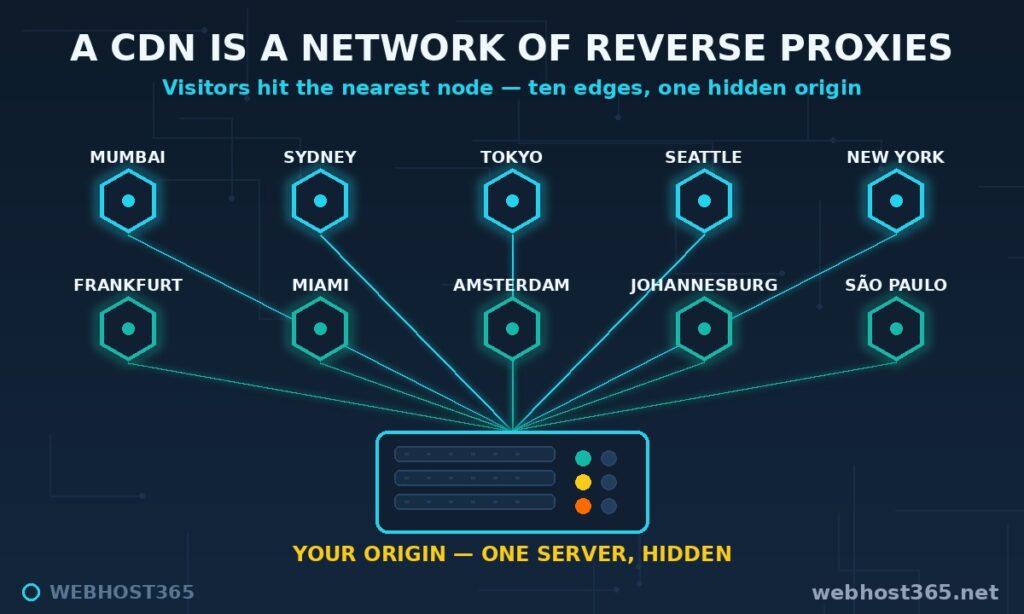
That is not a metaphor. We run this architecture in production: our Orbit CDN is ten reverse proxy nodes in ten cities, all fronting customer origins, and our Custom Port CDN applies the same pattern with a dedicated IP and port for applications that need them.
When is a single reverse proxy enough, and when do you want the distributed version? Distance decides. If your audience clusters in one region, a single well-placed proxy delivers nearly all the benefit. The moment your visitors span continents, physics takes over — no amount of caching on one machine fixes a 250-millisecond round trip. That is when the proxy needs to multiply and move closer to the people asking.
Inside Our Fleet: Running Reverse Proxies in Ten Cities
Theory is tidy. Operations teach you what the concept really is. Webhost365 runs a fleet of reverse proxies as the backbone of Orbit CDN — ten nodes in Mumbai, Sydney, Tokyo, Seattle, New York, Frankfurt, Miami, Amsterdam, Johannesburg, and São Paulo — and a few things about running them at that scale are worth passing on.
Our edge software is Apache Traffic Server, the same proxy that has carried Yahoo and Comcast traffic for years. Each node does the full lifecycle described earlier: terminates TLS, checks its cache, fetches from the customer’s origin on a miss, and serves thousands of domains from one process.
The part visitors never see is certificate logistics. When a customer’s domain gets a new SSL certificate at the origin, a hook fires automatically, distributes that certificate to all ten nodes, and registers the proxy entry on each one. No human touches it. At fleet scale, TLS termination is less about encryption and more about choreography — hundreds of certificates renewing on their own schedules across ten machines, and every renewal has to land everywhere.
Configuration changes taught us respect for graceful reloads. Traffic Server can reload its config without dropping a single in-flight connection, and we roll changes across the fleet one node at a time rather than all at once. A mistake that reaches one city is an incident. A mistake that reaches ten simultaneously is an outage.
The hardest lesson was about trust. Early on, a subtle misconfiguration left one cache volume unbound from its disk — the proxy ran fine, served everything correctly, and quietly achieved zero cache hits across 1.3 million requests. The metrics endpoint looked plausible. Only raw access-log analysis exposed the truth. Since then our rule is simple: the logs are ground truth, dashboards are decoration. If you run a reverse proxy anywhere, audit what it actually did, not what it says it is doing.
Reverse Proxy Software Compared
Six serious options cover nearly every reverse proxy deployment. All of them are good. They are good at different things.
| Software | Strongest at | Typical user | Licence |
|---|---|---|---|
| Nginx | All-round proxying, clear configs, huge community | Almost everyone | Open source |
| Apache httpd | .htaccess flexibility, mod_proxy on existing setups | Legacy and shared environments | Open source |
| LiteSpeed Enterprise | Dynamic PHP/WordPress speed with built-in cache | WordPress hosts | Commercial |
| OpenLiteSpeed | LiteSpeed performance, free tier | VPS owners running WordPress | Open source |
| HAProxy | Pure load balancing at extreme scale | High-traffic operations | Open source |
| Caddy | Automatic HTTPS with near-zero config | Developers, small deployments | Open source |
| Apache Traffic Server | Massive multi-tenant caching at the edge | CDN operators | Open source |
Our own stack is honest proof that there is no single winner. We run Apache Traffic Server at the CDN edge, because multi-tenant caching for thousands of domains is exactly what it was built for. Our hosting origins run LiteSpeed-family servers, because nothing serves WordPress faster. And our standalone tutorials use Nginx, because its config syntax is the easiest to teach and the most documented on the internet. Three different reverse proxies, each in the seat it deserves.
If you are choosing your first one: Nginx for general purposes, Caddy if you want HTTPS handled for you, OpenLiteSpeed if the workload is WordPress.
When Do You Need a Reverse Proxy?
Four scenarios cover most real decisions, plus one where the answer is that you already have one.
Several applications on one server. A VPS running a website on one port, an API on another, and an admin panel on a third needs one front door. A reverse proxy routes by hostname — app.domain.com to port 3000, api.domain.com to port 8080 — and the visitor sees clean URLs with no ports at all.
TLS for application servers. Node.js, Python, and similar app servers can speak HTTPS, but managing certificates inside every app is misery. The standard pattern puts a reverse proxy in front: it owns the certificates, the apps speak plain HTTP on localhost, and renewal happens in one place.
Exposing an AI stack safely. Every self-hosted AI service follows this pattern today. Our guides to hosting MCP servers, deploying A2A agents, and self-hosting n8n all place a reverse proxy in front of the service — for TLS, for authentication at the edge, and to keep the application process off the public internet entirely.
Traffic spikes and caching. If a traffic surge can take your site down, a caching reverse proxy is the cheapest insurance available. Cached pages cost the origin nothing, which converts a stampede into a non-event.
And the case where you can relax: a typical WordPress site on quality shared hosting is already behind a LiteSpeed server doing TLS, caching, and HTTP/3 — a reverse proxy in everything but the job title. If that describes your setup, the architecture in this article is already working for you. You needed to know it exists, not to build it.
A Minimal Nginx Reverse Proxy Example
Everything in this article condenses into about fifteen lines of configuration. This is a complete, working reverse proxy in front of an application listening on local port 3000:
server {
    listen 80;
    server_name app.yourdomain.com;

    location / {
        proxy_pass http://127.0.0.1:3000;
        proxy_http_version 1.1;
        proxy_set_header Host $host;
        proxy_set_header X-Real-IP $remote_addr;
        proxy_set_header X-Forwarded-For $proxy_add_x_forwarded_for;
        proxy_set_header X-Forwarded-Proto $scheme;
    }
}
The proxy_pass line is the entire concept: requests arriving at this server are forwarded to the address behind it. The four proxy_set_header lines are the forwarding headers from earlier in this article, preserving the real visitor IP, the requested hostname, and the original protocol so the application behind the proxy sees the truth. Run certbot afterwards and the proxy gains HTTPS, exactly as in our deployment guides. The Nginx proxy module documentation covers every directive beyond these basics.
That is genuinely all a reverse proxy requires to exist. The rest — caching rules, rate limits, multiple backends — is capability you switch on as you need it.
Common Reverse Proxy Mistakes
Five mistakes account for most reverse proxy pain. All five come from real operations, two of them from ours.
Buffering breaking streamed responses. Nginx buffers proxied responses by default, which silently ruins anything that streams — Server-Sent Events, AI token streams, long-polling. Symptoms look like a frozen app that suddenly delivers everything at once. The fix is proxy_buffering off for streaming routes, a lesson every MCP and A2A deployer hits eventually.
Missing forwarding headers. Skip the X-Forwarded-* lines and every visitor appears to come from 127.0.0.1, login redirects bounce to http instead of https, and rate limiting blocks everyone at once because everyone shares one IP. If an app misbehaves only behind a proxy, check the headers first.
Caching authenticated pages. The most dangerous one. A careless cache rule can store one user’s logged-in page and serve it to the next visitor. We once caught a service of ours sending Cache-Control: public on authenticated pages — a downstream cache was masking it, and only a header audit exposed the problem. Cache static assets aggressively, cache anonymous pages carefully, and never cache anything behind a login without explicit, tested rules.
Proxy loops. Pointing a proxy at a hostname that resolves back to the proxy itself creates an infinite loop that exhausts connections within seconds. It usually happens when DNS for the origin hostname was switched to the proxy’s IP. Always proxy to an address that bypasses the proxy — a private IP, localhost, or a dedicated origin hostname.
Timeouts cutting long-lived connections. Default proxy timeouts assume requests finish in about a minute. WebSockets, SSE streams, and slow AI tasks do not. If long-running connections die at suspiciously round intervals, raise proxy_read_timeout for those routes and the mystery disconnections stop.
Frequently Asked Questions
No. A VPN protects a user’s connection by encrypting their traffic and masking their identity. A reverse proxy protects a server by receiving traffic on its behalf and hiding its address. They sit on opposite ends of the connection and solve opposite problems.
The extra hop adds around a millisecond, and caching typically removes hundreds. In practice a well-configured reverse proxy makes websites dramatically faster, because cached responses skip the origin entirely. Slowdowns only appear when the proxy is misconfigured or placed far from both visitors and origin.
Both. Nginx serves files directly as a web server and forwards requests as a reverse proxy, often doing the two jobs in the same configuration. Most modern web servers, including LiteSpeed and Caddy, have this dual nature.
Usually not as a separate layer, because quality WordPress hosting already runs LiteSpeed or similar software performing the same role. You only add a dedicated reverse proxy for special cases, such as running WordPress alongside other applications on one VPS or putting a CDN in front of it.
Yes, with care. Anonymous dynamic pages, such as a blog post rendered by PHP, cache safely for short periods. Pages that depend on a logged-in session must be excluded, which is why cache rules distinguish visitors with session cookies from visitors without them.
Yes — a CDN is a network of reverse proxies distributed across many locations. Every CDN edge node performs the standard reverse proxy lifecycle: terminate TLS, serve from cache, fetch from the origin on a miss. The geographic distribution is what turns one proxy into a content delivery network.
Yes, as long as DNS points only at the proxy and the origin never leaks its address elsewhere. Visitors and attackers see the proxy’s IP, while the origin stays unreachable directly. This is one of the main security reasons reverse proxies are deployed.
Conclusion
The mental model fits in one sentence: a reverse proxy is the single front door for your origin, and everything good about it — speed, security, certificates, scaling — follows from owning that door. Once you see the pattern, you find it everywhere: in the LiteSpeed server under your shared hosting, in the Nginx block in front of your AI agent, and in every CDN edge node on the planet.
For the distributed version, Orbit CDN puts ten of our reverse proxies between your origin and the world. For building your own, a Linux VPS 365 instance from $4.99/mo runs the exact Nginx pattern from this article with room to spare. Either way, your server deserves a front desk.