
Every AI agent eventually hits the same wall. It reasons brilliantly across public data, but the moment your workflow needs a private database, an internal tool, or a proprietary API, the agent goes silent — or worse, hallucinates an answer. The old fix was writing a custom integration for every model and every tool combination, an N×M tangle of adapters nobody had time to maintain.
The Model Context Protocol (MCP) is an open standard, originally released by Anthropic in November 2024, that lets large language models connect to external tools, databases, and services through a single JSON-RPC 2.0 interface. You expose capabilities through MCP servers and consume them through MCP clients — every host that speaks MCP can talk to every server that speaks MCP, regardless of which model is doing the reasoning underneath.
Adoption has been vertical. Over 500 public MCP servers are now listed in the community registry, governance moved to the Linux Foundation in December 2025, and native MCP support ships in Claude, ChatGPT, and Google Gemini. We run MCP servers in production at Webhost365 ourselves — a self-hosted server bridges Claude Desktop to our WordPress editorial pipeline, automating much of the workflow behind the blog you are reading right now — so this guide is written from real deployment experience, not a documentation summary. What follows is everything you need to host an MCP server on your own VPS: how the architecture works, what hardware you actually need, the eight-step deployment process, and the security choices that matter once your server is reachable from the internet.
What Is an MCP Server?
An MCP server is a small program that exposes a defined set of tools, data sources, or actions to an AI application through the Model Context Protocol. The server publishes what it can do — read this database, search this file system, call this API — and an MCP-aware client can discover those capabilities and invoke them on behalf of a language model. The protocol itself is published openly at modelcontextprotocol.io and is now stewarded by the Agentic AI Foundation under the Linux Foundation.
Every MCP setup involves three components working together:
- The host is the AI application you are actually using — Claude Desktop, Cursor, VS Code, ChatGPT Desktop, or a custom agent you have built yourself. The host contains the language model and the user interface.
- The client lives inside the host and handles the wire-level conversation with one or more servers. You rarely interact with the client directly; it is the plumbing.
- The server is the program you are going to host. It speaks MCP, advertises a list of tools and resources, and executes them when the host asks. A single host can talk to many servers at once.
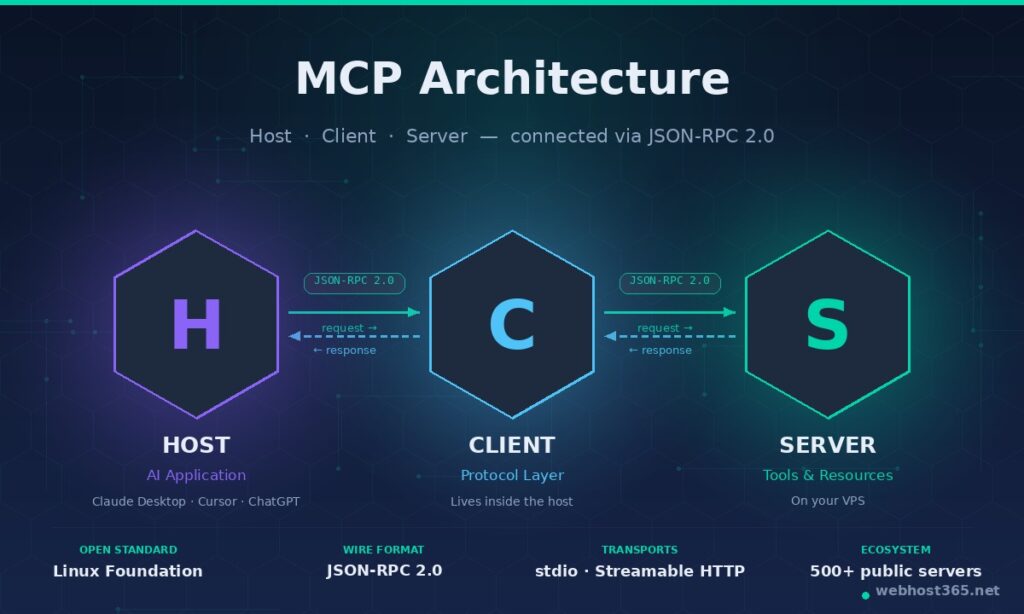
The reason this matters is what it replaces. Before MCP, every AI application needed a custom adapter for every external tool, every model required its own function-calling schema, and every team rebuilt the same integrations from scratch. With N AI applications and M tools, you were looking at N × M integrations — a quadratic mess that nobody had time to maintain. MCP collapses that into N + M. Write one server per tool, run one client per host, and any host can use any server without further work. The official analogy from the protocol authors is “USB-C for AI”, and it is accurate.
Underneath, MCP uses JSON-RPC 2.0 as its wire format. Messages are small, predictable, and easy to inspect with standard tools. Capabilities are exchanged at session start, so a host always knows exactly which tools a server offers before invoking them. This is what makes MCP servers practical to self-host — the protocol is boring in the best possible way, with no proprietary binary formats and no vendor lock-in.
Why Self-Host an MCP Server
Plenty of MCP servers are available as hosted services, and for public-data tools like a weather API or a search wrapper, those work fine. Self-hosting becomes the right choice the moment your server needs to touch anything you would not want a third party to handle.
Data sovereignty. If your MCP server reads from a private database, an internal wiki, a customer support inbox, or a proprietary code repository, every tool call passes data through whatever infrastructure runs the server. Self-hosting keeps that traffic inside your own VPS, behind your own firewall, on storage you control. For European businesses subject to GDPR, healthcare organisations subject to HIPAA, or any company that has spent money on an ISO 27001 audit, this is the difference between deployable and not.
Custom internal tools. Most useful MCP servers are not the generic ones in the public registry — they are the bespoke ones that wrap your company’s actual systems. A server that exposes your internal CRM, your billing platform, your deployment pipeline, or your CMS does not exist as a hosted product. You build it, you host it.
Predictable cost at scale. Hosted MCP services typically charge per call or per token. That is fine for prototyping; it becomes painful once an agent is making thousands of tool calls per day. A self-hosted server on a small VPS handles enormous call volumes at a flat monthly price, with no surprises in the invoice.
Latency and private network access. If your MCP server’s tools live inside a private VPC — internal APIs, databases on a private subnet, services behind a VPN — the server has to live on that network too. Self-hosting on a VPS that peers with your private infrastructure is the only practical option.
Authentication and SSO. Hosted providers offer a standard set of auth flows. Self-hosting lets you bolt your MCP server onto whatever identity system you already use — Okta, Azure AD, Google Workspace, an internal OAuth server — without negotiating with a vendor.
When not to self-host. If your tools only touch public APIs, your call volume is low, and you have no compliance requirements, a hosted MCP server is faster to set up and not worth the operational overhead. The honest test is whether you actually need any of the five points above. If you do not, save yourself the work.
MCP Transport Types: stdio vs Streamable HTTP
Before you can host an MCP server, you have to decide how it talks to its client. The protocol defines two transport options, and they are not interchangeable.
stdio transport runs the MCP server as a local subprocess of the host application. The host launches the server, talks to it over standard input and output, and shuts it down when the session ends. There is no network, no port, no authentication — the operating system’s process isolation is the entire security model. This is what most quick-start tutorials assume, because it is genuinely effortless: drop a server binary on disk, register it in Claude Desktop’s config file, restart the app, done. The trade-off is that a stdio server is tied to one machine, one user, and one client session at a time. You cannot share it, you cannot scale it, and you certainly cannot run it on a VPS for a remote client to consume.
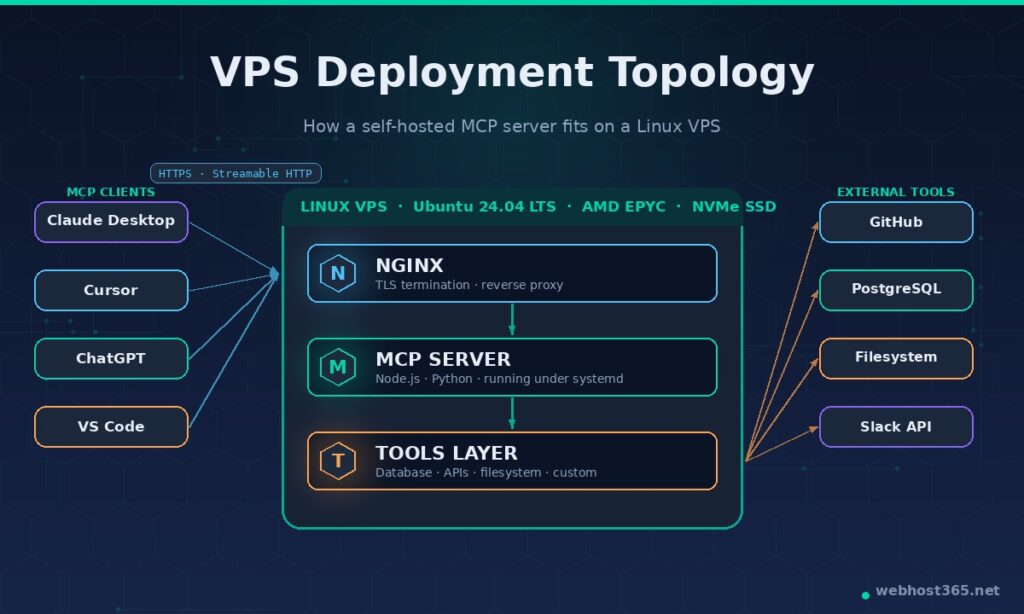
Streamable HTTP transport is the remote, networked option, and it is what production deployments use. The server runs as a long-lived process listening on an HTTPS endpoint. Any MCP client — Claude Desktop on your laptop, Cursor in your office, a custom agent running in CI, even ChatGPT Desktop — can connect to that endpoint over the public internet, authenticate, and start making tool calls. This is the transport that turned MCP from a clever local-tools protocol into infrastructure. It is also the transport that requires actual hosting, which is why this guide exists.
A useful rule of thumb: use stdio when the server has no reason to outlive the session, and use Streamable HTTP when the server is shared, multi-user, or needs to reach private infrastructure. A filesystem server that exposes a developer’s own laptop files is a textbook stdio case. A server that exposes your company’s customer database to every engineer’s Claude session is a textbook Streamable HTTP case.
Almost everyone reading this guide wants Streamable HTTP, because hosting only makes sense for that transport. The rest of the article assumes you are deploying a Streamable HTTP server on a Linux VPS, reached by clients over HTTPS. If you only need stdio, you do not need a VPS — you need a config file edit and a coffee.
VPS Hardware Requirements for MCP Server Hosting
MCP servers are surprisingly lightweight on their own. The protocol layer is minimal, the JSON-RPC payloads are small, and most of the work is just translating a tool call into an API request or a database query. What drives your hosting needs is what your tools actually do — a server that wraps a couple of REST APIs is very different from one that runs Puppeteer browser sessions or queries a half-terabyte Postgres database.
Here is what we actually see on our own production MCP server, which exposes WordPress publishing tools to Claude Desktop:
- CPU: A single vCPU handles dozens of concurrent sessions for tool-call-heavy work without breaking a sweat. CPU only becomes a constraint when your tools do real computation — image processing, ML inference, complex database joins. Plan one vCPU per couple of concurrent users for ordinary CRUD tools; more if your tools are compute-bound.
- RAM: A Node.js MCP server idles around 80–200 MB of resident memory. A Python server with the standard SDK sits closer to 100–300 MB. Add the memory footprint of whatever runtime your tools need — a server that opens database connections, caches API responses, or holds Puppeteer instances will eat more. 1 GB is a comfortable floor for a single server; 2 GB gives headroom for half a dozen.
- Storage: The server itself is tiny — usually under 200 MB on disk including dependencies. Logs grow over time and are the main reason to think about storage. 10 GB of NVMe SSD is enough for most single-server setups; pick more if your tools cache anything substantial.
- Bandwidth: JSON-RPC payloads are small and infrequent compared to web traffic. A busy MCP server might push a few GB per month. Unlimited bandwidth, which most quality VPS providers include, means you can ignore this metric entirely.
For a starting point, a 1 vCPU / 1 GB RAM / 25 GB NVMe Linux VPS will comfortably run one or two production MCP servers with room to grow. Our own Linux VPS 365 starts at $4.99/mo with AMD EPYC processors, NVMe SSD storage, and a 10G network — specs that are overpowered for an idle MCP server and exactly right when traffic picks up. The same VPS will also host a Docker container stack, a self-hosted n8n instance, or a local LLM runtime, which is how most teams end up running their AI infrastructure on a single box.
You only need to scale up when you hit one of three specific signals: tool calls start queuing because the server is CPU-bound, memory usage climbs past 80% of available RAM, or you start running multiple distinct MCP servers and each one wants headroom of its own. Until then, a small VPS is genuinely sufficient.
How to Deploy an MCP Server on a VPS: Step-by-Step
The eight steps below take you from a freshly provisioned Linux VPS to a working Streamable HTTP MCP server reachable by Claude Desktop, Cursor, ChatGPT, or any other MCP client over HTTPS. The example assumes Ubuntu 24.04 LTS and a Node.js-based MCP server, since that is the most common production pattern; Python notes are included where they differ.
Step 1: Provision the VPS
Sign up for a Linux VPS, choose Ubuntu 24.04 LTS as the operating system, and note the IPv4 address and root password from your welcome email. SSH into the server and bring everything up to date before installing anything else.
bash
ssh root@your-server-ip
apt update && apt upgrade -y
apt install -y curl git ufw build-essential
Set up a basic firewall while you are here. You will open ports 22, 80, and 443 — the rest stays closed.
bash
ufw allow OpenSSH
ufw allow 80/tcp
ufw allow 443/tcp
ufw --force enable
Create a non-root user for the MCP service. Running anything internet-facing as root is asking for trouble.
bash
adduser mcp --disabled-password --gecos ""
usermod -aG sudo mcp
Step 2: Install the Runtime
For a Node.js MCP server, install Node.js 20 LTS or newer from NodeSource:
bash
curl -fsSL https://deb.nodesource.com/setup_20.x | bash -
apt install -y nodejs
node --version  # should print v20.x or higher
For a Python MCP server, install Python 3.11 or newer and create a virtual environment:
bash
apt install -y python3 python3-pip python3-venv
python3 -m venv /home/mcp/venv
Step 3: Install or Build the MCP Server
If you are deploying one of the 500+ public MCP servers from the official registry, install it directly. If you are deploying your own server, clone the repository and install dependencies.
bash
su - mcp
mkdir -p ~/server && cd ~/server
git clone https://github.com/your-org/your-mcp-server.git .
npm install
npm run build   # or whatever the project's build command is
For a TypeScript server using the official SDK, the production entry point usually looks like this (src/server.ts):
typescript
import { Server } from "@modelcontextprotocol/sdk/server/index.js";
import { StreamableHTTPServerTransport } from "@modelcontextprotocol/sdk/server/streamableHttp.js";
import express from "express";

const server = new Server(
  { name: "your-mcp-server", version: "1.0.0" },
  { capabilities: { tools: {} } }
);

// Register your tools here…

const app = express();
const transport = new StreamableHTTPServerTransport({
  sessionIdGenerator: () => crypto.randomUUID(),
});
await server.connect(transport);

app.post("/mcp", (req, res) => transport.handleRequest(req, res));
app.listen(3000, "127.0.0.1");
Note the bind address — 127.0.0.1, not 0.0.0.0. The server should only be reachable from the same machine; Nginx will handle the outside world in Step 7.
Step 4: Configure Environment Variables and Secrets
MCP servers almost always need credentials — database passwords, API keys, OAuth tokens. Never commit these to the repository. Create a .env file with restricted permissions:
bash
cat > /home/mcp/server/.env <<EOF
DATABASE_URL=postgres://user:password@localhost:5432/mydb
GITHUB_TOKEN=ghp_xxxxxxxxxxxxxxxxxxxx
MCP_AUTH_TOKEN=$(openssl rand -hex 32)
EOF

chmod 600 /home/mcp/server/.env
chown mcp:mcp /home/mcp/server/.env
The MCP_AUTH_TOKEN is what clients will present as a bearer token to prove they are allowed to connect. Save it somewhere you will not lose it — you cannot recover it from the server later.
Step 5: Run the Server Under systemd
A bare node server.js will die the moment you close your SSH session. systemd keeps the process alive, restarts it if it crashes, and starts it automatically on reboot. Create the service file as root:
bash
exit  # back to the root user
cat > /etc/systemd/system/mcp-server.service <<EOF
[Unit]
Description=MCP Server
After=network.target

[Service]
Type=simple
User=mcp
WorkingDirectory=/home/mcp/server
EnvironmentFile=/home/mcp/server/.env
ExecStart=/usr/bin/node /home/mcp/server/dist/server.js
Restart=on-failure
RestartSec=5
StandardOutput=append:/var/log/mcp-server.log
StandardError=append:/var/log/mcp-server.error.log

[Install]
WantedBy=multi-user.target
EOF

systemctl daemon-reload
systemctl enable --now mcp-server
systemctl status mcp-server
For a Python server, swap ExecStart for /home/mcp/venv/bin/python /home/mcp/server/server.py. PM2 is a popular alternative if you prefer a Node-native process manager, but systemd integrates better with the rest of the Linux ecosystem and needs no extra dependency.
Step 6: Set Up Nginx as a Reverse Proxy
Direct internet exposure of a Node.js or Python process is a bad idea — Nginx handles TLS termination, gives you a stable HTTPS endpoint, and shields the application from malformed traffic.
bash
apt install -y nginx
cat > /etc/nginx/sites-available/mcp <<'EOF'
server {
    listen 80;
    server_name mcp.yourdomain.com;

    location /mcp {
        proxy_pass http://127.0.0.1:3000;
        proxy_http_version 1.1;
        proxy_set_header Host $host;
        proxy_set_header X-Real-IP $remote_addr;
        proxy_set_header X-Forwarded-For $proxy_add_x_forwarded_for;
        proxy_set_header X-Forwarded-Proto $scheme;

        # Streamable HTTP needs these for long-lived connections
        proxy_buffering off;
        proxy_read_timeout 3600s;
        proxy_send_timeout 3600s;
    }
}
EOF

ln -s /etc/nginx/sites-available/mcp /etc/nginx/sites-enabled/
nginx -t && systemctl reload nginx
Point your DNS A record mcp.yourdomain.com at the VPS IP before continuing. Once DNS is resolving, install Let’s Encrypt and grab a free SSL certificate:
bash
apt install -y certbot python3-certbot-nginx
certbot --nginx -d mcp.yourdomain.com --non-interactive --agree-tos -m you@yourdomain.com
Certbot rewrites the Nginx config to handle HTTPS, sets up automatic renewal, and your server is now reachable at https://mcp.yourdomain.com/mcp.
Step 7: Verify the Server is Reachable
Before touching any client, prove the server responds. From your laptop, not the VPS:
bash
curl -X POST https://mcp.yourdomain.com/mcp \
  -H "Content-Type: application/json" \
  -H "Authorization: Bearer YOUR_MCP_AUTH_TOKEN" \
  -d '{"jsonrpc":"2.0","id":1,"method":"initialize","params":{"protocolVersion":"2025-06-18","capabilities":{},"clientInfo":{"name":"curl","version":"1.0"}}}'
A successful response returns a JSON object describing the server’s capabilities. If you get a 502, the Node process is not running — check journalctl -u mcp-server -n 50. or if you get a 401, the bearer token is wrong. If the request hangs, the firewall is blocking 443.
Step 8: Connect From an MCP Client
Claude Desktop reads its server list from claude_desktop_config.json — on macOS this lives at ~/Library/Application Support/Claude/, on Windows at %APPDATA%\Claude\. Add an entry for the remote server:
json
{
  "mcpServers": {
    "your-server": {
      "url": "https://mcp.yourdomain.com/mcp",
      "headers": {
        "Authorization": "Bearer YOUR_MCP_AUTH_TOKEN"
      }
    }
  }
}
Restart Claude Desktop. The server’s tools should appear in the connector list within a few seconds. Cursor, VS Code, and ChatGPT Desktop use similar configuration patterns — the URL and the bearer token are the only details that vary between clients.
Security Best Practices for Self-Hosted MCP Servers
A self-hosted MCP server is a piece of internet-facing infrastructure that executes code on behalf of an AI model. The combination — public endpoint, automated callers, real side effects — makes security non-optional. The good news is that the practices below are standard server-hardening with one or two MCP-specific twists, not anything peculiar.
Never expose a stdio server to the internet. stdio transport assumes the process is running locally under the same user as the host application. There is no authentication, no authorization, no rate limiting — the operating system’s process boundary is the only barrier. Wrapping a stdio server in a TCP tunnel or a “quick HTTP shim” removes that boundary and gives anyone who finds the endpoint unrestricted access to whatever the server does. If the server needs to be remote, rebuild it on Streamable HTTP transport. Anything else is borrowed time.
Require authentication on every request. Bearer tokens are the simplest pattern and the one most MCP SDKs support out of the box. Generate the token with openssl rand -hex 32 so it is genuinely unguessable, store it in environment variables rather than the codebase, and reject any request that arrives without a valid Authorization header. For multi-user scenarios, graduate to OAuth — most identity providers (Okta, Auth0, Azure AD, Google Workspace) issue tokens that an MCP server can verify with a few lines of middleware.
Rate limit aggressively. An MCP server that exposes a database, an API, or a paid service can be turned into a denial-of-service vector or an expense-amplification attack by a misbehaving client. Add per-token rate limiting at the Nginx layer or inside the application itself. A reasonable starting point for an internal-tools server is 60 requests per minute per token, with separate, lower limits on tools that cost money to run.
Log every tool invocation. When something goes wrong — and on a server this active, something will eventually go wrong — the difference between a five-minute investigation and a five-hour one is whether you have an audit trail. Log the timestamp, the authenticated identity, the tool name, the input arguments, and the response status for every call. Keep at least 30 days of logs, and store them somewhere the MCP server itself cannot rewrite.
Isolate the network where it matters. If your MCP server has tools that touch private infrastructure — internal databases, staging environments, admin APIs — the server should not also be reachable from the open internet. Put it behind a VPN, restrict the Nginx config to a known IP range, or run it on a private network segment that only authorised clients can reach. Convenience and security trade off here; for anything sensitive, lean toward inconvenience.
Scope tool authorisations. A single MCP server can expose dozens of tools, but a given client may only need three of them. Define authorisation scopes at the token level — token A can call the read_* tools, token B can call everything including write_* tools, token C is admin-only. The protocol does not enforce this; you build it into the server. The work pays for itself the first time a compromised laptop’s token leaks and the blast radius stays small.
Manage secrets like secrets. The .env file with database passwords and API keys should be chmod 600, owned by the service user, and never committed to a repository. If your VPS hosts other services, use distinct credentials per service so a compromise of one does not cascade. For production-grade setups, graduate to a secrets manager — HashiCorp Vault, AWS Secrets Manager, or even age-encrypted files checked into a private repo — but a properly permissioned env file is genuinely adequate for a single-server deployment.
Keep the host updated. apt update && apt upgrade -y weekly, the Node.js or Python runtime patched within a few days of CVE disclosures, the MCP SDK kept current. Most of this can be automated with unattended-upgrades; the runtime updates are worth doing by hand so you notice if a dependency breaks.
The pattern across all of these is the same — minimise what the server can touch, log what it does, and assume one of your tokens will eventually leak. Build the server so that scenario is recoverable rather than catastrophic.
Popular MCP Servers Worth Self-Hosting
The official MCP registry passed 500 servers in early 2026, and the rate of new submissions is climbing rather than slowing. Most of those are niche; the list below is the set that genuinely justifies the operational overhead of running it yourself.
Filesystem server. The original reference implementation, and still one of the most useful. Exposes read, write, search, and edit operations on a configurable directory tree. Self-hosting matters when the directory in question is a private codebase, a confidential document store, or any file collection you would not paste into a public AI chat. Lightweight enough to coexist with a dozen other services on the same VPS.
PostgreSQL server. Lets an AI agent query and (optionally) modify a Postgres database through structured tool calls rather than raw SQL. Self-hosting is the only reasonable option here — exposing your production database through a third-party MCP service is a non-starter for almost any business. Pair it with read-only credentials for general use and a separate write-enabled token for the narrow cases that need it.
GitHub server. The hosted version works fine for public repositories, but private organisations almost always self-host. A self-hosted GitHub MCP server uses a fine-grained personal access token or GitHub App credentials scoped to specific repos, which keeps the AI’s reach predictable and audit-friendly. Common tool set: list issues, create pull requests, read file contents, run code search.
Browser/Puppeteer server. Exposes a headless Chrome instance for navigation, screenshots, form filling, and content extraction. The resource profile is heavier than other servers — figure on 500 MB to 1 GB of RAM per active session — and the security exposure is meaningful, so this is one to isolate carefully. The payoff is an AI agent that can interact with web applications that have no API.
Slack server. Reads channels, posts messages, fetches user information. Self-hosting matters because Slack messages frequently contain confidential business information; a self-hosted server keeps the message text inside your own infrastructure rather than routing it through a third party.
Custom company-internal servers. This is where most of the real value lives, and where almost nobody has a hosted option. A server that exposes your CRM, your billing platform, your deployment pipeline, your internal knowledge base, your customer support inbox — these do not exist as off-the-shelf products. You build them, you host them, and they become the integrations that make AI genuinely useful inside your organisation rather than just clever-looking.
A practical pattern: start with one community server (filesystem or GitHub is usually the right choice) to learn the operational mechanics, then build the first custom server for whichever internal system would change your day-to-day workflow most. The community servers teach you the deployment, the custom servers deliver the value.
Real-World Use Cases for Self-Hosted MCP
The use cases below are the ones we either run in production at Webhost365 or have set up for customers asking how to use their VPS for AI workflows. The pattern across all of them is the same — an AI assistant becomes substantially more useful the moment it can read and act on data that no public model has been trained on.
Editorial automation against your own CMS. This is the workflow that runs behind much of our own blog. A custom MCP server exposes a small set of WordPress tools to Claude Desktop: list draft posts, fetch a post’s content, update a post, set categories and tags, schedule for publication. The server itself is a couple of hundred lines of TypeScript and runs on the same VPS as a few other services. Claude can now read a draft, suggest a structural revision, apply the revision after we approve it, and queue the post for publishing — all without us touching the WordPress admin once. The resident memory on the server holds steady around 140 MB under normal use, so resource cost is essentially zero.
Code-aware AI on private repositories. Engineering teams give Cursor or Claude Code access to a self-hosted GitHub MCP server scoped to their private organisation. The assistant can search the actual codebase the engineer is working on, read related files, summarise recent pull requests, and find prior context that public models simply have no way to know. The combination of a model that reasons well and a server that knows your specific code is the difference between AI suggestions you have to ignore and AI suggestions you actually use.
Customer data lookup with audit trails. Sales and support teams connect Claude or ChatGPT to a self-hosted CRM MCP server. Tool calls retrieve a customer’s plan, their recent tickets, their payment history — whatever the underlying CRM exposes. Every call is logged with the operator’s identity, which satisfies the audit requirements that prevent most teams from putting this kind of data into a public AI in the first place.
Operational tooling. A small MCP server can expose Docker, systemd, or Kubernetes operations to a vetted set of operators. “Restart the staging API,” “show me the last 100 lines of the worker log,” “list the containers with high memory” become natural-language requests handled by tool calls underneath. The security model has to be tight — operational tools that can break production deserve the most careful auth and audit you can build — but for read-mostly diagnostic work, the productivity gain is significant.
Self-hosted RAG with tools. Pairs naturally with the private AI knowledge base setup we covered separately. A vector database stores your documents; an MCP server exposes a search_knowledge_base tool to the AI. Instead of stuffing every potentially relevant document into context on every query, the assistant calls the tool only when it needs to, dramatically reducing token usage and improving answer quality.
The common thread is that none of these use cases work without self-hosting. The data, the tools, or the side effects are private; running the MCP server on your own VPS is what makes the integration possible at all. Every other improvement — better models, better prompts, better clients — is downstream of having the server in place.
Performance Tuning for MCP Servers in Production
An idle MCP server is one of the cheapest pieces of infrastructure you will ever run. A busy one — handling dozens of concurrent sessions, executing tool calls that hit databases or external APIs — needs a handful of deliberate choices to stay responsive. The tuning below is what we apply to our own servers and what we suggest when customers ask why their MCP setup feels sluggish under load.
Pool your connections. The single biggest performance mistake in MCP servers is opening a fresh database connection or HTTP client on every tool call. The connection setup is often more expensive than the work itself. Use a connection pool — pg.Pool for Postgres, the global fetch keep-alive agent for HTTP, similar primitives in Python — and reuse those connections across calls. The difference between pooled and unpooled behaviour on a moderately busy server is usually an order of magnitude in latency.
Cache anything that does not change between calls. Tool definitions, schema lookups, configuration data, slowly-changing reference tables — these get queried on almost every session and rarely change. An in-memory cache with a sensible TTL (60 seconds is a reasonable default) eliminates most of that traffic. For shared state across multiple server instances, Redis works well; for a single instance, a plain JavaScript Map or a Python cachetools.TTLCache is genuinely enough.
Make tool handlers async, properly. Both the Node.js and Python MCP SDKs are async-native, which means every tool handler should be async and every blocking operation inside it should be awaited. A handler that does synchronous file I/O or a blocking HTTP call will pin the entire event loop and serialise every concurrent request behind it. The symptom is a server that feels fast with one user and falls over with five.
Monitor what you cannot see. Logs alone do not tell you when a server is degrading. Instrument tool-call latency, error rates, and resident memory, and ship the metrics somewhere you will actually look at them. A small Prometheus instance with Grafana dashboards runs comfortably on the same VPS; for a lighter setup, Netdata gives you reasonable defaults with almost no configuration. The point is to notice the day a tool’s p95 latency drifts from 200ms to two seconds before a user complains.
Know your real bottleneck. The MCP protocol layer is almost never the slow part. The slow part is what your tools are doing — a database query without an index, an external API rate-limiting you, a synchronous loop that should have been a Promise.all. When you tune, profile the tool handler, not the SDK. A few minutes with node --inspect or Python’s cProfile will tell you more than days of guessing.
Troubleshooting Common MCP Hosting Issues
Most problems in self-hosted MCP fall into one of half a dozen patterns. Recognising the pattern saves an hour of poking.
The server does not appear in the client. Almost always a configuration issue rather than a server problem. Check that the URL in the client config matches exactly — including the /mcp path and the protocol scheme. Confirm the bearer token has no stray whitespace (a surprisingly common copy-paste failure). Restart the client fully rather than reloading; most MCP clients only read their config at startup. If the server is reachable from curl but not from Claude Desktop, the issue is in the client config file, not on the VPS.
Authentication failures. A 401 Unauthorized from the server means the bearer token is missing or wrong; a 403 Forbidden means the token is recognised but does not have the scope to perform the requested action. The fix for 401 is checking that the Authorization: Bearer … header is actually being sent — some HTTP clients quietly strip headers on redirect. The fix for 403 is in your server’s authorisation logic, not the client.
Tool calls time out. Streamable HTTP holds connections open for the duration of a tool call, which can be longer than the default Nginx or systemd timeouts allow. The relevant Nginx settings are proxy_read_timeout and proxy_send_timeout — both should be set well above your longest expected tool duration (3600s is a reasonable ceiling for most setups). If the timeout is happening inside the tool itself, the fix is in the handler.
The server returns stale tool definitions. MCP clients cache server capabilities at session start. If you add a new tool and the client cannot see it, the client is using a cached session. Restart the client, or — for clients that support it — explicitly reconnect to the server. Tool changes only propagate at the start of a new session.
Transport mismatch errors. If a client expects stdio and the server speaks Streamable HTTP, or vice versa, you will see cryptic protocol-level errors rather than helpful messages. Check the transport explicitly in both the server initialisation and the client config; this is a single-line problem that masquerades as a deep one.
The server crashes silently. A Node.js process that exits without a clear error usually hit an unhandled promise rejection or a memory limit. journalctl -u mcp-server -n 200 shows the systemd-captured output; the last few lines almost always identify the culprit. If memory is the issue, the next section’s OOMKilled symptom in dmesg confirms it. The fix is either a memory leak in a tool handler or a VPS too small for the workload.
When in doubt, the order of investigation is: client config → network reachability (curl against the endpoint) → server logs (journalctl) → tool handler. Most issues resolve at one of the first three.
Self-Hosted vs Managed MCP: Decision Matrix
The framing question is not “which is better” but “which constraints am I actually operating under”. The table below is the one we use when customers ask whether they should run their own MCP infrastructure or use a hosted service.
| Factor | Self-Hosted MCP | Managed MCP |
|---|---|---|
| Setup time | Hours to a day for first server | Minutes |
| Monthly cost | Flat — VPS price (~$5–20/mo) regardless of call volume | Per-call or per-seat pricing scales with usage |
| Data residency | Full control — data stays on your infrastructure | Depends on provider’s regions and policies |
| Compliance | You inherit the VPS provider’s certifications and build on top | Limited to what the managed provider offers |
| Custom tools | Anything you can code | Only what the provider exposes |
| Private network access | Native — server lives in your network | Often impossible or requires complex tunneling |
| Maintenance overhead | You patch, monitor, upgrade | Provider handles everything |
| Outage recovery | Your responsibility | Provider’s SLA |
| Vendor lock-in | None — protocol is open | Variable, often significant |
| Best fit | Private data, custom tools, compliance constraints, high call volume | Public data, generic tools, low volume, no compliance constraints |
The honest test most teams should run on themselves: list every tool you actually need the AI to call, then mark which ones touch data your competitors should not see, internal systems with no public API, or workflows where per-call pricing would be uncomfortable at scale. If the list has anything on it, self-hosting is the path that scales. If the list is empty, save yourself the work — a managed provider will serve you fine until your needs change.
Why Webhost365 VPS Works Well for MCP Server Hosting
There is no requirement to use any particular hosting provider for an MCP server. Anything that gives you root access to a Linux box on the internet will work. That said, here is why our Linux VPS 365 is a reasonable fit and what to look for if you are evaluating providers generally.
The hardware matters less than people think for MCP itself but matters a lot for the tools the server runs. AMD EPYC processors and NVMe SSD storage are the practical baseline — older Intel Xeon servers on SATA SSDs will run an MCP server adequately, but database tools and any compute-bound work will feel noticeably slower. A 10G network connection rarely matters for MCP’s small JSON-RPC payloads, but matters significantly when the same VPS hosts a vector database, a local LLM, or other AI infrastructure alongside the MCP server — which is the most common real-world setup.
The integrated Bunny CDN that ships with our hosting plans is not directly relevant to most MCP servers, which serve dynamic JSON responses rather than cacheable static content. It becomes useful if your MCP server happens to expose any static resources — documentation, generated reports, downloadable artifacts — that benefit from edge caching. For pure protocol traffic, the CDN is incidental.
The ISO 27001 environment matters more for teams with compliance obligations. The auditing framework around the underlying infrastructure means a self-hosted MCP server inherits a certified operating context, which can simplify your own compliance posture when the server handles regulated data. This is the kind of detail that only matters until it matters, and then it matters a great deal.
Practical specs for an MCP-focused VPS: at least 1 vCPU, at least 1 GB of RAM (2 GB if you plan to run more than one server or any heavier tools), at least 25 GB of NVMe storage, and unlimited or high-cap bandwidth. Our Linux VPS 365 starts at $4.99/mo and clears that threshold comfortably. If you want to host MCP alongside a self-hosted RAG setup, a local LLM, or n8n — the typical AI-infrastructure stack — size up to 4 GB of RAM and pick the plan accordingly.
Frequently Asked Questions
MCP server hosting is the practice of running a Model Context Protocol server on infrastructure you control — most commonly a Linux VPS — so that AI applications like Claude Desktop, ChatGPT, Cursor, or custom agents can connect to it over the internet and use the tools it exposes. The server publishes a set of capabilities (read a database, call an API, modify a file), and any MCP-aware client can discover and invoke those capabilities through a standard JSON-RPC 2.0 interface. Self-hosting is the right approach when the server needs to touch private data, custom internal systems, or anything subject to compliance requirements.
In almost all cases, no. Shared hosting environments do not allow long-running custom processes, do not give you control over which ports are open, and do not let you install system-level dependencies like Node.js runtimes or process managers. An MCP server running over Streamable HTTP transport needs all three. The minimum viable hosting tier is a VPS with root access and the ability to run a service under systemd. A Linux VPS starting at $4.99/mo handles this comfortably.
A 1 vCPU / 1 GB RAM / 25 GB NVMe Linux VPS is enough for a single production MCP server with modest traffic. Below that — 512 MB of RAM, for example — Node.js servers start swapping and Python servers run out of memory the moment a tool does any real work. The realistic floor is around $4–6 per month from a quality provider with NVMe storage and unlimited bandwidth. Saving money on the VPS itself rarely pays off because the support quality and the underlying hardware drift downward faster than the price.
A Node.js MCP server idles at around 80–200 MB of resident memory. A Python server with the standard SDK runs closer to 100–300 MB. The runtime overhead of your tools matters far more than the protocol itself — a server that holds database connection pools, caches API responses, or runs headless browser sessions will use considerably more. For a single production server with ordinary CRUD-style tools, 1 GB of RAM is comfortable. Plan on 2 GB if you intend to run multiple servers on the same VPS or any tools that do meaningful computation.
A self-hosted MCP server can be more secure than a managed one because the data never leaves infrastructure you control — but only if you actually apply the hardening. The non-negotiable practices are: bearer token or OAuth authentication on every request, TLS through a reverse proxy like Nginx, per-token rate limiting, audit logging of every tool invocation, scoped authorisation so individual tokens only access the tools they need, and standard Linux hygiene (non-root service user, firewall, prompt patching). Skipping any of these turns a security advantage into a liability.
Technically yes — both the Node.js and Python MCP SDKs run on Windows, and the protocol itself is platform-agnostic. In practice, almost the entire MCP ecosystem assumes a Linux environment: tutorials, deployment patterns, process management with systemd, common Nginx configurations, and the official reference servers all target Linux. A Windows VPS makes sense only when the tools your server exposes are themselves Windows-only — interacting with Active Directory, MSSQL, or PowerShell-based workflows. For everything else, a Linux VPS is the path of least resistance.
Yes. OpenAI added MCP support to ChatGPT Desktop in March 2025, and the connector model in ChatGPT now supports both stdio and Streamable HTTP servers. The configuration pattern is similar to Claude Desktop — provide the server URL and any required authentication headers, and the tools become available within the chat interface. Native support across Anthropic, OpenAI, and Google’s products is part of what made MCP genuinely useful rather than vendor-specific.
Local MCP servers use the stdio transport — the host application launches the server as a subprocess and communicates over standard input and output. There is no network, no port, no authentication, and the server only exists for the duration of the host’s session. Remote MCP servers use the Streamable HTTP transport — the server runs as a long-lived process listening on an HTTPS endpoint, and clients connect over the network using bearer tokens or OAuth. stdio is appropriate for personal, single-user tools running on the same machine. Streamable HTTP is required for any server that needs to be shared, accessed remotely, or hosted on a VPS.
Not directly within the protocol itself. MCP is a client-server protocol, and servers do not have a built-in way to invoke each other. The standard pattern when you need cross-server workflows is to have the AI host orchestrate the chain — Claude calls a tool on server A, takes the result, and then calls a tool on server B. For more complex orchestration, an agent framework or workflow engine like n8n sits in front of both servers and coordinates the flow.
No. Docker is convenient for reproducibility and isolation, but a native install with systemd as the process manager works equally well and uses fewer resources. If you are already running Docker for other services on the same VPS, packaging your MCP server in a container is reasonable. If you are not, adding Docker just for MCP is unnecessary overhead — a directly installed Node.js or Python service under systemd is simpler to operate.
Conclusion
Self-hosting an MCP server stops being a clever experiment the moment your AI workflows need to touch anything that is yours alone — private data, custom systems, compliance-bound information, or call volumes that would make per-call pricing painful. The setup is genuinely not hard: a Linux VPS, a runtime, a few hundred lines of server code, Nginx in front, systemd keeping it alive. The hard part is recognising when to invest the effort, and the answer is almost always sooner than you expect.
The protocol layer itself is settling rather than changing — Linux Foundation governance, broad multi-vendor support, and an ecosystem of 500+ public servers mean the work you do today on a self-hosted MCP setup will keep paying off for years. What changes faster is what you connect to it. The first server you deploy will probably be filesystem or GitHub. The one that changes your workflow will be a custom server you build against your own internal system, and that server only exists because you decided to host it yourself.
If you are ready to deploy, our Linux VPS 365 gives you the AMD EPYC processors, NVMe SSD storage, and root-level control that MCP server hosting actually needs — starting at $4.99/mo, with the same VPS comfortably handling the rest of your AI infrastructure when you grow into it. The work pays for itself the first time an AI assistant reads from a system no public model could have known about.