
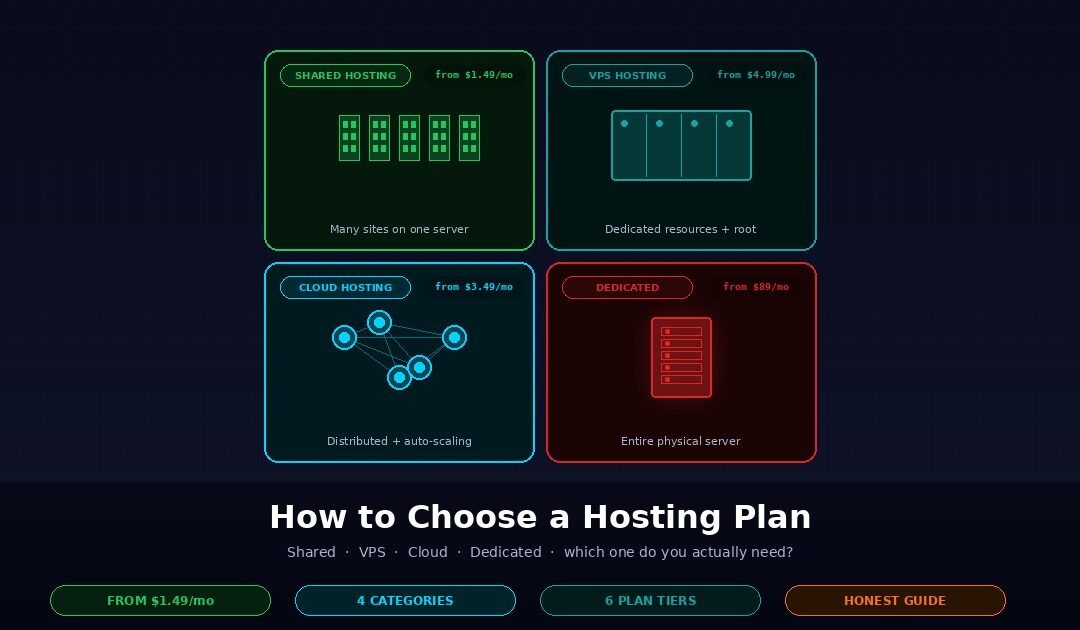
Choosing a hosting plan comes down to four questions: how much traffic you expect, how much control you need over the server, how much you want to pay, and how much of the technical work you want to do yourself. Shared hosting handles small sites at the lowest cost. VPS hosting gives you root access and guaranteed resources. Cloud hosting scales resources on demand. Dedicated bare metal gives you an entire physical server to yourself. Webhost365 offers all four categories from $1.49 per month for shared to $89 per month for bare metal, and this article walks through which tier fits which kind of site.
The next sections break down each hosting type with honest recommendations on who it fits and who it does not. The four-question decision framework comes first, because answering those questions narrows the four categories to one in under five minutes. After the per-tier deep dives, a comparison section puts everything side by side, specific site-type recommendations map common use cases to specific plans, and a red-flags section covers what to watch for regardless of which tier you pick. The HTTP Archive’s state of the web report shows that site performance and infrastructure quality are now critical ranking factors, which is the underlying reason the hosting decision matters at all.
The four-question decision framework
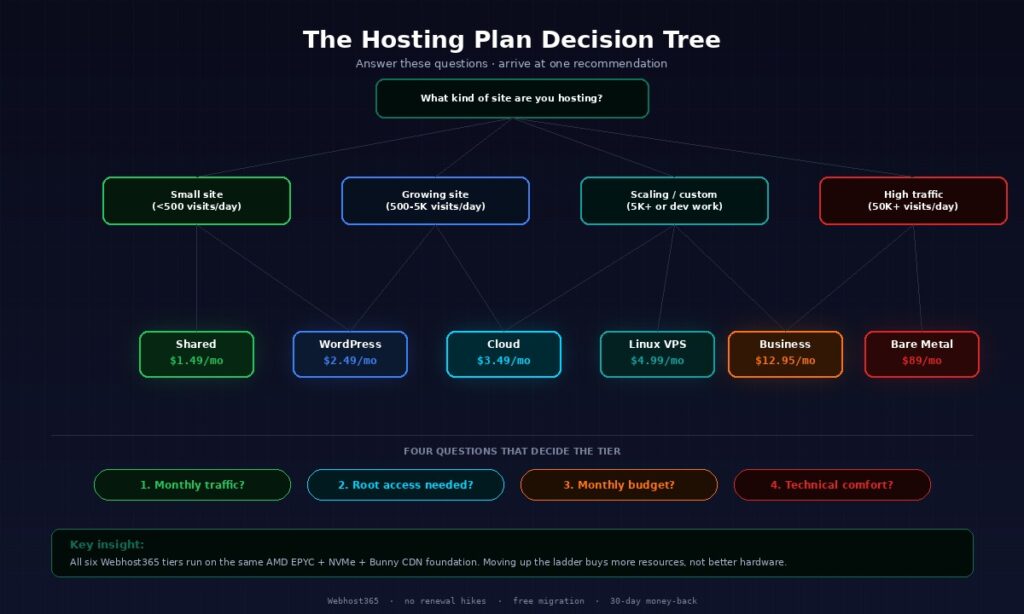
The right hosting plan depends on four factors in order of importance: expected monthly visitors, required control over the server environment, monthly budget, and technical comfort level. Answering these four questions narrows four categories down to one in under five minutes, which is why every hosting recommendation in this article follows that framework rather than a generic feature list.
How much traffic does your site get (or expect)?
Traffic is the first filter because it determines whether shared hosting can handle your load at all. Under 500 visits per day, shared hosting is more than sufficient for most websites. Between 500 and 5,000 daily visits, WordPress-specific hosting or basic cloud hosting starts to matter because caching and resource guarantees become important. Between 5,000 and 50,000 daily visits, VPS hosting or business-tier cloud gives you the dedicated resources needed to avoid slowdowns. Above 50,000 daily visits, dedicated bare metal or enterprise cloud becomes necessary to handle the sustained load.
Note that “visits” in this context means request-level traffic, not unique visitors. A site with 500 unique visitors per day where each person views four pages generates 2,000 page views, which is the number your hosting actually sees. If you use analytics that report unique visitors, multiply by your average pages-per-session to get the real traffic number. Be realistic about expected growth — provisioning for 10x your current traffic is a waste, but underprovisioning when a launch is coming guarantees downtime at the worst possible moment.
How much control do you need over the server?
Control level determines which hosting categories are even viable for your use case. If your honest answer is “I just want my site to work and never touch server settings,” shared hosting or WordPress hosting is right because both are fully managed — you get a control panel for domains, email, and files, and everything else is handled for you. Or if you need to install custom software like a specific Node.js version, a particular Python library, or Docker, you need VPS hosting because shared hosts block custom installations. If you need guaranteed performance that scales automatically with traffic spikes, cloud hosting solves that specifically. If you need complete physical hardware isolation for compliance or performance reasons, dedicated bare metal is the only option.
The control question has no middle ground. Either you need root access or you do not. Sites that need root access are usually custom applications, developer tools, or self-hosted software. Sites that do not need root access include most WordPress blogs, small business websites, e-commerce stores running on standard platforms, and content sites.
What is your realistic monthly budget?
Budget is the filter that eliminates options rather than selects them. Under five dollars per month limits you to shared or WordPress hosting, which for most small sites is completely sufficient. Between five and fifteen dollars per month opens up VPS hosting and business-tier plans, which is the range where most growing sites land. Between fifteen and fifty dollars per month covers cloud hosting and premium VPS configurations. Above fifty dollars per month is where dedicated bare metal servers live, starting at $89 per month on most hosts.
One honest note on pricing: unusually cheap intro prices often renew at three to four times the initial rate, a pattern we document with Indian market figures in our guide to web hosting price in India. A hosting plan advertised at $2.99 per month might renew at $11.99 per month, which means your second year costs four times what your first year did. Flat renewal pricing is worth paying slightly more for upfront, because the total cost over two or three years works out lower. Webhost365’s pricing stays flat at renewal across every tier, which is the specific reason our lifetime cost works out cheaper than competitors who advertise lower intro prices.
How technical are you willing to be?
Technical comfort is the filter that often gets ignored but matters most in practice. If you are a beginner who has never used SSH or edited a configuration file, shared or WordPress hosting is the right choice regardless of what your traffic or budget analysis suggests, because VPS hosting will frustrate you into paying someone else to manage it. Or if you are intermediate — comfortable with a control panel, familiar with basic server concepts, willing to Google an error message — cloud hosting hits the sweet spot because it gives you control without requiring full sysadmin skills.
If you are a developer or sysadmin who has used Linux command line, deployed applications, and configured web servers, VPS hosting gives you everything you need. You will enjoy the control and save significant money over managed alternatives. If you have a full DevOps team with enterprise infrastructure experience, bare metal or self-operated cloud deployments become viable because you have the skills to manage them, and the per-server cost savings justify the management effort.
Matching technical comfort to hosting category matters because the wrong match creates a compounding problem. A beginner on VPS wastes hundreds of hours learning skills that were not part of their actual business. A developer on shared hosting wastes money on managed services they do not need and fights platform limitations constantly. Match the tier to your team’s actual skill level, not the skill level you aspire to develop someday.
Shared hosting puts many websites on the same physical server, splitting the cost across customers. It is the cheapest hosting category, typically $1.49 to $5 per month, and the right choice for personal sites, small business sites, blogs, and any WordPress site with fewer than 500 visits per day. On a quality shared host, your site performs well even though the hardware is shared with other customers. On a low-quality shared host, the noisy-neighbour problem can make your site unpredictably slow. The difference is the provider, not the category itself.
One physical server hosts hundreds or thousands of customer websites simultaneously. The hosting provider’s control panel software — typically cPanel or DirectAdmin — handles the isolation between accounts, gives each customer a home directory for files, and provides the interface you use to manage your domain, email, databases, and subdomains. Resources like CPU time, RAM, and bandwidth are shared across all accounts on that physical server, which is where the category gets its name.
The trade-off is that you cannot install custom software, run custom services, or access the underlying operating system. When WordPress is the most demanding thing you plan to run, this trade-off is invisible. When you want to run Node.js, Python applications, or custom background workers, shared hosting blocks those entirely because they require permissions the host does not grant to shared accounts. The shared host is designed for PHP-based content management systems and standard web applications, and that is what it does well.
Noisy-neighbour behaviour is the technical problem that makes people fear shared hosting. In theory, another customer on the same physical server could consume so much CPU or memory that your site slows down. In practice, modern hosts implement resource limits — each account gets a maximum share of CPU, memory, and I/O, and accounts that exceed those limits get throttled automatically. On a quality shared host running AMD EPYC processors with enough cores and modern per-account limits, noisy neighbours become a non-issue. On a budget host oversubscribing old hardware, noisy neighbours can be painful.
Personal blogs and portfolios are the classic shared hosting use case. Traffic is modest, technical requirements are minimal, and the value of cheap hosting directly funds whatever other thing you would rather spend money on. Small business brochure websites with under ten pages and a contact form are the second classic case — the site needs to exist, needs email, needs basic SEO, and does not need to do anything technically demanding.
WordPress sites with fewer than 500 daily visits fit shared hosting comfortably, and honestly fit it better than any other tier because the upgrade justifications do not apply yet. Anyone who wants zero server management and no learning curve belongs on shared hosting. First-time site owners who are not sure what they need should default to shared hosting and upgrade later once the need becomes obvious, rather than over-provision at the start.
The economic case for shared hosting is stronger than most buyers realise. At $1.49 per month, the total first-year cost is $17.88. Even if you outgrow shared hosting in year two and upgrade to VPS at $4.99 per month, your total two-year hosting cost is under $80. Starting on VPS “just in case” costs you $120 in the same period for resources you did not use.
E-commerce stores with regular traffic usually outgrow shared hosting quickly. The combination of database-heavy queries, concurrent shoppers, and the cost of downtime (direct lost revenue) pushes most serious stores to cloud or business-tier hosting within the first year. Shared hosting works for a store in its first three months before traffic picks up, but plan the upgrade path from day one.
Any application requiring custom software is automatically disqualified. Node.js applications, Python web apps, Ruby on Rails, Go services, and anything using Docker all require root access that shared hosting does not provide. Webhost365’s Node.js Hosting, Python Hosting, and Ruby Hosting plans exist as mid-tier options for these languages on shared-style infrastructure, but pure vanilla shared hosting blocks these stacks entirely.
Sites that have clearly outgrown shared hosting should upgrade rather than squeeze more out of the tier. The signs are consistent: page loads taking more than three seconds, intermittent 503 errors under normal traffic, the host sending warning emails about resource usage, or the realisation that you cannot install something you need. Each of those signals means it is time to move to VPS, cloud, or WordPress hosting depending on your other needs.
Anyone needing guaranteed performance should skip shared hosting entirely. “Guaranteed” is the operative word — shared hosting by definition provides variable performance because resources are shared. Most small sites never notice the variability. Sites that host critical business operations, run e-commerce checkouts, or serve enterprise customers with SLA expectations should not accept variable performance even when the average is good.
VPS hosting — what it is and who it fits
VPS hosting gives you a virtual private server with dedicated CPU cores, RAM, and disk space carved out of a physical host using virtualisation software. You get root access, install whatever software you want, and pay typically $4.99 to $50 per month depending on resources. VPS is the right choice for developers, custom applications, and sites that have outgrown shared hosting but do not need a full dedicated server. The core advantage is that your vCPU allocation is actually yours, not shared with other customers, which gives you predictable performance at any traffic level.
How VPS actually works
A hypervisor — typically KVM or Xen on modern hosts — divides one physical server into multiple isolated virtual machines. Each virtual machine runs its own operating system, gets dedicated allocations of CPU, RAM, and disk, and cannot see or interfere with other VMs on the same host. From your perspective, a VPS looks exactly like a physical server. You SSH into it, install your operating system of choice, configure your web server, and deploy your application.
The dedicated vCPU allocation is what makes VPS performance predictable. When your plan says 2 vCPUs, those 2 virtual cores are reserved for you even when they are idle. Your neighbour on the same physical host cannot use them during your quiet periods, and you cannot use theirs during your busy periods. This contrasts with shared hosting’s opportunistic resource sharing, where your CPU access depends on what everyone else is doing. Predictable performance is worth paying for when your application’s responsiveness actually matters.
Root Access
Root access is the other defining feature. You install any software you want, configure anything you need, and run custom services that shared hosting blocks. Docker, Node.js, Python, Ruby, Go, custom databases, background workers, cron jobs — all of these run on VPS without restriction. This is why most developers and technical teams default to VPS when they outgrow shared hosting, rather than moving to cloud or WordPress tiers.
Scaling on a VPS is manual rather than automatic. When you need more resources, you either resize the VM (adding vCPUs or RAM within the same host’s capacity) or migrate to a bigger plan. This manual scaling is fine for most workloads because traffic grows predictably over weeks and months, not unpredictably in minutes. For workloads that genuinely need elastic scaling, cloud hosting is the right category, but paying for auto-scaling capacity you never use is a common mistake.
Who VPS is right for
Developers running Node.js, Python, Ruby, Go, or custom applications fit VPS perfectly because they need the root access that shared hosting blocks and the predictable performance that matters for their applications. Sites that have outgrown shared hosting with consistent 500-plus daily visitors fit VPS because the dedicated resources handle higher traffic reliably. Anyone self-hosting tools like n8n, Gitea, Portainer, or Home Assistant fits VPS because these applications run as Docker containers or custom services that shared hosts do not support.
Docker deployments, small SaaS applications, and staging environments fit VPS cleanly. A $4.99 per month VPS can run three or four containerised applications simultaneously for most light workloads, which is absurdly good value compared to managed container platforms charging $30-plus per small container. For a practical walkthrough of how this looks in practice, see our guide on deploying Docker containers on a VPS.
Teams that want root access but do not need enterprise-scale infrastructure find VPS is the natural tier. The cost is low enough that experimental projects are affordable. The control is high enough that custom workloads run without compromise. The management overhead is low enough that a small team can operate multiple VPS instances without a dedicated DevOps person.
Windows VPS vs Linux VPS
Linux VPS is the default choice for web applications and costs less because Linux has no licensing fees. Nearly every open-source technology that matters — Docker, Kubernetes, Node.js, Python, PHP, MySQL, PostgreSQL, Redis — was developed on Linux and runs best there. If you do not have a specific reason to use Windows, Linux VPS is the right pick and saves meaningful money over the server’s lifetime.
Windows VPS becomes necessary when your application specifically requires Windows Server. The common cases are .NET applications that have not been migrated to .NET Core (which runs on Linux), Microsoft SQL Server databases, specific enterprise software with Windows-only versions, and applications that integrate tightly with Active Directory. Windows VPS costs more than Linux VPS largely because of Microsoft’s Windows Server licensing fees, which the hosting provider pays per VM and passes through to the customer. If you do not strictly need Windows, do not pay for it.
Webhost365 offers both: Linux VPS from $4.99 per month for the standard case, and Windows VPS for Microsoft-specific workloads. If you are buying from India, our guide to VPS hosting in India covers pricing in rupees and where the server should sit. For a deeper comparison of VPS against cloud hosting specifically — a common next question after choosing between VPS tiers — our Linux VPS vs Cloud Hosting article covers the tradeoffs in more detail.
Cloud hosting — what it is and who it fits
Cloud hosting spreads your website across multiple physical servers with resources allocated on demand rather than fixed to one machine. If your traffic spikes, cloud hosting automatically provisions more resources. If one physical server fails, your site continues running on another. Typical pricing is $3.49 to $50 per month depending on the tier, and it fits sites that need predictable uptime and the ability to scale without upgrading plans. The fundamental tradeoff is flexibility versus cost predictability — you pay for elasticity you may not always need.
How cloud hosting differs from VPS
The easiest way to understand cloud hosting is to contrast it against VPS, because the two are often confused. A VPS is one virtual machine on one physical host — your resources are fixed, and you scale by either resizing the VM or migrating to a bigger plan. Cloud hosting runs your workload across multiple physical hosts with load balancing and failover built in. If one host has a hardware failure, cloud hosting continues your service on another host automatically. If your traffic spikes, cloud hosting provisions additional capacity without a manual migration.
Cloud hosting typically includes automatic scaling (called auto-scaling in the industry), while VPS scaling is always manual. The auto-scaling feature is genuinely useful for workloads that see unpredictable traffic — product launches, viral content, seasonal spikes, news events. For steady workloads with predictable growth, auto-scaling is a feature you pay for and rarely use. Most hosting buyers overestimate how often they need auto-scaling, which is why VPS remains the better default for most small and medium sites.
Uptime SLAs are usually higher on cloud hosting because of the built-in hardware redundancy. A VPS uptime depends on the single physical host it runs on, typically 99.9% (about 8 hours of downtime per year). Cloud hosting typically targets 99.95% or 99.99% (4 hours or 50 minutes per year respectively), because the failover handles individual host failures automatically. For sites where every hour of downtime costs measurable revenue, the higher SLA is worth the cost premium.
Who cloud hosting is right for
Sites with unpredictable traffic are the clearest cloud hosting use case. Viral content that spikes from 100 visitors per hour to 10,000, seasonal e-commerce stores that do 80% of their annual revenue in November and December, product launches that go from zero traffic to 50,000 daily visits overnight — all of these benefit from auto-scaling because provisioning fixed capacity for the peak wastes money for 11 months of the year. Google Core Web Vitals now directly affect search ranking, and poor performance during traffic spikes can permanently hurt SEO if the spike happens at the wrong time.
E-commerce stores where downtime directly costs money are the second clear case. A WooCommerce store doing $500 per day in revenue loses $20 per hour of downtime, plus the compounded cost of lost customer trust from a broken checkout. Cloud hosting’s higher uptime SLA and automatic failover are worth the $10 to $20 per month premium over equivalent VPS resources because a single hour of downtime per year would cost more than the annual premium.
SaaS applications with variable load across the day or week are a natural cloud fit. A B2B SaaS that sees heavy traffic during business hours and near-zero traffic at night can auto-scale up during the day and back down overnight, which is more efficient than paying for peak capacity 24/7. Teams that need managed scaling without DevOps overhead benefit from cloud hosting because the scaling logic is built in, rather than requiring them to build it themselves. Anyone prioritising uptime over raw cost-per-CPU-core belongs in the cloud tier.
Cloud hosting vs VPS — honest tradeoffs
Cost is the first honest tradeoff. VPS is usually cheaper than cloud hosting for equivalent resources because cloud hosting prices include the failover infrastructure and scaling logic you are paying to maintain. A $5 per month VPS gives you more raw CPU and RAM than a $5 per month cloud plan, because the cloud plan is subsidising the redundancy. For workloads that do not need auto-scaling or high-availability failover, the VPS is strictly better value.
Complexity is the second tradeoff. Cloud hosting control panels tend to be more complex than VPS control panels because they expose more configuration surface — load balancer rules, scaling triggers, health checks, failover targets. For a developer who wants to SSH in, install Docker, and deploy their app, VPS is simpler and faster. For a team that wants managed infrastructure with less operational overhead, cloud is simpler despite the more complex initial setup.
Billing
Predictability of billing is the third tradeoff that surprises first-time cloud buyers. VPS bills are fixed monthly at the advertised price. Cloud bills can vary based on actual resource usage, which means a traffic spike can produce an unexpectedly large invoice at the end of the month. This is not a flaw — it is how elastic pricing works — but it means cloud hosting requires active monitoring of usage to avoid bill surprises. Webhost365 Cloud Hosting includes clear monthly caps to prevent runaway bills, but this is a feature worth checking on any cloud provider.
The practical conclusion for most buyers is that VPS is the better default for small to medium sites, and cloud wins when scaling or uptime specifically matters. If you cannot articulate a specific reason cloud hosting is better for your site — beyond “it sounds more modern” — you probably want VPS. For a deeper comparison focused on which tier fits developer workloads, see our Linux VPS vs Cloud Hosting article. For the shared versus cloud question, our Cloud Hosting vs Shared Hosting article covers the upgrade path.
Dedicated hosting (bare metal) — what it is and who it fits
Dedicated hosting, also called a bare metal server, gives you an entire physical server to yourself with no virtualisation layer between your application and the hardware. You get maximum performance, complete isolation, and full control, at significantly higher cost — typically $89 to $500 or more per month. Dedicated is the right choice for high-traffic sites, large databases, and applications with strict performance or compliance requirements. For most businesses, it is overkill, and this section includes an honest rule of thumb for knowing when you actually need it.
How dedicated bare metal works
One customer and one physical server, with no sharing. You get the entire machine — all CPU cores, all RAM, all storage, all network bandwidth — and no hypervisor layer stealing resources or adding latency. Your application runs directly on the hardware the way it would in your own data centre, except the hosting provider handles the physical location, power, cooling, network connectivity, and hardware replacement.
The performance difference versus VPS comes from two places. First, no hypervisor overhead — on a VPS, a small percentage of CPU time is spent by the hypervisor managing virtualisation rather than running your code. On bare metal, 100% of CPU time is yours. Second, no noisy neighbours at all — on a VPS, your dedicated vCPUs are yours, but shared physical resources like disk I/O bandwidth can still see contention. On bare metal, nothing is shared with anyone.
Setup times are longer than VPS or cloud because physical hardware is being provisioned for you specifically. A VPS can be deployed in minutes because the virtual machine is spun up on existing hardware. A bare metal server typically takes 2 to 24 hours to provision because the provider is preparing a specific physical machine. This is a one-time cost during initial setup that does not affect ongoing operations, but it matters if you need something running in the next hour.
Who dedicated hosting is right for
High-traffic sites with 50,000 or more daily visitors are the first clear use case. At that traffic level, the per-server cost calculation starts favouring dedicated — one $89 per month bare metal server can handle load that would cost $200 or $300 per month across multiple VPS instances. The performance is also more consistent because there is zero possibility of resource contention from other customers.
Large e-commerce platforms with massive product catalogues and databases fit dedicated cleanly. A store with 100,000 SKUs, complex category filtering, and real-time inventory across multiple warehouses can saturate even a high-end VPS during peak load. On bare metal, the entire server’s resources are available for your workload, which means consistent performance under the query patterns that matter.
Applications with strict compliance requirements sometimes require dedicated hosting explicitly. PCI-DSS compliance for payment card handling has requirements that are much easier to satisfy on a dedicated server than on shared infrastructure, because the compliance auditor only needs to assess your server rather than your provider’s entire multi-tenant environment. HIPAA compliance for healthcare data has similar characteristics. If your business requires these certifications, dedicated hosting is often the simpler path.
Database-heavy workloads that saturate VPS resources benefit from dedicated hosting because database performance is typically memory-bandwidth bound, and bare metal gives you 100% of the server’s memory bandwidth. Game servers at scale, streaming platforms, and resource-intensive SaaS applications where CPU utilisation regularly exceeds 50% all fit dedicated well. Webhost365 Bare Metal Servers start at $89 per month with full root access, 10 Gbps network connection, and the same AMD EPYC hardware that powers every other tier, but with the entire machine dedicated to your workload.
Who does NOT need a dedicated server
Anyone with fewer than 10,000 daily visitors is paying for capacity they will never use. A modern VPS at $10-$15 per month handles that traffic level comfortably, with cloud hosting as an alternative if scaling matters. Spending $89 or more per month for bare metal when a $15 VPS would work is a waste of eight times the money for no measurable performance gain.
WordPress sites that have never hit resource limits on their current plan do not need dedicated hosting. The honest question is whether you have actually seen slowdowns, 503 errors, or support emails warning about resource usage. If the answer is no, you have not outgrown your current tier yet, and upgrading preemptively wastes money. If the answer is yes, a mid-tier VPS or cloud plan usually handles the load at a fraction of dedicated pricing.
Small businesses that “want the best” without a specific performance justification are the most common dedicated-hosting mistake. Marketing materials for dedicated hosting emphasise power, performance, and enterprise-grade features, which appeals to buyers who want to feel they are choosing quality. In reality, most small business websites would run identically fast on shared hosting as on dedicated, because the limiting factor is never the server’s peak capacity.
The honest rule of thumb is simple: if you are asking yourself “do I need dedicated hosting?”, the answer is almost certainly no. Teams that genuinely need dedicated hosting know it because they have measured their current resource usage and hit clear limits. Buyers who are unsure are almost always better served by a VPS or cloud tier that costs 80% less and performs equivalently for their actual traffic.
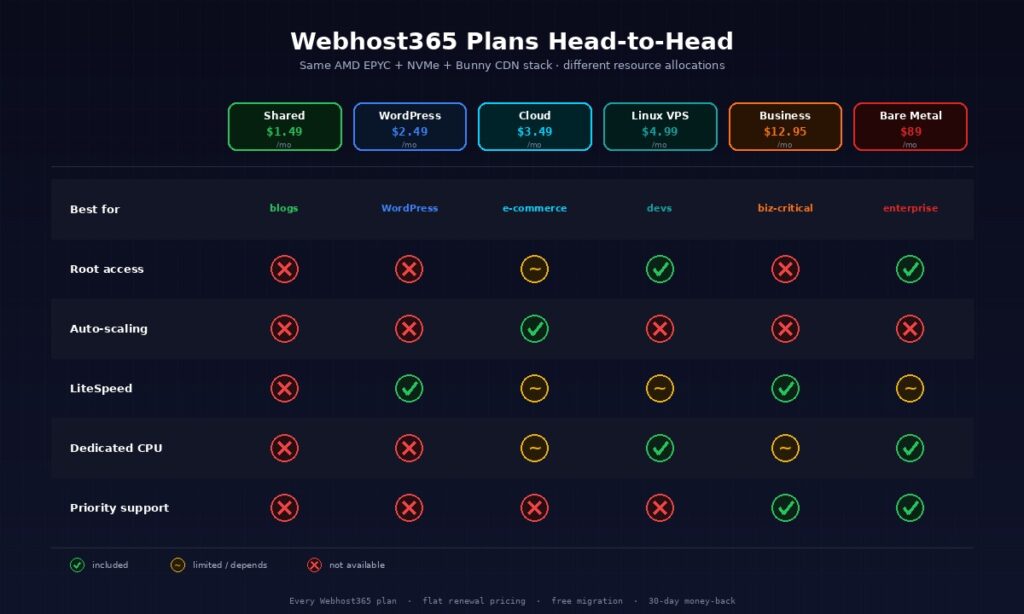
The four hosting categories differ primarily on four axes: monthly cost, performance guarantees, level of technical control, and ability to handle traffic spikes. Shared is cheapest with no guarantees. VPS offers dedicated resources at modest cost. Cloud adds automatic scaling. Dedicated gives maximum performance at maximum cost. The two tables below summarise the Webhost365 plan tiers side by side so you can compare pricing, scaling behaviour, and control level without scrolling back through individual sections.
| Plan type | Starts at | Best for |
|---|---|---|
| Shared | $1.49/mo | Small sites, blogs, beginners |
| WordPress | $2.49/mo | WordPress sites with LiteSpeed |
| Cloud | $3.49/mo | Scaling, e-commerce, SaaS |
| Linux VPS | $4.99/mo | Developers, custom apps |
| Business | $12.95/mo | Mission-critical sites |
| Bare Metal | $89/mo | High-traffic, enterprise |
Level of access
The second table covers control level and scaling behaviour, which are the two features that actually determine which tier can run your specific application. Root access is a binary yes-or-no question that filters out shared and WordPress hosting for anything requiring custom software. Auto-scaling is unique to cloud hosting and matters only for workloads with genuinely unpredictable traffic patterns.
| Plan type | Root access | Auto-scaling |
|---|---|---|
| Shared | No | No |
| WordPress | No | No |
| Cloud | Limited | Yes |
| Linux VPS | Yes | No (manual resize) |
| Business | No | No |
| Bare Metal | Yes | No (physical) |
One important thing the tables do not show: every Webhost365 tier runs on the same underlying hardware stack. AMD EPYC processors provide the CPU foundation across shared, WordPress, cloud, VPS, business, and bare metal. NVMe SSD storage is standard on every tier. Integrated Bunny CDN across 119 edge locations delivers static assets close to your visitors regardless of which plan you pick. The differences between tiers are resource allocation and level of control, not underlying hardware quality. A $1.49 shared plan runs on the same EPYC servers as the $89 bare metal tier — you just get a smaller slice of the machine.
This matters because some hosting providers use worse hardware on their cheap tiers to cut costs, which means moving up the price ladder gives you both more resources and better hardware. On Webhost365, moving up the ladder gives you only more resources. The hardware is consistent from bottom to top, which keeps the performance characteristics predictable as you scale between tiers.
Which hosting plan for which kind of site
The shortest path from confusion to decision is matching your site type to a tier directly. Personal blog goes to shared, WordPress business site goes to WordPress hosting, e-commerce store goes to cloud or business hosting, SaaS app goes to VPS, and enterprise workload goes to dedicated. The specific tier within each category depends on expected traffic and budget, and the seven subsections below cover the most common site types with specific recommendations plus honest upgrade triggers so you know when to move up.
Personal blog or portfolio
Shared hosting at $1.49 per month handles this use case perfectly. Traffic is modest, uptime demands are minimal, and every feature you need — WordPress installer, free SSL, email, database, FTP — comes included. Paying more for a higher tier is purely a status purchase, not a performance purchase.
The upgrade trigger is rarely relevant for this category. Most personal blogs never outgrow shared hosting, and the ones that do have typically become businesses that justify the upgrade on commercial grounds rather than personal grounds. If your portfolio somehow generates significant freelance leads, upgrading to WordPress Hosting for the LiteSpeed caching is reasonable. Otherwise, stay on shared and spend the savings elsewhere.
Small business brochure website
A small business website with under 10 pages, a contact form, and maybe a blog fits comfortably on shared hosting at $1.49 per month or WordPress Hosting at $2.49 per month. The WordPress tier adds LiteSpeed caching, which helps if your site is hit by search engine crawlers or gets occasional traffic bumps from social media. The $1 per month difference is usually worth paying for the performance headroom.
The upgrade trigger for small business sites is usually a specific capability change rather than traffic. Adding e-commerce to a brochure site pushes you to cloud or business hosting. Starting to handle customer data beyond basic contact forms raises compliance questions that may push you to dedicated hosting. Pure traffic growth rarely forces an upgrade at this tier because shared hosting handles small business traffic comfortably.
WordPress blog or news site
WordPress Hosting at $2.49 per month is specifically tuned for this use case with LiteSpeed Enterprise and LSCache included. Server-level caching is what separates fast WordPress sites from slow ones at any traffic level, and LiteSpeed delivers it without the plugin conflicts that plague other caching setups.
The upgrade trigger is consistent 1,000-plus daily visits, plugin conflicts that only show up under load, or custom development work that needs staging environments. At that point, Business Hosting at $12.95 per month adds priority support and advanced DDoS protection, or a VPS at $4.99 per month gives you root access for custom configurations. Most WordPress sites never hit the upgrade trigger, which is why WordPress Hosting is the right default for the category.
E-commerce store (WooCommerce, Magento)
E-commerce stores have different requirements than content sites because downtime directly costs revenue and database load is significantly heavier. Cloud Hosting at $3.49 per month is the right starting point because the uptime SLA is higher and the resource scaling handles traffic spikes during promotions or product launches. As the store grows, Business Hosting at $12.95 per month adds priority support that becomes genuinely valuable when every support ticket is a potential lost sale.
The upgrade trigger for e-commerce is reaching roughly 1,000 products, serving 100-plus concurrent shoppers regularly, or processing enough daily transactions that an hour of downtime would cost more than a month of premium hosting. At that scale, dedicated hosting or enterprise cloud makes sense because the performance predictability of bare metal eliminates the noisy-neighbour variability that can slow checkouts at peak times.
Developer project or custom application
Linux VPS at $4.99 per month is the natural fit. Root access lets you install whatever stack your project uses — Node.js, Python, Ruby, Go, Docker, custom databases, background workers. Dedicated vCPU allocation makes development and testing predictable, and the $4.99 price point is cheap enough that maintaining separate production and staging VPS instances is affordable for solo developers.
The upgrade trigger is running out of resources on your current plan. The specific signals are CPU usage consistently above 70%, memory pressure forcing swap usage, or disk I/O latency affecting application response times. At that point, resize to a bigger VPS plan or migrate to dedicated if your workload has grown enough to justify a full physical server. For most developer projects, a single $4.99 VPS runs comfortably for years before needing a real upgrade.
SaaS application with customer data
SaaS applications deserve more careful hosting consideration because three things matter simultaneously: uptime (your customers expect it), scaling (your load varies with customer activity), and security (you hold customer data). Cloud Hosting is the right starting point for most SaaS apps because the uptime SLA and auto-scaling both matter directly. For smaller SaaS apps where you value root access over scaling flexibility, a Linux VPS works well.
The upgrade trigger for SaaS is usually a customer requirement rather than a technical limit. Enterprise customers requiring compliance attestations (SOC 2, ISO 27001, HIPAA, PCI-DSS) often push SaaS companies to dedicated hosting because the compliance audit scope is much simpler on a single-tenant server. Business Hosting at $12.95 per month is the practical middle ground for SaaS companies that want better support and isolation without jumping to full dedicated.
High-traffic website or platform
Bare Metal servers at $89 per month are the appropriate tier for genuinely high-traffic workloads. The honest qualifier for this category is 50,000 or more daily visitors measured consistently over weeks, not a one-time spike or aspirational projection. At that traffic level, bare metal’s performance predictability and per-server economics both make sense.
If you are reading this subsection wondering if you need bare metal and you are not already measuring traffic at that level, the honest answer is that VPS or cloud hosting is still sufficient for your current needs. Dedicated hosting is genuinely valuable for sites that need it and genuinely wasteful for sites that do not. For detailed hosting-provider comparison across tiers, our hosting comparison page breaks down Webhost365 against Hostinger, GoDaddy, Bluehost, and DreamHost across 22 feature dimensions.
Red flags when choosing a hosting provider
The category of hosting you pick (shared, VPS, cloud, dedicated) matters less than the provider’s honesty about specifications, renewal pricing, and limitations. A good shared hosting provider beats a bad VPS provider for your actual experience, because the host’s operating practices determine whether you have a good time or not. Five red flags apply regardless of tier: renewal prices that triple after year one, vague hardware specifications, hidden resource caps labelled as “unlimited,” forced upsells during signup, and no published uptime SLA.
Renewal pricing that triples after the intro period
The most common hosting industry practice is advertising a low intro price for the first year or first three years, then renewing at two to four times the advertised rate. A plan sold as “$2.99 per month” might actually cost $2.99 for the first 12 months and $11.99 for every month after that. Over a three-year period, the total cost works out to far more than a flat-priced competitor advertising $4.99 per month upfront.
The specific tactic to watch for is the difference between “introductory price” and “renewal price.” Reputable hosts disclose both clearly on the checkout page. Less reputable hosts hide the renewal price in the fine print or only show it on the renewal invoice, by which point you are already committed. For a detailed breakdown of the industry pattern and how to spot it before you sign up, see our web hosting renewal price hikes article, which covers the specific competitors who practice this and the math on total cost of ownership over three years.
Vague hardware specifications
Hosting providers that advertise “enterprise hardware,” “high-performance servers,” or “blazing-fast infrastructure” without naming the actual CPU family, storage type, or memory technology are hiding something. Modern hosts that run good hardware are proud of it and name it explicitly. AMD EPYC processors, NVMe SSD storage, DDR5 memory, and 10 Gbps network connections are all specific claims that can be verified.
The test when evaluating a new host is simple: can you find the specific processor family they use on their product page or FAQ? If yes, the host is running modern competitive hardware and is willing to be transparent about it. If the answer requires contacting sales or if they only describe hardware in vague superlatives, they are probably running older or lower-grade hardware that they prefer not to disclose. Vague specifications are not necessarily a deal-breaker — some small hosts run fine hardware without marketing it well — but they warrant asking direct questions before signing up.
“Unlimited” that isn’t
Unlimited bandwidth, unlimited storage, unlimited websites, unlimited email accounts — all of these claims have fine print. No host actually provides genuinely unlimited anything, because infrastructure costs money and no legitimate business model gives away infinite resources for $2 per month. The question is whether the limits are disclosed honestly or hidden behind marketing language.
Honest hosts publish specific limits and stick to them. A plan that says “500 GB storage and 5 TB bandwidth” is more honest than a plan that says “unlimited” but enforces undisclosed fair-use limits that throttle your site the moment you actually use resources. The specific pattern to watch for is accounts that work fine during testing and get throttled or suspended when they hit actual production traffic. If a host advertises “unlimited” anything, check their Terms of Service for the actual fair-use policy before committing, because that document reveals what the marketing page hides.
Forced upsells during signup
Hosts that automatically add domain privacy, SiteLock, backup add-ons, or priority support to your shopping cart during signup are relying on customers not noticing. The typical pattern is a pre-checked add-on with a subtle remove link and a total that includes 30% to 50% more than the advertised plan price. Customers who do not read the cart carefully pay for services they did not intend to buy.
Domain privacy should be free in the post-ICANN-privacy-update era (it has been since 2018). Paid SiteLock is usually a watered-down version of free Cloudflare WAF. “Priority support” as a paid add-on usually means the default support tier has been deliberately degraded to make the upsell worthwhile. The test is to read your final cart line-by-line before completing checkout. Every line should correspond to something you actively chose, and if a line appears that you do not recognise, remove it. Reputable hosts let you remove add-ons without guilt-trip popups or “are you sure?” dialogs designed to change your mind.
No published uptime SLA
Serious hosting providers publish a specific uptime Service Level Agreement with a specific credit policy for downtime. “We aim for 99.9% uptime” is not an SLA — it is a marketing sentence. A real SLA specifies the guaranteed uptime percentage (typically 99.9%, 99.95%, or 99.99%), the measurement period (monthly is standard), the credit you receive for each hour of downtime below the threshold, and the process for claiming the credit.
Hosts without a published SLA are signalling that they do not want to be held accountable for downtime. This is sometimes fine for cheap shared hosting where you are not paying enough for guarantees, but it is unacceptable for any tier advertised as business-grade or enterprise-grade. Before paying more than $10 per month for any hosting plan, find the SLA. If it does not exist, pick a different provider. If it exists but requires you to manually request credits, set a calendar reminder to check uptime monthly so you actually claim what you are owed.
Frequently asked questions
What is the difference between shared hosting and VPS?
Shared hosting puts many websites on the same physical server, sharing all resources between customers, while VPS hosting gives you a virtual machine with dedicated CPU cores, RAM, and disk carved out of a physical host. Shared hosting is cheaper, typically $1.49 to $5 per month, and requires no server management. VPS hosting gives you root access, dedicated resources, and predictable performance starting around $4.99 per month. The practical difference is whether you need custom software installation and guaranteed performance — if yes, VPS; if no, shared.
Do I need VPS or cloud hosting?
You need VPS when you want root access, predictable performance, and custom software installation but do not need automatic scaling. You need cloud hosting when uptime is critical, traffic is unpredictable, or you need capacity that scales automatically with demand. For most small to medium sites with steady traffic, VPS is the better default because it costs less for equivalent resources and offers simpler pricing. Cloud hosting becomes the right choice when you can articulate a specific reason — traffic spikes, uptime SLA requirements, or scaling beyond a single server.
You should upgrade from shared hosting when you see consistent signals that the tier cannot handle your load: page loads regularly taking more than three seconds, intermittent 503 errors under normal traffic, warning emails from your host about resource usage, or the realisation that you cannot install software your application needs. Upgrading before those signals appear is wasted money. Upgrading after them is usually overdue. Most small business sites never hit the upgrade trigger and stay on shared hosting successfully for years.
Is cloud hosting better than dedicated?
Cloud hosting is better for sites with variable or unpredictable traffic that benefit from automatic scaling and built-in hardware redundancy. Dedicated hosting is better for sites with consistently high traffic that benefit from maximum performance and complete isolation. Neither is universally better — they solve different problems. Cloud hosting is more flexible and usually cheaper at small to medium scale. Dedicated hosting delivers more consistent performance at high scale and is sometimes required for compliance reasons. The right choice depends on your specific workload, not a general “better” ranking.
What is the cheapest hosting plan that still works?
The cheapest hosting plan that actually works reliably is quality shared hosting starting around $1.49 per month on a reputable provider with flat renewal pricing. Below that price point, you typically lose features that matter (SSL, backups, reasonable resource limits) or hit hidden caps that make the cheap plan functionally worthless. Free hosting plans exist but usually include advertising on your site, severely limited resources, or other tradeoffs that make them unsuitable for anything but personal experiments. For serious use, pay for proper shared hosting at a sensible price with flat renewal pricing.
Can I upgrade my hosting plan later?
Every reputable host lets you upgrade your hosting plan later, and most hosts offer in-place upgrades within the same account so you do not need to migrate files or change DNS. Upgrading from shared to WordPress hosting, from WordPress to VPS, or from VPS to cloud typically takes minutes on a modern hosting provider. The exception is moving between fundamentally different hosting categories like shared to dedicated, which sometimes requires a fresh server provisioning. The practical advice is to start at the lowest tier that fits your current needs and upgrade only when you see specific signals that you have outgrown it.
WordPress hosting is shared hosting specifically optimised for WordPress sites, typically adding LiteSpeed web server with LSCache for server-level caching, WordPress-specific security rules, automatic WordPress updates, and staging environments. Regular shared hosting runs Apache or similar web servers and requires you to install caching plugins that work less efficiently than server-level caching. For any WordPress site, WordPress-specific hosting is worth the typical $1 per month premium over regular shared hosting because the performance gain is significant and the setup is much simpler.
Quality shared hosting handles 500 to 1,000 daily visitors comfortably on a standard WordPress site, which is plenty for most small business websites, personal blogs, and hobby projects. Traffic above that level starts to show variable performance, longer page loads during peak times, and occasional errors when multiple customers on the same physical server hit traffic at once. The transition point depends heavily on your specific site — a simple static site handles 5x more traffic than a complex WooCommerce store at the same hosting tier.
What hosting do I need for WooCommerce?
WooCommerce works on any hosting tier but performs best on Cloud Hosting or Business Hosting because e-commerce sites benefit from guaranteed resources, higher uptime SLAs, and scaling for traffic spikes during promotions. Small stores with fewer than 100 products and modest traffic can run on WordPress hosting at $2.49 per month. Stores with larger catalogues, significant traffic, or substantial revenue should move to Cloud Hosting at $3.49 per month or Business Hosting at $12.95 per month. The underlying database load from WooCommerce is the limiting factor — bigger catalogues mean heavier queries, which need more resources.
Is managed hosting worth the extra cost?
Managed hosting is worth the extra cost when your time is more valuable than the price difference and you do not have the skills or interest to manage a server yourself. A managed WordPress host handles updates, security, backups, and performance tuning for roughly $15 to $35 per month, which is reasonable if your time is worth more than that and you would otherwise be doing those tasks manually. Unmanaged VPS costs 80% less but requires you to handle those operational tasks yourself. The right choice depends on whether you value the time savings or the cost savings more — there is no universally correct answer.
Pick the right Webhost365 plan for your site
Every Webhost365 plan runs on the same AMD EPYC and NVMe SSD foundation with integrated Bunny CDN across 119 global edge locations, flat renewal pricing with no surprise hikes, free website migration, and a 30-day money-back guarantee. Shared Hosting starts at $1.49 per month for personal sites and small blogs, WordPress Hosting at $2.49 per month adds LiteSpeed Enterprise for WordPress-specific performance, Cloud Hosting at $3.49 per month gives you scaling and higher uptime SLAs for e-commerce and SaaS, Linux VPS at $4.99 per month provides root access for developers and custom applications, Business Hosting at $12.95 per month covers mission-critical sites with priority support, and Bare Metal Servers from $89 per month deliver full physical hardware for high-traffic workloads. Browse all hosting plans to see the detailed specifications or compare against other providers to see how the stack holds up against Hostinger, GoDaddy, Bluehost, and DreamHost.