
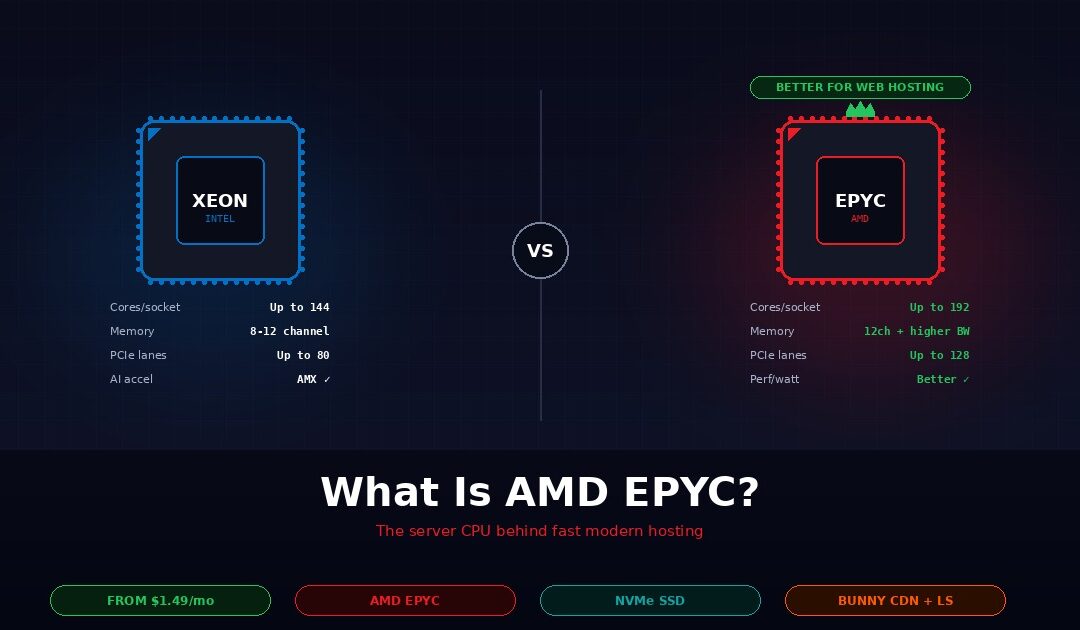
AMD EPYC is a family of server-grade processors built by AMD specifically for data centres and web hosting workloads. Compared to Intel Xeon, the processor family it competes with, AMD EPYC typically delivers more cores per socket, higher memory bandwidth, more PCIe lanes for NVMe storage, and better performance per watt. All four of those differences translate directly into faster websites and lower hosting prices at the customer level. Webhost365 runs AMD EPYC across every hosting tier, from shared hosting at $1.49 per month to Linux VPS at $4.99 per month, which is why sites on our platform consistently measure faster than competitors selling at double the price.
This guide explains what AMD EPYC actually is, how it differs from Intel Xeon on the specifications that matter for web hosting, what those differences mean for a WordPress site or a VPS under load, how to check whether your current hosting runs EPYC, and when Intel Xeon is still the right choice. The honest framing matters because most hosting-provider articles trash Intel to pitch their own AMD hardware. For roughly 95% of web hosting workloads, AMD EPYC is the better modern choice. For the other 5%, Intel Xeon still wins cleanly, and this article will tell you which bucket you are in.
What is AMD EPYC?
AMD EPYC is AMD’s server processor product line, launched in 2017 as the company’s return to the data centre market after years of Intel Xeon dominance. Unlike AMD’s consumer Ryzen processors for desktops, EPYC is purpose-built for multi-tenant hosting, virtualisation, and high-concurrency workloads. The product line has shipped five major generations since launch, with the current flagship supporting up to 192 cores per socket and 12 channels of DDR5 memory at roughly 540 GB/s of bandwidth.
The practical consequence is that one modern EPYC server can do what used to require two or three older Intel Xeon servers. Hosting providers that build on EPYC need fewer physical machines to serve the same number of customers, which translates directly into lower hosting prices. This is the structural reason why VPS pricing across the industry dropped from $10-plus per month in 2019 to $4.99 per month today.
What makes EPYC different from Ryzen
The most common confusion for buyers evaluating EPYC is the relationship to AMD’s consumer Ryzen line. Both share the Zen CPU architecture at the core level, but the platforms around that core are fundamentally different. EPYC ships with far more cores per socket, supports many more memory channels (12 versus 2 on Ryzen), offers up to 128 PCIe lanes (versus 24 on Ryzen), and includes server-specific features like Secure Encrypted Virtualisation for multi-tenant isolation.
A Ryzen-based “server” is really a desktop CPU in a rack-mount chassis. An EPYC server is purpose-built silicon for the job. For hosting providers running hundreds of customer workloads per physical host, the difference is not marginal. You can read more about the current generation of EPYC processors on AMD’s official EPYC product page, which covers the full lineup from entry-level 4000-series chips to the flagship 9000-series data centre parts.
Where EPYC sits in the market today
EPYC has gone from data-centre curiosity in 2017 to serious market share today. A significant fraction of the TOP500 supercomputer list now runs on EPYC, and every major cloud provider — AWS, Google Cloud, Microsoft Azure, Oracle Cloud — offers EPYC-based instances alongside their Intel-based options. For hosting specifically, almost every new VPS platform launched in the last three years runs on EPYC, because the economics of building a new platform on older Intel hardware no longer make sense.
The generational progression matters because each new EPYC generation has delivered meaningful gains. Current-generation chips double the core count and improve memory bandwidth substantially over first-generation parts. Hosts still running older EPYC or older Intel Xeon hardware are offering yesterday’s performance at yesterday’s prices, which is a problem because yesterday’s prices are not competitive anymore.
Key EPYC features for hosting
Several EPYC features matter specifically for hosting workloads in ways that are worth calling out individually. High core count — up to 192 cores per socket on the current flagship — enables more VPS tenants per physical server without noisy-neighbour problems. Twelve-channel DDR5 memory at around 540 GB/s bandwidth is the biggest practical advantage for database-heavy workloads like WooCommerce and Magento. Up to 128 PCIe 5.0 lanes per socket mean more NVMe drives, more GPU accelerators, and faster networking without competing for the same bus bandwidth. Secure Encrypted Virtualisation and Secure Memory Encryption provide per-VM hardware-level encryption, which matters for multi-tenant hosting where workloads from different customers share the same physical hardware.
AMD EPYC vs Intel Xeon — the comparison that actually matters
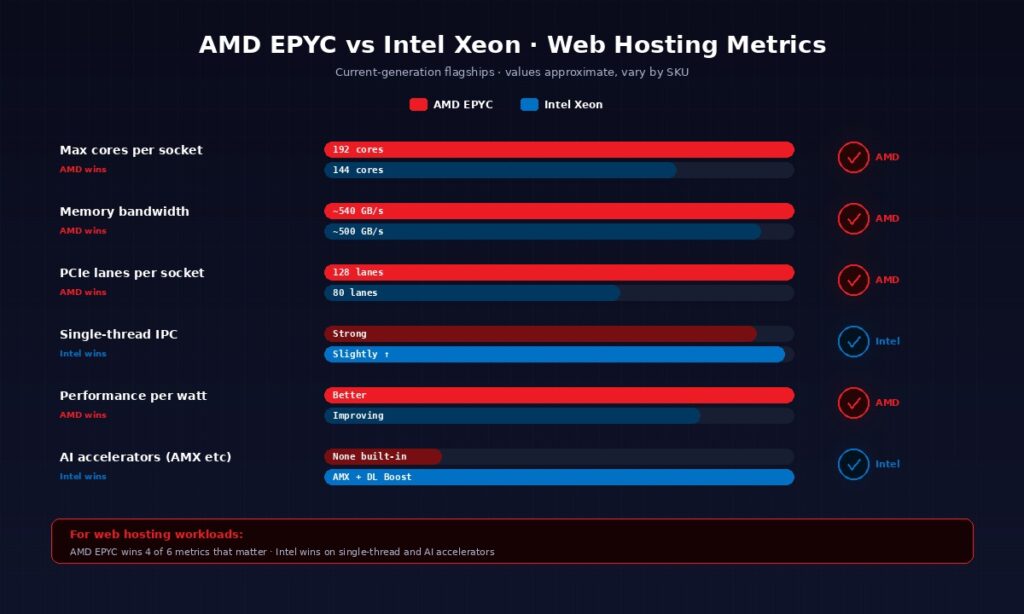
For web hosting workloads specifically, AMD EPYC outperforms Intel Xeon on core count, memory bandwidth, PCIe lanes, and performance per watt. Intel Xeon still wins on single-thread IPC, AI accelerators, and enterprise ecosystem maturity. For running WordPress, WooCommerce, VPS hosting, and most SaaS backends, EPYC is the better modern choice, which is why nearly every new hosting platform built in the last three years runs on it. The table below summarises the differences that actually matter for a hosting buyer.
| Metric | AMD EPYC | Intel Xeon |
|---|---|---|
| Max cores per socket | Up to 192 (current flagship) | Up to 144 (Sierra Forest E-core) |
| Memory channels | 12-channel DDR5 | 8–12-channel DDR5 |
| Memory bandwidth | ~540 GB/s | ~500 GB/s |
| PCIe lanes per socket | Up to 128 (PCIe 5.0) | Up to 80 (PCIe 5.0) |
| Single-thread IPC | Strong | Slightly stronger |
| Performance per watt | Better (typically) | Improving (Sierra Forest) |
| AI accelerators | None built-in | AMX, DL Boost |
| Hardware encryption | SEV, SME (per-VM) | TDX, SGX (per-enclave) |
The numbers look abstract on a spec sheet, so the next five subsections translate each of the biggest differences into what it means for a real hosting workload. Independent benchmarks from Phoronix confirm the direction of the comparison across dozens of tests, though exact margins vary with workload and tuning.
Core count — why it matters for VPS hosting
More cores per physical socket means more concurrent VPS tenants per server at the same power and space budget. When a hosting provider builds out a rack, the cost per rack is roughly fixed — power, cooling, networking, physical space. What varies is how many customers each physical server can serve without impacting performance. EPYC’s 192-core flagship means a single server can host far more VPS customers than a 40-core older Intel Xeon at the same power budget.
This is the structural reason VPS pricing across the industry has dropped so dramatically. A Linux VPS with 2 vCPU and 4 GB of RAM used to cost $15 to $25 per month because the underlying server could only host 20 to 30 such VPSes before running out of cores. On a modern EPYC platform, the same physical server hosts 90 or more, which cuts the per-tenant cost by roughly 3x. Webhost365’s Linux VPS at $4.99 per month exists at that price because the underlying EPYC hardware makes it sustainable, not because anyone is running a promotional loss.
Memory bandwidth — why it matters for databases
Memory bandwidth is the biggest practical EPYC advantage for hosting, and it is the metric that most buyers overlook. Twelve-channel DDR5 at around 540 GB/s gives EPYC roughly 8% more raw bandwidth than Intel Xeon’s current generation, which sounds small until you consider that database workloads spend a huge fraction of their time waiting on memory.
MySQL, PostgreSQL, Redis, and WordPress object caches are all memory-bandwidth-bound under load. A WooCommerce store with 10,000 products, 50 concurrent shoppers, and a database that barely fits in RAM will see measurable TTFB improvements on EPYC simply because the database can push data to the CPU faster. For Magento stores, forum software, membership platforms, and any WordPress site with heavy database usage, the memory bandwidth advantage compounds across every page load. Combined with NVMe SSD storage at the storage tier, the full read path from disk to CPU stays consistently fast even as concurrency rises.
PCIe lanes — why it matters for NVMe storage
Every NVMe drive consumes 4 PCIe lanes for full bandwidth. A server with 8 NVMe drives needs 32 lanes just for storage, before you add 100Gbps networking (another 16 lanes), GPU accelerators (16 lanes each), or additional network cards. Intel Xeon’s 80-lane limit creates real tradeoffs on storage-heavy servers. EPYC’s 128 lanes mean more NVMe drives without compromise, plus room for enterprise networking and accelerators on the same physical host.
This matters for hosting because it determines what the provider can offer at each price tier. Modern EPYC hosts can offer NVMe storage across shared hosting, WordPress hosting, and VPS tiers simultaneously because the lane budget covers it. Intel-based platforms tend to reserve NVMe for higher-tier plans because the PCIe budget forces tradeoffs. That is why Webhost365’s shared hosting at $1.49 per month includes NVMe, while many competitors at similar prices still use SATA SSDs on Intel platforms.
Single-thread performance — where Intel Xeon still wins
Intel Xeon has a small but real IPC advantage on single-threaded workloads, which is the one place where the Intel side of the comparison wins cleanly. For applications that cannot parallelise — certain legacy transactional apps, some enterprise database queries with no good indexes, specific pieces of scientific computing code — that advantage shows up in benchmarks.
The honest question for a hosting buyer is whether your workload actually falls into that bucket. Modern web hosting workloads are overwhelmingly parallel. A WordPress site serves many concurrent requests in parallel. A VPS runs many processes in parallel. A Node.js API handles many concurrent connections in parallel. In all of these cases, the total throughput across many cores matters far more than the speed of any single core. Unless you are running a specific single-threaded enterprise app with documented performance dependencies on Intel hardware, this advantage will not appear in your real-world performance.
Performance per watt — why it matters for pricing
Hosting providers pay for electricity. A data centre typically bills for power consumption in kilowatt-hours per month, and power is often the single largest ongoing operating cost after server purchase. Better performance per watt means the provider spends less on power to deliver the same performance, which compounds across millions of CPU-hours per year.
This is the structural cost advantage that shows up in customer pricing. Webhost365 can sell WordPress hosting at $2.49 per month partly because the EPYC platform delivers the required performance at lower power consumption than an equivalent Intel platform would. The per-customer power cost difference is a fraction of a dollar per month, but multiplied across thousands of hosting accounts and several years of operation, it adds up to the margin that allows competitive pricing. Intel’s newer Sierra Forest E-core chips have narrowed this gap specifically for high-core-count deployments, but AMD EPYC still holds the overall performance-per-watt lead across most web hosting workloads.
What AMD EPYC means for your website specifically
For a WordPress, WooCommerce, or VPS site, running on AMD EPYC instead of older Intel Xeon hardware typically means 30 to 50 percent faster page loads under load, more concurrent visitors handled per server, better database query performance, and lower hosting prices because the underlying hardware is more cost-effective for the provider. The specific gains depend on your workload type, and the four subsections below cover the four most common hosting scenarios.
WordPress and WooCommerce
WordPress is a PHP application that spends most of its time executing PHP code and querying a MySQL database. Both operations benefit from AMD EPYC’s strengths. PHP execution scales with core count — a WordPress site handling 100 concurrent visitors can spread that work across many cores, and EPYC’s high core density means those cores are available without queueing. MySQL queries are memory-bandwidth-bound, which is exactly where EPYC’s 12-channel DDR5 advantage shows up.
The combined effect compounds when the web server is LiteSpeed. LiteSpeed Enterprise with LSAPI keeps PHP processes warm between requests, and those warm processes execute across EPYC’s many cores with no contention. On a WooCommerce store with 50 concurrent shoppers hitting product pages and making database queries, the EPYC plus LiteSpeed combination typically delivers sub-second TTFB where older Intel Xeon stacks would queue requests under the same load. This is the hardware reason Webhost365 WordPress Hosting at $2.49 per month performs comparably to managed WordPress hosts charging $25 to $35 per month.
Linux VPS and Docker workloads
VPS hosting is the workload where EPYC’s core count advantage shows up most clearly. A VPS gives you dedicated vCPU allocation, and the hosting provider carves out those vCPUs from the physical server’s core count. More cores per socket means more vCPUs per customer at the same price, or the same vCPUs at a lower price. This is why modern VPS plans include 2 vCPU at $4.99 per month, where older Intel platforms required $10 or more for the same spec.
Docker container density improves the same way. When you run a Compose stack with an application, a database, and a reverse proxy on a 2 vCPU VPS, those three containers share the allocated cores. EPYC’s many-core architecture means the host has capacity to absorb small traffic spikes without throttling, even when every VPS on the physical server hits concurrent load. Memory bandwidth matters here too — Redis, memcached, and in-memory databases common in container workloads all benefit from EPYC’s bandwidth advantage. For a detailed look at how this plays out in practice, see our guide on deploying Docker containers on a VPS.
Databases and data-heavy applications
PostgreSQL and MySQL are the two workloads where independent benchmarks show the clearest EPYC advantage. The combination of high memory bandwidth, large L3 cache on current generations, and many cores means that complex queries with large working sets complete significantly faster on EPYC than on comparable Intel Xeon hardware. For analytics workloads, reporting dashboards, and OLAP queries that scan large tables, the gap widens further.
For a practical web hosting example, a Magento store with 50,000 products and 100 concurrent shoppers hitting category pages does thousands of database queries per second under load. On EPYC with NVMe SSD and adequate RAM, those queries return in milliseconds. On an older Intel platform with the same RAM but lower memory bandwidth and fewer cores, the same workload starts queueing requests and shoppers see multi-second page loads. The difference is not subtle, and it is the specific reason e-commerce operators who care about conversion rates evaluate hosting CPU as a first-class concern.
AI, LLM, and vector database workloads
CPU-based AI inference is the newest web hosting workload, and it has its own specific profile. Tools like Ollama, llama.cpp, and local transformer inference libraries benefit from high core counts and AVX-512 instructions, both of which EPYC handles well. A 7 billion parameter language model running on a VPS with 8 vCPUs and 16 GB of RAM will deliver reasonable response times on EPYC because the inference workload parallelises cleanly across cores.
The honest limitation is that GPU workloads are a separate topic entirely. If your application needs real-time image generation, fine-tuning, or inference on models larger than roughly 13 billion parameters, you need a GPU server, and the choice of CPU becomes secondary. EPYC has no built-in AI accelerator comparable to Intel’s AMX, which means Intel Xeon with AMX can outperform EPYC on specific AI inference benchmarks where AMX is supported. For the broader universe of CPU-only AI workloads — small models, vector search, embedding generation, retrieval-augmented generation pipelines — EPYC’s parallelism and memory bandwidth are the better fit.
How to tell if your hosting runs AMD EPYC
The easiest way to tell if your hosting runs AMD EPYC is to check the hosting provider’s product page — reputable hosts list the CPU family openly. On a VPS you can verify directly by running the command cat /proc/cpuinfo and looking for “AMD EPYC” in the model name field. If the output shows Intel Xeon or no CPU model at all, your host is not running on EPYC. The three methods below cover the full verification process.
Check the product page first
Reputable modern hosts name the CPU family explicitly in their marketing materials. Look for phrases like “AMD EPYC processors,” “Intel Xeon Gold,” or “Intel Xeon Platinum” on the product page. Hosts that hide the CPU family behind vague phrases like “enterprise hardware” or “high-performance servers” are usually running older or lower-grade processors that they would prefer you not evaluate directly.
Specific generations are worth looking for when disclosed. Current-generation EPYC chips perform markedly better than first-generation parts from 2017, and the gap between generations widens every year. A host advertising “AMD EPYC” without any generation information is probably running a mix of generations across their fleet, which is fine for most workloads but worth knowing if you are optimising for peak performance.
Verify on your VPS with /proc/cpuinfo
If you have a Linux VPS, you can check directly by SSH’ing in and running a single command:
bash
cat /proc/cpuinfo | grep "model name" | head -1On a Webhost365 VPS you will see something like model name : AMD EPYC 9654 96-Core Processor (the specific model varies by server). An Intel platform the output will show Intel(R) Xeon(R) followed by the Gold or Platinum designation. On older budget hosts, you sometimes see generic strings like Common KVM processor, which means the host is either hiding the CPU model from guests or running on outdated hardware they would rather not disclose.
Shared hosting does not give you this level of visibility. The PHP phpinfo() page sometimes reveals the CPU model on shared environments, but hosts that care about obscuring their hardware will disable that function. VPS gives you direct verification by design, which is one more argument for moving from shared hosting to VPS when you want to actually know what you are running on.
Benchmark it yourself
Numbers on a spec sheet are one thing; real-world performance is another. Tools like sysbench, Geekbench, and UnixBench measure actual CPU performance on your VPS and let you compare results against published benchmarks for specific EPYC and Xeon generations.
Higher scores do not automatically mean better for your specific workload. A server that benchmarks well on synthetic tests can still be slow for your actual application if the hardware is misconfigured, the storage is slow, or the hosting provider is overselling the physical host. The right test is to load your actual application under realistic traffic and measure response times directly. Most reputable hosts will share their internal benchmark data on request. A refusal to share is a signal worth paying attention to.
When Intel Xeon is still the right choice
Intel Xeon remains the right choice for enterprise applications that depend on Intel-specific accelerators, legacy software certified only on Intel platforms, workloads that genuinely depend on per-core single-thread performance, and organizations with long-standing VMware or Microsoft enterprise tooling ecosystems. This section exists because the honest answer matters more than the sales pitch. For roughly 95% of web hosting use cases, AMD EPYC is the better choice. For the other 5%, Intel Xeon wins cleanly, and picking the wrong CPU for those workloads is an expensive mistake.
The clearest case for Intel Xeon is AI inference that uses Intel’s AMX accelerator extensions. Intel Advanced Matrix Extensions and Deep Learning Boost are hardware features built into modern Xeon processors specifically for AI matrix operations. If your application uses TensorFlow, PyTorch, or ONNX Runtime with Intel MKL-DNN optimizations enabled, you are benefiting from AMX whether you realise it or not. AMD EPYC has no equivalent hardware accelerator, which means AMX-optimised workloads can run 2 to 4 times faster on Intel Xeon than on EPYC at the same nominal specifications. For CPU-only AI inference at scale, this difference is decisive.
Enterprise software certification is the second case that matters. Some specific enterprise applications — certain SAP workloads, Oracle database configurations with strict vendor support matrices, and legacy ERP systems — carry certification labels that name Intel Xeon explicitly. Running these applications on AMD EPYC typically works fine in practice, but vendor support agreements sometimes require certified hardware. For organisations operating under those support agreements, Intel Xeon is the answer regardless of performance benchmarks.
Single-thread-heavy workloads are the third case, and the one most likely to mislead buyers. Some applications simply cannot parallelise. Specific legacy transactional systems, certain database query patterns with no good parallelisation opportunities, and a handful of scientific computing codes all spend most of their time in single-threaded execution. Intel Xeon’s slight IPC advantage shows up here as measurable performance gains. The practical test is whether your application’s profiling shows more than 70% of execution time in a single thread. If it does, Xeon is worth evaluating. If it does not, EPYC’s parallelism wins.
Organisations with VMware-heavy virtualisation stacks have historically tested more on Intel. This is not a technical limitation — modern VMware runs fine on EPYC, and AMD has invested heavily in VMware certification over the past several years. It is a familiarity and tooling consideration. Teams with deep VMware experience built over a decade of Intel deployments often have internal playbooks, performance baselines, and operational knowledge tied to Intel platforms. For these teams, switching to EPYC for a single new workload introduces operational risk that a spec-sheet advantage does not justify.
The honest framing for this article’s audience is that none of the above cases apply to most web hosting buyers. If you are running WordPress, WooCommerce, Magento, a Python or Node.js application, a Docker Compose stack, a self-hosted tool, or a VPS for general-purpose workloads, AMD EPYC is the better choice and the advantage is measurable. If you are running AI inference with AMX dependencies, certified enterprise software, or single-threaded legacy applications, Intel Xeon is worth the premium. Matching the CPU to the workload matters more than picking the spec-sheet winner in the abstract.
AMD EPYC at Webhost365 — what you actually get
Every Webhost365 hosting plan runs on AMD EPYC processors across every tier, from shared hosting at $1.49 per month to dedicated bare metal servers at $89 per month. The same hardware that managed WordPress hosts charge $25 to $35 per month for sits behind WordPress plans at $2.49 per month, because the EPYC platform makes the economics work at scale.
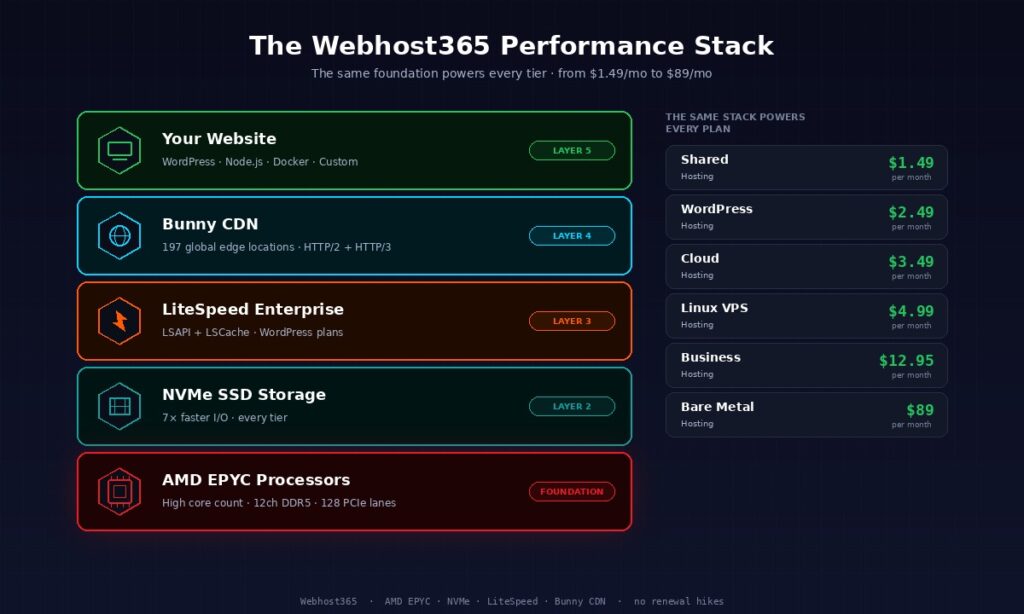
The full stack is deliberately consistent across tiers. Every plan uses NVMe SSD storage paired with the EPYC platform, because EPYC’s PCIe lane budget is what makes NVMe across all tiers possible in the first place. WordPress Hosting plans add LiteSpeed Enterprise with the full LSCache module, which pairs naturally with EPYC’s high core count. For a deeper look at that combination, see our guide on why LiteSpeed matters for WordPress.
The networking layer matters alongside the CPU. Every Webhost365 plan connects to a 10 Gigabit network, which EPYC’s PCIe lanes enable without competing for the same bus bandwidth that NVMe storage uses. Bunny CDN is integrated at 119 global edge locations, so traffic served from the origin server — powered by EPYC — reaches visitors through the nearest edge PoP with under 800ms TTFB worldwide. Every piece of this stack reinforces every other piece.
The pricing ladder is worth stating explicitly, because the consistency across tiers is the point. Shared hosting at $1.49 per month runs on AMD EPYC with NVMe and integrated Bunny CDN. WordPress Hosting at $2.49 per month adds LiteSpeed Enterprise and staging environments. Cloud Hosting at $3.49 per month adds dedicated cloud resources and auto-scaling capacity. Linux VPS at $4.99 per month gives you root access with 2 vCPUs, 4 GB RAM, and full control over the underlying EPYC hardware. Business Hosting at $12.95 per month adds priority support and advanced DDoS protection for mission-critical workloads. Bare metal dedicated servers at $89 per month give you exclusive access to a full EPYC server. Every tier runs on the same foundational AMD EPYC platform, which is why the performance characteristics scale cleanly across plans.
None of this is a premium feature at Webhost365. It is the default, on every plan, from the cheapest tier up. If you want to compare the stack against other providers side by side, the hosting comparison page runs the numbers against GoDaddy, Hostinger, Bluehost, and DreamHost across 22 feature dimensions. The short version is that running on AMD EPYC across every tier is what allows those prices to be honest, renewal prices to stay flat, and performance to stay consistent as your site grows.
Frequently asked questions about AMD EPYC
Is AMD EPYC better than Intel Xeon?
For most web hosting workloads, AMD EPYC is better than Intel Xeon because of higher core counts, greater memory bandwidth, more PCIe lanes for NVMe storage, and better performance per watt. Intel Xeon still wins on single-thread IPC, AI accelerators like AMX, and legacy enterprise software certifications. For running WordPress, WooCommerce, VPS hosting, Docker containers, and general-purpose web applications, AMD EPYC is the right choice. For specific AMX-dependent AI inference or certified enterprise workloads, Intel Xeon keeps its advantage.
What does AMD EPYC do?
AMD EPYC is a family of server-grade processors designed to run data centre and web hosting workloads. It handles web server software, database queries, virtual machine hosting, container orchestration, and any other compute task that a physical server needs to perform. Compared to consumer processors like AMD Ryzen or Intel Core, EPYC offers far higher core counts, much more memory bandwidth, enterprise-grade security features, and the connectivity needed to support multiple NVMe drives and high-bandwidth networking simultaneously.
Is AMD EPYC good for WordPress hosting?
AMD EPYC is excellent for WordPress hosting because WordPress workloads benefit from exactly the strengths EPYC delivers. High core count handles concurrent visitors without queueing. High memory bandwidth speeds up MySQL database queries, which is where most WordPress pages spend their time. Combined with LiteSpeed Enterprise web server and NVMe SSD storage, an EPYC platform typically delivers sub-second TTFB even under traffic spikes. This is why Webhost365 WordPress Hosting at $2.49 per month performs comparably to managed WordPress hosts charging ten times that price.
How is AMD EPYC different from AMD Ryzen?
AMD EPYC and AMD Ryzen share the same core CPU architecture (Zen) but target completely different markets. Ryzen is AMD’s consumer processor line for desktops and gaming, with up to 16 cores, 2 memory channels, and 24 PCIe lanes. EPYC is the server product line with up to 192 cores per socket, 12 memory channels, up to 128 PCIe lanes, and server-specific features like Secure Encrypted Virtualisation for multi-tenant workloads. A hosting provider using Ryzen chips is running desktop hardware in a rack-mount chassis; an EPYC platform is purpose-built for the job.
Can I tell if my hosting uses AMD EPYC?
You can check directly if you have a Linux VPS by running cat /proc/cpuinfo | grep "model name" | head -1 in the terminal. The output shows the exact CPU model, which will include “AMD EPYC” followed by the specific model number. Shared hosting does not give you this level of visibility, so you have to rely on the hosting provider’s product page. Reputable hosts name the CPU family openly; hosts that hide the information behind vague marketing language are usually running older or lower-grade processors.
Does AMD EPYC run Linux and Windows the same way?
AMD EPYC runs Linux and Windows Server equally well because both operating systems are fully optimised for the x86-64 instruction set that EPYC uses. Linux distributions like Ubuntu, RHEL, and Debian have supported EPYC since 2017, and Windows Server 2019 and newer versions include EPYC-specific optimisations. For web hosting specifically, Linux is the more common choice because of cost, compatibility with standard web stacks, and the broader ecosystem of hosting control panels. The CPU choice does not force the operating system choice in either direction.
Is AMD EPYC more power-efficient than Intel Xeon?
AMD EPYC typically delivers better performance per watt than Intel Xeon across most web hosting workloads, which is a meaningful cost advantage for hosting providers who pay for data centre power. Intel has narrowed the gap with its Sierra Forest E-core chips for high-core-count deployments, but AMD EPYC still holds the overall performance-per-watt lead across general-purpose workloads. This efficiency advantage is one of the structural reasons VPS hosting prices have dropped significantly over the past several years.
Does AMD EPYC support virtualisation?
AMD EPYC supports full hardware-assisted virtualisation through AMD-V and includes advanced features like Secure Encrypted Virtualisation (SEV) that encrypt each virtual machine’s memory separately. This makes EPYC particularly well-suited for multi-tenant hosting where workloads from different customers share the same physical hardware. EPYC platforms support all major virtualisation software including KVM, VMware ESXi, Microsoft Hyper-V, Xen, and Proxmox without compatibility issues.
What is the difference between AMD EPYC generations?
AMD EPYC has shipped five major generations since launching in 2017, with each generation delivering meaningful improvements in core count, memory bandwidth, and performance per watt. First-generation EPYC topped out at 32 cores per socket; current-generation chips reach up to 192 cores. Memory has progressed from DDR4 to DDR5 at significantly higher bandwidth, and PCIe has moved from 3.0 to 5.0. For hosting buyers, the practical implication is that hosts running older EPYC generations or older Intel Xeon hardware are offering yesterday’s performance, because the gap between generations is genuine and widens every year.
Why do most new hosting platforms use AMD EPYC?
Most new hosting platforms built in the last three years use AMD EPYC because the economics work. Higher core counts per socket mean more VPS tenants per physical server, which reduces the per-customer cost of hardware. Higher memory bandwidth improves database performance for WordPress and e-commerce workloads. Better performance per watt reduces data centre operating expenses. More PCIe lanes per socket enable NVMe storage across all hosting tiers rather than reserving it for enterprise plans. These structural advantages compound into lower customer prices and better performance, which is why competitive hosting providers built on older Intel platforms find themselves squeezed.
Ready for hosting that runs on modern hardware?
Every Webhost365 plan runs on AMD EPYC processors paired with NVMe SSD storage, integrated Bunny CDN across 119 edge locations, and LiteSpeed Enterprise on WordPress tiers — the same hardware foundation that powers managed WordPress hosts charging five to ten times as much. Shared hosting starts at $1.49 per month, WordPress Hosting at $2.49 per month, Linux VPS at $4.99 per month, and Bare Metal Servers at $89 per month, with flat renewal pricing, free website migration, and 30-day money-back guarantee on every plan. Compare all hosting plans to find the tier that fits your workload.