
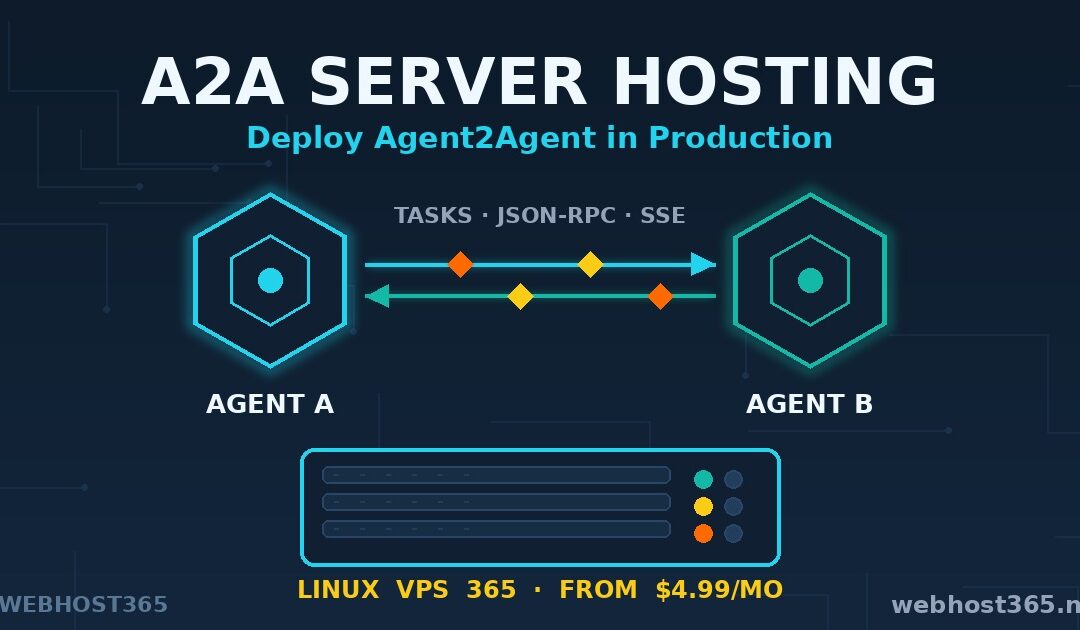
A2A server hosting means running an Agent2Agent protocol server on infrastructure you control, with a public HTTPS endpoint, a discoverable agent card, and a process that survives reboots. That is what this guide builds. By the end, you will have a working A2A agent running on a VPS, reachable by any A2A-compliant client on the internet, secured and supervised the way a production service should be.
Every official A2A tutorial stops at http://localhost:8000. The protocol documentation teaches you to build an agent. It does not teach you to run one. The gap between those two things is hosting, and that gap is this article.
This is the fourth piece in our AI protocols series at Webhost365. We have covered how to self-host MCP servers on a VPS, how to build your own MCP server, and how to connect Claude Desktop to WordPress through MCP. Those three articles cover agents talking to tools. This one covers agents talking to each other. To write it, we deployed the full setup described below on one of our own Linux VPS 365 instances, from $4.99/mo, and every command in this guide was run on that server before it was written down here.
If you are new to agent protocols, read on from the next section. If you already know what A2A is and want the deployment, jump to the step-by-step setup.
What Is the A2A Protocol?
A2A, or Agent2Agent, is an open protocol that lets AI agents discover each other and work together, regardless of which framework or vendor built them. An agent built with Google ADK can delegate a task to an agent built with LangGraph. Neither needs to know anything about the other’s internals. They only need to speak A2A.
The protocol was launched by Google Cloud in April 2025 and has since been donated to the Linux Foundation, which now governs it as a vendor-neutral standard. IBM’s competing Agent Communication Protocol merged into A2A shortly after. That consolidation matters. There is now one presumptive standard for agent-to-agent communication, the way MCP became the standard for agent-to-tool communication.
Technically, A2A is unexciting in the best way. It runs over plain HTTP. Messages use JSON-RPC 2.0. Streaming updates arrive over Server-Sent Events. There is no exotic transport, no new wire format, and nothing your existing web infrastructure cannot already handle. That is precisely why A2A server hosting is a normal hosting problem, solvable with a normal VPS. The full specification lives at the official A2A Protocol documentation, maintained under the Linux Foundation.
What makes an agent “A2A-compliant” is simple. It publishes a capability document called an agent card, it accepts tasks at a known endpoint, and it reports task progress in the standard format. We will build all three pieces in this guide.
A2A vs MCP: Two Protocols, One Stack
The cleanest way to understand the two protocols: MCP connects one agent to its tools, while A2A connects many agents to each other. MCP gives a single agent hands. A2A gives a team of agents a shared language.
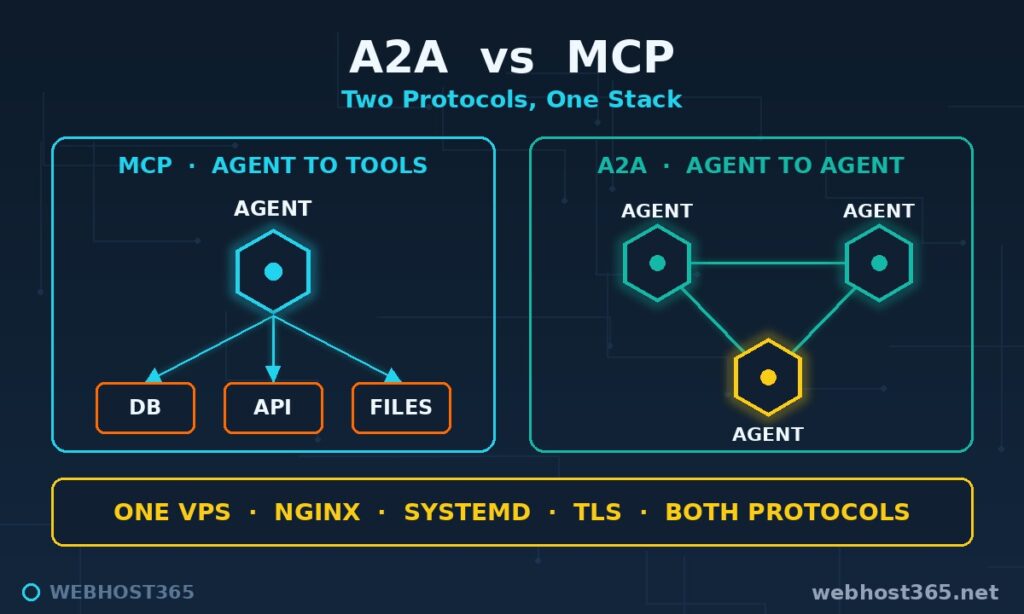
They are not competitors. A production agent system typically uses both at once. Each agent reaches its own databases and APIs through MCP servers, then collaborates with other agents through A2A. The Model Context Protocol handles the vertical connection. A2A handles the horizontal one.
| Dimension | MCP | A2A |
|---|---|---|
| Connects | Agent ↔ tools and data | Agent ↔ agent |
| Unit of work | Tool call | Task |
| Discovery | Client config | Agent card at a public URL |
| Transport | Streamable HTTP | HTTP + JSON-RPC 2.0 + SSE |
| Typical question | “What tools can I use?” | “Which agent can do this?” |
| Governance | Anthropic, open spec | Linux Foundation |
The hosting implications differ too. An MCP server is usually private. You configure it into a client you control, and outsiders never need to find it. An A2A server is built to be discovered. Its agent card sits at a public, well-known URL precisely so that other agents can find and call it. That difference is why A2A server hosting puts more weight on the public-facing layer: TLS, a stable domain, and authentication that holds up against strangers.
If you have followed our MCP series, the deployment below will feel familiar. The same VPS that runs your MCP servers can run your A2A agents beside them.
How A2A Works: Agent Cards, Tasks, and Messages
Three concepts carry the whole protocol. Once you understand them, everything in the deployment steps will make sense.
The agent card
The agent card is a JSON document that describes what an agent can do. It lists the agent’s name, description, skills, supported input and output types, and the authentication schemes it accepts. By convention it is served at a well-known path on the agent’s domain, such as https://agent.yourdomain.com/.well-known/agent-card.json.
The card is the discovery mechanism. A client fetches it first, reads the capabilities, and decides whether this agent fits the job. No registry is required, no central directory. If you can serve a URL, you can be discovered. This is also why hosting matters so much for A2A: the agent card URL is your agent’s identity, and it needs to be stable, public, and served over HTTPS.
Tasks and messages
Work in A2A happens through tasks. A client sends an initial message with a unique task ID. The server accepts the task, works on it, and emits status updates as it progresses. Long-running tasks stream their updates over Server-Sent Events, so the client watches progress in real time rather than polling. Every task ends in a terminal state: completed, failed, or cancelled.
Messages within a task can carry text, structured data, or files. Multi-turn exchanges are supported, so an agent can ask a clarifying question mid-task and resume when the answer arrives.
Skills
Skills are the published abilities on the agent card. Each skill has a name, a description, and examples, much like a well-documented MCP tool. The difference is the consumer. MCP tool descriptions are read by one model you configured. A2A skills are read by any agent on the internet that fetches your card. Write them as if a stranger’s agent will rely on them, because that is the point.
That is the complete mental model: publish a card, accept tasks, stream updates. Everything else is engineering around those three moves, and engineering is what the rest of this guide is about.
Why Localhost Tutorials Are Not Enough for A2A Server Hosting
Run any official A2A quickstart and you end up in the same place. The agent answers on http://localhost:8000, the client script sits in the next terminal tab, and everything works. Then you close the laptop and your agent no longer exists.
That is fine for learning the protocol. It is useless for the thing A2A was designed for. Agent-to-agent collaboration assumes the other agent is reachable when yours calls it. A teammate’s orchestrator in another office, a partner company’s booking agent, a scheduled pipeline that fires at 3 a.m. — none of them can reach a process on your laptop behind a home router.
Production A2A server hosting adds the layer the tutorials skip. Your agent needs a public HTTPS endpoint with a real certificate, because clients will refuse to negotiate without one. It needs a stable domain, it needs process supervision, so a crash at midnight ends in a silent restart instead of a dead service. It needs authentication, because a discoverable endpoint will be discovered by more than your friends. And it needs logs you can actually read when a task fails three steps deep.
When we moved our own test agent from a laptop to a VPS, the protocol code did not change by a single line. Everything around it did. That is the honest shape of the work: A2A development is a Python problem, but A2A server hosting is an infrastructure problem. This guide solves the second one.
What We Are Deploying: Architecture Overview
The stack is deliberately boring, which is what you want underneath an agent that strangers will call.
At the core sits a Python A2A agent built with the official a2a-sdk. We start with a minimal skill and upgrade it to call an LLM, so the pattern covers both utility agents and reasoning agents. The agent runs inside Uvicorn, an ASGI server that handles the HTTP and Server-Sent Events traffic the protocol needs.
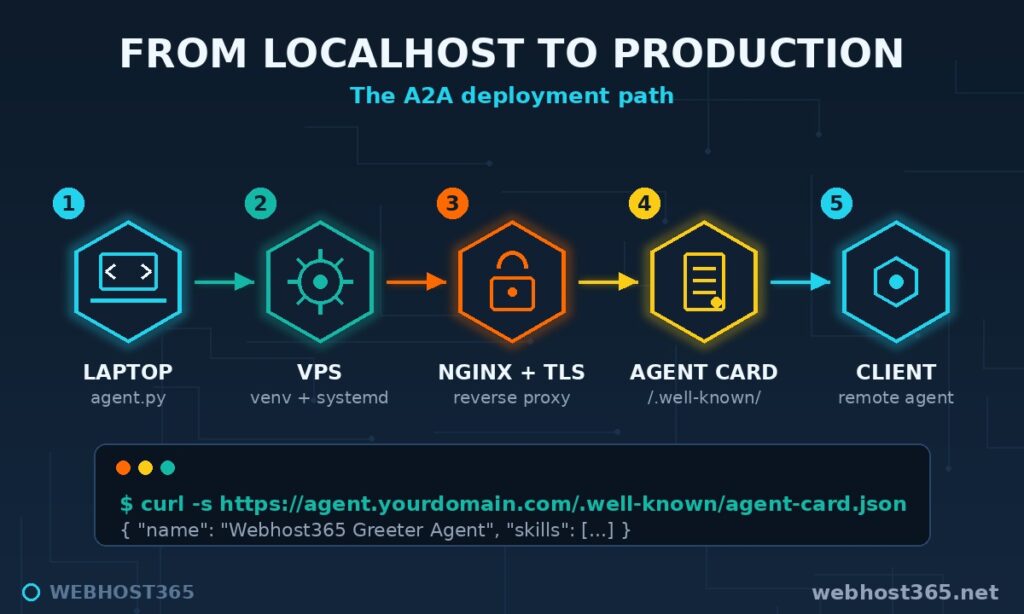
In front of Uvicorn sits Nginx as a reverse proxy. It terminates TLS with a free Let’s Encrypt certificate, serves the agent card at the public well-known path, applies rate limits, and shields the Python process from the raw internet. Supervision comes from systemd: one unit file gives the agent automatic restarts, boot persistence, environment-variable secrets, and centralised logs in journald.
The request path end to end: a remote A2A client fetches https://agent.yourdomain.com/.well-known/agent-card.json, reads the capabilities, then opens a task. Nginx receives the call, proxies it to Uvicorn, the agent works, and status updates stream back over SSE through the same path.
Nothing here is exotic. If you have deployed any Python web service, you already know 80% of this. The remaining 20% is the A2A-specific detail — the agent card path, SSE-safe proxy settings, and skill declarations — and that is where this guide spends its time.
Prerequisites
Five things before we start. Most readers will have all of them.
A Linux VPS with root access. Any provider works. We use a Linux VPS 365 instance, and the entry tier at $4.99/mo — 2 AMD cores, 4GB RAM, 25GB NVMe — is more than enough for the agent we are building. Resource sizing for heavier agents is covered later in this guide.
A domain or subdomain. The agent card URL is permanent infrastructure, so give it a clean home such as agent.yourdomain.com. Point an A record at your VPS IP before you begin; certificate issuance needs DNS already resolving.
Python 3.11 or newer. Ubuntu 24.04 ships Python 3.12, so a fresh VPS needs nothing extra.
An LLM API key, optionally. The starter agent needs no AI provider at all. The upgraded agent calls a model API, so have a key ready if you want to follow that part. If you prefer to keep inference on your own hardware, pair this guide with our local LLM on a budget VPS walkthrough and point the agent at your own endpoint.
No GPU. Worth saying explicitly because people assume otherwise. The agent is an orchestration layer. The heavy compute happens wherever your model runs, not on the agent’s VPS.
Step 1: Prepare the VPS
Ten minutes of groundwork. If you followed our MCP server hosting guide, this will look familiar, and deliberately so — the same hardened base serves both protocols. That guide covers the full security pass in depth; here is the minimum for a clean start.
Create a working user
Running internet-facing services as root is how small mistakes become big ones. Create a dedicated user and give it sudo:
adduser a2a
usermod -aG sudo a2a
su - a2a
Lock down the firewall
Three ports only: SSH, HTTP for certificate issuance, and HTTPS for everything else.
sudo ufw allow OpenSSH
sudo ufw allow 80/tcp
sudo ufw allow 443/tcp
sudo ufw enable
Note what is missing. Port 8000, where Uvicorn will listen, stays closed to the outside. Only Nginx talks to it, locally. The Python process is never directly exposed.
Keep the OS patching itself
sudo apt update && sudo apt upgrade -y
sudo apt install -y unattended-upgrades nginx python3-venv
sudo dpkg-reconfigure -plow unattended-upgrades
That single command set also installs Nginx and Python’s virtual environment tooling, both of which we need shortly.
Create the project environment
mkdir -p ~/a2a-agent && cd ~/a2a-agent
python3 -m venv venv
source venv/bin/activate
A virtual environment keeps the agent’s dependencies isolated from the system Python, which matters the day Ubuntu updates and your service does not want to come along.
The server is now a clean, patched, firewalled base with nothing exposed except SSH and the web ports. In the next step we put an actual agent on it.
Step 2: Build a Minimal A2A Agent
With the environment active, install the official SDK and the app server:
pip install a2a-sdk uvicornThe SDK is maintained by the A2A project under the Linux Foundation, and its GitHub repository links the spec, the SDKs, and runnable samples. The code below follows the SDK’s standard server pattern: declare a skill, declare the card, implement an executor, serve it.
Create agent.py inside ~/a2a-agent:
import uvicorn

from a2a.server.apps import A2AStarletteApplication
from a2a.server.request_handlers import DefaultRequestHandler
from a2a.server.tasks import InMemoryTaskStore
from a2a.server.agent_execution import AgentExecutor, RequestContext
from a2a.server.events import EventQueue
from a2a.utils import new_agent_text_message
from a2a.types import AgentCapabilities, AgentCard, AgentSkill


class GreeterExecutor(AgentExecutor):
    """The agent's actual behaviour lives here."""

    async def execute(self, context: RequestContext, event_queue: EventQueue) -> None:
        user_text = context.get_user_input()
        reply = f"Hello from the VPS. You said: {user_text}"
        await event_queue.enqueue_event(new_agent_text_message(reply))

    async def cancel(self, context: RequestContext, event_queue: EventQueue) -> None:
        raise NotImplementedError("This agent has no long-running tasks to cancel.")


skill = AgentSkill(
    id="greeter",
    name="Greeter",
    description="Replies to any text message with a greeting that echoes the input.",
    tags=["demo", "text"],
    examples=["Say hello", "Introduce yourself"],
)

card = AgentCard(
    name="Webhost365 Greeter Agent",
    description="A minimal production-hosted A2A agent used in our deployment guide.",
    url="https://agent.yourdomain.com/",
    version="1.0.0",
    default_input_modes=["text"],
    default_output_modes=["text"],
    capabilities=AgentCapabilities(streaming=True),
    skills=[skill],
)

app = A2AStarletteApplication(
    agent_card=card,
    http_handler=DefaultRequestHandler(
        agent_executor=GreeterExecutor(),
        task_store=InMemoryTaskStore(),
    ),
).build()

if __name__ == "__main__":
    uvicorn.run(app, host="127.0.0.1", port=8000)
Two details deserve attention. The url field in the card is the public HTTPS address, not localhost — clients that fetch your card will call whatever you put here, so it must be the real domain from day one. And Uvicorn binds to 127.0.0.1, not 0.0.0.0. The agent listens only on the loopback interface; the outside world will reach it exclusively through Nginx.
Start it and test locally:
python agent.pyIn a second SSH session:
curl -s http://127.0.0.1:8000/.well-known/agent-card.jsonYou should get the card back as JSON, with your skill listed. That is a working A2A server. The SDK moves quickly, so if an import path differs on your version, match it against the current samples in the repository rather than this page.
Swapping the echo logic for a real model is one change: inside execute, replace the reply line with a call to your LLM provider’s API (or your own self-hosted endpoint) and enqueue the model’s answer instead. The protocol layer, the card, and everything that follows in this guide stay identical. That separation is the point — A2A server hosting does not care how smart the agent is.
Stop the agent with Ctrl+C. From here on, systemd runs it, not your terminal.
Step 3: Run It as a Service
A terminal process dies with your SSH session. A systemd unit survives reboots, restarts on crashes, and keeps secrets out of your shell history.
Create an environment file for anything sensitive:
sudo mkdir -p /etc/a2a
sudo nano /etc/a2a/agent.envLLM_API_KEY=put-your-key-heresudo chmod 600 /etc/a2a/agent.envThen the unit file at /etc/systemd/system/a2a-agent.service:
[Unit]
Description=A2A Greeter Agent
After=network-online.target
Wants=network-online.target

[Service]
User=a2a
WorkingDirectory=/home/a2a/a2a-agent
EnvironmentFile=/etc/a2a/agent.env
ExecStart=/home/a2a/a2a-agent/venv/bin/python agent.py
Restart=always
RestartSec=3

[Install]
WantedBy=multi-user.target
Enable and start:
sudo systemctl daemon-reload
sudo systemctl enable --now a2a-agent
sudo systemctl status a2a-agent
Status should read active (running). Logs flow into journald, which gives you the debugging view you will want the first time a task fails:
journalctl -u a2a-agent -fKill the process deliberately once and watch systemd bring it back within three seconds. That reflex is the difference between an agent that is hosted and an agent that happens to be running.
Step 4: Nginx Reverse Proxy and HTTPS
The last infrastructure layer puts a real web server in front of the agent: TLS termination, the public agent card path, and proxy settings that do not strangle Server-Sent Events.
Create /etc/nginx/sites-available/a2a-agent:
server {
    listen 80;
    server_name agent.yourdomain.com;

    location / {
        proxy_pass http://127.0.0.1:8000;
        proxy_http_version 1.1;
        proxy_set_header Host $host;
        proxy_set_header X-Real-IP $remote_addr;
        proxy_set_header X-Forwarded-For $proxy_add_x_forwarded_for;
        proxy_set_header X-Forwarded-Proto $scheme;

        # SSE-safe settings: never buffer the stream, never time it out early
        proxy_set_header Connection '';
        proxy_buffering off;
        proxy_cache off;
        proxy_read_timeout 3600s;
    }
}
The three SSE lines matter more than they look. Nginx buffers proxied responses by default, which turns a live task stream into one delayed lump at completion. proxy_buffering off keeps updates flowing the moment the agent emits them, and the long read timeout stops Nginx from cutting a slow task’s connection mid-stream.
Enable the site and reload:
sudo ln -s /etc/nginx/sites-available/a2a-agent /etc/nginx/sites-enabled/
sudo nginx -t && sudo systemctl reload nginx
Now the certificate. With DNS for agent.yourdomain.com already pointing at the VPS:
sudo apt install -y certbot python3-certbot-nginx
sudo certbot --nginx -d agent.yourdomain.com
Certbot rewrites the server block for HTTPS, installs the certificate, and schedules its own renewals. No separate location block is needed for the agent card — the application serves /.well-known/agent-card.json itself, and the catch-all proxy passes it through.
The proof, from any machine in the world:
curl -s https://agent.yourdomain.com/.well-known/agent-card.jsonWhen that returns your card over a valid certificate, your agent has a public identity. Discovery, the thing the whole protocol is built around, now works for anyone you choose to allow — and controlling who that is, is exactly what the next section covers.
Step 5: Verify with an A2A Client
Curl proves the card is public. A real verification means completing a task over the protocol, from a machine that is not the server.
The quickest protocol-level test needs nothing but curl, because A2A is plain JSON-RPC over HTTPS. From your laptop:
curl -s https://agent.yourdomain.com/ \
  -H "Content-Type: application/json" \
  -d '{
    "jsonrpc": "2.0",
    "id": 1,
    "method": "message/send",
    "params": {
      "message": {
        "role": "user",
        "messageId": "msg-001",
        "parts": [{"kind": "text", "text": "Say hello to the internet"}]
      }
    }
  }'
The response carries the agent’s reply inside a completed task object. If you see your greeting echoed back, the full chain works: DNS, TLS, Nginx, Uvicorn, executor, and back out again.
For an SDK-level test, the client classes in the a2a-sdk package resolve the card and manage tasks for you, and the runnable client samples in the project repository are the reference to copy from. Point any of them at https://agent.yourdomain.com/ and they will discover your skills from the card without further configuration. That is the protocol doing its job: no shared config files, no registration step, just a URL.
Run the same test once more after a reboot of the VPS. The agent should answer without you touching anything. Reboot survival is the quiet definition of hosted.
On our own deployment, the running agent settles at roughly 120MB of resident memory with negligible idle CPU, and a burst of concurrent tasks barely registers on a 2-core instance. The orchestration layer is light. Whatever model sits behind it carries the real load, somewhere else.
A2A Server Hosting: Security and Access Control
A discoverable endpoint is an invitation, and the internet accepts every invitation. Within hours of going live, your access log will show scanners probing the new hostname. None of that is alarming. All of it is the reason this section exists.
The first rule of A2A server hosting: never expose an unauthenticated agent that can change anything. Our greeter is harmless by construction — it has no tools, no database, no side effects. The moment your agent can write to a system, book a resource, or spend money, authentication stops being optional.
Require an API key at the edge
The simplest robust pattern enforces a key in Nginx, before a request ever reaches Python:
    location / {
        if ($http_x_api_key != "your-long-random-key") {
            return 401;
        }
        proxy_pass http://127.0.0.1:8000;
        # ... existing proxy settings ...
    }
Declare the scheme on the agent card with the SDK’s securitySchemes field, so legitimate clients know to send the header. Keep the agent card path itself open if you want to remain discoverable, or behind the same key if the agent is private to your own systems.
Rate limit before you need to
One block in the http context of your Nginx config caps abuse at the door:
limit_req_zone $binary_remote_addr zone=a2a:10m rate=10r/s;Then add limit_req zone=a2a burst=20; inside the location block. Ten requests per second is generous for agent traffic and hostile to scrapers.
Shrink the audience where you can
Agents that only serve your own orchestrator do not need a public audience at all. An allow/deny list in Nginx restricts callers to known IPs in two lines. Between a key, a rate limit, and an allow-list, you choose how discoverable the agent really is — the protocol makes discovery possible, not mandatory.
Watch the logs
journalctl -u a2a-agent shows every task the agent ran. The Nginx access log shows everyone who knocked. Five minutes a week reading both is the cheapest security control you will ever deploy. For the deeper layer underneath all of this — SSH hardening, fail2ban, kernel updates, backup posture — our MCP server hosting guide covers the full VPS security pass, and every word of it applies to an A2A host unchanged.
A2A Server Hosting Costs and Resource Sizing
The pleasant surprise of A2A server hosting is how little server it needs. The agent is a coordinator, not a compute engine, and coordinators are cheap to run.
| Agent type | What it does | VPS tier that fits |
|---|---|---|
| Utility agent | Echo, formatting, lookups, glue logic | 2 cores / 4GB — $4.99/mo |
| LLM-API agent | Reasoning via external model APIs | 2 cores / 4GB — $4.99/mo |
| Multi-agent host | Several agents + MCP servers on one box | 4 cores / 8GB — $19.99/mo |
| Agent + local LLM | Self-hosted inference on the same VPS | Upper tiers, sized to the model |
The first two rows surprise people. An agent that calls Claude or GPT through an API spends its life waiting on network responses, which costs almost no CPU. Our production-tested greeter ran comfortably inside the entry tier with room left over. The Linux VPS 365 entry plan at $4.99/mo — 2 AMD cores at 3.8GHz, 4GB RAM, 25GB NVMe, 8TB bandwidth — hosts it without breaking stride.
Costs only climb when inference moves onto the box. A quantised small model wants the RAM and cores of the upper tiers, and our local LLM hosting guide maps model sizes to plans in detail. The honest advice for most builders: keep inference on an API or a separate machine, and let the agent’s VPS stay small.
One cost note that compounds quietly: renewal pricing. An agent endpoint is permanent infrastructure with a permanent URL, which makes it exactly the kind of service that hurts when a host doubles the price at renewal. Webhost365 renews at the same price you signed up at, a policy we have written about in our renewal price hikes investigation. For infrastructure you intend to keep for years, the second-year price matters more than the first.
Where A2A Server Hosting Runs Best
Three deployment homes exist for an A2A agent, and the right one follows from who calls it.
Your laptop or office machine is for development only. The localhost setup is perfect for writing skills and testing executors, and wrong for anything another party depends on. No stable URL, no uptime, no identity.
Hyperscaler clouds work, with overhead. A small agent on a large cloud means navigating load balancers, IAM, and egress pricing for a service that needs one box and one domain. Teams already living in that ecosystem can stay there. Everyone else is buying complexity they will not use.
A VPS is the natural fit, and not just ours. A2A server hosting wants exactly what a VPS provides: a fixed public IP, full control of the web server, root access for systemd, and a flat monthly price for an always-on process. Every layer in this guide — Nginx, certbot, journald — assumes nothing more exotic than that.
Our own agents run on Linux VPS 365, starting at $4.99/mo on AMD EPYC processors with NVMe SSD storage, a 10Gbps network, and an ISO 27001 environment. The same box happily hosts the rest of the AI stack beside the agent: MCP servers, a RAG knowledge base, an n8n automation pipeline, or any of the AI workloads we have covered in this series. One server, one bill, the whole agent stack.
Frequently Asked Questions
MCP connects a single agent to tools and data, while A2A connects agents to other agents. MCP answers “what can this agent use,” and A2A answers “which agent can do this task.” They operate at different layers and are designed to be used together in the same system.
For a single agent serving one application, MCP alone is usually enough. A2A becomes necessary the moment two or more agents need to delegate work to each other, especially across different frameworks or organisations. Most production multi-agent systems run both: MCP vertically for tools, A2A horizontally for collaboration.
No. The A2A server is an orchestration layer that coordinates tasks and messages, which is light CPU work. Heavy inference happens wherever the model runs, typically an external API or a separate inference server. A 2-core VPS handles a production A2A agent comfortably.
An agent card is a public JSON document describing an agent’s name, skills, supported input types, and authentication requirements. It is served at a well-known URL, conventionally /.well-known/agent-card.json on the agent’s domain. Clients fetch the card first to discover what the agent can do before sending it any task.
Yes. Each agent runs as its own systemd service on its own local port, and Nginx routes a separate subdomain to each one. A mid-tier VPS with 4 cores and 8GB RAM hosts several agents alongside MCP servers without strain, since agents spend most of their time waiting on I/O.
Google ADK, LangGraph, BeeAI, and Microsoft Agent Framework all ship A2A support, and the official SDKs cover Python, JavaScript, Java, and C#. Any agent wrapped in an A2A server becomes callable by any compliant client, regardless of the framework underneath. That interoperability is the protocol’s entire purpose.
The protocol is governed by the Linux Foundation, has absorbed IBM’s competing standard, and ships stable SDKs with enterprise backing from Google, IBM, and Microsoft. The specification is still evolving, so pin your SDK version and read release notes before upgrading. For hosted deployments like the one in this guide, it is ready today.
Conclusion
A2A server hosting is the unglamorous half of the agent revolution, and the half that makes it real. The protocol gives agents a shared language. Hosting gives them an address, an identity, and the reliability to be worth calling. Everything in this guide — the card at a public URL, the systemd supervision, the SSE-safe proxy, the authentication at the edge — exists to turn a script on a laptop into infrastructure another agent can depend on.
This completes the four pillars of our AI protocols series. You can host any MCP server in production, build your own MCP server, wire Claude into WordPress, and now publish an agent that other agents can discover and call. Tools, custom tools, real-world integration, and collaboration: the full stack of the agentic web, all of it self-hosted.
If you are ready to give your agent a permanent home, our Linux VPS 365 starts at $4.99/mo with AMD EPYC processors, NVMe SSD, and renewal pricing that never climbs. Deploy the greeter from this guide in an afternoon, swap in your own skills, and your corner of the agent ecosystem is live.