
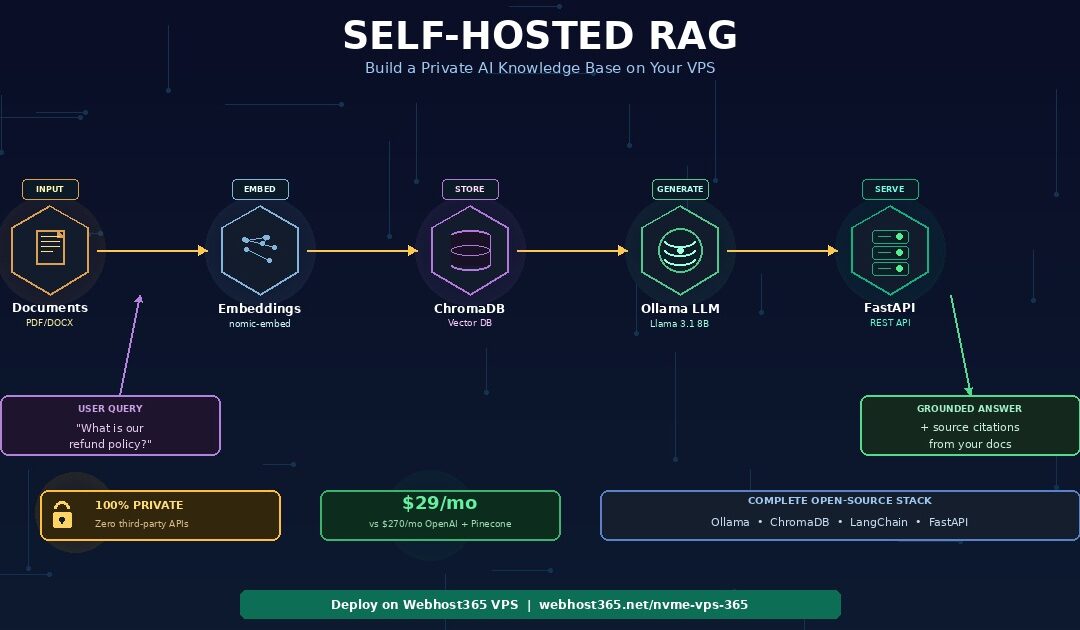
A self-hosted RAG system turns a locally-running open-source LLM into a private AI assistant that can answer questions about your own documents — without sending a single byte of data to OpenAI, Anthropic, or any third-party API. The complete stack runs on a single Webhost365 VPS from $14.99 per month: Ollama serves the language model, ChromaDB stores document embeddings as searchable vectors, LangChain orchestrates the retrieval-augmented generation pipeline, and FastAPI exposes a clean API endpoint.
For a moderate RAG workload of 10,000 queries per month, this architecture costs approximately $29 per month on a 16 GB VPS — compared to $270 per month using the OpenAI API with Pinecone Cloud. The cost savings compound as you scale, while privacy, compliance, and data sovereignty improve dramatically. At 500,000 queries per month, self-hosting on bare metal saves over $9,700 every month.
This guide walks through the complete deployment: choosing the right VPS size for your chosen LLM, installing Ollama and pulling a model, setting up ChromaDB with persistent storage, building a document ingestion pipeline that handles PDFs and Word files, configuring LangChain for retrieval and generation, exposing the system through FastAPI, and scaling from prototype to production.
The entire self-hosted RAG stack is open-source, runs on Linux, and eliminates both the per-query API costs and the third-party data exposure that make cloud-based RAG unsuitable for legal, healthcare, finance, and intellectual-property-sensitive workloads. If you have not yet set up your LLM, start with our companion guide on how to host a private local LLM on a budget VPS — this RAG tutorial assumes you have Ollama running.
What is RAG and why self-host it in 2026?
RAG stands for Retrieval-Augmented Generation. It is a technique that gives a language model access to external documents at query time so it can generate answers grounded in your specific data rather than relying only on its pre-trained knowledge. In practical terms, RAG is how you turn a generic LLM like Llama 3.1 or Mistral into a custom AI assistant that knows your company wiki, your product documentation, your legal contracts, or any set of documents you provide.
Without RAG, a language model only knows what it learned during training. It cannot answer questions about your internal processes, your product manuals, or any document published after its training cutoff. With RAG, the same model can answer detailed questions about documents it has never seen before — because those documents are retrieved and fed into the prompt at the moment of each query.
The three-step RAG process
Every RAG query follows the same three-step flow. Understanding this flow is essential before you build one.
Step 1 — Retrieve. When a user asks a question, the system converts the question into a numerical vector called an embedding. The vector database (ChromaDB in our setup) then searches through all your document embeddings and returns the three to five chunks that are most semantically similar to the question. These chunks might come from a PDF paragraph, a Word document section, or a page from your company wiki.
Step 2 — Augment. The retrieved chunks are combined with the original question into an expanded prompt. Instead of sending just “What is our refund policy?” to the LLM, the system sends something like: “Based on the following context from our documentation, answer the question. Context: [retrieved policy text]. Question: What is our refund policy?”
Step 3 — Generate. The LLM processes the augmented prompt and generates an answer that is grounded in the retrieved content. Because the relevant context sits directly inside the prompt, the model can quote from it, paraphrase it, or synthesise across multiple retrieved chunks. The result is a response that reflects your documents specifically — not the model’s general training knowledge.
The entire process completes in 2-5 seconds on a properly-sized VPS. Furthermore, the quality of the response depends more on the retrieval step than on the LLM itself. Well-chunked documents and good embeddings matter more than raw model size.
Why self-host RAG instead of using OpenAI plus Pinecone?
Most RAG tutorials you will find online use OpenAI’s API for the LLM and embeddings, plus Pinecone Cloud for the vector database. This stack is easier to demo because it requires no infrastructure setup, but it becomes expensive fast and creates serious privacy concerns. Self-hosting on a VPS solves both problems. There are three specific reasons to self-host your RAG system: cost, privacy, and long-term control.
Cost scales linearly with API pricing. The OpenAI API charges per token for both input and output. A typical RAG query uses 2,000 to 4,000 input tokens (the question plus retrieved context) and generates 500 to 1,000 output tokens. At GPT-4o-mini pricing of $0.15 per million input tokens and $0.60 per million output tokens, each RAG query costs roughly $0.001 to $0.002. That sounds cheap until you multiply by volume — 10,000 queries per month becomes $10-20 for GPT-4o-mini, or $200-500 for GPT-4. Add Pinecone starter at $70 per month and embedding API costs, and a moderate RAG workload runs $270-600 per month. A self-hosted 16 GB VPS handles the same workload for $29 per month with unlimited queries.
Privacy
Privacy is not negotiable for sensitive industries. OpenAI and Anthropic both retain API data to varying degrees depending on your plan tier, though enterprise tiers offer zero data retention. However, the documents and queries still traverse third-party servers during processing. For legal practices handling client communications, healthcare organisations managing patient records, finance companies processing client data, HR teams working with employee information, and any organisation dealing with intellectual property or trade secrets, routing that data through an external API is often prohibited by contract, regulation, or policy. Self-hosted RAG keeps every byte of data on a single VPS you control.
Long-term control protects against platform risk. API pricing changes without your consent. Models get deprecated — GPT-4 gave way to GPT-4o, which gave way to GPT-4 Turbo, each requiring prompt engineering changes. Rate limits apply during peak times. Terms of service get updated. Self-hosted RAG uses models you download once, running on infrastructure you control, at predictable costs. Your system behaves exactly the same on month 36 as it did on day 1 — regardless of what OpenAI, Anthropic, or Google decide to do with their products.
The real cost comparison — self-hosted RAG vs OpenAI plus Pinecone
The true cost of a RAG system depends heavily on query volume. For low-volume prototypes, API-based RAG is genuinely cheaper because there is no minimum infrastructure cost. However, for any production workload above a few thousand queries per month, self-hosted RAG becomes dramatically cheaper — and the savings widen as you scale.
| Query volume/month | OpenAI API + Pinecone | Self-Hosted VPS (Webhost365) | Monthly savings |
|---|---|---|---|
| 1,000 queries (prototype) | $90 | $29 | $61 |
| 10,000 queries (small business) | $270 | $29 | $241 |
| 50,000 queries (growing startup) | $1,050 | $49 | $1,001 |
| 100,000 queries (production SaaS) | $2,070 | $89 | $1,981 |
| 500,000 queries (enterprise) | $9,980 | $249 (Bare Metal) | $9,731 |
The assumptions behind these numbers: OpenAI GPT-4o-mini pricing of $0.15 per million input tokens and $0.60 per million output tokens, approximately 3,000 input tokens plus 800 output tokens per RAG query, Pinecone starter at $70 per month, and embedding API costs at $0.02 per million tokens. Self-hosted pricing uses Webhost365 Linux VPS 365 plans with 16 to 64 GB RAM depending on workload, or Bare Metal for enterprise-scale RAG systems.
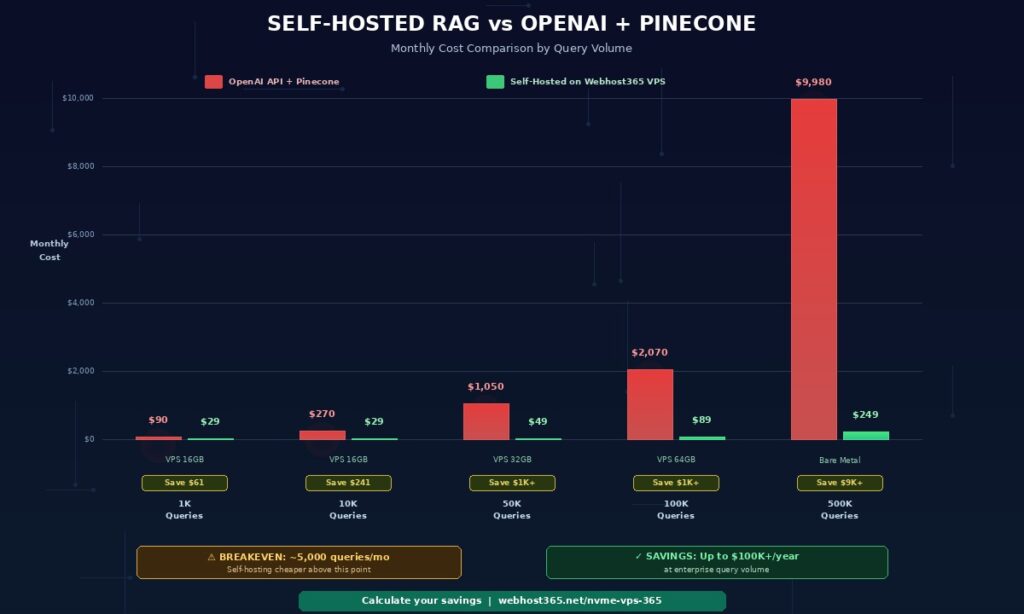
The breakeven point arrives around 4,000 to 5,000 queries per month. Above that threshold, self-hosting becomes cheaper. Beyond 10,000 queries per month, the savings become substantial. At enterprise scale of 500,000 queries or more per month, self-hosting saves over $100,000 per year — while simultaneously eliminating third-party data exposure and reducing compliance complexity.
These calculations also ignore three hidden advantages of self-hosting. First, there are no usage spikes on your bill when traffic grows unexpectedly. Second, document embedding is free once the infrastructure is provisioned — re-embedding 10 million documents costs the same as re-embedding 100. Third, you can run multiple RAG systems on the same VPS (different models, different knowledge bases) without paying for each separately.
The self-hosted RAG stack — 5 components that replace OpenAI
A complete self-hosted RAG system needs five components working together. Every component is open-source, free to use, and runs on a single Linux VPS. Together they replace the functionality of OpenAI, Pinecone, LangChain Cloud, and any other third-party services that typical RAG tutorials rely on.
Ollama — the LLM inference engine
Ollama is an open-source tool that runs large language models locally on your VPS. It handles model downloading, quantization, GPU/CPU optimisation, and serving via a simple HTTP API. Think of Ollama as Docker for LLMs — you pull a model, run it, and query it through a local endpoint.
Supported models include Llama 3.1 and 3.3 from Meta, Mistral and Mixtral from Mistral AI, Phi-3 from Microsoft, Gemma 2 from Google, Qwen 2.5 from Alibaba, and thousands of community fine-tunes from Hugging Face. Ollama handles GGUF quantization automatically, so a 7B parameter model that would normally require 16 GB of RAM in full precision can run comfortably in 5-6 GB with 4-bit quantization — with minimal quality loss for RAG use cases.
The HTTP API makes Ollama easy to integrate. A single POST request to http://localhost:11434/api/generate returns a model response in 2-5 seconds on a properly-sized VPS. LangChain has built-in Ollama integration, so connecting the RAG pipeline to Ollama is a single line of code. For a complete walkthrough of installing and configuring Ollama on a Webhost365 VPS, see the prerequisite guide on hosting a private LLM on a budget VPS.
ChromaDB — the vector database
ChromaDB is an open-source vector database that stores document embeddings and enables fast similarity search. When a user asks a question, ChromaDB converts the question to a vector and finds the document chunks with the closest vector distances. These chunks become the context fed into the LLM.
Alternatives exist — Qdrant, Weaviate, Milvus, pgvector — but ChromaDB has the simplest deployment story. It runs as a single Python package or a single Docker container, persists data to disk automatically, and handles the workload for most self-hosted RAG systems without performance issues. For collections under 100,000 document chunks, ChromaDB running on NVMe SSD storage handles similarity queries in single-digit milliseconds.
Unlike Pinecone, which costs $70 per month for the starter tier and $500+ per month for production scale, ChromaDB runs on your VPS with zero additional cost. The persistent vector data sits on NVMe SSD storage, which matters for query latency — slower storage would create a noticeable bottleneck during similarity search.
LangChain — the orchestration layer
LangChain is a Python framework that connects the components of a RAG system — document loaders, text splitters, embedding models, vector stores, and LLMs — into a coherent pipeline. Rather than writing custom code to chunk documents, generate embeddings, query vectors, build prompts, and call the LLM, LangChain provides pre-built abstractions for each step.
The primary alternative is LlamaIndex, which is slightly more RAG-focused with specialised indexing structures. Both frameworks work well for self-hosted RAG. We use LangChain throughout this guide because of its larger community, broader documentation, and more mature Ollama and ChromaDB integrations. Migration between the two is straightforward if you change your mind later.
LangChain adds roughly 200-300 MB of RAM overhead on top of the LLM and ChromaDB. On a 16 GB VPS running a 7B model, that leaves ample headroom for FastAPI, operating system processes, and request spikes.
The embedding model
An embedding model converts text into numerical vectors that capture semantic meaning. Documents and queries both get embedded using the same model, and vector similarity search finds matches based on meaning rather than exact keyword matching. The embedding model is a separate model from the LLM — smaller, faster, and specialised for producing high-quality vector representations.
For self-hosted RAG, two embedding models stand out. The first is nomic-embed-text, available via Ollama with a single command. It produces 768-dimensional embeddings, runs in under 500 MB of RAM, and matches the quality of OpenAI’s text-embedding-ada-002 for most English-language tasks. The second option is sentence-transformers/all-MiniLM-L6-v2 from Hugging Face, which produces 384-dimensional embeddings with even lower resource requirements and excellent performance for short text.
Both embedding models are free, run entirely locally, and process hundreds of documents per second on modern CPUs. For multilingual document sets, use paraphrase-multilingual-MiniLM-L12-v2 instead — it handles 50+ languages with comparable quality.
FastAPI — the production API layer
FastAPI exposes your RAG pipeline as a REST API so other applications can query it. Web apps, mobile apps, Slack bots, internal dashboards, and customer support tools all become possible consumers of your private RAG system through a single HTTP endpoint.
FastAPI is fast — built on async Python with uvicorn as the ASGI server, it handles concurrent requests efficiently. It automatically generates OpenAPI documentation at /docs, which provides an interactive testing interface out of the box. Request validation, response typing, and error handling come built-in through Python type hints. Running FastAPI behind Nginx as a reverse proxy gives you a production-ready HTTPS endpoint with rate limiting, caching, and SSL termination.
For guidance on deploying Python applications on a VPS including FastAPI, see our complete guide on how to deploy a Python app. The deployment pattern for a RAG API is identical to any other FastAPI service.
VPS sizing guide — how much RAM do you actually need?
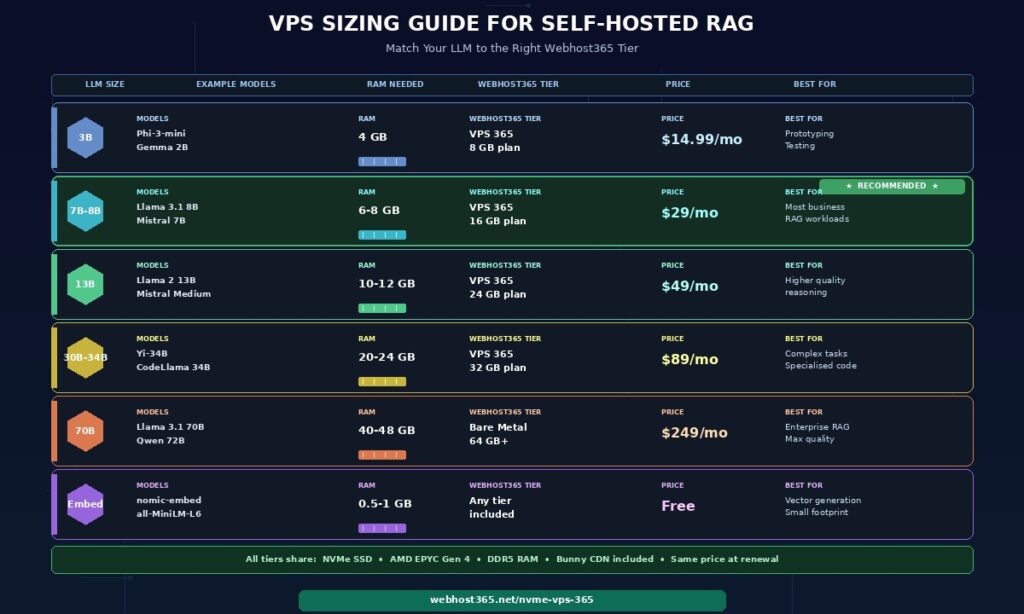
The RAM requirement for self-hosted RAG is determined almost entirely by the LLM you choose. Everything else — ChromaDB, LangChain, FastAPI, and the operating system — uses under 1 GB combined. The LLM accounts for 80 to 95 percent of total memory usage, which means matching the model to the VPS tier is the single most important sizing decision.
| LLM size | Model examples | RAM needed (4-bit quant) | Recommended Webhost365 tier |
|---|---|---|---|
| 3B | Phi-3-mini, Gemma 2B | 4 GB | VPS 365 — 8 GB plan |
| 7B-8B | Llama 3.1 8B, Mistral 7B | 6-8 GB | VPS 365 — 16 GB plan |
| 13B | Llama 2 13B, Mistral Medium | 10-12 GB | VPS 365 — 24 GB plan |
| 30B-34B | Yi-34B, CodeLlama 34B | 20-24 GB | VPS 365 — 32 GB plan |
| 70B | Llama 3.1 70B, Qwen 72B | 40-48 GB | Bare Metal — 64 GB+ |
| Embedding only | nomic-embed-text, all-MiniLM-L6-v2 | 0.5-1 GB | Included in any tier |
The numbers above assume 4-bit quantization, which is the standard for production self-hosted RAG. Full-precision models require roughly 4x more RAM — a 7B model at full precision needs 28-32 GB instead of 6-8 GB. For RAG use cases, 4-bit quantization produces response quality that is essentially indistinguishable from full precision while using a quarter of the memory.
Which model should you actually use for RAG?
For most business RAG workloads, Llama 3.1 8B or Mistral 7B hits the sweet spot. Response quality is excellent for document question-answering, internal knowledge bases, customer support automation, and policy lookup use cases. Latency runs 2-5 seconds per query on a 16 GB VPS with 4-bit quantization. These models understand context, follow instructions, cite retrieved sources accurately, and handle multi-turn conversations well.
The 70B class models — Llama 3.1 70B, Qwen 72B — deliver noticeably better performance on complex reasoning tasks, subtle interpretation of legal or technical language, and multi-step analysis. However, they cost 6-10 times more to host and produce noticeably higher latency. For standard RAG applications where the answer is grounded in retrieved documents, the extra capability of a 70B model is rarely necessary.
Start with Llama 3.1 8B or Mistral 7B on a 16 GB VPS. Evaluate response quality against your specific documents and queries. Upgrade to a larger model only if the 7B-8B tier produces insufficient results for your use case — which is uncommon for document-grounded Q&A.
Storage requirements for RAG
Model weights consume disk space in addition to RAM. A 7B model with 4-bit quantization is approximately 5 GB on disk. A 13B model is around 8 GB. A 70B model is 40 GB+. Vector database storage depends on document corpus size — 10,000 document chunks at 768-dimensional embeddings use approximately 30 MB, making ChromaDB storage a rounding error for most workloads.
Total disk requirements land at 20-50 GB for typical business RAG deployments. Every Webhost365 VPS uses NVMe SSD storage, which matters specifically for vector retrieval. ChromaDB performs similarity searches by reading embeddings from disk when memory caching is insufficient — NVMe storage means those reads happen in microseconds rather than milliseconds. For a deeper explanation of why NVMe matters for database-like workloads, see our guide on what NVMe SSD is and why it makes your website faster.
Step-by-step — deploy your private RAG system
This section walks through deploying a complete self-hosted RAG system on a Webhost365 Linux VPS. Total setup time is 30 to 60 minutes. All commands assume a fresh Ubuntu 22.04 or 24.04 VPS with root or sudo access. By the end of these seven steps, you will have a working RAG API that answers questions about your documents without any third-party services.
Step 1 — Provision your VPS and install dependencies
Spin up a Webhost365 Linux VPS 365 with 16 GB RAM if you plan to run Llama 3.1 8B or Mistral 7B. The 8 GB plan works for smaller 3B models like Phi-3-mini or Gemma 2B. Once provisioned, SSH into your server using the credentials from your hosting control panel.
Update the system and install the base dependencies you will need for every subsequent step.
bash
# Update package lists and upgrade existing packages
sudo apt update && sudo apt upgrade -y

# Install Python 3.11, pip, and build essentials
sudo apt install -y python3.11 python3.11-venv python3-pip build-essential

# Install system libraries for PDF and document processing
sudo apt install -y libmagic1 poppler-utils tesseract-ocr

# Create a dedicated user for the RAG system
sudo useradd -m -s /bin/bash rag
sudo su - rag

# Create a working directory and Python virtual environment
mkdir ~/rag-system && cd ~/rag-system
python3.11 -m venv venv
source venv/bin/activate
The dedicated rag user provides process isolation — if your RAG service has an issue, it cannot affect other services on the VPS. The virtual environment keeps Python dependencies isolated from system packages, which prevents conflicts with other Python projects you might run later.
Step 2 — Install Ollama and pull a model
Ollama installs with a single command and configures itself as a systemd service automatically. Switch back to your regular user (or root) for the installation, since Ollama needs system-level access to register the service.
bash
# Install Ollama (single-command install)
curl -fsSL https://ollama.com/install.sh | sh

# Enable Ollama to start on boot
sudo systemctl enable ollama
sudo systemctl start ollama

# Verify Ollama is running
curl http://localhost:11434/api/tags
Next, pull the language model and the embedding model. The LLM handles generation, and the embedding model converts text into vectors for ChromaDB. The download takes 5 to 15 minutes depending on your VPS network speed.
bash
# Pull Llama 3.1 8B with 4-bit quantization (4.9 GB download)
ollama pull llama3.1:8b-instruct-q4_K_M

# Pull the embedding model (270 MB download)
ollama pull nomic-embed-text

# Test the LLM
ollama run llama3.1:8b-instruct-q4_K_M "Write a haiku about retrieval-augmented generation."
If the haiku generates in under 10 seconds, your LLM is working correctly. Type /bye to exit the interactive prompt. Ollama will continue running as a background service on port 11434, ready to accept requests from your RAG pipeline.
Step 3 — Install Python dependencies and set up ChromaDB
Switch back to the rag user and install the Python packages needed for the RAG pipeline. LangChain provides the orchestration, ChromaDB handles vector storage, and additional packages handle document loading.
bash
# As the rag user with venv activated
sudo su - rag
cd ~/rag-system && source venv/bin/activate

# Install RAG pipeline dependencies
pip install langchain langchain-community langchain-ollama langchain-chroma
pip install chromadb pypdf python-docx unstructured
pip install fastapi uvicorn[standard] python-multipart
Create a ChromaDB initialisation script that sets up persistent storage. Save this as init_chroma.py in your project directory.
python
# init_chroma.py
from langchain_chroma import Chroma
from langchain_ollama import OllamaEmbeddings

# Initialize the embedding model (runs via Ollama)
embeddings = OllamaEmbeddings(
    model="nomic-embed-text",
    base_url="http://localhost:11434"
)

# Create a persistent ChromaDB collection
vectorstore = Chroma(
    collection_name="documents",
    embedding_function=embeddings,
    persist_directory="/home/rag/chroma_data"
)

print(f"ChromaDB initialized with {vectorstore._collection.count()} documents")
Run the script once to verify everything connects properly. On first run, the output will report 0 documents — that is expected because you have not ingested anything yet.
bash
python init_chroma.py
# Expected output: ChromaDB initialized with 0 documents
The /home/rag/chroma_data directory now holds the vector database. As you ingest documents, this directory fills with the SQLite database and embedding files that power retrieval. Because Webhost365 VPS storage uses NVMe SSD, similarity searches across this data happen in milliseconds.
Step 4 — Build the document ingestion pipeline
The ingestion pipeline loads documents from a folder, splits them into chunks, generates embeddings for each chunk, and stores them in ChromaDB. Save this script as ingest.py in your project directory.
python
# ingest.py
import os
from langchain_community.document_loaders import (
    PyPDFLoader,
    Docx2txtLoader,
    TextLoader,
    UnstructuredMarkdownLoader
)
from langchain.text_splitter import RecursiveCharacterTextSplitter
from langchain_chroma import Chroma
from langchain_ollama import OllamaEmbeddings

DOCUMENTS_FOLDER = "/home/rag/documents"
CHROMA_DIR = "/home/rag/chroma_data"

# Map file extensions to the appropriate LangChain loader
LOADERS = {
    ".pdf": PyPDFLoader,
    ".docx": Docx2txtLoader,
    ".txt": TextLoader,
    ".md": UnstructuredMarkdownLoader,
}

def load_documents(folder):
    """Walk through folder and load every supported file."""
    documents = []
    for root, _, files in os.walk(folder):
        for file in files:
            file_path = os.path.join(root, file)
            ext = os.path.splitext(file)[1].lower()
            if ext in LOADERS:
                try:
                    loader = LOADERS[ext](file_path)
                    docs = loader.load()
                    for doc in docs:
                        doc.metadata["source_file"] = file
                    documents.extend(docs)
                    print(f"Loaded: {file} ({len(docs)} sections)")
                except Exception as e:
                    print(f"Failed to load {file}: {e}")
    return documents

def main():
    # Initialize embedding model
    embeddings = OllamaEmbeddings(
        model="nomic-embed-text",
        base_url="http://localhost:11434"
    )

    # Load all documents from the documents folder
    documents = load_documents(DOCUMENTS_FOLDER)
    print(f"\nTotal documents loaded: {len(documents)}")

    # Split into chunks with overlap for context preservation
    splitter = RecursiveCharacterTextSplitter(
        chunk_size=1000,
        chunk_overlap=200,
        length_function=len,
        separators=["\n\n", "\n", ". ", " ", ""]
    )
    chunks = splitter.split_documents(documents)
    print(f"Total chunks created: {len(chunks)}")

    # Store in ChromaDB with embeddings
    vectorstore = Chroma(
        collection_name="documents",
        embedding_function=embeddings,
        persist_directory=CHROMA_DIR
    )
    vectorstore.add_documents(chunks)
    print(f"Ingested {len(chunks)} chunks into ChromaDB")

if __name__ == "__main__":
    main()
Create the documents folder, drop your files into it, and run the ingestion.
bash
mkdir -p /home/rag/documents
# Copy your PDFs, DOCX, and TXT files into /home/rag/documents
python ingest.py
The chunk size of 1,000 characters with 200-character overlap works well for most document types. Smaller chunks produce more precise retrieval but lose context. Larger chunks preserve context but reduce retrieval precision. The overlap ensures that information spanning chunk boundaries is not lost — a common failure mode in poorly-configured RAG systems.
For a typical corpus of 100 PDF documents averaging 20 pages each, ingestion takes 5 to 10 minutes on a 16 GB VPS. The process is CPU-bound during embedding generation and I/O-bound during ChromaDB writes. As a result, running ingestion during off-peak hours keeps your RAG API responsive for live queries.
Step 5 — Build the RAG query function
The query function accepts a user question, retrieves relevant chunks from ChromaDB, constructs an augmented prompt, and returns the LLM’s grounded response along with source citations. Save this as rag.py in your project directory.
python
# rag.py
from langchain_chroma import Chroma
from langchain_ollama import OllamaEmbeddings, ChatOllama
from langchain.prompts import ChatPromptTemplate
from langchain.schema.runnable import RunnablePassthrough
from langchain.schema.output_parser import StrOutputParser

CHROMA_DIR = "/home/rag/chroma_data"

# Initialize embeddings and LLM
embeddings = OllamaEmbeddings(
    model="nomic-embed-text",
    base_url="http://localhost:11434"
)

llm = ChatOllama(
    model="llama3.1:8b-instruct-q4_K_M",
    base_url="http://localhost:11434",
    temperature=0.1  # Low temperature for factual RAG
)

# Connect to the existing ChromaDB collection
vectorstore = Chroma(
    collection_name="documents",
    embedding_function=embeddings,
    persist_directory=CHROMA_DIR
)

# Configure retriever to return top 5 most relevant chunks
retriever = vectorstore.as_retriever(search_kwargs={"k": 5})

# RAG prompt template
prompt = ChatPromptTemplate.from_template("""
You are a helpful assistant that answers questions based on the provided context.
Use ONLY the information in the context below to answer the question.
If the context does not contain the answer, say "I don't have that information in the provided documents."
Cite the source file for each piece of information you use.

Context:
{context}

Question: {question}

Answer:
""")

def format_docs(docs):
    """Format retrieved documents with source citations."""
    formatted = []
    for i, doc in enumerate(docs, 1):
        source = doc.metadata.get("source_file", "unknown")
        formatted.append(f"[Source {i}: {source}]\n{doc.page_content}")
    return "\n\n".join(formatted)

def query_rag(question):
    """Run a RAG query and return the answer with sources."""
    # Retrieve relevant documents
    docs = retriever.invoke(question)
    context = format_docs(docs)

    # Build the chain
    chain = prompt | llm | StrOutputParser()
    answer = chain.invoke({"context": context, "question": question})

    # Return answer and sources
    sources = list(set(d.metadata.get("source_file", "unknown") for d in docs))
    return {"answer": answer, "sources": sources}

if __name__ == "__main__":
    # Test the RAG system
    question = "What is our refund policy?"
    result = query_rag(question)
    print(f"Answer: {result['answer']}")
    print(f"Sources: {', '.join(result['sources'])}")
Run it with a test question related to your ingested documents.
bash
python rag.pyThe response includes the LLM’s grounded answer plus the list of source documents that contributed retrieval context. If the answer incorrectly says information is missing, either the relevant documents were not ingested properly or the chunking strategy split key information across chunk boundaries. Consequently, adjusting chunk size upward (1,500 or 2,000 characters) often fixes this issue.
Step 6 — Expose the RAG system via FastAPI
Now wrap the query function in a FastAPI service so other applications can call it via HTTP. Save this as main.py in your project directory.
python
# main.py
from fastapi import FastAPI, HTTPException, Header
from pydantic import BaseModel
from typing import Optional
import os
from rag import query_rag

app = FastAPI(title="Private RAG API", version="1.0")

# Simple API key authentication (use environment variable in production)
API_KEY = os.getenv("RAG_API_KEY", "change-me-in-production")

class QueryRequest(BaseModel):
    question: str

class QueryResponse(BaseModel):
    answer: str
    sources: list[str]

@app.post("/query", response_model=QueryResponse)
async def query(
    request: QueryRequest,
    x_api_key: Optional[str] = Header(None)
):
    if x_api_key != API_KEY:
        raise HTTPException(status_code=401, detail="Invalid API key")

    try:
        result = query_rag(request.question)
        return QueryResponse(**result)
    except Exception as e:
        raise HTTPException(status_code=500, detail=str(e))

@app.get("/health")
async def health():
    return {"status": "ok"}
Run FastAPI with uvicorn as a background service. For production, configure it as a systemd service so it restarts automatically on reboot or crash.
bash
# Set your API key
export RAG_API_KEY="your-secret-key-here"

# Run FastAPI (development mode)
uvicorn main:app --host 0.0.0.0 --port 8000

# For production, create a systemd service:
sudo nano /etc/systemd/system/rag-api.service
The systemd service file content:
ini
[Unit]
Description=Private RAG API
After=network.target ollama.service

[Service]
Type=simple
User=rag
WorkingDirectory=/home/rag/rag-system
Environment="RAG_API_KEY=your-secret-key-here"
ExecStart=/home/rag/rag-system/venv/bin/uvicorn main:app --host 0.0.0.0 --port 8000
Restart=on-failure

[Install]
WantedBy=multi-user.target
bash
# Enable and start the service
sudo systemctl daemon-reload
sudo systemctl enable rag-api
sudo systemctl start rag-api

# Test the API
curl -X POST http://localhost:8000/query \
  -H "X-API-Key: your-secret-key-here" \
  -H "Content-Type: application/json" \
  -d '{"question": "What is our refund policy?"}'
The API is now running on port 8000. For public access with HTTPS, place Nginx in front as a reverse proxy with a Let’s Encrypt SSL certificate — a pattern that Webhost365’s free SSL automation handles automatically when you configure a domain to point at your VPS.
Step 7 — Optional, add a web UI with OpenWebUI
Most developers want a ChatGPT-style web interface for their RAG system rather than only an API endpoint. OpenWebUI is an open-source chat UI that connects directly to Ollama — giving your team a polished interface without writing any frontend code.
bash
# Install Docker if not already installed
sudo apt install -y docker.io
sudo systemctl enable docker

# Run OpenWebUI connected to your local Ollama
docker run -d \
  --network=host \
  --name open-webui \
  -v open-webui:/app/backend/data \
  -e OLLAMA_BASE_URL=http://localhost:11434 \
  --restart always \
  ghcr.io/open-webui/open-webui:main
Access the UI at http://your-vps-ip:8080. Create an admin account on first visit. OpenWebUI automatically discovers your Ollama models and provides a chat interface that supports markdown, code highlighting, conversation history, and multi-user access. For RAG specifically, OpenWebUI has built-in document upload — you can complement your programmatic ingestion pipeline with ad-hoc document uploads through the UI.
Privacy and compliance — why enterprise chooses self-hosted RAG
For organisations handling sensitive documents, self-hosted RAG is not a cost optimisation — it is often the only legally or contractually permissible option. OpenAI, Anthropic, and Google AI services retain data in various forms depending on plan tier, and sending regulated documents to third-party servers violates numerous compliance frameworks. Consequently, entire industries are blocked from using cloud-based RAG regardless of how much better the API quality might be.
Data never leaves your infrastructure
With self-hosted RAG on a Webhost365 VPS, every document, query, and response stays on a single server you control. No API calls to OpenAI. embeddings not sent to Pinecone. No logs stored on third-party infrastructure. Your data sovereignty is complete — no external party has the technical ability to access the data, regardless of their policies or terms of service.
This matters for multiple regulatory frameworks. GDPR in the European Union requires clear data processing agreements and restricts transfers of personal data outside approved jurisdictions. The California Consumer Privacy Act gives consumers rights over their data that become harder to fulfil when data sits on third-party servers. Similar frameworks apply in Brazil (LGPD), Canada (PIPEDA), India (Digital Personal Data Protection Act), and dozens of other jurisdictions. Self-hosting removes the compliance complexity because there is no third party to manage contracts, audits, and data residency requirements with.
Use cases where self-hosted RAG is mandatory
Several industries cannot use cloud-based AI APIs regardless of the technical advantages. For these organisations, self-hosted RAG is the only viable path to deploying AI assistants on their documents.
Legal practices deal with attorney-client privileged communications, contract confidentiality clauses, and case law that may include sealed or protected information. Routing client documents through OpenAI creates privilege waiver concerns and potential breach of fiduciary duty. Law firms building RAG systems for contract analysis, case law research, or internal knowledge bases generally cannot use external APIs.
Healthcare organisations manage patient records governed by HIPAA in the United States and equivalent regulations globally. While HIPAA compliance requires additional controls beyond just self-hosting, sending medical records to general-purpose AI APIs is typically prohibited. Self-hosted RAG on a dedicated VPS provides the foundation for compliant clinical decision support, medical Q&A systems, and policy lookup tools.
Financial services operate under SOC 2, PCI DSS, and various regional regulations that restrict where customer financial data can be processed. Internal RAG systems for compliance document lookup, policy Q&A, and advisor knowledge bases must run on controlled infrastructure.
Government and defence contractors often face contractual obligations to keep sensitive project data on approved infrastructure — sometimes including sovereignty requirements that mandate data stays within national borders. Self-hosted RAG on a VPS located in the appropriate jurisdiction meets these requirements.
Intellectual-property-sensitive industries including pharmaceutical research, product design, pre-release software, and trade secret-heavy manufacturing cannot risk their core IP being processed on third-party servers. Even with zero-retention API policies, the data transits third-party infrastructure during processing.
Human resources handle employee records, salary information, performance reviews, and personal data that employees have not consented to share with external AI providers. Internal HR chatbots that answer policy questions are a common RAG use case that requires self-hosting.
Compliance checklist for self-hosted RAG on VPS
Self-hosting provides the foundation for compliance but does not automatically achieve it. Six additional measures complete the compliance posture for production RAG deployments.
First, encrypt data at rest — Webhost365 NVMe storage supports encryption, and operating-system-level disk encryption (LUKS) adds another layer. Second, encrypt data in transit using HTTPS for the API (via Let’s Encrypt) and SSH for administrative access. Third, implement access controls using API keys for programmatic access, VPN for administrative access, and role-based permissions for multi-user deployments. Fourth, enable audit logging that captures every query with timestamps, user identifiers, and retrieved source documents. Fifth, implement a tested backup strategy with daily automated backups and documented restoration procedures. Sixth, maintain isolation by running RAG workloads on dedicated VPS or Bare Metal infrastructure rather than shared hosting.
Webhost365’s ISO 27001 certification provides a foundation that compliance programs can build on. The certification demonstrates that the underlying hosting infrastructure follows documented information security management practices — a requirement in many audit processes.
Scaling from prototype to production
A working RAG prototype on a 16 GB VPS is the starting point. Production deployments face additional challenges: higher query volume, longer document corpora, strict uptime requirements, and the need to evolve the system over time without breaking existing integrations. Four scaling considerations apply as RAG moves from prototype to production.
When to upgrade your VPS
Several signs indicate you have outgrown your current VPS tier. Queries taking 10 or more seconds typically indicate RAM pressure — the LLM is swapping to disk when it should be running entirely in memory. Running free -h during a query reveals whether swap is being used. If swap shows significant usage, upgrade to a VPS tier with more RAM.
Slow ChromaDB similarity searches indicate corpus size has outgrown the current storage tier — though this is rare on NVMe SSD until you exceed 500,000 document chunks. Increasing LLM inference time without RAM pressure suggests CPU saturation from concurrent queries, which is solved by either a larger VPS with more CPU cores or load balancing across multiple instances.
The upgrade path for typical RAG growth: start at 16 GB for prototype and early production, scale to 32 GB for faster response times and larger models, and move to Bare Metal hosting at 64 GB+ when running 70B models or serving 100,000+ daily queries. Webhost365 makes the upgrade path predictable — same infrastructure quality across tiers, no migration headaches, and pricing that stays stable at renewal.
Load balancing multiple Ollama instances
For high-traffic RAG systems, a single Ollama instance becomes the bottleneck. Each instance can typically handle 1-3 concurrent queries before latency degrades noticeably. Scaling beyond this requires running multiple Ollama instances across multiple VPS nodes with a load balancer distributing queries.
The pattern: run Ollama on two or more VPS instances, each with identical models loaded. Configure Nginx on a separate VPS as a round-robin load balancer pointing at the Ollama backends. ChromaDB stays on a single instance and is queried by whichever Ollama node handles each request. FastAPI routes queries through the load balancer rather than to a specific Ollama instance. This architecture handles 10,000+ queries per hour with sub-5-second latency.
Caching strategies
Production RAG systems see significant query repetition — users often ask the same questions. Without caching, every repeated query re-runs the full retrieval and LLM generation pipeline unnecessarily. Redis-based caching on question-to-response mappings cuts average latency from 3-5 seconds to under 100 milliseconds on cache hits.
The caching layer sits between FastAPI and the RAG pipeline. On each query, hash the question and check Redis. If a cached response exists and is fresh (typically 1-24 hours depending on data update frequency), return it directly. If not, run the full RAG pipeline and store the result. Cache invalidation happens when documents are re-ingested — clear the cache after each ingestion run to ensure responses reflect the latest document state.
Backup and disaster recovery
Production RAG systems require three backup layers. First, back up the ChromaDB persistent directory daily to off-server storage (object storage, another VPS, or cloud backup). The vector database represents hours to days of embedding work that would be painful to regenerate. Second, version-control your document corpus in Git or a document management system, so the source of truth for the knowledge base is independent of the RAG infrastructure. Third, keep Ollama model files in object storage for fast re-provisioning — the 5-40 GB model download is the slowest part of disaster recovery.
Test the restoration procedure monthly. A backup that has never been restored is a backup you cannot trust. Document the exact commands to provision a new VPS, restore ChromaDB, re-download models, and bring the RAG API online. The goal is a 30-60 minute recovery time objective for complete infrastructure failure.
Build your private AI knowledge base today
Self-hosted RAG is the fastest path to a private AI assistant that knows your business without paying OpenAI or compromising your data. The complete stack — Ollama, ChromaDB, LangChain, FastAPI — runs on a single Webhost365 Linux VPS starting at $14.99 per month. For the most common business scenario of serving a 7B model with a few thousand queries per day, the sweet spot is a 16 GB VPS at $29 per month. For larger models or enterprise-scale workloads, Bare Metal servers start at $89 per month with 64 GB RAM or more.
Every Webhost365 VPS and Bare Metal server runs on the same infrastructure that powers our hosting: AMD EPYC Gen 4 processors for fast inference, NVMe SSD storage for sub-millisecond vector retrieval, DDR5 RAM for large model workloads, and a 10 Gbps network for responsive API endpoints. Add Bunny CDN in front of your RAG API and your globally-distributed users get low-latency responses regardless of location.
Linux VPS 365 — from $4.99/mo (starter, 3B models) | Linux VPS 365 16 GB (recommended, $29/mo, handles 7-8B models) | Bare Metal Server — from $89/mo (70B models, enterprise RAG) | Python Hosting (if deploying RAG with external LLM API instead) | 30-Day Trial (test before commit) | Prerequisite: How to Host a Private LLM on Budget VPS
Frequently asked questions
Is self-hosted RAG as good as OpenAI-based RAG?
For most business use cases — document question-answering, internal knowledge bases, customer support automation — yes. Open-source models like Llama 3.1 8B, Mistral 7B, and Qwen 2.5 7B produce response quality that is essentially indistinguishable from GPT-4o-mini for retrieval-augmented tasks. For complex reasoning, advanced coding, or tasks requiring the latest world knowledge, GPT-4 class models still have an edge. However, RAG itself reduces the importance of the base model’s knowledge because answers are grounded in your retrieved documents rather than the model’s training data. For 90 percent of RAG applications, a well-tuned 7B-8B model delivers excellent results at a fraction of the cost — and with complete data privacy.
How long does it take to build a self-hosted RAG system?
A minimal working system takes 30 to 60 minutes of setup on a fresh Webhost365 VPS. The time breakdown: installing Ollama takes 5 minutes, pulling a model takes 10-15 minutes depending on network speed, installing Python dependencies takes 5 minutes, writing the ingestion and query scripts using this guide as a template takes 20 minutes, and verifying end-to-end with test documents takes 10 minutes. A production-ready system with authentication, logging, a web UI, systemd service configuration, backups, and monitoring adds another 4-8 hours of engineering work. The total investment is approximately one engineer-day plus ongoing hosting of $29 per month for a 16 GB VPS.
Can I use free hosting for self-hosted RAG?
No. RAG requires at least 6-8 GB of RAM to run even a 4-bit quantized 7B model, plus additional memory for ChromaDB, LangChain, FastAPI, and the operating system. Free hosting tiers typically provide 1-2 GB RAM, which is insufficient for anything beyond prototype testing with tiny models. The minimum practical VPS for self-hosted RAG is 8 GB RAM for a 3B model such as Phi-3-mini or Gemma 2B. The recommended starting point is 16 GB RAM for a 7B model like Llama 3.1 8B or Mistral 7B, which handles real-world business RAG workloads well. Webhost365 Linux VPS 365 plans start at $4.99 per month and scale up to 64 GB RAM, with Bare Metal options available for larger models or higher query volumes.
What embedding model should I use for self-hosted RAG?
For English-only documents, use nomic-embed-text via Ollama. It runs locally, produces 768-dimensional embeddings, and delivers performance comparable to OpenAI’s text-embedding-ada-002. For multilingual documents, use paraphrase-multilingual-MiniLM-L12-v2 via Hugging Face Transformers — it handles 50+ languages with strong quality. Both models are small (under 500 MB) and fast (milliseconds per embedding on CPU). Avoid using OpenAI’s embedding API if your goal is full self-hosting — it reintroduces the third-party data exposure you are trying to eliminate. The embedding model also runs inside Ollama alongside your main LLM, which simplifies the architecture and eliminates the need for separate embedding infrastructure.
How do I update the knowledge base with new documents?
Document updates go through the ingestion pipeline. To add new documents, drop them in your /home/rag/documents folder and run the ingestion script — LangChain loads them, splits them into chunks, generates embeddings, and adds them to ChromaDB without affecting existing content. For updated versions of existing documents, use ChromaDB’s metadata filtering to delete old chunks by source filename before re-ingesting the updated file. For frequently-changing document sets, schedule the ingestion script as a cron job to run nightly or hourly. ChromaDB handles incremental updates efficiently without requiring a full rebuild of the vector index. Additionally, clear any response caches after ingestion so users get responses based on the latest documents.
Can self-hosted RAG work with proprietary document formats?
Yes. LangChain provides document loaders for virtually every common format: PDF via PyMuPDF and pdfplumber, Microsoft Word (.docx) via python-docx, Excel (.xlsx) via openpyxl, PowerPoint (.pptx), plain text, Markdown, HTML, JSON, CSV, and email formats like .eml and .msg. For proprietary or legacy formats, you can write custom document loaders by extending LangChain’s base loader class — any format that can be converted to text becomes compatible with the RAG pipeline. The unstructured library also handles complex documents with embedded images, tables, and mixed content automatically. The only hard requirement is that documents can be programmatically converted to text; LangChain handles the rest of the pipeline regardless of source format.