
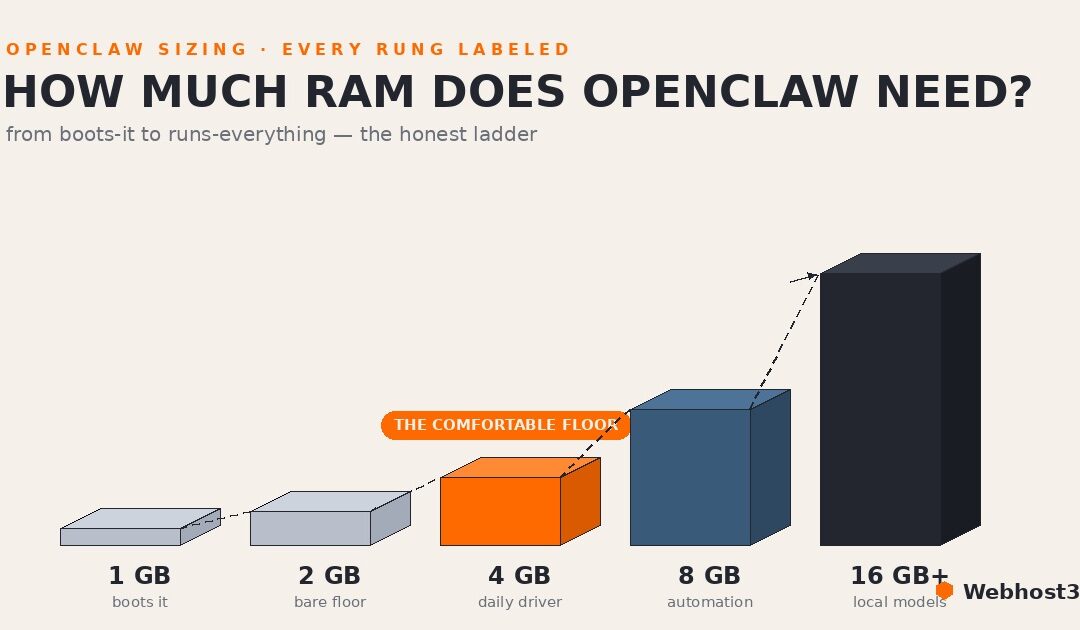
OpenClaw needs 2 GB of RAM as the honest floor for a light text-only agent, 4 GB for comfortable 24/7 use, 8 GB once browser automation enters the picture, and 16 GB or more for local models — with 2 vCPU and 20 GB of SSD storage rounding out the typical spec. One gigabyte boots it, but doesn’t keep it alive. The rest of this guide explains where every one of those numbers comes from, and the calculator below sizes them to your exact workload.
Ask three different sources about OpenClaw requirements and you’ll collect three confident, incompatible answers. The official docs have quoted figures modest enough to fit a shoebox VPS. Hosting guides insist on eight gigabytes. Somewhere on Reddit, someone swears the whole thing purrs on a Raspberry Pi they found in a drawer. They can’t all be right, and yet none of them is exactly wrong.
This guide untangles the mess. First we’ll explain why the numbers disagree (spoiler: they’re answering different questions), then break down what actually consumes CPU, RAM, and storage on an OpenClaw server, and give you two honest figures for each resource. the minimum to start, and the comfortable spec for an agent that runs around the clock. And because your workload isn’t anyone else’s, the calculator below turns your actual plans (channels, browser automation, local models) into a spec you can take to any provider’s order form.
Why the Numbers Online Disagree
The disagreement makes sense once you notice that three different questions are being answered under one name.
The first question is “what does it take to start the gateway?” The honest answer: very little. OpenClaw’s core is a Node.js process, and a small VPS can boot it without complaint, which is where the shoebox-sized figures come from.
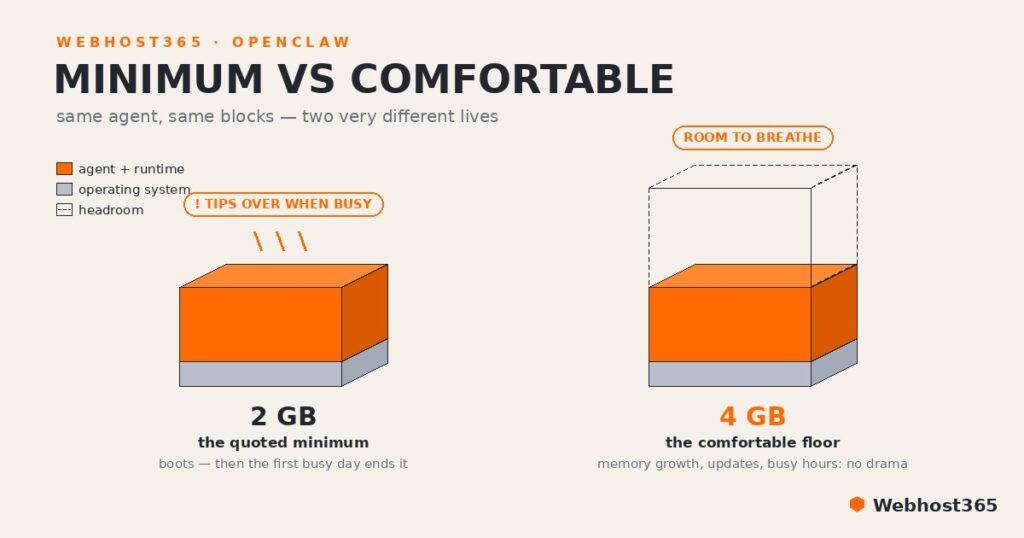
The second question is “what does it take to run an agent well, around the clock, for months?” That answer includes headroom for memory that grows, sessions that pile up, updates that run, and the occasional busy hour, and it is always a bigger number. Minimum-to-boot and comfortable-to-live are both real specs; quoting one as the other is how internet arguments start.
Then there’s drift. The project ships fast, and a requirements line quoted in winter describes different software by summer, so guides frozen at different moments disagree with each other and, eventually, with the docs themselves.
But the biggest factor is you. A chat-only assistant, an agent that drives a headless browser, and a box that also hosts its own model are three different machines wearing the same name — the spread between those setups is wider than the spread between any two published recommendations.
That’s why every OpenClaw requirements figure in this article comes in pairs, minimum and comfortable, and why the calculator asks about your workload before it answers.
The OpenClaw Requirements Calculator
Answer five questions about how you’ll actually use your agent, and the calculator returns two honest specs: the minimum to start, and the comfortable configuration for running 24/7. The RAM math is itemized below the result, so you can see exactly where every gigabyte goes — and challenge us if you disagree.
What Actually Uses the Resources
Every OpenClaw requirements figure is really six smaller numbers wearing a trench coat. Pull them apart and the internet's disagreement dissolves.
The gateway and its runtime are the modest part. Idle, the core process sits at roughly 300–800 MB, and this slice is what minimum-spec quotes tend to measure, including the baseline in the official docs. It's a real number; it's just not the whole bill.
Sessions and memory are the slow riser. An agent that's been your daily driver for three months carries conversation context, a growing memory store, and workspace files that hour-one benchmarks never see. This is why "ran fine at first" and "keeps restarting lately" are so often the same server.
The headless browser is the first cliff. The moment your agent drives real web pages, a Chromium process joins the party at one to two gigabytes in steady use, with multi-tab sessions spiking past that. No automation, no cliff; heavy automation, and the browser out-eats the agent.
A local model is the second cliff, and it dwarfs everything above. Model weights must sit in RAM for CPU inference, and agent work adds a large context cache on top of the weights themselves. One choice in the calculator moves your spec more than every other input combined.
Channels, pleasantly, are near-free: each one is a lightweight listener, which is why the calculator charges them almost nothing. And a final family lives on disk rather than in RAM (the runtime, logs, memory files, and the temp space updates need), which is where the storage section picks up.
The thread connecting all six: RAM is the resource that fails ungracefully. Starve the CPU and things get slow; starve memory and the process simply dies, taking unsaved session state with it.
RAM: The Honest Floor and the Comfortable Middle
Now the ladder, with each rung labeled honestly.
One gigabyte boots the gateway and belongs in demos, not deployments; the first busy task tips it over. Two gigabytes is the true floor for a light, text-only agent, with caveats attached: it holds for the native install this cluster recommends, while Docker-based setups can fail at this size before the agent even starts, and there's no headroom for the slow riser above.
Four gigabytes is the comfortable floor, the same figure our secure install guide plans around, and the point where months of memory growth, an update, and a busy hour can all happen on the same day without drama. Eight gigabytes is where browser automation lives, for the cliff-shaped reason above.
Local models rewrite the ladder entirely. A small ~4B model fits an 8 GB plan; a 7–8B model belongs on 16 GB once you account for weights plus the large context window that agent workloads demand — the official Ollama integration recommends 64K tokens and up, and that cache costs real gigabytes. Those tiers match our Ollama VPS guide deliberately, margin included. One warning shared by every tier: swap prevents the crash but murders the experience, so treat swapping as a fire alarm, not a plan.
If you skipped the calculator above, this ladder is what it automates, one workload at a time.
CPU: Cores Matter Less Than You Think, Until They Don't
Here's the anticlimax: for an API-backed agent, the processor mostly waits. The gateway's day job is I/O — sending a request to a model provider, idling until the answer returns, then dispatching a tool call — and two vCPU cores handle that life with room to spare. If your agent is chat-first, CPU is the spec you can stop worrying about.
Two workloads break the rule. Browser automation is the first: rendering real web pages is genuinely CPU-hungry work, and steady automation is happier on four cores. Local inference is the second and the dramatic one, because when the model runs on your CPU, cores and modern instruction sets become the speed dial; the same model can feel conversational or glacial depending on what silicon it landed on.
One architecture note for the Oracle crowd from our free hosting guide: OpenClaw runs fully on Arm, including Oracle's Ampere instances, with the same caveat that applies to that whole tier — the occasional third-party tool still assumes x86.
Storage: 20 GB Is the Floor
Storage is the quiet requirement, which is exactly how 10 GB boxes get people in trouble. The runtime itself is small, but four things grow around it: logs that an always-on agent writes continuously, a memory and workspace footprint that expands with use, the local staging space your nightly backup archive needs before it ships off-box, and — the classic trap — the temporary space updates require, which is precisely when a nearly-full disk chooses to fail. Twenty gigabytes gives all four room to coexist.
Local models change the storage math the way they change everything else: each model is a multi-gigabyte download (a 7–8B model runs four to five gigabytes in weights alone), and people rarely keep just one. And whatever the size, make it SSD or NVMe; an agent persists session state constantly, and spinning-disk write latency is a tax on every single task.
Three Reference Builds
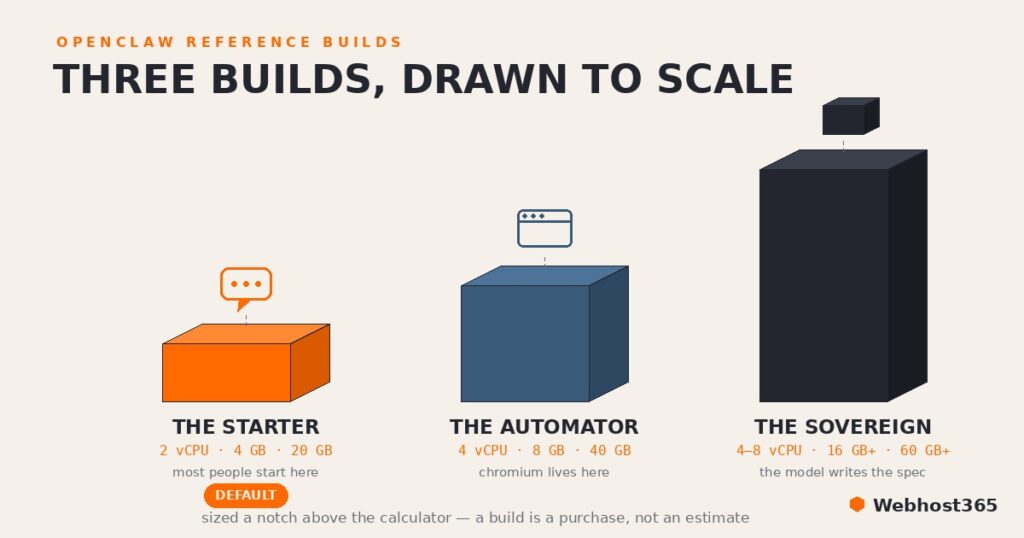
If you'd rather skip the arithmetic entirely, here are the three OpenClaw requirements profiles we'd actually order, sized a notch above the calculator's comfortable column because a build is a purchase, not an estimate — storage especially rounds up to real plan sizes with working room.
| Build | vCPU | RAM | Storage | Built for | Watch for |
|---|---|---|---|---|---|
| The Starter | 2 | 4 GB | 20 GB | A chat-first daily agent on API models — most people, most of the time | Memory growth over months; regular swapping is your upgrade signal |
| The Automator | 4 | 8 GB | 40 GB | Browser automation, several channels, busy schedules | Chromium spikes under multi-tab work; check the journal for OOM kills |
| The Sovereign | 4–8 | 16 GB+ | 60 GB+ | Local models via Ollama — the everything-on-your-box setup | The model, not the agent, sets the spec; CPU inference speed scales with cores |
Two honest footnotes to the table. First, Oracle's free tier from our hosting guide is, on paper, a Sovereign build at $0 — 24 GB of Arm RAM — which is exactly why it earns its place despite the patience it demands. Second, the mapping to real servers is simple: our managed OpenClaw plans are sized along these same three profiles, and if you're going the DIY route from the install guide, our NVMe Linux VPS line covers all three builds with the SSD requirement handled by default.
When You Outgrow the Box
Servers rarely announce that they're too small; they just get weird. The signals arrive in a reliable order. First come OOM kills in the journal — the same journalctl command you bookmarked in the install guide will show the kernel quietly executing your gateway when memory runs out. Then comes swap thrash, where everything technically works and everything feels underwater. Slow responses that cluster around browser-heavy tasks are the CPU's way of raising a hand.
Upgrade in the order things fail: RAM first, always, because it's the resource that dies rather than degrades; cores only when automation or local inference is provably the bottleneck; storage the first time an update complains about space. On most providers this is a resize rather than a migration, and on our managed tiers it's the ladder working as designed: the agent stays put while the box grows underneath it.
Final Thoughts
For the skimmers who scrolled straight here, the OpenClaw requirements answer in one breath: 2 vCPU, 4 GB of RAM, and 20 GB of SSD runs a real daily agent comfortably; 8 GB is the price of admission for browser automation; 16 GB and up is local-model territory, where the model, not the agent, writes the spec. One gigabyte is a demo, and swap is a fire alarm.
Everything subtler than that is workload-dependent, which is what the calculator above is for. Size it once, honestly, and the only time you'll think about these numbers again is the day your agent has earned a bigger box.
Specs are only half of the planning. The other half is the bill: our full monthly cost breakdown, tokens included, shows why two people with identical servers can pay twenty times differently. And if you're planning to run more than the agent on one machine, sizing for OpenClaw plus n8n on one server covers the combined spec and the secure architecture that makes it work.
FAQs
The honest OpenClaw requirements ladder: 1 GB can boot the gateway but fails during real tasks, 2 GB is the floor for a light text-only agent on a native install, 4 GB is the comfortable spec for a daily agent that runs around the clock, and 8 GB or more is needed for browser automation. Add a local model and RAM jumps again, with 16 GB the sensible tier for 7–8B models.
It can start there, which is where the smallest quoted minimums come from, but starting and staying up are different things. The first busy task, memory that grows with use, or an update is usually enough to tip a 1 GB box over, and OpenClaw fails abruptly rather than gracefully when memory runs out. Treat 1 GB as a demo environment and 2 GB as the real floor, with caveats.
No. The agent itself is a lightweight Node.js process, and if your models run through an API, there's nothing on your server for a GPU to accelerate. GPUs only enter the picture with local models, and even there small models run acceptably on modern CPU cores; a GPU buys speed, not capability, until you reach model sizes most personal agents never need.
The software itself is small; the 20 GB floor exists for everything around it: continuously written logs, a memory and workspace footprint that grows with use, staging space for backups, and the temporary room updates need, which is exactly when a full disk fails you. Local models add real weight on top, at roughly four to five gigabytes per 7–8B model, and SSD storage is effectively mandatory.
Yes, and it's a popular setup because it removes per-token API costs entirely. Just size for the sum: the agent's own needs plus the model weights plus the large context cache agent workloads demand. In practice that means an 8 GB plan for small ~4B models and 16 GB for the 7–8B class, with CPU cores mattering more than usual since they're doing the inference.
Fully. Arm64 is a supported first-class architecture, which includes Oracle's Ampere instances and similar cloud Arm offerings, and it's part of why the Oracle free tier is such a popular home for OpenClaw. The only friction is occasional: a third-party tool or dependency that ships x86-only, which is worth a quick check if your workflow leans on unusual software.