
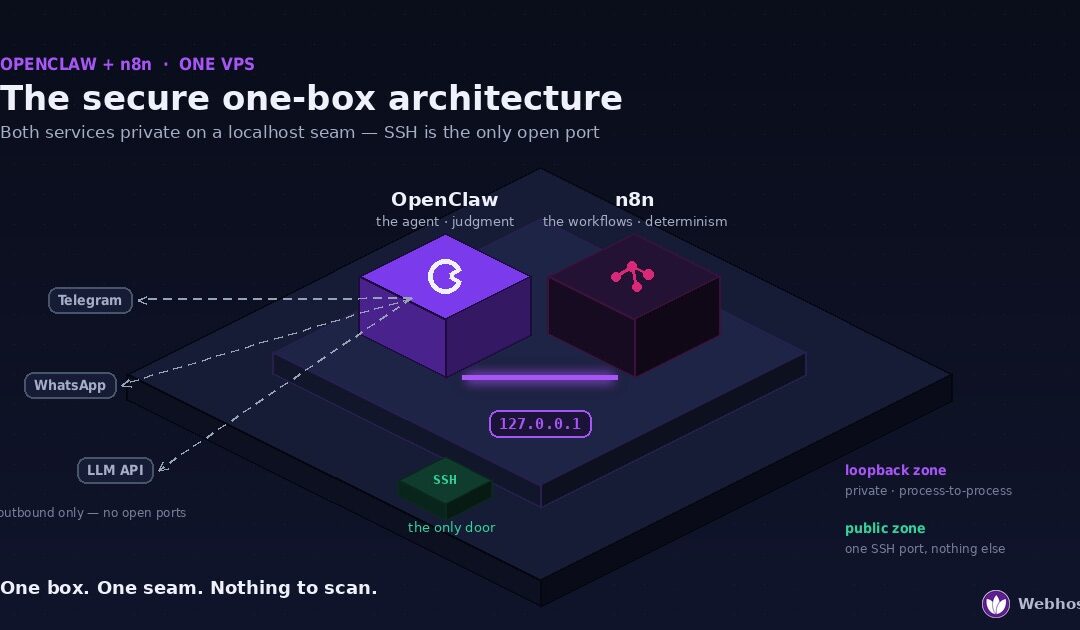
Yes — OpenClaw and n8n run comfortably together on a single VPS. A 2 vCPU / 4 GB box handles the pair for typical workloads, and the secure pattern is simpler than most guides make it: bind n8n to 127.0.0.1, let OpenClaw trigger workflows over the loopback interface, and expose nothing to the internet except SSH. One server, one bill, zero public attack surface.
That last part is where this guide parts ways with nearly every other OpenClaw and n8n tutorial you’ll find. The popular setup instructions put your n8n instance — an automation engine holding credentials for your email, your spreadsheets, your APIs — on the open internet behind a webhook URL and basic auth, and call it a day. I run this stack in production, and I wouldn’t run it that way. This article walks through the architecture I would: what goes where, who holds which keys, and the exact commands to wire the two together so they can talk to each other without either of them talking to the world.
Why Run Them on One Box
OpenClaw and n8n get framed as competitors often enough that it’s worth saying plainly: they are not the same kind of tool, and the overlap is smaller than it looks. OpenClaw is the brain — an agent that reads context, makes judgment calls, and handles the conversations and one-off tasks that don’t reduce to a flowchart. n8n is the hands — a workflow engine that executes the same deterministic pipeline the same way every time, at 3 a.m., without an LLM token being spent or a model having an opinion about it.
The moment you use both seriously, the pairing suggests itself. The agent shouldn’t be re-deriving your invoice-processing pipeline from scratch every time; that’s a workflow. The workflow engine shouldn’t be guessing what a vague email means; that’s a judgment call. An agent that can trigger workflows — “run the weekly report,” and n8n does exactly what it did last week — gets you determinism where you want it and intelligence where you need it.
So why one server instead of two? Three reasons, in the order they’ve mattered to me in practice.
Latency and simplicity. When both services live on the same box, OpenClaw reaches n8n over the loopback interface — a call that never leaves the machine. No DNS, no TLS handshake between your own services, no network hop to fail. The wiring section later in this guide is short precisely because localhost makes it short.
Security posture. This is the big one. Two servers talking to each other across the internet means at least one of them must listen publicly, and in every mainstream tutorial the one left listening is n8n — the service holding your real credentials. One box with a localhost seam means the conversation between agent and engine happens entirely inside the machine. The only thing an attacker can see from outside is an SSH port. We’ll spend a full section on this, because it’s the reason this architecture exists.
Cost. A VPS sized for the pair costs meaningfully less than two adequately sized boxes, and the resource profiles are complementary — OpenClaw’s load is bursty and conversation-driven, n8n’s is scheduled and predictable, so they rarely peak at the same time. You’re not halving one server’s power; you’re letting two half-idle services share the idle.
The honest caveat before we go further: one box is the right call for a personal agent and a reasonable workflow load. If you’re planning heavy browser automation on the agent side and hundreds of workflow executions an hour on the n8n side, you’ll eventually want the split — and the final section covers the signals that tell you when. For everyone else, which is most people, one well-sized server is the correct amount of infrastructure.
The Architecture: A Localhost Seam, Not a Public Webhook
Before any commands, get the shape of the thing right, because the shape is the security model.
Picture the server as two zones. The public zone is everything reachable from the internet, and in this architecture it contains exactly one thing: the SSH port. The loopback zone is everything bound to 127.0.0.1 — reachable by processes on the machine and by nothing else, ever, no matter what firewall rules exist or fail to exist. That’s not a firewall behaving well; it’s how the loopback interface works. Traffic to 127.0.0.1 never touches the network card.
Inside the loopback zone live both services. n8n listens on 127.0.0.1:5678 — the editor, the API, and every webhook it exposes are addresses that only exist inside the machine. OpenClaw’s gateway runs alongside it, and when the agent needs a workflow, it calls http://127.0.0.1:5678/webhook/... — a request that goes process-to-process through the kernel and back. The two services have a private conversation on a seam that has no public side.
Now contrast that with the pattern most tutorials teach, and honestly, the pattern most people are running right now. n8n gets a public subdomain — n8n.yourdomain.com — behind a reverse proxy, with the editor protected by basic auth and the webhooks protected by nothing but the unguessability of their URLs. That instance holds working credentials for every service your workflows touch: your email, your calendars, your spreadsheets, your payment APIs. It sits on the open internet as a permanent, crawlable, scannable target, and its safety now depends on the strength of one password, the absence of the next authentication bug, and every future CVE in a fast-moving open-source project being patched before someone finds you. n8n is well-built software — that’s not the concern. The concern is that “credential vault reachable from every IP on Earth” is a category of risk you can simply choose not to have.
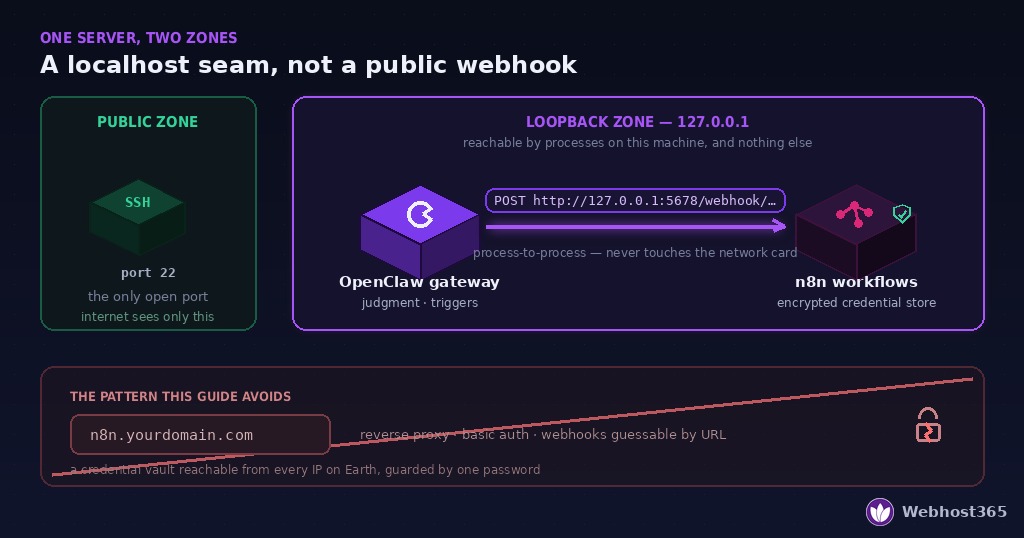
The one thing the public pattern buys you is inbound webhooks from external services — Stripe calling your workflow when a payment lands, GitHub pinging on a push. If you need that, you need a public entry point, and there are careful ways to build one. But here’s what the tutorials skip: in an OpenClaw-and-n8n setup, most of the time you don’t need it. Your inbound channel already exists — it’s OpenClaw, listening on WhatsApp or Telegram through an outbound connection that exposes no port at all. Events reach the agent; the agent decides; the agent triggers n8n on loopback. The agent is the front door, and the front door opens from the inside.
So the full picture, top to bottom: the internet sees an SSH port. OpenClaw maintains outbound connections to your chat channels and your model provider. n8n sits fully inside, executing what it’s told through the seam. And when you need the n8n editor to build workflows, you reach it through an SSH tunnel that makes your laptop temporarily part of the machine — which is a five-second command we’ll cover in its own section.
One box. One seam. Nothing to scan.
The good news about sizing this pair: n8n is a light roommate. Its idle footprint is a few hundred megabytes, its executions are short-lived, and its load is scheduled and predictable — the polar opposite of an agent’s bursty, conversation-driven profile. Stacking n8n onto an OpenClaw box costs you roughly one gigabyte of honest headroom, not a doubling of anything.
Here are the two specs I’d actually order, following the same minimum-versus-comfortable honesty as our OpenClaw requirements guide:
| Spec | vCPU | RAM | Storage | What it carries |
|---|---|---|---|---|
| Minimum to start | 2 | 4 GB | 30 GB | A text-first agent plus a modest set of scheduled workflows — fine for evaluating the stack |
| Comfortable 24/7 | 4 | 8 GB | 40 GB | The pair in daily production: busy hours, workflow bursts, months of session and execution history, updates without drama |
Three sizing notes that are specific to the combination rather than either tool alone.
RAM is still the resource that fails ungracefully — that rule carries over from the single-service world, but now an OOM event has two possible victims, and the kernel doesn’t consult you about which process it kills. On a 4 GB box, a busy agent hour landing on top of a heavy workflow execution is exactly the collision that tips it. The 8 GB tier exists so those two peaks can coexist.
Storage grows on two fronts now. OpenClaw writes logs, memory, and workspace files; n8n keeps a database of every workflow execution, inputs and outputs included, and that history grows quietly until the day it doesn’t. Set n8n’s execution-data pruning early (we’ll flag the setting in the setup section) and 40 GB stays comfortable for a long time.
Docker overhead counts once, not twice. Since this architecture runs n8n in Docker and OpenClaw native, you pay the container-runtime tax only on the n8n side — one of several small dividends of the split-install approach the next section walks through.
If your plans include browser automation on the agent side or a local model via Ollama, size from the requirements calculator first and then add n8n’s gigabyte on top — the model, not the pair, will dominate the spec. And if you’d rather test the marriage before paying for it, both halves have free tiers: free OpenClaw hosting and free n8n hosting let you rehearse the workflows before committing to one shared box.
Setup, Step by Step
Four stages: harden the base, put n8n on the loopback, install OpenClaw beside it, then wire the seam. On a fresh VPS this is a 30–40 minute session.
Step 1 — Start from a hardened base
Everything in our secure OpenClaw install guide applies here unchanged: SSH keys only, no root login, a firewall that allows SSH and nothing else, unattended security updates, and a dedicated non-root user. Do that first — this article assumes it. The one addition for this build is a second system user, which becomes important in the credential section:
bash
sudo adduser --system --group n8n
sudo adduser --system --group openclaw   # skip if the install guide's user already exists
Two services, two users, no shared home directory. Remember that your firewall allows inbound SSH only — nothing we install below will ever ask you to open another port. If a tutorial step ever does, that’s the fork in the road where this guide and that tutorial disagree.
Step 2 — n8n in Docker, bound to the loopback
Install Docker from the official repository, then run n8n with one deliberate detail in the port flag — the 127.0.0.1: prefix:
bash
sudo mkdir -p /opt/n8n/data && sudo chown -R n8n:n8n /opt/n8n

sudo docker run -d --name n8n --restart unless-stopped \
  -p 127.0.0.1:5678:5678 \
  -v /opt/n8n/data:/home/node/.n8n \
  -e GENERIC_TIMEZONE="Asia/Kolkata" \
  -e N8N_SECURE_COOKIE=false \
  -e EXECUTIONS_DATA_PRUNE=true \
  -e EXECUTIONS_DATA_MAX_AGE=336 \
  docker.n8n.io/n8nio/n8n
That port prefix is the entire security model in eight characters. -p 5678:5678 publishes the port to every interface — the pattern most tutorials use, and the one that puts n8n on the internet the moment your firewall has a bad day. -p 127.0.0.1:5678:5678 tells Docker to bind only to the loopback, and this matters doubly with Docker because Docker manipulates iptables directly and can bypass simple firewall front-ends; binding to the loopback at publish time closes that class of surprise entirely. The remaining flags: N8N_SECURE_COOKIE=false because you’ll reach the editor through an SSH tunnel as plain http://localhost (the transport is already encrypted by SSH itself), and the two EXECUTIONS_DATA_* variables enable the execution-history pruning the sizing section promised — 336 hours keeps two weeks of history, which is plenty for debugging without letting the database eat your disk. Full reference for every variable is in the n8n environment docs.
Verify the binding before moving on:
bash
ss -tlnp | grep 5678The output must show 127.0.0.1:5678 — not 0.0.0.0:5678, not *:5678. If you see either of those, stop and fix the port flag; there is no later step that compensates for a public bind.
Step 3 — OpenClaw, native, beside it
Install OpenClaw natively exactly as the install guide walks through — same commands, same systemd unit, same private-access posture. Native for the agent and Docker for n8n isn’t an accident of history: the agent benefits from the lighter footprint and direct filesystem workspace access, while n8n is the textbook case for containerization — a self-contained service with a clean volume, trivially upgradable by pulling a new image. You pay the Docker tax once, for the roommate that uses it best.
Confirm both services are up and keeping to their lanes:
bash
systemctl status openclaw --no-pager | head -5
sudo docker ps --filter name=n8n --format "{{.Status}}"
Step 4 — Wire the seam
Open the SSH tunnel from your laptop (the dedicated section below explains this properly — for now, the one command):
bash
ssh -L 5678:127.0.0.1:5678 youruser@your-vps-ipBrowse to http://localhost:5678, create your n8n owner account, and build a minimal test workflow: a Webhook trigger node (method POST, path agent-test, respond “immediately”), connected to any action you like. Activate it. n8n now exposes that trigger at a URL that exists only inside your server.
Back on the VPS, prove the seam works from the agent’s side of the wall:
bash
curl -s -X POST http://127.0.0.1:5678/webhook/agent-test \
  -H "Content-Type: application/json" \
  -d '{"from":"openclaw","test":true}'
A response means the loopback conversation is live. The final wiring step is teaching the agent the address: give OpenClaw the base URL http://127.0.0.1:5678/webhook/ — as a skill, a tool definition, or a standing instruction, whichever pattern your setup uses — so that “run the weekly report” becomes, in the agent’s hands, a POST to the matching workflow path with a JSON body. For the return direction, the same seam works in reverse: an n8n HTTP Request node pointed at OpenClaw’s local gateway port lets a finished workflow hand its results back to the agent for a judgment call or a summary in your chat channel. Both directions, zero public surface.
From here, every workflow you build is automatically reachable by the agent and automatically invisible to everyone else — which is the whole point.
Credential Isolation: Who Holds Which Keys
The localhost seam protects you from the outside. This section protects you from something the tutorials never mention: your own agent.
Here’s the uncomfortable truth about running an LLM-powered agent with real credentials. OpenClaw reads untrusted input all day — emails, chat messages, web pages it browses on your behalf. Any of that input can contain instructions aimed at the agent rather than at you, and prompt injection remains an unsolved problem across the industry: not “unsolved by careless people,” unsolved by everyone. You should therefore design as if, someday, a malicious email will successfully talk your agent into doing something you didn’t ask for. The question isn’t whether that’s likely on any given day. The question is: on that day, what can the agent actually reach?
The answer this architecture gives: not much — because the keys live on the other side of the seam.
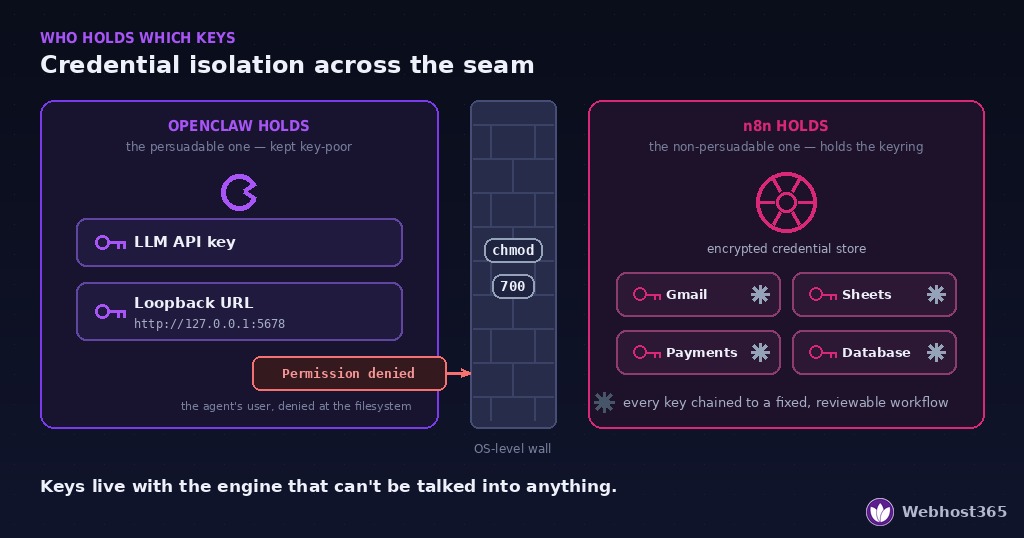
n8n holds the service credentials. Your Gmail OAuth token, your Sheets access, your payment-provider API keys, your database passwords — all of them live inside n8n’s encrypted credential store, attached to specific nodes inside specific workflows. n8n uses each credential to do exactly what its workflow says and nothing else. A workflow is not persuadable; it has no opinions to manipulate. “Send the weekly report” runs the same steps whether it was triggered by you, by a schedule, or by an agent that’s having a bad day.
OpenClaw holds two things only: its model-provider API key, and the loopback URL where workflows can be triggered. That’s the agent’s entire keyring. When the agent wants something done to your email, it can’t touch your email — it can only ask n8n to run the email workflow, and the workflow’s steps are fixed. The blast radius of a compromised agent collapses from “everything my accounts can do” to “any of my predefined workflows, with whatever parameters they accept” — which is exactly the list you reviewed when you built them, and it’s a list you can read.
The OS enforces the same line. This is why Step 1 created two system users. OpenClaw’s process cannot read /opt/n8n/data — where n8n’s encrypted credential database lives — because Linux file permissions say no, regardless of what any prompt says:
bash
sudo chmod 700 /opt/n8n/data
sudo -u openclaw ls /opt/n8n/data 2>&1   # should print: Permission denied
That second command is worth actually running. It’s the whole section in one line of output: the agent’s user, denied at the filesystem, by a mechanism that has never once been talked out of its configuration.
Two habits complete the picture. First, when you build workflows the agent can trigger, treat their parameters as attacker-controlled — a “send email” workflow whose recipient, subject, and body are all free-form agent inputs has quietly handed the agent your email account with extra steps; fix the recipient list in the workflow, or validate inputs in an early node. Second, scope every credential to the minimum the workflow needs — a Sheets token that can read one spreadsheet beats a Drive-wide token in the one scenario this section exists for.
None of this is paranoia priced into your daily experience. Set up once, it’s invisible: the agent feels exactly as capable, because everything you want it to do is a workflow away. The only party that notices the wall is the one you built it for.
Reaching the n8n Editor Safely
Everything so far has kept n8n invisible, which raises the obvious question: how do you build workflows in an editor that isn’t on the internet? Two good answers, in order of how little they ask of you.
The default: an SSH tunnel. You already have SSH access to the server — that’s the one door we left open — and SSH can carry the editor to your laptop through it:
bash
ssh -L 5678:127.0.0.1:5678 youruser@your-vps-ipRead it left to right: forward my laptop’s port 5678 to the address 127.0.0.1:5678 as seen from the server. While that session is open, http://localhost:5678 in your browser is the n8n editor, delivered through the same encrypted, key-authenticated channel as your shell. Close the terminal and the door closes with it — nothing persists, nothing listens, nothing new is exposed. If you’d rather not keep a terminal window hostage while you work, add -N -f to run the tunnel in the background, and see the OpenSSH manual for the full forwarding reference.
The tunnel’s honest limits: it exists only while you run it, it’s per-device, and on a phone it’s clumsy. For a workflow you edit twice a month, none of that matters — the tunnel is the right tool and the finish line. If you’re in the editor daily, or you want it from a tablet on your sofa, upgrade to option two.
The comfortable option: Tailscale. Tailscale builds a private WireGuard network between your devices — install it on the VPS and your laptop, sign both into the same account, and the server gets a permanent private address (typically 100.x.y.z) that only your enrolled devices can reach. n8n stays bound to the loopback; you then either publish it to your private network with Tailscale’s serve feature, or simply keep using the same SSH tunnel but over the Tailscale address — which lets you close public SSH entirely, taking the last public port off the internet. That final state is worth pausing on: a production agent-and-automation stack whose server, from the open internet’s point of view, does not exist.
What you should not do is the thing every general n8n tutorial reaches for at this point: a public subdomain with a reverse proxy and a login page. That reintroduces the exact exposure this entire architecture was built to avoid — a permanent, internet-facing door into your credential store, guarded by one password and the hope of timely patching. The tunnel costs you one command. The subdomain costs you the threat model.
Three Workflows That Justify the Marriage
Architecture is only interesting if it earns its keep. These three patterns are the ones that make the one-box setup feel less like two tools sharing rent and more like one system — each uses the seam in a different direction, and together they cover most of what people actually build. Treat them as templates: swap the specifics for your own services and the shapes hold.
Pattern 1 — Agent triggers, workflow executes. The direction we wired in the setup section, and the daily workhorse. You tell OpenClaw “run the weekly client report,” and the agent POSTs to the matching loopback webhook; n8n then does the deterministic part it was built for — pull the numbers from Sheets, render the document, email it to the fixed recipient list — identically every time. The division of labor is the point: the agent contributes exactly one judgment (now is the time), and everything downstream of that judgment is a machine that cannot be sweet-talked into CCing anyone new. Anything you currently re-explain to your agent step by step is a candidate — the moment a task stops needing judgment mid-flight, freeze it into a workflow and reduce the agent’s role to pulling the trigger.
Pattern 2 — Schedule fires, agent summarizes. The reverse direction, and the pattern that turns your agent from a tool you poke into a colleague who briefs you. An n8n Schedule Trigger runs at 7:00 every morning, gathers the overnight raw material — RSS feeds, yesterday’s sales rows, server metrics, unread-email counts — and hands the bundle across the seam to OpenClaw’s local gateway. The agent does the one thing the workflow engine can’t: it reads the pile, decides what matters, and sends you three useful sentences on Telegram instead of forty rows of JSON. n8n is the newsroom; the agent is the editor. Neither could produce the morning briefing alone.
Pattern 3 — Event arrives, agent decides, workflow acts. The full round trip, and the pattern that quietly replaces an entire category of paid automation tools. Something happens — a form submission lands, a monitoring check fails, an email from a particular sender arrives. The workflow that catches it doesn’t guess at intent; it passes the event to the agent with a narrow question: support request, sales lead, or noise? The agent answers, and its answer routes back into n8n, where each branch is — again — a fixed, reviewable workflow: file the ticket, draft the CRM entry, archive silently. Judgment sits in the middle of the pipeline like a valve, with deterministic pipe on both sides of it. This is the pattern where the credential-isolation section quietly pays off, too: even here, at maximum agent involvement, the agent never touches the CRM or the ticket system. It only ever answers questions and pulls triggers.
Start with the first pattern — it’s a fifteen-minute build on the test workflow you already made — and let the other two accrete as real needs show up. In my experience the second one is the keeper: the reports and briefings feel like a gimmick for about three days, right up until the morning they catch something you’d have missed.
Maintenance and the Day It Outgrows One Box
A two-service box needs a little more discipline than a one-service box — not more work, just more order. Here’s the routine, and then the honest conversation about when this architecture stops being the right one.
Updates, in the right order. The two halves update independently, which is another quiet dividend of the split install. For n8n, it’s the standard container dance — pull, remove, re-run with the exact same flags:
bash
sudo docker pull docker.n8n.io/n8nio/n8n
sudo docker stop n8n && sudo docker rm n8n
# then re-run the full docker run command from Step 2, unchanged
Your workflows and credentials live in /opt/n8n/data on the host, so the container is disposable; losing the 127.0.0.1: prefix during the re-run is the one mistake that matters, which is why the ss -tlnp | grep 5678 check belongs after every update, not just the first install. Keep the full run command in a small shell script and the mistake becomes impossible. For OpenClaw, follow the update path from the install guide — and update the two on different days. Not because simultaneous updates usually break anything, but because when something does break, “which update did this” is a question you want to have only one answer.
Backups now have two subjects. Alongside the agent’s workspace and config you’re already backing up, add /opt/n8n/data — it contains the SQLite database and, critically, the credential encryption key; an n8n backup without that key is a list of workflows that can no longer talk to anything. Stop the container (or at least quiesce heavy workflows) when the archive runs, since copying a SQLite file mid-write is how you discover restore-time corruption. Both service directories, one nightly archive, shipped off-box — the same rhythm as before, one more directory in the tar.
Watch the box the same way, with one addition. Everything from the requirements guide’s outgrowing section applies — OOM kills in the journal, swap thrash, the reliable order in which small servers get weird. The one new instrument: when memory pressure appears, check which resident is responsible before upgrading, because the answer changes the fix. sudo docker stats n8n shows the container’s live footprint; if n8n is fat, it’s almost always execution history — check that the pruning variables from Step 2 survived your last update before buying RAM. If the agent is fat, it’s the usual suspects from the requirements article, and RAM first, always.
The signals that it’s time for two boxes. One server stops being the right answer when the residents start peaking together. The tell isn’t load average — it’s correlation: your agent gets slow at exactly the times your workflows are busiest, or workflow executions start queueing during the agent’s browser-automation sessions, or a single OOM event takes out both halves of your automation at once and you notice how much you’d built on the assumption that at least one of them stays up. Any of those, persisting after a RAM upgrade, is the architecture telling you the marriage needs a bigger house — or two houses.
The graceful part: this design splits cleanly. Move the n8n container and its data directory to a second VPS, and the only thing that changes is the seam — 127.0.0.1:5678 becomes the new box’s private address, ideally over the same Tailscale network from the editor section, so the conversation between agent and engine still never touches the public internet. The workflows don’t change, the credentials don’t move to the agent, and the security model survives the split intact. On our managed tiers, that split is a support ticket; on the DIY VPS line, it’s an evening. Either way, one box was never a ceiling — it was the right-sized start.
Final Thoughts
The one-paragraph version for the skimmers: OpenClaw and n8n belong on the same VPS for most people — 4 GB to start, 8 GB for comfort — with n8n Docker-published to 127.0.0.1:5678, OpenClaw installed native beside it, and nothing public but SSH. The agent supplies judgment, the workflows supply determinism, the loopback seam lets them talk without letting the internet in, and the credential split means even a manipulated agent can only pull triggers you pre-approved. It’s less infrastructure than the two-server tutorials, and it’s meaningfully more secure than the public-webhook ones.
The deeper point is worth one more sentence: most guides treat security as a hardening checklist you apply after the architecture is chosen. Choose the architecture right — everything private by default, judgment and credentials on opposite sides of a wall — and there’s very little left to harden. Build the test workflow, wire the seam, and let the three patterns grow into whatever your mornings need. And if you’d rather have the box arrive with all of this already true, that’s exactly what our managed OpenClaw plans are.
If you’re pricing the setup before you build it, our complete OpenClaw running-cost math itemizes hosting, tokens, and the extras — including why moving deterministic work into n8n is the cheapest optimization on the list.
FAQ
Yes, and for most personal and small-team setups it’s the recommended arrangement. The two have complementary resource profiles — OpenClaw’s load is bursty and conversation-driven while n8n’s is scheduled and predictable — so a single well-sized server carries both comfortably. Running them together also enables the secure loopback architecture this guide describes, where the services communicate over 127.0.0.1 and nothing is exposed to the internet except SSH.
A 2 vCPU, 4 GB RAM, 30 GB SSD server is the honest minimum for a text-first agent plus a modest workflow load; 4 vCPU with 8 GB RAM and 40 GB storage is the comfortable 24/7 spec. n8n adds roughly one gigabyte of real headroom on top of OpenClaw’s own needs. Browser automation or a local model via Ollama changes the math — size those from the OpenClaw requirements calculator first, then add n8n’s gigabyte.
Usually not. If OpenClaw is in the picture, it already provides your inbound channel through outbound connections to Telegram, WhatsApp, or other platforms — no open ports required — and it can trigger every n8n workflow over the loopback interface. The only case that genuinely needs a public entry point is receiving webhooks directly from external services like Stripe or GitHub, and even then it should be a narrowly built exception, not a fully exposed n8n instance.
They solve different problems. OpenClaw supplies judgment — reading context, making decisions, handling conversations — while n8n supplies determinism, running the same pipeline identically every time without spending an LLM token. If you find yourself re-explaining a multi-step task to your agent repeatedly, that task wants to be a workflow. Together, the agent decides when and the workflow controls what, which is both cheaper and safer than either tool doing everything.
Yes. Both halves of the stack have genuinely free tiers at Webhost365 — free OpenClaw hosting and free n8n hosting — which let you build and rehearse the workflows and agent behavior before committing to a shared box. The free plans run each service separately rather than on one machine, so treat them as a rehearsal space; when you’re ready for the single-server loopback architecture, move both onto a VPS sized per the table above.
It works, with sizing as the caveat: a local model dwarfs both OpenClaw and n8n combined. A small ~4B model pushes the box to 8 GB minimum and a 7–8B model to 16 GB, with the model — not the pair — writing the spec. The architecture itself doesn’t change: Ollama also binds to the loopback by default, so it joins the same private zone, and you end up with a three-service machine that still shows the internet nothing but an SSH port.