
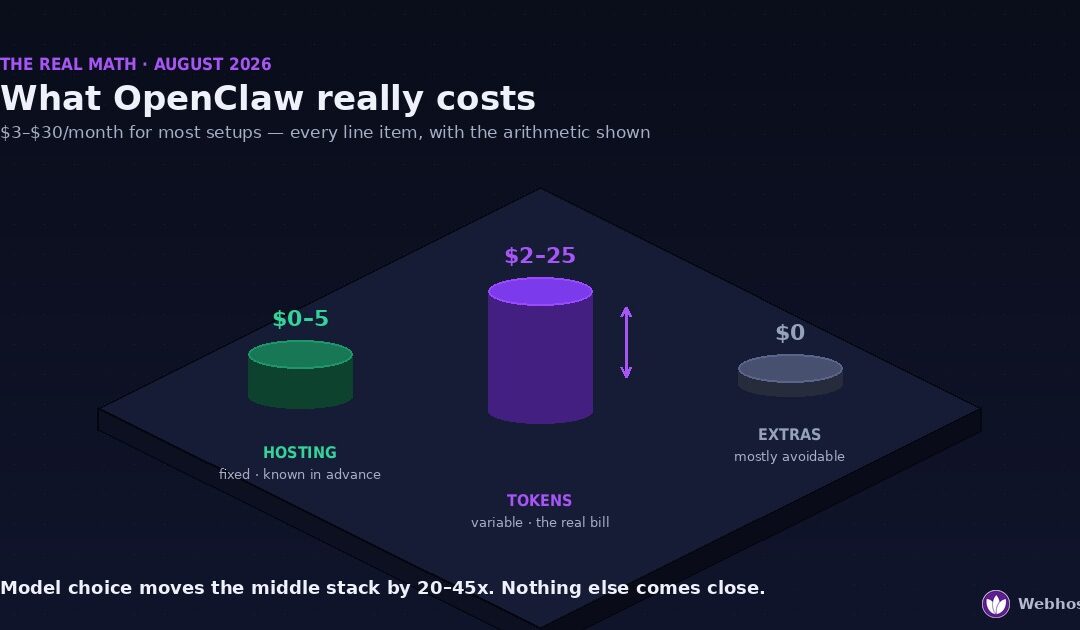
For most personal setups, running OpenClaw costs between roughly $3 and $30 per month. The bill has three parts: hosting at $0–$5, LLM API tokens at $2–$25 depending on your model and usage, and messaging channels, which are free. Heavy browser automation or a flagship model can push the total past $100 — and by the end of this guide you’ll know exactly which dial does that.
If you’ve asked this question before, you’ve probably found the same non-answer everywhere: “it depends — anywhere from free to $800 a month.” That’s true and useless. It depends on about four decisions, each of which has a number attached, and nobody seems willing to show the arithmetic. So this article does: real per-token prices as of August 2026, worked monthly math for three kinds of users, and the reference budgets I’d actually plan around. I run this stack in production; these are the numbers I watch.
One honesty note before we start: API prices move — twice this year already, both times downward. Every figure here is dated in place, and where a price is promotional we say so. Treat the method as permanent and the numbers as this quarter’s snapshot.
The Three Bills
Every OpenClaw budget, from the free-tier tinkerer to the automation power user, decomposes into the same three line items — and they behave completely differently, which is why lumping them into one “cost of OpenClaw” figure produces those useless $0–$800 ranges.
Bill one: hosting. This is the boring bill, in the best way — fixed, small, and known in advance. Somewhere between $0 and $10 a month buys the server OpenClaw lives on, and nothing you say to your agent changes this number. It’s the only bill of the three you can genuinely lock to zero.
Bill two: tokens. This is the real bill — variable, usage-driven, and widely misunderstood, because an agent doesn’t consume tokens the way a chat window does. Every message you send arrives at the model wrapped in system prompt, memory, and context you never see, and the meter runs on all of it. Two people with identical servers and identical models can have monthly token bills that differ by 20x. This is where the article earns its keep, and it gets the longest section.
Bill three: the extras. Proxies, premium skills, paid channel APIs, add-on services — the miscellaneous drawer. Here’s the short version in advance: for most people this bill should be zero, and when it isn’t, it’s usually one deliberate choice rather than an accumulation. We’ll cover the two extras that are actually worth paying for and the ones that quietly aren’t.
The structure of the guide follows the money: the fixed bill first, because it’s quick; the variable bill at full length, with the arithmetic; then the traps that inflate it and the levers that shrink it — including the one lever most people never pull, which is making a chunk of your token bill disappear entirely by handing repetitive work to a tool that doesn’t bill per thought.
Bill #1: Hosting ($0–$10)
The fixed bill first, because it’s genuinely simple. OpenClaw needs a server that’s always on, and as of August 2026 that costs somewhere between nothing and ten dollars:
| Route | Monthly cost | What you get | Right for |
|---|---|---|---|
| Free OpenClaw hosting | $0 | A managed instance, no credit card | Testing whether the agent fits your life before spending anything |
| Managed OpenClaw plan | from $2.49 | Provisioned, updated, and maintained for you | Running 24/7 without owning the sysadmin work |
| DIY NVMe VPS | from $4.99 | Root access, you install and harden it yourself | Full control, and the one-box pairings from the rest of this cluster |
Size it honestly — 4 GB of RAM for a comfortable text-first agent, more only when browser automation or local models enter the picture — and the requirements calculator turns your exact plans into a spec in thirty seconds. The important budgeting point: whichever row you pick, this number is now fixed. Write it down and forget it, because everything interesting about your OpenClaw bill happens in the next section.
Bill #2: Tokens — Where the Real Money Goes
Token billing is simple in principle — you pay per million tokens, input (what the model reads) priced separately from output (what it writes), with output running five to six times input at most providers. What makes agent bills surprising isn’t the pricing. It’s how much reading an agent does that you never see.
What one message actually costs
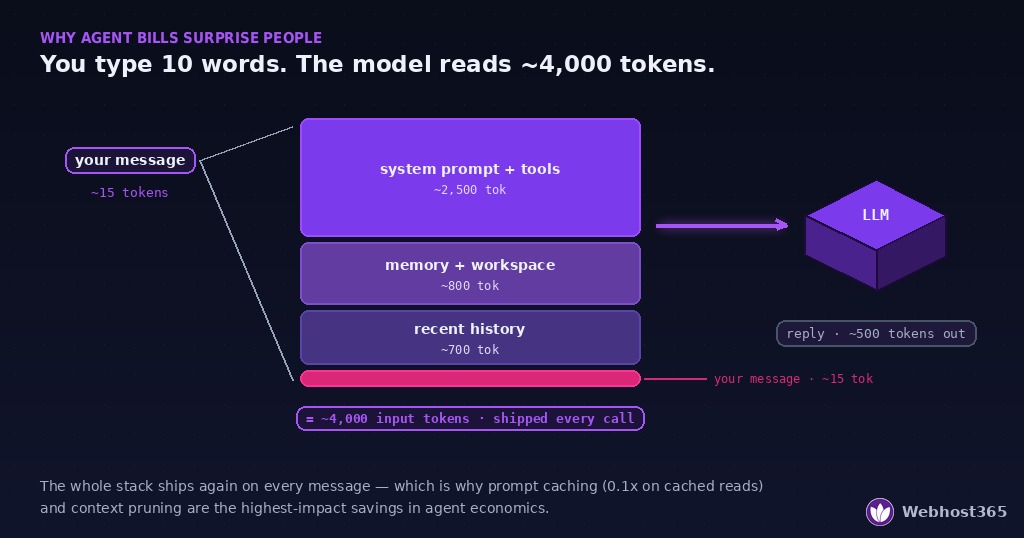
When you send OpenClaw a one-line message, the model doesn’t receive one line. It receives the agent’s system prompt and tool definitions — typically a few thousand tokens — plus workspace context and relevant memory, plus recent conversation history, and then your line. A message you experience as ten words is routinely a 3,000–5,000-token input event, and it happens on every call, because models are stateless: the whole context ships again each time. Add scheduled heartbeats and background checks, which bill the same way whether or not you’re at the keyboard, and you get the defining property of agent economics: input volume, not output length, drives the bill — and input volume is mostly invisible.
The math: three users, three model tiers
Here’s the arithmetic nobody publishes. Three realistic usage profiles — the per-message context sizes are my working assumptions from running this stack, stated so you can adjust them to yours:
- Light use — ~30 messages/day, lean context (~2,500 input / 300 output tokens per exchange): ≈ 2.3M input + 0.3M output tokens/month.
- Daily driver — ~120 messages/day, normal memory and context (~4,000 / 500): ≈ 14.4M input + 1.8M output/month.
- Power use — ~300 messages/day plus automations, heavy context (~8,000 / 800): ≈ 72M input + 7.2M output/month.
Priced at August 2026 list rates for the three tiers of the market — budget (DeepSeek V4 Flash, $0.14/$0.28 per million; Gemini Flash-class and GPT-5.6 Luna sit nearby), mid-tier (the ~$2/$10 class, e.g. Claude Sonnet 5), and flagship ($5/$25 class, e.g. Claude Opus, GPT-5.6 Sol):
| Monthly token bill | Budget model | Mid-tier model | Flagship model |
|---|---|---|---|
| Light use | ~$0.40 | ~$7 | ~$18 |
| Daily driver | ~$2.50 | ~$47 | ~$117 |
| Power use | ~$12 | ~$216 | ~$540 |
Read that table twice, because it contains the entire mystery of the “$0 to $800” non-answer. A daily-driver OpenClaw agent costs about $2.50 a month on a budget model and about $117 on a flagship — same server, same conversations, one settings change apart. Model choice moves your bill by roughly 20 to 45x. Nothing else in this article comes close to that lever.
Two footnotes the table needs. First, these are list prices, dated August 2026; the mid-tier figure uses Claude Sonnet 5’s introductory $2/$10 rate, which is scheduled to revert to $3/$15 after August 31, 2026. Second, the table ignores prompt caching — deliberately, so it shows the worst case. Since the biggest chunk of your input is the same system prompt shipped every call, providers that bill cached reads at a tenth of the input rate (Anthropic’s published rate) can cut the input side of real-world bills dramatically once caching is configured; the daily-driver mid-tier figure can realistically land closer to a third of the table’s number. Caching is the difference between the sticker price and what a tuned setup pays.
The strategy the table implies
Don’t pick one model; pick a default and an exception. A budget-tier default handles the routine 90% of agent traffic for pocket change, and the flagship gets summoned for the tasks where judgment quality actually pays for itself. Every mainstream setup supports this kind of routing now, and the table above is the reason it exists.
The $0 API Bill: Going Local with Ollama
There’s a fourth column missing from that table: run the model on your own server via Ollama and the per-token price becomes zero. What you pay instead is RAM.
The trade is straightforward. A ~4B-parameter model wants an 8 GB server; the 7–8B class wants 16 GB — the full ladder is in the requirements guide, and the dedicated breakdowns in our budget local-LLM guide and best VPS for Ollama cover model-by-model sizing. Market-wise, stepping from a 4 GB box to a 16 GB one costs roughly $10–20 more per month — so the crossover math writes itself: if your monthly token bill consistently exceeds the price difference of the bigger server, local inference wins on cost. Against the table above, a power user on anything mid-tier or up crosses that line comfortably; a light user on a budget model never will, and shouldn’t try.
The honest asterisk is quality. A 7–8B local model is not a frontier model, and for judgment-heavy work the difference is visible daily. The setups that actually work treat local as the third tier of the routing strategy from the last section: local model for high-volume, low-stakes traffic — summaries, classification, routine chatter — API budget tier as the default brain, flagship on demand. That hybrid keeps the always-on chatter off the meter entirely while the tasks that deserve a frontier model still get one. And because Ollama binds to the loopback by default, it slots into the same private one-box architecture as everything else in this cluster — three services, still nothing public but SSH.
The Cost Traps
Every surprising OpenClaw bill I’ve seen traces back to one of four mechanisms. None of them is a bug; each is the agent doing exactly what it was configured to do, at a volume nobody priced in advance.
Browser automation is a token firehose. Web pages are enormous in token terms — a single page’s content can run tens of thousands of tokens, and browsing tasks send page after page through the model as the agent reads, decides, clicks, and reads again. One “research this and summarize” errand can consume more input tokens than a full day of conversation. Browser automation is genuinely useful; it just belongs in your mental model as a premium activity, priced accordingly — and routed to a budget model unless the judgment truly matters.
Context grows until you prune it. Memory files, long-running conversations, accumulated workspace notes — all of it rides along as input on every call. An agent that cost $5 a month in week one can cost $15 by month three with identical usage, purely because each message now carries more history. The bill creeping upward at constant usage is the signature of context bloat, and the fix is hygiene, not a cheaper model.
Loops multiply everything. An agent retrying a failing task, two automations triggering each other, a scheduled job that errors and re-runs — agentic setups can spend tokens with nobody in the room. This is the trap with the genuinely scary ceiling, because it scales with time, not with your usage.
Heartbeats bill around the clock. Periodic check-ins are small individually, but they run 24/7. An aggressive schedule on a mid-tier model is real money for work that’s 95% “nothing to report” — and it’s the first thing to route to a budget or local model, where the same vigilance costs pennies.
The universal insurance against all four costs nothing: set a hard spend cap at your API provider before day one. Every major provider supports monthly limits or prepaid credits. A cap converts every trap above from a scary bill into an error message — which is the correct severity for a misbehaving automation.
How to Cut the Bill
The levers, in descending order of impact — the first two are worth more than everything else combined.
Route by task, not by loyalty. The 20–45x spread in the token table above is the whole game. A budget-tier default with flagship escalation for the tasks that deserve it typically lands within arm’s reach of the budget-only bill while keeping frontier quality on tap. If you change one thing after reading this article, change your default model.
Turn on prompt caching. The largest share of your input is the same system prompt and tool definitions shipped on every call. Cached reads billed at a tenth of the input rate turn that fixed overhead from your biggest line item into a rounding error. Check your provider’s caching documentation and confirm it’s active — this is the highest-value configuration check in agent economics, and the one most setups skip.
Prune memory and context deliberately. Periodically clear stale memory, keep workspace notes tight, start fresh conversations instead of continuing month-old threads. Every thousand tokens trimmed from standing context is a thousand tokens saved on every future call — pruning compounds.
Tune the heartbeat. Match the check-in frequency to how fast your world actually changes, and point heartbeats at the cheapest model in your routing stack. Vigilance is valuable; expensive vigilance over a quiet inbox is not.
Move deterministic work off the meter entirely. This is the lever most people never pull. A meaningful slice of what agents get asked to do isn’t judgment at all — it’s the same report, the same pipeline, the same transformation, every time. Every one of those runs through the model bills tokens to re-derive a procedure that never changes. Freeze those tasks into n8n workflows and the agent’s role shrinks to pulling a trigger: a few hundred tokens instead of a few thousand, with the workflow itself executing for free. Our OpenClaw and n8n one-server guide shows the full architecture — same box, no extra hosting bill, and the workflows run without a model having an opinion about them.
Three Real Reference Budgets
Everything above, assembled into the bills I’d actually plan around. Prices as of August 2026, caching assumed on, routing as described.
| Monthly budget | The Tinkerer | The Daily Driver | The Power User |
|---|---|---|---|
| Hosting | $0 — free tier | $2.49 — managed plan | $4.99+ — VPS, sized 8–16 GB |
| Tokens | ~$1 — budget model only | ~$5–10 — budget default, flagship on demand | ~$15–40 — routed + cached + local model for volume |
| Extras | $0 | $0 | $0–10 — typically a proxy, if browsing demands one |
| Total | ~$1 | ~$8–13 | ~$20–55 |
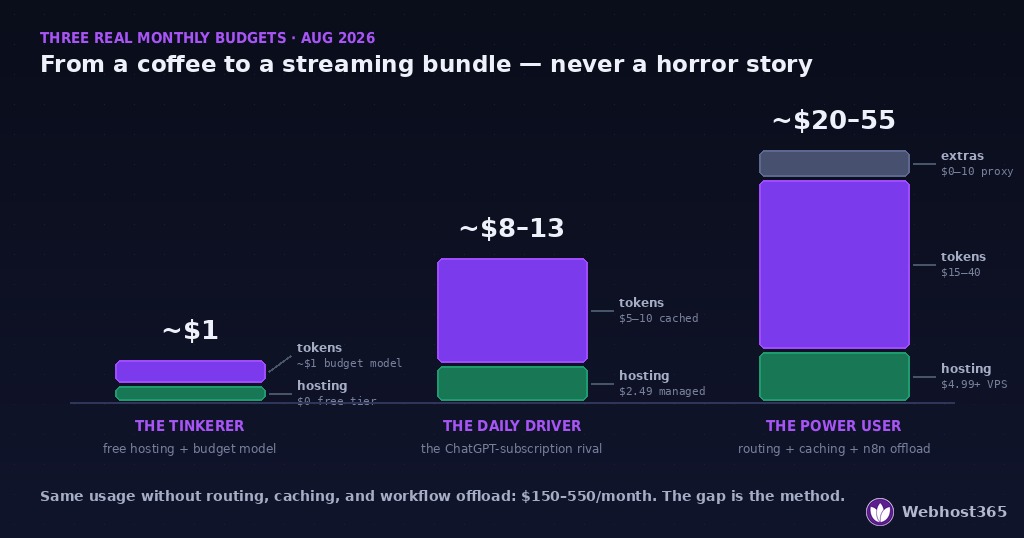
Three observations to close the arithmetic. The Tinkerer’s dollar is real: free hosting plus a budget model means trying a genuine 24/7 agent costs less than a coffee, which is the correct price for finding out whether this technology fits your life. The Daily Driver’s ~$10 is the number to compare against a $20 ChatGPT subscription — for less money you get an agent that’s yours, always on, on your channels, with your memory. And the Power User’s ceiling is a choice, not a fate: the same usage without routing, caching, and workflow offloading runs $150–550 on the worst-case token table above. The gap between those numbers is this article.
Final Thoughts
The skimmer’s version: running OpenClaw costs roughly $3–$30 a month for most people — hosting is $0–$5 and fixed, tokens are the variable bill, and extras should be zero. Model choice moves your token bill by 20–45x, making it the only decision that really matters; caching, context pruning, and offloading repetitive work to n8n handle the rest. Set a provider spend cap on day one and the scary stories can’t happen to you.
The wider point: “AI agent” sounds like an expensive hobby, and the $800-a-month horror stories keep that impression alive. But those bills are always the same recipe — flagship model as default, no caching, no cap, browser automation running unrouted — and every ingredient is optional. Priced deliberately, a genuinely useful 24/7 agent costs less than a streaming subscription, and trying one costs nothing at all. The arithmetic in this guide is the whole secret; the rest is just choosing to do it.
FAQ
Free hosting plus a budget-tier model. A free managed OpenClaw instance costs nothing for the server, and a budget model like DeepSeek V4 Flash (about $0.14 per million input tokens as of August 2026) handles light daily use for roughly a dollar a month. That makes the honest floor for a real, always-on agent about $1/month — not the $0 some guides promise, because tokens are never free, but close enough to make trying it a non-decision.
The hosting can be genuinely free — Webhost365’s free OpenClaw tier requires no credit card and covers the server side entirely. What no host can make free is the model: OpenClaw needs an LLM to think with, and API tokens are billed by your model provider separately. Budget the two independently: hosting $0, tokens from about $1/month on a budget model, scaling with your usage and model choice.
Far more than the message itself. Each call ships the system prompt, tool definitions, memory, and recent history alongside your text, so a ten-word message is typically a 2,500–8,000-token input event depending on how much context your setup carries, plus a few hundred output tokens for the reply. That invisible input overhead — not response length — is what drives agent bills, and it’s why prompt caching and context pruning are the highest-impact optimizations.
Above a threshold, yes. Local inference trades the per-token bill for a bigger server — roughly 8 GB of RAM for a ~4B model, 16 GB for the 7–8B class — which costs about $10–20 more per month than a base agent box. If your monthly token spend consistently exceeds that difference, local wins on cost; heavy users cross the line easily, light users never do. Quality is the caveat: small local models suit high-volume routine traffic best, with an API model kept for judgment-heavy tasks.
Only if you let it. The mechanisms are known — browser automation’s token appetite, context bloat, retry loops, and around-the-clock heartbeats — and all of them are neutralized by one free setting: a hard monthly spend cap or prepaid credit limit at your API provider. With a cap in place, the worst case for any runaway automation is a stopped agent and an error message, never a shocking invoice.
Usually less. A well-configured daily-driver setup — managed hosting at $2.49 plus a routed, cached token bill of $5–10 — lands around $8–13 a month against a $20 subscription. The difference in kind matters more than the difference in price: your agent runs 24/7 on your own server, reaches you on your channels, keeps persistent memory, and executes tasks instead of only chatting.