

The best VPS for Ollama is decided by one spec above all others: RAM. A language model either fits in your server’s memory or it does not, and everything else — how fast it answers, how much you pay — only matters once it fits. Get the memory right and a modest, affordable server runs Ollama well. Get it wrong and the model simply refuses to load, no matter how many CPU cores you bought. So this guide is organised around that single deciding question, mapping every Ollama model size to the VPS plan that actually runs it.
One thing stated plainly up front, because honesty here saves you money: this is about CPU inference, with no GPU involved. That scope is not a limitation to apologise for — it is the right tool for a large share of real work. Small and mid-sized models run perfectly well on CPU for steady, sensible workloads, which is exactly what most teams self-hosting a model actually need. Where a GPU still earns its keep, we will say so clearly rather than pretend a CPU server does everything.
What Ollama Actually Needs From a Server
Ollama is the tool that makes running an open model on your own server almost trivial — one command to install, one to pull a model, one to run it. What it asks of the server underneath comes down to three things, in order of importance.
First, enough RAM to hold the model. The entire model has to live in memory while it runs, so this is the hard gate: too little RAM and the model will not load at all. Second, enough CPU to generate tokens at a tolerable pace. More cores and higher clock speed mean faster responses, though this affects how quickly you get an answer, not whether you get one. Third, fast storage. NVMe matters because models are large files — several gigabytes each — and fast disks load them quickly and swap between them without a long wait.
Notice what is not on that list: a graphics card. A GPU dramatically speeds up inference, but it is not required to run a model, and for the model sizes most businesses need, a well-specified CPU server does the job at a sensible cost. Our budget local LLM guide walks through getting one of these running from scratch. The rest of this article is about choosing the server with the right amount of the one resource that decides everything: memory.
RAM Is the Deciding Spec for a VPS for Ollama
When choosing a VPS for Ollama, RAM is where you start and very nearly where you finish. The reason is simple arithmetic. A model’s memory footprint is roughly its parameter count multiplied by the bytes used per parameter, plus some headroom for the conversation context. The parameter count is the number in the model’s name — the 7 in a 7B model means seven billion parameters. The bytes per parameter depend on quantisation, which is the lever that makes all of this affordable.
Quantisation means running a model at reduced numerical precision. An unquantised model uses about two bytes per parameter, so a 7B model would need roughly 14GB just for the weights. Quantise it to 4-bit precision and that drops to under one byte per parameter — the same 7B model now fits in about 5 to 6GB, with very little loss in quality for most tasks. This is why quantisation is the standard practice for self-hosting: it turns a model that demanded expensive hardware into one that fits a modest box. Throughout this guide, the RAM figures assume sensible 4-bit quantisation, because that is what you will actually run.
So the working rule for a VPS for Ollama is this: take the model size, apply quantisation to get its real memory footprint, then add headroom for context and the operating system, and choose a plan with comfortably more RAM than that total. CPU cores and NVMe speed then tune how fast it feels — and we will come to those — but they never override the memory gate. A server with blazing cores and too little RAM runs nothing. A server with modest cores and enough RAM runs your model every time. Memory first, always.
Ollama Model Sizes Mapped to VPS Plans
This is the table to bookmark. It maps each common Ollama model size, at sensible 4-bit quantisation, to the RAM it needs and the Linux VPS 365 plan that runs it — with an honest note on what each tier feels like in practice. Find your model size, read across, and you have your answer.

| Model size | RAM needed (4-bit) | Linux VPS 365 plan | Price/mo | What to expect |
|---|---|---|---|---|
| 1–3B | 3–4 GB | c4.medium (4 core / 8GB) | $19.99 | Fast and snappy; great for simple tasks |
| 7–8B | 6–8 GB | m4.xlarge (8 core / 16GB) | $79.99 | The sweet spot; capable and usable |
| 13–14B | 10–12 GB | m4.2xlarge (10 core / 32GB) | $159 | Comfortable; noticeably slower per token |
| 30–34B | 20–24 GB | r6.4xlarge (20 core / 64GB) | $319 | Works well for batch; sluggish for live chat |
| 70B | 40–48 GB | r6.6xlarge (28 core / 128GB) | $638 | Batch and low-concurrency only |
A few notes on reading this table honestly. The RAM figures are the model weights plus working headroom for context and the operating system, which is why a 7B model wanting “6–8GB” still lands on a 16GB plan rather than an 8GB one — you always want comfortable margin, not a tight squeeze. The two smaller plans in the ladder, the $4.99 t3.nano and the $9.99 t3.small, run tiny 1–3B models for experiments and learning, but the c4.medium is where real work starts. And the “what to expect” column is the part most guides leave out: a bigger model on a CPU is not just slower in proportion to its size, it falls off more sharply, which is exactly why the next two sections matter more than the table alone.
The Sweet Spot: 7B–8B Models on 16GB
If you read no further, this is the recommendation: for most people, the best VPS for Ollama is the m4.xlarge — 8 cores, 16GB of RAM, $79.99 a month. The reason is that the 7B–8B model class has become genuinely capable, and 16GB is exactly the amount of memory that runs one comfortably with room for real conversations.
Modern 7B and 8B models are not toys. They handle chat, summarisation, drafting, structured extraction, classification, and retrieval for a knowledge base with a competence that would have required a far larger model a year or two ago. On an 8-core server they answer at a pace that feels conversational for a single user or a small team — not instant, but not a frustrating wait either. And 16GB leaves headroom above the model’s 6–8GB footprint for a generous context window and the rest of the system, so nothing is running on the edge.
Where do these models tap out? They are weaker at long chains of careful reasoning, at holding very large contexts, and at the broad world knowledge that the largest frontier models carry. If your task is “answer questions about my documents,” “route this ticket,” or “summarise this thread,” a 7B–8B model on the m4.xlarge will likely surprise you. If your task is “reason through a complex multi-step problem from scratch,” you will feel the ceiling — and the honest move there is often the API, as our cost comparison lays out. For the enormous middle ground of practical work, the 16GB sweet spot is the plan to buy.
Going Bigger: 13B, 30B, and 70B on a CPU
You can run larger models on a CPU VPS, and the ladder goes all the way up — but this is where honesty earns its keep, because the experience changes as you climb.
A 13B–14B model on the 32GB m4.2xlarge is the last comfortable step. It fits with headroom and runs at a pace that is slower than the 7B sweet spot but still perfectly workable for a single user or background tasks. Above that, the trade-offs sharpen. A 30B-class model quantised to 4-bit wants the 64GB r6.4xlarge, and while it loads and runs, token generation on CPU is slow enough that it suits batch jobs and low-concurrency automation far better than anyone sitting waiting for a reply. A quantised 70B model needs the full 128GB r6.6xlarge simply to fit, and there the same rule applies twice over: it is a tool for overnight processing and occasional queries, not for serving a room full of users in real time.
Here is the line we will not blur: real-time, many-user chat with large models is a GPU workload, and we do not sell GPUs. A CPU server is the right, economical choice for small-to-mid models and steady, patient workloads. It is the wrong choice if your plan is to serve a 70B model to hundreds of concurrent users with snappy responses — no amount of cores fixes that, and we would rather tell you so now than sell you a box that disappoints. If your needs genuinely exceed the published ladder, we also build custom servers beyond 128GB to spec, but the same physics of CPU inference still applies. Match the model to the work, and the CPU path serves a remarkable amount of it well.
CPU, NVMe, and the Specs That Affect Speed
Once RAM has decided which models you can run, the other specs decide how fast they feel. They never change what is possible, only what is pleasant.
CPU cores and clock speed set your token generation rate — how quickly words appear in the response. More cores let the model crunch its math in parallel, so the 8 cores on the m4.xlarge generate noticeably faster than the 4 on the c4.medium running the same model. The AMD processors across the Linux VPS 365 range run at a high clock speed, which helps single-threaded portions of the work. NVMe storage governs a different kind of speed: how quickly a model loads from disk into memory the first time you run it, and how fast you can switch between models. A multi-gigabyte model loads in seconds from NVMe rather than the long wait older disks would impose. The 10G network and free backups round out the picture — useful for pulling models quickly and not losing your setup — but they sit well behind RAM and CPU in deciding the Ollama experience.
Installing Ollama on Your VPS
Getting Ollama running is genuinely a few commands. The install is a single script:
curl -fsSL https://ollama.com/install.sh | shThen pull and run a model — a 7B-class model is the sensible first choice on a 16GB box:
ollama pull llama3.1:8b
ollama run llama3.1:8b
That gives you a working model answering at the command line. The official models and their sizes are listed on ollama.com, so you can match a pull to the RAM your plan has.
One rule matters more than any other once it works: do not expose Ollama’s port directly to the internet. By default it listens locally, and it should stay that way, reached only through a controlled front door. Put a reverse proxy in front of it to add HTTPS and authentication, exactly as you would for any service you do not want strangers calling. With the model running and safely fronted, you have the foundation for the things worth building on it — a self-hosted AI agent or a RAG knowledge base both sit naturally on top of an Ollama server.
Picking the Best VPS for Ollama: A Decision Path
Choosing the right VPS for Ollama is a short chain of questions, each one narrowing the answer. Walk it in order and you land on a single plan.
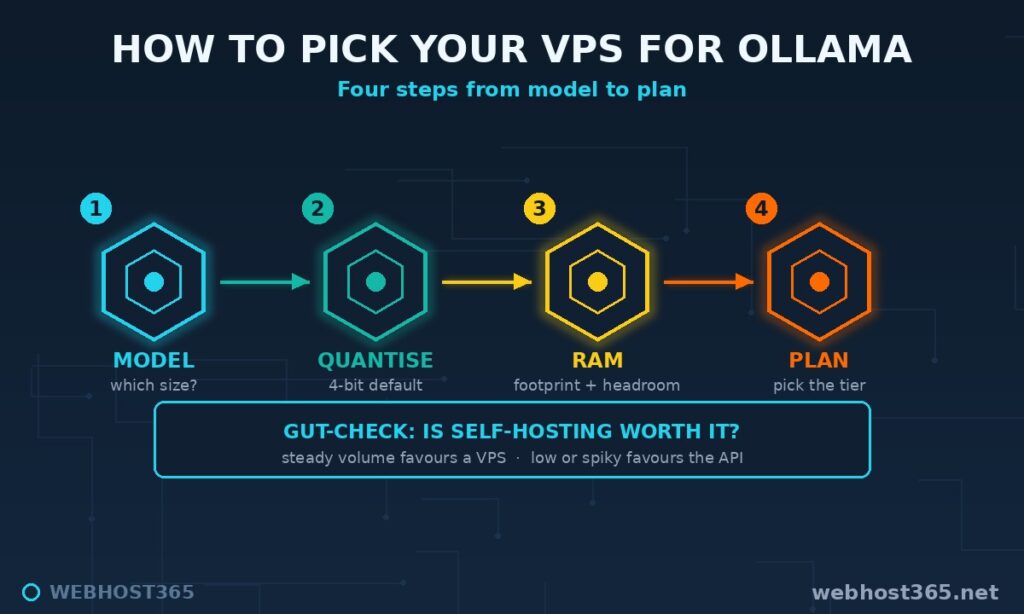
Start with the model. Which model does your task actually need — a small 3B, a capable 7–8B, or something larger? Be honest here, because most tasks are served by a 7–8B model, and reaching higher costs real money for real slowdown. Next, the quantisation: assume 4-bit, the sensible default, which sets the model’s true memory footprint. That footprint plus headroom gives you a RAM target, and the RAM target points directly at a plan from the ladder. Finally, sanity-check the whole thing against cost. If the workload is small or spiky, our API-versus-self-hosting break-even guide may show that an API is cheaper than any server — self-hosting earns its place at steady, predictable volume. Model, then quantisation, then RAM, then plan, with cost as the gut-check: four steps to the box you should buy.
Common Mistakes Choosing a VPS for Ollama
Most disappointing Ollama setups trace back to a handful of avoidable errors when choosing the VPS for Ollama.
Undersizing RAM is the big one — pick a plan that barely fits the weights and the model fails to load the moment context grows. Always leave headroom. Forgetting context headroom is the subtler version of the same mistake: the model fits, but a long conversation pushes it over the edge. Expecting GPU speed on a CPU is a mistake of expectation rather than configuration — a CPU server runs the model, it does not run it at graphics-card pace, and going in clear-eyed prevents disappointment.
Exposing the Ollama port to the open internet is a security error that turns a private tool into a public one; keep it behind a reverse proxy. Choosing an unquantised model when a 4-bit version fits the same box wastes most of your RAM for quality gains you will rarely notice. And over-buying works against you too — paying for a 128GB server to run a 7B model is money spent on memory that sits empty. Match the plan to the model, not to your ambitions.
Local models are one side of a trade-off worth pricing out: the API-versus-local cost crossover shows the monthly spend at which a bigger server beats per-token billing. And if the same box is going to carry an agent and a workflow engine alongside Ollama, running an agent and n8n beside it covers how to keep all three services private on one machine.
Frequently Asked Questions
For most users it is a plan with 16GB of RAM, such as the m4.xlarge, which comfortably runs a capable 7–8B model with room for context. Smaller models run on 8GB plans, while larger models need 32GB and up. RAM is the spec that decides the right plan.
It depends on the model. At 4-bit quantisation, a 3B model needs around 4GB, a 7B model 6–8GB, a 13B model 10–12GB, and a 70B model 40GB or more. Always choose a plan with comfortable headroom above the model’s footprint for context and the operating system.
Yes. Ollama runs models on CPU, and for small-to-mid models this is genuinely viable. CPU inference suits steady, lower-concurrency workloads; a GPU only becomes necessary for serving large models to many users in real time.
A VPS can run anything that fits in its RAM — from tiny 1–3B models on an 8GB plan up to quantised 70B models on a 128GB plan. The larger the model, the slower it generates on CPU, so big models suit batch work more than live chat.
For a single user or a small team running 7–8B models, yes — responses arrive at a conversational pace. Speed drops as models grow, so 30B and 70B models on CPU are better suited to background and batch tasks than to instant replies.
Yes, a quantised 70B model fits on a 128GB plan, but expect slow generation on CPU. It is practical for batch processing and occasional queries, not for serving fast responses to many concurrent users, which remains a GPU workload.
Keep Ollama listening locally and place a reverse proxy in front of it to add HTTPS and authentication. Never expose its port directly to the internet, and apply the same firewall and update discipline you would give any production service.
Conclusion
Choosing the best VPS for Ollama comes down to one honest chain: match the model to the RAM it needs, match the RAM to the plan, and stay realistic about CPU speed. A 7–8B model on a 16GB server handles a remarkable share of real work, and that is the plan most readers should buy. The rest of the ladder is there for when your model genuinely outgrows it — and for when it does not, smaller is cheaper and faster.
Linux VPS 365 starts at $4.99/mo, with the 16GB m4.xlarge at $79.99 as the everyday Ollama pick and tiers scaling to 128GB, plus custom builds beyond. Choose your model first, let it tell you the RAM, and the right plan picks itself.