
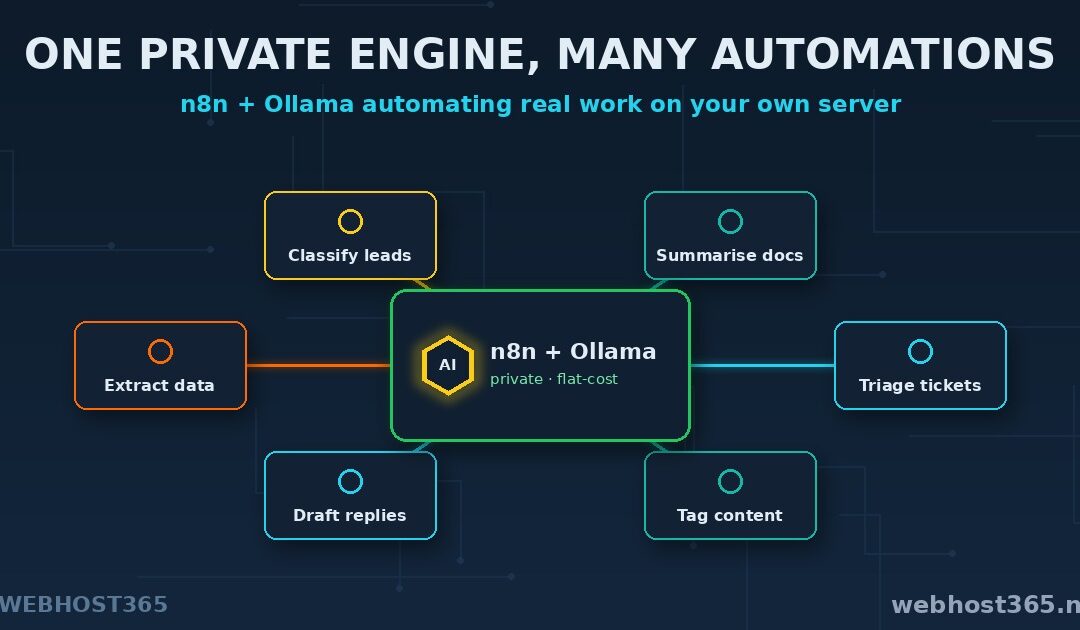
n8n AI workflows let you automate real work using a language model that runs on your own server: n8n handles the steps, Ollama supplies the intelligence, and nothing you process ever leaves your box. A form submission gets summarised, a support email gets categorised and routed, a messy spreadsheet gets cleaned and tagged — automatically, by a model you host yourself. It is the same automation power the cloud platforms sell, except private and running on a flat monthly bill instead of a per-task meter.
That combination is what makes this worth building. Automation tools are common and local AI models are now genuinely capable; putting the two together on one server is the step most people have not taken yet. This guide shows how — connecting n8n to a local Ollama model, building your first working automation, and doing it securely — so the whole pipeline, from trigger to AI decision to action, stays on infrastructure you control.
What n8n AI Workflows Actually Are
To see why this is powerful, separate the two halves. n8n is a visual automation tool. You build workflows on a canvas by connecting nodes: a trigger to start things off, steps in the middle to transform or check data, and actions at the end that do something useful. If something happens here, do that there — n8n has done this for years, across hundreds of services, without anyone writing orchestration code.
An AI workflow is simply one where a step in that chain calls a language model. Instead of a rigid rule, the workflow asks a model to read, reason, classify, summarise, or decide, and then continues based on the answer. This is the shift that turned automation tools into something far more capable: a workflow can now handle the fuzzy, language-shaped tasks that rigid rules never could — understanding what a customer email is actually asking, pulling the key facts out of a document, deciding which of five categories a request belongs in.
Here is the part that defines this guide. In most AI automation setups, that model step calls a cloud API, sending your data out to a third party on every run. We are going to point it at your own Ollama model instead, running on the same server as n8n. The reasoning happens locally. The workflow stays whole, and it stays yours.
Why Run AI Workflows on Your Own Server
Three reasons make the self-hosted approach worth the small extra setup, and they line up exactly with why people self-host anything.
Privacy comes first, and it is bigger here than with a simple chat tool. An automation does not just handle one conversation — it processes a stream of your real business data, often unattended: every support ticket, every uploaded document, every lead. Run that through a cloud AI step and all of it leaves your network on every execution. Run it through a local model and the entire pipeline is private end to end — the trigger data, the model’s reasoning, and the result all stay on your server.
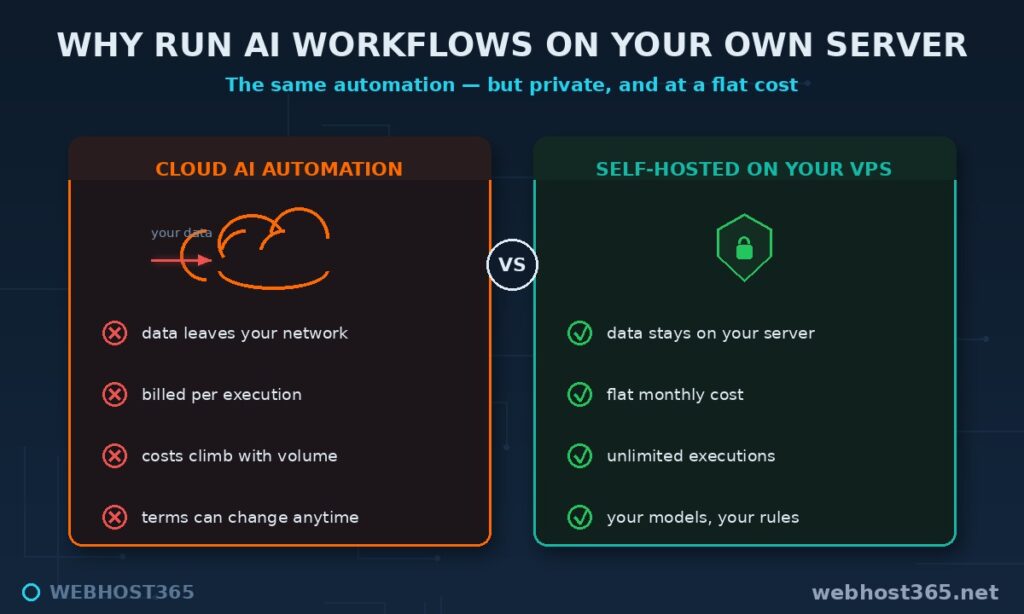
Cost is the second reason, and it compounds with volume. Cloud automation and AI APIs both bill per use, so a busy workflow that runs thousands of times a month turns into a bill that climbs with your success. A self-hosted setup runs on a flat VPS cost that does not move whether the workflow fires ten times a day or ten thousand. We worked through exactly where that crossover falls in our guide to self-hosted versus API cost, and automation pushes the case harder because the run counts are so high.
Control is the third. You choose the model, you set the rules, and no platform can change pricing, throttle you, or alter terms underneath a workflow your business depends on. It is the same ownership argument behind running your own private ChatGPT — extended from chatting with a model to putting it to work.
What You Need to Build n8n AI Workflows
Three things, and the list is short because n8n itself is light.
The first is a VPS sized for both n8n and the model on one box. n8n barely registers — it sips resources — so the model is what decides your plan, exactly as it did for a standalone Ollama setup. The familiar sweet spot applies here too: the 16GB m4.xlarge at $79.99 a month comfortably runs a capable 7–8B model with n8n alongside it and room to spare. Smaller experiments fit on less; larger models want more, and the full mapping is in our best VPS for Ollama guide. The second is Docker, which runs both n8n and its database cleanly in containers. The third is Ollama already installed with a model pulled — the engine from the previous guides, doing the same job here.
If you would rather skip the server management entirely, our n8n Hosting plans run a managed instance for you; this guide takes the self-managed path, where you control every layer.
Step 1: Get n8n and Ollama Running Together
Ollama you already have from the earlier guides, listening locally on port 11434. Now add n8n beside it. The clean way is Docker Compose, which brings up n8n with a PostgreSQL database for durable storage so your workflows and credentials survive restarts. A minimal compose file looks like this:
services:
  postgres:
    image: postgres:16
    restart: always
    environment:
      POSTGRES_USER: n8n
      POSTGRES_PASSWORD: change-me
      POSTGRES_DB: n8n
    volumes:
      - pgdata:/var/lib/postgresql/data

  n8n:
    image: n8nio/n8n
    restart: always
    ports:
      - "5678:5678"
    environment:
      DB_TYPE: postgresdb
      DB_POSTGRESDB_HOST: postgres
      N8N_ENCRYPTION_KEY: a-long-random-string
    volumes:
      - n8ndata:/home/node/.n8n

volumes:
  pgdata:
  n8ndata:
Bring it up with docker compose up -d, and n8n is live on port 5678. Two values matter for later: set a real POSTGRES_PASSWORD, and set a long, random N8N_ENCRYPTION_KEY and save it somewhere safe — it encrypts your stored credentials, and losing it makes them unrecoverable. The full n8n deployment detail, including upgrades and reverse-proxy setup, is in our self-hosted n8n guide; the Ollama side is covered in the VPS for Ollama guide.
Step 2: Connect n8n to Your Local Ollama Model
With both running on the same server, you connect them inside n8n. In the editor, add an Ollama model credential and point it at your local Ollama. The one detail that trips everyone is the address n8n uses to reach Ollama, because n8n is inside a container and Ollama is on the host.
The base URL to use is:
http://host.docker.internal:11434That host.docker.internal name is how a container reaches a service running on the host machine, the same pattern Open WebUI needed. Enter it as the Ollama base URL, and n8n can now see the models you have pulled. Select your 7–8B model from the list, save the credential, and the connection is made. The official node reference lives in the n8n documentation, and the model side at ollama.com if you need to pull a different model first.
Step 3: Build Your First AI Workflow
Now make it do something real. A classic first workflow takes an incoming item, asks the local model to make sense of it, and routes the result — useful immediately and a template for everything after.
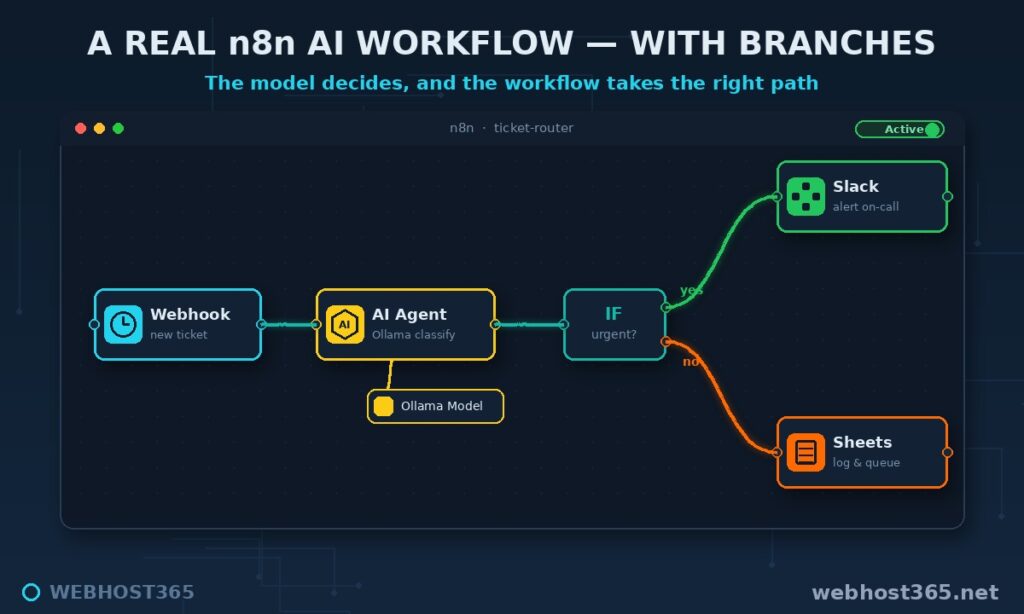
Picture support-email triage. The trigger is a new message arriving. The next node passes the email text to your Ollama model with a simple instruction: classify this as billing, technical, or sales, and summarise it in one line. The model reads the message and returns a category and summary, locally, with nothing sent outside. A final action node uses that output — filing the ticket under the right label, posting a one-line summary to a team channel, or writing a row to a sheet. Three nodes, and an inbox that sorts itself.
That shape — trigger, then a local-model reasoning step, then an action — is the backbone of nearly every AI workflow you will build. Swap the trigger for a form, a webhook, or a schedule; swap the action for whatever system you use; change the instruction to fit the task. The engine in the middle stays the same: your own model, reasoning privately, inside an automation you control.
Practical n8n AI Workflow Recipes
The triage example is one shape; here is a menu of high-value n8n AI workflows worth building, each a small variation on trigger, local model, action.
Support ticket triage and routing: classify incoming messages by topic and urgency, then assign or escalate automatically. Document summarisation: feed long PDFs, contracts, or meeting transcripts to the model and get a one-paragraph summary filed alongside the original. Lead classification: score and tag incoming form submissions so hot leads surface immediately. Data extraction: pull structured fields — names, dates, amounts, order numbers — out of messy free text and write them to a database. Draft replies for review: have the model write a first-draft response that a human approves before it sends, keeping the speed without losing the oversight. Content tagging and enrichment: categorise blog posts, products, or records and fill in missing metadata.
Every one of these runs on the same private foundation. The data never leaves your server, the executions are unlimited, and the only cost is the VPS the whole thing sits on. Start with the one that removes your most repetitive task and grow from there.
Going Further: AI Agents and RAG in n8n
The recipes above use the model as a single smart step. n8n can go further, and this is where it earns the “AI orchestration” description.
The AI Agent node turns the model from a one-shot responder into something that can take multiple steps to reach a goal. An agent has access to tools — other nodes it can choose to call — and memory of the conversation so far, so it can reason about a request, decide which tool to use, act, and repeat until the job is done. Driven by your local Ollama model, that entire agent loop runs privately, and our self-hosted AI agent guide goes deep on the pattern.
The second capability is retrieval-augmented generation. Using a vector store node alongside Ollama embeddings, an n8n workflow can answer from your own documents rather than the model’s general training — ingest your files once, then let workflows query them on demand. It is the same approach our self-hosted RAG guide builds out in full, here available as nodes on the same canvas as the rest of your automation. Between agents and RAG, n8n becomes the place where your private model actually does work, not just answers questions.
Keeping Self-Hosted AI Workflows Secure and Reliable
A tool that processes your business data unattended deserves real care, and four habits cover most of it.
Never expose n8n or Ollama directly to the internet. n8n holds your credentials and runs your automations; it belongs behind a reverse proxy that adds HTTPS and a login, with the raw ports closed to the outside world. Back up the right things together: your PostgreSQL database holds the workflows, but the n8n encryption key decrypts the credentials inside them — back up both, because the database alone is useless without the key. Watch your memory: n8n and the model share one box, so size for the model plus headroom and keep an eye on usage when workflows run in parallel. And keep both n8n and Ollama patched, because self-hosting means the security updates are now your responsibility — a discipline worth building into a monthly routine.
None of this is heavy, but skipping it is how a convenient automation becomes a liability. Treat the instance like the production service it is.
Common Mistakes Building n8n AI Workflows
A handful of errors account for nearly every stuck n8n AI workflow, and all are quick to avoid.
The most common is n8n failing to reach Ollama — usually the base URL, which must be host.docker.internal:11434 rather than localhost, because the n8n container and the model are in different places. The second is undersizing RAM, where the model and n8n together exhaust memory and the workflow stalls; size for the model with comfortable headroom. The third is exposing services to the internet instead of putting them behind a proxy. The fourth catches people badly: forgetting to back up the encryption key, so a restore brings back workflows whose credentials can no longer be decrypted. And the fifth is expecting GPU-speed reasoning from a CPU model inside a high-volume workflow — for heavy real-time throughput, keep the model task light or accept that batches take a little longer. Sidestep those five and your automations run quietly for months.
If you’re adding an AI agent to this stack rather than only workflows, the secure one-server OpenClaw and n8n architecture shows how to run both on a single box with the automation engine bound to localhost — and the running-cost math explains why moving repetitive work into n8n is the cheapest optimization available to an agent setup.
Frequently Asked Questions
They are automations built in n8n where one or more steps call a language model to reason, classify, summarise, or decide. Instead of rigid rules, the workflow uses AI to handle language-shaped tasks, then continues based on the model’s answer. When the model is self-hosted, the entire workflow runs privately on your own server.
Yes. n8n connects to a local Ollama model just as easily as to a cloud API, so your workflows can run entirely on your own infrastructure. You point n8n at your local Ollama address and select a model you have pulled, and no data leaves your server.
No. A 7–8B model runs on a CPU server with enough RAM, which suits most workflow tasks like classification, summarisation, and extraction. A GPU only becomes necessary for high-volume, real-time reasoning at speed.
Add an Ollama credential in n8n and set the base URL to http://host.docker.internal:11434, which lets the n8n container reach Ollama running on the host. Then select a pulled model, and your workflows can call it. The host address is the detail people most often get wrong.
The n8n software is free to self-host with unlimited executions, so your only cost is the VPS it runs on. Compared with cloud automation that bills per task or per execution, this flat cost is what makes high-volume workflows affordable.
A 16GB plan, such as the m4.xlarge at $79.99 a month, comfortably runs n8n alongside a capable 7–8B model. n8n itself is light, so the model’s RAM requirement is what sets the plan; larger models need 32GB and up.
Yes. n8n’s AI Agent node gives the model tools and memory so it can take multi-step actions toward a goal, and it works with a local Ollama model just as it does with cloud APIs. This lets you run autonomous, tool-using agents entirely on your own infrastructure.
Conclusion
The pieces fit simply: n8n orchestrates the steps, Ollama supplies the reasoning, and your VPS keeps the whole pipeline private. The result is automation that is genuinely yours — unlimited runs on a flat bill, your data never leaving your server, and a model you control sitting at the centre of it. Start with one workflow that removes a repetitive task, and let it grow from there.
The 16GB Linux VPS 365 m4.xlarge at $79.99/mo runs n8n and a capable model together comfortably, with plans from $4.99/mo to begin smaller. If you would rather not manage the stack, our n8n Hosting plans handle it for you. Pair this with the best VPS for Ollama sizing guide and the self-hosted versus API cost comparison, and you have the full self-hosted AI picture: what to run it on, what it costs, and how to put it to work.