
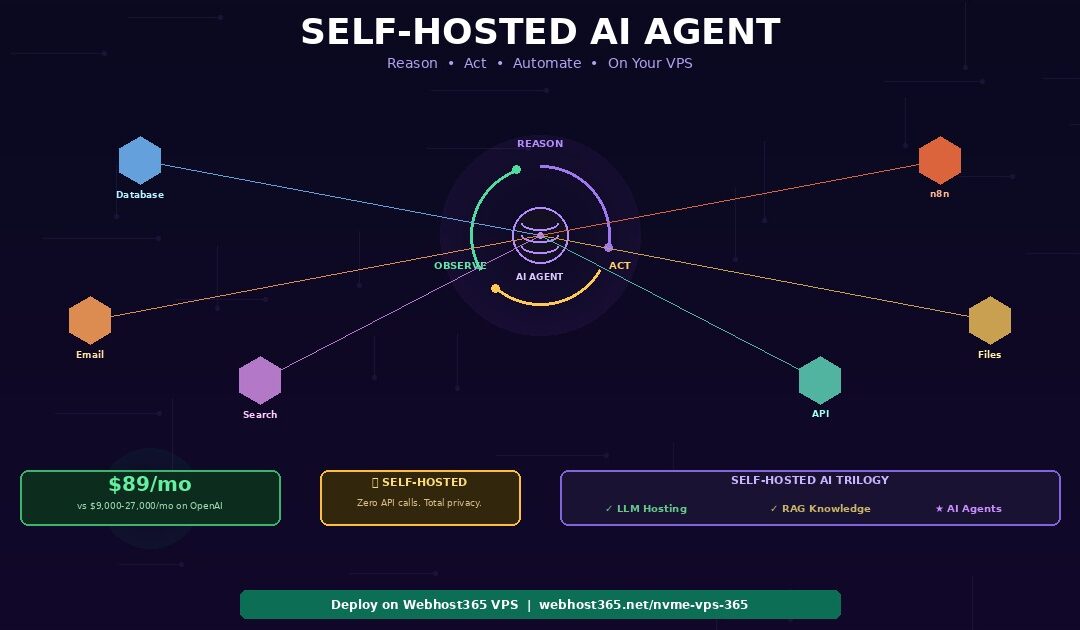
A self-hosted AI agent runs on your own VPS, reasons through multi-step problems, calls external tools like databases and APIs, and completes complex tasks autonomously — without sending a single request to OpenAI or any cloud AI provider. The complete stack runs on a Webhost365 Linux VPS from $29 per month: Ollama serves the language model for reasoning and decision-making, LangGraph orchestrates the agent’s think-act-observe loop, custom tool functions connect the agent to your databases, APIs, file systems, and web services, ChromaDB provides persistent memory across conversations, and FastAPI exposes the agent as a production API endpoint.
Unlike a chatbot that simply answers questions, an AI agent decides what to do, which tools to use, and in what order — then executes the plan and adapts based on results. A customer support agent retrieves order data, checks shipping status, drafts a response, and escalates to a human when needed. A research agent searches documents, cross-references sources, and generates a summary with citations. A business automation agent reads incoming emails, categorises them, updates your CRM, and triggers follow-up workflows via n8n.
Costing
On the OpenAI Assistants API, each of these tasks consumes 20,000 to 60,000 tokens at $0.30 to $0.90 per task. At 1,000 tasks per day, that adds up to $9,000 to $27,000 per month. Self-hosted on a $89/mo VPS, the same workload runs at zero per-task cost. This guide walks through the complete deployment: how agents differ from chatbots, the self-hosted stack, VPS sizing, step-by-step code, integration with n8n for business automation, and production patterns that make agents reliable enough for real business use.
If you have not yet set up Ollama, start with our companion guide on how to host a private local LLM on a budget VPS. If you need your agent to answer questions from your documents, see our guide on building a self-hosted RAG system. This article is the third and final piece of the self-hosted AI trilogy — it adds the action layer on top of the foundation (LLM) and knowledge (RAG) layers.
AI agent vs chatbot — what makes a self-hosted AI agent different?
A chatbot generates text responses to questions. An AI agent reasons about problems, creates plans, executes actions using external tools, evaluates results, and adjusts its approach — autonomously completing multi-step tasks that would normally require a human sitting at a keyboard.
The chatbot limitation
A chatbot — including a sophisticated RAG chatbot — receives a question, optionally retrieves relevant context from a document database, and generates one response. The interaction is fundamentally single-turn: question in, answer out. Even the most advanced RAG systems are reactive rather than autonomous. They answer “what is our refund policy?” but they cannot process a refund, check order status, email the customer, and update the CRM.
That second category of work requires reasoning about what needs to happen next, deciding which tool to use at each step, executing the tool, interpreting the result, and repeating until the task is complete. Those capabilities define an AI agent. Consequently, the jump from chatbot to agent is not about better language models — it is about adding a reasoning loop and tool execution capabilities on top of the same model.
The Reason-Act-Observe loop
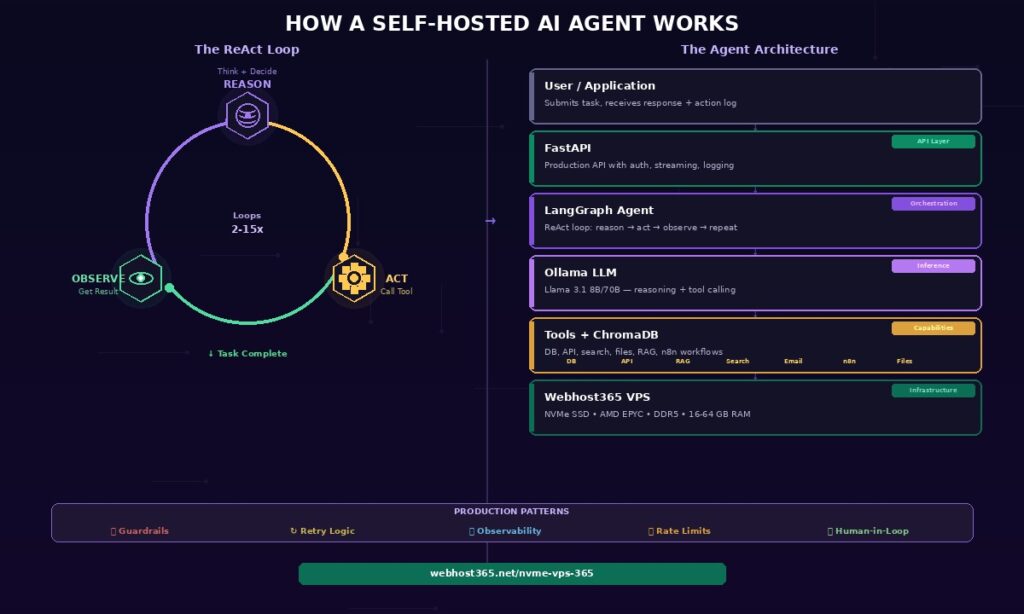
Every self-hosted AI agent operates on the ReAct (Reasoning + Acting) pattern, which cycles through three stages until the task is complete.
Reason. The LLM analyses the current situation — what the user asked, what the agent already knows, and what information is still missing. Based on this analysis, the model decides the next action: which tool to call, with what parameters, and why this step moves the task forward.
Act. The agent calls the chosen tool function. This might be querying a database, making an API call to a shipping provider, reading a PDF document, running a calculation, searching the web, or triggering an n8n workflow. The tool executes outside the LLM and returns a concrete result.
Observe. The agent receives the tool’s output and incorporates it into its reasoning context. The LLM now has new information it did not have before. With this updated context, the loop returns to the Reason stage, where the model decides whether the task is complete or whether another action is needed.
A simple task might loop 2 to 3 times. A complex research task might loop 10 to 15 times. Each loop iteration consumes one LLM inference call, which is precisely why agent costs on paid APIs scale linearly with task complexity — and why self-hosting becomes dramatically cheaper at scale.
What agents can do that chatbots cannot
The difference between a chatbot and an agent becomes concrete when you look at real business tasks that require multiple steps and multiple tool interactions.
A customer support agent receives a complaint, looks up the customer’s order in the database, checks the shipping provider’s tracking API for delivery status, searches the company knowledge base for the relevant return policy, drafts a personalised response based on all retrieved information, and escalates to a human supervisor if the case falls outside standard policy boundaries.
A research agent accepts a topic, searches your document database via RAG, queries the web for recent developments, cross-references claims across multiple sources, identifies contradictions or gaps, and produces a structured summary with source citations for each claim.
A DevOps monitoring agent watches server metrics, detects an anomaly in CPU usage, queries the application logs to identify the cause, restarts the problematic service, verifies the fix resolved the issue, and sends an alert summary to the engineering Slack channel.
A sales pipeline agent receives a new lead from a form submission, enriches the lead data by querying your CRM, scores the lead based on defined criteria, drafts a personalised outreach email, and triggers an n8n workflow to schedule a follow-up reminder in three days.
Each of these tasks is impossible with a single chatbot response. They require the Reason-Act-Observe loop running across multiple steps, each building on the results of the previous step. The LLM provides the reasoning. The tools provide the capability. Together, they produce autonomous task completion.
The real cost of self-hosted AI agents vs OpenAI
Agents are dramatically more expensive than chatbots on pay-per-token APIs because they make multiple LLM calls per task. A single chatbot query uses 3,000 to 4,000 tokens. A self-hosted AI agent task that reasons through 5 steps, calls 3 tools, and synthesises a final answer uses 20,000 to 60,000 tokens. At moderate scale, this difference transforms manageable API bills into five-figure monthly invoices.
| Agent workload | OpenAI Assistants API | Self-Hosted VPS (Webhost365) | Monthly savings |
|---|---|---|---|
| 100 tasks/day (small team) | $900–2,700/mo | $29/mo — VPS 16 GB | $870–2,670 |
| 500 tasks/day (department) | $4,500–13,500/mo | $49/mo — VPS 32 GB | $4,450–13,450 |
| 1,000 tasks/day (company-wide) | $9,000–27,000/mo | $89/mo — VPS 64 GB | $8,910–26,910 |
| 5,000 tasks/day (SaaS product) | $45,000–135,000/mo | $249/mo — Bare Metal | $44,750–134,750 |
These numbers assume GPT-4o pricing of $2.50 per million input tokens and $10 per million output tokens, with an average of 40,000 tokens per agent task across 5 reasoning steps, 3 tool calls, and a synthesis response. The range reflects simple versus complex tasks. Self-hosted costs use Ollama with Llama 3.1 8B through 70B depending on the VPS tier.
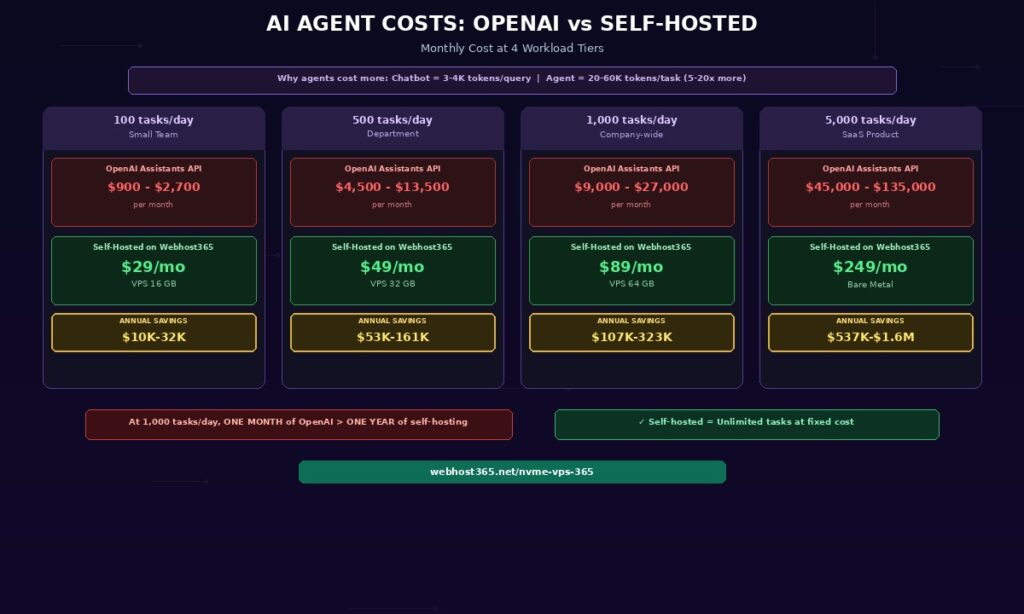
The key insight is striking. At 1,000 tasks per day on OpenAI, the monthly API cost exceeds the entire annual cost of self-hosting. The annual savings at this workload range from $107,000 to $323,000. Even at the smallest tier of 100 tasks per day — a single team using an agent for internal workflows — self-hosting saves $10,000 to $32,000 per year. At SaaS scale of 5,000 tasks per day, the annual savings reach $537,000 to $1.6 million.
These calculations also ignore a hidden cost advantage of self-hosting. On OpenAI, every retry (failed tool call, ambiguous response that needs re-reasoning) consumes additional tokens and additional cost. On a self-hosted VPS, retries cost nothing because the VPS price is fixed regardless of how many inference calls Ollama processes.
The self-hosted AI agent stack — 5 components
Building a self-hosted AI agent requires five components working together. Each is open-source, runs on a single Linux VPS, and replaces a paid cloud service. Together they provide the same capabilities as OpenAI’s Assistants API at a fixed monthly cost.
Ollama — the reasoning engine
Ollama provides the LLM that powers the agent’s reasoning, tool selection, and response generation. For agent workloads specifically, the model must support tool calling — the ability to output structured function calls rather than just text. Most modern instruct-tuned models support this, including Llama 3.1, Mistral, Qwen 2.5, and their variants.
For simple tool-use agents that handle 2 to 3 reasoning steps, Llama 3.1 8B with 4-bit quantization works well on a 16 GB VPS. It calls tools accurately, follows instructions reliably, and responds in 2 to 5 seconds per reasoning step. For complex multi-step agents that require 8 or more reasoning steps with nuanced decision-making, Llama 3.1 70B on a 64 GB VPS or Bare Metal server delivers significantly better tool-calling accuracy and reasoning depth. The larger model makes fewer mistakes when deciding which tool to call and when to stop reasoning — errors that compound across many steps.
If Ollama is not yet installed on your VPS, see our guide on hosting a private LLM on a budget VPS for the complete setup walkthrough.
LangGraph — the agent orchestration framework
LangGraph is the current standard for building stateful AI agents in Python. It replaces the deprecated LangChain AgentExecutor with a graph-based architecture that provides significantly more control over the agent’s behaviour.
In LangGraph, each step of the agent’s workflow is a node in a directed graph. Nodes represent reasoning steps, tool calls, observation processing, or decision points. Edges define the flow between nodes based on the agent’s decisions — if the agent decides to call a tool, execution flows to the tool node; if the agent decides the task is complete, execution flows to the response node. This graph structure naturally implements the Reason-Act-Observe loop as a cycle in the graph.
LangGraph handles three critical capabilities that raw LLM calls cannot. First, state management — it remembers what the agent has done across all steps within a single task. Second, conditional branching — the flow path changes dynamically based on tool results and agent decisions. Third, cycle support — the ReAct loop runs as many times as needed, with the graph handling iteration automatically.
Alternative frameworks exist. CrewAI is simpler for multi-agent chat scenarios but less flexible for custom workflows. AutoGen excels at multi-agent debate and collaboration but has a steeper learning curve. LangGraph hits the sweet spot of flexibility, documentation quality, and production readiness for most self-hosted agent deployments.
Tool functions — giving the agent hands
Tools are Python functions that the agent can call to interact with the outside world. Each tool has a name, a description that the LLM reads when deciding which tool to use, a typed input schema, and execution logic that performs the actual work. The agent’s power is directly proportional to the quality and variety of its tools — the LLM provides reasoning, while the tools provide capability.
Common tools for business agents include a database query tool that executes SQL against your database and returns structured results, a web search tool that searches the internet using DuckDuckGo or Tavily, a file reader tool that reads and parses PDFs, CSVs, or Word documents, an API caller tool that makes HTTP requests to external services like your CRM, shipping provider, or payment processor, a calculator tool for math operations, a RAG tool that queries your ChromaDB knowledge base to answer document-grounded questions, and an n8n trigger tool that kicks off an n8n workflow to send emails, update spreadsheets, post to Slack, or create support tickets.
The tool descriptions matter enormously. The LLM decides which tool to call based on the text description you provide. A vague description like “handles database stuff” produces poor tool selection. A precise description like “Queries the orders database by order_id and returns order status, shipping tracking number, and customer email” produces accurate tool selection on nearly every call.
ChromaDB — persistent agent memory
Agents need memory to be useful across sessions. Short-term memory — the current conversation and the steps taken so far in the current task — lives in the LangGraph state object. Long-term memory — facts the agent has learned across many interactions — persists in ChromaDB.
After each conversation, the agent extracts key facts and stores them as embeddings in ChromaDB. “Customer X prefers email over phone.” “Server Y was restarted on Tuesday.” “The Q4 report is stored in the finance shared drive.” Before each new conversation, the agent retrieves relevant memories based on the user’s identity, the topic, or the task context.
This transforms a stateless agent that forgets everything between sessions into one that accumulates knowledge with every interaction. The setup uses the same ChromaDB configuration from our self-hosted RAG guide — if you have already deployed RAG, your agent’s memory infrastructure is already in place.
FastAPI — the production API layer
FastAPI wraps the agent in an HTTP API so other systems can submit tasks and receive results programmatically. The core endpoint accepts a POST request with a task description and returns the agent’s complete action log and final result as structured JSON.
For agent workloads specifically, streaming support matters more than it does for chatbots. A chatbot streams tokens as they generate. An agent streams reasoning steps as they execute — “Querying database… Found order #1234… Checking shipping status… Tracking shows delivered… Drafting response…” This real-time progress feed lets frontend applications show users what the agent is doing at each stage rather than presenting a blank loading screen for 15 to 30 seconds.
The FastAPI deployment pattern is identical to the RAG article: uvicorn behind Nginx, systemd service for auto-restart, HTTPS via Let’s Encrypt. For a complete Python deployment walkthrough, see our guide on how to deploy a Python application.
VPS sizing guide for self-hosted AI agents
Agent workloads are more resource-intensive than chatbot or RAG workloads because each task triggers multiple LLM inference calls. A 5-step agent task on a 7B model makes 5 separate LLM calls plus tool executions, all of which consume CPU, RAM, and I/O simultaneously. The VPS must handle the LLM, ChromaDB, tool execution processes, and FastAPI concurrently.
| Agent complexity | Example use case | Recommended model | RAM needed | Webhost365 tier |
|---|---|---|---|---|
| Simple tool-use (2-3 steps) | FAQ bot with database lookup | Llama 3.1 8B (4-bit) | 12-16 GB | VPS 365 16 GB — $29/mo |
| Multi-step reasoning (5-8 steps) | Customer support agent with CRM | Llama 3.1 8B or Mistral 7B | 16-24 GB | VPS 365 24 GB — $49/mo |
| Complex reasoning + many tools (8-15 steps) | Research agent with RAG + web search | Llama 3.1 70B (4-bit) or 13B | 32-48 GB | VPS 365 32-64 GB — $89/mo |
| Multi-agent system (2+ agents) | Sales pipeline automation | Multiple models in parallel | 48-64 GB+ | Bare Metal 64 GB+ — $249/mo |
Choosing the right starting point
Start with a 16 GB VPS running Llama 3.1 8B for simple tool-use agents. This configuration handles the majority of business use cases: database lookups, document retrieval, API integration, email drafting, and basic multi-step reasoning. Response time per reasoning step is 2 to 5 seconds, which means a 3-step agent task completes in 6 to 15 seconds including tool execution.
Upgrade to 32 to 64 GB when your agent tasks regularly exceed 8 reasoning steps, when tool-calling accuracy on the 8B model is insufficient for your specific use case, or when you need to run multiple concurrent agent sessions simultaneously. The larger VPS accommodates either a bigger model (13B or 70B for better reasoning) or higher concurrency (multiple 8B sessions in parallel).
Move to Bare Metal for multi-agent architectures where two or more models run simultaneously — for example, a planning agent that breaks tasks into subtasks and a worker agent that executes each subtask. Multi-agent systems require 48 to 64 GB of RAM or more and benefit from bare metal’s dedicated CPU cores with no virtualisation overhead.
Why NVMe storage matters for agent workloads
Agent tasks generate substantial I/O during execution. ChromaDB reads embeddings during memory retrieval. Tool functions read and write temporary files. LangGraph persists state checkpoints for resumability. Logging writes structured records for every reasoning step. On NVMe SSD storage, these operations complete in microseconds. On SATA or HDD storage, the cumulative I/O delay across a 10-step agent task adds measurable seconds to total execution time — degrading the user experience and reducing the number of concurrent tasks the server can handle.
Step-by-step — deploy a self-hosted AI agent on your VPS
This section deploys a complete AI agent with tool use, persistent memory, and a production API on a Webhost365 VPS. Total setup time is 45 to 90 minutes. We build a customer support agent that can look up orders, check shipping status, search your knowledge base, and trigger n8n workflows to send emails — a practical agent pattern that applies to dozens of business use cases.
Step 1 — Set up your VPS with Ollama and dependencies
Provision a Webhost365 Linux VPS 365 with 16 GB RAM for a simple tool-use agent or 32 GB for multi-step reasoning. SSH into the server and install the base stack.
bash
# Update system
sudo apt update && sudo apt upgrade -y

# Install Python 3.11 and build tools
sudo apt install -y python3.11 python3.11-venv python3-pip build-essential

# Install Ollama (if not already installed from LLM guide)
curl -fsSL https://ollama.com/install.sh | sh
sudo systemctl enable ollama && sudo systemctl start ollama

# Pull the LLM and embedding model
ollama pull llama3.1:8b-instruct-q4_K_M
ollama pull nomic-embed-text

# Create project directory and virtual environment
mkdir -p ~/agent-system && cd ~/agent-system
python3.11 -m venv venv
source venv/bin/activate

# Install agent dependencies
pip install langgraph langchain langchain-ollama langchain-chroma langchain-community
pip install chromadb fastapi uvicorn[standard] httpx python-dotenv
If you already have Ollama running from the LLM hosting guide or the RAG guide, skip the Ollama installation and model pull — your existing setup works directly with the agent.
Step 2 — Define your agent’s tools
Tools are Python functions that the agent calls to interact with the outside world. Each tool needs a clear description (the LLM reads this to decide when to use it), typed parameters, and a return value. Save the following as tools.py in your project directory.
python
# tools.py
from langchain_core.tools import tool
import httpx
import json

@tool
def lookup_order(order_id: str) -> str:
    """Look up an order by its order ID. Returns the order status,
    customer name, items ordered, total amount, and shipping
    tracking number. Use this when the user asks about an order,
    a purchase, delivery status, or refund eligibility."""
    # Replace with your actual database query
    orders = {
        "ORD-1234": {
            "customer": "Sarah Johnson",
            "status": "shipped",
            "items": ["Widget Pro x2", "Cable Kit x1"],
            "total": "$89.97",
            "tracking": "1Z999AA10123456784"
        },
        "ORD-5678": {
            "customer": "Michael Chen",
            "status": "processing",
            "items": ["Server Rack Mount x1"],
            "total": "$249.00",
            "tracking": None
        }
    }
    order = orders.get(order_id)
    if order:
        return json.dumps(order, indent=2)
    return f"No order found with ID {order_id}"


@tool
def check_shipping_status(tracking_number: str) -> str:
    """Check the shipping status for a tracking number. Returns
    the current location, estimated delivery date, and delivery
    status. Use this after looking up an order that has a
    tracking number."""
    # Replace with actual shipping API call
    return json.dumps({
        "tracking": tracking_number,
        "carrier": "UPS",
        "status": "In Transit",
        "location": "Distribution Centre, Chicago IL",
        "estimated_delivery": "2026-04-18",
        "last_update": "2026-04-16 08:30 UTC"
    }, indent=2)


@tool
def search_knowledge_base(query: str) -> str:
    """Search the company knowledge base for policies, procedures,
    FAQs, and product documentation. Use this when the user asks
    about company policies, refund rules, warranty terms, or any
    question that requires internal documentation."""
    # Connects to your existing ChromaDB RAG setup
    from langchain_chroma import Chroma
    from langchain_ollama import OllamaEmbeddings

    embeddings = OllamaEmbeddings(
        model="nomic-embed-text",
        base_url="http://localhost:11434"
    )
    vectorstore = Chroma(
        collection_name="documents",
        embedding_function=embeddings,
        persist_directory="/home/rag/chroma_data"
    )
    results = vectorstore.similarity_search(query, k=3)
    if results:
        return "\n\n".join(
            f"[Source: {r.metadata.get('source_file', 'unknown')}]\n{r.page_content}"
            for r in results
        )
    return "No relevant information found in the knowledge base."


@tool
def trigger_n8n_workflow(
    workflow_name: str,
    payload: str
) -> str:
    """Trigger an n8n workflow via webhook. Available workflows:
    'send_email' (requires: to, subject, body in payload),
    'update_crm' (requires: customer_id, field, value),
    'create_ticket' (requires: title, description, priority).
    Use this to execute business actions like sending emails,
    updating records, or creating support tickets."""
    # Replace with your actual n8n webhook URLs
    webhooks = {
        "send_email": "http://localhost:5678/webhook/send-email",
        "update_crm": "http://localhost:5678/webhook/update-crm",
        "create_ticket": "http://localhost:5678/webhook/create-ticket",
    }
    url = webhooks.get(workflow_name)
    if not url:
        return f"Unknown workflow: {workflow_name}"

    try:
        data = json.loads(payload)
        response = httpx.post(url, json=data, timeout=30)
        if response.status_code == 200:
            return f"Workflow '{workflow_name}' triggered successfully."
        return f"Workflow failed with status {response.status_code}"
    except Exception as e:
        return f"Error triggering workflow: {str(e)}"


# Collect all tools for the agent
all_tools = [
    lookup_order,
    check_shipping_status,
    search_knowledge_base,
    trigger_n8n_workflow,
]
The tool descriptions are the most important part of this file. The LLM decides which tool to call based entirely on the description text. Vague descriptions produce poor tool selection. Specific descriptions that explain when and why to use each tool produce accurate selection on nearly every call.
Notice the search_knowledge_base tool connects directly to the ChromaDB setup from the self-hosted RAG guide. If you have already deployed RAG, your agent automatically gains access to your entire document knowledge base as one of its tools.
The trigger_n8n_workflow tool is where the unique integration happens. Your self-hosted AI agent reasons about what to do. n8n executes the action — sending the email, updating the CRM record, or creating the support ticket. The agent handles the intelligence. n8n handles the connectivity to 700+ external services.
Step 3 — Build the agent with LangGraph
LangGraph defines the agent’s behaviour as a directed graph. Nodes represent processing steps, edges define the flow between them, and conditional edges route execution based on the agent’s decisions. Save this as agent.py in your project directory.
python
# agent.py
from typing import Annotated, TypedDict
from langgraph.graph import StateGraph, END
from langgraph.graph.message import add_messages
from langgraph.prebuilt import ToolNode
from langchain_ollama import ChatOllama
from tools import all_tools

# Define the agent's state (conversation history + metadata)
class AgentState(TypedDict):
    messages: Annotated[list, add_messages]
    step_count: int

# Initialize the LLM with tool binding
llm = ChatOllama(
    model="llama3.1:8b-instruct-q4_K_M",
    base_url="http://localhost:11434",
    temperature=0.1
).bind_tools(all_tools)

# Maximum steps to prevent infinite loops
MAX_STEPS = 15

def reasoning_node(state: AgentState) -> AgentState:
    """The REASON step: LLM analyses the situation and
    decides whether to call a tool or respond to the user."""
    response = llm.invoke(state["messages"])
    return {
        "messages": [response],
        "step_count": state.get("step_count", 0) + 1
    }

def should_continue(state: AgentState) -> str:
    """Conditional edge: route to tools, end, or
    stop if max steps reached."""
    # Safety: prevent runaway loops
    if state.get("step_count", 0) >= MAX_STEPS:
        return "end"

    last_message = state["messages"][-1]

    # If the LLM decided to call a tool, route to tool node
    if hasattr(last_message, "tool_calls") and last_message.tool_calls:
        return "tools"

    # Otherwise, the agent is done — return response to user
    return "end"

# Build the graph
graph = StateGraph(AgentState)

# Add nodes
graph.add_node("reason", reasoning_node)
graph.add_node("tools", ToolNode(all_tools))

# Set entry point
graph.set_entry_point("reason")

# Add conditional edges (the ReAct loop)
graph.add_conditional_edges(
    "reason",
    should_continue,
    {"tools": "tools", "end": END}
)

# After tool execution, return to reasoning
graph.add_edge("tools", "reason")

# Compile the agent
agent = graph.compile()


def run_agent(task: str) -> dict:
    """Run the agent on a task and return the result
    with full action log."""
    initial_state = {
        "messages": [
            ("system", """You are a helpful customer support agent for
            an online store. You have access to tools for looking up
            orders, checking shipping, searching the knowledge base,
            and triggering business workflows. Always look up relevant
            data before responding. Be specific and cite your sources.
            If you need to take an action (send email, create ticket),
            use the n8n workflow trigger tool."""),
            ("human", task)
        ],
        "step_count": 0
    }

    result = agent.invoke(initial_state)

    # Extract the final response and action log
    messages = result["messages"]
    final_response = messages[-1].content if messages else "No response"

    action_log = []
    for msg in messages:
        if hasattr(msg, "tool_calls") and msg.tool_calls:
            for tc in msg.tool_calls:
                action_log.append({
                    "tool": tc["name"],
                    "input": tc["args"]
                })

    return {
        "response": final_response,
        "actions_taken": action_log,
        "steps": result.get("step_count", 0)
    }


if __name__ == "__main__":
    result = run_agent(
        "Customer Sarah Johnson says she hasn't received her "
        "order ORD-1234 yet. Can you check the status and let "
        "her know what's happening?"
    )
    print(f"Response: {result['response']}")
    print(f"Actions: {result['actions_taken']}")
    print(f"Steps: {result['steps']}")
When you run this agent, the LangGraph flow executes the ReAct loop automatically. The LLM reasons that it needs to look up the order, calls lookup_order with “ORD-1234”, observes the result (order is shipped with tracking), then decides it should check the tracking for delivery details, calls check_shipping_status, observes the shipping is in transit to Chicago with an estimated delivery date, and finally generates a complete response for Sarah with all the details. Three reasoning steps, two tool calls, one synthesised answer — all running locally on your VPS.
bash
python agent.pyStep 4 — Add persistent memory with ChromaDB
Short-term memory — the current conversation — lives in the LangGraph state and disappears when the task completes. Persistent memory stores facts the agent learns across many interactions so it becomes more useful over time. Save this as memory.py in your project directory.
python
# memory.py
from langchain_chroma import Chroma
from langchain_ollama import OllamaEmbeddings
from datetime import datetime

MEMORY_DIR = "/home/agent/memory_data"

embeddings = OllamaEmbeddings(
    model="nomic-embed-text",
    base_url="http://localhost:11434"
)

memory_store = Chroma(
    collection_name="agent_memory",
    embedding_function=embeddings,
    persist_directory=MEMORY_DIR
)


def store_memory(fact: str, user_id: str = "default"):
    """Store a fact the agent learned during a conversation."""
    memory_store.add_texts(
        texts=[fact],
        metadatas=[{
            "user_id": user_id,
            "timestamp": datetime.now().isoformat(),
        }]
    )


def recall_memories(query: str, user_id: str = "default", k: int = 5) -> str:
    """Retrieve relevant memories for a user and topic."""
    results = memory_store.similarity_search(
        query,
        k=k,
        filter={"user_id": user_id}
    )
    if results:
        return "\n".join(
            f"- {r.page_content} (learned: {r.metadata.get('timestamp', 'unknown')})"
            for r in results
        )
    return "No previous memories found for this user."
To integrate memory with the agent, add a memory retrieval step at the beginning of each conversation and a memory storage step at the end. Before the agent starts reasoning, it recalls relevant memories for the current user and injects them into the system prompt. After the agent finishes, it extracts any new facts worth remembering and stores them.
This transforms the agent from a stateless tool into one that remembers “Sarah Johnson called last week about a delayed shipment” or “Michael Chen prefers email updates over phone calls.” Over time, the agent builds a rich understanding of each user that makes every subsequent interaction faster and more personalised.
Step 5 — Expose the agent via FastAPI
FastAPI wraps the agent in a production HTTP API with authentication, streaming, and structured responses. Save this as main.py in your project directory.
python
# main.py
from fastapi import FastAPI, HTTPException, Header
from fastapi.responses import StreamingResponse
from pydantic import BaseModel
from typing import Optional
import json
import os
from agent import agent
from memory import recall_memories, store_memory

app = FastAPI(title="Self-Hosted AI Agent API", version="1.0")

API_KEY = os.getenv("AGENT_API_KEY", "change-me-in-production")

class TaskRequest(BaseModel):
    task: str
    user_id: Optional[str] = "default"

class TaskResponse(BaseModel):
    response: str
    actions_taken: list
    steps: int

@app.post("/agent/task", response_model=TaskResponse)
async def submit_task(
    request: TaskRequest,
    x_api_key: Optional[str] = Header(None)
):
    if x_api_key != API_KEY:
        raise HTTPException(status_code=401, detail="Invalid API key")

    try:
        # Recall relevant memories for this user
        memories = recall_memories(request.task, request.user_id)

        # Build initial state with memories injected
        system_prompt = f"""You are a helpful customer support agent.
You have access to tools for orders, shipping, knowledge base,
and business workflow triggers via n8n.

Previous context about this user:
{memories}

Always look up data before responding. Be specific."""

        initial_state = {
            "messages": [
                ("system", system_prompt),
                ("human", request.task)
            ],
            "step_count": 0
        }

        result = agent.invoke(initial_state)

        # Extract response and action log
        messages = result["messages"]
        final_response = messages[-1].content if messages else "No response"

        action_log = []
        for msg in messages:
            if hasattr(msg, "tool_calls") and msg.tool_calls:
                for tc in msg.tool_calls:
                    action_log.append({
                        "tool": tc["name"],
                        "input": tc["args"]
                    })

        # Store any new facts learned
        if action_log:
            summary = f"Handled task: {request.task[:100]}. "
            summary += f"Used tools: {', '.join(a['tool'] for a in action_log)}"
            store_memory(summary, request.user_id)

        return TaskResponse(
            response=final_response,
            actions_taken=action_log,
            steps=result.get("step_count", 0)
        )

    except Exception as e:
        raise HTTPException(status_code=500, detail=str(e))

@app.get("/agent/health")
async def health():
    return {"status": "ok", "model": "llama3.1:8b-instruct-q4_K_M"}
Deploy as a systemd service behind Nginx, identical to the RAG deployment pattern.
bash
# Set API key
export AGENT_API_KEY="your-secret-key-here"

# Test in development mode
cd ~/agent-system && source venv/bin/activate
uvicorn main:app --host 0.0.0.0 --port 8001

# Test the agent API
curl -X POST http://localhost:8001/agent/task \
  -H "X-API-Key: your-secret-key-here" \
  -H "Content-Type: application/json" \
  -d '{"task": "Check the status of order ORD-1234 for Sarah Johnson", "user_id": "sarah-johnson"}'
The response includes the agent’s final answer, a complete log of every tool it called and why, and the total number of reasoning steps. This transparency is essential for debugging, auditing, and building trust in the agent’s behaviour.
Step 6 — Connect the agent to n8n for business automation
This is where the self-hosted AI agent becomes a full autonomous business automation system. The agent handles reasoning and decision-making. n8n handles execution across 700+ external services. Two integration patterns make this work.
Pattern 1 — Agent triggers n8n. The agent decides an action is needed (send an email, update a CRM record, create a ticket) and calls the trigger_n8n_workflow tool with the appropriate webhook URL and payload. n8n receives the webhook, executes the workflow, and the tool returns a success or failure status to the agent.
Setting up this pattern requires three steps. First, create an n8n workflow with a Webhook trigger node. Second, build the workflow logic (send email via Gmail node, update record via Google Sheets node, post to Slack, etc.). Third, copy the webhook URL into the agent’s tool configuration. On Webhost365, your n8n instance runs on the same VPS or on a separate n8n hosting plan at $6.49 per month. You can test the integration at zero cost using free n8n hosting.
Pattern 2 — n8n triggers the agent. An n8n workflow detects an event — a new email arrives, a form is submitted, a scheduled timer fires — and sends an HTTP request to the agent’s FastAPI endpoint. The agent processes the event, reasons about what to do, and optionally triggers additional n8n workflows in response.
The combined pattern
is the most powerful. An incoming customer email arrives in your inbox. n8n detects the new email and sends the content to the agent. The agent reads the email, queries the CRM for the customer’s history, looks up any related orders, searches the knowledge base for the relevant policy, drafts a personalised response, and triggers an n8n workflow to send the reply and log the interaction. The entire flow from email received to response sent happens autonomously — with the agent handling the thinking and n8n handling the action execution.
This integration is unique to Webhost365’s product lineup. No other hosting provider sells both VPS hosting for the agent and n8n hosting for the workflow execution. The two products work together to create capabilities that neither provides alone.
Production patterns for reliable self-hosted AI agents
A demo agent that works in testing is very different from a production agent that handles real business tasks reliably. Five patterns separate production-ready agents from toy demonstrations. Implementing these patterns is what makes an agent trustworthy enough for enterprise deployment.
Guardrails — preventing harmful or off-task actions
Define explicit boundaries for what the agent can and cannot do. Implement a validation layer that checks the agent’s chosen tool and parameters before execution. The agent can query the database but cannot run DELETE statements. It can draft emails but cannot send them to external addresses without approval. It can read files but cannot modify or delete them.
Guardrails are implemented as a wrapper around the tool execution node in LangGraph. Before the tool runs, the wrapper checks the tool name and parameters against a allowlist of allowed actions. If the action falls outside the allowed set, the wrapper returns an error message to the agent instead of executing the tool. The agent then adjusts its approach based on the constraint.
For business-critical deployments, also implement output guardrails that scan the agent’s final response before it reaches the user. Check for hallucinated order numbers, fabricated policy details, or responses that contradict your documentation. A simple pattern: run the final response through the RAG knowledge base and flag any claims that have no supporting document.
Retry logic and error handling
Tools fail in production. APIs return timeout errors. Database connections drop. External services go temporarily unavailable. Without retry logic, a single tool failure crashes the entire agent task, wasting all previous reasoning steps.
Implement retries with exponential backoff at the tool execution level. If a tool fails on the first attempt, wait 1 second and retry. If it fails again, wait 3 seconds. After 3 failures, return an error message to the agent rather than crashing the task. The agent then reasons about the failure — it might try an alternative tool, skip the failed step, or inform the user that one piece of information could not be retrieved.
LangGraph’s error handling nodes make this straightforward. Add a try-except wrapper around each tool execution, and route errors back to the reasoning node with context about what failed and why.
Observability — understanding what the agent did and why
Log every step of the ReAct loop in structured JSON format: what the agent reasoned, which tool it chose, what parameters it used, what the tool returned, and how the agent interpreted the result. Store these logs persistently for debugging, performance analysis, and compliance auditing.
In regulated industries, the ability to explain precisely why the agent took a specific action is a legal requirement. If the agent processed a refund, the audit log must show which order it looked up, which policy it referenced, what criteria it evaluated, and what decision it made at each step. Without observability, an agent is a black box — unusable for any workflow that requires accountability.
A practical observability stack: log to structured JSON files per task, rotate daily, and optionally forward to an analysis tool. Every log entry includes the timestamp, step number, node name (reason/tool/observe), the full message content, and execution duration. Over time, these logs reveal which tools are called most often, where reasoning errors occur, and which tasks take the longest to complete.
Rate limiting and loop prevention
An agent with a bug, ambiguous instructions, or a confused model can enter an infinite loop — calling the same tool repeatedly without progress or oscillating between two reasoning states. Without safeguards, this consumes unlimited compute resources and produces no useful result.
Implement three protective limits. First, a maximum step count per task — 15 steps is a reasonable default for most business agents. If the agent exceeds this limit, it stops and returns whatever partial result it has gathered. Second, a maximum execution time per task — 60 to 90 seconds prevents runaway processes from consuming VPS resources indefinitely. Third, rate limits on individual tools — an agent should not call the same API endpoint more than 5 times per task. These limits are already implemented in the LangGraph code from Step 3 via the MAX_STEPS constant and the should_continue conditional edge.
Human-in-the-loop for high-stakes actions
Some actions should not be fully autonomous regardless of how confident the agent is. Sending customer communications, processing payments, modifying production databases, escalating issues to external parties, or deleting records all carry consequences that an incorrect agent decision could amplify.
Implement approval gates in the LangGraph flow for these high-stakes tools. When the agent decides to send an email or process a refund, the graph pauses execution at an approval node. The pending action is presented to a human reviewer through the API or a web interface. The reviewer approves, modifies, or rejects the action. Only after explicit human approval does execution resume and the tool actually fire.
This hybrid approach captures 90 percent of the automation benefit — the agent still does all the research, reasoning, drafting, and preparation autonomously. The human only reviews the final action, which takes seconds rather than the minutes or hours the full task would have taken manually. Over time, as trust in the agent builds, approval gates can be loosened for routine actions while remaining strict for edge cases and high-value decisions.
Build your self-hosted AI agent today
AI agents are the next evolution beyond chatbots and RAG systems. They reason through complex tasks, use tools to take actions, evaluate results, and adapt their approach — completing multi-step business workflows that previously required a human at every stage. Self-hosted on a Webhost365 VPS, they run at a fraction of the cost of OpenAI with complete data privacy and zero per-task fees. Combined with n8n for workflow execution, a self-hosted agent becomes a full autonomous business automation system.
This article completes the self-hosted AI trilogy. Together, these three guides cover the complete stack:
- How to Host a Private LLM — run the model (foundation layer)
- Self-Hosted RAG Guide — ground in your documents (knowledge layer)
- Self-Hosted AI Agent — reason, act, automate (action layer)
Linux VPS 365 16 GB — $29/mo (simple tool-use agents) | Linux VPS 365 32-64 GB — $49-89/mo (multi-step reasoning agents) | Bare Metal — from $89/mo (multi-agent systems, 70B models) | n8n Hosting — $6.49/mo (agent + workflow integration) | Free n8n Hosting — $0/mo (test the integration) | 30-Day Trial
Frequently asked questions
What is the difference between an AI agent and a chatbot?
A chatbot generates text responses to questions in a single turn — question in, answer out. An AI agent reasons about multi-step problems, creates plans, calls external tools like databases and APIs, evaluates results, and adjusts its approach across multiple steps before delivering a final answer. The defining characteristic of an agent is the Reason-Act-Observe loop: the LLM decides what to do, a tool executes the action, and the LLM processes the result before deciding the next step. A chatbot answers “what is our refund policy?” An agent looks up the customer’s order, checks eligibility against the refund policy, processes the refund through the payment system, sends a confirmation email via n8n, and updates the CRM — all autonomously across 5 to 8 reasoning steps.
How much does it cost to run AI agents on OpenAI versus self-hosted?
AI agents consume 5 to 20 times more tokens per task than a single chatbot query because each task involves multiple reasoning steps and tool calls. A typical agent task uses 20,000 to 60,000 tokens across 5 reasoning steps and 3 tool interactions. At OpenAI GPT-4o pricing, that costs $0.30 to $0.90 per task. At 1,000 tasks per day, the OpenAI Assistants API costs $9,000 to $27,000 per month. The same workload self-hosted on a Webhost365 VPS with Ollama costs $89 per month for a 64 GB VPS with unlimited tasks. The annual savings at 1,000 tasks per day range from $107,000 to $323,000. Even at 100 tasks per day for a small team, self-hosting saves $10,000 to $32,000 per year.
Which LLM is best for self-hosted AI agents?
For most business agent workloads involving 2 to 5 reasoning steps with database lookups, API calls, and document retrieval, Llama 3.1 8B with 4-bit quantization provides reliable tool-calling accuracy on a 16 GB VPS at $29 per month. Response time per reasoning step is 2 to 5 seconds, and tool selection accuracy is high when tool descriptions are well written. For complex reasoning tasks requiring 8 or more steps or nuanced decision-making, Llama 3.1 70B on a 64 GB VPS or Bare Metal delivers significantly better performance. Start with the 8B model to validate your agent’s workflow and tool definitions, then upgrade to a larger model only if accuracy is insufficient for your specific use case.
Can I connect a self-hosted AI agent to n8n for automation?
Yes, and this is one of the most powerful patterns for business automation. Two integration paths exist. First, the agent can trigger n8n workflows via webhook — the agent decides to send an email, update a CRM, or create a support ticket, and it calls the n8n webhook tool to execute the action. Second, n8n can trigger the agent — an n8n workflow detects an event (new email, form submission, scheduled timer) and sends an HTTP request to the agent’s FastAPI endpoint for processing. The combined pattern creates fully autonomous workflows: n8n detects events and executes actions while the agent handles all reasoning and decision-making in between. Webhost365 offers n8n hosting from $6.49 per month and free n8n hosting for testing the integration at zero cost.
Is a self-hosted AI agent as capable as OpenAI’s Assistants API?
For structured tool-use tasks — database queries, API calls, document retrieval, calculations, and workflow triggers — open-source models like Llama 3.1 8B and Mistral 7B handle tool calling reliably when tools are well-defined with clear descriptions and typed parameters. For unstructured creative reasoning or highly nuanced judgment calls, GPT-4 class models retain an edge. However, most business agent use cases are structured: look up data, apply rules, take actions, report results. These tasks run well on self-hosted models at a fraction of the cost. Furthermore, the production patterns described in this guide — guardrails, retry logic, observability, and human-in-the-loop approval — compensate for any model capability gap by catching errors before they reach the user.
How do I prevent a self-hosted AI agent from making mistakes?
Five production patterns prevent agent errors in business deployments. First, guardrails define allowed and prohibited actions — the agent can query the database but cannot delete records, and can draft emails but cannot send them without approval. Second, retry logic handles tool failures gracefully with exponential backoff and alternative approaches instead of crashing the task. Third, observability logging records every reasoning step and tool call in structured JSON for debugging, performance analysis, and compliance auditing. Fourth, rate limiting and maximum step counts prevent infinite loops — a 15-step maximum and 90-second timeout stop runaway processes. Fifth, human-in-the-loop approval gates pause the agent before high-stakes actions like sending customer communications or processing payments. Together, these patterns deliver 90 percent of the automation benefit with full safety controls and complete auditability.