
Every payment confirmation that pings your phone, every form submission that lands in Slack, and every code push that deploys itself starts with the same invisible mechanism. You probably triggered a dozen webhooks today without knowing it. Yet when developers answer the question “what is a webhook,” they often reach for jargon that makes a simple idea sound complicated.
It is not complicated. A webhook is one app tapping another on the shoulder the instant something happens. This guide explains what a webhook is in plain English, shows how one actually works under the hood, compares webhooks against APIs and polling, and walks through real examples you already rely on. By the end, you will be able to read a webhook payload, secure an endpoint, and build your first automation around one.
What Is a Webhook?
A webhook is an automated HTTP request that one application sends to another the moment a specific event happens. Instead of waiting to be asked, the source application pushes the data immediately to a URL you provide, which makes webhooks the fastest and most efficient way for apps to notify each other about events.
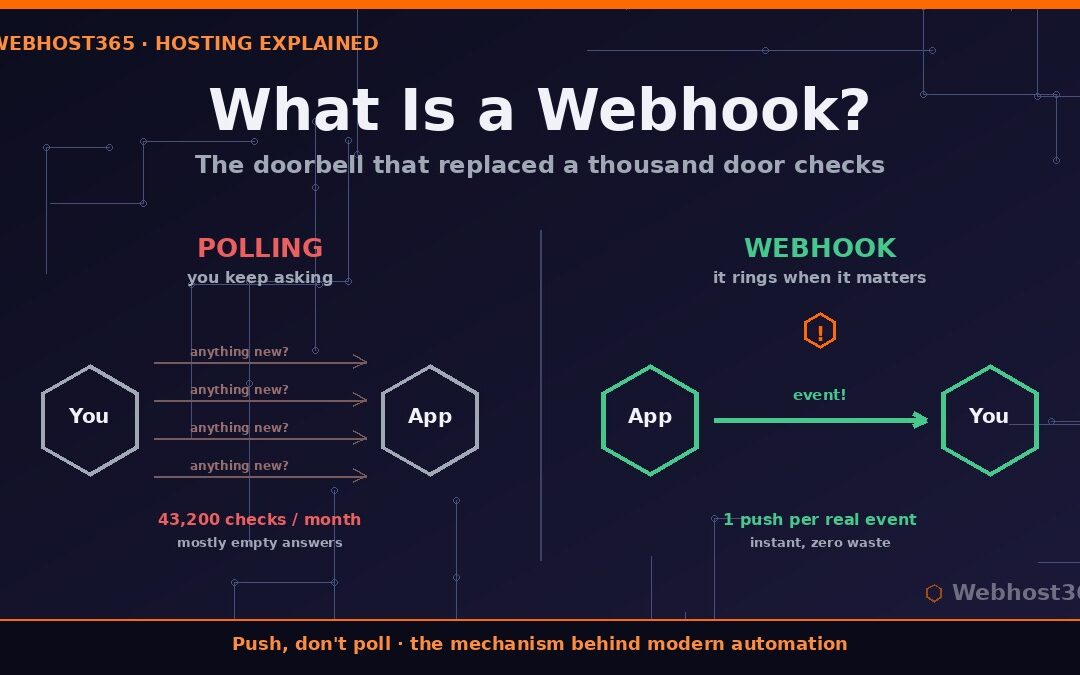
The easiest way to understand what a webhook is: think of a doorbell. Without one, you would have to walk to the door every minute to check whether someone is standing there. That is polling — repetitive, wasteful, and usually pointless, because most checks find nothing. A doorbell flips the model. You do nothing at all until the moment a visitor presses the button, and then you know instantly. A webhook is that doorbell for software: silence until an event occurs, then an immediate push notification carrying the details.
This push-based design is why webhooks power so much of the modern web. The sender does the work exactly once, when something genuinely happened, and the receiver never burns resources asking “anything new?” thousands of times a day.
How a Webhook Actually Works
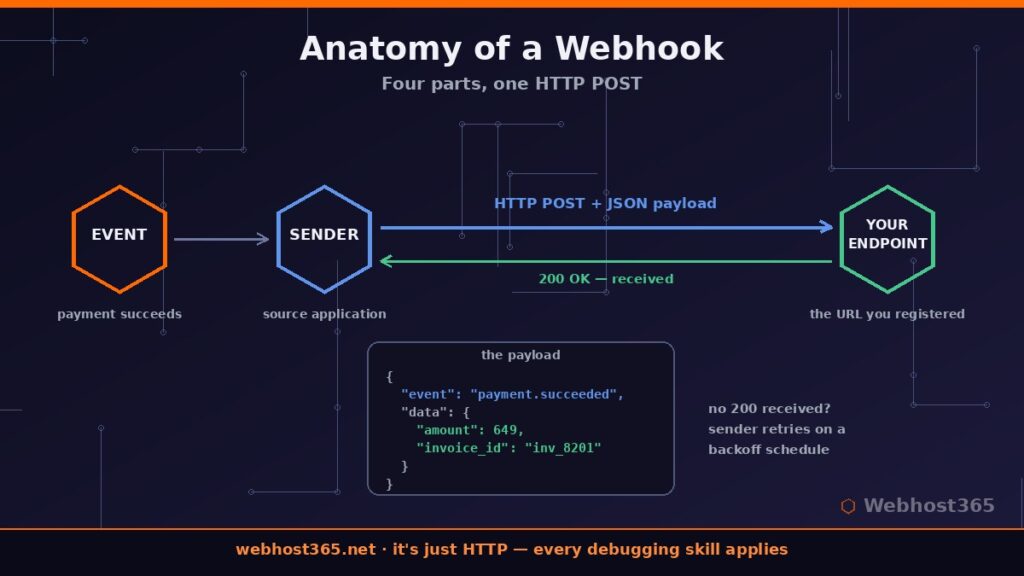
Underneath the analogy, a webhook is ordinary web plumbing. Every webhook interaction has the same four parts, and once you can name them, no integration documentation will intimidate you again.
The Four Parts of Every Webhook
First comes the event: something happens in the source application, such as a payment succeeding or a form being submitted. Second is the sender, the application where the event occurred. Third is the request itself: the sender makes an HTTP POST request containing a payload, almost always formatted as JSON, that describes the event. Fourth is the endpoint: the receiving URL you registered with the sender, which accepts the request and acts on it.
That endpoint URL is the only thing you ever really configure. When a service asks you to “add a webhook,” it is asking one question: where should I POST the data when this event fires?
Reading a Webhook Payload
Here is a simplified payload a payment provider might send when a checkout succeeds:
{
  "event": "payment.succeeded",
  "created": 1718193600,
  "data": {
    "amount": 649,
    "currency": "usd",
    "customer_email": "jane@example.com",
    "invoice_id": "inv_8201"
  }
}
Notice the pattern, because nearly every webhook follows it: an event type telling you what happened, a timestamp telling you when, and a data object carrying the specifics. Your endpoint reads the event type first, then decides what to do with the rest.
What the Response Codes Mean
After delivering the POST, the sender watches your endpoint’s HTTP response. A 200-range status says “received, all good,” and the transaction ends there. A 400-range response signals that the request itself was rejected, while a 500-range response or a timeout tells the sender your endpoint is having problems. Consequently, most well-built senders will retry failed deliveries on a backoff schedule — typically several attempts over hours — which is why a briefly offline endpoint usually misses nothing. However, retries eventually stop, so a dead endpoint silently loses events, a failure mode we will cover in the testing section.
Webhook vs API vs Polling: What’s the Difference?
The question “what is a webhook” almost always comes paired with a second one: how is that different from an API? The cleanest answer is direction. With a regular API, your application pulls — it asks the other service for data whenever it wants an update. With a webhook, the other service pushes — it sends data to you the moment something changes. Polling is simply pulling on a timer: calling the API every minute to ask whether anything is new.
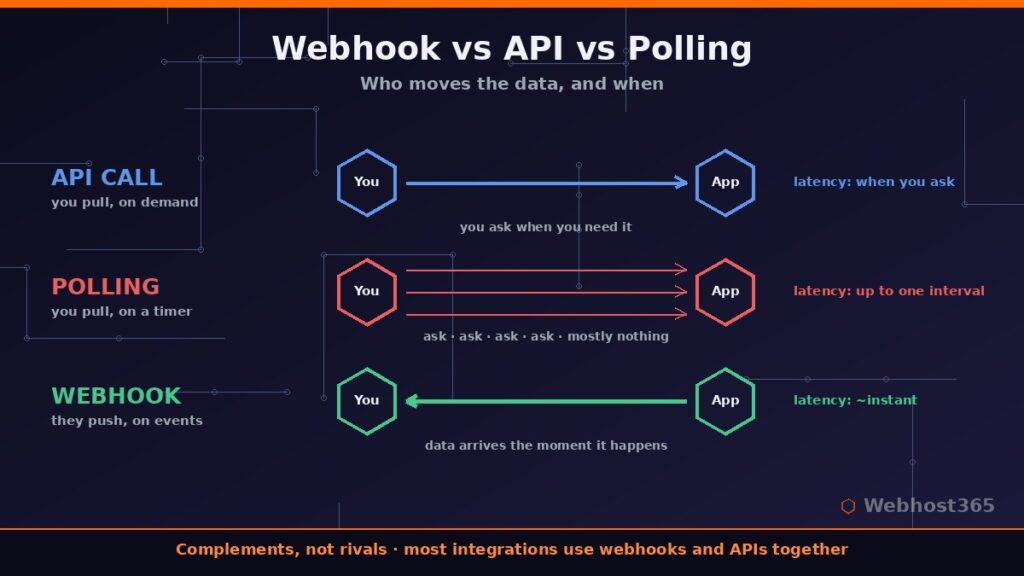
| Method | How data moves | Best for |
|---|---|---|
| API call | You pull on demand | Fetching data when you need it |
| Polling | You pull on a schedule | Legacy systems with no webhook support |
| Webhook | They push on events | Instant reactions to events |
Polling is the expensive option, and the math shows why. Checking an API every minute means 43,200 requests a month, even if only ten of them ever find new data. The same integration built on a webhook produces exactly ten requests — one per real event — with effectively zero latency. Therefore, whenever a service offers webhooks, they are nearly always the better choice for event-driven work.
One important clarification: webhooks and APIs are complements, not rivals. A typical integration uses both. The webhook tells you that something happened, and your code then calls the API to fetch fuller details or to act on the event. Asking whether to use a webhook or an API is like asking whether to use a doorbell or a door — they do different jobs in the same house.
Real Webhook Examples You Already Use
Abstract definitions only go so far, so here is what a webhook is in practice — four patterns running constantly behind services you use every day.
Payment Confirmations
When a customer completes checkout, the payment gateway fires a webhook to the store’s endpoint within seconds. That single POST is what flips the order to “paid,” triggers the receipt email, and starts fulfillment. Without it, stores would poll the gateway endlessly for every pending order.
Form Submissions to Automation
A form tool fires a webhook the instant someone submits, and an automation platform catches it to validate the lead, create the CRM contact, and alert sales. This exact pattern is the first build in our collection of practical n8n workflow examples, where a Webhook node serves as the trigger for the whole chain.
Git Push to Auto-Deploy
Modern deployment runs on webhooks. When you push code, the repository host sends a webhook to your server or CI system, which pulls the new code and redeploys automatically. If you have ever set up the flow from our guide on how to deploy a Node.js app, the “push and it’s live” experience is a webhook doing the work.
Monitoring Alerts
Uptime monitors, error trackers, and security scanners all deliver their alarms through webhooks pointed at chat tools. The alert that appears in your team’s channel seconds after a site goes down traveled as a JSON payload to a webhook URL that the chat platform generated for you.
The common thread across all four examples is the same: an event on one side, an instant POST to a URL on the other, and no human in the middle.
How to Secure a Webhook
An open webhook endpoint is a URL that accepts data from anyone who finds it. That is the entire security problem in one sentence: if your endpoint trusts every POST it receives, an attacker can forge fake events — phantom payments, bogus alerts, malicious payloads. Securing a webhook means verifying that each request genuinely came from the sender you expect.
Five Practical Protections
Signature verification is the gold standard. The sender signs each payload with a shared secret using HMAC, attaches the signature as a header, and your endpoint recomputes it before trusting anything. A mismatch means the request is forged or tampered with, so you discard it. Most serious providers support this, and their docs include verification snippets for every major language.
Beyond signatures, four habits close most remaining gaps. Use HTTPS only, so payloads cannot be read or altered in transit — if your endpoint sits behind a reverse proxy, that is exactly where TLS terminates. Treat your webhook URL itself as a credential and include a random token in the path. Check timestamps and reject events older than a few minutes to block replay attacks. Finally, where the sender publishes their IP ranges, allowlist them at the firewall as a coarse outer filter.
None of this requires deep cryptography knowledge. Verifying a signature is typically five lines of code, and automation platforms with built-in webhook triggers handle most of it for you.
How to Test and Debug Webhooks
The awkward part of webhook development is that the sender lives on the internet, while your code often lives on your laptop. The standard solutions are request-capture services, which give you a temporary public URL that displays every incoming payload, and tunneling tools that forward a public URL to your local machine. Both let you fire test events and inspect exactly what arrives — headers, body, and timing.
When a webhook misbehaves in production, the failures are remarkably predictable. Check these four first: a wrong or changed endpoint URL (the silent killer after migrations), a content-type mismatch where your code expects JSON but receives form-encoded data, endpoint timeouts because you do heavy work before returning a response, and signature failures caused by comparing against the parsed body instead of the raw one. The fix for timeouts deserves special mention: respond with 200 immediately, then process the payload afterwards, because senders only care that you answered quickly.
Above all, log every delivery — timestamp, event type, response you returned. When an event goes missing three weeks from now, that log is the difference between a five-minute diagnosis and an afternoon of guesswork. The deeper lesson of understanding what a webhook is comes down to this: it is just HTTP, so every HTTP debugging skill you have applies directly.
Conclusion: A Small Mechanism with Enormous Leverage
So, what is a webhook? It is an automated HTTP POST that one application sends to another the instant an event happens — a doorbell for software that replaces thousands of wasteful “anything new?” checks with a single push at exactly the right moment. That one design choice is the connective tissue holding together payments, deployments, alerts, and virtually every automation you will ever build.
The fastest way to turn this knowledge into something working is to get yourself an always-on webhook endpoint, and a hosted n8n instance is precisely that. A free n8n instance gives you production-ready Webhook trigger URLs in minutes, with 200 executions a month, unlimited workflows, and no credit card. Point any service at it, watch the payloads arrive, and build your first automation today. When your webhooks multiply, Nebula at $6.49 per month and Stellar with unlimited executions at $12.49 scale the same instance — and your renewal price never moves from your signup price.
FAQ: What Is a Webhook?
No. An API is a door you knock on whenever you want data; a webhook is a doorbell the other service rings when something happens. They move data in opposite directions and most real integrations use both together — the webhook announces the event, and an API call fetches further details.
A webhook URL is the public address of your receiving endpoint — the location where the sending application delivers its HTTP POST when an event fires. You generate or host this URL on your side and register it with the sender. Treat it like a credential, since anyone who knows it can send requests to it.
They can be made very secure with little effort. HMAC signature verification confirms each payload genuinely came from the expected sender, HTTPS protects data in transit, and timestamp checks block replayed requests. An unverified endpoint, however, will trust forged events, so verification is not optional for anything involving money or access.
Most senders retry failed deliveries on a backoff schedule, often for hours or days, so brief downtime usually loses nothing. Retries are finite though: an endpoint that stays dead eventually misses events permanently, which is why logging deliveries and monitoring your endpoint matters.
Use an automation platform with a built-in webhook trigger. In n8n, dragging a Webhook node onto the canvas instantly generates a URL that catches incoming events, and you wire the rest of the workflow visually. Our ten practical workflow examples show this pattern in production, starting with simple lead capture.