
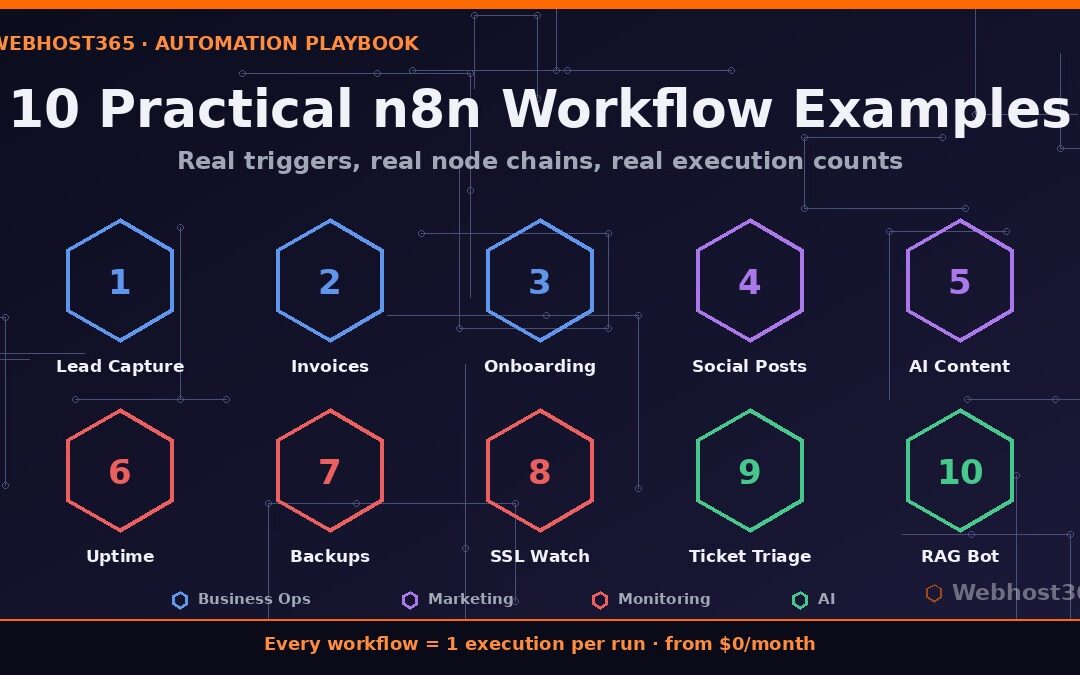
Most automation tutorials show you toy demos: send yourself an email, post “hello world” to Slack, done. That teaches you the editor, but it does not show you what automation is actually for. Therefore, this guide takes a different approach. The ten n8n workflow examples below are patterns that real teams run in production every day, and each one comes with its trigger, its node chain, and an honest estimate of how many executions it consumes per month.
That last number matters more than you might think. Because n8n counts one execution per workflow run regardless of how many steps it contains, you can predict your exact monthly cost before you build anything. In fact, every example in this list fits comfortably inside a free 200-execution instance or a $6.49 plan, and we will tally the full bill at the end. Pick the one that wastes the most of your week, and you can have it running today.
How to Read These Examples
Each of the n8n workflow examples below follows the same format, so you can scan quickly and build immediately. First comes the trigger, the event that starts the workflow. Next is the node chain, the sequence of steps n8n performs, using node names you can find directly in the n8n node reference. Finally, each example lists a typical executions-per-month figure and the plan tier it fits.
Remember the core billing rule: one complete run equals one execution, whether the workflow has three nodes or thirty. We broke down why that makes n8n dramatically cheaper than per-step competitors in our full n8n vs Zapier vs Make comparison, so this guide simply applies that math to real builds. Estimates assume a small business; scale them to your own volume.
Business Operations Workflows
Operations automations are usually the highest-value starting point, because they run constantly and replace genuinely tedious manual work.
1. Lead Capture to CRM
A form submission should never sit in an inbox waiting to be copied into three systems by hand.
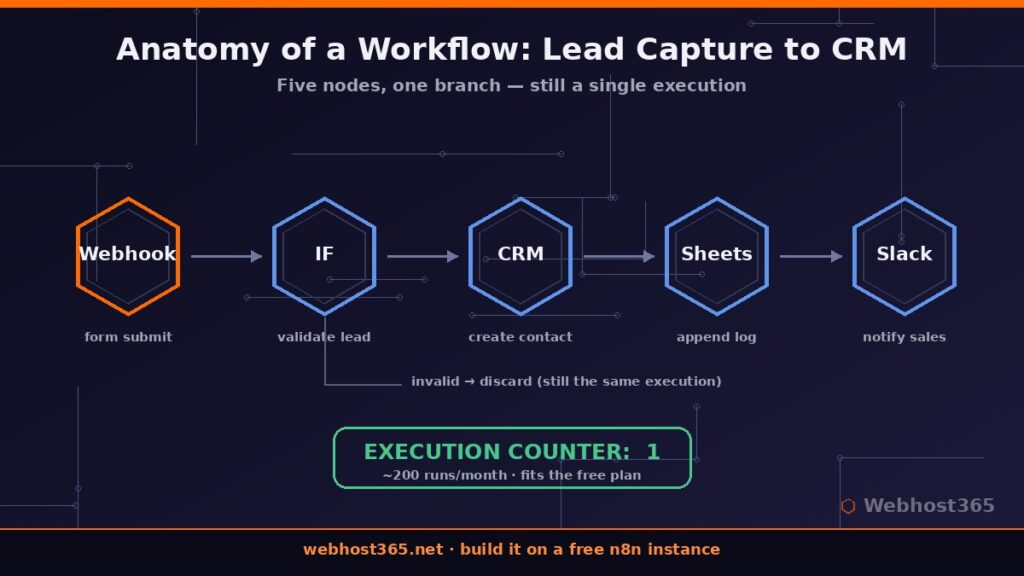
Trigger: Webhook node receiving your website form, or a native Typeform/Google Forms trigger.
Node chain: Webhook → IF (validate email and required fields) → CRM node such as HubSpot or Pipedrive (create contact) → Google Sheets (append to master log) → Slack (notify sales channel).
Executions: ~200/month for a site capturing 6–7 leads a day.
Cost tier: exactly fits the free plan.
The validation branch is the detail most people skip. By filtering junk submissions before they reach the CRM, you keep your pipeline clean, and rejected runs still count as just one execution each.
2. Invoice Processing
Accounts payable is repetitive, deadline-driven, and error-prone — the perfect automation target.
Trigger: Email Trigger (IMAP) watching an invoices@ mailbox.
Node chain: Email Trigger → Extract from File (pull PDF data) → IF (amount above approval threshold?) → branch A: approval request to a manager via Slack; branch B: accounting node such as Xero or QuickBooks (create bill) → Move file to archive folder.
Executions: ~150/month for a small business.
Cost tier: free plan.
Because the approval branch lives inside the same workflow, even a multi-day wait for a manager’s response still counts as a single execution.
3. Customer Onboarding Sequence
Consistent onboarding is the difference between an activated customer and a silent churn three weeks later.
Trigger: new signup webhook from your product or payment platform.
Node chain: Webhook → CRM update (tag as new customer) → Send welcome email → Wait node (2 days) → Send getting-started guide → Wait (5 days) → IF (logged in since signup?) → either a check-in email or a task for customer success to call.
Executions: ~100/month at 3–4 signups a day.
Cost tier: free plan.
Wait nodes are the underrated feature here. Consequently, an entire week-long drip sequence with conditional logic still bills as one execution per customer, where per-step platforms would meter every email and every check.
Marketing Workflows
Marketing automations run less frequently than operations workflows, yet they recover hours of repetitive publishing and drafting work every week.
4. Social Cross-Posting from Your Blog
Publishing an article should automatically announce it everywhere your audience lives, without you opening four tabs.
Trigger: RSS Feed Trigger watching your blog feed.
Node chain: RSS Trigger → Set node (build platform-specific copy: short hook for X, longer summary for LinkedIn, casual tone for Facebook) → X node → LinkedIn node → Facebook node → Google Sheets (log the published links).
Executions: ~30/month for a blog publishing daily.
Cost tier: free plan.
The Set node is where this beats naive cross-posters. Instead of blasting identical text everywhere, each platform receives copy shaped for its format, and the whole fan-out still counts as one execution per article.
5. AI-Assisted Content Pipeline
This is one of the most popular n8n workflow examples among teams producing content at volume, because it removes the blank-page stage entirely.
Trigger: Schedule Trigger every Monday morning.
Node chain: Schedule → Google Sheets (read next topic from the content calendar) → Ollama node (generate an outline and key points from the topic brief) → Format with a Set node → Email or Slack to the editor for human review.
Executions: ~20/month for a weekly cadence across a few content streams.
Cost tier: free plan.
Crucially, the drafting model runs on your own server, so there is no per-token API bill on top. We built a complete version of this pattern, including the Ollama setup, in our guide to self-hosted AI workflows with n8n and Ollama.
Monitoring and Ops Workflows
Monitoring workflows are where execution counts explode, and therefore where n8n’s flat pricing shines brightest.
6. Uptime Monitor with Smart Alerts
Commercial uptime services charge monthly fees for what is, underneath, a very simple loop.
Trigger: Schedule Trigger every 5 minutes.
Node chain: Schedule → HTTP Request (check your site, expect status 200 within a timeout) → IF (down?) → first alert to Slack → Wait (5 minutes) → second check → IF (still down?) → escalate via SMS or phone-call node to the on-call person.
Executions: ~8,640/month — and this is the example that justifies an unlimited plan.
Cost tier: Stellar, where 8,640 or 86,400 runs cost the same flat price.
On per-task platforms, monitoring at this frequency is economically absurd. On n8n it is a rounding error, which is exactly the structural difference our comparison article quantified.
7. Backup Verification
A backup you have never verified is a hope, not a backup.
Trigger: Schedule Trigger daily at 7 a.m.
Node chain: Schedule → SSH or S3 node (list latest backup file) → IF (file older than 24 hours, or size suspiciously small?) → alert to Slack with details; otherwise append a green checkmark row to a Sheets log.
Executions: ~30/month.
Cost tier: free plan.
This pairs directly with the 3-2-1 approach we laid out in our website backup strategies guide: the strategy creates the backups, and this workflow proves they actually exist every single morning.
8. SSL Certificate Expiry Watch
An expired certificate takes your site down as effectively as a server crash, yet it is entirely predictable.
Trigger: Schedule Trigger daily.
Node chain: Schedule → HTTP Request or SSL-check community node (read certificate expiry date) → Switch node (30 days out → reminder; 14 days → warning; 3 days → urgent alert with renewal checklist).
Executions: ~30/month per batch of monitored domains.
Cost tier: free plan.
Check several domains in one run by looping over a list, and the whole sweep still counts as a single execution.
AI-Powered Workflows
The final two n8n workflow examples show where automation is heading: workflows that do not just move data, but understand it. Both run AI on infrastructure you control, so the per-token API meter that haunts other platforms never starts.
9. Support Ticket Triage with a Local LLM
Reading, classifying, and routing incoming tickets is the most expensive five minutes your support team repeats fifty times a day.
Trigger: Email Trigger (IMAP) or webhook from your helpdesk.
Node chain: Trigger → Ollama node (classify the message: billing, technical, sales, urgent) → Switch node (route by category) → CRM or helpdesk node (assign to the right queue with priority set) → IF (urgent?) → immediate Slack alert to the duty engineer.
Executions: ~1,000/month for a small support operation.
Cost tier: Nebula at $6.49, with half the execution allowance to spare.
The classification model runs entirely on your own VPS, and choosing the right one for the job is exactly what we covered in our guide to the best VPS for Ollama. A 7–8B model handles intent classification with ease, and the per-ticket marginal cost is zero.
10. RAG-Powered Slack Answer Bot
Every team has a colleague who answers the same documentation questions daily. This workflow becomes that colleague.
Trigger: Slack Trigger watching mentions in a help channel.
Node chain: Slack Trigger → question embedding → vector store lookup against your indexed docs → Ollama node (compose an answer from the retrieved passages) → Slack node (reply in thread with sources).
Executions: ~500/month for an active team.
Cost tier: free plan or Nebula, depending on what else you run.
The retrieval pipeline behind this — embedding your documentation into a vector store and querying it — is built step by step in our self-hosted RAG guide. Once the index exists, this workflow is genuinely a five-node build.
Running All Ten: What Would It Cost?
Here is the honest tally if you built every one of these n8n workflow examples and ran them simultaneously.
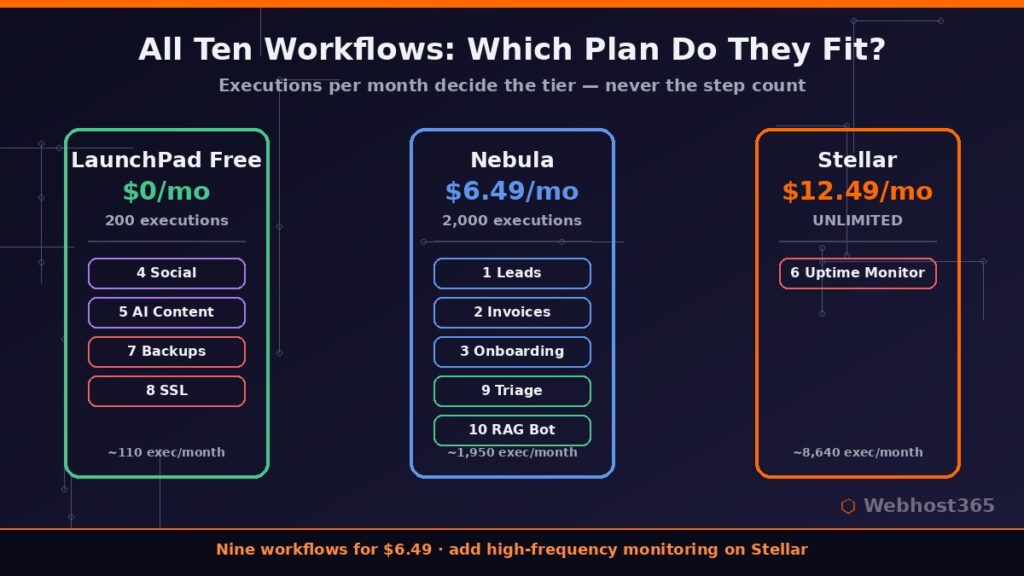
| Workflow group | Executions/month | Tier needed |
|---|---|---|
| Business ops (1–3) | ~450 | Free covers any one; Nebula covers all |
| Marketing + ops checks (4, 5, 7, 8) | ~110 | Free plan |
| AI workflows (9, 10) | ~1,500 | Nebula |
| Uptime monitor (6) | ~8,640 | Stellar |
Without the uptime monitor, the entire stack — nine production workflows — totals roughly 2,060 executions and sits at the edge of Nebula’s 2,000-execution plan for $6.49 per month. Add high-frequency monitoring and Stellar’s unlimited executions at $12.49 become the obvious home. For contrast, we priced this exact kind of stack on per-task platforms in the n8n vs Zapier vs Make comparison, where the same workload lands in the hundreds of dollars.
Start with the Workflow That Hurts Most
Do not try to build all ten this weekend. Instead, pick the single task that wastes the most of your week — for most teams that is lead capture or ticket triage — and automate that one first. The n8n workflow examples above are deliberately ordered so each one teaches a pattern the next one reuses: webhooks, branches, waits, schedules, and finally AI nodes.
The fastest way to start is a free hosted n8n instance: 200 executions a month, unlimited workflows, unlimited users, no credit card, live in minutes. That allowance comfortably runs your first two or three workflows from this list. When they prove themselves, Nebula at $6.49 per month or Stellar with unlimited executions at $12.49 scale the same instance without rebuilding anything — and your renewal price stays exactly what you signed up at.
FAQ: n8n Workflow Examples
Where can I find ready-made n8n templates?
The official n8n template library hosts thousands of community workflows you can import directly. The ten n8n workflow examples in this guide are described structurally so you can rebuild them with your own apps, which usually teaches you more than importing a black box.
Can I import these examples directly?
These are patterns rather than export files, because your CRM, helpdesk, and channels will differ. However, each node chain maps one-to-one to nodes in the editor, so an experienced user can rebuild any of them in under half an hour.
How many executions do typical workflows use?
Event-driven workflows like lead capture typically run 100–500 times a month, scheduled checks run 30–300 times, and high-frequency monitoring can reach thousands. One complete run always equals one execution, regardless of step count.
Can n8n run AI workflows without OpenAI?
Yes. The Ollama node connects n8n to models running on your own server, which is how examples 5, 9, and 10 work. You get AI classification, drafting, and retrieval answers with no per-token charges and no data leaving your infrastructure.
Do these examples work on the free plan?
Seven of the ten n8n workflow examples fit inside a free 200-execution instance individually, and several fit together. Only the high-frequency uptime monitor genuinely requires an unlimited plan.