
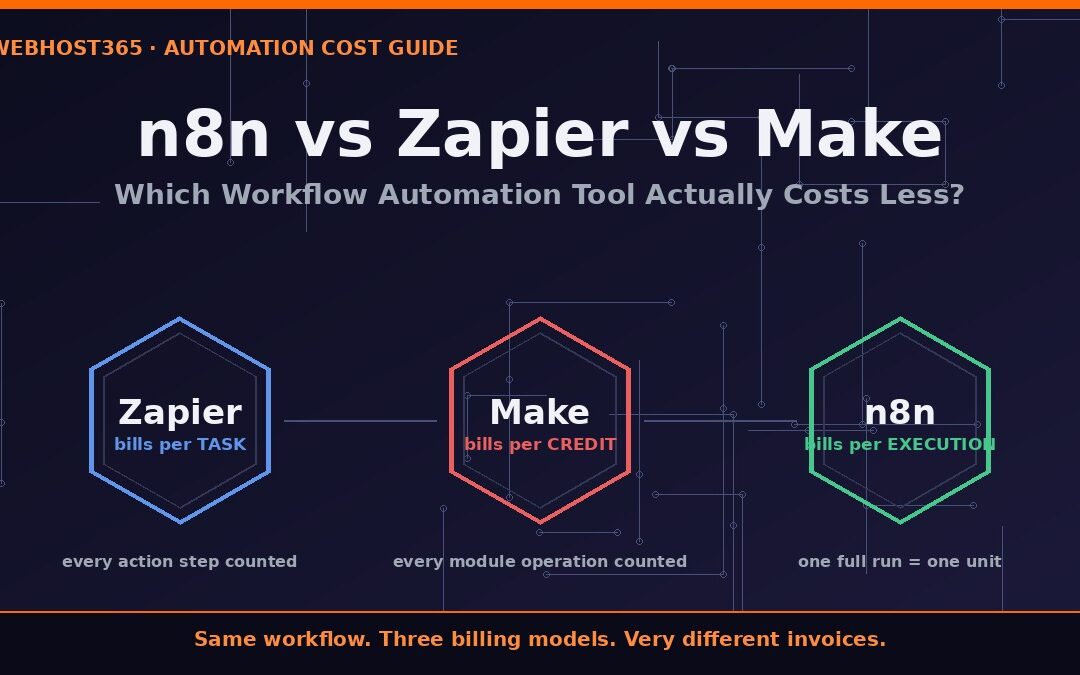
If you compare n8n vs Zapier vs Make on features alone, the three tools look almost interchangeable. All of them connect your apps, react to triggers, and run multi-step workflows without code. The real difference appears on your invoice, because each platform bills you for a completely different unit of work. Zapier charges per task, Make charges per credit, and n8n charges per execution.
That single design decision determines whether your automation costs $0, $6.49, or several hundred dollars a month for exactly the same workflow. Therefore, this comparison ignores marketing pages and instead prices the same real workflows on all three platforms, at three different volume levels. By the end, you will know precisely which tool costs less for your situation, and also when Zapier or Make is genuinely the better choice despite the price.
The Three Tools in One Minute
Zapier is the oldest and most recognizable automation platform. It offers the largest app catalog of the three, a simple linear builder, and the fastest path from signup to a first working automation. Consequently, it remains the default recommendation for non-technical teams, and also the most expensive option at almost any volume.
Make (formerly Integromat) takes a visual approach. You build scenarios on a drag-and-drop canvas where branching, loops, and parallel paths are easier to see than in Zapier. As a result, Make usually undercuts Zapier on price for equivalent workflows, although its credit-based billing has its own traps, which we will cover shortly.
n8n is the open-source option in the n8n vs Zapier vs Make debate. It supports 700+ integrations, custom JavaScript and Python code, webhooks, and AI nodes. Moreover, you can run it three ways: self-hosted on your own server, on a managed cloud instance, or even on a free hosted plan. Its fair-code license is the reason its pricing model works so differently from the other two.
| Tool | Billing unit | Entry paid price |
|---|---|---|
| Zapier | Task (per action step) | $19.99/mo for 750 tasks |
| Make | Credit (per module operation) | $9–10.59/mo for 10,000 credits |
| n8n (managed) | Execution (per full workflow run) | $6.49/mo for 2,000 executions |
The Billing Unit Is the Whole Game
Most n8n vs Zapier comparisons stop at the headline prices in the table above. That is a mistake, because the three numbers measure different things. To compare them honestly, you first need to understand exactly what each platform counts when your workflow runs.
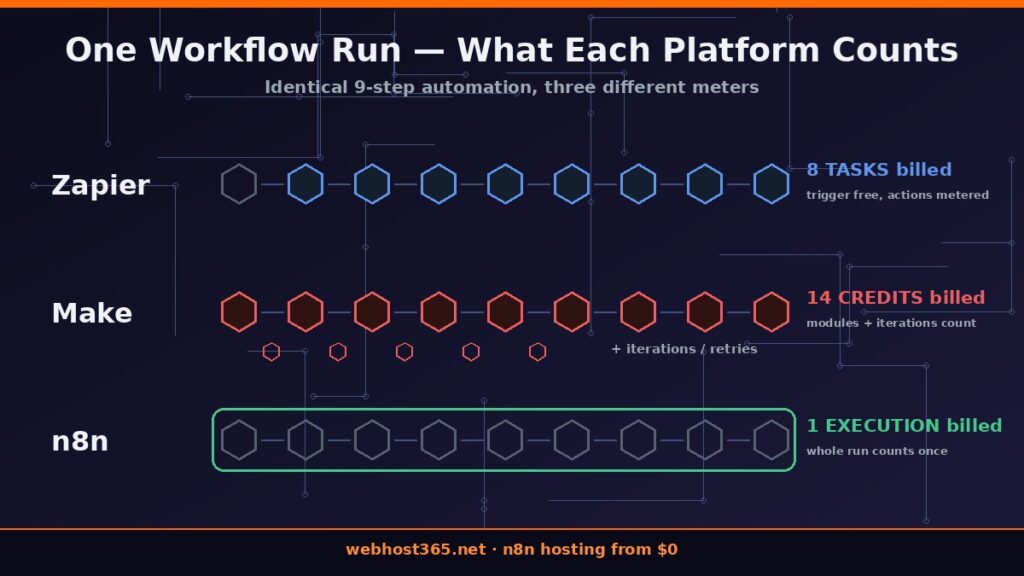
What Zapier Counts: A Task per Action Step
In Zapier, every action step that completes successfully consumes one task. The trigger itself is free, but everything after it is metered. For example, a 5-step Zap that watches a form, checks a condition, creates a CRM record, updates a spreadsheet, and sends a Slack message burns 4 tasks on every single run. According to Zapier’s pricing page, the free plan includes 100 tasks per month and only allows two-step Zaps, so one modest workflow can exhaust it in days. Furthermore, accounts past their limit switch to pay-per-task overage billing automatically, which means the meter never really stops.
What Make Counts: A Credit per Module Operation
Make bills in credits, and a credit is consumed by every module operation in a scenario. That includes the trigger, filters, routers, and each iteration of a loop. In practice, a scenario that looks like three steps on the canvas frequently consumes 8 to 15 credits per run once iterators and retries are included. The official Make pricing page lists a free tier of 1,000 credits per month and a Core plan with 10,000 credits, which sounds generous. However, AI modules and failed runs draw from the same pool, so heavy scenarios drain it far faster than the step count suggests.
What n8n Counts: One Execution per Workflow Run
n8n counts one execution every time a workflow runs from start to finish, regardless of how many nodes it contains. A 6-step workflow is one execution. A 40-node workflow with branching logic, three AI calls, and a database write is still one execution, as the n8n documentation defines it. This is the structural advantage that decides the n8n vs Zapier cost battle: complexity is free. Consequently, the more sophisticated your automation becomes, the wider the price gap grows in n8n’s favor, which the next section demonstrates with real numbers.
Real Cost at Three Volume Tiers
Abstract billing rules only matter once you attach real numbers to them. Therefore, let’s price three typical automation setups on all three platforms. The volumes below are deliberately ordinary: a solo founder, a growing team, and a heavy automation user. Prices for Zapier and Make reflect their published plans at the time of writing.
Scenario A: Starter (200 runs per month, 6-step workflow)
Imagine a lead-capture workflow: form submission, validation check, CRM entry, spreadsheet log, welcome email, Slack alert. It runs about 200 times a month.
| Tool | What gets counted | Monthly cost |
|---|---|---|
| Zapier | ~1,000 tasks (5 actions × 200 runs) | ~$20–30 paid tier required |
| Make | ~1,400 credits (7 operations × 200 runs) | ~$9–11 Core plan required |
| n8n | 200 executions | $0 on a free hosted plan |
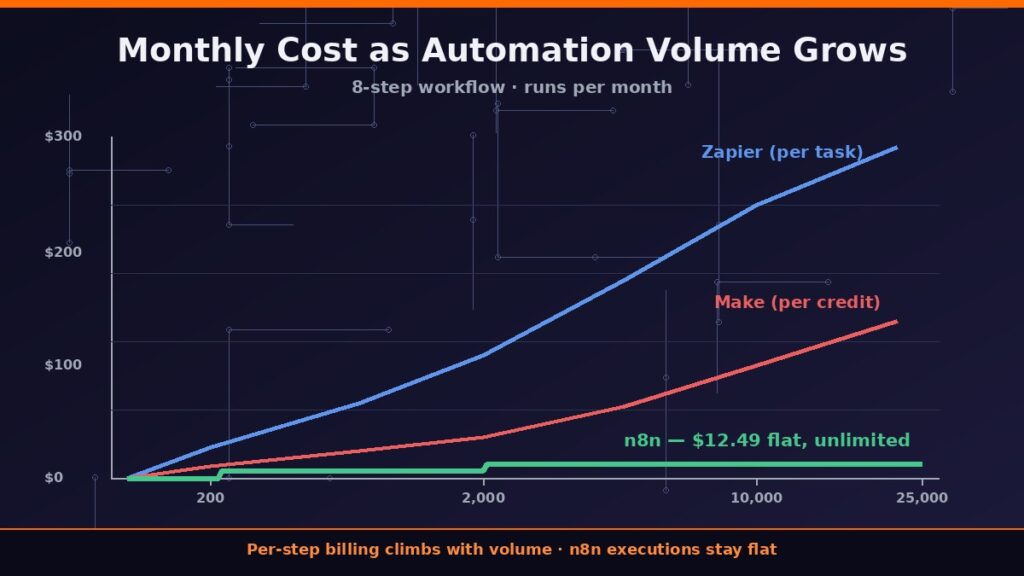
Zapier’s free plan dies in roughly two days at this volume, since 100 tasks cover only 20 runs. Make’s 1,000 free credits get closer but still fall short. Meanwhile, the same 200 runs sit comfortably inside the 200 monthly executions of a free n8n hosting plan, with unlimited workflows and unlimited users included. If you want the full walkthrough, we covered every option in our guide on how to host n8n for free.
Scenario B: Growing Team (2,000 runs per month, 8-step workflow)
Now scale up: order processing with payment verification, inventory update, invoice creation, two notification channels, and error handling. It fires 2,000 times a month.
| Tool | What gets counted | Monthly cost |
|---|---|---|
| Zapier | ~14,000 tasks (7 actions × 2,000 runs) | ~$80–110 on Professional/Team |
| Make | ~20,000 credits (10 operations × 2,000 runs) | ~$21–30 with add-on packs |
| n8n | 2,000 executions | $6.49 on Nebula |
This is where the n8n vs Zapier gap turns dramatic. Zapier needs a high Professional slider tier or the Team plan, because step count multiplies the bill. Make stays cheaper but requires extra credit packs above its Core allowance. In contrast, the Nebula plan from our managed n8n hosting lineup includes exactly 2,000 executions, unlimited workflows, and unlimited users for $6.49 per month — less than a tenth of the Zapier figure.
Scenario C: Heavy Automation (10,000+ runs, AI-powered workflows)
Finally, consider serious volume: support ticket triage with AI classification, content pipelines, and webhook-driven syncs running 10,000+ times monthly, many steps deep.
| Tool | What gets counted | Monthly cost |
|---|---|---|
| Zapier | 100,000+ tasks, AI features billed separately | Several hundred dollars |
| Make | 100,000+ credits, AI modules consume extra | $100+ on Teams with packs |
| n8n | Unlimited executions | $12.49 flat on Stellar |
At this tier, per-step billing becomes punishing, especially because AI steps multiply consumption on both Zapier and Make. n8n flips the logic entirely: the Stellar plan removes the meter, so 10,000 or 100,000 runs cost the same $12.49. Additionally, n8n’s AI nodes let you route those classification steps to a model you control, a pattern we demonstrated in our n8n and Ollama AI workflow guide, which removes per-token API costs from the equation as well.
The Hidden Costs Nobody Puts on the Pricing Page
The plan prices above are only the visible part of the bill. Each platform also carries hidden costs that surface after a few months of real usage, and they affect the n8n vs Zapier vs Make calculation in different ways.
Zapier: Overage Billing and Task Multipliers
Zapier does not stop your Zaps when you exceed your plan limit. Instead, it automatically switches to pay-per-task overage billing for the rest of the cycle, so a busy month quietly becomes an expensive one. Additionally, certain built-in features act as task multipliers: a single routed lead through some premium features can consume dozens of tasks rather than one. Teams routinely discover this only when the invoice arrives, because nothing on the workflow canvas warns you about the multiplication.
Make: Retries, Failed Runs, and Add-On Pack Markups
Make’s credit system has two quiet drains. First, retries and partially failed runs still consume credits, so a buggy scenario looping overnight can empty a monthly allowance before breakfast. Second, when you outgrow your plan, additional credit packs are priced noticeably above the per-credit rate included in the plan itself. Furthermore, the Teams tier bills per user, which means giving five colleagues debug access multiplies the seat cost even if they never build anything.
n8n: Your Time Is the Cost (If You Self-Host)
Honesty matters here: self-hosted n8n is free as software, but not free as a system. You own the server updates, the SSL renewals, the backups, and the 2 a.m. restart when a container misbehaves. We documented the full setup in our guide to self-hosting n8n with Docker Compose, including the reverse proxy layer most tutorials skip. If that maintenance work is not where you want to spend your hours, a managed instance converts those hidden hours into a small flat fee instead.
When Each Tool Genuinely Wins
A fair n8n vs Zapier vs Make verdict has to admit that price is not the only axis. Each platform has a territory where it is legitimately the right answer.
Zapier wins when app coverage and speed-to-first-automation matter more than cost. Its catalog is the largest in the industry, its editor is the gentlest for non-technical users, and a low-volume workflow on a small plan is perfectly affordable. For a marketing team running a handful of light automations, Zapier remains a sensible choice.
Make wins for visually complex logic on a moderate budget. Its canvas handles branching, iteration, and parallel paths more intuitively than Zapier’s linear editor, and its per-credit price is consistently lower. Consequently, a non-developer who needs sophisticated routing without code is often happiest on Make.
n8n wins everywhere volume, complexity, or privacy enters the picture. Multi-step and AI-heavy workflows cost the same as simple ones, executions are either generously metered or unlimited, and self-hosting keeps sensitive data on infrastructure you control. Teams who want that power without the server maintenance get the same economics from a managed instance, a tradeoff we explored in depth in our managed n8n hosting guide for teams. For anything beyond casual automation, the economics simply point one way.
Migrating from Zapier or Make to n8n
If the math above convinced you, the good news is that switching is a project of days, not months. Most teams settling the n8n vs Zapier question follow the same four-step path.
First, inventory your existing Zaps or scenarios and rank them by monthly run volume, because the highest-volume workflows deliver the biggest savings. Second, rebuild each one in n8n by mapping triggers and actions to their equivalent nodes; with 700+ integrations, the overwhelming majority map one-to-one, and a Code node covers anything exotic. Third, run old and new versions in parallel for a week, comparing outputs before you trust the switch. Finally, disable the originals and downgrade the old subscription.
The zero-risk way to start is a free hosted instance. The LaunchPad plan includes 200 executions per month with unlimited workflows and unlimited users, requires no credit card, and takes minutes to provision — so you can rebuild and test your first workflows before paying anyone anything. When volume grows, Nebula at $6.49 per month covers 2,000 executions, and Stellar at $12.49 per month removes the limit entirely. Compare both on our n8n hosting plans page and keep your renewal price identical to your signup price, as with every Webhost365 plan.
FAQ: n8n vs Zapier vs Make
The software is fair-code and free to self-host, and free hosted plans exist as well. Self-hosting costs you server fees and maintenance time, while a free hosted instance gives you 200 executions per month at genuinely zero cost. Either way, there is no per-step meter running in the background.
One complete run of a workflow, from trigger to final node, counts as a single execution. The number of nodes inside is irrelevant, so a 40-step workflow with AI calls and database writes consumes exactly the same single execution as a 2-step one.
For most teams, yes. n8n covers 700+ integrations, webhooks, schedules, custom code, and AI nodes, which exceeds what typical Zapier setups use. The honest exception is coverage of very obscure apps, where Zapier’s larger catalog occasionally has a connector n8n lacks, though a generic HTTP Request node usually closes that gap.
Generally yes, often by a factor of three to five for equivalent workflows. However, Make’s credits are consumed by triggers, iterators, and retries, so the savings are smaller than the headline prices suggest. In the n8n vs Zapier vs Make ranking by cost, Make sits in the middle at nearly every volume level.
No. A VPS is only required if you choose to self-host. Managed and free hosted plans give you the same n8n with provisioning, updates, SSL, and backups handled for you, which is the sensible route if server administration is not your job.
Your usage simply tells you it is time to either optimize workflows — filter events early, merge duplicate triggers, batch writes — or upgrade. Moving to Nebula or Stellar keeps every workflow, credential, and user intact, so nothing needs rebuilding.
The Verdict: Stop Paying Per Step
The n8n vs Zapier vs Make question comes down to one structural fact: Zapier and Make charge you for every step your automation takes, while n8n charges only when a workflow runs. At 200 runs a month the difference is an annoyance. for 2,000 runs it is a 10x price gap. At 10,000 runs it is the difference between a flat $12.49 and an invoice you have to explain to your accountant.
Zapier still earns its place for low-volume teams who value its enormous app catalog, and Make remains a solid middle ground for visual builders on a budget. However, the moment your automations become numerous, multi-step, or AI-powered, per-step billing punishes exactly the workflows you should be building more of. n8n removes that penalty entirely.
The best part is that testing this claim costs nothing. Spin up a free n8n instance with 200 monthly executions, unlimited workflows, and unlimited users — no credit card, provisioned in minutes. Rebuild your single most expensive Zap or scenario, run it for a week, and compare the math yourself. When you outgrow the free tier, Nebula at $6.49 per month and Stellar at $12.49 per month with unlimited executions are one click away, and your renewal price will always equal your signup price. Your workflows deserve a meter that is not running against you.