
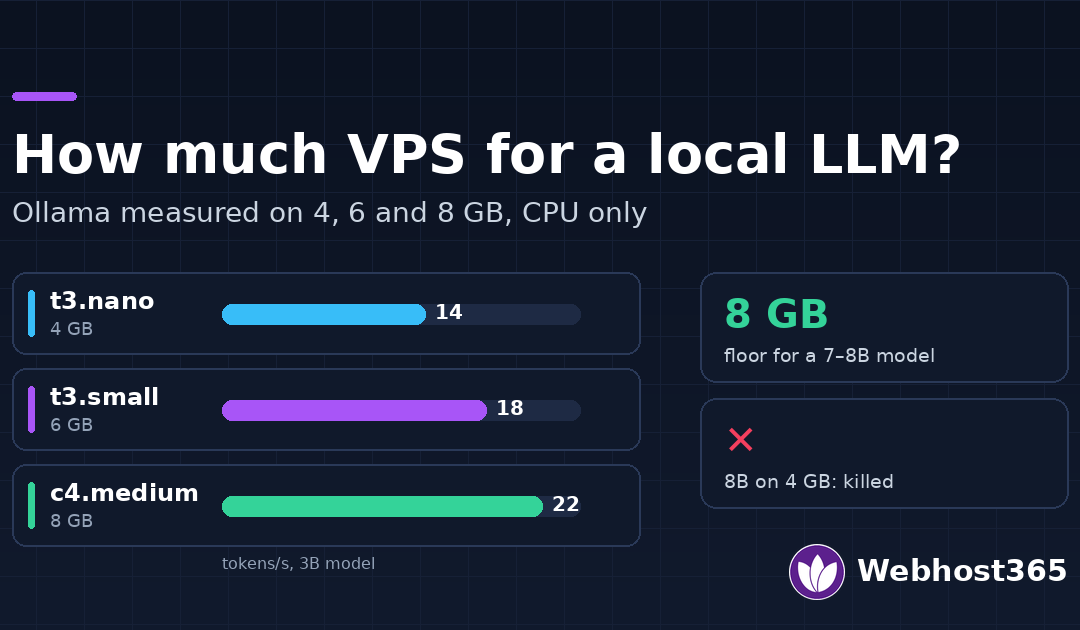
A 3B-parameter model runs usably on a 4 GB VPS. A 7–8B model needs 8 GB to run safely; on 4 GB it does not fit at all, and on 6 GB it runs with almost nothing to spare. We measured three model sizes on three of our VPS plans, on CPU only, and this guide shows exactly what each plan buys you in tokens per second and in headroom.
What Actually Limits a Local LLM on a VPS
Two resources decide whether a model runs and how well: memory and CPU. A VPS has no GPU, so everything below is about CPU inference, which is how most self-hosted assistants, classifiers and RAG pipelines on rented servers actually run.
Memory decides whether it runs at all. The whole model has to sit in RAM while it works, plus a cache for the conversation context. If the total exceeds what the server has, Linux does not slow the model down; it kills it. In our test, the 8B model on a 4 GB plan did not crawl, it was terminated by the kernel’s out-of-memory killer, and took the Ollama service down with it.
CPU decides how fast it answers. Generation speed is measured in tokens per second, roughly words per second. On a CPU, more cores help up to a point, and that point depends on the model: small models saturate early, larger ones keep gaining. A modern CPU with AVX2 instructions matters more than raw clock speed, which is one reason AMD EPYC servers handle this well.
Quantisation is why any of this fits. Models ship in compressed, quantised versions that store each weight in about four bits instead of sixteen. An 8B model that would need 16 GB at full precision needs about 5 GB quantised, with a small loss in quality that most applications never notice. Every model in this test is the default quantised version Ollama downloads.
Context costs memory too. Ollama reserves memory for the context window when the model loads, not as the conversation grows, so a longer context costs RAM even on a one-line prompt. The Ollama FAQ explains how to set it with the num_ctx parameter. Our test used the 4,096-token context Ollama chose by default.
The Test: Three Plans, Three Models
We ran the same test on three of our Linux VPS plans, all on AMD EPYC with NVMe storage, Ubuntu 24.04 and Ollama 0.40.15, on 9 November 2026.
| Plan | vCPU | RAM | Price |
|---|---|---|---|
| t3.nano | 2 | 4 GB | $4.99/mo |
| t3.small | 3 | 6 GB | $9.99/mo |
| c4.medium | 4 | 8 GB | $19.99/mo |
On each, we ran three models from Llama, chosen to span the sizes people actually deploy:
- llama3.2:1b, a 1.3 GB download, for classification, routing and short answers.
- llama3.2:3b, a 2.0 GB download, the common choice for a small assistant.
- llama3.1:8b, a 4.9 GB download, the most popular model in the 7–8B class.
Each model answered the same prompt three times, asking for a 150-word explanation and capped at 200 generated tokens, with temperature set to zero so every run did the same work. We took tokens per second from Ollama’s own timing data and report the median of the three runs. Load time comes from the first, cold run. Memory comes from Ollama’s report of the loaded model and from the system’s free memory while it was loaded. Nothing else was running on the servers.
One thing to know before you try this yourself: on a fresh Ubuntu 24.04 server, the Ollama installer stops with an error asking for zstd. Install it first with apt-get install zstd, then run the installer.
Results: Tokens per Second, RAM and Load Time
Here is what each plan did with each model. Speed is the median of three runs; free memory is what the server had left with the model loaded.
| Model | Ollama memory | t3.nano, 4 GB | t3.small, 6 GB | c4.medium, 8 GB |
|---|---|---|---|---|
| llama3.2:1b | 1.5 GB | 21 tok/s, 2.0 GB free | 27 tok/s, 3.9 GB free | 28 tok/s, 5.9 GB free |
| llama3.2:3b | 2.6 GB | 14 tok/s, 1.1 GB free | 18.5 tok/s, 2.9 GB free | 22 tok/s, 4.8 GB free |
| llama3.1:8b | 5.6 GB | Does not fit | 7.7 tok/s, 0.2 GB free | 9 tok/s, 2.1 GB free |
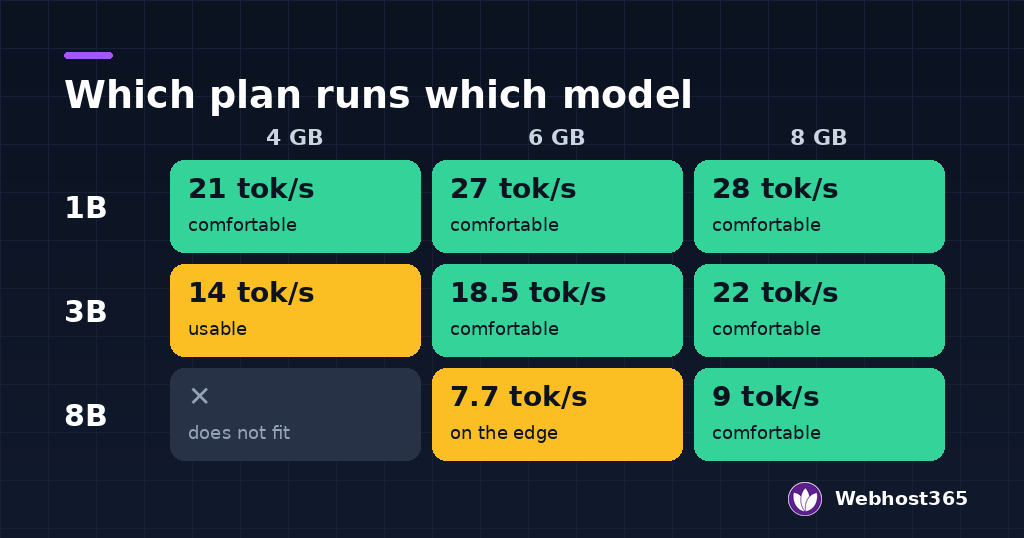
Cold load times were the same on every plan, because they depend on the model rather than the CPU: about 2 seconds for the 1B model, 4 seconds for the 3B and 7 to 8 seconds for the 8B. After the first request a loaded model answers immediately, which is why keeping it in memory matters more than load speed.
Three patterns stand out. Small models saturate the CPU early: the 1B model gained almost nothing going from three cores to four. The 3B model scales cleanly with cores, from 14 to 22 tokens per second, which makes it the model where your plan choice shows most. And the 8B model is defined by memory, not speed: whether it runs at all depends on RAM, and once it fits, it runs at a steady 8 to 9 tokens per second. The Llama 3.1 page in Ollama’s library lists the larger 70B and 405B sizes, which are out of reach for any VPS.
What 4 GB runs
The t3.nano runs the 1B model comfortably at 21 tokens per second with 2 GB to spare, and the 3B model usably at 14 tokens per second with about 1 GB left. That 1 GB matters: it is enough for the operating system and a small application, but not for a second model or a database of any size alongside.
The 8B model does not run on 4 GB, and it fails badly. The kernel’s out-of-memory killer terminated the model mid-load, and on a second attempt the whole Ollama service was gone until we restarted it. Do not try to squeeze an 8B model onto 4 GB; choose a 3B model instead, or move up a plan.
What 6 GB adds
The t3.small makes the 3B model comfortable: 18.5 tokens per second with nearly 3 GB of headroom for your application, a vector database or a second small model. It is the best value for a 3B assistant.
It also runs the 8B model, at 7.7 tokens per second, but with only about 200 MB of memory left. That is technically working and practically fragile. A second request, a longer context window or any other process on the server can push it over the edge, and it then fails the same way it did on 4 GB. Treat 6 GB as a 3B plan that can demonstrate an 8B model, not as an 8B production server.
What 8 GB makes comfortable
The c4.medium is the honest floor for a 7–8B model. It runs llama3.1:8b at 9 tokens per second with 2.1 GB of headroom, enough for an application and a modest context. It is also the fastest plan for the 3B model, at 22 tokens per second, which is fast enough to feel instant in a chat interface.
If you want to run an 8B model alongside other services, such as n8n, a database and a web app, plan for more than 8 GB. Our n8n requirements guide has measured figures for the automation side of that stack.
Which VPS for Which Use
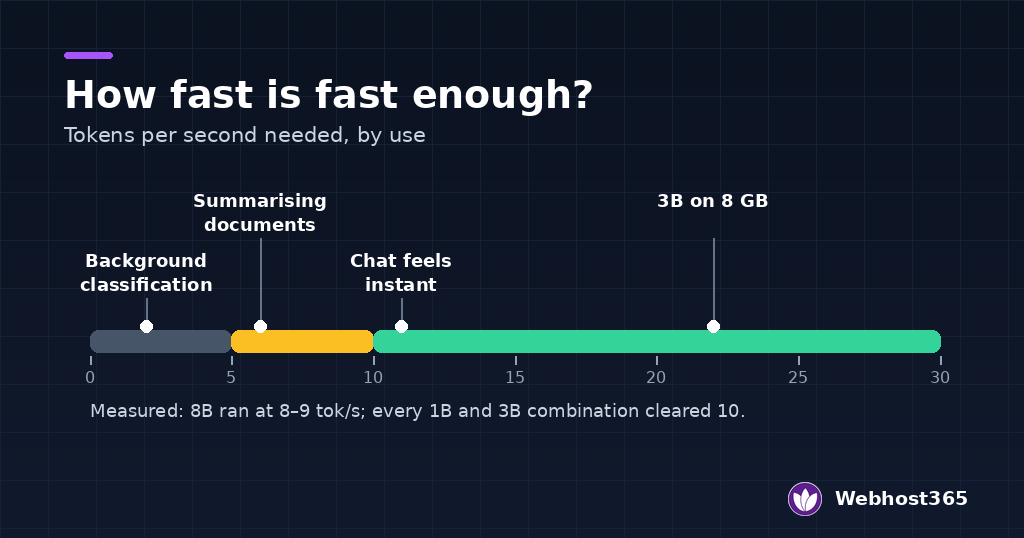
Tokens per second only matters relative to what you are doing with them. People read at roughly five to eight words a second, so anything above about 10 tokens per second feels instant in a chat window, while background jobs can run at almost any speed. Here is how the measurements map to real uses.
| Use | Speed it needs | Model | Plan |
|---|---|---|---|
| Classification, routing, tagging | Any | 1B | t3.nano |
| Summarising documents in the background | 5+ tok/s | 3B | t3.nano or t3.small |
| An internal chat assistant | 10+ tok/s | 3B | t3.small or c4.medium |
| RAG over your own documents | 10+ tok/s, plus memory for the index | 3B | c4.medium |
| Better reasoning and writing quality | 8+ tok/s | 7–8B | c4.medium |
For classification and routing, a 1B model on the t3.nano is enough. It answers in a few hundred milliseconds for short outputs, and the job is usually choosing between a handful of labels, which small models do well.
For a chat assistant, the 3B model on the t3.small is the value pick: fast enough to feel responsive, with room left for the application. Move to the c4.medium if several people will use it at once.
For retrieval over your own documents, remember that the model is not the only thing in memory. The vector index, the embedding model and the application all need room, which is why we put RAG on the 8 GB plan. Our self-hosted RAG guide walks through that stack, and our guide to hosting AI applications covers serving the model behind an API.
For the best quality a VPS can give, run the 8B model on the c4.medium. It writes noticeably better than the 3B, at a speed that is still comfortable to read. For the install itself, our guide to running a local LLM on a budget VPS goes step by step.
Making It Faster Without a GPU
On a CPU there is no magic setting, but five changes make a real difference.
Keep the model loaded. The first request loads the model from disk, which took up to eight seconds in our test; every request after that is immediate. Ollama unloads an idle model after five minutes by default. For an always-on service, set the OLLAMA_KEEP_ALIVE environment variable to a longer value so users never wait for a reload.
Use the smallest model that does the job. Moving from 8B to 3B more than doubled the speed on every plan in our test. Test the smaller model on your real task before assuming you need the larger one.
Keep the context window modest. Context memory is reserved when the model loads, so a large window costs RAM even when the conversation is short. If your prompts are short, a smaller num_ctx leaves more memory for everything else.
Run one model at a time. Two loaded models share the same CPU cores and the same RAM. On a small VPS that means both run slower and either can be killed when memory runs out.
Consider a smaller quantisation. The default downloads use about four bits per weight. Lower-bit versions exist and use less memory, at a visible cost in quality; the llama.cpp project, which Ollama runs on, documents the formats and their trade-offs.
When a VPS Is the Wrong Tool
A VPS is the right home for small and mid-size models serving a team or an application. It is the wrong one in three cases.
Models of 13B parameters and up. They need more than 8 GB of memory before any context, and on CPU they run at a few tokens per second. A bare metal server gives you the memory and the cores without sharing them.
Many simultaneous users. CPU inference handles one request at a time per loaded model, efficiently. Twenty people chatting at once will queue behind each other, and the experience degrades long before the server fails.
Latency-critical products. If your product’s value depends on answers starting in under a second for every user, a hosted API or GPU hardware will do it more cheaply than a fleet of VPS. A local model earns its place on privacy, predictable cost and control, not raw speed.
How We Measured
Anyone can repeat this test; here is everything that went into it.
- Servers: three of our Linux VPS plans in Delhi: t3.nano (2 vCPU, 4 GB), t3.small (3 vCPU, 6 GB) and c4.medium (4 vCPU, 8 GB), all AMD EPYC with NVMe storage, Ubuntu 24.04, nothing else running.
- Software: Ollama 0.40.15, CPU-only mode. Install
zstdfirst on a fresh Ubuntu 24.04 server, or the installer stops. - Models: llama3.2:1b, llama3.2:3b and llama3.1:8b, default tags from Ollama’s library.
- Prompt: “Explain in about 150 words why a website should use a CDN”, capped at 200 generated tokens, temperature zero, three runs per model per server.
- Speed: tokens per second from Ollama’s own
eval_countandeval_duration, median of three runs. - Memory: the size Ollama reports in
ollama pswith the model loaded, and the system’s available memory at the same moment. - Date: 9 November 2026.
The 1B and 3B results were consistent within a few tokens per second across runs. The 8B model on 4 GB failed on every attempt.
Final Thoughts
Size the server for the model you will actually run. A 1B or 3B model is happy on 4 GB, 6 GB makes the 3B comfortable, and 8 GB is the honest floor for a 7–8B model. The 6 GB plan can run an 8B model, but with so little memory spare that it is a demonstration, not a service.
Memory decides whether a model runs at all; cores decide how fast. If you are choosing between the two, buy memory first. And if your workload grows past an 8B model or a handful of simultaneous users, that is the point to look at bare metal or an API rather than a bigger VPS.
Every plan we tested is available on our Linux VPS page, and on our Indian VPS page priced in rupees with GST included.
FAQs
Yes, if the model is 3B parameters or smaller. In our test, a 4 GB VPS ran Llama 3.2 1B at 21 tokens per second and Llama 3.2 3B at 14 tokens per second, both on CPU. A 7–8B model does not fit: on 4 GB the 8B model was killed by the out-of-memory killer and took the Ollama service down with it. For a 7–8B model, start at 8 GB.
For a chat interface, about 10 tokens per second or more feels instant, because it is faster than most people read. Between 5 and 10 is readable but noticeable. For background work such as summarising documents or classifying tickets, speed matters much less, and even a few tokens per second is fine. In our test every 1B and 3B combination cleared 10 tokens per second; the 8B model ran at 8 to 9.
No. Ollama runs in CPU-only mode when it finds no GPU, which is how it ran on every server in our test. CPU inference is slower than a GPU, but small and mid-size models run at practical speeds on a modern multi-core CPU with AVX2 support, such as AMD EPYC. A GPU becomes necessary for large models, high concurrency or very low latency.
Llama 3.1 8B, or another model in the 7–8B class, is the most capable choice that runs safely on 8 GB. In our test it used 5.6 GB and ran at 9 tokens per second with 2.1 GB left over for the application. If you need more speed, a 3B model on the same server ran at 22 tokens per second.
The most common causes are a cold start, where the first request loads the model from disk, too many cores competing for other work, a large context window, or two models loaded at once. Keep the model loaded with OLLAMA_KEEP_ALIVE, run one model at a time, and keep the context window to what your prompts need. On CPU, a smaller model is the single biggest speed gain.
At steady volume, often yes, because the VPS costs the same every month however many requests it serves, while an API charges per token. At low or irregular volume an API is usually cheaper and faster. The other reasons to run locally are privacy, since your data never leaves your server, and predictable cost with no surprise bill.