
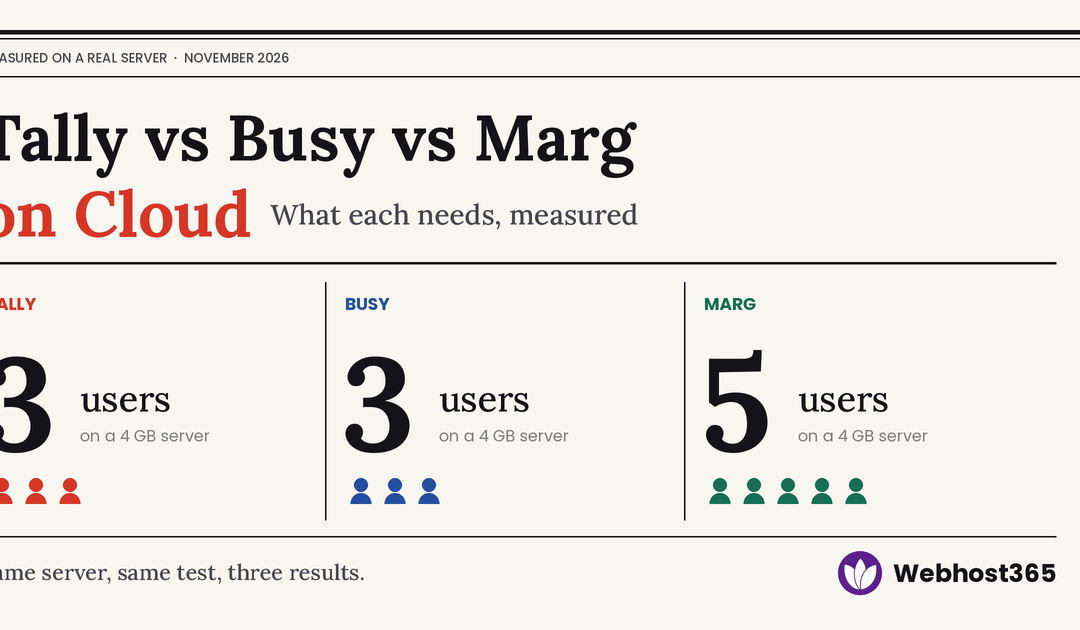
Tally, Busy and Marg all run on the same kind of cloud server, but they do not need the same amount of it. In our tests, Marg used the least memory for each user, and Tally and Busy used about the same. The larger difference is in what each vendor charges for its own cloud.
We ran these tests in November 2026 and re-read every price on 24 November 2026.
Tally vs Busy vs Marg at a Glance
First, a word on what this comparison is. We are a hosting company, so we do not judge which product has the better accounting, GST or stock features. Your accountant can tell you that. Instead, we compare what we measured on a server and what each vendor publishes on its own price list.
| Tally | Busy | Marg | |
|---|---|---|---|
| Made by | Tally Solutions | Busy Infotech | Marg ERP |
| Version we tested | TallyPrime | BUSY Magic | Marg ERP AI+ |
| Licence for several users | Gold, ₹67,500 one-time | Depends on the plan | Gold, ₹26,000, unlimited users |
| Vendor’s own cloud charge | ₹450 to ₹600 per user a month | ₹10,800 per user for 360 days | ₹7,500 per user a year |
| Our server plans start at | ₹882 a month for 3 users | ₹882 a month for 3 users | ₹882 a month for 5 users |
Vendor prices are before GST, and our plan prices include it. The Busy figure is from Busy’s own price guide, and the Marg figure is from Marg’s cloud FAQ.
Each product has its own page with full plan details: Tally on cloud, Busy on cloud and Marg on cloud. If you are also weighing a web-based system, see our ERPNext hosting guide.
How Many Users Fit on One Server
This is the question most buyers ask first, and most answers are guesses. Therefore we tested all three the same way.
We installed each product on Windows Server 2022. Then we signed in users over Remote Desktop, one at a time. Every user opened the software and the same company. After each sign-in, we read how much memory the server still had free.
| Reading | Tally | Busy | Marg |
|---|---|---|---|
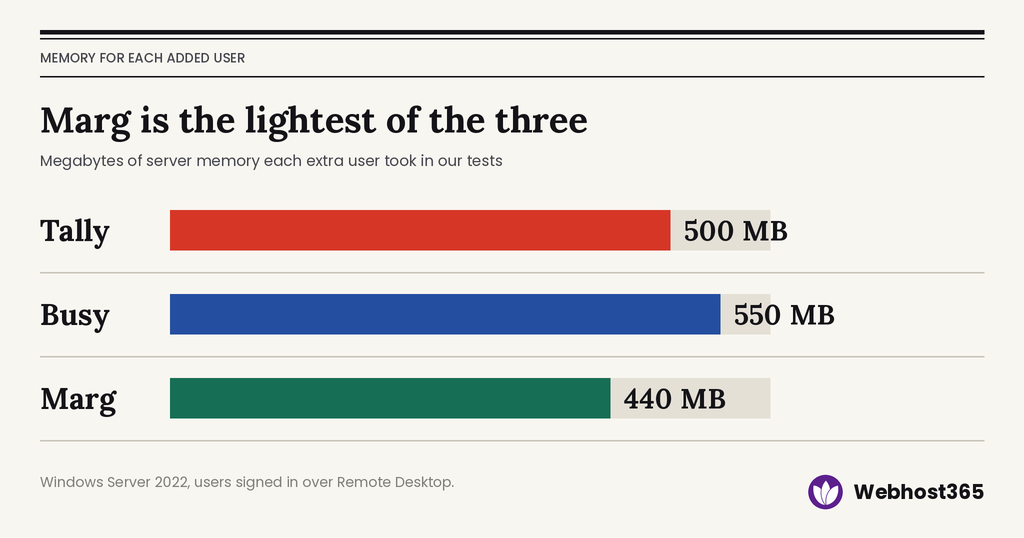
| Memory for each added user | About 500 MB | About 550 MB | About 440 MB |
| The program itself, per user | About 350 MB | 300 to 350 MB | 95 to 117 MB |
| 4 GB server, 3 users working | 836 MB free | 0.5 to 0.8 GB free | 1,522 MB free |
| 4 GB server, 4 users working | 163 MB free | Not tested | 1,492 MB free |
The Busy figure for three users is part measured and part calculated. Busy’s free trial allowed only one running copy on that test, so we worked out the rest from our 8 GB reading.
From those readings, this is how many users we rate on each plan.
| Plan | Price a month | Tally | Busy | Marg |
|---|---|---|---|---|
| 4 GB, 3 cores | ₹882 | Up to 3 | Up to 3 | Up to 5 |
| 6 GB, 4 cores | ₹1,666 | Up to 6 | Up to 6 | Up to 8 |
| 8 GB, 6 cores | ₹2,352 | Up to 9 | Up to 9 | Up to 12 |
Only the smaller counts were measured. The 6 GB and 8 GB figures are calculated from the memory each added user took. In addition, Busy has a second mode that uses Microsoft SQL Server, and it fits fewer users: 1, 4 and 7 on the three plans.
Two limits apply to all of this. Our test companies were small, and a company with many years of data uses more memory. We also did not measure processor load at the highest user counts. The full method is in each guide: Tally, Busy and Marg.
Why Marg fits more users
The reason is the size of the program. Marg itself used about 100 MB for each user, while Tally and Busy each used about three times that. The rest of each user’s share is the Windows desktop session, which costs much the same for all three.
The 4 GB server shows the effect clearly. With four people in Tally, it had 163 MB left, which is too little to work with. With four people in Marg, it still had about 1.5 GB free. As a result, the same ₹882 plan carries three Tally users or five Marg users.
What the Cloud Part Costs: Vendor Cloud vs a Server
Each of the three vendors sells its own cloud service, and all three charge for each user. A rented server is priced by its size instead. Here is one year of each, for an office of four and an office of eight.
The vendor figures include 18% GST, so they compare fairly with our prices. Tally’s rate is ₹450 per user a month in its 4 and 8 user packs, as listed in Tally’s own cost guide. Busy charges ₹10,800 per user for 360 days, and Marg charges ₹7,500 per user a year.
| One year of cloud | Tally | Busy | Marg |
|---|---|---|---|
| Vendor cloud, 4 users | ₹25,488 | ₹50,976 | ₹35,400 |
| Our server for 4 users | ₹19,992 | ₹19,992 | ₹10,584 |
| Vendor cloud, 8 users | ₹50,976 | ₹1,01,952 | ₹70,800 |
| Our server for 8 users | ₹28,224 | ₹28,224 | ₹19,992 |
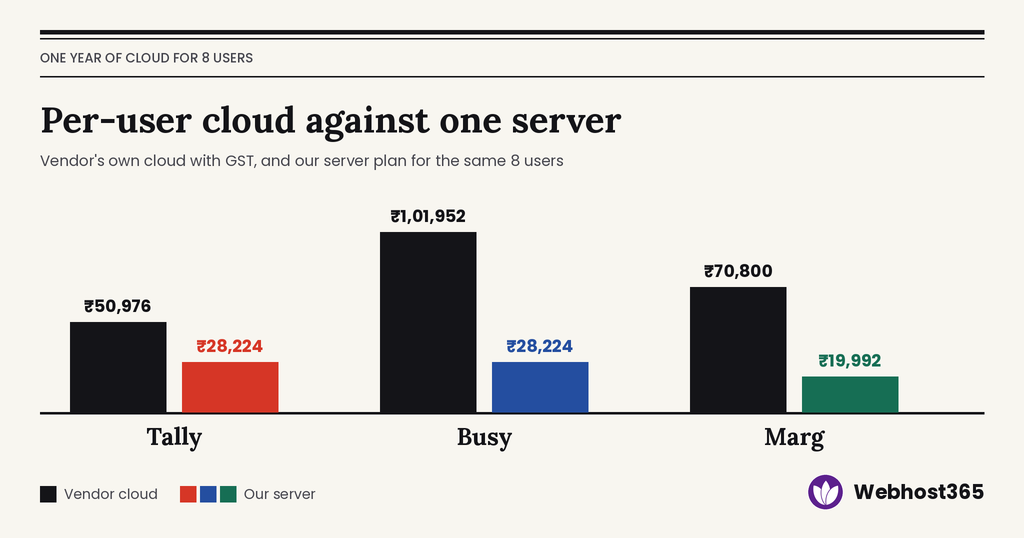
The server rows differ because the plans differ. Four Tally or Busy users need our 6 GB plan, while four Marg users fit on the 4 GB plan. Likewise, eight Tally or Busy users need the 8 GB plan, and eight Marg users fit on the 6 GB plan.
None of these figures includes the software licence. You pay that to the vendor on either route, so it does not change the comparison.
However, the vendor clouds are not the same product as a server. The vendor runs the service and looks after it, and each one has its own limits on users and companies. On a server, you hold the Administrator login and add users yourself, at no extra charge.
For a single user, the picture is different. Tally’s cloud costs about ₹8,496 a year with GST and Marg’s costs ₹8,850. Both are below the ₹10,584 for our smallest server. Therefore, a one-person office is usually better served by the vendor’s own cloud.
The Licence Rule That Decides Multi-User
A server can carry many users, but the software licence decides how many may work at once. This is the check that buyers most often miss, and it differs for each product.
| Entry licence | Licence for several users | How it is paid | |
|---|---|---|---|
| Tally | Silver, ₹22,500, one user | Gold, ₹67,500 | Once, or rented at ₹750 or ₹2,250 a month |
| Busy | BUSY 21 Basic, ₹11,000 | Depends on the plan | Once for BUSY 21, or every 360 days for BUSY Magic |
| Marg | Nano, ₹5,550, up to 2 users | Gold, ₹26,000, unlimited users | Once, plus a yearly renewal |
All prices are before GST and come from each vendor’s own price list.
Tally is the simplest to read. Silver is for one person on one computer, and Gold is for many. If several people will work on a server, you need Gold.
Busy sells two families. BUSY 21 is a one-time purchase, and BUSY Magic is paid every 360 days from ₹5,000. The number of users differs between plans, so ask your dealer which plan covers your team. Also ask whether your plan may be used over Remote Desktop.
Marg has the widest range. Nano and Basic allow up to two users. Silver includes one full user and one view-only user, with extra users at ₹3,000 each. Gold allows unlimited users and companies, as shown on Marg’s price list.
One more licence applies to all three, and it comes from Microsoft. Windows Server lets two administrators connect at once. Every person beyond that needs a Remote Desktop licence. Without one, Windows allows a grace period of 120 days, and then it cuts each session after 60 minutes. We tested exactly that in our Tally on cloud price guide. Our plans include these licences, so your users are not cut off.
Tally vs Busy on a Server
On a server, Tally vs Busy is a close contest. Each added user took about 500 MB in Tally and about 550 MB in Busy. As a result, we rate both at three, six and nine users on our three plans.
The real difference is how each stores its data. Tally keeps its data in its own files and needs no separate database program. Busy gives you a choice between two modes when you create a company.
The first Busy mode uses Microsoft Access files, and it behaves much like Tally on a server. The second uses Microsoft SQL Server, which is a database program that runs all the time. In our test, SQL Server took about 150 MB while idle. With one person working in a small company, SQL mode used about 0.7 GB more than Access mode.
That extra memory costs users. In SQL mode, the same three plans carry 1, 4 and 7 users. Busy prices its own cloud the same way, at ₹16,800 per user for SQL against ₹10,800 for Access. Our Busy on cloud price guide explains when SQL mode is worth it.
Setup also differs a little. Tally worked for every Windows user from the start. Busy showed an error for the second user until we changed one folder permission.
Tally vs Marg and Busy vs Marg on a Server
Tally vs Marg comes down to weight. Marg used about 440 MB for each added user, against 500 MB for Tally. On the 4 GB plan, that is five Marg users or three Tally users.
Busy vs Marg gives the same result with a slightly wider gap, because Busy used about 550 MB. Therefore, Marg is the lightest of the three on every plan we tested.
Marg was also the hardest to set up, however. This table shows what a second Windows user saw on each product before we fixed anything.
| What the second user saw | The fix | |
|---|---|---|
| Tally | It opened normally | None needed |
| Busy | “The Microsoft Jet database engine cannot open the file” | One permission on the Busy folder |
| Marg | “File access is denied” | A permission on every file, repeated every 15 minutes |
Busy’s fix is a single command, because its files accept a permission set on the folder. Marg’s files ignore the folder’s permission, so each file needs its own. Marg also creates new files as people work, and those arrive without it. For that reason, we added a scheduled job that reapplies the permission. The details are in our Marg on cloud price guide.
None of this affects you on our plans, since each server arrives with its fix in place. It matters if you set up a plain server yourself.
Which Server for Which Software
Put together, the tests give a simple table. Find your software and the number of people who work in it at the same time.
| People working at once | Tally | Busy | Marg |
|---|---|---|---|
| Up to 3 | 4 GB, ₹882 | 4 GB, ₹882 | 4 GB, ₹882 |
| 4 or 5 | 6 GB, ₹1,666 | 6 GB, ₹1,666 | 4 GB, ₹882 |
| 6 | 6 GB, ₹1,666 | 6 GB, ₹1,666 | 6 GB, ₹1,666 |
| 7 or 8 | 8 GB, ₹2,352 | 8 GB, ₹2,352 | 6 GB, ₹1,666 |
| 9 | 8 GB, ₹2,352 | 8 GB, ₹2,352 | 8 GB, ₹2,352 |
| 10 to 12 | A larger server | A larger server | 8 GB, ₹2,352 |
Prices are per month and include GST. The Busy column is for Access mode. In SQL mode, count on 1, 4 and 7 users for the three plans.
Three cautions apply before you choose. First, count the people who work at the same time, and not everyone who has a login. Second, a company with many years of data needs more memory, so move up a plan if the server feels slow. Third, check that your licence allows that many users, as the section above explains.
The plans themselves are on the Tally on cloud, Busy on cloud and Marg on cloud pages. For a team larger than the table covers, contact us with your user count and data size. If you use other Windows software, see our Windows VPS plans in India.
Moving From a Desktop to a Server
Whichever product you use, the move follows the same four steps. None of them changes how the software looks or works.
Move the data. Take a backup inside Tally, Busy or Marg, and send it to your host. On our plans, our team restores it on the server at no charge. Then we open the company to confirm that it loads.
Create the logins. Give each person a separate Windows login and a separate user inside the software. Shared logins hide who changed an entry.
Connect the printers and drives. Remote Desktop can share the printer on your desk and the drives on your computer. Our connection file switches both on, so you print and export as before.
Set the backups. Our servers are backed up daily, and we keep 30 days. Still, take your own backup from inside the software before a year-end closing or an update. Our guide to website backup strategies explains why one copy is never enough.
Final Thoughts
Choose between Tally, Busy and Marg for what the software does for your trade. That is a question for your accountant and your dealer, and not for a hosting company.
Once you have chosen, the server side is simple. All three run on the same kind of Windows server. Marg needs the least memory for each user, and Tally and Busy need about the same. Busy needs more again if you use SQL mode.
Finally, check two licences before you order: the software edition that covers your user count, and the Remote Desktop licences for Windows. With those in place, size the server from the table above.
FAQs
All three ran well on a cloud server in our tests, with several users in one company at the same time. Marg was the lightest and fitted the most users on each plan. We do not rank their accounting features, so choose the one that suits your trade.
Marg. In our tests each added Marg user took about 440 MB, against about 500 MB for Tally and 550 MB for Busy. The Marg program itself used about 100 MB per user, while Tally and Busy each used 300 to 350 MB.
Yes, a Windows server can have more than one of them installed, and each needs its own licence. The memory adds up, so size the server for everyone who works at the same time. We tested each product on its own and not together.
It depends on the software. Tally Gold and Marg Gold each cover many users under one licence, and Busy depends on your plan. Windows also needs a Remote Desktop licence for each user beyond two administrators, and our plans include those.
On our plans, five Tally or Busy users need the 6 GB server at ₹1,666 a month, and five Marg users fit the 4 GB server at ₹882 a month, GST included. The vendors’ own clouds charge per user: ₹450 a month for Tally, ₹10,800 for 360 days for Busy and ₹7,500 a year for Marg, before GST.
No. You buy the Tally, Busy or Marg licence from the vendor or a dealer, and you keep using the one you already have. A hosting provider supplies the server, Remote Desktop access and backups.