
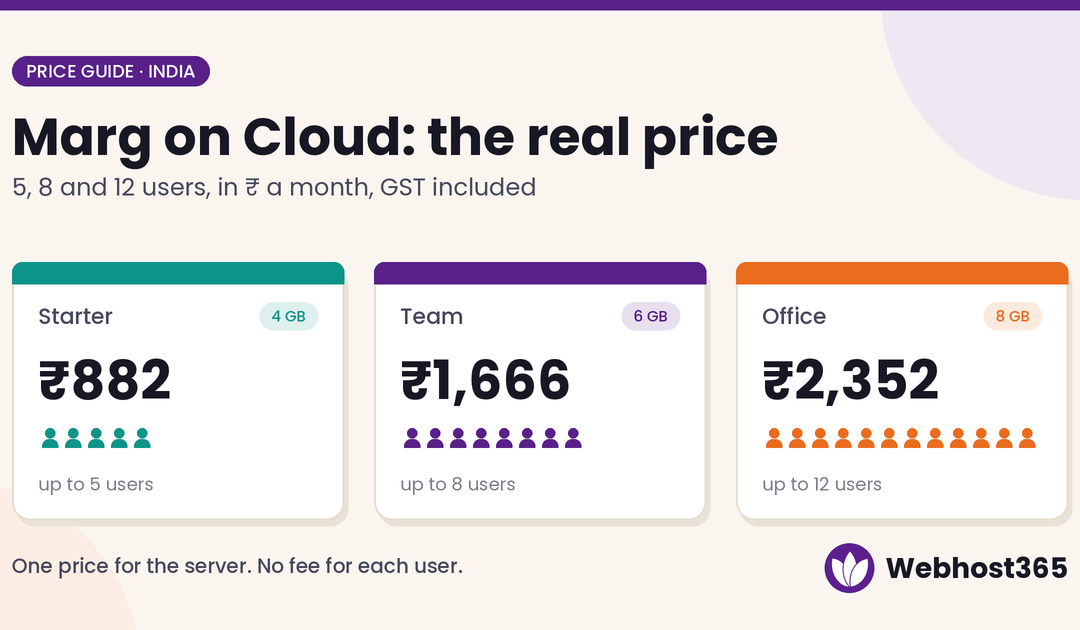
The Marg on cloud price in India has three parts: your Marg licence, the cloud itself, and Remote Desktop licences. Marg’s own cloud costs ₹7,500 per user per year before GST. A server priced by size costs ₹10,584 a year for 5 users, GST included. First, though, check how many users your Marg edition allows.
We checked these prices and ran our tests on 22 and 23 November 2026.
What “Marg on Cloud” Actually Is
Marg on cloud means Marg ERP runs on a server in a data centre, and not on a computer in your shop. Your billing counters, your accountant and you all open the same company from wherever you are. There are two common ways to get there.
The first is Marg’s own service, called Marg Cloud. Marg hosts the software and charges for each user, on top of the licence. According to Marg’s cloud FAQ, each plan includes one user and one company, and extra users cost more.
The second is a Windows server that you rent, with Marg installed on it. Your staff sign in over Remote Desktop, which is built into Windows. Inside the session, Marg looks and works exactly as it does on a desktop. The billing screens, shortcuts and reports stay the same.
The difference that matters is how the bill grows. Marg Cloud’s bill grows with every user you add. A rented server’s bill depends on its size, so adding a login costs nothing. Our Marg on cloud plans work the second way.
The Three Parts of the Price
Whichever route you choose, the total has the same three parts. Most price pages show only one of them.
1. The Marg licence. You buy this from Marg or a Marg dealer, and you pay a renewal each year. A cloud provider cannot include it, so you keep the licence you already have. The current figures are on Marg’s price list, and 18% GST is extra.
2. The cloud charge or the server. With Marg Cloud, this is ₹7,500 per user per year before GST, or ₹10,800 on the Premium tier. With a rented server, it is one monthly price for the whole machine.
3. Remote Desktop licences. Windows Server allows only two people to sign in at once, and those two sessions are meant for administration. More users need Remote Desktop licences from Microsoft. Some hosts charge for these separately, so ask before you order. Our plans include them, and we tested what happens without them in our Tally on cloud price guide.
Your Marg edition sets the user limit
A server can carry many users, but your Marg edition decides how many Marg will allow. Therefore, check this table before you size anything.
| Marg edition | Licence price | Yearly renewal | Users Marg allows |
|---|---|---|---|
| Nano | ₹5,550 | ₹2,400 | Up to 2 |
| Basic | ₹10,300 | ₹3,990 | 1 user, up to 2 |
| Silver | ₹13,900 | ₹4,780 | 1 full user and 1 view-only user |
| Gold | ₹26,000 | ₹9,550 for up to 25 users, ₹19,100 for unlimited | Unlimited users and companies |
All prices are before GST, as read on Marg’s price list in November 2026. On that list, an extra user costs ₹3,000 on the licence and ₹1,050 on each renewal.
As a result, Gold is the edition that suits a busy counter with many logins. If you have Nano or Basic, a small server is enough, because Marg stops you at two users anyway.
One more check is worth a phone call. Ask your dealer to confirm that your edition can be used over Remote Desktop. We have not confirmed this with Marg for every edition, so we will not state it as fact here.
Marg on Cloud Price for 5, 8 and 12 Users
Here is the cloud part of the bill for one year, side by side. The Marg cloud price is ₹7,500 per user per year, and we have added 18% GST so both columns compare fairly. The server column uses our three plans, which already include GST.
| Users | Marg Cloud, before GST | Marg Cloud, with GST | Server priced by size, GST included | Difference in a year |
|---|---|---|---|---|
| 5 | ₹37,500 | ₹44,250 | ₹10,584 | ₹33,666 |
| 8 | ₹60,000 | ₹70,800 | ₹19,992 | ₹50,808 |
| 12 | ₹90,000 | ₹1,06,200 | ₹28,224 | ₹77,976 |
Neither column includes the Marg licence or its renewal. You pay those to Marg on both routes, so they do not change the comparison.
The server prices are ₹882, ₹1,666 and ₹2,352 a month. Paying yearly takes 15% off, which brings the three figures down to ₹8,996.40, ₹16,993.20 and ₹23,990.40.
However, the two routes are not the same product. Marg Cloud is run by Marg, and each plan covers one user and one company. A rented server is a Windows machine that you control, with Marg installed on it. You get the Administrator login, and you can add a user at any time without a new charge.
That last point matters most in a busy season. For example, a distributor may add two billing operators for March and remove them in April. On a per-user plan, that changes the bill. On a server, it does not.
How Much Server Marg Needs: What We Measured
A server priced by size only works if you know what size to buy. Most pages guess. Instead, we installed Marg ERP AI+ on Windows Server 2022 and measured it. We used Marg’s trial licence, and the version was dated 12 November 2026.
We signed in users over Remote Desktop, one at a time. Each one opened Marg and the same company. After each sign-in, we read how much memory the server still had free.
| Test | Server memory | Memory still free |
|---|---|---|
| Before Marg was installed | 8 GB | 6,248 MB |
| 1 person in Marg | 8 GB | 5,858 MB |
| 4 people in Marg, same company | 8 GB | 4,545 MB |
| 3 people in Marg, same company | 4 GB | 1,522 MB |
| 4 people in Marg, same company | 4 GB | 1,492 MB |
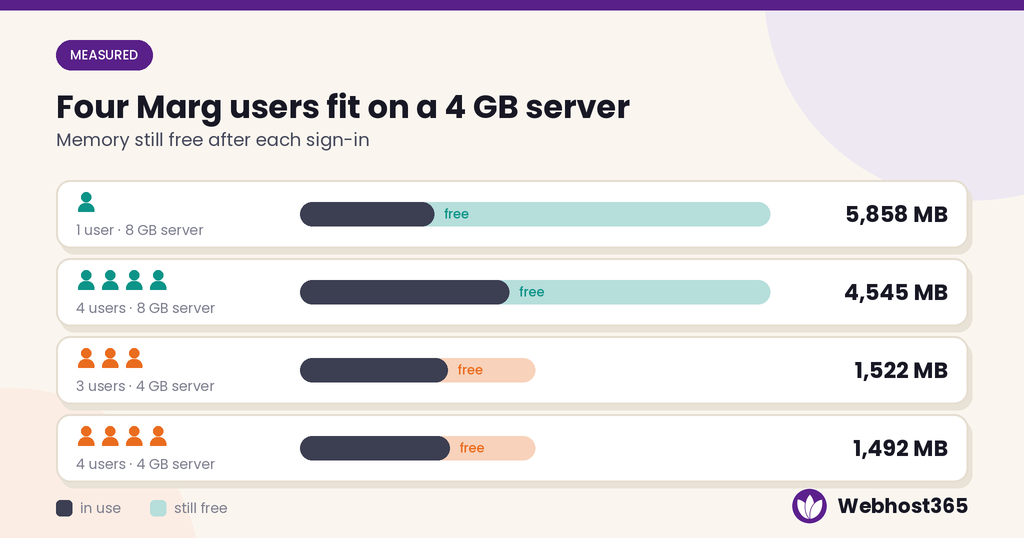
On the 8 GB server, each added person used about 440 MB. The Marg program itself is light, at 95 to 117 MB for each user. The rest is the Windows desktop session around it, plus memory that Windows shares between sessions. Counted on its own, each user’s session came to between 263 and 286 MB. We size the plans with the larger 440 MB figure to stay on the safe side.
The 4 GB result surprised us. Four people were working in Marg, and the server still had about 1.5 GB free. Windows had moved some idle memory to the page file, which rose from 9% to 22%. Nobody saw an error or a slow screen during the test.
From these readings, this is how we size the three plans.
| Plan | Memory | CPU | Best for | Price a month, GST included |
|---|---|---|---|---|
| Starter | 4 GB | 3 cores | Up to 5 users | ₹882 |
| Team | 6 GB | 4 cores | Up to 8 users | ₹1,666 |
| Office | 8 GB | 6 cores | Up to 12 users | ₹2,352 |
Four users is the most we measured. The figures for 5, 8 and 12 users are calculated at 440 MB for each extra person. On that basis, each plan keeps roughly 1 GB of memory free.
Two limits of the test are worth stating. First, we did not measure processor load with twelve people billing at once. Second, our test company was small, and a company with many years of data will use more memory. If the server feels slow, move up a plan.
You can see the full plan details on our Marg on cloud page.
Can several users work in one company?
Yes. This is the question behind most searches for Marg ERP multi user setups, so we tested it directly.
Four people opened the same company from four separate Windows logins. Then they saved entries into it at the same time. Every entry was saved, and Marg showed no locking message and no error.
One condition applies in your own office. Your Marg edition must allow that many users, as the edition table above shows.
“File Access Is Denied” in Marg, and the Fix
This error is the main reason a first Marg server setup fails. It appeared in our test as soon as a second Windows user opened Marg. The Administrator could work normally, but the new user saw this message:
File access is denied c:\margerp\snmanri1.ini.
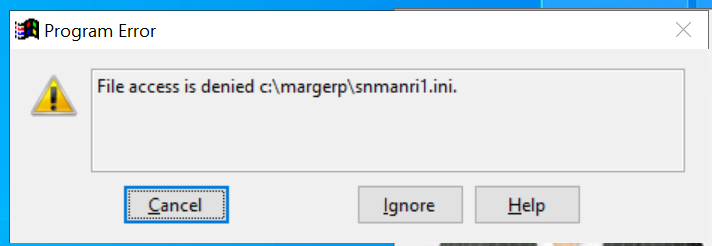
In short, Marg was installed by one Windows account, and it protects its files for that account. Every other login on the server is then shut out.
Why a folder permission is not enough
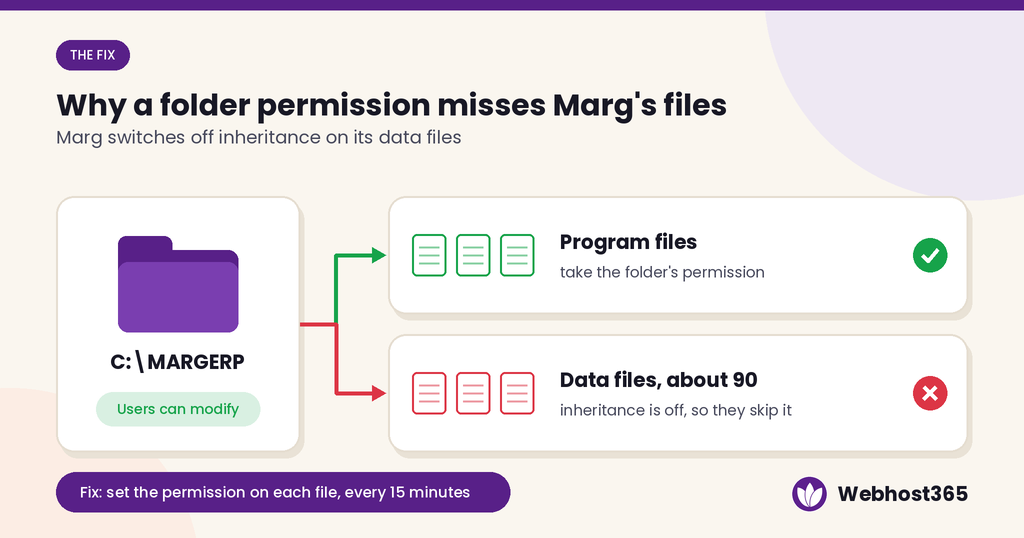
Our first attempt was the usual one. We gave the Users group permission on the whole Marg folder, so that every file inside would inherit it. That same step fixed a similar error in our Busy on cloud price guide.
With Marg, it changed nothing. The second user saw the same error for the same file.
The reason is that Marg switches off inheritance on its own data files. A file with inheritance switched off ignores any permission set on the folder above it. In our test, about 90 files had skipped the folder permission.
You can check one file yourself. Run this in PowerShell as Administrator:
(Get-Acl C:\MARGERP\snmanri1.ini).AreAccessRulesProtectedIf the answer is True, the file ignores the folder’s permissions.
The command that fixed it
The fix is to set the permission on each file directly. This command does that for every file in the Marg folder. It uses icacls, a tool that is built into Windows. Run it as Administrator:
icacls "C:\MARGERP\*" /grant "Users:M" /T /QAfter that, the second user opened Marg and saw the company at once. The fix also survived a restart of the server. If your Marg is installed in a different folder, change the path to match.
Keeping it fixed
However, one command is not the end of it. Marg keeps creating new files as people work, and the new files do not carry the permission. A few hours after our fix, 35 files were missing it again.
Therefore, we added a scheduled job that runs the same command every 15 minutes. Run this once as Administrator:
schtasks /Create /TN "MargPermissions" /SC MINUTE /MO 15 /RU SYSTEM /RL HIGHEST /TR "icacls C:\MARGERP\* /grant Users:M /T /C /Q" /FAfter the job ran, every file had the permission again.
One caution applies. This permission lets every Windows login on the server change Marg’s files. That is correct for a server used only by your own staff. Inside Marg, each person’s user name and rights still decide what they can see and do.
Our Marg servers are delivered with both steps already in place, so your staff do not meet this error.
Marg’s Own Cloud or a Server Priced by Size
Neither route is right for everyone. The honest answer depends on how many people work in Marg at the same time.
| Your situation | Route that fits | Cloud cost in a year |
|---|---|---|
| 1 user, on one computer | Stay on the desktop | Nothing extra |
| 1 user who needs access from anywhere | Marg Cloud | ₹8,850 with GST |
| 2 to 5 users | Server, Starter plan | ₹10,584, GST included |
| 6 to 8 users | Server, Team plan | ₹19,992, GST included |
| 9 to 12 users | Server, Office plan | ₹28,224, GST included |
| More than 12 users | A larger server | Quoted for your team |
For a single user, Marg Cloud costs less than any server, so we would not sell you one. From two users onward, the per-user charge passes the price of a whole server. For example, two users on Marg Cloud cost ₹17,700 a year with GST.
Besides the price, think about control. On a server you hold the Administrator login. As a result, you can install Marg updates, add logins and run other Windows software on the same machine.
If you have more than 12 users, contact our team with your user count and data size. Some offices also run a second accounting package. In that case, the same kind of server is available as Tally on cloud and Busy on cloud. For any other Windows software, see our Windows VPS plans in India.
Keeping Marg Data Safe on a Server
Moving Marg to a server puts all your billing and stock data in one place. That is convenient, and it also means the one place must be protected well.
Backups. Our servers are backed up every day, and we keep 30 days of backups. As a result, the server can be restored to any day in the last month. In addition, take a backup from inside Marg before a year-end closing or a Marg update. Our guide to website backup strategies explains why one copy is never enough.
Logins. Give each person a separate Windows login and a separate Marg user name. Shared logins make it impossible to see who changed a bill. Also, remove a login on the day a staff member leaves.
Location. Our Marg servers run in a data centre in Noida, so your data stays in India. A nearby server also keeps Remote Desktop quick, which matters at a billing counter. We explain the effect of distance in our guide to VPS hosting in India.
Your own copy. Our connection file shares your computer’s drives with the session. Therefore, you can save a Marg backup straight to your own computer whenever you like.
Final Thoughts
The Marg on cloud price is easy to work out once you take it in order. First, check how many users your Marg edition allows. Next, count the people who work in Marg at the same time. Then compare a per-user charge with a server sized for that count.
For one user, Marg’s own cloud costs less. From two users onward, a server priced by size is cheaper, and the gap widens with every login. In our test, a 4 GB server carried four Marg users with about 1.5 GB of memory to spare.
Finally, remember the file permission. Without it, only the first Windows user can open Marg. Our Marg on cloud plans come with that fix applied and start at ₹882 a month, GST included.
FAQs
Marg’s own cloud costs ₹7,500 per user per year before GST, on top of the Marg licence. A server priced by size costs ₹882 a month for up to 5 users, ₹1,666 for up to 8 and ₹2,352 for up to 12, with GST included. Neither price includes the Marg licence.
No. You buy the Marg licence from Marg or a Marg dealer, and you pay its renewal each year. A hosting provider supplies the server, Remote Desktop and backups. You keep using the Marg licence you already have.
According to Marg’s price list, the Gold edition allows unlimited users and companies. It costs ₹26,000 before GST. Its yearly renewal is ₹9,550 for up to 25 users and ₹19,100 for unlimited users. Nano and Basic allow up to 2 users.
Yes. In our test, four people opened the same company from four Windows logins and saved entries at the same time. Marg showed no error. Your Marg edition must allow that number of users.
In our test, Marg itself used 95 to 117 MB for each user, and each added person used about 440 MB with the Windows session included. A 4 GB server carried four users with about 1.5 GB free. We suggest 4 GB for up to 5 users, 6 GB for up to 8 and 8 GB for up to 12.
Marg protects its data files for the Windows account that installed it, so other logins on the same server cannot open them. A permission on the folder does not help, because the files ignore it. The fix is to set the permission on each file and repeat it on a schedule.