
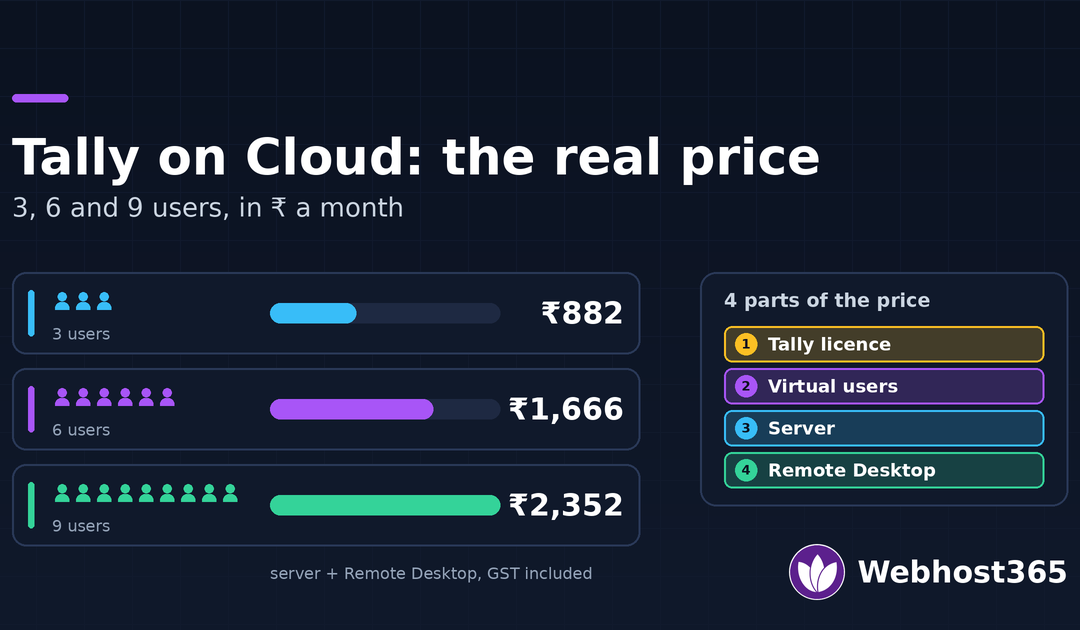
The price of Tally on cloud has four parts: the TallyPrime licence, Tally Virtual User packs, the server, and Remote Desktop access for each person. For the server and access together, an office of 3, 6 or 9 users pays ₹882, ₹1,666 or ₹2,352 a month with us, GST included, against ₹400 to ₹600 per user at most providers. The licence is the part most quotes leave out. Prices in this guide were checked on 20 November 2026.
What “Tally on Cloud” Actually Is
Tally on cloud is TallyPrime installed on a Windows server in a data centre instead of on a computer in your office. Each person signs in to that server over Remote Desktop and sees the normal Tally screen. It is the same software, the same licence and the same company data. Nothing runs in a web browser, and nothing about vouchers, shortcuts or reports changes.
What you gain is access. The accountant in the office, the owner at home and the CA in another city can all work on the same books at the same time, and the data sits in one place that is backed up every day.
Three ways to buy it
- Tally’s own service. Tally Solutions sells TallyPrime Cloud Access, hosted on AWS and priced per user.
- A Tally cloud provider. Dozens of Indian hosts sell a ready server, most of them priced per user as well.
- A server priced by size. You pay for the server and add as many logins as it can carry. This is how our Tally on cloud plans work.
Whichever you choose, pick a server in India. Remote Desktop sends every key press to the server and back, so distance shows up as lag while typing. We measured the gap between Indian and overseas servers in our n8n hosting in India guide.
The Four Parts of the Price
Every Tally on cloud bill is made of the same four parts. A quote that looks cheap has usually left one of them out.
1. The TallyPrime licence
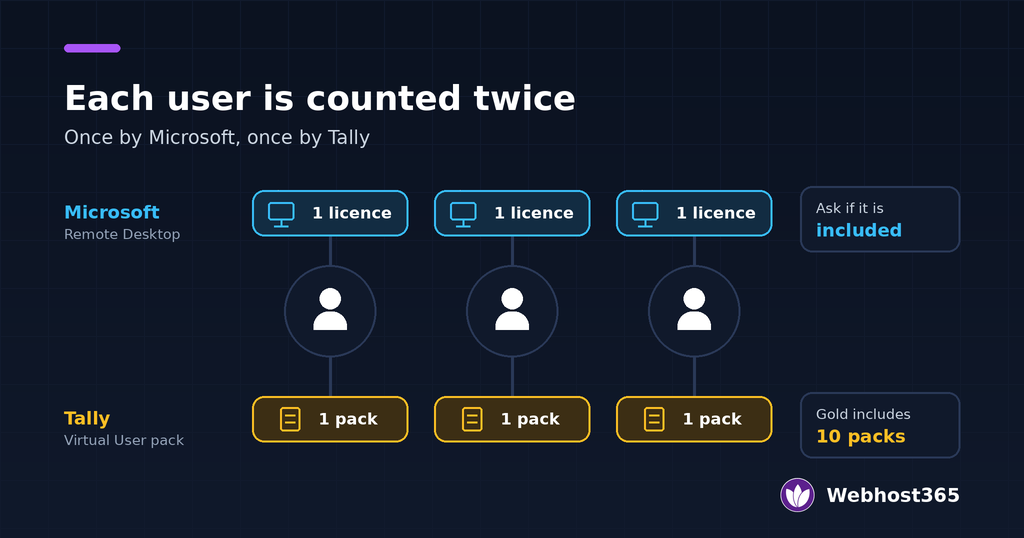
No cloud price includes the Tally licence, and that is true of Tally’s own service too. TallyPrime Silver is for one user and costs ₹22,500. TallyPrime Gold is for many users and costs ₹67,500. Both are one-time prices before 18% GST. Rental is ₹750 a month for Silver and ₹2,250 a month for Gold. Tally publishes these figures in its guide to the total cost of TallyPrime in India.
If more than one person will work in Tally at the same time, you need Gold. If you already own a licence, you keep using it on the server.
2. Tally Virtual User packs
Tally counts each person who uses TallyPrime over Remote Desktop or any cloud as a Tally Virtual User, or TVU. Silver comes with 1 TVU pack and Gold comes with 10, free for the life of the licence. Each extra pack costs ₹125 per user per month, billed yearly, plus taxes. The rules are in Tally’s TVU questions and answers.
For an office of 3, 6 or 9 people on Gold, this part costs nothing. One rule matters: every user on the licence must belong to the same company.
3. The server
This is the monthly hosting charge. Memory decides how many people a server can carry, and we measured that further down. Providers price it in two ways: per user, usually ₹400 to ₹600 a month each, or by server size with no charge per user.
4. Remote Desktop access
Windows Server lets two administrators connect at once. Every person beyond that needs a Remote Desktop licence from Microsoft, which is separate from anything Tally sells. Some providers include these, and some charge for each extra user. We have seen ₹600 a month per extra user on a public price list. Ask before you pay. Our plans include Remote Desktop access for every user.
Tally on Cloud Price for 3, 6 and 9 Users
The table below covers the server and Remote Desktop access for one month, with 18% GST added so that every column can be compared directly. The TallyPrime licence comes on top and is the same in every column.
| Users | Tally’s own Cloud Access | A per-user provider at ₹400 to ₹600 | Webhost365 |
|---|---|---|---|
| 3 users | ₹2,124 | ₹1,416 to ₹2,124 | ₹882 |
| 6 users | ₹4,248 | ₹2,832 to ₹4,248 | ₹1,666 |
| 9 users | ₹6,372 | ₹4,248 to ₹6,372 | ₹2,352 |
Tally sells Cloud Access in fixed sizes of 1, 2, 4, 8 and 12 users, at ₹600 per user for the two smallest and ₹450 per user above that, before GST. The column uses the smallest size that fits: the 4-user plan for 3 people, the 8-user plan for 6 and the 12-user plan for 9. Our figures are the three Tally on cloud plans, which already include GST.
What a full year costs
Add the licence to see the real yearly figure. This example uses TallyPrime Gold on Tally’s 12-month rental plan, which costs less than twelve single months: ₹24,300 before GST and ₹28,674 with it. Gold includes 10 Tally Virtual User packs, so that part is nil for all three team sizes.
| Users | Gold rental for a year | Server for a year, Tally’s own | Server for a year, Webhost365 | Total with Tally’s own | Total with Webhost365 |
|---|---|---|---|---|---|
| 3 users | ₹28,674 | ₹25,488 | ₹10,584 | ₹54,162 | ₹39,258 |
| 6 users | ₹28,674 | ₹50,976 | ₹19,992 | ₹79,650 | ₹48,666 |
| 9 users | ₹28,674 | ₹76,464 | ₹28,224 | ₹1,05,138 | ₹56,898 |
If you already own Gold, drop the rental column and only the server remains. Paying us yearly takes a further 15% off the server.
Where a single user fits
For one person, Tally’s own Personal plan is the cheaper choice. It costs ₹600 a month before GST, or ₹708 with it, and works with a Silver licence. Our smallest plan is ₹882 and is sized for three people. A flat price starts to win from the second or third user.
How Much Server Tally Needs: What We Measured
Most sizing advice for Tally on a Windows VPS is a guess, so we tested it. We took a 4 GB server running Windows Server 2022, signed in users over Remote Desktop, opened TallyPrime in each session and recorded the memory left. The tests ran on 9 and 10 November 2026. TallyPrime ran in Educational mode with a small test company.
| On a 4 GB server | Memory still free | Page file in use |
|---|---|---|
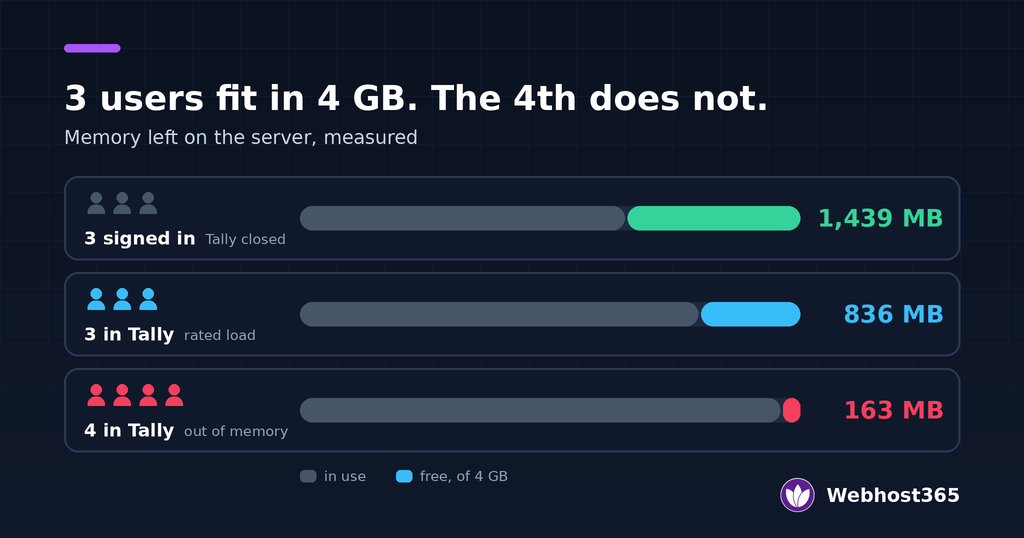
| 3 users signed in, Tally not yet open | 1,439 MB | 29% |
| 3 users working in TallyPrime | 836 MB | 50% |
| A 4th user opens TallyPrime | 163 MB | 58% |
With three people in Tally the server was comfortable. The fourth pushed it to 163 MB free, which is the point where Windows starts to struggle and sessions slow down or drop.
What each user costs in memory
Windows itself used about 1.2 GB before anyone signed in. Each Remote Desktop session added 150 to 180 MB, and TallyPrime added about 350 MB on top. That makes roughly 0.5 GB for each person working in Tally.
From users to server size
| People in Tally at once | Server memory | Memory left over | Basis |
|---|---|---|---|
| Up to 3 | 4 GB | About 0.8 GB | Measured |
| Up to 6 | 6 GB | About 1.3 GB | Calculated |
| Up to 9 | 8 GB | About 1.9 GB | Calculated |
Only the 4 GB row was measured. The other two start from the 836 MB left in the test, add the extra memory of the bigger server, and take off 0.5 GB for each extra user. A company with many years of vouchers uses more memory than our test data did, so treat these as starting sizes and move up a plan if the server feels slow. Processor load was light throughout, because Tally spends most of its time waiting for the next key press.
If you would rather set Tally up yourself on a plain server, the same sizes apply to our Windows VPS plans in India.
What Happens When Remote Desktop Licences Are Missing
This is the part of a Tally server that fails late. A Windows server set up for many Remote Desktop users works without licences at first, because Microsoft gives a new server a grace period of 120 days. A provider can hand over a server that passes every test in the first week and still has nothing installed.
We wanted to see day 121 for ourselves. We set up a test server with multi-user Remote Desktop and no licences, then moved its clock forward 125 days so the grace period read zero.
What the user sees
- At sign-in: the user is let in, and a box titled “Remote Desktop License Issue” appears. It says the session will be disconnected in 60 minutes.
- Near the end: a second warning appears with two minutes left.
- At 60 minutes: the session is cut, whatever the user was doing.
Why this is worse than being refused
A server that refuses the login is an obvious fault, and someone reports it the same morning. A server that lets you in and cuts you off an hour later is harder to pin down. The accountant is in the middle of a voucher or a long report when the screen closes, and it looks like a network problem. It then happens again every hour, to every user.
What to ask before you pay
Ask the provider two questions in writing:
- Are Remote Desktop licences for all my users installed on the server today?
- Are they included in the price, or charged per user?
Our Tally servers are delivered with the licences already installed, so the grace period never comes into it.
Tally’s Own Cloud, a Per-User Provider or a Server Priced by Size
Tally cloud hosting in India comes down to these three choices, plus a fourth for offices with their own IT person. The right one depends mostly on how many people use Tally at once.
| Your situation | Best fit | Why |
|---|---|---|
| 1 user | Tally’s own Personal plan | ₹708 a month with GST. Nothing with a flat price beats it for one person. |
| 2 users | A server priced by size | Tally’s 2-user plan is ₹1,416 with GST. Our 3-user plan is ₹882. |
| 3 to 9 users | A server priced by size | The gap widens with every user, as the cost table shows. |
| More than 9 users | A custom server | Ask for one price for the server you need, not a price per head. |
| You have an IT person and run other Windows software too | A plain Windows VPS | You install Tally yourself and arrange the Remote Desktop licences. |
Three questions that separate providers
Price is not the only difference. Ask each provider these before you decide:
- Is the server mine alone? Some low per-user prices come from putting several customers on one server. Your books should sit on a server only your office uses.
- Do I get Administrator access? Without it, you cannot install a Tally add-on or a TDL file, add a user or run another program without raising a request.
- What does an extra login cost? A CA at audit time or a temporary operator in March should not change the bill.
Our Tally on cloud plans answer these as follows: the server is yours alone, you get the Administrator login, and extra logins are free. For a plain server, see the Windows VPS plans in India. For more than 9 users, contact us with your user count.
Keeping Tally Data Safe on a Server
Moving Tally to a server puts your books in one place, so that place has to be looked after. Four things cover most of the risk.
Backups
Check that the provider backs up the whole server every day and ask how many days are kept. Ours are kept for 30 days. Keep your own copy as well: take a Tally backup at each month-end and save it to your own computer through the shared drive in the Remote Desktop session. Our guide to website backup strategies explains why one copy is never enough, and the same rule applies to accounts.
Who can log in
Give each person their own login and never share one between two people. Use long passwords, and remove a login the day someone leaves. A Tally server is reachable from the internet, so a weak password is the most likely way in.
Where the data sits
Your books hold names, addresses, bank details and salaries. Keep them on a server in India, close to your users and under Indian law. Our guide to VPS hosting in India covers why location matters, and the DPDP Act guide covers what the law expects when you hold personal data.
Access inside Tally
A server login is not the same as permission to see every company. Use TallyPrime’s own security controls to decide who can open which company and who can alter vouchers.
Final Thoughts
Work out the price of Tally on cloud in this order. Count the people who will use Tally at the same time. Check your licence: one user can stay on Silver, and more than one needs Gold, which also covers up to 10 users for Tally’s virtual user rule. Then choose the server. For one person, Tally’s own plan at ₹708 a month is the cheapest route. From two users upward, a server priced by size costs less, and with us that is ₹882, ₹1,666 or ₹2,352 a month for 3, 6 or 9 users, GST included. Before paying anyone, ask whether Remote Desktop licences are installed and whether an extra login costs more.
FAQs
The server and Remote Desktop access cost ₹400 to ₹600 per user a month at most providers, before GST. Tally’s own Cloud Access is ₹450 to ₹600 per user. Our plans are priced by server size: ₹882, ₹1,666 and ₹2,352 a month for up to 3, 6 and 9 users, GST included. The TallyPrime licence is extra in every case.
No. Every provider, including Tally Solutions, expects you to have your own TallyPrime licence. Silver costs ₹22,500 and Gold costs ₹67,500 as one-time prices before GST, or ₹750 and ₹2,250 a month on rental. If you already own a licence, you use it on the server.
You need Gold if more than one person will work in Tally at the same time. Silver allows a single user. Gold also includes 10 Tally Virtual User packs, which covers up to 10 people using Tally over Remote Desktop.
It is Tally’s permission for one person to use TallyPrime over Remote Desktop or any cloud. Silver includes 1 pack and Gold includes 10, free for the life of the licence. Extra packs cost ₹125 per user a month, billed yearly, plus taxes. All users must belong to the same company.
In our test, Windows Server used about 1.2 GB and each person working in TallyPrime added about 0.5 GB. A 4 GB server carried 3 users comfortably and ran out of memory with a fourth. By the same figures, 6 users need about 6 GB and 9 users need about 8 GB.
That happens when the server has no Remote Desktop licences installed and its 120-day grace period has ended. Windows lets the user in, warns that the session will end in 60 minutes, and then cuts it. The fix is for the provider to install the licences.