
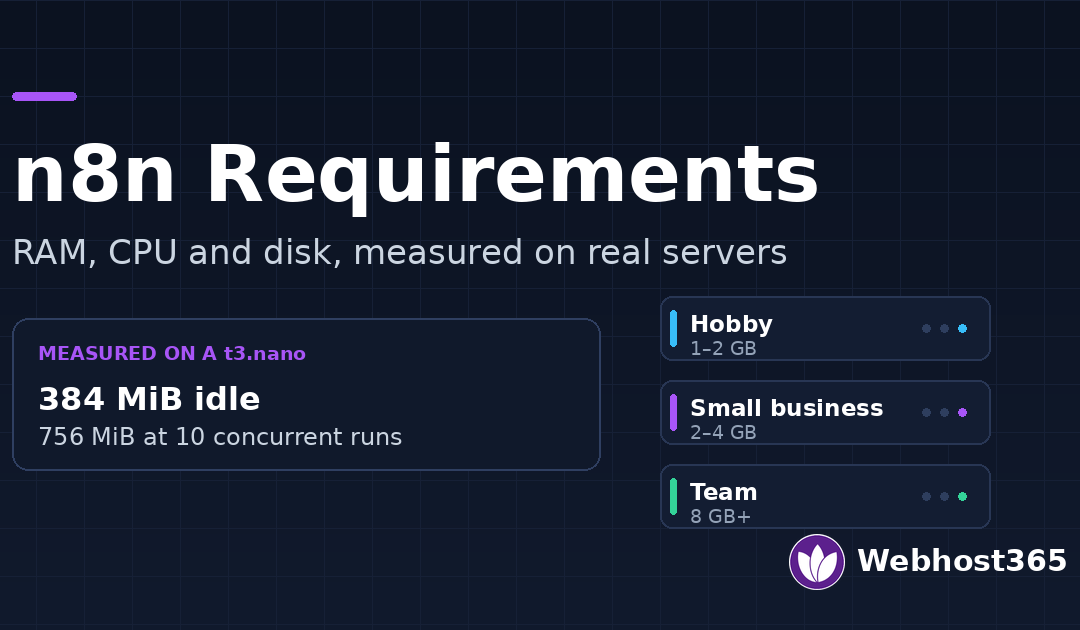
A small n8n instance runs comfortably in 2 GB of RAM. CPU barely matters, because n8n spends most of each run waiting on API calls, not computing. The requirement most people miss is disk: execution history grows fast and fills the server before memory ever becomes the problem. This guide sizes each part by workload, with numbers measured on our own hardware.
n8n Requirements at a Glance
Here are the n8n system requirements by workload. Find the row that matches your execution volume, then read the sections below for why each number lands where it does. The memory figures for the first two rows are measured, not estimated; the heavier rows extrapolate from the same test, and our Linux VPS page lists the plans named here.
| Workload | Executions / month | Concurrency | RAM | vCPU | Database |
|---|---|---|---|---|---|
| Hobby / personal | Under 1,000 | 1 | 1–2 GB | 1 | SQLite |
| Small business | 1,000–20,000 | 1–3 | 2–4 GB | 2 | SQLite or PostgreSQL |
| Busy | 20,000–100,000 | 5–10 | 4–8 GB | 2–4 | PostgreSQL |
| Team / production | 100,000+ | 10+ | 8 GB+ across main and workers | 4+ | PostgreSQL + Redis (queue mode) |
Two things decide which row you are in: how often workflows run, and how much data each run carries. Everything else follows from those. If you are still on a free plan, start with our free n8n hosting and move up only when the numbers below say you need to.
How Much RAM Does n8n Need, and Why RAM Beats CPU
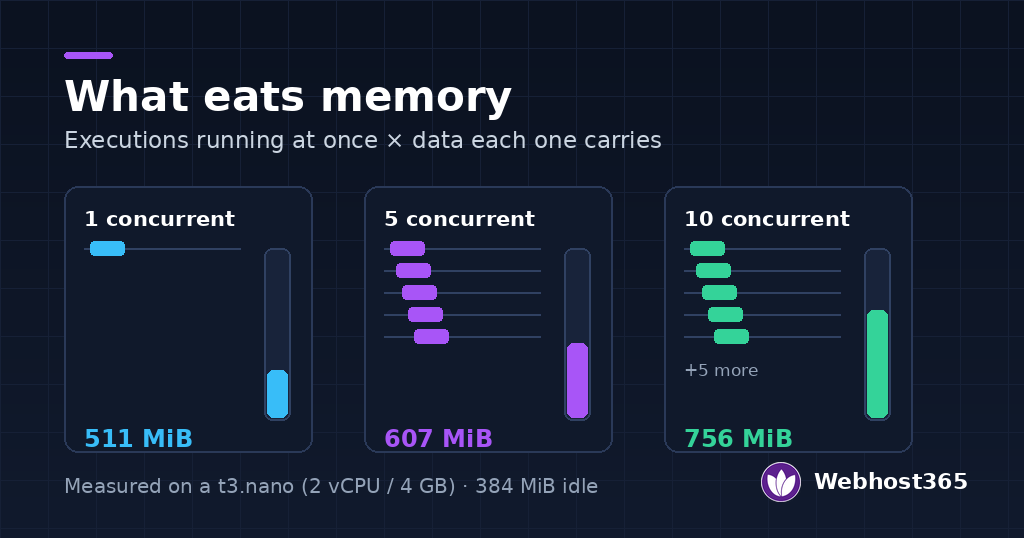
Memory is the resource that decides whether n8n stays up. The rule is simple: the number of executions running at once, multiplied by the data each one holds, is what sits in RAM. A workflow processing a 50-line spreadsheet costs almost nothing. One pulling a 20 MB API response and transforming it costs real memory, and ten of those at once cost ten times as much.
We measured this on an entry t3.nano VPS (2 vCPU, 4 GB, NVMe). Idle, the n8n container used 384 MiB. Under a workflow carrying roughly 500 KB per run, memory rose to 511 MiB at one execution at a time, 607 MiB at five, and 756 MiB at ten. Nothing failed, and plenty of headroom remained. For most small and mid-sized automation, 4 GB is comfortable, and 2 GB is enough if payloads stay small.
What one execution costs
n8n loads the data moving through a workflow into memory for the length of the run. Small JSON items are negligible. The expensive cases are large HTTP responses, binary files, and nodes that hold the whole dataset at once, such as merges and aggregations. If a workflow downloads files or processes big API payloads, size for the peak, not the average.
The Node.js heap ceiling
n8n runs on Node.js, which caps how much memory a single process may use for its heap. When a run exceeds that ceiling, the process crashes with an out-of-memory error rather than slowing down. On a server with more RAM, you can raise the ceiling with the –max-old-space-size flag, which tells Node it may use more. Adding RAM to the server without raising this value does not always help, so the two move together.
Task runners and the Code node
Recent n8n versions run Code nodes in a separate task-runner process rather than inside the main one. This isolates custom JavaScript, so a heavy Code node is less likely to take the whole instance down with it. It also means a busy instance has more than one process using memory, which is worth remembering when you read total usage. For most workloads the effect is small, but it is why a fresh install idles a little higher than older versions did.
CPU: n8n Waits More Than It Computes
CPU is rarely the limit. Most of what n8n does is call an API and wait for the answer, which uses no processor at all. This is why the sizing table moves RAM up faster than vCPU, and why a 2-core server handled ten concurrent runs in our test without strain.
CPU does matter in three cases. Heavy Code nodes that loop over large arrays burn processor time. Large JSON transforms, where n8n reshapes thousands of items, are CPU-bound. And a flood of webhooks arriving together needs enough cores to accept them without queuing. Outside those, adding vCPU to an n8n box is usually money better spent on RAM. For context on how this differs from sizing a normal website, see our guide to how much RAM a website needs.
Storage: Where the Disk Actually Goes
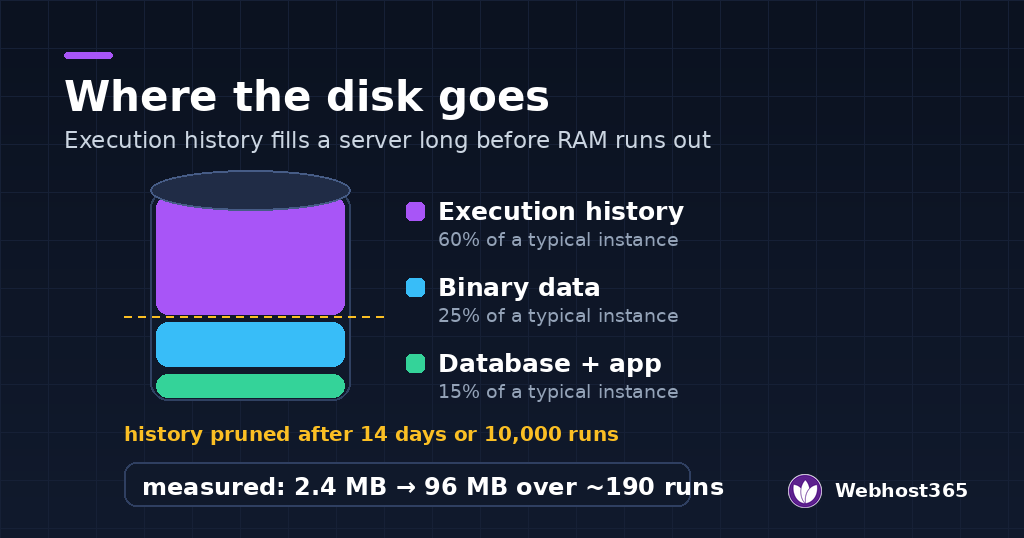
Disk is the requirement that catches people out, because it grows quietly while everything still works. The space goes to three places: your execution history, the files your workflows handle, and the database itself. Of the three, execution history is the one that fills a server.
Execution history and the pruning defaults
Every time a workflow runs, n8n saves a record of it, including the data that passed through each node. On a busy instance that adds up fast. In our own test, a workflow carrying about 500 KB per run grew the database from 2.4 MB to 96 MB across roughly 190 executions. At that rate, heavy payloads on a small disk become a problem in weeks, not months.
n8n prunes this history automatically. By default it keeps the last 14 days, or the last 10,000 executions, whichever limit it reaches first, and deletes the rest. For most instances the defaults are fine. If you run large payloads or a small disk, shorten the retention or stop saving successful runs, and the growth drops sharply. The n8n docs on managing execution data list the exact settings.
SQLite or PostgreSQL
n8n ships with SQLite, a single file that needs no setup. It is the right choice up to a few thousand executions a month. One catch matters for disk: when SQLite prunes old data, it does not return the freed space to the operating system, it reuses it internally. So the file stops growing but does not shrink, which surprises people who expected pruning to reclaim disk.
Move to PostgreSQL once volume climbs or you run more than one n8n process. Postgres handles concurrent writes better, reclaims pruned space, and is required for queue mode. For a hobby instance it is unnecessary weight; for a busy one it is the difference between stable and stuttering.
Binary data
Files that pass through a workflow, such as downloads, uploads, and attachments, are binary data. By default n8n keeps them with the execution, so they are pruned on the same schedule. If workflows move large files, point binary storage at the filesystem rather than the database, and keep an eye on that directory. Our guide to website backup strategies covers backing up the n8n data directory and database together.
Minimum vs Recommended: Three Setups That Work
There is no single correct size for n8n, but there are three setups that cover almost everyone. Pick the one that matches your volume, not the biggest one you can afford.
Hobby
One vCPU, 1 to 2 GB RAM, SQLite, default settings. This runs a personal instance handling a few hundred executions a month without trouble. It is the right size for learning n8n, running home automations, or a side project. Do not pay for more until something tells you to.
Small business
Two vCPU, 2 to 4 GB RAM, with a concurrency limit set so a traffic spike cannot overwhelm the instance. Move to PostgreSQL at the top of this range. This is the workhorse setup, and the entry t3.nano we measured sits here: it held ten concurrent executions at 756 MiB, well inside 4 GB. Most businesses running real automation never need more than this.
Team: queue mode
Beyond roughly 100,000 executions a month, or when many workflows fire at once, a single process is no longer enough. Queue mode splits n8n into a main instance plus separate worker processes that pull jobs from a Redis queue, so you add capacity by adding workers rather than a bigger box. It needs PostgreSQL and Redis alongside n8n. This is production territory, and our guide to self-hosting n8n on a VPS with Docker Compose walks through the full stack. You can run it on one larger server or spread it across several.
When the Free Tier Is Enough, and When It Isn’t
A free plan is the right place to start, and for a lot of people it is also the right place to stay. Our free n8n hosting gives you 200 executions a month, unlimited workflows and users, with HTTPS and webhooks working. That covers a daily sync, a handful of form-to-email flows, or learning the tool properly before you spend anything.
Three signs tell you it is time to move up. You are hitting the monthly execution limit, so workflows stop running before the month ends. A workflow needs to run more often than the plan allows, such as every few minutes. Or you need something a shared free tier cannot give, like a custom community node, more memory for big payloads, or full control of the environment.
When that happens, there are two directions. If you would rather not manage a server, our managed n8n hosting runs the instance for you: the Nebula plan at $6.49 a month gives 2,000 executions, and Stellar at $12.49 removes the execution limit entirely. You never size or patch anything. If you want control instead, self-host on a VPS, where the only limits are the ones your hardware sets. The t3.nano we measured, at $4.99 a month with an Indian or US node, handles far more than 2,000 executions and gives you root, custom nodes, and your own database. One route trades control for convenience; the other trades convenience for control.
For Indian users there is one more reason to pick a VPS with an Indian node: a webhook fired from an Indian service reaches an Indian server faster, which matters when a workflow has to respond in real time.
How We Measured
The memory and database figures in this guide come from a real instance, not from vendor guidance. We ran the test so you can repeat it.
- Server: entry Linux VPS 365 (t3.nano), 2 vCPU AMD, 4 GB RAM, 25 GB NVMe, Indian node, Ubuntu 24.04.
- Software: n8n 2.46.4 on Node.js 26.12.1, in Docker, SQLite database, regular mode, default settings.
- Workflow: a webhook that builds roughly 500 KB of data in a Code node, makes one external HTTP request, and summarises the result.
- Method: idle memory recorded after ten minutes at rest, then peak memory sampled while firing 20, 50 and 100 runs at 1, 5 and 10 concurrent. Database growth read before and after the runs.
- Date: measured November 2026. Your own numbers will vary with payload size, node types and n8n version, which is the point: measure your own workload before you size for it.
Final Thoughts
Sizing n8n comes down to four habits. Buy RAM before CPU, because memory is what fails first. Set a concurrency limit so a spike cannot take the instance down. Prune execution history, or watch the disk fill. And measure your own workload rather than trusting a generic minimum, because a workflow moving large files has nothing in common with one moving a few lines of text.
For most people the path is simple: start free, move to a 2 GB or 4 GB instance when you outgrow it, and only reach for queue mode when a single process genuinely can’t keep up. If you would rather not think about any of this, managed hosting makes the sizing someone else’s job. If you want the control, our Linux VPS gives you the room measured here, with an Indian node for Indian traffic.
FAQs
A small n8n instance runs comfortably in 2 GB of RAM, and 4 GB is plenty for most business automation. On a 4 GB server we measured, n8n used 384 MiB idle and 756 MiB while running ten workflows at once. What raises the figure is concurrency and payload size: many executions running together, or workflows carrying large files or API responses. Size for your busiest moment, not your average.
Yes, for light use. A 1 GB instance handles a hobby workload of a few hundred executions a month with small payloads. It becomes risky once workflows run concurrently or move larger data, because n8n loads that data into memory and a single run exceeding the limit crashes the process rather than slowing down. For anything beyond personal use, 2 GB is the safer floor.
SQLite is enough up to a few thousand executions a month and needs no setup. Move to PostgreSQL when volume climbs, when you run more than one n8n process, or when you use queue mode, which requires it. Postgres also reclaims disk space when old executions are pruned, whereas SQLite reuses the space internally and the file does not shrink.
The install itself is small; the growth comes from execution history. In our test a workflow carrying about 500 KB per run grew the database from 2.4 MB to 96 MB over roughly 190 executions. n8n prunes history automatically, keeping 14 days or 10,000 executions by default, but heavy payloads on a small disk still need attention. Shorten retention or stop saving successful runs to keep it in check.
When a single process can no longer keep up, which is usually beyond roughly 100,000 executions a month or when many workflows fire at the same time. Queue mode splits n8n into a main instance and separate worker processes that pull jobs from a Redis queue, so you scale by adding workers. It needs PostgreSQL and Redis. Below that volume, a single instance with a concurrency limit is simpler and enough.
For light, steady automation, yes. A free plan with 200 executions a month runs a daily sync or a few form-to-email flows without trouble. You outgrow it when you hit the monthly limit, need workflows to run more frequently than the plan allows, or need custom nodes and more memory. At that point a managed plan or a small VPS is the next step.