
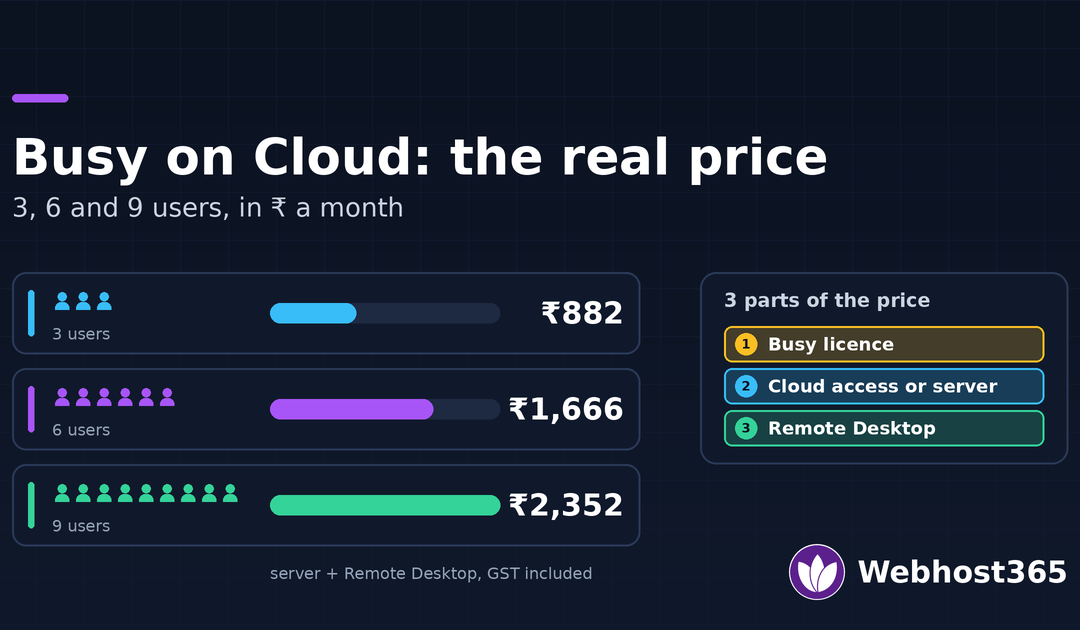
The price of Busy on cloud has three parts: your Busy licence, the cloud access or server, and Remote Desktop access for each person. Busy’s own cloud add-on costs ₹10,800 per user for 360 days before GST. A server priced by size costs ₹882, ₹1,666 or ₹2,352 a month with us for 3, 6 or 9 users, GST included. Before paying for either, check that your Busy plan allows remote use. Prices in this guide were checked on 22 November 2026.
What “Busy on Cloud” Actually Is
Busy on cloud is your Busy accounting software running on a Windows server in a data centre instead of on a computer in your office. Each person signs in to that server over Remote Desktop and sees the normal Busy screen. It is the same software, the same licence and the same company data. Vouchers, billing and reports work as they always have.
What you gain is access. The billing counter, the accountant, the owner at home and the CA in another city can all work in the same company, and the data sits in one place that is backed up every day.
Three ways to buy it
- Busy’s own add-on. Busy sells BUSY Online, which it describes as secure remote access to your desktop software. It is priced for each user.
- A hosting provider that charges per user. Several Indian hosts sell a ready server and bill by head count.
- A server priced by size. You pay for the server and add as many logins as it can carry. This is how our Busy on cloud plans work.
The Three Parts of the Price
Every Busy on cloud bill is made of the same three parts. A quote that looks cheap has usually left one of them out.
1. The Busy licence
No cloud price includes the Busy licence. Busy sells two lines. BUSY 21 is a one-time purchase: Basic costs ₹11,000, Standard ₹16,500 and Enterprise ₹22,000. BUSY Magic is paid for every 360 days: Start costs ₹5,000, Smart ₹8,000, Power ₹12,000 and Power+ ₹50,000. All of these are before 18% GST. Busy lists them in its guide to accounting software prices.
If you already own a licence, you keep using it on the server.
2. Cloud access or a server
This is the part that puts Busy online. Busy’s own add-on comes in two forms. BUSY Online Access costs ₹10,800 and BUSY Online SQL costs ₹16,800, each for one user and one company for 360 days, before GST. Extra users and extra companies cost more.
The other route is a server. You pay a monthly charge for the machine, and the number of users depends on its memory, which we measured further down.
3. Remote Desktop access
Windows Server lets two administrators connect at once. Every person beyond that needs a Remote Desktop licence from Microsoft. Some providers include these and some charge for each user. We showed what happens when they are missing in our Tally on cloud price guide, and the same applies to Busy. Our plans include Remote Desktop access for every user.
Check that your plan allows remote use
Busy’s plans differ in how many people may work at once, and Busy says that user allowances and limits vary by plan. Dealers also describe some plans as not meant for Remote Desktop use. So ask your Busy dealer two questions in writing before you pay for any server:
- How many users may work at the same time on my plan?
- Does my plan allow Busy to be used over Remote Desktop on a server?
You can also try the setup first. Busy offers a free 15-day trial with all features, which is what we used for the tests in this guide.
Busy on Cloud Price for 3, 6 and 9 Users
The table below covers one year of cloud access or server, with 18% GST added so that every column can be compared directly. The Busy licence comes on top and is the same in every column.
| Users | BUSY Online Access | BUSY Online SQL | Webhost365, 12 months |
|---|---|---|---|
| 3 users | ₹38,232 | ₹59,472 | ₹10,584 |
| 6 users | ₹76,464 | ₹1,18,944 | ₹19,992 |
| 9 users | ₹1,14,696 | ₹1,78,416 | ₹28,224 |
The first two columns are Busy’s own add-on at ₹10,800 and ₹16,800 per user, multiplied by the number of users, plus GST. Each of those subscriptions covers one company for 360 days. Our column is the three Busy on cloud plans at ₹882, ₹1,666 and ₹2,352 a month, which already include GST. They come with 4 GB, 6 GB and 8 GB of memory. Paying us yearly takes a further 15% off.
What that means per user
Busy’s add-on works out to about ₹900 per user a month before GST, or ₹1,062 with it. On our plans the same user costs ₹294, ₹278 or ₹261 a month, depending on the plan. In addition, an extra login for your CA or a temporary operator costs nothing, because the price is for the server and not for the head count.
What the table leaves out
Price is not the whole comparison. With Busy’s own add-on, Busy runs the service and you deal with one company for software and access. With a server, you get the Administrator login and can run other Windows software on it, and you look after your own user logins. Choose with both in mind.
How Much Server Busy Needs: What We Measured
Most sizing advice for Busy on a server is a guess. Busy’s own system requirements give a minimum of 8 GB of memory, and that figure is written for an office PC. So we tested a server. We installed BUSY Magic on Windows Server 2022, signed in users over Remote Desktop, opened the same company in each session and recorded the memory left. The tests ran on 22 November 2026, using Busy’s free trial and a small test company.
| Test | Server | Memory still free |
|---|---|---|
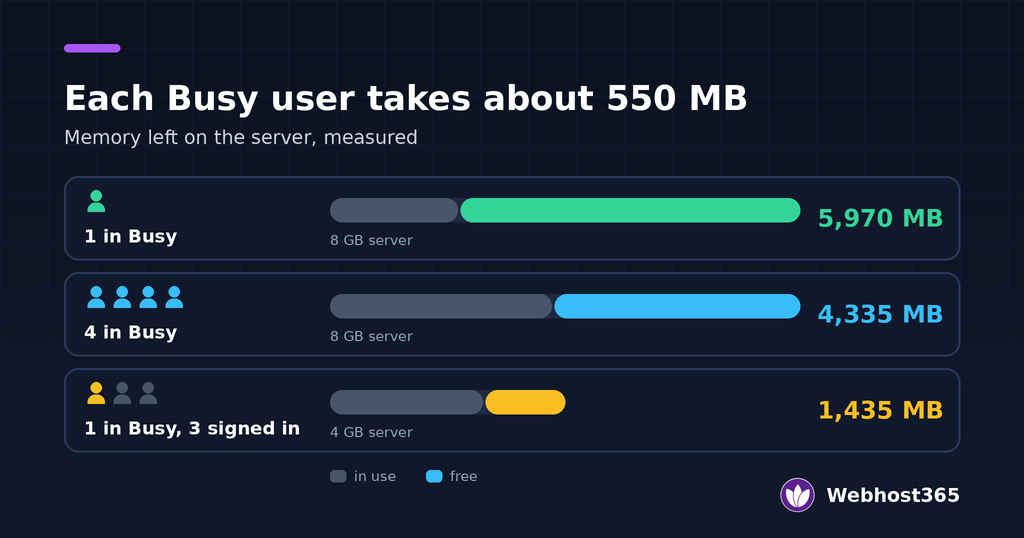
| 1 person in Busy | 8 GB | 5,970 MB |
| 4 people in Busy, same company | 8 GB | 4,335 MB |
| 3 people signed in, 1 of them in Busy | 4 GB | 1,435 MB |
Three more people cost 1,635 MB between them, which is about 550 MB each. The Busy program itself used 300 to 350 MB per person, and the rest was each user’s Windows session.
Can several users work in one company?
Yes. This is the question behind most searches for Busy multi user on a server, so we tested it directly. Four people had the same company open at once. Two of them then saved invoices into it at the same moment, and both went through with no locking error.
From users to server size
| People in Busy at once | Server memory | Memory left over | Basis |
|---|---|---|---|
| Up to 3 | 4 GB | 0.5 to 0.8 GB | Part measured |
| Up to 6 | 6 GB | About 1.1 GB | Calculated |
| Up to 9 | 8 GB | About 1.5 GB | Calculated |
The 4 GB row is part measured because Busy’s trial stopped us at one running copy partway through, which we explain below. We measured three sessions with one copy of Busy open on 4 GB, then took off the measured cost of two more copies. The other two rows are calculated from the 8 GB test at 550 MB per person.
These figures are for Access mode, which is how Busy stores data unless you choose otherwise. A company with many years of vouchers uses more memory than our test data did, so treat these as starting sizes and move up a plan if the server feels slow.
Access Mode or SQL Mode
Busy can keep a company’s data in two ways, and you choose between them on its Data screen.
- Microsoft Access. The data sits in files inside Busy’s own folder. Nothing else needs installing, and this is what Busy uses unless you change it.
- Microsoft SQL. The data sits in a SQL Server database that runs as a separate program on the server. It suits larger data and more users.
Busy prices its own add-on the same way: the SQL version costs ₹16,800 per user against ₹10,800 for the Access version.
What SQL mode costs in memory
The free edition, SQL Server 2022 Express, is enough for most Busy companies. Microsoft’s list of SQL Server 2022 editions limits it to a 10 GB database and 1,410 MB of memory for cached data. We installed it on the test server and took three readings.
| Stage | Memory still free on 8 GB |
|---|---|
| Before installing SQL Server | 6,427 MB |
| SQL Server installed and idle | 6,277 MB |
| 1 person working in a SQL company | 5,246 MB |
Idle, SQL Server cost about 150 MB. With one person working, the server had 5,246 MB free, against 5,970 MB for the same person in Access mode. So SQL mode added about 0.7 GB with our small company. The figure rises as the data grows, up to the limit above.
Users on each plan, in both modes
| Server memory | Access mode | SQL mode |
|---|---|---|
| 4 GB | Up to 3 users | 1 user |
| 6 GB | Up to 6 users | Up to 4 users |
| 8 GB | Up to 9 users | Up to 7 users |
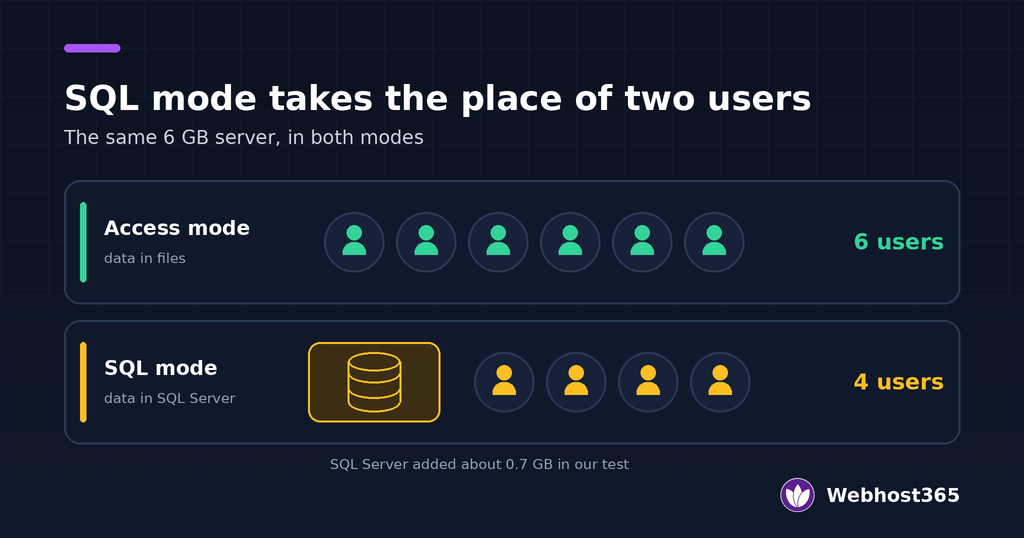
The SQL column is calculated from our readings and allows about 1.1 GB for the database. In short, SQL mode takes the place of about two users. On our Busy on cloud plans we install SQL Server 2022 Express on request at no extra charge.
Two Errors You Will Meet on a Server, and the Fix
We hit both of these during the test. Neither is a fault in Busy, and the first has a one-line fix.
“The Microsoft Jet database engine cannot open the file”
We installed Busy as Administrator and it worked. Then a standard user signed in and tried to create a company. Busy showed “Failed to create company”, followed by this message:
“The Microsoft Jet database engine cannot open the file ‘C:\BusyMagic\SYSTEM\NEPALIDATE.BDS’. It is already opened exclusively by another user, or you need permission to view its data.”
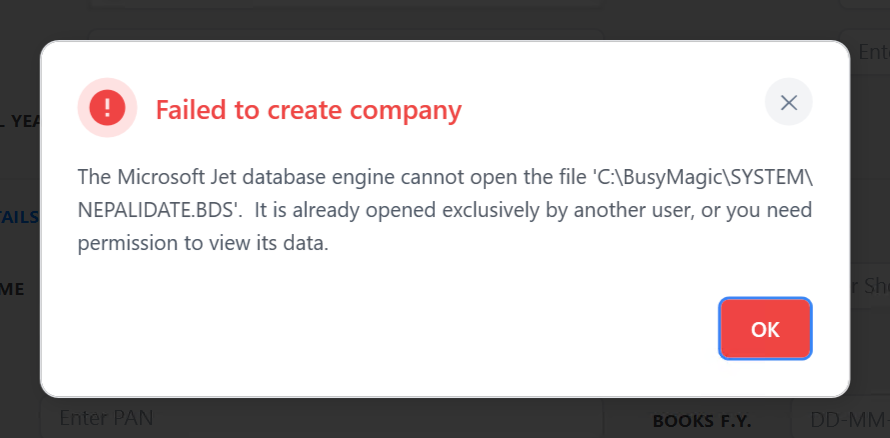
That user also could not see the company the Administrator had made. The cause is file permissions. Busy keeps its data in its own folder, and Windows gives standard users read-only access there. An Access-type database needs every user to be able to write to its folder, even to open a file someone else is using.
The fix is to give standard users permission to change files in that folder. Run this once as Administrator, in PowerShell or Command Prompt:
icacls C:\BusyMagic /grant "Users:(OI)(CI)M" /TThen close Busy and open it again. After this, our standard users saw every company and could open the same one together. Use this only on a server that belongs to your own office, because it lets every user on the machine change Busy’s files.
“Only one BUSY instance is allowed in demo mode”
On the first day, the free trial let four copies of Busy run at once. After a restart, the third person to open Busy saw a box titled “Demo Mode Limit”:
“Only one BUSY instance is allowed in demo mode. 2 instance(s) already running. Please close one before launching another, or activate a licence.”
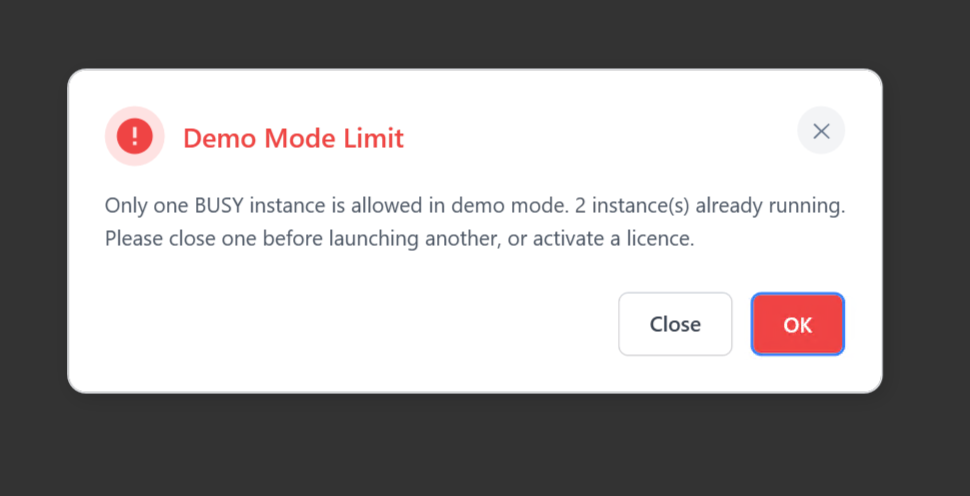
This is the trial’s limit and not a problem with the server. A licensed plan that covers several users does not show it. Two things follow. Do not judge multi-user working by the trial alone. And expect each Windows user to be asked to activate the trial separately, as ours were.
Busy’s Own Cloud or a Server Priced by Size
The right choice depends mostly on how many people use Busy at once and how large your data is.
| Your situation | Best fit | Why |
|---|---|---|
| 1 user who works from one place | Neither | Busy on your own computer is enough. Cloud access adds cost without a benefit. |
| 1 user who needs access from anywhere | Compare both | Busy’s add-on is ₹12,744 a year with GST. Our smallest server is ₹10,584 a year and has room for two more people. |
| 2 to 9 users | A server priced by size | Busy’s add-on is charged for every user, so the gap widens with each person you add. |
| Large data or heavy reports | A 6 GB or 8 GB server in SQL mode | SQL Server needs memory of its own, as the test showed. |
| More than 9 users | A custom server | Ask for one price for the server you need, not a price per head. |
| You have an IT person and run other Windows software | A plain Windows VPS | You install Busy yourself and arrange the Remote Desktop licences. |
Questions that separate providers
Ask any provider these before you decide:
- Is the server mine alone? Your books should sit on a server only your office uses.
- Do I get Administrator access? Without it you cannot add a user, install a Busy update or run another program without raising a request.
- Will you set Busy up for several users? That means the folder permission described above, and SQL Server if you want SQL mode.
- What does an extra login cost? A CA at audit time should not change the bill.
Our Busy on cloud plans answer these as follows: the server is yours alone, you get the Administrator login, we set Busy up for several users, and extra logins are free. If your office also uses Tally, the same servers run it, and the plans are on our Tally on cloud page. For a plain server, see the Windows VPS plans in India. For more than 9 users, contact us with your user count.
Keeping Busy Data Safe on a Server
Moving Busy to a server puts your books in one place, so that place has to be looked after.
Backups
Check that the provider backs up the whole server every day and ask how many days are kept. Ours are kept for 30 days. Keep your own copy too: use the Backup button on Busy’s Data screen at each month-end and save the file to your own computer through the shared drive in the Remote Desktop session. Our guide to website backup strategies explains why one copy is never enough.
Who can log in
Give each person their own login and never share one between two people. Use long passwords, and remove a login the day someone leaves. A Busy server is reachable from the internet, so a weak password is the most likely way in.
Where the data sits
Your books hold names, addresses, bank details and prices. Keep them on a server in India, close to your users. Our guide to VPS hosting in India covers why location matters, and the DPDP Act guide covers what the law expects when you hold personal data.
Final Thoughts
Work out the price of Busy on cloud in this order. First, ask your dealer whether your Busy plan allows remote use and how many users it covers. Second, count the people who will work in Busy at the same time. Third, choose Access mode unless your data is large, because SQL mode takes the memory of about two users. Then choose the server. Busy’s own add-on costs ₹10,800 per user for 360 days before GST. A server priced by size costs ₹882, ₹1,666 or ₹2,352 a month with us for 3, 6 or 9 users, GST included, and an extra login is free.
FAQs
Busy’s own cloud add-on, BUSY Online Access, costs ₹10,800 per user for 360 days before GST, and the SQL version costs ₹16,800. Our servers are priced by size: ₹882, ₹1,666 and ₹2,352 a month for up to 3, 6 and 9 users, GST included. The Busy licence is extra in every case.
No. Every route expects you to have your own Busy licence. BUSY 21 costs ₹11,000 to ₹22,000 as a one-time price, and BUSY Magic costs ₹5,000 to ₹50,000 for 360 days, all before GST. If you already own a licence, you use it on the server.
Yes. In our test, four people had the same company open on one server, and two of them saved invoices into it at the same moment with no locking error. Your Busy plan must allow more than one user for this.
In our test each person working in Busy used about 550 MB of memory. A 4 GB server suits up to 3 users, 6 GB suits up to 6 and 8 GB suits up to 9, in Access mode. SQL mode needs about 0.7 GB more with a small company.
Use Access mode unless your data is large or you have many users. It needs nothing extra installed. SQL mode runs a SQL Server database on the server, which took the memory of about two users in our test. SQL Server 2022 Express is free and allows a 10 GB database.
On a server, this usually means a standard user cannot write to Busy’s folder. Busy keeps its data there, and Windows gives standard users read-only access by default. Giving the Users group permission to modify the C:\BusyMagic folder fixed it in our test.