
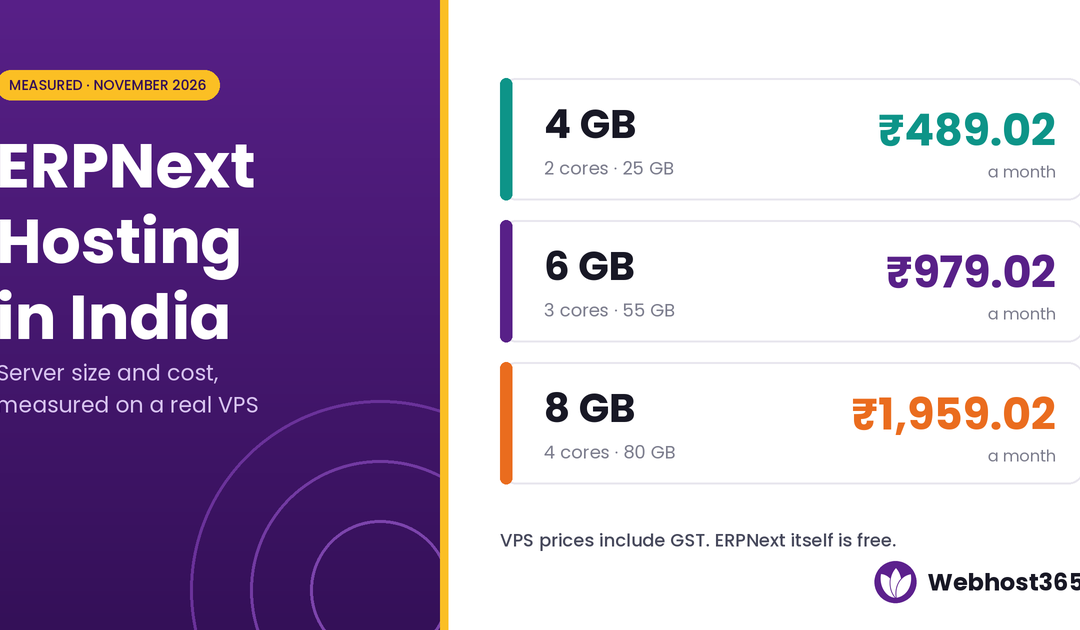
ERPNext hosting in India starts at ₹410 a month on Frappe Cloud, or ₹489 a month on a VPS you manage yourself. We installed ERPNext 16 on 4 GB, 6 GB and 8 GB servers and measured each one. A 4 GB VPS runs it with room to spare. However, the install fails on that size unless you add swap first.
We checked the prices and ran the tests on 23 November 2026.
Two Ways to Host ERPNext
ERPNext is free, open-source software. The licence costs nothing, so the money goes on where it runs and who looks after it. For ERPNext hosting in India, there are two realistic routes.
The first is Frappe Cloud. Frappe is the company that builds ERPNext, and this is its own hosting service. It installs the software, applies upgrades and takes backups for you. You pay by the amount of computing your site uses each day, and not by the number of users.
The second is a VPS, which is a server you rent and manage. You install ERPNext yourself and you look after upgrades and backups. In return, you get the whole machine at a fixed price. Frappe’s own ERPNext pricing page lists self-hosting as an option for companies with a tech team.
Server location matters on both routes, because every screen in ERPNext is a round trip to the server. We covered that effect in our guide to VPS hosting in India.
If your office runs desktop accounting software instead, we have measured that too. See our guides for Tally, Busy and Marg.
ERPNext Hosting Cost in India
Here is the ERPNext hosting cost on each route, starting with Frappe Cloud. These are the plans for a single site on its site pricing page. Frappe sells the same prices on three providers. We show AWS, which it recommends for production use.
| Frappe Cloud plan | CPU time a day | Database limit | Storage | Extras |
|---|---|---|---|---|
| ₹410 a month | 0.5 hour | 250 MB | 2.5 GB | Upgrades and backups |
| ₹820 a month | 1 hour | 500 MB | 5 GB | Upgrades and backups |
| ₹2,050 a month | 2 hours | 1 GB | 25 GB | Adds offsite backups and private benches |
| ₹3,075 a month | 3 hours | 1.5 GB | 37.5 GB | Same as above |
| ₹4,100 a month | 4 hours | 2 GB | 50 GB | Adds database access and product warranty |
The same prices on Hetzner give four times the CPU time and database. However, Frappe describes that option as suitable for experimental or demo sites. Check at checkout whether GST is added to these prices.
Frappe also rents whole servers. Its ERPNext pricing page shows them from ₹1,800 a month on Hetzner and from ₹5,400 on AWS, Oracle or DigitalOcean. Its Frappe Cloud pricing page shows servers from ₹3,600.
Now the second route. These are our Linux VPS plans, and every price includes 18% GST.
| VPS plan | Memory | CPU | NVMe storage | Price a month |
|---|---|---|---|---|
| t3.nano | 4 GB | 2 cores | 25 GB | ₹489.02 |
| t3.small | 6 GB | 3 cores | 55 GB | ₹979.02 |
| c4.medium | 8 GB | 4 cores | 80 GB | ₹1,959.02 |
The two tables measure different things, so compare them with care. Frappe Cloud limits compute time and database size, and it does the maintenance. A VPS gives you fixed memory, cores and disk all day, and you do the maintenance.
Our test puts some numbers on those limits. A new ERPNext site’s database was about 125 MB before any real data. After 4,401 sales invoices, it had grown to 178 MB. So the 250 MB limit on the ₹410 plan leaves room for a small business to start, but not for years of entries.
Compute time is harder to judge. In our test, one sales invoice took about 63 milliseconds to post. If every invoice cost that much compute, half an hour a day would cover about 28,000 of them. Real use also spends compute on reports, page loads and background jobs. Therefore, treat that figure as a ceiling and not as a forecast.
ERPNext Server Requirements: What We Measured
Most pages that list ERPNext server requirements repeat the same figures and show no test. So we installed it and measured it, as we did for n8n and for local AI models.
The test used ERPNext 16.60.0 on Ubuntu 24.04, with MariaDB 10.11, Redis 7, Python 3.14 and Node 24. We installed it with bench in production mode, which is the standard way. Then we read the server’s memory at each stage.
| Stage | Memory in use |
|---|---|
| Bare Ubuntu 24.04 server | 487 MB |
| With MariaDB and Redis installed | 560 MB |
| ERPNext set up, one user signed in | 1,757 MB |
| ERPNext under load, after a restart | 1,230 MB |
| Same, with 9 web workers instead of 5 | 1,481 MB |
The third reading is higher than the fourth for a simple reason. On the first day, a Frappe helper service called flow was running and held 268 MB. It did not come back after a restart, so the later readings are lower.
In short, a working ERPNext 16 needs between 1.2 GB and 1.8 GB of memory. On a 4 GB server, that leaves over 2 GB free. The server never touched its swap space while ERPNext was running.
What each part uses
ERPNext is several programs that run together. This is how the memory was shared out during the load test.
| Part | What it does | Memory |
|---|---|---|
| Web workers (5) | Answer every page and request | 726 MB |
| MariaDB | Stores the data | 226 MB |
| Background workers and scheduler | Run queued and timed jobs | 206 MB |
| Realtime service | Pushes live updates to the browser | 88 MB |
| Redis | Holds the cache and the job queue | 43 MB |
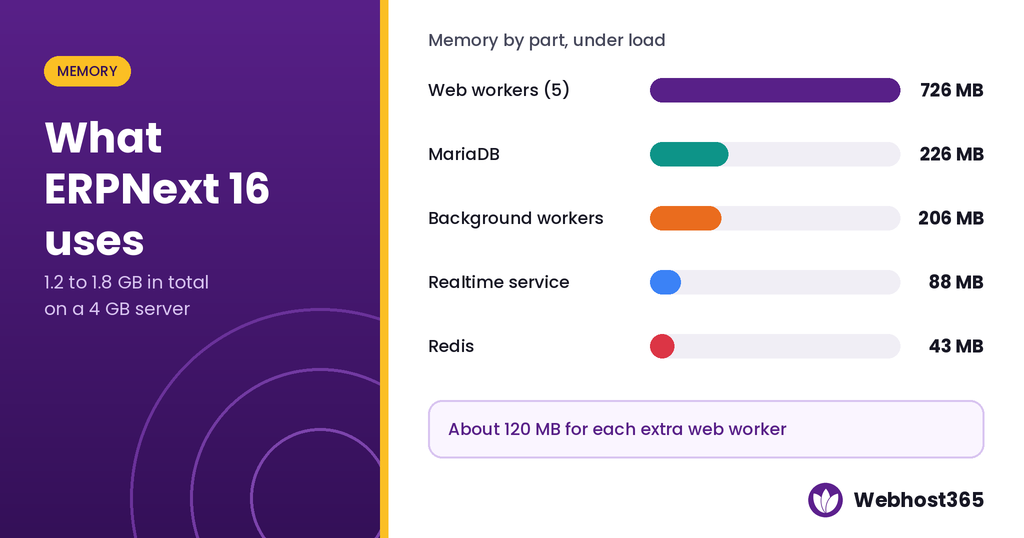
These figures are read for each program, and programs share some memory with each other. That is why they add up to a little more than the total in the first table. The web workers are the largest part, and their number depends on the processor. Bench sets two workers for each core, plus one. Therefore a 2-core server gets 5 workers and a 4-core server gets 9.
When we raised the count from 5 to 9, the workers grew from 726 MB to 1,197 MB. That is about 120 MB for each extra worker. Our test company was new and almost empty, however. A database with years of entries will want more memory for MariaDB.
Installing ERPNext 16 on a 4 GB VPS: Three Faults and Fixes
We followed the community guide to install ERPNext 16 on Ubuntu 24.04. That guide lists MariaDB 11.8, and we used the 10.11 version that ships with Ubuntu without any error. Three other things went wrong, though, and each one has a short fix.
The build is killed for lack of memory
The first heavy step is the command that downloads and builds the framework. On our 4 GB server with no swap, it stopped like this:
✓ 3759 modules transformed.
Killed
error Command failed with exit code 137.
Exit code 137 means the system ran out of memory and stopped the process. The kernel log confirmed it with an “Out of memory: Killed process” line.
The fix is a swap file, which gives the server spare room on disk for moments like this. Run these as a user with sudo rights:
sudo fallocate -l 4G /swapfile
sudo chmod 600 /swapfile
sudo mkswap /swapfile
sudo swapon /swapfile
echo '/swapfile none swap sw 0 0' | sudo tee -a /etc/fstab
With swap in place, the same build finished in 1 minute 38 seconds. At its peak it used 3,562 MB of memory and up to 998 MB of swap. The peak lasted about half a minute. As a result, a 2 GB swap file would also have been enough.
The later steps were lighter. Building the ERPNext app took 1 minute 4 seconds and peaked at 2,185 MB. Installing it on the site took 38 seconds.
Supervisor shows no services
The production setup command finished without an error. Yet the service list was empty:
sudo supervisorctl statusThat command printed nothing at all. Because the services were not running, the next step failed with “Please make sure that Redis Queue runs @ redis://127.0.0.1:11000”.
The cause was a missing link between bench’s service file and supervisor’s folder. These three commands create the link and start the services:
sudo ln -sf /home/frappe/frappe-bench/config/supervisor.conf /etc/supervisor/conf.d/frappe-bench.conf
sudo supervisorctl reread
sudo supervisorctl update
Change the path if your user or folder has a different name. In addition, run the production setup before you install the ERPNext app on the site. The app install needs those services to be up.
“node not found” for the realtime service
After that, six services were running and one kept failing. Its log repeated one line:
Error: Cannot start socketio: node not found and the python backend is unavailable.We had installed Node with nvm, as the guide suggests. However, nvm puts Node only on that user’s own path, so a system service cannot find it. One link solves it:
sudo ln -sf "$(which node)" /usr/local/bin/node
sudo supervisorctl restart all
All seven services then showed as running, and they came back on their own after every restart.
How Fast Is ERPNext on a VPS?
Memory tells you whether ERPNext will run. It does not tell you how it feels when several people work at once. So we also sent requests to the server in batches of 5, 10 and 20 at the same time.
We ran two tests on each server size. The first read a list of 100 accounts. The second created and submitted a sales invoice, which is heavier because it posts ledger entries. Afterwards we counted the records in the database. All 4,401 invoices had been submitted, and no request had failed.
First, the read test with 20 requests at once.
| Server | Reads per second | Typical response |
|---|---|---|
| 4 GB, 2 cores | 782 | 25 ms |
| 6 GB, 3 cores | 1,345 | 14 ms |
| 8 GB, 4 cores | 1,627 | 12 ms |
Reads got faster with every extra core. Four cores handled about twice as many as two.
Next, the sales invoice test.
| Invoices at once | 4 GB, 2 cores | 6 GB, 3 cores | 8 GB, 4 cores |
|---|---|---|---|
| 1 | Not tested | 14.9 a second, 65 ms each | 14.6 a second, 63 ms each |
| 5 | 16.7 a second, 294 ms each | 17.8 a second, 280 ms each | 18.6 a second, 266 ms each |
| 10 | 17.0 a second, 584 ms each | 18.3 a second, 546 ms each | 18.8 a second, 529 ms each |
| 20 | 17.0 a second, 1,146 ms each | 18.8 a second, 1,057 ms each | 19.1 a second, 1,036 ms each |
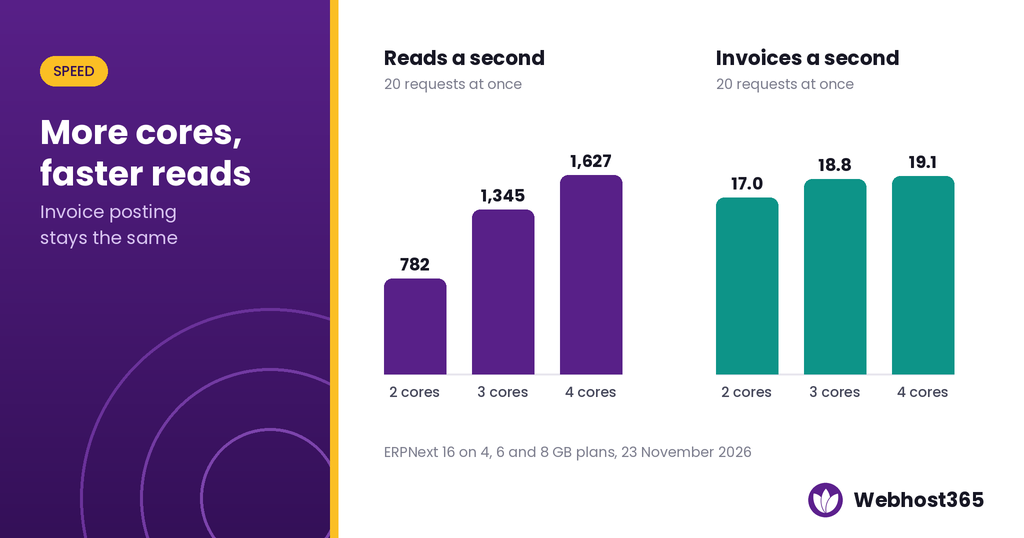
This result surprised us. The server posted between 15 and 19 invoices a second on every size, however many arrived together. Extra cores did not raise that figure. Instead, each extra request simply waited longer for its turn.
That pattern suggests ERPNext posts sales invoices one after another. We did not trace where inside the software that happens, so we state it as what we observed.
For a small business, the ceiling is far away. Seventeen invoices a second is about 1,000 a minute. Even so, it explains why a bigger server will not make month-end posting faster.
Two limits apply to these figures. We sent the requests from the server itself through the API, and not from real browsers. Also, our company was new, and a large database will respond more slowly.
Which ERPNext VPS Size to Choose
Our results point to a simple rule for an ERPNext VPS. Memory was never the problem on any size. Therefore, choose by disk space and by how much reading your team does.
| Your situation | Plan that fits | Why |
|---|---|---|
| A first install, or a small team starting out | 4 GB, 2 cores, 25 GB | It runs ERPNext with over 2 GB free, but the disk is tight |
| A working business with attachments and backups | 6 GB, 3 cores, 55 GB | Room for the database, files and local backups |
| Heavy reporting, many users or more than one site | 8 GB, 4 cores, 80 GB | The fastest reads in our test, and the most disk |
The disk deserves a closer look. Our bare server used 2.7 GB. ERPNext and its framework added 4.3 GB, and the build left another 4.3 GB of download caches behind. The database server, build tools and other packages took roughly 2.5 GB more. With our 4 GB swap file, the 25 GB disk was 18 GB full once the install was done.
You can ease that on the smallest plan. For example, use a 2 GB swap file and clear the build caches after the install. Still, a database grows, and backups need space beside it. For that reason, the 6 GB plan is the one we would pick for daily business use.
You can see all three on our Linux VPS plans page. If you are unsure which size suits your data, ask our team.
Frappe Cloud or Your Own VPS
Neither route is better for everyone. The right choice depends mostly on who will look after the server.
Choose Frappe Cloud if:
- nobody in your business is comfortable on a Linux command line
- you want upgrades and backups handled for you
- you want support from the people who build ERPNext
- your data is small enough for the plan you can afford
Choose your own VPS if:
- you or your IT person can follow an install guide and fix the faults we listed
- you want a fixed monthly price that does not depend on usage
- you want full access to the database and the files
- you plan to add custom apps or run more than one site
The three faults in our install are the honest cost of the second route. None was hard to fix, but each one would stop a beginner. Likewise, upgrades and backups become your job.
On price, the gap opens as you grow. Frappe’s own pricing overview explains that its plans are metered by compute. Its ₹2,050 plan gives 2 hours of CPU a day and a 1 GB database. Our 6 GB VPS costs ₹979.02 a month, GST included, with three cores available all day. On the other hand, that VPS comes with no one to run ERPNext for you.
Keeping ERPNext Safe on a VPS
On your own server, nobody else is watching the ERP. Four habits cover most of the risk.
Back up, and keep a copy elsewhere. Bench has a built-in backup command for the database and the uploaded files:
bench --site your-site-name backup --with-filesSchedule it daily, and copy the result off the server. A backup that sits on the same disk does not survive a disk failure. Our guide to website backup strategies explains how many copies to keep. Also, restore one backup on a test server before you rely on it.
Add a certificate before real use. Our test site ran on plain HTTP, which is fine for a test only. For business data, point a domain at the server and add a free certificate, so every login is encrypted.
Keep the database private. Only the web ports need to be open to the internet. Leave the database port closed, and give each person an ERPNext login of their own.
Update on a schedule. ERPNext receives frequent fixes. Therefore, take a backup first, then update in a quiet hour and check that the services restart.
Final Thoughts
ERPNext hosting in India is cheaper than most people expect, because the software itself is free. The real choice is who does the upkeep.
Our measurements remove most of the guesswork about size. ERPNext 16 used between 1.2 GB and 1.8 GB of memory, so a 4 GB server runs it. The install is the hard moment, and a swap file gets you through it. After that, disk space and reading speed matter more than memory.
If your team can manage a Linux server, a VPS gives you the whole machine at a fixed price. Our Linux VPS plans start at ₹489.02 a month, GST included. If it cannot, Frappe Cloud is the safer route.
FAQs
In our test, a working ERPNext 16 used between 1.2 GB and 1.8 GB of memory. A 4 GB server therefore had over 2 GB free. The install is heavier: the build step peaked at 3,562 MB and needed swap as well.
Yes. We ran it on a 4 GB server with 2 cores, and it handled 782 reads and 17 sales invoices a second. Two cautions apply. The install fails without a swap file, and a 25 GB disk fills up quickly.
The server ran out of memory during the build, and the system stopped the process. It happened to us on a 4 GB server with no swap. Adding a swap file fixed it, and the build then finished in 1 minute 38 seconds.
Frappe Cloud site plans run from ₹410 to ₹4,100 a month, priced by daily compute time and database size. A VPS you manage yourself costs ₹489.02 a month for 4 GB, ₹979.02 for 6 GB and ₹1,959.02 for 8 GB on our plans, with GST included.
Yes. ERPNext is open-source software under the GPL-3.0 licence, so there is no licence fee and no charge for each user. You pay for the hosting, and for help with setup if you want it.
We measured requests and not people. A 2-core server answered 782 reads a second and posted 17 sales invoices a second. For most small businesses, the size of the database and the reports matter more than the number of users.