
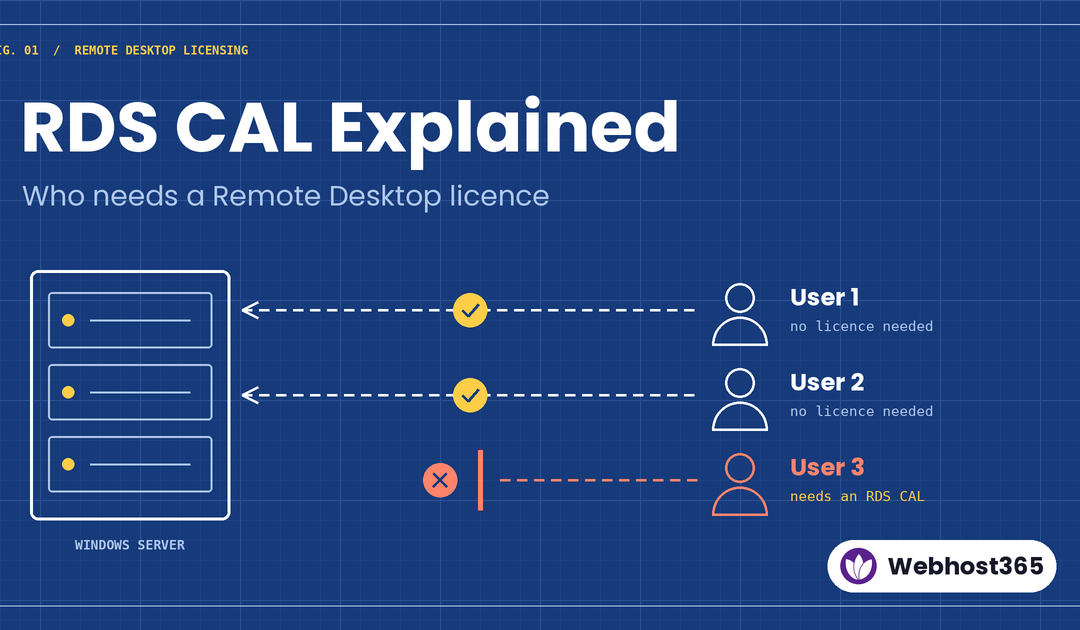
An RDS CAL is a Microsoft licence that lets one person or one device use a Windows server over Remote Desktop. Windows Server lets two people connect without one. Every further person needs an RDS CAL, which costs ₹22,429 in India. Without them, sessions end after 60 minutes once a 120-day grace period is over.
We read the prices and rules in this guide on 24 November 2026, and the tests ran on our own servers.
What Is an RDS CAL
RDS stands for Remote Desktop Services. It is the part of Windows Server that lets several people sign in to one server at the same time, each with a separate desktop. CAL stands for Client Access Licence. So an RDS CAL is the licence that covers one person or one device using that service.
It is easy to confuse with two other licences. In fact, a server with several users needs all three:
| Licence | What it covers | Who sells it |
|---|---|---|
| Windows Server licence | The server itself | Microsoft, or included by your hosting provider |
| RDS CAL | Each person or device that connects over Remote Desktop | Microsoft |
| Software licence | The program you run, such as Tally, Busy or Marg | The software maker |
RDS CALs exist only on Windows. A Linux server has no such licence, which is one of the differences in our Windows VPS vs Linux VPS comparison.
We are a hosting company, so this guide explains Microsoft’s published rules and what we tested. It is not licensing advice. For the exact terms, read Microsoft’s page on RDS CALs.
How Many Users Can Connect to Windows Server Without RDS CALs
Two. A Windows server with no RDS CALs lets two people stay connected over Remote Desktop at the same time.
We checked this on a plain Windows VPS. First, we signed in as Administrator. Next, we signed in as a second user from another computer. Then a third user tried to sign in.
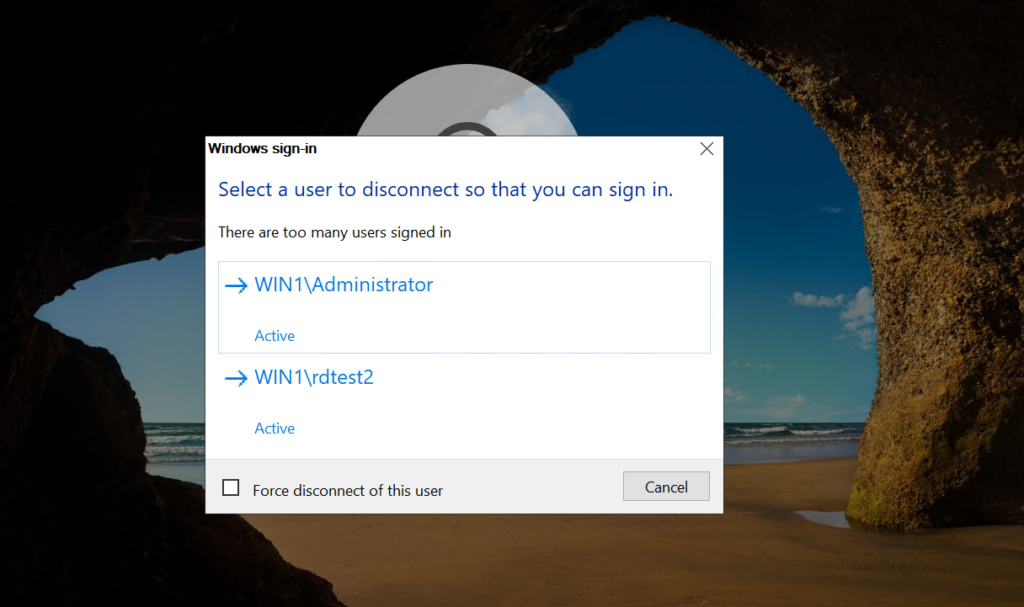
The third user was not let in. Instead, Windows showed this message: “Select a user to disconnect so that you can sign in. There are too many users signed in.” Below it, Windows listed the two people already connected. As a result, the third person could only get in by pushing one of them out.
What the two sessions are for
The two sessions are there so that someone can manage the server. That is enough for an owner and an IT person. It is also enough for one person who runs a program on a Windows VPS and signs in alone.
However, it is not enough for an office. If five people need the same accounting program at the same time, three of them will see the message above.
Can you raise the limit without licences
Yes, but only for a while. Windows Server has a role called Remote Desktop Session Host. Once it is installed, the two-user limit goes away and many people can connect. The server then works without licences for 120 days. We cover what happens after that later in this guide.
RDS CAL Per User vs Per Device
Microsoft sells the RDS CAL in two kinds. A Per User CAL belongs to one person, who can connect from any device. A Per Device CAL belongs to one computer, tablet or phone, which any person can use. Both kinds cost the same.
The server is set to one kind or the other, and the licences must match it. Microsoft’s page lists these differences:
| Per User CAL | Per Device CAL | |
|---|---|---|
| Assigned to | A user in Active Directory | A device |
| Works without Active Directory | No. It cannot be tracked in a workgroup | Yes |
| Temporary licence on first sign-in | None | Yes, valid for 90 days |
| Can more connect than you bought | Yes, but that breaks the licence terms | No |
Which one works on a single server
Active Directory is the system large offices use to manage users across many computers. A single rented server is usually not part of one. Windows calls that kind of server a workgroup machine.
Microsoft says a Per User CAL cannot be tracked in a workgroup. Therefore, a single server uses Per Device mode. Our own Tally servers are set up that way, and the check later in this guide shows it.
Per Device changes how you count. Each computer, laptop or phone that connects takes one licence. So a person who works from an office PC and a home laptop uses two licences. Before you buy, count the devices and not just the people.
RDS CAL Price in India
Microsoft sells RDS CALs in its own online store for India. On 24 November 2026, the store listed the Windows Server 2025 version at these prices, with GST included:
| Pack | Per User | Per Device |
|---|---|---|
| 1 licence | ₹22,429 | ₹22,429 |
| 5 licences | ₹1,11,639 | ₹1,11,639 |
You can check the current figure on the Microsoft Store India page. The pack of five saves only ₹506 against five single licences. So the price is close to ₹22,400 per licence, however you buy.
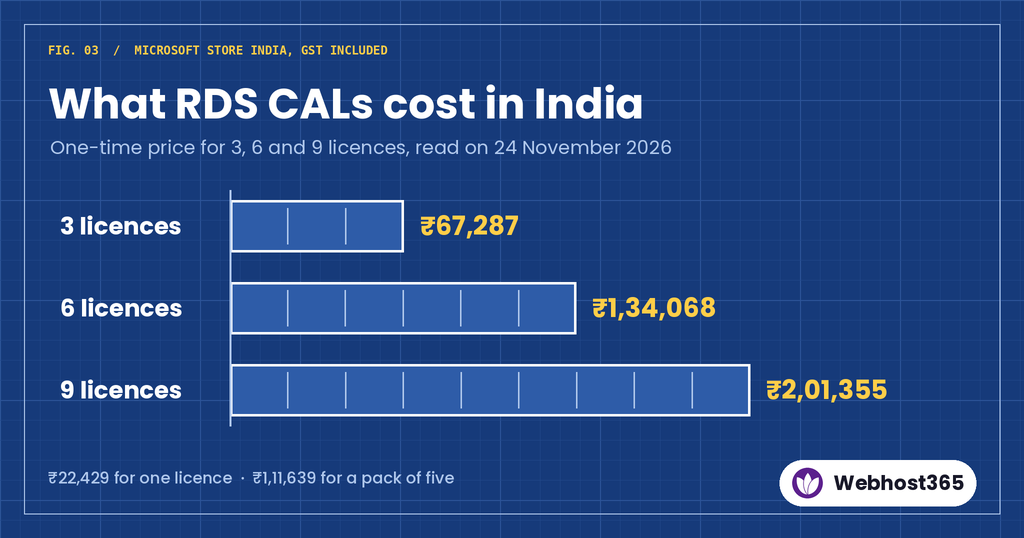
This is a one-time price and not a monthly fee. For a small office, it adds up as follows:
| Licences needed | Cheapest way to buy | Price with GST |
|---|---|---|
| 3 | Three single licences | ₹67,287 |
| 6 | One pack of five and one single | ₹1,34,068 |
| 9 | One pack of five and four singles | ₹2,01,355 |
Buying licences or renting a server that has them
There are two other ways to pay. Some hosting providers charge for Remote Desktop access by the user each month. For example, we have seen ₹600 a month for each extra user on a public price list.
Other providers install the licences on the server and include them in the plan price. Our Tally, Busy and Marg servers work this way. The monthly price stays the same when you add a user.
Whichever way you choose, compare it with the table above. An office of six would spend ₹1,34,068 on licences before paying for any server.
Which RDS CAL for Windows Server 2022 and 2025
An RDS CAL is made for one version of Windows Server. It works on that version and on older ones. However, it never works on a newer one. Microsoft’s page gives this table:
| Your server runs | 2025 CAL | 2022 CAL | 2019 CAL | 2016 CAL |
|---|---|---|---|---|
| Windows Server 2025 | Yes | No | No | No |
| Windows Server 2022 | Yes | Yes | No | No |
| Windows Server 2019 | Yes | Yes | Yes | No |
| Windows Server 2016 | Yes | Yes | Yes | Yes |
This matters in two cases. First, check the server version before you buy. A 2022 CAL bought for a Windows Server 2025 machine will not work. Second, plan for upgrades. If you move from Windows Server 2022 to 2025 later, the 2022 CALs do not move with you.
For that reason, a 2025 CAL is the safer purchase. It works on both versions.
What Happens When the RDS Grace Period Expires
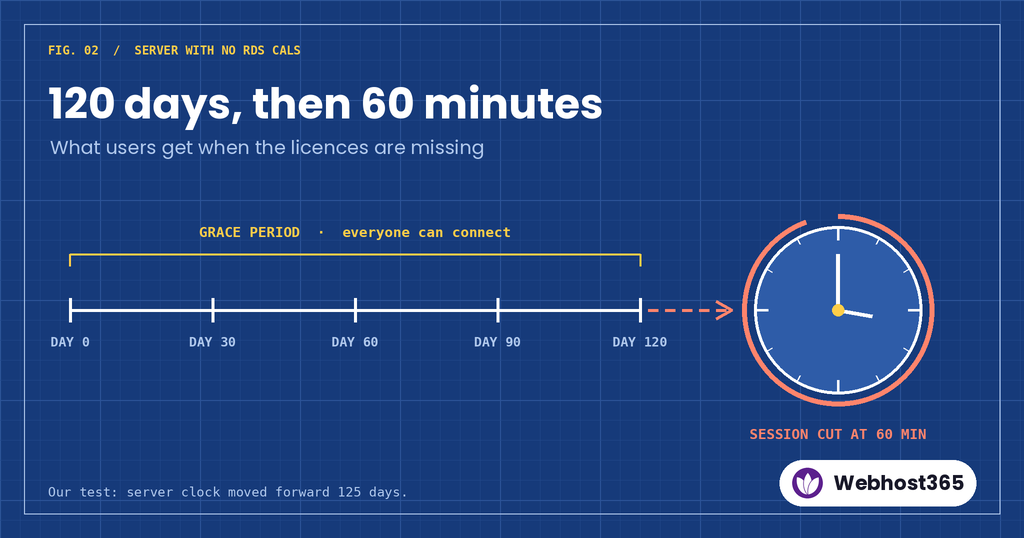
A server with the Remote Desktop Session Host role does not need licences on day one. Microsoft allows a grace period of 120 days. During that time, many people can connect with no RDS CALs installed.
That is about four months. As a result, a server can look fine through a trial and the first few invoices, and then fail.
We tested what the failure looks like. We set up a server for many Remote Desktop users with no licences. Then we moved its clock forward 125 days, so the grace period read zero. After that, a user signed in. This is what happened:
- The sign-in worked and the desktop opened as usual.
- A box appeared with the title “Remote Desktop License Issue”. It said the session would end in 60 minutes.
- A second warning appeared with two minutes left.
- At 60 minutes, the session was cut, whatever the user was doing.
The full test is in our Tally on cloud price guide.
Why the session ends after 60 minutes
If your Remote Desktop session disconnects after 60 minutes, this is the most likely cause. The grace period is over and the server has no RDS CALs to hand out.
It is easy to blame something else. The internet connection, the program or the user’s computer all look like suspects, because the sign-in itself still works. In addition, the fault starts months after the server was set up, when nobody has changed anything.
The fix is not on your computer. Someone has to install RDS CALs on the server and point it to them. If you rent the server, ask your provider. The next section shows how to check for yourself.
How to Check If a Server Has RDS Licences
You do not have to take anyone’s word for it. Three short commands and one built-in tool show whether a server is licensed. All of them only read information, so they change nothing.
Sign in as an administrator and open Windows PowerShell with “Run as administrator”. The results below are from one of our own Tally servers, which runs Windows Server 2022.
1. Check the licensing mode
Get-WmiObject -Namespace root\cimv2\terminalservices -Class Win32_TerminalServiceSetting | Select-Object LicensingName, LicensingType, @{n='LicenceServers';e={$_.GetSpecifiedLicenseServerList().SpecifiedLSList}} | Format-ListOur server returned this:
LicensingName  : Per Device
LicensingType  : 2
LicenceServers : localhost
The first line should read Per Device or Per User. The last line names the machine that holds the licences. Here it says localhost, which means the server holds its own. If the mode is not set or the last line is empty, the server has nowhere to get a licence from.
2. Count the licences installed
Get-WmiObject Win32_TSLicenseKeyPack | Select-Object ProductVersion, TypeAndModel, TotalLicenses, IssuedLicenses, AvailableLicenses | Format-Table -AutoSizeOur server returned this:
ProductVersion      TypeAndModel               TotalLicenses IssuedLicenses AvailableLicenses
--------------      ------------               ------------- -------------- -----------------
Windows 2000 Server Built-in TS Per Device CAL    4294967295              0        4294967295
Windows Server 2022 RDS Per Device CAL                    50              1                49
Ignore the first row. It is built into every licence server and does not cover modern Windows. The second row is the one that counts. It shows a pack of 50 Per Device CALs for Windows Server 2022, with 1 issued and 49 still free.
If you see only the built-in row, no RDS CALs are installed. Also, check that the version in this row matches your server, as the version table above explains.
3. Check the grace period
(Get-WmiObject -Namespace root\cimv2\terminalservices -Class Win32_TerminalServiceSetting).GetGracePeriodDays().DaysLeftOur licensed server returned 0. That is normal. Zero only means the grace period is no longer running. Therefore, this number is not a verdict on its own. A zero with licences installed is fine, while a zero with no licences is the 60-minute problem.
4. Run the RD Licensing Diagnoser
Windows includes a tool that sums all of this up on one screen. To open it, run this:
lsdiag.mscOn our server, it reported that it “did not identify any licensing problems”. Below that, it showed 49 licences available for clients, Windows Server 2022, and Per Device as the licensing mode. The Active Directory line read “Not applicable”, because a single server is not part of a domain.
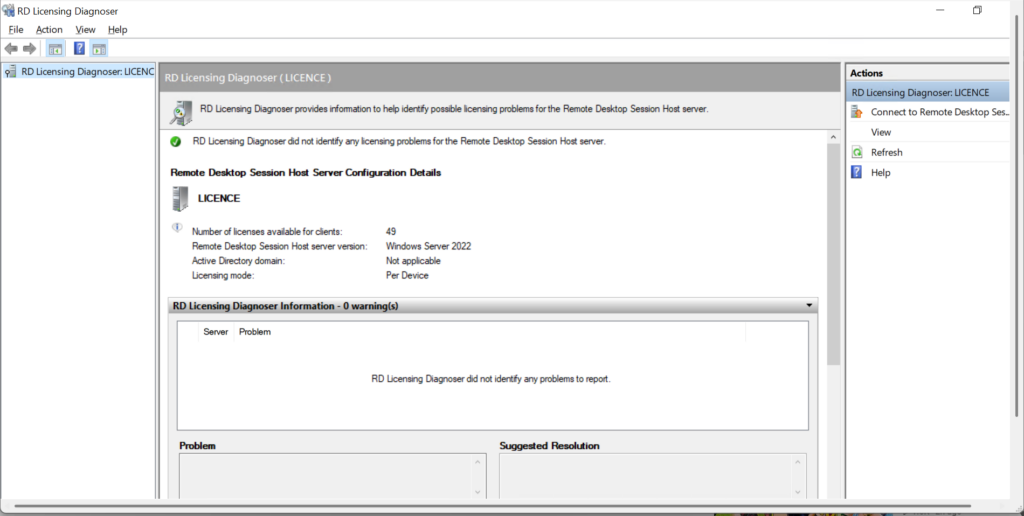
If you rent a server and have no administrator login, ask your provider for a screenshot of this screen. It answers the question in one picture.
Do You Need RDS CALs for Tally, Busy or Marg
Yes, as soon as more than two people use the server at the same time. Tally, Busy and Marg are ordinary Windows programs. When several people run them on one server, each person works in a Remote Desktop session. So Microsoft’s rule applies in the same way to all three.
The RDS CAL is also separate from the accounting licence. For example, Tally Gold allows several users inside Tally. However, it does not license their Remote Desktop sessions. You need both. Our Tally vs Busy vs Marg on cloud comparison covers the accounting licences side by side.
What we include
Our servers for these three programs are delivered with RDS CALs already installed. The check in the previous section came from one of them. The plan price does not change when you add a user:
- Tally on cloud, from ₹882 a month for up to 3 users
- Busy on cloud, from ₹882 a month for up to 3 users
- Marg on cloud, from ₹882 a month for up to 5 users
For the server size each program needs, see the Busy on cloud price guide and the Marg on cloud price guide.
What to ask any provider
If you buy from someone else, ask two questions in writing before you pay:
- Are Remote Desktop licences for all my users installed on the server today?
- Are they included in the price, or charged per user?
Then run the checks above in the first week. Do not wait for the 120 days to find out.
Final Thoughts
An RDS CAL is a simple idea with an awkward failure. Windows Server lets two people in for free. Everyone after that needs a licence. If the licences are missing, nothing goes wrong for 120 days, and then sessions start ending after 60 minutes.
So do three things before you put a team on a Windows server. First, count the devices that will connect. Second, check the server version, because a 2022 CAL does not work on Windows Server 2025. Third, run the checks in this guide, or ask your provider for the Diagnoser screenshot.
If you would like help working out how many licences your office needs, contact us and we will go through it with you.
FAQs
An RDS CAL is a Remote Desktop Services Client Access Licence from Microsoft. It allows one person or one device to use a Windows server over Remote Desktop. It is separate from the Windows Server licence and from the licence of any program you run on the server.
Two people can be connected at the same time. In our test, the third person saw the message “There are too many users signed in” and could only get in by disconnecting one of the other two. For more than two, the server needs the Remote Desktop Session Host role and RDS CALs.
On 24 November 2026, the Microsoft Store in India listed the Windows Server 2025 RDS CAL at ₹22,429 for one licence and ₹1,11,639 for a pack of five, with GST included. Per User and Per Device CALs cost the same. It is a one-time price and not a monthly fee.
No. An RDS CAL works on its own version of Windows Server and on older versions, but not on a newer one. A 2025 CAL works on both Windows Server 2025 and 2022, so it is the safer one to buy.
The most likely cause is that the server has no RDS CALs and its 120-day grace period has ended. In our test, the user could still sign in, saw a “Remote Desktop License Issue” box, and was cut off at 60 minutes. The fix is to install RDS CALs on the server.
Yes, if more than two people will use the server at the same time. The same applies to Busy and Marg. The RDS CAL covers the Remote Desktop session, while your Tally licence covers Tally itself, so you need both. Some hosting plans, including ours, come with the RDS CALs already installed.