
“How much bandwidth does a website need?” is a question that sounds like it should come with a big, intimidating number attached. Hosting plans advertise “unlimited” and “unmetered” transfer as if bandwidth were a wall you are about to slam into, and it is easy to come away thinking you need to buy headroom for a flood. For the overwhelming majority of websites, the real figure is far smaller than the marketing implies — and it is genuinely easy to estimate in a few seconds.
Use the calculator below to get a realistic number for your own site, then read on for how it arrives at that figure, what actually drives it up or down, and why, on a modern unmetered plan, bandwidth is one of the last things you need to worry about. Move the inputs and the estimate updates live, so you can see exactly how your traffic and the weight of your pages combine into a monthly total.
Calculate your bandwidth requirement
How Much Bandwidth Does Your Site Need?
Move the controls — your monthly estimate updates instantly.
Estimated monthly bandwidth
This is an estimate for your own understanding, not a limit — real usage varies with your pages, traffic pattern, and caching. Bandwidth is the data sent to visitors, which is different from storage (the space your site occupies). Optimizing images and using a CDN both reduce it.
What Website Bandwidth Actually Is
Before the numbers, a quick definition, because bandwidth is one of the most misunderstood terms in hosting. Bandwidth — often called data transfer — is the total amount of data your website sends to its visitors over a period of time, usually measured per month. Every time someone loads one of your pages, their browser downloads the HTML, the images, the stylesheets, the scripts, and any fonts or videos on that page, and all of that downloaded data counts toward your bandwidth.
The simplest way to picture it: if a single page is two megabytes in size and one visitor loads it, that is two megabytes of bandwidth used. Multiply that across every page, every image, and every visitor over a month, and you have your monthly bandwidth.
One distinction is worth getting straight because it trips up so many people: bandwidth is not the same as storage. Storage, your disk space, is how much data your website occupies sitting still on the server — your files, your database, your media library. Bandwidth is how much data moves out to visitors as they browse. A site can use very little storage while consuming large amounts of bandwidth if a few lightweight pages receive heavy traffic. Conversely, a site can use a lot of storage but consume relatively little bandwidth if it contains many files that visitors rarely download. They measure two completely different things, and a hosting plan lists them separately for exactly that reason.
How the Calculator Works
The estimate above relies on a simple calculation, and understanding it makes the result easier to trust. To estimate monthly bandwidth, multiply your traffic by the amount of data each visitor loads.
In plain terms: take the number of visitors you get in a month, multiply by how many pages each one views on average, and multiply that by the average size of one of your pages. That gives the raw data transferred, and the calculator adds a small margin on top for the things that do not fit neatly into “page views” — search-engine crawlers, retries, and assets loaded in the background. The result is a realistic monthly figure rather than a bare-minimum one.
The piece of that equation people consistently underestimate is the size of their pages. Visitor counts are easy to picture, but page weight is invisible until you measure it — and as the next section shows, it is the single biggest lever in the whole calculation. Two sites with identical traffic can land at wildly different bandwidth totals purely because one serves lean, optimized pages and the other serves heavy ones.
Why Page Size Is the Number That Matters Most
If you change one input in the calculator and watch the total swing, make it the page size — because it is the variable that quietly decides everything. And the broader trend is not in your favor unless you act on it: the web has roughly tripled in page weight over the past decade. According to the HTTP Archive’s Web Almanac, the median web page is now around 2.6 megabytes, up from well under a megabyte ten years ago, and it keeps growing by several percent every year.
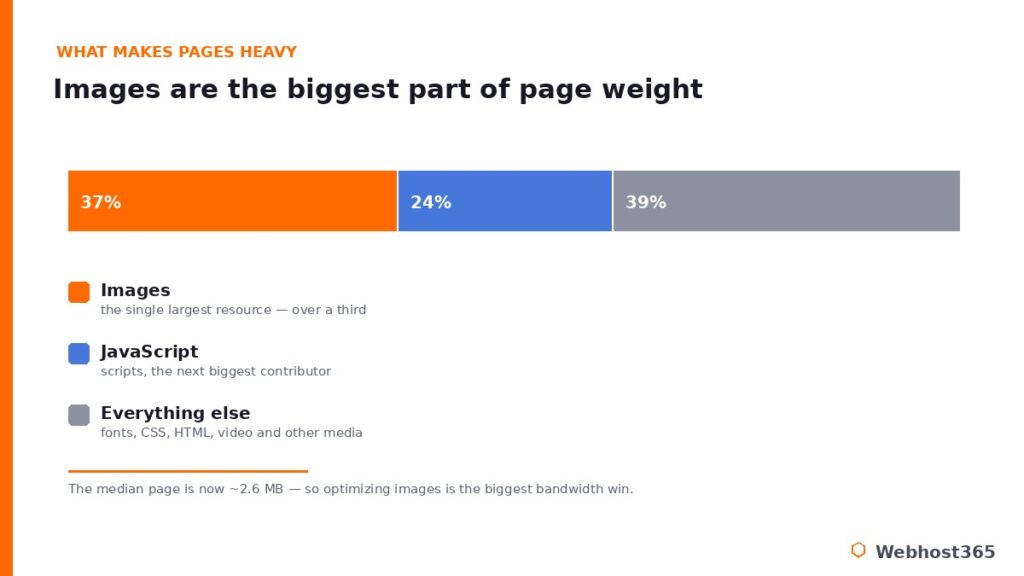
What is making pages so heavy? Images, mostly. They are consistently the single largest component of page weight, accounting for well over a third of the total bytes on a typical page, with JavaScript the next biggest contributor. This is why two websites with exactly the same traffic can have completely different bandwidth bills. A lean, well-optimized blog serving one-megabyte pages uses a fraction of the data of a media-heavy site pushing four-megabyte pages to the same number of visitors. The traffic is identical; the page weight is the multiplier that sets them apart. Your bandwidth is far more a story about how heavy your pages are than about how many people visit.
How to Use Less Bandwidth
The good news in that last point is that the biggest lever is entirely in your control. If the calculator’s number looks higher than you would like, these steps bring it down — and they make your site faster at the same time, so it is effort that pays twice.
Start with images, because they are the largest slice of the problem. Compressing your images and serving them at the right dimensions is the single highest-impact change you can make, and switching to modern formats helps enormously — a WebP image is typically a quarter to a third smaller than the equivalent JPEG, and AVIF can be roughly half the size, at the same visual quality. Next, put a CDN in front of your site.
A content delivery network serves cached copies of your images and files from edge locations near each visitor, which not only speeds delivery but offloads a large share of the transfer from your origin server entirely. Beyond those two, caching reduces repeated work, lazy-loading defers images until they are actually scrolled into view, and minifying your CSS and JavaScript trims the rest. The same habits that shrink your bandwidth are the ones that fix a slow website, which is why optimization is rarely wasted effort.
“Unmetered” Bandwidth: What It Really Means
Here is the part that should put the whole question to rest for most people. You will see hosting plans advertise “unmetered” or “unlimited” bandwidth, and it is worth understanding honestly what that does and does not mean, because the marketing language invites suspicion.
Unmetered bandwidth means there is no hard gigabyte cap on your account — you are not metered per gigabyte and you will not get a bill or a shut-off for crossing a line, because there is no line drawn at a specific number. What it is subject to, on any host, is a fair-use policy: the resources are there for running websites, not for operating a public file-distribution service or streaming platform that consumes a server’s entire capacity. For a normal website — a blog, a business site, a portfolio, even a busy store — you will never come close to a fair-use concern.
Your traffic would have to become genuinely extreme and unusual before it mattered. That is the practical reality the calculator’s number sits inside: it is a useful figure for your own understanding, not a limit you are racing toward. On an unmetered plan, knowing your bandwidth is reassurance, not a countdown.
When Bandwidth Genuinely Becomes a Consideration
To stay honest, there are real cases where data transfer is worth thinking about — they are just not the cases the “unlimited bandwidth” marketing is aimed at. If you are running a large video-streaming service, distributing big downloadable files like software or high-resolution media at scale, or hosting a genuinely enormous media library, your transfer can climb into territory where it stops being a rounding error.
But here is the important reframing: in those cases, the gigabytes themselves are rarely the real constraint. What actually matters is the server resources behind that traffic — the CPU and memory needed to serve a flood of large files or concurrent video streams without slowing down. A site sending huge volumes of data is also a site doing a lot of work, and the limiting factor is almost always the processing power, not an abstract bandwidth number. That is a resourcing question, and our RAM calculator and hosting requirements by traffic guide help you size for it. For workloads like these, a VPS with dedicated resources is the right home — not because you will run out of bandwidth, but because you need guaranteed power behind it. For everyone else, this section simply does not apply.
Conclusion: Estimate It, Then Stop Worrying About It
The honest answer to how much bandwidth a website needs is that it is easy to estimate, smaller than you probably feared, and driven far more by the weight of your pages than by your visitor count. Run the calculator, see your realistic monthly figure, and then — on a modern unmetered plan — largely stop thinking about it. If the number ever bothers you, the fix is the same work that makes your site faster: optimize your images and put a CDN in front, and both your bandwidth and your load times improve together.
That combination is exactly what good hosting should give you out of the box. Every Webhost365 plan includes unmetered bandwidth alongside Bunny CDN across 119 locations and NVMe storage, so the data side of your site is handled and your pages are served fast from the edge — bandwidth simply is not a number you have to manage. WordPress hosting starts at $2.49 a month, and for genuinely transfer-heavy or resource-intensive workloads like video or large-scale file distribution, a Linux VPS from $19.99 gives you the dedicated power behind the traffic. Your renewal price always matches your signup price. Estimate your bandwidth once, then get back to building your site.
FAQ: Website Bandwidth
Most websites need far less than they expect. A typical site uses roughly its monthly visitors multiplied by pages per visit multiplied by page size, so a site with 10,000 visitors viewing a few 2.5MB pages each uses somewhere in the tens of gigabytes per month. Heavier, media-rich sites use more, but the figure is usually well within what any modern plan handles comfortably.
There is no hard gigabyte cap, so you are not metered or billed per gigabyte and will not be cut off at a set number. It is subject to a fair-use policy, meaning the resources are meant for running websites rather than operating a large-scale file-distribution or streaming service. A normal website, even a busy one, will never approach that line.
Storage is how much space your website occupies on the server — your files, database, and media sitting still. Bandwidth is how much data moves out to visitors as they browse. A small site can use high bandwidth if it gets heavy traffic, and a large site can use little bandwidth if its files are rarely downloaded. Hosting plans list the two separately because they measure different things.
Start with images, since they are the largest part of most pages: compress them, size them correctly, and use modern formats like WebP or AVIF, which are significantly smaller than JPEG at the same quality. Then add a CDN to serve cached copies from the edge, enable caching, and lazy-load images. These steps cut bandwidth and speed up your site at the same time.
It depends almost entirely on your page size. At a typical 2.5MB per page with a few pages per visit, 100,000 monthly visitors land in the range of several hundred gigabytes a month. A lean, image-optimized site uses noticeably less, and a media-heavy one more. On an unmetered plan, any of these is comfortably handled without a cap to worry about.
Yes, on your origin server. A CDN serves cached copies of your images and files from edge locations close to visitors, so a large share of your data transfer comes from the CDN rather than your hosting account. That offloads bandwidth from your server, speeds up delivery worldwide, and reduces the load your origin has to handle.