
“How much hosting does my WordPress site need?” sounds like it should have a clean answer, and almost every guide online gives you one: a tidy table that says 10,000 visitors needs 4GB of RAM, and so on. The problem is that the table is usually wrong, because two WordPress sites with identical traffic can need five times different resources. WordPress hosting requirements are decided far more by what your site does and how well it caches than by the raw number of people visiting it.
This guide gives you realistic requirements at four traffic levels — roughly 1,000, 10,000, 100,000, and 1,000,000 monthly visitors — and, just as importantly, the two levers that decide where you actually land within each tier. By the end you will know not only which plan fits your traffic, but how to tell whether you can comfortably run on a smaller one or genuinely need to size up. The official baseline from WordPress.org is modest, and most sites need far less than the internet’s scary tables suggest.
The Three Things That Actually Decide Your Requirements
Before any numbers, understand the variables, because they explain why a blanket “X visitors needs Y RAM” rule misleads people into overpaying or under-provisioning.
The first and biggest factor is caching. When a page is cached, your server hands a visitor a pre-built copy without running any PHP or touching the database — it is almost free to serve, and one small server can deliver thousands of these per minute. When a page is not cached, every single visit runs the full WordPress engine: PHP executes, the database is queried, the page is assembled from scratch. The gap between those two paths is enormous, and it is the single largest reason real-world WordPress hosting requirements vary so wildly at the same traffic level, so how much RAM does a website need ? well, you will have an answer at the end.
The second factor is what your site actually is. A static blog or brochure site serves mostly cacheable pages and asks very little of the server. A WooCommerce store, a membership site, or a forum is different in kind: carts, logins, checkouts, and account pages cannot be cached the same way, because each one is unique to the logged-in visitor. That dynamic work lands on PHP and the database every time, so a store can need roughly twice the resources of a content site at the same traffic.
The third factor is plugins and theme weight. Every active plugin adds code that runs and memory that is consumed on each uncached request. A lean site with a handful of well-built plugins is dramatically lighter than one carrying forty plugins and a heavy page builder. The practical mental model for the rest of this guide: your traffic level sets the floor, and these three factors set the multiplier on top of it.
A Quick Word on RAM, CPU, and PHP Workers
You do not need to be a sysadmin to size a site, but one idea makes everything clearer: for most WordPress sites, RAM is the real ceiling, not CPU.
Here is why. Each visitor whose request is not served from cache needs a PHP worker to handle it, and every worker consumes a chunk of memory while it runs. The number of workers you can run at once is set by how much RAM you have, using a simple piece of arithmetic: take your total RAM, subtract what the operating system, the database, and the object cache need, and divide what is left by the size of one worker. On a content site a worker might use 30 to 50MB; on a WooCommerce store, 40 to 80MB. That division is your real concurrency limit — the number of uncached visitors you can serve at the same instant.
CPU matters too, but mostly for that uncached dynamic work: assembling pages, running store logic, processing PHP. A well-cached site barely touches the processor, while a busy uncached store leans on it heavily. Storage matters in a third way — fast NVMe SSD speeds up every database query and cache read, which is why it has become the baseline for serious WordPress hosting. And running a current, supported version of PHP, as the PHP project documents, gives you a real speed gain for free over older releases. Keep this picture in mind as we walk the traffic tiers: caching decides how often you pay the PHP-and-RAM cost at all.
Up to 1,000 Visitors a Month: The Small Site
This is where most websites live, and the honest truth is that the requirements here are tiny. A personal blog, a portfolio, a local business brochure site, a small community page — at roughly a thousand visitors a month, you are serving a few dozen people a day, rarely more than one or two at the same moment.
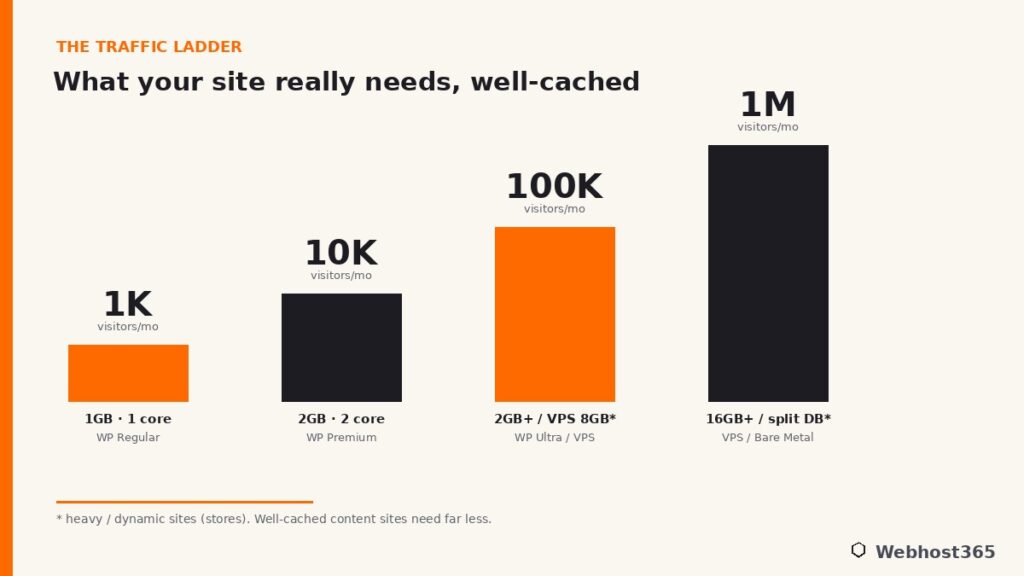
With basic caching in place, a site like this runs comfortably on about 1GB of RAM and a single CPU core. There is no need for a VPS, no need to think about PHP workers, no need for anything exotic. The official WordPress.org requirements ask for very little, and at this traffic level you will never come close to straining them. Quality shared WordPress hosting is exactly the right tool: it handles the caching, the PHP tuning, and the server maintenance for you, so you can spend your time on the site rather than the server.
The only thing that changes this picture is site type. A tiny WooCommerce store with a thousand visitors still spends most of its time serving cacheable catalog pages, so it remains comfortable here, but you will want to make sure object caching is switched on so the cart and account pages stay responsive. For a content site, this tier is genuinely effortless. The signal that you are ready to move up is not a calendar date but a feeling: pages starting to feel slower during your busiest hour, or your hosting dashboard showing memory regularly near its limit.
For this tier, a plan like Webhost365 WP Regular at $2.49 per month — 1GB of RAM, NVMe storage, and Bunny CDN included — is purpose-built, and the CDN alone means your images and static files are served from the edge rather than your server at all.
Around 10,000 Visitors a Month: The Growing Site
Ten thousand visitors a month is the sweet spot for a successful blog, an active small business, a content site finding its audience, or a low-volume store. You are now serving a few hundred people a day, with real concurrency during peak hours, and this is the level where caching stops being optional and becomes the thing that holds everything together.
The good news is that caching does the heavy lifting beautifully here. A well-cached content site at this traffic typically runs on around 1.5 to 2GB of RAM with two CPU cores, and still spends most of its time handing out cached pages that never touch PHP. This remains comfortable shared-hosting territory, provided the hosting is genuinely tuned for WordPress with page caching, object caching, and a CDN working together. The visitor count looks bigger, but because the vast majority of those visits hit the cache, the actual load on the server stays modest.
Where this tier gets interesting is the store. A WooCommerce site at ten thousand visitors generates a steady stream of uncached, logged-in activity — people browsing as customers, adding to carts, checking out — and each of those requests needs a PHP worker and the memory behind it. A store at this level wants the upper end of the range, comfortably more RAM and the headroom to run more workers at once, where a content site at the same traffic would coast. This is the first tier where the answer genuinely splits by site type rather than by visitor count.
A growing site at this level fits a plan like WP Premium at $4.95 per month, with more cores and a larger NVMe allocation, or WP Ultra at $7.95 if you are running a store or simply want more headroom for spikes. Both keep the same renewal price you sign up at, so growing into them does not mean a renewal-time surprise.
Around 100,000 Visitors a Month: High Traffic
A hundred thousand visitors a month is a genuinely popular site, and this is the tier where the caching question stops being advice and becomes the whole story. Two sites at this traffic can have completely different needs, and the difference is entirely about how much of that traffic can be served from cache.
A well-cached content site can still surprise you at this level. Because the overwhelming majority of those hundred thousand visits are anonymous readers hitting cacheable pages, a strong, properly tuned server with 2GB or more of RAM can keep serving them from cache without breaking a sweat. The traffic number looks intimidating, but the server is mostly doing cheap work. A content site that caches well is the cheapest kind of site to scale, and many publishers are quietly running large audiences on modest hardware for exactly this reason.
A busy store at this traffic is a different animal. A WooCommerce site doing a hundred thousand visits is generating a continuous stream of carts, logins, and checkouts that cannot be cached, and that uncached load is what decides your requirements now. This is the point where dedicated resources start to matter more than a shared plan can offer: a VPS with around 4 cores and 8GB of RAM, a Redis object cache holding the database’s frequent lookups in memory, and PHP-FPM tuned to run enough workers for your real concurrency. This is the classic crossover, the traffic level where a serious store graduates from shared hosting to a VPS, where it gets guaranteed resources that are not shared with anyone else.
The practical read: if you run a well-cached content site, a strong WordPress plan still serves you here. If you run a store or a heavily dynamic site, this is where you move to a VPS and feel the difference immediately.
1,000,000 Visitors a Month and Beyond: Scale
At a million visitors a month, the conversation changes from “how big a server” to “how is this built.” Raw specifications still matter, but architecture matters just as much, and a single box configured the default way is no longer automatically the right answer.
For a content site that caches aggressively, a million visits is very achievable, especially with a CDN carrying the static files and cacheable pages at the edge so your origin server handles only the misses. For a heavy or dynamic site at this scale, the standard move is to stop asking one server to do everything. You separate the database onto its own server so it has dedicated memory and fast storage, while the web server focuses on PHP, because the two have genuinely different appetites. Memory climbs into the 16GB-and-beyond range, caching becomes aggressive at every layer, and a CDN stops being a nice-to-have and becomes mandatory.
There is an honest point worth making here that ties the whole guide together: a fully cached, mostly static site serving a million readers is often cheaper and easier to run than a dynamic store serving a hundred thousand. Scale is not really about the visitor count. It is about how much uncacheable work each visit demands, which is the same truth that governed every tier below this one, just written larger. At this level a larger Linux VPS or a bare-metal server becomes the foundation, sized to the dynamic load rather than the headline traffic figure.
The Levers That Move You Down a Tier
Everything above points to one practical conclusion: you can often serve more traffic on less hardware by pulling a few levers. Each of these can drop you a tier, or absorb a traffic spike that would otherwise take your site down.
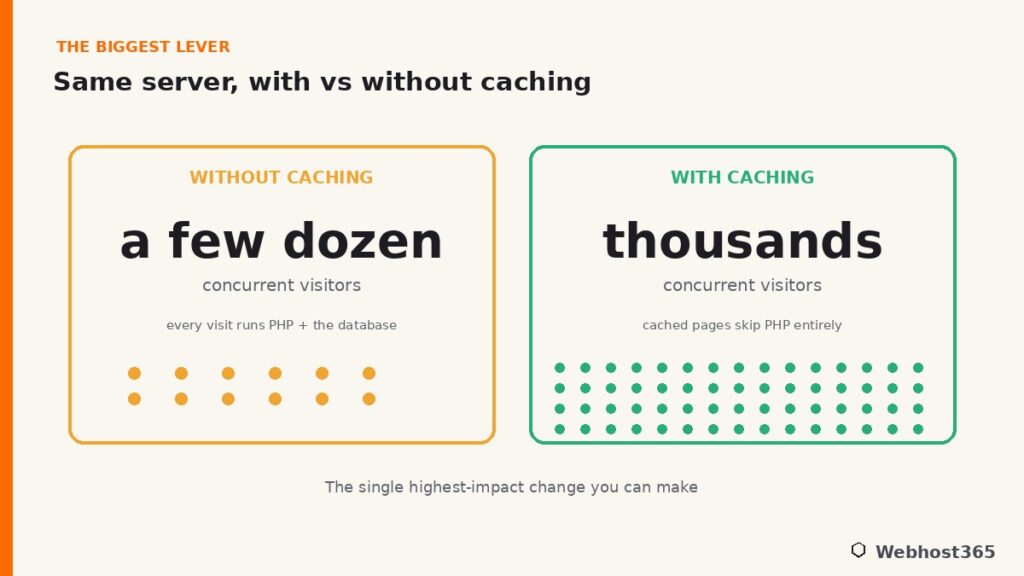
Page caching is the biggest lever by far. A full-page cache, whether LiteSpeed’s LSCache, an Nginx FastCGI cache, or a well-configured caching plugin, means anonymous visitors are served pre-built pages that never run PHP. Turn this on and a server that struggled under a few dozen concurrent visitors can suddenly handle thousands. If you do nothing else, do this.
Object caching is the next lever, and it targets the work caching alone cannot remove. A tool like Redis keeps the database’s frequent, repeated lookups in memory, which dramatically lightens the load from logged-in users, carts, and admin pages, the exact dynamic traffic that a page cache cannot help. Our guide to Redis object caching for WordPress walks through setting it up and why it matters most for stores and membership sites.
A CDN is the third lever, and it works by moving load off your server entirely. A content delivery network serves your images, CSS, JavaScript, and even cacheable HTML from edge locations close to each visitor, so your origin server never handles those requests at all. The principles that make this effective are the same ones the performance community documents at resources like web.dev, and the practical effect is that a large share of your traffic is answered before it ever reaches your hosting. Beyond these three, keeping your plugin list lean and your PHP version current quietly trims the cost of every request that does reach the server.
Conclusion: Match the Plan to the Workload, Not the Hype
The real answer to “how much hosting does my WordPress site need” is that it depends far less on your visitor count than the scary tables suggest, and far more on two things you control: how well your site caches, and how much uncacheable work it does. A well-cached content site punches enormously above its hardware, while a busy dynamic store needs real resources to stay fast. Size to the workload, not the headline number, and you will neither overpay for idle capacity nor get caught short during your best week.
The honest ladder looks like this. Small sites up to a few thousand visitors thrive on WP Regular at $2.49 per month. Growing sites and light stores fit WP Premium at $4.95 or WP Ultra at $7.95. Busy stores and high-traffic dynamic sites step up to a Linux VPS with dedicated resources, from $19.99 for an 8GB c4.medium. Every Webhost365 WordPress plan ships with Bunny CDN and LiteSpeed caching already built in, which is precisely why these plans serve more traffic than their raw RAM figures would imply, and your renewal price never moves from the price you signed up at. Match the plan to what your site actually does, and the hosting question stops being stressful.
FAQ: WordPress Hosting Requirements
It depends on caching and site type more than traffic. A well-cached content site runs comfortably on 1 to 2GB of RAM even at high traffic, because cached pages never run PHP. A WooCommerce store or membership site needs more, since logged-in and checkout pages cannot be cached and each one consumes a PHP worker and its memory.
For a well-cached content site, yes, comfortably. The majority of those visits are served from cache and never strain the server. A busy WooCommerce store at the same traffic is different, because its uncacheable cart and checkout activity needs dedicated resources, which is where a VPS becomes the better fit.
Yes, roughly twice as much at the same traffic level. A blog serves mostly cacheable pages that skip PHP entirely, while a store constantly handles carts, logins, and checkouts that cannot be cached. That dynamic work runs the full WordPress engine on every request, so stores need more RAM and more PHP workers.
Dramatically. Page caching lets a server serve thousands of concurrent visitors from pre-built pages instead of choking under a few dozen uncached requests. It is the single highest-impact change you can make, and it is the main reason two sites with identical traffic can need vastly different hosting.
When your site’s uncacheable load outgrows shared resources, which usually means a busy store, a membership site, or a heavily dynamic application rather than a content site. The signals are pages slowing during peak hours, memory regularly near its limit, or needing server-level control like a tuned Redis cache and custom PHP-FPM settings.
Yes. A CDN serves your static files and cacheable pages from edge locations, so a large share of your traffic is answered before it reaches your server. That offloading reduces the work your hosting does, which means you can serve more visitors on a smaller plan. Every Webhost365 plan includes Bunny CDN for this reason.