
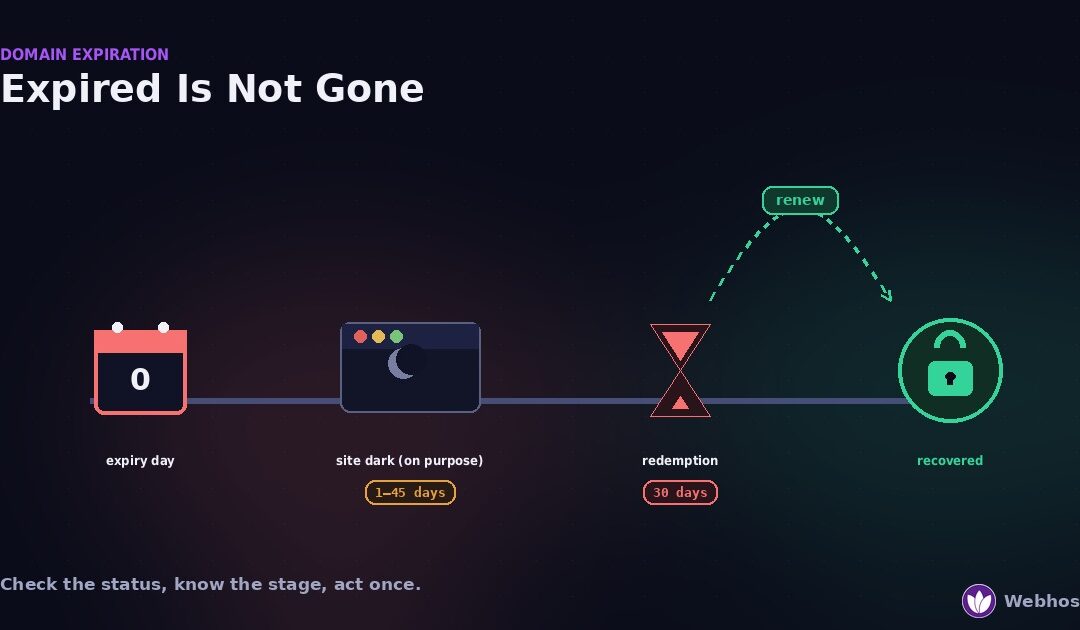
When a domain expires, the website and email stop working, but the name is not gone. Most domains pass through a renewal grace period, then a 30-day redemption period, before anyone else can register them. Renew during the grace period at the normal price. Redeem during redemption at a higher fee. Check the domain’s status first, because it tells you exactly which stage you are in.
Most guides on this topic come from registrars. They say “log in and click renew,” and they stop there. However, that leaves out the parts you actually need: what each stage costs, how long you have, and what you are entitled to when the registrar makes it difficult.
So this guide is written for the person whose site just went dark. First it confirms the domain really expired, because half of these panics are something else. Then it walks the timeline stage by stage, with the rules that protect you at each one.
First: Did It Actually Expire?
A site that stops loading is not proof of expiry. DNS changes, hosting outages, and certificate failures all look identical from a browser. Therefore, before you pay anyone anything, read the domain’s own record.
Look up the domain
Run a WHOIS or RDAP lookup on the domain. Any lookup tool works, and most registrars offer one on their site. The result shows three things that matter: the registrar, the expiry date, and one or more status codes.
Read the expiry date first. If it is in the future, the domain has not expired. Skip to the look-alikes below, because your problem is somewhere else.
Read the status code
If the date has passed, the status code tells you which stage the domain is in. Registrars all use the same codes, so this works everywhere.
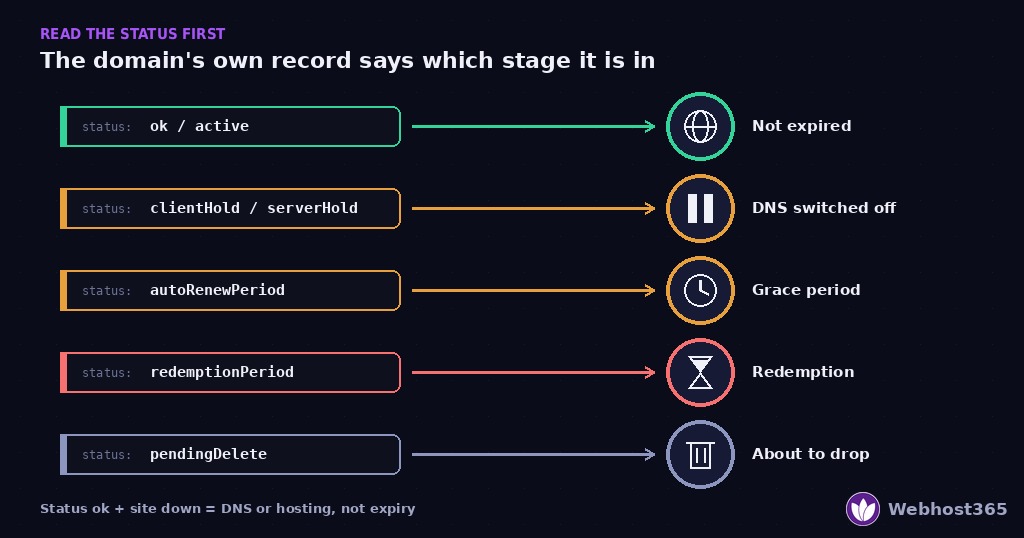
| Status shown in WHOIS / RDAP | What it means | Where you are |
|---|---|---|
| ok or active | Registered and resolving normally | Not expired — check DNS and hosting instead |
| clientHold or serverHold | DNS switched off by the registrar or registry | Expired and in the grace period, or suspended |
| autoRenewPeriod | Past expiry, inside the registrar’s grace window | Stage 1 — renew now at the normal price |
| redemptionPeriod | Deleted by the registrar, held by the registry | Stage 2 — 30 days to redeem at the higher fee |
| pendingDelete | Redemption over, release imminent | Stage 3 — hours to days before anyone can register it |
One code needs a note. A clientHold on a domain whose expiry date is still in the future is not expiry at all. It usually means a suspension for an unpaid invoice, a failed contact verification, or an abuse report. In that case, the fix is a ticket to the registrar, not a renewal.
The three look-alikes
Status ok, site down. Then the domain is fine and something behind it broke. The most common cause is a DNS record that changed during a migration, which our DNS records guide covers. Beyond DNS, the 5-minute site-down diagnosis walks through hosting and server causes in order.
A browser warning about privacy or certificates is different again. That is an expired SSL certificate, not an expired domain, and the SSL error guide fixes it in minutes.
In short, only an expiry date in the past plus a hold, autoRenewPeriod, redemptionPeriod, or pendingDelete status means the domain itself expired. If that describes your result, keep reading.
The Expiration Timeline
Expiry is not one event. It is a sequence of stages with fixed rules, and the rules come from ICANN’s Expired Registration Recovery Policy, not from any single registrar. Here is the whole sequence in one table.
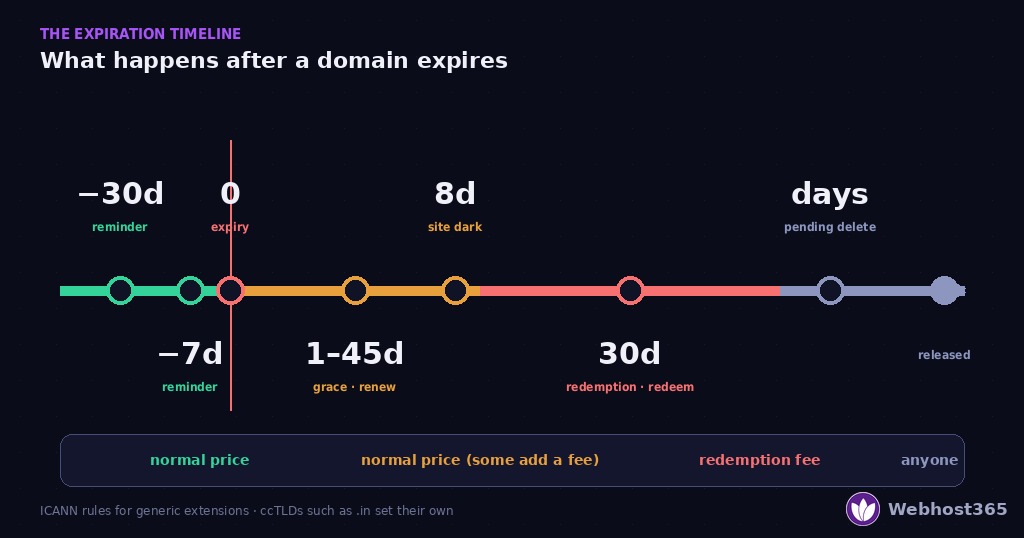
Stage by stage
| Stage | How long | Your site and email | What you can do | What it costs |
|---|---|---|---|---|
| Reminders | ~30 days and ~7 days before expiry | Working normally | Renew — nothing changes | Normal renewal price |
| Expiry day | Day 0 | Often still working for a short time | Renew immediately | Normal price, sometimes a late fee |
| Grace period | 1–45 days, set by the registrar | Switched off, deliberately, for up to 8 days before deletion | Renew | Normal price, or a late fee some registrars add |
| Redemption | 30 days after deletion | Off; transfers blocked | Redeem through the same registrar | Redemption fee — typically far above renewal |
| Pending delete | A few days | Off | Nothing — wait for release | Nothing |
| Released | — | Gone | Register it again if nobody else does | Registration price, or whatever the new owner asks |
Two facts in that table surprise almost everyone.
The site goes dark on purpose
Your website did not stop working by accident. ICANN’s policy requires registrars to interrupt the domain’s DNS for up to eight days before deleting it, and requires registries to keep it interrupted through the redemption period. ICANN explains this in its guide to what every registrant should know about the policy. The blackout exists to make sure you notice. In other words, a dark site during the grace period is the warning system working, not the domain being lost.
Redemption is a right, not a favour
The same policy sets minimum protections. Registrars must send at least two reminders before expiry, about a month ahead and about a week ahead. Every generic top-level domain registry must offer a 30-day redemption period after deletion. Furthermore, registrars must let you redeem during that period, and they must publish their renewal, late, and redemption fees at the time you register.
So if a registrar tells you a deleted domain cannot be recovered inside those 30 days, that is not true for a .com, .net, .org, or any other generic extension. Stage 2 below explains what to do about it.
Where the rules stop
Two honest limits apply. First, the grace period is the registrar’s choice, anywhere from one day to forty-five, and some registrars charge a fee to renew during it or even auction the domain then. Read your registrar’s terms, because they are allowed to. Second, country-code extensions such as .in, .co.uk, and .us follow their own registry’s rules, which can differ. The stages are similar, but the days and fees are not guaranteed.
Stage 1: Just Expired — The Grace Period
Your status shows autoRenewPeriod, or a hold with an expiry date a few days in the past. This is the cheap stage, and the only urgent one. Renew now, and the whole thing ends here.
How long you have
The grace period belongs to the registrar, not the registry. ICANN allows anywhere from one to forty-five days, and each registrar picks its own length. Most large registrars give somewhere between fifteen and forty days. A few give almost nothing.
So do not assume you have a month. Find the exact number in your registrar’s terms, or ask support today. Until you know, treat the deadline as this week.
What renewal costs right now
During the grace period, renewal is usually the normal yearly price. However, some registrars add a late fee, and the policy allows it as long as the fee was published when you registered. Check the invoice before you pay, and check that the renewal term is what you expect.
The auction risk
One more thing the policy permits, and few people know: a registrar may list an expired domain for auction during the grace period, if its terms of service say so. The domain is still yours to renew, but a bid on it is a bad sign. Renew before the auction closes, because after that the registrar’s terms decide what happens.
Why the renewal failed in the first place
Renewals rarely fail because someone decided not to renew. They fail silently. Four causes explain most of them.
The card expired. Auto-renew was on, the charge bounced, and the retry emails went unread. This is the most common cause by far.
The reminder emails went to the wrong address. The contact on the domain is an old work email, a former developer, or a mailbox nobody checks.
Auto-renew was never on. It is off by default at many registrars, and a domain bought years ago was never set.
The domain lives at a registrar you forgot. A previous designer registered it, or it sits in an account under someone else’s name.
Whichever it is, fix the cause while you renew. Otherwise the same thing happens next year, and Stage 2 gets more expensive.
Renew it
Log in to the registrar named in the WHOIS result. Update the payment method first, then renew. Then wait: DNS usually returns within a few hours, though it can take up to a day to propagate everywhere. The domains page shows what renewal costs here, and why we show the renewal price next to the registration price.
Stage 2: Redemption — 30 Days to Get It Back
The status reads redemptionPeriod. The registrar has deleted the domain, but the registry is holding it for you. You have thirty days, and this stage costs real money.
What redemption costs
Redemption fees are set by the registrar and are usually far above the renewal price. Some are several times a year’s renewal. The fee covers the registry’s restore charge plus the registrar’s own margin.
However, the fee must be published. ICANN requires registrars to make renewal, post-expiry, and redemption fees available at the time you register. Look for a “redemption” or “restore” fee in the registrar’s pricing or terms. If the number you are quoted is different, ask why.
How to redeem
Contact the registrar that held the domain, because only that registrar can restore it. Ask for a redemption, or a restore, and pay the fee plus at least one year of renewal. Most registrars complete it within a day or two, and DNS returns shortly after.
You cannot transfer the domain away during redemption. Registries block transfers in this stage. So even if you are unhappy with the registrar, redeem first and move the domain later.
If the registrar says no
This is the part worth knowing before you need it. During the 30-day redemption period, your registrar must allow you to redeem. ICANN’s renewal and expiration FAQ says it plainly: if you tried to redeem a domain in the redemption period and could not, the registrar may be in breach of the policy — and ICANN provides a Domain Renewal Complaint form for exactly that case.
So the sequence is: ask in writing, keep the reply, and if the answer is a refusal or silence, file the complaint while the 30 days are still running. The clock does not pause for a dispute.
What the registry does meanwhile
During redemption the registry disables DNS and blocks transfers, and it marks the domain as being in redemption in public lookups. That is why the status shows redemptionPeriod and why your site stays dark until the restore completes. Nothing you do at the DNS or hosting level changes that. The fix is the restore, and only the restore.
Stage 3: Pending Delete — and When Someone Else Registers It
The status reads pendingDelete. Redemption has ended, and the registry will release the name within a few days. At this point nothing you or the registrar can do will restore it. The only question is who registers it next.
The drop
When the registry releases a domain, it becomes available to anyone, at the normal registration price. For most names, nobody is waiting, and you can simply register it again the moment it drops.
For names with traffic, age, or a good keyword, that is not true. Drop-catching services watch pending deletions and register valuable names within seconds of release, then resell them. If your domain had a real website on it for years, assume someone is watching.
Backorder before the drop
If you are in pendingDelete and the name matters, place a backorder now — our guide to taken domain names compares backordering with the other options. Several services queue a registration attempt for the exact moment of release. It does not guarantee success, because other services may be queued too, but it is the only move that can beat a drop-catcher.
Place the backorder with more than one service if the name is important. The cost is small compared with the alternatives below.
If someone else got it
Three honest options remain, in order of cost.
Buy it back. Most drop-catchers list the domain for sale or respond to an offer. Expect a price far above registration, and expect it to rise if you reveal how much the name matters to you.
Register a variant and redirect. A different extension or a modified name, with a note to customers and a change to your email addresses. Cheaper, and permanent.
A dispute, only if you hold a trademark. The UDRP process exists for domains registered in bad faith against a trademark you own. It costs more than most buy-backs, takes months, and does nothing for a name you never trademarked. In other words, it is a tool for brands, not for expired-domain recovery.
How to Renew an Expired Domain, Step by Step
Whichever stage you are in, the mechanics are the same six steps. Work through them in order.
First, find the registrar. The WHOIS result names it. It may not be who you assumed, especially if a developer or an agency registered the domain for you.
Second, get into the account. Reset the password if you must. If the account belongs to someone else, contact them today; a registrar will not hand you a domain registered in another person’s name.
Third, fix the payment method before anything else. An expired card is why most renewals fail. Update it, then renew.
Fourth, renew or redeem. Renew during the grace period; request a redemption during the redemption period. Pay for at least one year, and consider several.
Fifth, wait for DNS to return. Restores and renewals usually resolve within hours, occasionally up to a day. Nothing at the hosting level needs changing.
Finally, verify everything. Load the site from a device outside your network, send yourself an email at the domain, and confirm the new expiry date in a fresh lookup.
Never Again: Five Settings
Expiry is entirely preventable, and prevention takes ten minutes. Set these five things today.
Turn on auto-renew, and confirm it. Auto-renew is off by default at many registrars. Turn it on, then check that a saved payment method exists, because auto-renew with no card is just a setting.
Put the card’s expiry on your calendar. Cards expire on a schedule, and a dead card is the number-one cause of silent renewal failure. A reminder a month before the card expires prevents the whole chain.
Use a registrant email you read every day. Not a former employee’s, not a developer’s, not a mailbox nobody opens. The two ICANN-required reminders only work if a human sees them.
Renew the main domain for several years. A domain that renews every year has an annual chance to fail. One renewed for five years has one. Registrars offer multi-year terms for exactly this reason.
Add a domain-expiry check to your monitoring. Most uptime monitors can watch a domain’s expiry date and alert you weeks ahead, independent of any registrar email. Our uptime monitoring guide covers setting it up alongside the other checks.
On our side, every domain on the Webhost365 domains page shows the renewal price next to the registration price and comes with reminders and auto-renew, because a renewal you can predict is one you will not miss.
If your domain is a .in, verification lapses can suspend it independently of expiry — our guide to .in domain registration covers the KYC rules and what triggers a suspension.
Final Thoughts
The method fits in three lines. Check the status before you pay anyone, because half of these panics are DNS or hosting. Know which stage you are in, because the cost and the clock change at each one. Then act once — renew, redeem, or backorder — and fix the cause so it never repeats.
And remember the part your registrar’s panel does not say. ICANN’s policy gives you two reminders, a 30-day redemption period, published fees, and a complaint route if a registrar refuses. You have more rights than the renew button suggests. Use them.
FAQ
It depends on the stage. The grace period runs from 1 to 45 days after expiry, set by each registrar, and renewal there costs the normal price or the normal price plus a late fee. After the registrar deletes the domain, every generic extension enters a 30-day redemption period during which the same registrar must let you redeem it at a higher fee. After redemption ends, the name is released and anyone can register it.
Redemption fees are set by the registrar and are usually several times the yearly renewal price, because they include the registry’s restore charge plus the registrar’s margin. ICANN requires registrars to publish their renewal, late, and redemption fees at the time you register, so look for a “redemption” or “restore” fee in the registrar’s pricing before you pay.
Not immediately, for generic extensions. The domain passes through the registrar’s grace period and then a 30-day redemption period before release, and during both only you can recover it. The exception is the auction some registrars run during the grace period under their own terms. Once the domain is released, drop-catching services can register it within seconds, so a backorder is the safeguard for a valuable name.
Almost always because the payment failed silently. The saved card expired, the charge was declined, or no payment method was on file at all. The retry emails then went to a registrant address nobody reads. Auto-renew is only a setting; it needs a working card and a monitored email to actually work.
A short outage during the grace period does little harm, because search engines retry pages that fail temporarily. A domain that stays dark for weeks is different: pages start dropping from the index, and if the domain is released and re-registered by someone else, the history goes with it. Renewing during the grace period keeps rankings intact in most cases.
Expiration is the day the registration term ends; the registrar’s grace period starts then. Deletion is when the registrar removes the domain from its records, which starts the registry’s 30-day redemption period. Redemption is that period, during which you can still restore the domain at a higher fee. Only after redemption ends is the domain released for anyone to register.