
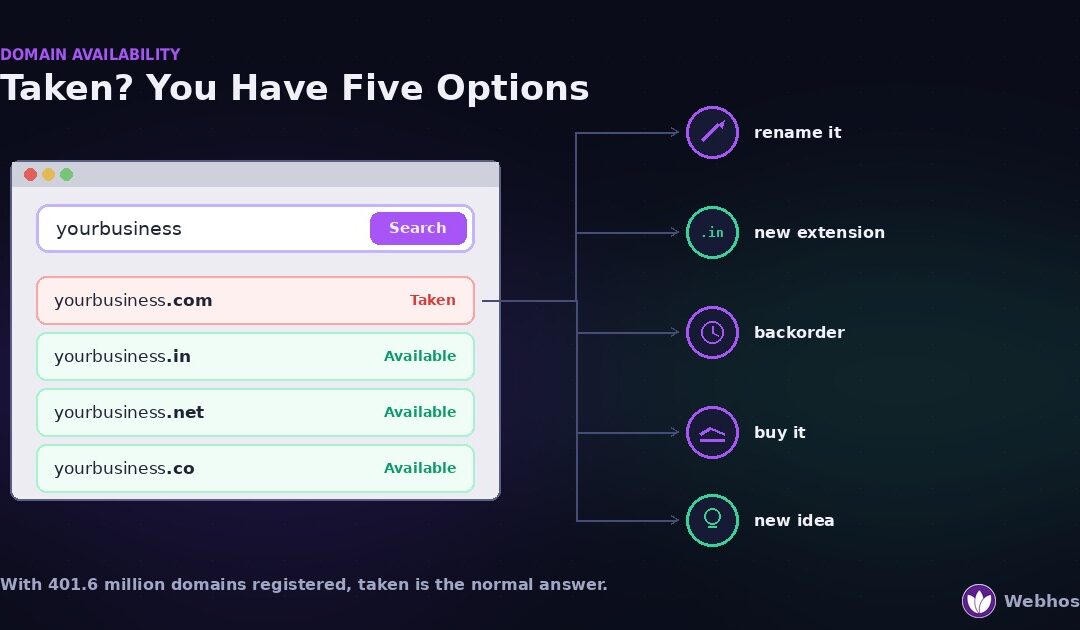
To check whether a domain is available, search it at any registrar or run a WHOIS lookup. An unregistered name returns no record. If the name is taken — and with more than 400 million domains registered worldwide, most short ones are — you have five options: change the name slightly, change the extension, backorder it, buy it from the owner, or choose something different.
Most pages on this topic are a search box with a paragraph above it. They answer the easy question and stop exactly where the real one begins, which is what to do thirty seconds later when the name you wanted is gone.
So this guide covers both halves. First, how to check properly, including the cases where “unavailable” does not mean what you think. Then the five options with what each actually costs, and the eight checks worth running before you pay for any name at all.
How to Check If a Domain Is Available
Three methods answer the question, and they tell you slightly different things. Start with the fastest and escalate only if the answer looks odd.
Method 1: a registrar search
Type the name into any registrar’s search box. You get an instant answer plus suggestions for other extensions, and you can register on the spot. Our domain search works this way, as does every registrar’s.
One limitation matters. A registrar can only tell you about the extensions it sells. If it does not carry .dev or .co.in, those will not appear, and their absence is not the same as unavailability.
Method 2: a WHOIS or RDAP lookup
This is the authoritative check. WHOIS and its modern replacement RDAP query the registry directly and return the registration record for the name.
Read the result simply. No record found means nobody has registered the name; it is genuinely available. A record with dates and a registrar means it is taken, and the record tells you when it expires and who manages it. Either way, you have the truth rather than one company’s inventory.
That expiry date matters later, because a domain expiring in three weeks is a different opportunity from one just renewed for five years.
Method 3: check the ccTLD registry directly
Country-code extensions such as .in, .co.uk, and .de are run by national registries, and each publishes its own lookup. For these, the registry’s own tool is the most reliable source, because some registrars carry incomplete data for extensions they resell.
Use it when a country extension matters to your business and the registrar’s answer looks uncertain.
Here is the part almost no guide explains. A search can say a name is unavailable for four quite different reasons, and only one of them means somebody owns it.
The four cases
Genuinely registered. Somebody holds it. A WHOIS lookup returns a full record with a creation date and a registrar. This is the common case, and the five options in Section 4 apply.
Premium pricing. The name is unregistered, but the registry has flagged it as premium and set a much higher price — sometimes hundreds, sometimes thousands. It shows in search results with an unusual price rather than an “available” badge. You can register it; you simply pay the registry’s premium, and often a premium renewal every year after.
Reserved or blocked. Registries reserve some strings: single characters, country names, terms with legal restrictions, and names blocked under trademark protection schemes. These are not for sale at any price, and WHOIS returns no record — which makes them look available until checkout fails.
A registrar quirk. Occasionally one registrar shows a name as taken while another shows it free. Cached results and incomplete TLD data both cause this.
How to tell them apart in ten seconds
Run a WHOIS lookup and compare it with the registrar’s answer.
Record exists, registrar says taken: genuinely registered. No record, but the price is unusually high: premium. No record, and the registrar refuses to sell it: reserved or blocked. No record, and another registrar sells it happily: a quirk at the first registrar.
That single cross-check saves people from abandoning names that were available all along.
Why Everything Good Is Taken
If your first five ideas were all taken, that is not bad luck. It is arithmetic, and knowing the number changes how you approach the search.
The number
According to Verisign’s Domain Name Industry Brief, the second quarter of 2026 closed with 401.6 million domain registrations across all top-level domains, an increase of 8.1% year over year. The .com and .net extensions alone accounted for 179.1 million of those.
So roughly four hundred million names are already spoken for, and the total grew by nearly thirty million in a year. Short, common, dictionary-word .com names have been gone for two decades.
What that changes
Treat “taken” as the expected result rather than a setback. The goal shifts from find a name that is free to choose a good name that happens to be free, and those are different searches.
In practice that means bringing three or four candidate names to the search instead of one, and being willing to use a different extension. It also means deciding in advance what you would pay to acquire a taken name, because without a number you will either overpay or waste weeks.
The one thing not to do
Do not settle for a name you dislike because it was the first available option. You will use it in every email address, invoice, and advert for years, and changing it later costs far more than a week of thinking now.
Section 7 has the eight checks worth running before you commit. Between here and there, the five options for a name that is already gone.
It’s Taken: Your Five Options
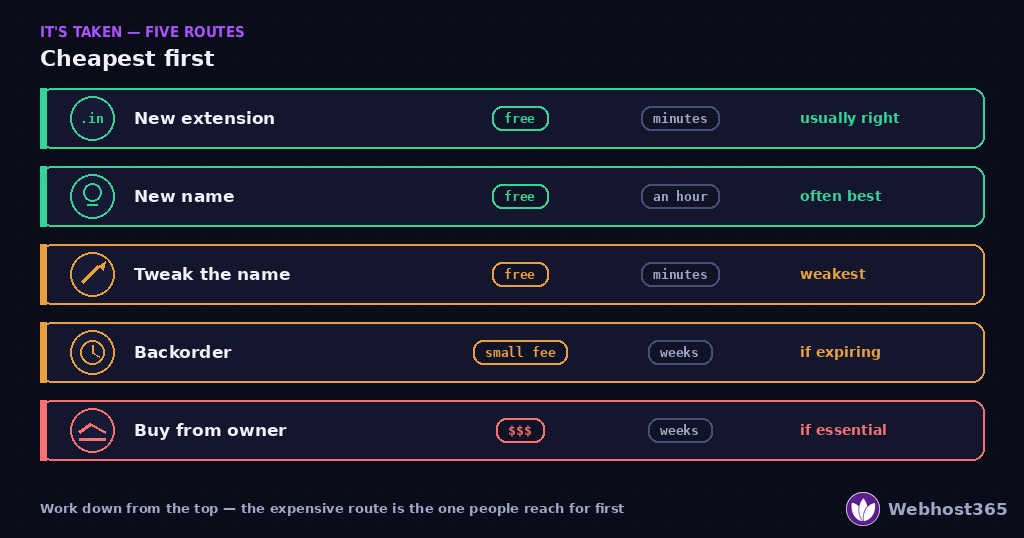
Five routes exist, and they differ enormously in cost, time, and certainty. Work down the table from the top, because the cheap options are also the ones people skip while reaching for the expensive one.
The decoder
| Option | What it costs | How long | Risk | When it is right |
|---|---|---|---|---|
| Change the name slightly | Registration price | Minutes | Weak names age badly | Rarely — see the warning below |
| Take a different extension | Registration price | Minutes | Low, if the extension fits | Most of the time |
| Backorder it | Small fee, plus registration | Weeks to months | You may lose the drop | Only when the current registration is near expiry |
| Buy it from the owner | Hundreds to five figures | Weeks | Overpaying; the owner may refuse | When the exact name is genuinely worth it |
| Choose a different name | Registration price | Hours of thinking | None | More often than anyone admits |
Why “change it slightly” is the weakest option
Adding a hyphen, a digit, or the word “the” gets you a registerable name in seconds. It also gets you a name that people mistype, mishear, and confuse with the site that owns the original.
Every time someone says your address aloud, they will have to explain the hyphen. Every time you print it, half the traffic goes to the other site. So treat this route as the last resort rather than the first, despite it being the easiest.
Why “different extension” is usually the right answer
A different extension keeps the name intact, which is the part that matters for memory and word of mouth. yourbusiness.in reads as cleanly as the .com, and it signals an Indian business at the same time.
The rule is to match the extension to the audience. Country extensions work well when you serve one country. Category extensions such as .shop or .io work when they match what you do. Anything obscure works against you, because visitors hesitate before typing something they have never seen.
One caution: check the renewal price before choosing an extension. Some are cheap for a year and several times that afterwards, which the pricing table on our domains page shows for every extension we sell.
Why “choose a different name” deserves more respect
No page that sells domains ever recommends this, which is exactly why it belongs here. A short, clear, available name usually beats a compromised version of your first idea, and it costs nothing but an afternoon.
If your first choice is taken and the alternatives feel awkward, the honest answer is often that the name was not distinctive enough. That is useful information, and it is cheaper to learn now than after printing business cards.
Buying a Domain Someone Already Owns
Sometimes the exact name genuinely matters — an established brand, a trademark you hold, or a term your customers already type. Then buying it becomes reasonable. Here is how that actually works.
Find out who owns it
Start with a WHOIS lookup. Since privacy rules tightened, most records hide the owner’s details behind a redacted contact or a privacy service, so expect not to see a name.
You still have routes. Many registrars provide a contact form that forwards to the owner without revealing their address. Some domains display a “for sale” landing page with a price or a form. And if the domain hosts a live business, its own contact page is the obvious channel.
Approach it carefully
Two rules protect you before you say anything about price.
Do not reveal urgency or identity. An owner who learns that a funded company needs this exact name will price accordingly. Ask what they would consider, rather than announcing what you would pay.
Do not make the first number a real one. Open low enough to leave room, and expect a counter. Names change hands across a wide range, and there is no published rate card — comparable sales are the only guide, and they vary enormously.
Pay safely
Never send money directly to a stranger for a domain. Use an escrow service that holds the funds until the transfer completes, which protects both sides and costs a small percentage.
For anything expensive, a broker earns their fee. They negotiate anonymously, know recent comparable prices, and handle escrow and transfer. For a modest purchase, escrow alone is enough.
Once the domain is yours, the move to your registrar follows the normal process in our domain transfer guide — including the 60-day lock that applies after a change of registrant, which catches people who buy a domain and immediately try to move it.
Backordering a Domain That May Drop
The last option applies only in a specific situation: the name is registered, but its registration is close to expiring and the owner may not renew.
When a backorder makes sense
Look at the expiry date in the WHOIS record. A domain expiring next month might drop; one just renewed for three years will not.
Then watch the status. As our domain expiration guide explains, an expired domain passes through a grace period and a 30-day redemption period before release. A status of pendingDelete means release is days away, and that is when a backorder has a real chance.
The honest odds
A backorder queues a registration attempt for the moment the name is released. It does not reserve anything.
For an ordinary name with no traffic, a single backorder usually succeeds. For a name with age, links, or search traffic, several drop-catching services will be competing for the same instant, and your odds fall sharply. Placing backorders with more than one service improves them, at the cost of more fees.
Also remember that most expired domains never drop at all. Owners renew late far more often than they abandon a name, so treat a backorder as a lottery ticket with reasonable odds rather than a plan.
Eight Checks Before You Register
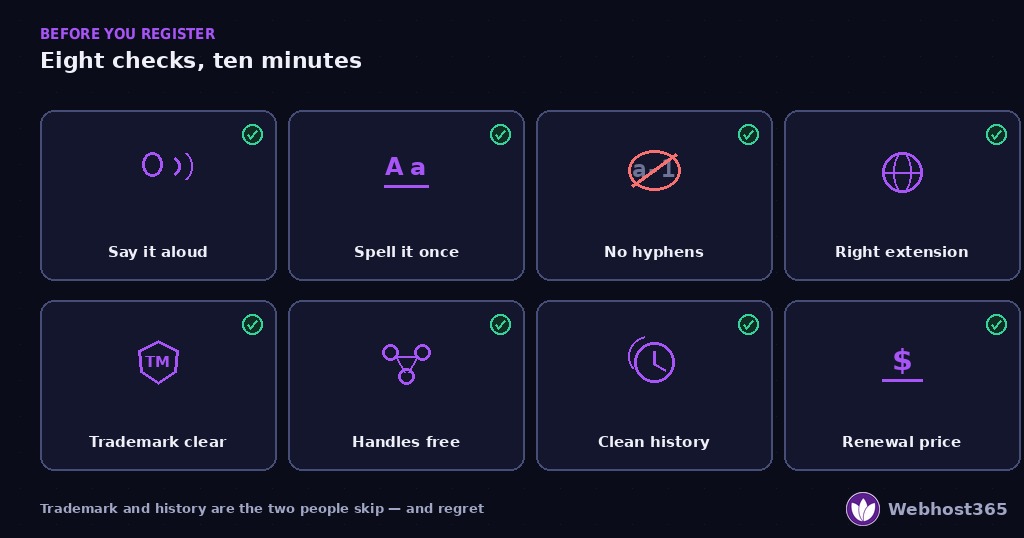
You found an available name you like. Spend ten more minutes on these eight checks, because every one of them is cheap now and expensive later.
The scorecard
1. Say it aloud. Read the name to someone over the phone. If they ask you to repeat it, or spell it, the name will cost you traffic every day for years.
2. Spell it once. Write it down as they hear it. Names with doubled letters, silent letters, or two plausible spellings send visitors to a competitor’s site by accident.
3. Avoid hyphens and digits. People forget hyphens and cannot tell “4” from “four” when spoken. If a name only works with one, the name is not working.
4. Match the extension to the audience. A .in signals a business serving India, which helps local trust. A .io reads as software. An extension nobody recognises makes people hesitate before typing.
5. Search the trademark register. Registering a domain gives you no rights over someone else’s trademark, and a dispute can take the name away regardless of who registered first. In the United States, search the USPTO’s free Trademark Search — note that the old TESS system was retired in 2023, so any guide pointing you there is out of date. Other countries maintain their own registers, and a free search is a starting point rather than legal clearance.
6. Check the social handles. If the matching username is taken everywhere, your brand is fragmented before you launch. Consistency across the domain and the main platforms is worth a small compromise on the name itself.
7. Check the domain’s history. An available name may have been registered before, and pasts travel. Search the name in Google, and look for the domain in the Internet Archive. A previous life as a spam site can mean lingering penalties and a poor reputation with email providers.
8. Read the renewal price, not the first-year price. Some extensions cost a few dollars to register and several times that to renew, every year, forever. We publish both numbers for every extension on our domains page, and the same pattern in hosting is covered in our article on renewal price hikes.
The one that catches people
Checks five and seven cause the most regret. A trademark conflict can cost you the name after you have built on it, and a domain with a spam history can quietly suppress your email deliverability for months while you wonder why nothing arrives.
Both take five minutes before registration. Neither is fixable afterwards without starting again.
One Timing Note for .com in 2026
A short, practical note if you are registering or renewing a .com this autumn.
Verisign, which operates the .com registry, announced in April that it will raise the annual registry-level wholesale fee for every new, renewed, and transferred .com domain from 1 November 2026. That fee moves from $10.26 to $10.97, roughly 7%, and it is the first increase since September 2024.
Registrars pay that fee and pass it through, so retail .com prices generally follow within a billing cycle. Two practical consequences, and neither is a reason to buy something you did not want.
If you were going to register or renew a .com anyway, before November is cheaper. The difference is under a dollar per domain per year, which matters little for one name and adds up across a portfolio.
Multi-year registration locks the current rate. Registering or renewing for several years now fixes the price for those years, which is worth considering for a domain you intend to keep regardless.
That is the whole point. A domain you actually want is worth registering whenever you decide; the date only affects what it costs.
After You Register
The name is yours. Five minutes of setup now prevents the two most common problems later.
Turn on auto-renew and check a card is saved. Auto-renew with no working payment method is just a setting. Expiry is the most common way a healthy site goes dark, and our domain expiration guide explains what recovery costs when it happens.
Use a registrant email you read daily. Renewal notices and transfer confirmations go there, not to your account login. A former employee’s address is how domains get lost.
Point it somewhere. Add the DNS records for your hosting, or park the name on a simple page until the site is ready — our free hosting plan covers a placeholder at no cost. The DNS records guide explains what each record does.
Consider the obvious variants. If the .com and the .in both matter to your customers, registering both and pointing them at the same site costs little and prevents someone else trading on your name.
For Indian businesses, the .in extension is often available where the .com is long gone — see our guide to .in domain registration for price, rules, and who can register one.
Final Thoughts
Checking availability takes seconds; choosing well takes an afternoon. Run a WHOIS lookup rather than trusting one registrar’s answer, and remember that “unavailable” can mean premium, reserved, or simply a quirk rather than taken.
When the name genuinely is taken, work the five options from the cheapest end. A different extension keeps the name intact and is usually right. Buying from an owner is legitimate but slow and expensive, and choosing a different name is more often the best decision than anyone selling domains will tell you.
Then run the eight checks before you pay. Say it aloud, check the trademark, check the history, and read the renewal price. Ten minutes there is worth more than any amount of searching afterwards — and when you are ready, our domain search shows availability and both prices side by side.
FAQ
Search the name at any registrar for an instant answer, or run a WHOIS or RDAP lookup for the authoritative one. If the lookup returns no record, nobody has registered the name. If it returns a record with a creation date and a registrar, the domain is taken, and the record also shows when it expires. A registrar search only covers the extensions that registrar sells, so a missing extension there does not mean the name is unavailable.
That is a premium domain. The registry has flagged the name as valuable and set a higher price than standard registration, sometimes hundreds or thousands. Nobody owns it, so you can register it, but check whether the premium applies to renewals as well as the first year. Many premium names carry the higher price every year, which changes the long-term cost considerably.
Yes, if the owner will sell. Start with a WHOIS lookup; most owner details are now hidden behind privacy services, but many registrars provide a contact form that forwards to the owner. Approach without revealing urgency or your identity, because both raise the price. Use an escrow service so funds are held until the transfer completes, and consider a broker for anything expensive.
Usually, yes. A different extension keeps the name itself intact, which is what people remember and repeat, while a hyphenated or misspelled .com costs you traffic permanently. Match the extension to your audience: a country extension such as .in works well for a business serving one country, and category extensions work when they describe what you do. Check the renewal price before committing, because some extensions cost far more after the first year.
Search the relevant trademark register before you register the domain. In the United States that is the USPTO’s free Trademark Search system, which replaced the retired TESS database in 2023. Other countries maintain their own registers. A free search is a starting point rather than legal clearance, because it will not show unregistered common-law marks or state registrations, so consult a professional for anything you plan to build a business on.
Only after checking its history. An expired domain can carry search penalties, a poor sending reputation with email providers, or links from spam sites, none of which are visible in a registrar search. Search the name in Google and look it up in the Internet Archive to see what it used to host. A clean history makes an expired domain a fine purchase; a spam history is a problem you inherit.