
Every audio file you send to a cloud transcription API is a recording of a human voice leaving your control. A client call, a team meeting, a doctor’s dictation, a voicemail — it travels to someone else’s servers, gets processed under someone else’s privacy policy, and lingers in someone else’s logs for a retention period you do not set. For a surprising amount of audio, that is a problem people only notice after the recording is already gone.
Self-hosted Whisper solves it at the root: the audio never leaves your machine. OpenAI’s Whisper is an open-source speech-to-text model, genuinely excellent, and you can run it on a server you control for nothing beyond the cost of the box. This guide shows how to do exactly that on a budget VPS — which implementation to choose, which model size fits modest hardware, the real performance you should expect on a CPU, and how to wrap it into a private transcription service. No GPU, no per-minute fee, no audio leaving your infrastructure.
Why Self-Host Whisper at All?
Three reasons, in the order most people come to care about them.
Privacy is the first and biggest. When transcription runs on your own server, the audio and the resulting text stay on infrastructure you administer. There is no third-party processor, no external retention window, and nothing to disclose in a vendor list. For anyone handling calls, interviews, or regulated material, that single property is often the whole decision.
Cost is the second. Cloud speech-to-text bills per minute of audio, which is fine for a handful of files and brutal for a backlog. Transcribing a few thousand hours of archived recordings through an API is a serious invoice; doing it on a VPS you already pay a flat monthly rate for is effectively free at the margin. This is the same economics we walked through for language models in our comparison of the OpenAI API versus self-hosted LLMs, and it applies just as cleanly to audio.
Control is the third. Your own instance has no rate limits, no per-request quotas, and no surprise deprecations. You batch ten thousand files overnight if you want to, and you keep the exact model version that works for you.
Honesty matters here too, so the counterpoint: if you transcribe only a few short clips a month, or you need the very largest model with no GPU and no patience, the cloud API is the pragmatic choice. Self-hosting wins on volume, privacy, and recurring use — not on one-off convenience.
Whisper vs faster-whisper: Pick the Right Implementation
Before installing anything, one decision shapes everything else. “Whisper” refers to the original model OpenAI released, and the reference implementation runs it directly in PyTorch. It works, but on a CPU it is slow and memory-hungry — exactly the wrong profile for a budget VPS.
The implementation that makes self-hosted Whisper genuinely practical without a GPU is faster-whisper, a reimplementation built on the CTranslate2 inference engine. It produces the same transcripts from the same models, but runs several times faster and uses substantially less RAM, largely because it supports int8 quantization on CPU. That combination is the difference between “transcription is viable on this $5 server” and “this server thrashes and gives up.” The project lives at the faster-whisper repository, and it is what we use for the rest of this guide.
Two other implementations deserve a one-line mention so you can recognize them: whisper.cpp targets extreme portability in C++, and WhisperX adds speaker diarization and word-level timestamps. Both are excellent for their niches, but faster-whisper is the right default for a general private transcription service, so that is where we stay.
Choosing a Model Size
Whisper ships in several sizes, and picking the right one is the most consequential choice you will make for performance on modest hardware. Larger models are more accurate but demand more memory and more time per minute of audio. Here is the practical tradeoff for a CPU-only budget VPS.
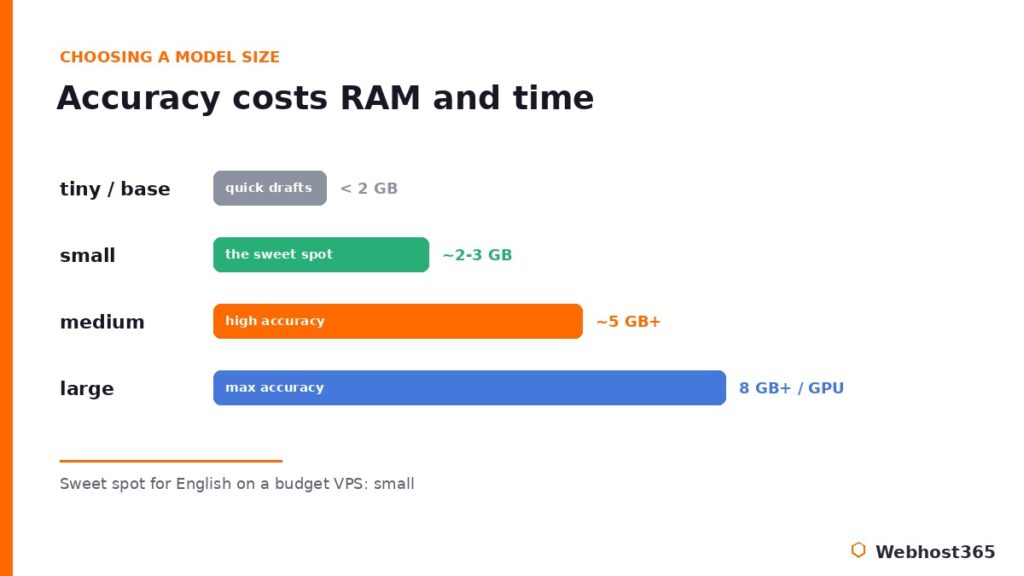
| Model | Approx. RAM | Best for |
|---|---|---|
| tiny / base | Under 1–2 GB | Quick drafts, clear English, low-resource boxes |
| small | ~2–3 GB | The sweet spot: solid accuracy, runs on a budget VPS |
| medium | ~5 GB+ | High accuracy when you have RAM and can wait |
| large | 8 GB+ (wants GPU) | Maximum accuracy, realistically a GPU workload |
The operator takeaway: for English transcription on a budget VPS, the small model is the sweet spot almost every time — clearly better than base, far lighter than medium, and comfortable within a couple of gigabytes of RAM. Reach for medium only when accuracy genuinely matters more than turnaround and you have the memory to spare. For sizing the box itself, the same hardware logic we laid out in our guide to the best VPS for Ollama applies directly: RAM headroom and fast NVMe storage matter more than raw core count for this kind of workload.
Step 1: Prepare the VPS
A clean Linux VPS needs three things before it can transcribe a single second of audio: Python, the faster-whisper package, and ffmpeg. That last one is the dependency everyone forgets, and its absence produces confusing errors later, so we install it first.
Start by updating the system and installing Python’s virtual environment tools and ffmpeg:
sudo apt update
sudo apt install -y python3-venv python3-pip ffmpeg
ffmpeg is what Whisper uses under the hood to decode audio formats, so without it even a perfect setup fails the moment you feed it an MP3. With it present, create an isolated environment for the project and install faster-whisper into it:
python3 -m venv ~/whisper-env
source ~/whisper-env/bin/activate
pip install faster-whisper
A virtual environment keeps these packages separate from the system Python, which means an upgrade or another project can never break your transcription setup. Activation is confirmed when your prompt shows the environment name.
One security note that is not optional. The moment this server accepts audio files from anywhere other than your own hands, it becomes a box that takes untrusted input from the internet, and it must be hardened accordingly. Before you expose any upload endpoint, walk through our guide on how to secure your Linux VPS: SSH keys, a default-deny firewall, and fail2ban are the baseline, and they take about thirty minutes. Transcribing private audio on an unhardened server defeats the entire privacy purpose of self-hosting it.
Step 2: Your First Transcription
With the environment ready, transcription is remarkably little code. Create a file called transcribe.py:
from faster_whisper import WhisperModel

model = WhisperModel("small", device="cpu", compute_type="int8")

segments, info = model.transcribe("meeting.mp3", beam_size=5)

print(f"Detected language: {info.language}")
for segment in segments:
    print(f"[{segment.start:.1f}s -> {segment.end:.1f}s] {segment.text}")
Three details in that short script carry all the weight. The model name “small” selects the sweet-spot size from the table above; change it to “base” or “medium” to move along the speed-accuracy curve. The device=”cpu” setting is what makes this work on a budget VPS with no graphics card. And compute_type=”int8″ is the quantization that keeps memory low and speed acceptable on a CPU, which is precisely the optimization faster-whisper exists to provide.
Run it inside your activated environment:
python transcribe.pyThe first run downloads the chosen model, so it pauses briefly; every run after that uses the cached copy. The output is your transcript, broken into timestamped segments, with the detected language reported up front. faster-whisper handles language detection automatically, so you can point it at audio in dozens of languages without changing a line.
That is genuinely the entire core of self-hosted Whisper. Everything that follows is about turning this script into a service you can actually use, and tuning it to run as efficiently as your hardware allows.
Step 3: Build a Real Transcription Service
A script you run by hand is useful; an endpoint other applications can call is powerful. Wrapping faster-whisper in a small FastAPI service turns your VPS into a private transcription API that any tool on your network can send audio to. Install the web pieces into the same environment:
pip install fastapi uvicorn python-multipartThen create app.py, loading the model once at startup so every request reuses it rather than paying the load cost each time:
from fastapi import FastAPI, UploadFile
from faster_whisper import WhisperModel
import tempfile, shutil

app = FastAPI()
model = WhisperModel("small", device="cpu", compute_type="int8")

@app.post("/transcribe")
async def transcribe(file: UploadFile):
    with tempfile.NamedTemporaryFile(suffix=".audio", delete=True) as tmp:
        shutil.copyfileobj(file.file, tmp)
        tmp.flush()
        segments, info = model.transcribe(tmp.name, beam_size=5)
        text = " ".join(seg.text.strip() for seg in segments)
    return {"language": info.language, "text": text}
Loading the model at module level, outside the request handler, is the single most important performance decision in this file. A small model takes a few seconds to load; doing that once at startup instead of on every request is the difference between a snappy service and an unusable one. Start it with uvicorn:
uvicorn app:app --host 127.0.0.1 --port 8000Notice the host: 127.0.0.1, not 0.0.0.0. The service binds to localhost only, which means nothing on the public internet can reach it directly. That is deliberate. To expose it safely over HTTPS, put it behind a reverse proxy that terminates TLS on port 443 and forwards to your local service, exactly as that explainer describes. Your audio travels encrypted, your application server stays private, and your firewall story stays simple.
Step 4: Wire Transcription Into an Automation
The real payoff arrives when transcription stops being something you trigger and becomes something that just happens. The pattern is straightforward: audio lands somewhere, a workflow catches it, your Whisper endpoint transcribes it, and the text flows wherever it is useful.
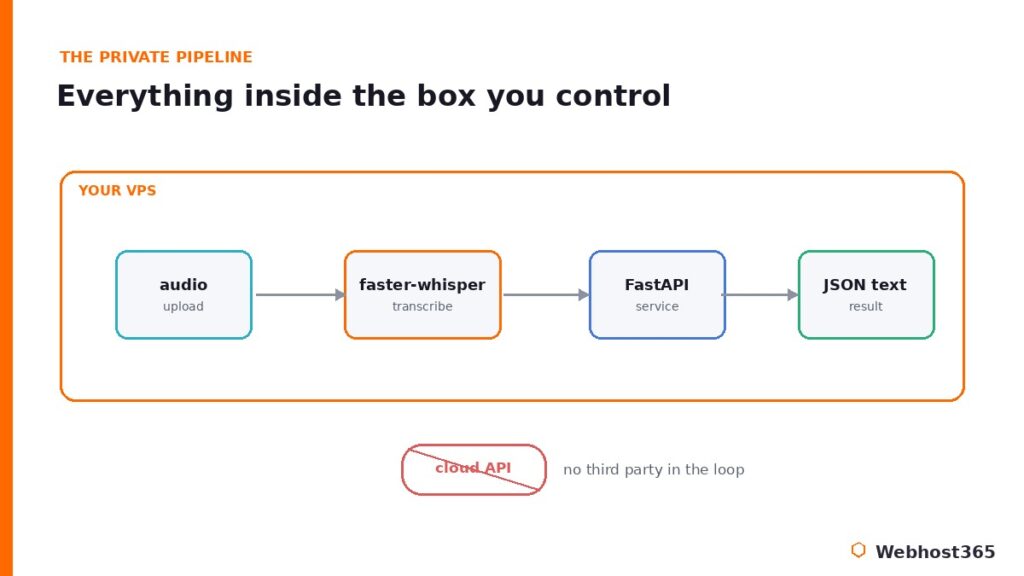
Concretely, a voicemail or an uploaded recording fires a webhook, an automation platform receives it, posts the file to your /transcribe endpoint, and drops the returned text into a document or a chat channel. We built exactly this style of event-driven pipeline in our collection of n8n workflow examples, and a transcription step slots into several of them naturally — support voicemails become searchable tickets, recorded interviews become draft notes, sales calls become CRM entries, all without a human pressing play.
There is a second, quieter payoff worth naming. Transcripts are text, and text is exactly what a retrieval system feeds on. Run your meeting recordings through Whisper and you have built a searchable, question-answerable archive of everything your team has discussed. Pipe those transcripts into the kind of system we built in our self-hosted RAG guide, and “what did we decide about pricing in March?” becomes a query your own infrastructure can answer, from audio that never once left your servers.
Performance Tuning and Honest Limits
A budget VPS will transcribe audio reliably, but it will not do it at the speed of a GPU, and pretending otherwise helps nobody. Here is how to get the most from CPU-only hardware, and where the honest ceiling sits.
The int8 quantization in your compute_type setting is already the biggest win, and it is on by default in every example above. Beyond that, three adjustments matter. Lowering beam_size from 5 to 1 speeds transcription noticeably at a small accuracy cost, which is often the right trade for clear audio. Enabling voice-activity-detection filtering skips silent stretches entirely, so a recording with long pauses transcribes far faster. And processing files sequentially rather than in parallel keeps memory predictable on a small box, since each concurrent transcription holds its own working set.
Now the honest limit. On a CPU, expect transcription to run somewhere around real-time or slower with the small model, and meaningfully slower than real-time with medium. A ten-minute clip might take several minutes; an hour-long recording is a background job, not an interactive one. For a private archive, overnight batch processing, or a steady trickle of files, that is perfectly fine. If you need near-instant transcription of long recordings at volume, that is the signal to add a GPU, where the same faster-whisper code runs an order of magnitude faster by switching device to “cuda”. The beauty of the setup is that nothing else changes: your service, your pipeline, and your privacy guarantees stay identical.
Conclusion: Your Audio, Your Server
Self-hosted Whisper turns a genuinely hard privacy problem into a solved one. Pick faster-whisper, choose the small model, run it on a budget VPS, and you have private speech-to-text at zero marginal cost: no audio leaving your infrastructure, no per-minute meter running, no third party in the loop. The reference script is a dozen lines, the service is a dozen more, and the only real constraint is patience on long files, which batch processing erases entirely.
The one thing the whole approach depends on is a server where you hold root and control the environment. Our Linux VPS 365 plans start at $4.99 per month with full root access, NVMe storage, and AMD EPYC processors, which is exactly the profile this workload wants: RAM headroom for the model and fast disk for the audio. Everything in this guide runs as written, your renewal price stays what you signed up at, and your recordings stay yours. Spin up a box, install faster-whisper, and transcribe your first file privately this afternoon.
FAQ: Self-Hosted Whisper
Yes. Using faster-whisper with int8 quantization, the tiny through medium models run comfortably on a CPU-only VPS. A GPU makes transcription dramatically faster and becomes worthwhile at high volume or for the large model, but it is not required for private, practical speech-to-text on a budget server.
For English on a budget VPS, the small model is the sweet spot: clearly more accurate than tiny or base, yet light enough to run in a couple of gigabytes of RAM. Step up to medium only when accuracy matters more than speed and you have the memory to spare; the large model realistically wants a GPU.
It can be identical. The OpenAI transcription API and self-hosted Whisper run the same underlying models, so a self-hosted large or medium model produces comparable accuracy. faster-whisper changes only the speed and memory profile, not the transcript quality, for a given model size.
Plan for roughly 2 to 3 GB of available RAM for the small model, and 5 GB or more for medium. Always leave headroom beyond the model itself for the operating system and your service, so a plan with a few gigabytes of memory handles the recommended small model comfortably.
Yes. Whisper is multilingual and detects the spoken language automatically, supporting dozens of languages out of the box. Accuracy is strongest for widely represented languages, and the larger models handle less common ones noticeably better than the tiny and base sizes.