
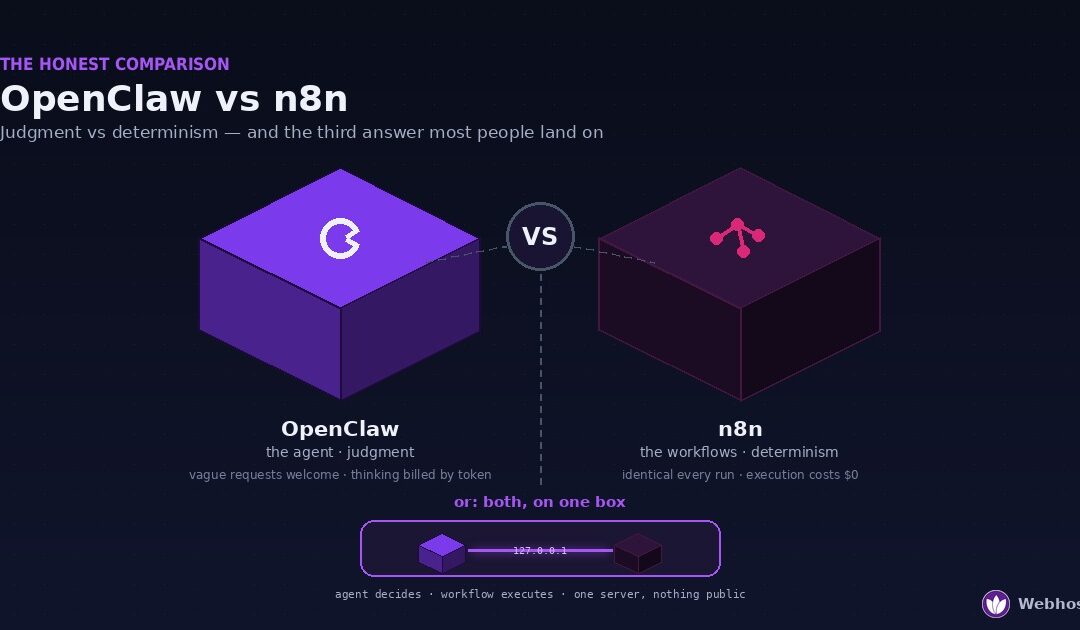
OpenClaw and n8n solve different problems, and neither replaces the other. OpenClaw is an AI agent: it reads context, makes judgment calls, and talks to you on the chat apps you already use. n8n is a workflow engine: it runs the same deterministic pipeline identically every time, without spending a single AI token. Pick OpenClaw when you want an assistant, n8n when you want pipelines — and for a growing number of setups, the honest answer is both, on one server.
That last option is the one most comparison articles never reach, because most comparison articles are written by people who’ve picked a side. We run both in production — OpenClaw and n8n are two of the managed products we host at Webhost365, and they run side by side on our own boxes — so this comparison has no side to pick. What it has instead is a decision tree: by the end, you’ll know which tool your actual use case needs, what each one genuinely costs to operate, where each one falls on its face, and when pairing them beats choosing between them.
Why Everyone Compares Them
The comparison happens for understandable reasons. Both are open source and self-hostable. Both exploded into the mainstream within the same twelve months — OpenClaw as the fastest-growing repository in GitHub’s history, n8n as the workflow tool that graduated from developer circles to everywhere. Both get filed under the same word, “automation.” And both promise the same seductive outcome: things happening on your behalf while you do something else.
So when someone decides this is the year their digital life runs itself, they search, find both names in every thread, and arrive at the reasonable question this article answers: which one do I actually need?
The confusion is compounded by a real overlap zone. Both tools can run something on a schedule. Both can react to an incoming event. Both can glue services together — read from here, transform, write to there. Both can send you a message when something happens. If your entire wishlist lives inside that overlap, then genuinely, either tool could carry it, and the comparison feels like a coin flip.
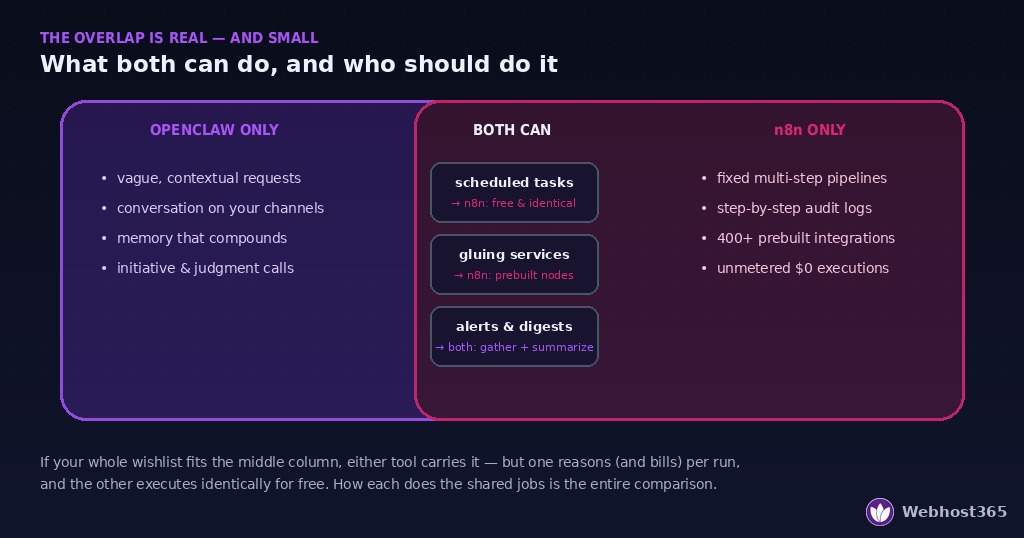
But the overlap is the smallest part of both tools, and the coin flip dissolves the moment you look at how each one does those shared jobs. One of them reasons its way through the task, differently each time, billing tokens for the thinking. The other executes a fixed graph, identically, for free. That single difference — judgment versus determinism — is the entire comparison, and every row of the table later in this article is that difference wearing a different costume.
Concretely, this guide is written for three people. The person who’s heard of both and wants the short honest answer before investing a weekend. The person already running one and wondering whether the other adds anything or just adds a server bill. And the person mid-build who keeps hitting the same wall — an agent that won’t do the same thing twice, or a workflow that can’t cope with a vague instruction — without realizing the wall has a name, and the name is “you’re using the wrong tool for this half of the job.”
By the next section you’ll know which of those walls is which. Let’s take the two tools one at a time, on their own terms, before putting them in the same ring.
What OpenClaw Is Built For
OpenClaw is a personal AI agent that lives on your server and reaches you through the channels you already use — WhatsApp, Telegram, Discord, Slack, and more. You message it like a person; it responds like an assistant with hands: it reads and writes files, runs commands, browses the web, remembers what you’ve told it, and acts on schedules. The official docs cover the full surface, but the essence fits in one sentence: OpenClaw is built for the requests you can’t write a flowchart for.
That’s the defining property. You don’t configure OpenClaw with steps; you tell it what you want, in ordinary language, with all the vagueness ordinary language carries. “Go through my inbox and tell me what actually needs me today.” “Find a decent hotel near the venue, nothing over 150.” “Keep an eye on that thread and summarize it tonight.” Each of those requests requires judgment — reading context, weighing options, deciding what “decent” and “actually needs me” mean — and judgment is precisely what an LLM-powered agent supplies. Ask it the same thing on two different days and you may get two differently-worded, differently-reasoned answers, both fine. That’s not a flaw; that’s the product.
Three properties follow from the judgment engine, and each one matters for the comparison.
It’s conversational and stateful. The agent holds memory across sessions — your preferences, your projects, what you told it last Tuesday — so it improves with tenure. It’s the only tool in this comparison you develop a working relationship with.
It’s channel-native. There’s no dashboard you have to remember to visit. The agent is a contact in the messaging app you already check fifty times a day, which is most of why agents get used while dashboards get abandoned.
Its thinking is metered. Every request runs through an AI model, and models bill per token — the full cost math is its own article, but the short version is that a sensibly configured agent runs a few dollars a month, and the bill scales with how much thinking you ask for. The judgment is the value, and the judgment is also the meter.
Where does it run? Any always-on Linux box: 4 GB of RAM is the comfortable spec for a daily agent. You can install and harden it yourself, take a managed plan where that’s done for you, or try it free before deciding it deserves a server at all.
If you read this section nodding — yes, an assistant, that’s the thing I want — hold that thought through the next one, because the strongest OpenClaw setups still end up wanting what n8n has.
What n8n Is Built For
n8n is a workflow automation engine. You build automations visually — nodes on a canvas, connected into a graph: a trigger starts it, data flows through transformations and branches, actions fire at the end. Once built, that workflow executes the same way every time it runs: same steps, same order, same logic, at 3 a.m. on a Tuesday or the four-hundredth run in a row. The n8n docs cover a system that has grown enormous, but its essence also fits in one sentence: n8n is built for the tasks you never want done differently.
Where OpenClaw’s superpower is coping with vagueness, n8n’s is refusing it. A workflow has no opinions and takes no liberties. “Every Monday at 8, pull last week’s orders, compute the totals, write them to the sheet, email the summary to these three addresses” — that sentence is a flowchart, and n8n is the tool that runs flowcharts. The invoice pipeline, the backup check, the lead-capture flow, the price monitor: tasks whose entire value lies in being boring, repeatable, and exactly correct.
Three properties define it, mirroring the agent’s three.
It’s deterministic and auditable. Every execution is logged step by step — what came in, what each node did, what went out. When something fails, you can see precisely where. There is no “the model interpreted it differently today.” For anything touching money, customer data, or commitments, this property is not a preference; it’s a requirement.
It’s integration-rich. Hundreds of prebuilt nodes for the services people actually use — Gmail, Sheets, Stripe, Telegram, databases, webhooks — plus HTTP and code nodes for everything else. The connective breadth is the moat: if two services need to talk on a schedule, n8n almost certainly already speaks both languages.
Its execution is free. This is the economic mirror image of the agent. A workflow run costs no tokens — no model is consulted, nothing is metered. Whether it runs ten times a month or ten thousand, the marginal cost is zero; you pay only for the server underneath. Heavy, high-frequency automation is where this property compounds into real money saved.
Where does it run? Lighter than the agent: n8n idles at a few hundred megabytes, making it an easy roommate on a modest box. It’s a managed product here with a genuine free tier to build on, and if you want to see it doing real AI-adjacent work, our n8n and Ollama workflow guide walks a full local build.
The limitation is the same coin, flipped: n8n cannot cope with a request it wasn’t built for. Hand it something vague and it has no judgment to fill the gap. Which is exactly the wall from Section 1 — and exactly the shape of the tool from Section 2. Time to put them side by side.
Head-to-Head: The Honest Table
Everything the last two sections argued, compressed into one reference. Read it as a compatibility chart, not a scoreboard — there’s deliberately no winner column, because every row where one tool shines is a row where you’d regret forcing the other.
| Dimension | OpenClaw | n8n |
|---|---|---|
| What it fundamentally is | An AI agent — a judgment engine you talk to | A workflow engine — a determinism machine you configure |
| How you instruct it | Natural language, vagueness allowed | Visual node graph, every step explicit |
| Same input, run twice | May reason and phrase differently each time | Identical execution, every time |
| How it starts work | You message it; it also acts on schedules and its own initiative | Triggers: schedules, webhooks, app events — never initiative |
| Cost of one run | Tokens — real money per thought, scaling with context | $0 — no model consulted, unmetered at any volume |
| Where you meet it | Inside WhatsApp, Telegram, Discord — a contact, not a dashboard | A browser canvas and execution logs — a tool, not a presence |
| Memory | Persistent — remembers you, improves with tenure | Stateless between runs (only the data you explicitly store) |
| When it fails | Ambiguously — a wrong judgment can look like a right one | Loudly — a red node, a logged step, an exact location |
| Auditability | Conversational history; reasoning partly opaque | Step-by-step execution log; fully inspectable |
| Handles vague requests | Its entire purpose | Cannot — undefined input is a broken workflow |
| Handles repetitive pipelines | Can, but re-reasons (and re-bills) every run | Its entire purpose |
| Security surface | Prompt injection via content it reads; mitigated by key scoping | Credential store + the exposed-webhook pattern; mitigated by loopback binding |
| Server appetite | 4 GB comfortable; more for browser automation | Light — happy in ~1 GB alongside other services |
| Typical monthly cost | Hosting from $0 + tokens from ~$1 (full math) | Hosting from $0 — free tier or a few dollars managed; execution free |
Four rows deserve a sentence beyond the table.
The cost rows are the ones people underestimate. An agent re-deriving the same weekly report costs tokens every single Monday, forever; a workflow doing it costs nothing after the hour you spent building it. Run the comparison at real volume and the gap compounds — it’s the single strongest argument for n8n existing in an agent owner’s life, and we quantified it in the running-cost guide.
The failure rows are the ones businesses should read twice. “May reason differently each time” is delightful in a research assistant and disqualifying in an invoicing pipeline. If a task’s output goes to a customer, a ledger, or a regulator, determinism isn’t a preference — pick the tool that cannot improvise.
The memory row cuts the other way. n8n will run your pipeline perfectly for a decade and never once know who you are. The accumulating, compounding usefulness of a tool that remembers context is something no workflow graph delivers, and it’s why agents get described in relationship words while workflow tools get described in infrastructure words.
And the security rows are different in kind, not degree. Each tool’s characteristic risk has a characteristic fix — scoped keys for the agent, loopback binding for the engine — and notably, both fixes live in the same architecture, which is a hint about where this article ends up. But first: the decision tree.
The Decision Tree
The table tells you what each tool is; this section tells you which one you need. Four questions, honestly answered, settle nearly every case. (The diagram below renders the same tree visually.)
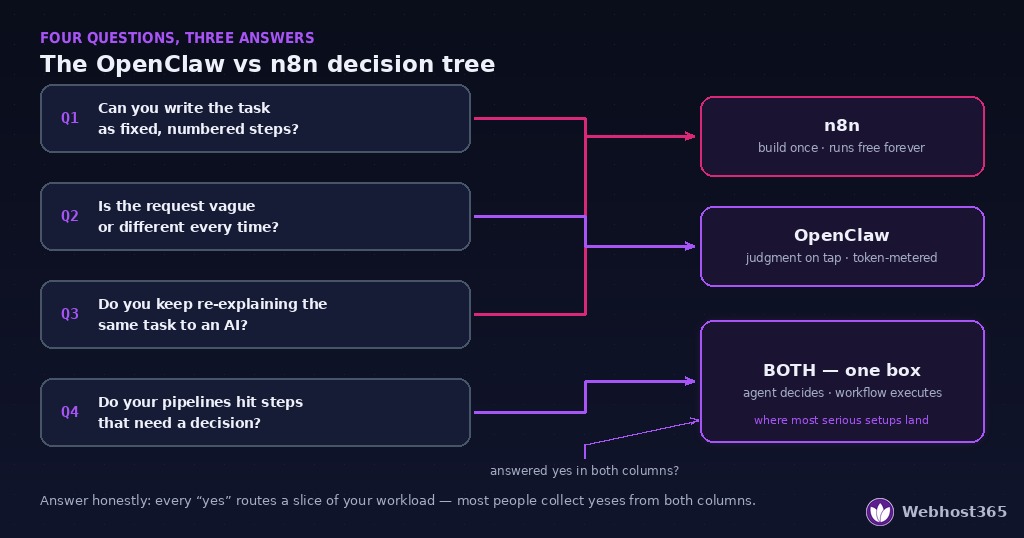
Question 1: Can you write your task down as numbered steps that never change? If yes — same steps, same order, every time — you have a workflow, and the answer is n8n. Building it takes an hour once; running it costs nothing forever. Putting an AI agent on a task like this means paying tokens, every run, for judgment the task doesn’t contain.
Question 2: Is the request vague, contextual, or different every time? “Deal with my inbox.” “Find me something decent.” “What should I focus on today?” If defining the steps precisely is the hard part, you need judgment, and the answer is OpenClaw. No amount of workflow nodes reconstructs the ability to understand what you meant.
Question 3: Do you keep re-explaining the same multi-step task to an AI tool? This is the tell most people miss. If you’re on your fourth conversation walking an assistant through the identical procedure, that task has quietly revealed itself as a workflow wearing a conversation costume — the answer is n8n for the task, whatever else you run. Every re-explanation is tokens spent re-deriving a flowchart that never changes.
Question 4: Do your pipelines keep hitting a step that needs a decision? The mirror image: your workflow runs perfectly until the point where something must be read and judged — is this email a lead or spam, does this alert matter, which category does this belong in — and there’s no node for “understand it.” That’s a judgment step inside a deterministic pipeline, and the answer is both: the workflow carries the pipeline, the agent supplies the verdict at the seam.
Score yourself honestly and most people land in one of three places. Only questions 1 and 3 fired: you’re an n8n user — start on the free tier and you may never need more. Only question 2: you’re an OpenClaw user — same deal, free first. Questions from both columns, or question 4 at all: you’re the person the last section of this article was written for, and you’re the majority of people who use either tool seriously for more than a month.
Where Each One Struggles
No honest comparison skips this section. Both tools have real failure modes, and knowing them in advance is the difference between choosing a tool and discovering one.
Where OpenClaw struggles. The judgment engine’s costs are exactly its virtues, inverted. It’s non-deterministic — the same request can produce different reasoning on different days, which is charming in research and unacceptable in anything customer-facing or ledger-touching. Its costs drift — memory and context grow with use, so the same usage quietly bills more in month three than in week one, a pattern we dissected in the cost guide. It carries a prompt-injection surface — an agent that reads emails and web pages can be addressed by their authors, which is why our pairing guide is largely about making sure a manipulated agent holds nothing worth stealing. And it’s overkill for fixed pipelines — an agent doing a workflow’s job is a lawyer doing data entry: capable, expensive, and occasionally creative in ways nobody asked for.
Where n8n struggles. The determinism machine fails at everything that isn’t determined. It has no judgment — a step it wasn’t built for is a step it cannot take, and vague input doesn’t degrade gracefully, it breaks. It’s brittle with unstructured reality — the email that doesn’t match the expected format, the page whose layout changed, the edge case nobody drew a branch for. Its learning curve is front-loaded — the first workflow takes an evening of thinking in nodes, expressions, and data shapes, where an agent’s first task takes one sentence. And its ecosystem carries an exposure habit: the standard tutorial pattern puts n8n on a public subdomain behind basic auth, parking your credential store on the open internet — avoidable entirely, but only if you follow the localhost-bound setup rather than the defaults most guides teach.
Notice the symmetry. Each tool’s weakness is the other’s core strength: the agent’s non-determinism is solved by the workflow engine; the workflow’s blindness to nuance is solved by the agent. Weaknesses that interlock this cleanly aren’t an argument for choosing carefully. They’re an argument for the section you probably saw coming.
The Third Answer: Both on One Box
If the decision tree sent you here, you’ve already discovered what most serious users of either tool discover within a month: the interesting tasks have both kinds of work inside them. A judgment at the top of a pipeline, or a pipeline hanging off a judgment. Choosing one tool means doing the other half of the job badly — the agent expensively improvising a fixed procedure, or the workflow standing helpless before a decision.
The pairing dissolves the dilemma, and it has a clean division of labor: the agent decides, the workflow executes. You tell OpenClaw “run the weekly report,” and n8n does the deterministic part identically every time. n8n’s morning schedule gathers the overnight raw material, and the agent turns forty rows of data into three sentences you actually read. An inbound event hits a workflow, the agent supplies the one verdict the pipeline needed — lead, support, or noise — and fixed branches carry it from there.
Three things about this arrangement are better than either tool alone, and each one closes a gap from the struggles section.
It’s cheaper. Every task frozen into a workflow leaves the token meter permanently. The agent’s role shrinks to pulling triggers — a few hundred tokens instead of a few thousand — while the workflow itself executes for free. In the running-cost math, offloading deterministic work to n8n is the optimization lever most people never pull, and it’s the biggest one after model choice.
It’s safer. The pairing enables a credential split neither tool gets alone: n8n’s encrypted store holds the real keys — email, sheets, payments — chained to fixed, reviewable workflows, while the agent holds only its model key and a loopback URL. A manipulated agent can trigger your predefined workflows and nothing else; the blast radius collapses to a list you wrote yourself.
And it fits on one server. The two have complementary appetites — the agent bursty, the engine light and scheduled — so a single 4 GB box carries both, with the conversation between them happening entirely on the loopback interface: no public webhooks, no exposed dashboard, nothing on the internet but SSH. The complete architecture, commands included, is our OpenClaw and n8n one-server guide — and both halves have free tiers to rehearse on before you commit to the shared box.
The “vs” in this article’s title, it turns out, was the wrong preposition all along. The right one is “and.”
Final Thoughts
The one-breath answer: choose OpenClaw if you want an assistant — judgment, conversation, memory, vague requests welcome, thinking billed by the token. Choose n8n if you want pipelines — determinism, schedules, integrations, execution free forever. If you can write the task as numbered steps, it’s a workflow; if defining the steps is the hard part, it’s a judgment; and if your real workload contains both — which, after a month of serious use, it almost certainly does — stop choosing and start pairing: agent decides, workflow executes, one box, nothing public.
Whichever door you walk through first, walk through it free: a free OpenClaw instance or a free n8n tier will teach you more about your own answer in a weekend than any comparison article can — this one included.
FAQ
No. OpenClaw is an AI agent built for judgment — understanding context, handling vague requests, conversing on your chat apps — while n8n is a workflow engine built for determinism, running fixed pipelines identically every time at zero token cost. An agent can technically perform workflow-shaped tasks, but it re-reasons and re-bills every run. They replace different kinds of manual work, which is why serious setups increasingly run both.
Only inside a narrow overlap. n8n can call AI models within a workflow, so a specific, pre-designed AI step is achievable. What it cannot do is be an agent: hold memory across sessions, converse naturally on your channels, handle requests it wasn’t explicitly built for, or act with initiative. If the value you’re after is “an assistant that understands me,” a workflow graph doesn’t reconstruct that regardless of how many AI nodes it contains.
n8n, and it isn’t close on a per-task basis. Workflow executions consume no AI tokens, so n8n’s operating cost is just its hosting — from $0 on a free tier. OpenClaw’s hosting is similarly cheap, but every task runs through a model billed per token, typically a few dollars monthly for personal use. The practical takeaway: run judgment tasks on the agent and everything repetitive on workflows, which keeps the metered tool doing only the work that deserves metering.
Different kinds of easy. OpenClaw’s first task takes one sentence in a chat app — the learning curve is in operating it well over time. n8n’s first workflow takes an evening of learning nodes, triggers, and data shapes — but once built, it needs nothing further from you. If “easy” means starting fast, the agent wins; if it means finished and forgotten, the workflow does.
Yes — it’s the strongest configuration of either tool. The agent triggers workflows over the loopback interface on a shared server, workflows hand results back for summarizing or decisions, and the credential split keeps real keys inside n8n’s store rather than in the persuadable agent’s hands. The pairing runs comfortably on a single 4 GB VPS with nothing exposed to the internet except SSH.
Not to start, in either case. OpenClaw is operated in plain language, with a one-command installer; n8n is visual, and its prebuilt nodes cover most common services without code. Comfort with a Linux terminal helps for self-hosting either one securely — and if that’s the part you’d rather skip, managed hosting exists for exactly that reason.