
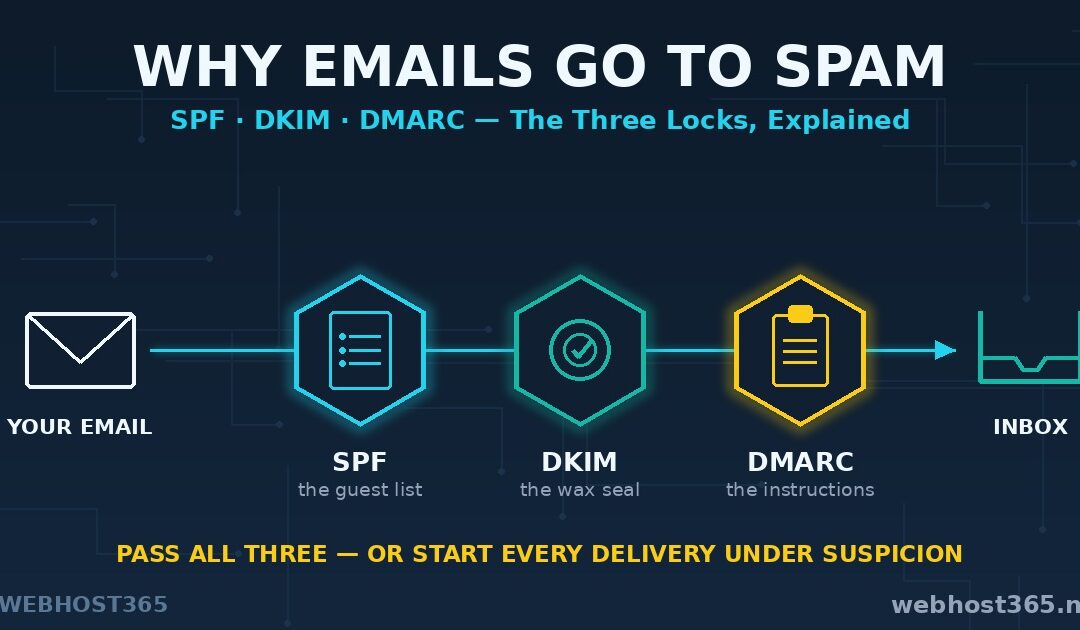
Your emails go to spam when the receiving server cannot prove the sender is really you — and SPF, DKIM, and DMARC are the three DNS records that provide that proof. They are not optional extras for big companies. Since Gmail and Yahoo began enforcing authentication for bulk senders, unauthenticated mail has moved from “suspicious” to increasingly rejected outright, and every mailbox provider has tightened in the same direction. If your messages from a domain you own keep landing in spam folders, these three records are the first place to look and usually the place the problem ends.
The good news: none of this requires cryptography knowledge or a developer. Each record has a simple job that can be explained in plain English, and this guide does exactly that — what each one proves, how the three cooperate on every email you send, how to check what your domain has right now, and how to set them up safely without breaking your own mail in the process.
Why Good Emails Go to Spam
To understand the fix, look at the problem from the receiving server’s chair. Every minute, it accepts mail from strangers, and the email protocol itself proves nothing about them. SMTP was designed in a more trusting era: anyone can connect to a mail server and write any address they like in the From line. Nothing in the protocol stops a stranger from sending mail that claims to be from your domain. That is not a rare exploit — it is the default state of email, and spammers have abused it for decades.
So receiving servers score every inbound message on three things. Authentication: can the sender prove the mail genuinely comes from the domain it claims? Reputation: what is the track record of the sending server and domain? Content: does the message itself look like spam? Reputation and content matter, but authentication is the foundation the other two stand on — a receiver cannot even build reputation for your domain if it cannot verify which mail is genuinely yours.
That verification is exactly what SPF, DKIM, and DMARC supply, each answering a question the protocol left open. Where your mail service lives matters here too — we covered that side in our email hosting vs web hosting comparison — but no mail service can save a domain whose DNS provides no proof of identity. The three records below are that proof.
SPF: The Guest List
SPF, the Sender Policy Framework, is a public list of servers allowed to send mail for your domain. You publish it as a DNS TXT record. When your message arrives somewhere, the receiving server looks at which machine actually delivered it, fetches your list, and checks whether that machine is on it. On the list: SPF passes. Not on the list: SPF fails, and the message starts its life under suspicion.
A real record is one line:
v=spf1 a mx include:_spf.example.com ~allReading left to right: v=spf1 declares the record type. a allows the server at your domain’s own IP address. mx allows your mail servers. include: pulls in another provider’s list — this is how you authorise your host or a service like a newsletter platform. And the ending qualifier sets the policy for everyone else: ~all means “treat unlisted senders with suspicion” (softfail), while -all means “refuse them outright”. The one ending you must never use is +all, which authorises the entire internet to send as you and makes the whole record worse than useless.
Two rules break more SPF setups than everything else combined. First, a domain may have exactly one SPF record — publish two and receivers return a permanent error, which scores worse than having none. Add new senders inside the existing record, never as a second one. Second, evaluating the record may trigger at most ten DNS lookups. Every include costs at least one, and includes can contain includes; a record bloated with old services silently dies at lookup eleven.
SPF has one honest limitation worth knowing: it validates the invisible envelope sender and the delivering server, so it breaks when mail is forwarded — the forwarding server is not on your list. That gap is precisely why the second record exists.
DKIM: The Wax Seal
DKIM, DomainKeys Identified Mail, puts a cryptographic signature on every message your server sends — a wax seal that travels with the letter. Your mail server signs each outgoing message using a private key only it holds. The matching public key sits in your DNS for anyone to fetch. The receiving server fetches it, checks the signature, and learns two things at once: the message really was sent by a server holding your domain’s key, and not one character of the signed content has been altered in transit.
The DNS side explains the odd-looking record name. DKIM keys live at selector._domainkey.yourdomain.com, where the selector is just a label — default, mail, s1 — chosen by whoever set up the signing. Selectors let one domain hold several keys at once, which is how your hosting server and your newsletter service can each sign with their own key without conflict.
DKIM’s superpower is the one SPF lacks: the seal survives forwarding. However many servers a message passes through, the signature still verifies, because it depends on the message content and key rather than on which machine made the final delivery.
But note carefully what a DKIM pass proves: the mail was validly signed by the domain in the signature. Nothing forces that domain to match the From address a human reads. A spammer can sign their mail perfectly with their own domain’s key while the From line claims to be your bank. Both SPF and DKIM share this blind spot — each proves something real, but neither one connects that proof to the address shown to the reader. Closing that gap is the entire job of the third record.
DMARC: The Instructions
DMARC, Domain-based Message Authentication, Reporting and Conformance, is the policy layer on top of the other two. It does two things SPF and DKIM cannot do alone: it demands alignment, and it tells receivers what to do about failures.
The record lives at _dmarc.yourdomain.com and a sensible starting version is one line:
v=DMARC1; p=none; rua=mailto:dmarc-reports@yourdomain.comThe p= tag is the instruction — your published request for how receivers should treat mail that claims to be you but fails authentication. p=none means “deliver it anyway, but send me reports”. p=quarantine means “put it in spam”. p=reject means “refuse it at the door”. The rua= tag is where aggregate reports go: receiving providers periodically send summaries of every server seen sending as your domain and how its authentication fared. Those reports are how you discover senders you forgot about before tightening the policy — much more on that in the rollout section.
Alignment: the check that makes the other two honest
Alignment is the concept most guides fumble, and it is the actual heart of DMARC. To pass DMARC, it is not enough for SPF or DKIM to pass somewhere — at least one of them must pass for the same domain the reader sees in the From line.
Watch it defeat a real spoof. A scammer sends mail with From: support@yourbank.com, delivered through their own server and DKIM-signed with their own domain, crook-mail.com. SPF? Passes — for crook-mail.com. DKIM? Valid — for crook-mail.com. Under SPF and DKIM alone, this message authenticates beautifully. DMARC asks the one question that matters: did anything pass for yourbank.com, the domain in the From line? Nothing did. Alignment fails, yourbank.com’s published policy says reject, and the message dies at the door without a human ever seeing it.
That is the complete trio. SPF lists who may send. DKIM seals what was sent. DMARC binds both proofs to the address people actually see, and issues the instructions for failures. Next, we follow one email through all three checks at once.
How SPF, DKIM, and DMARC Work Together
Follow one message and the division of labour becomes obvious. You write an email and hit send. Your mail server delivers it and adds a DKIM signature on the way out. The receiving server accepts the connection and starts asking questions before anything reaches an inbox.
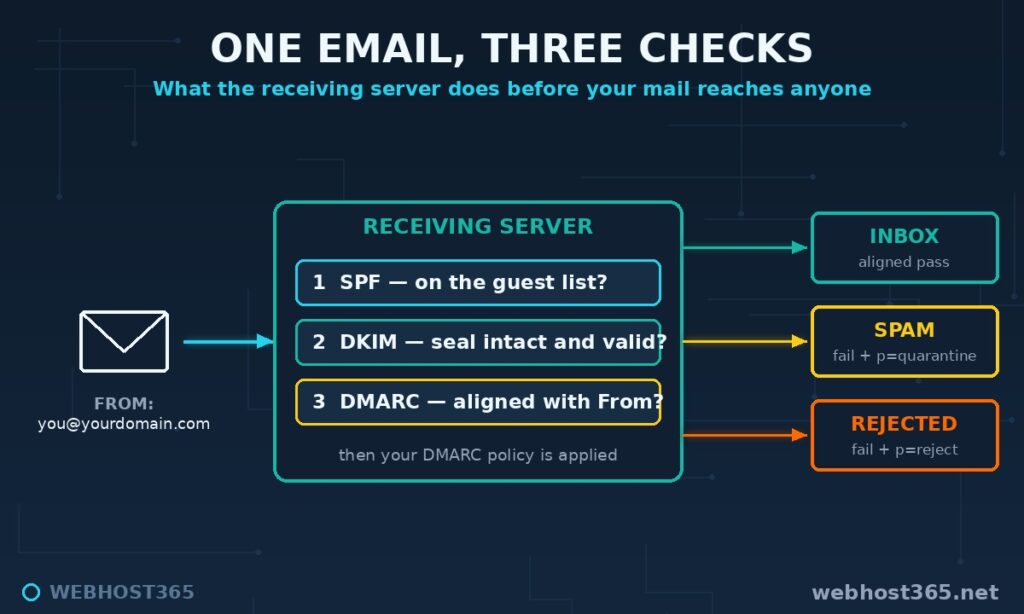
First question: is the delivering server on the sender’s guest list? It fetches your SPF record and checks the connecting machine against it. Second: does the seal verify? It reads the DKIM signature, fetches the public key from your DNS, and confirms the message is intact and validly signed. Third, the DMARC question: did either of those checks pass for the domain shown in the From line? Then it fetches your DMARC record and applies your instructions. Aligned pass — inbox, with your domain’s reputation accruing properly. Failure with p=quarantine — spam folder. Failure with p=reject — the message is refused and never exists for the reader at all.
| Record | What it proves | Where it lives | When it fails |
|---|---|---|---|
| SPF | The delivering server is authorised | TXT at yourdomain.com | Message treated with suspicion |
| DKIM | The message is signed and unaltered | TXT at selector._domainkey | Signature ignored, no proof |
| DMARC | Proof matches the visible From + your policy | TXT at _dmarc | Your instructions applied: none, spam, or reject |
Notice the asymmetry that confuses people: SPF and DKIM are evidence, DMARC is the verdict. A message can fail SPF and still pass DMARC, because a valid aligned DKIM signature is sufficient — this is exactly what happens to legitimately forwarded mail, and it is why the system works. The reverse is also true: SPF and DKIM can both technically pass while DMARC fails, when neither passing domain matches the From line. If you remember one sentence from this article, make it this one: receivers do not care what passed — they care what passed for the domain the reader sees.
The Gmail and Yahoo Rules Changed the Game
For years, these records were best practice — recommended, rewarded, but optional. That era ended in February 2024, when Google and Yahoo switched from recommending authentication to requiring it, and the rest of the industry has been tightening ever since. Microsoft followed with equivalent requirements for Outlook senders in 2025. The full current rules live in Google’s official Email sender guidelines, and they are worth reading once, but the shape is simple.
Bulk senders — domains sending 5,000 or more messages a day to Gmail — must have all of it: SPF and DKIM both passing, a DMARC record published (at minimum p=none), the From domain aligned with the authentication, one-click unsubscribe on marketing mail, and a spam-complaint rate kept below thresholds. Fall short and mail is increasingly rejected at the door rather than filtered.
The mistake is reading “5,000 a day” and relaxing. Every sender, at any volume, is now required to authenticate with at least SPF or DKIM and maintain valid reverse DNS — and in practice, small senders without the full trio simply lose the scoring contest. Your invoice from a properly authenticated domain competes against billions of authenticated messages; the unauthenticated one starts every delivery at a disadvantage that no amount of polite subject lines repairs. The requirements have only moved in one direction since 2024, and building to the bulk-sender standard today is the cheap option compared to firefighting deliverability later.
The practical takeaway is blunt: the trio is now table stakes for anyone who sends email from their own domain — a five-person shop sending quotes and invoices included. Which raises the immediate question: what does your domain have right now?
How to Check Your SPF, DKIM, and DMARC Records
Three checks, two minutes, no tools you do not already have.
From any terminal — macOS, Linux, or a server — dig answers everything. Check SPF:
dig +short TXT yourdomain.comLook for the line starting v=spf1 in the output. No such line means no SPF; two such lines mean a broken setup (remember: exactly one allowed). Check DMARC:
dig +short TXT _dmarc.yourdomain.comA line starting v=DMARC1 is your policy; empty output means you have none. DKIM needs the selector in the query, which you get from your provider or from a received message’s headers:
dig +short TXT default._domainkey.yourdomain.comReplace default with your actual selector — a long string containing p= is your public key. On Windows, nslookup -type=TXT yourdomain.com does the same job for each of the three names.
The second check is better, because it shows you the verdict rather than the configuration. Send a message from your domain to any Gmail address you control, open it, choose Show original from the message menu, and Gmail displays a summary table at the top: SPF, DKIM, and DMARC, each with PASS or FAIL and the domain each verdict applies to. This is the receiving server’s actual judgement of your mail — the ground truth, straight from the system that decides your inbox placement. The full Authentication-Results header below the summary tells the same story in detail, and learning to skim it pays off the first time a customer says your invoice went to junk.
If all three show PASS with your domain next to them, your authentication is healthy and your spam problems, if any, live in reputation or content — covered near the end of this guide. Anything missing or failing, and the next two sections are the fix: first the setup, then the safe path to a strict policy.
Setting Up SPF, DKIM, and DMARC on Webhost365 Hosting
If your domain is hosted with us, this section is short, because the work is already done. When a domain is set up on our DirectAdmin-based hosting, the platform creates the full authentication trio automatically — the SPF record authorising our mail servers, DKIM signing with the key published in your DNS, and a DMARC record to complete the set. Create your email account, start sending, and your mail leaves the server authenticated from the first message. There is no toggle to find and no record to write.
Trust, then verify. Run the checks from the previous section against your own domain — the dig commands, or simply mail yourself at Gmail and read the verdict in Show original. You should see all three present and passing, which also gives you a baseline reading you will want later. The records live in DirectAdmin’s DNS Management section, where you can view and edit them like any other DNS entry.
Two situations still need your hand on the wheel. First, third-party senders: the moment a newsletter platform, CRM, or invoicing tool starts sending as your domain, it needs its include: added to the existing SPF record and its DKIM keys published — every reputable platform hands you the exact records to paste into DNS Management. Skip this and DMARC will treat that platform’s mail as the spoofing it is indistinguishable from. Second, the DMARC policy itself: the auto-created record gets you authenticated and reporting-ready, but climbing to quarantine and reject is a decision only you can make for your domain, using the staircase in the next section. Add a rua= reporting address pointing at a mailbox you actually own, watch the reports, and tighten when they prove it is safe. The specification and report-format references live at dmarc.org, and SPF’s complete mechanics are in RFC 7208 if you ever need the deep end.
For businesses where email is the front door, our Business Hosting plans from $12.95/mo pair this authentication stack with the resources serious mail volume wants, and every plan on our hosting lineup ships the same auto-configured trio. Either way, the part of deliverability most domains get wrong is handled before you send your first message.
The Safe DMARC Rollout
The most common DMARC mistake is not a syntax error. It is enthusiasm — reading about p=reject, publishing it the same afternoon, and discovering a week later that the company invoices sent through some CRM nobody documented have been silently refused by every customer’s mail server. DMARC is the one record here that can break your own legitimate mail, which is why it gets deployed as a staircase, not a switch.
Step one: observe. Publish p=none with a reporting address:
v=DMARC1; p=none; rua=mailto:dmarc-reports@yourdomain.comThis changes nothing about delivery — every message flows exactly as before. What changes is visibility: mailbox providers now send you aggregate reports listing every server on the internet seen sending mail as your domain, with its authentication results. Let this run for two to four weeks. The reports arrive as XML attachments, which are readable with patience, and the question you are answering is simple: which legitimate senders of mine are failing?
Step two: fix what the reports expose. Almost every domain finds forgotten senders — the website’s contact form mailing through PHP, a billing system, a newsletter tool added two years ago. Each legitimate sender that fails needs its authentication completed: its servers added to your SPF include, its DKIM keys published under your domain. When the reports show your genuine mail passing aligned authentication consistently, and the only failures left are machines you have never heard of, those strangers are the spoofers — and you are ready to act against them.
Step three: quarantine. Move to p=quarantine. Failing mail now lands in spam folders instead of inboxes. Cautious operators phase it in with pct=25, applying the policy to a quarter of failing mail and raising the percentage as confidence grows. Stay here a few weeks, keep reading reports.
Step four: reject. p=reject is the destination — spoofed mail refused outright, never seen by a human, your domain effectively useless to impersonators. By the time you arrive via the staircase, it is an anticlimax: the reports already proved nothing legitimate fails, so nothing legitimate breaks.
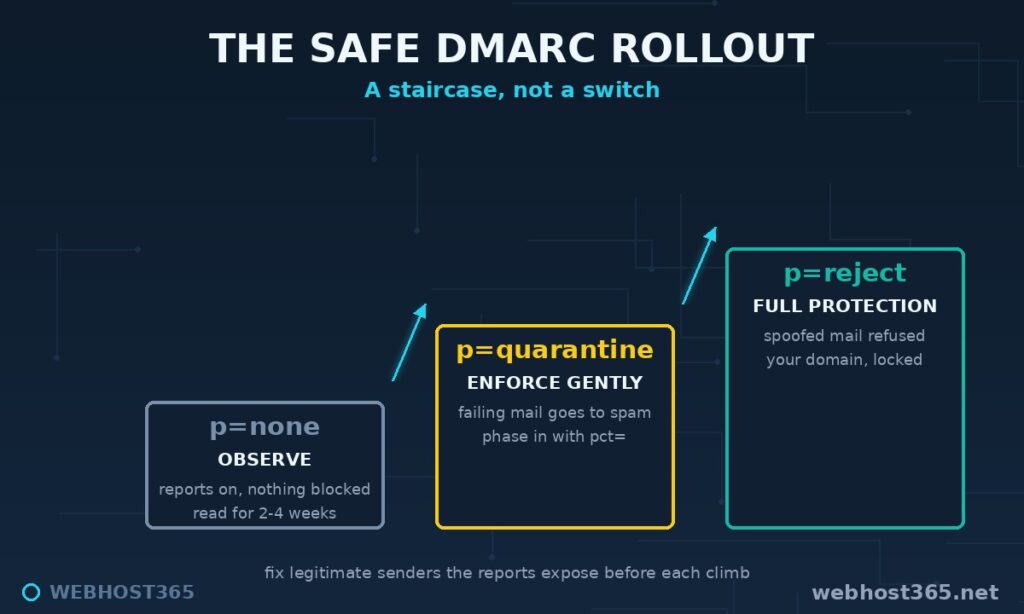
The whole journey takes a month or two of patience and pays back in two currencies: your real mail builds clean, aligned reputation, and your domain stops being raw material for scammers.
Common SPF, DKIM, and DMARC Mistakes
Eight mistakes account for nearly every broken setup we see. All are cheap to avoid and expensive to debug.
Two SPF records. The most common one. A new service says “add our SPF record”, someone pastes it as a second TXT record, and the domain now returns a permanent error — scoring worse than no SPF at all. New senders go inside the one existing record as an additional include:.
Blowing the ten-lookup limit. Every include: costs DNS lookups, and includes nest. A record carrying years of abandoned services dies silently at lookup eleven. Audit yours annually and remove senders you no longer use.
+all. This qualifier authorises every server on earth to send as your domain. It appears in records written by people who saw failures and reached for the biggest hammer. It is never correct.
Confusing ~all and -all. Softfail (~) asks receivers to be suspicious of unlisted senders; hardfail (-) asks them to refuse. With DMARC properly deployed, ~all is the comfortable choice — DMARC’s policy does the enforcing, and softfail avoids hard-killing forwarded mail at the SPF stage.
Forgetting third-party senders. Your newsletter platform, CRM, and helpdesk all send as your domain. Each needs to be in your SPF and, more importantly, signing with DKIM keys aligned to your domain — most platforms provide DNS records for exactly this. Skip it and the staircase’s step two becomes a fire drill.
Leaving subdomains unguarded. Your DMARC policy covers subdomains by default, but a spoofer can target ones that never send mail. If your organisation sends no mail from subdomains, sp=reject in the DMARC record closes that door explicitly.
Reports sent to a mailbox nobody owns. A rua= address that does not exist means step two of the rollout never happens, and the domain stays parked on p=none forever — authentication theatre. Create the mailbox first.
Smart quotes. Records copy-pasted from formatted blog posts sometimes arrive with curly quotation marks, which DNS treats as garbage. Type records into your DNS panel, or paste from plain-text sources only.
When Authenticated Mail Still Goes to Spam
Honesty before the finish line: the trio is necessary, not sufficient. Authentication proves who you are. It does not prove you are pleasant to receive. If all three records pass aligned and mail still folders as spam, the problem has moved up the stack to reputation or content.
Reputation attaches to your sending IP and your domain. On shared infrastructure, the IP’s history is collective — one bad tenant can drag a neighbourhood, which is one of the structural arguments for dedicated email services we covered in email hosting vs web hosting. Domain reputation is yours alone and responds to behaviour: complaint rates, sending to dead addresses, sudden volume spikes from a quiet domain. The fixes are operational — clean your lists, remove bounces promptly, warm up volume gradually, and give recipients an unsubscribe path so the angry ones do not reach for the spam button instead.
Content is the last filter and the most overrated one. Genuine messages from authenticated, reputable domains survive the occasional exclamation mark. But link-shorteners, mismatched link text, image-only messages, and attachment-heavy mail from a domain with no history all add weight on the wrong side of the scale. Write like a human with nothing to hide, because that is what the filters are calibrated to recognise.
The order of operations matters: authentication first, reputation second, content last. Most deliverability advice on the internet has this exactly backwards, which is why so many people are rewording subject lines while their domain publishes no DMARC record at all.
Frequently Asked Questions
SPF is a DNS list of servers allowed to send mail for your domain. DKIM is a cryptographic signature proving a message is genuine and unaltered. DMARC binds both checks to the From address people actually see and tells receiving servers what to do when verification fails. They solve three different parts of one problem and work as a set.
Yes, for any domain that sends email. SPF or DKIM alone leaves gaps a spoofer can walk through, and mailbox providers now expect the full trio — Gmail and Yahoo require DMARC outright for bulk senders. The records cost nothing and take minutes to verify.
Not if you start at p=none, which changes nothing about delivery and only sends you reports. Breakage happens when domains jump straight to p=reject before confirming all their legitimate senders pass authentication. Climb the policy ladder gradually and nothing real ever breaks.
It instructs receivers to deliver failing mail normally while sending you aggregate reports about every server using your domain. It enforces nothing — its job is visibility. Treat it as the observation step, not the destination.
Typically minutes to a few hours, depending on the TTL of your DNS records, with older cached values expiring as they time out. Allow up to 24-48 hours for the entire internet to see a change before judging the results.
They stop exact-domain spoofing — mail claiming to be precisely your domain — which is the most dangerous kind. They cannot stop lookalike domains (yourcompany-billing.com) or display-name tricks, which is why recipient vigilance still matters. Reducing the attack to lookalikes is still an enormous win.
Alignment. DMARC requires the passing check to match the domain in the From line, and mail sent through a third-party platform often passes SPF for the platform’s domain rather than yours. The fix is configuring that platform’s DKIM to sign with your domain, which the platform’s setup guide will call domain authentication or verification.
Conclusion
Three records, three locks: the guest list that says which servers may send as you, the wax seal that proves each message genuine, and the instructions that bind both proofs to the address your reader sees. Together they decide — before any human judgement, before content, before reputation — whether your mail starts its journey trusted or suspect. Most spam-folder misery traces back to this layer, and unlike reputation, it is fixable in an afternoon.
Check your domain today with the two-minute tests above. If you host with us, the trio is already published and passing — verify it, add your reporting address, and climb the policy staircase at your own pace. If your records are missing or failing elsewhere, you now know exactly what each one needs to say. Email is too important to send unsigned.