
Perl has a reputation as a language of the past, and the reputation is wrong. It quietly runs an enormous amount of the web’s plumbing — build systems, sysadmin tooling, bioinformatics pipelines, and plenty of production web applications that have worked reliably for twenty years and see no reason to stop. The language is actively maintained, with current releases in the 5.4 series, and CPAN remains one of the richest module archives in any ecosystem. What persists is a myth: that you cannot run a modern Perl web application on shared hosting. You can, and there are two good ways to do it.
This guide covers both. The modern path runs your application on a persistent application server using PSGI and Plack — the right approach for any real web app or framework like Dancer2 or Mojolicious. The classic path uses CGI, the simplest possible way to run a Perl script on the web, which is still perfectly valid for a small script or a legacy application. By the end you will know how to deploy a Perl app either way on a DirectAdmin account, and which one fits what you are building.
Two Ways to Run Perl on DirectAdmin, and Which to Pick
Before any commands, understand the choice, because it shapes everything that follows.
The modern way is PSGI on NGINX Unit. PSGI is the standard interface between Perl web applications and web servers — the Perl equivalent of the WSGI standard in Python or Rack in Ruby — and Plack is its reference toolkit. Run a PSGI app on a persistent application server and your code stays loaded in memory between requests, so responses are fast and the application behaves like a real service. This is the right choice for anything you would call a web app, and every serious Perl web framework speaks PSGI natively. On DirectAdmin, the application server for this is NGINX Unit, the same one our Ruby on Rails guide uses.
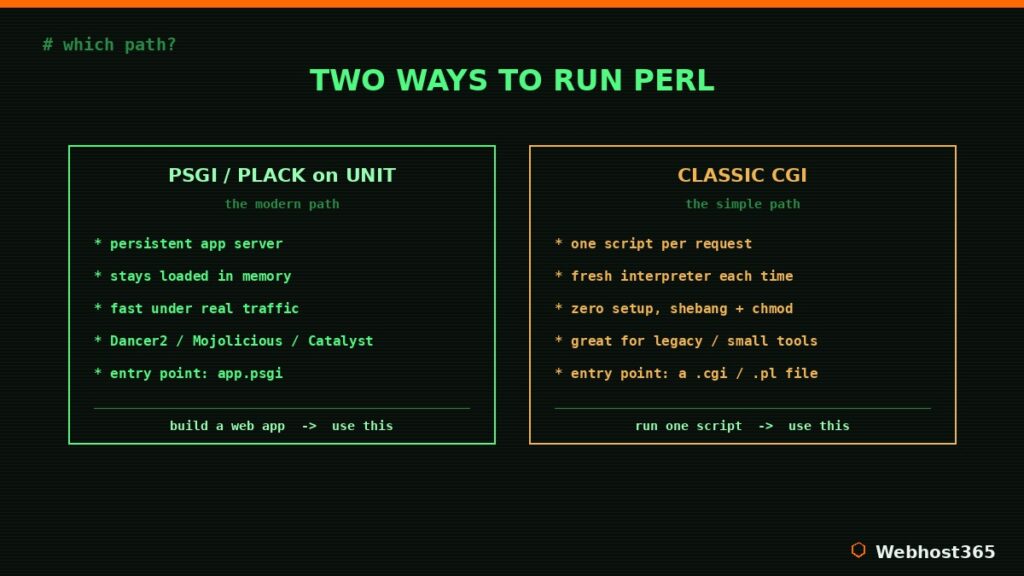
The classic way is CGI. Here the web server runs your Perl script fresh for each request, hands it the incoming data, and returns whatever the script prints. There is no application server, no persistent process, almost no setup — you drop a script in place and it runs. The trade-off is performance: starting a new Perl interpreter on every request is fine for a contact-form handler or a low-traffic admin tool, but it does not hold up under real load. CGI is the right tool for a single small script or for keeping a legacy application alive, not for a busy modern app.
The decision rule is simple. If you are building a web application or using a framework, take the PSGI path. If you have one small script to run, or you are maintaining something that already works as CGI, the CGI path is the honest, low-ceremony choice. The rest of this guide walks through both, so you can pick with confidence.
What You Need Before Starting
Three things, none of them exotic. First, a hosting plan with SSH access, which you will use to install Perl modules and test your app from the command line. Second, a domain pointed at your account. Third, basic comfort in a terminal — if you can cd, ls, and edit a file, you are ready.
This guide is the final piece of our DirectAdmin deployment series. If your stack is different, we have the same walkthrough for Ruby on Rails, which shares the exact NGINX Unit model this guide uses for Perl, along with our guides for Python, Node.js, and Laravel. The platform mechanics rhyme across all of them; only the language specifics change.
Verify Perl and Install Modules from CPAN
Every DirectAdmin account already has Perl available, so begin by confirming the version over SSH:
perl -vYou should see a Perl 5 release. With that confirmed, the one habit that makes Perl on shared hosting painless is installing your modules into your own home directory rather than system-wide, which needs no root access. The tool for this is cpanminus, a modern, fuss-free CPAN client. Set up a per-user library path and install it:
curl -L https://cpanmin.us | perl - --local-lib=~/perl5 local::lib App::cpanminusThen tell your shell to use that local library on every login by adding it to your profile:
echo 'eval "$(perl -I$HOME/perl5/lib/perl5 -Mlocal::lib)"' >> ~/.bashrc
source ~/.bashrc
From now on, cpanm installs cleanly into ~/perl5 with no permission errors. For the modern deployment path we are about to use, install Plack, the PSGI toolkit that the official Plack project maintains:
cpanm PlackOne honest note. Some CPAN modules include XS components written in C that compile during installation, and a few need a system library present to build. If an install fails, the error names the module and the missing piece — and that exact message is what a support ticket should contain. The common web modules install cleanly on our platform, and the broader Perl ecosystem at perl.org documents anything unusual you might hit.
The Modern Path: PSGI/Plack on NGINX Unit
This is the path for a real web application, and if you have read our Ruby on Rails guide the model will look familiar — it is identical, with a Perl application in place of a Ruby one. DirectAdmin uses NGINX Unit as its application server, and Unit runs your Perl app as a persistent process that stays loaded between requests.
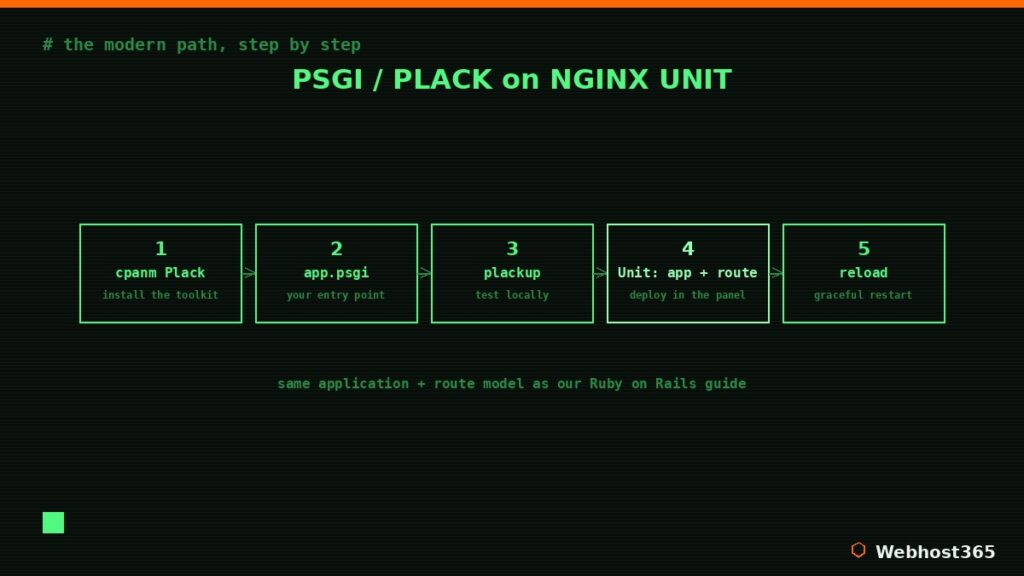
Every PSGI application has one entry point: a file, conventionally named app.psgi, that returns a code reference. That code receives the request environment and returns the status, headers, and body. A minimal one looks like this:
my $app = sub {
    my $env = shift;
    return [
        200,
        [ 'Content-Type' => 'text/plain' ],
        [ "Hello from Perl on NGINX Unit\n" ],
    ];
};
In a real project you would not write at this level — a framework like Dancer2 or Mojolicious gives you routing, templates, and structure, and because they are all PSGI-native, each one ultimately hands Unit the same kind of app.psgi entry point. The framework changes; the deployment does not.
Before deploying, test it locally with the plackup command that ships with Plack:
plackup app.psgiThat starts a development server so you can confirm the app responds. Once it does, deploying is a panel task. In your DirectAdmin user panel, open Advanced Features and then Nginx Unit, and create an Application: set the language to Perl, the path to your application directory, the script to app.psgi, and the number of processes — one is plenty to start. Then create a Route that connects your domain to that application. DirectAdmin writes the configuration to Unit for you, and your Perl app is live.
When you change your code later, you reload through the same Nginx Unit interface, which restarts the application gracefully. This is the equivalent of the restart step in any application-server deployment, and it is entirely separate from the CGI approach we cover next — there is no script to re-run and no file to touch, just a reload in the panel.
The Simple Path: Classic CGI Scripts
If you only need to run a single script — a contact-form handler, a small admin tool, or a legacy application that already works this way — CGI is the path of least resistance. There is no application server to configure and no entry point to write; the web server simply runs your script when its URL is requested and returns whatever it prints.
Three things make a CGI script work, and getting all three right is the whole job. First, the shebang line at the very top must point to Perl, and the portable form is best:
#!/usr/bin/env perl
use strict;
use warnings;

print "Content-Type: text/html\n\n";
print "<h1>Hello from Perl CGI</h1>\n";
Second, the script must be executable. Place it in your web directory and set the executable bit over SSH:
chmod 755 hello.cgiThird — and this is the detail that trips up newcomers — the very first thing your script prints must be the Content-Type header followed by a blank line, exactly as shown above. That blank line tells the browser the headers are finished and the body is beginning. Miss it and you get an error instead of a page.
One modern gotcha worth knowing. The venerable CGI.pm module, which older scripts often rely on for parsing form input, was removed from Perl’s core library in version 5.22. On current Perl it is no longer present by default, so if your script uses it, install it once into your home directory with the per-user setup from earlier:
cpanm CGIAfter that the module is available and your legacy script runs unchanged. This is the single most common surprise when moving an old CGI application onto a modern Perl, and it is a one-line fix.
The honest limitation of CGI is performance. Because the web server starts a fresh Perl interpreter for every single request, loading the script and its modules from scratch each time, CGI is perfectly fine for low-traffic tools but does not scale to a busy application. That cost per request is exactly the problem the PSGI path solves by keeping your app loaded in memory — so if your CGI script starts feeling slow under real traffic, that is the signal to graduate it to the modern path above.
Troubleshooting the Common Failures
Both paths fail in predictable ways. Here are the ones you are most likely to meet, in symptom-then-cause-then-fix form.
A CGI script returns a 500 Internal Server Error. This is almost always one of three things: the file is not executable (fix with chmod 755), the shebang line is wrong or the file has Windows line endings instead of Unix ones (re-save it with LF endings), or the script is not printing the Content-Type header and its blank line first. Adding use CGI::Carp qw(fatalsToBrowser) near the top during development surfaces the real error in the browser, and you remove it before going live.
A script reports a module as not found even though you installed it. Your per-user library path is not active in that session. Confirm the local::lib line from earlier is in your profile and run source ~/.bashrc, then check that you installed the module under the same Perl you are running.
The browser shows your Perl source code instead of running it. The CGI handler is not active for that location, so the server is treating the file as plain text rather than executing it. Make sure the script is in a directory where CGI execution is enabled and carries the correct extension.
A PSGI app on NGINX Unit will not start, or returns a 503. Check that the application’s script path points at your app.psgi and that the file has no syntax errors — running perl -c app.psgi catches those instantly. A 503 usually means Unit has no healthy process for the route, so re-check the Application’s path and that its process count is at least one, then reload through the Nginx Unit interface. As always, the logs are the fastest route to the real cause: read them before changing anything else.
Conclusion: Perl, Deployed Properly
The myth that Perl cannot run a modern web app on shared hosting falls apart the moment you see the two real paths side by side. For an application or a framework, PSGI and Plack on NGINX Unit give you a fast, persistent app server using the exact deployment model that serves Ruby, Python, and Node.js on the same platform. For a single script or a legacy tool, classic CGI still works exactly as it always has, with nothing more than a shebang, an executable bit, and a Content-Type header. One language, two honest choices, and a clear rule for picking between them: build an app, reach for PSGI; run a script, reach for CGI.
Everything in this guide runs as written on Webhost365 Perl Hosting. Every plan ships with the latest Perl 5 and full CPAN access over SSH, native .pl and .cgi execution, cron jobs, NGINX Unit ready at the user level, free SSL, and Bunny CDN across 119 locations. Nimbus at $4.49 per month runs your first Perl app or script on 10GB of NVMe. Orion at $7.49 doubles the resources for a second project, and Zenith at $22.49 carries heavier workloads with unlimited NVMe storage. Annual plans include a free domain, your renewal price always matches your signup price, and CPAN module installs are covered by 24×7 support. Deploy your Perl app this week — whichever path fits.
FAQ: Deploying Perl on DirectAdmin
Yes. Perl 5 is actively maintained with regular stable releases, and CPAN remains one of the richest module archives in any language. It runs production web applications, REST APIs, data-processing pipelines, and long-standing CGI tools across the web. Modern frameworks like Mojolicious, Dancer2, and Catalyst make it a perfectly capable choice for new web projects.
Shared hosting is enough for most Perl applications. With PSGI and Plack on NGINX Unit you get a persistent application server on a standard shared account, and CGI scripts run with no special setup at all. A VPS becomes worthwhile only when you need root access to build a custom Perl interpreter, run Perlbrew, or scale a high-traffic application beyond shared resources.
CGI starts a fresh Perl interpreter for every request, loading your script and its modules from scratch each time, which is simple but slow under load. PSGI with Plack runs your application as a persistent process that stays in memory between requests, so it responds far faster. CGI suits single scripts and legacy tools; PSGI is the right choice for any real web application.
Yes. Both are PSGI-native frameworks, so they deploy through NGINX Unit using the same app.psgi entry point any PSGI application uses. You install the framework from CPAN into your home directory with cpanm, point a Unit application at your app.psgi, create a route for your domain, and your framework-based app is live.
Use cpanminus with a per-user library directory. Installing cpanm together with local::lib sets up a ~/perl5 path that holds your modules in your home directory, so cpanm Module::Name installs cleanly with no root privileges. Adding one line to your shell profile makes your scripts find those modules automatically on every login.
Not obsolete, just specialized. CGI is the wrong tool for a busy modern application because of its per-request startup cost, but it remains perfectly valid for low-traffic scripts, simple form handlers, and legacy applications that have run reliably for years. For anything performance-sensitive, PSGI and Plack are the modern answer.