
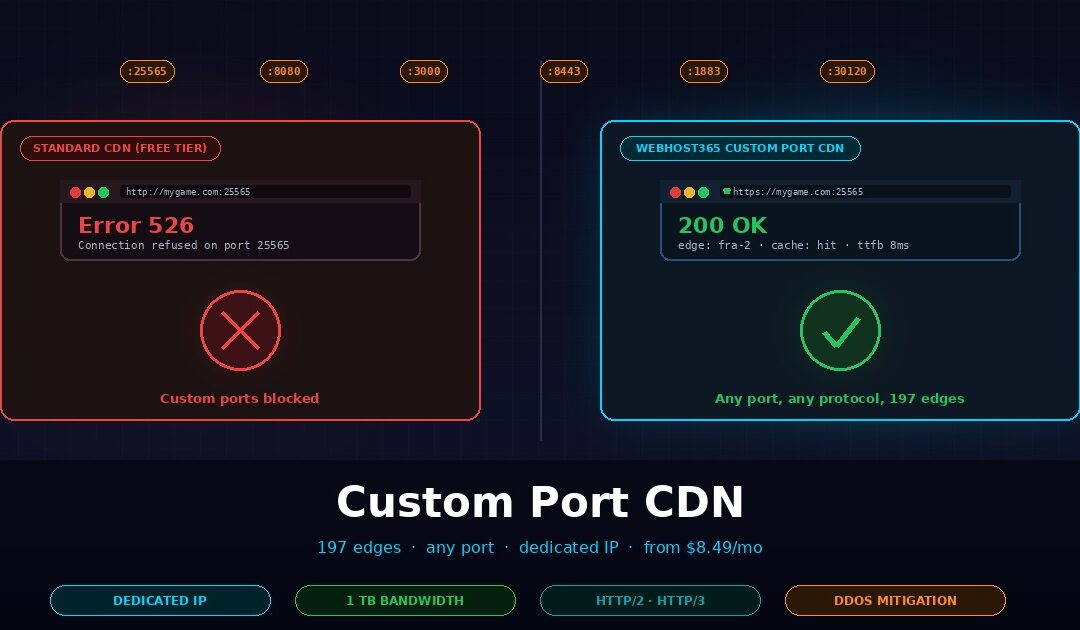
A Custom Port CDN is a content delivery network that accepts and caches traffic on network ports other than the standard 80 (HTTP) and 443 (HTTPS). Most mainstream CDNs — Cloudflare free, Bunny CDN, Fastly — only serve traffic on those two ports, which breaks game servers, WebSocket applications, SaaS apps behind corporate firewalls, and anything running on ports like 8080, 3000, or 25565. Webhost365 Custom Port CDN solves this with a dedicated frontend IP, your choice of port, 119 global edge locations, and 1TB of monthly bandwidth from $8.49 per month.
This guide explains why standard CDNs block non-standard ports in the first place, the six real-world use cases that genuinely need custom port support, how a Custom Port CDN works under the hood, and how the pricing compares to enterprise alternatives like Cloudflare Spectrum. You will finish with a clear answer to whether your specific application needs one, because for most standard websites the honest answer is that it does not.
Why standard CDNs block custom ports
Mainstream CDNs restrict traffic to ports 80 and 443 because their shared-IP architecture, SSL termination model, and DDoS filtering all assume standard HTTP and HTTPS. Allowing arbitrary ports creates security, routing, and cost complications that most CDN providers choose to avoid on their free and mid-tier plans. This is not a technical limitation of CDNs in general. It is a business decision about which customers each CDN wants to serve.
A typical CDN edge location hosts a single anycast IP address that tens of thousands of customer websites share. Your site at example.com and another customer’s site at randomapp.io both resolve to the same edge IP. The CDN routes requests to the correct customer by reading the HTTP Host header or the TLS Server Name Indication (SNI) field. Both of these work only on standard HTTP and HTTPS traffic.
The moment you ask a CDN to serve traffic on port 25565 or port 8080, that routing logic breaks. The edge server has no standard way to identify which customer the connection belongs to, because non-HTTP traffic does not carry a Host header. Opening custom ports on a shared IP would either route every connection to the wrong customer or force the CDN to dedicate an IP address to each customer, which eliminates the cost advantage of shared infrastructure.
SSL termination assumes port 443
Edge SSL termination — where the CDN holds your TLS certificate and decrypts traffic close to the user — is the core speed advantage of modern CDNs. The industry standardized the entire Server Name Indication (SNI) mechanism around TCP port 443. CDNs can terminate SSL on port 8443, but operators must configure every part of the infrastructure—from the load balancer to the certificate manager—to support it. For a CDN serving ten million customers, adding custom port support to a shared SSL termination layer is engineering work with no revenue upside on the free tier.
DDoS mitigation is written for HTTP traffic patterns
CDN DDoS protection is tuned to specific attack signatures. Layer 7 rules inspect HTTP headers, rate-limit by URL path, and challenge suspicious requests with captchas. None of that works on raw TCP or UDP traffic on a custom port. Protecting a Minecraft server on port 25565 requires completely different logic — packet-rate limits, connection tracking, protocol-level validation. Most CDN providers simply do not invest in that infrastructure on their low-tier plans because the customers who need it are a small fraction of the market.
What actually happens when you try
When you point your domain at Cloudflare’s free tier and try to serve traffic on port 8080, the connection is silently dropped. Cloudflare returns HTTP 520 or 526 errors on ports they do not support, because their edge simply rejects the packets. Bunny CDN and Fastly behave similarly on their standard plans. AWS CloudFront supports ports 80, 443, and 1935 (RTMP streaming) but nothing else on its default configuration. For a deeper look at how CDNs work in general and why integration quality matters, see our guide on what a CDN is and how it makes websites faster.
The enterprise solution for each of these providers exists but costs enterprise money. Cloudflare Spectrum supports arbitrary TCP and UDP ports, but it is sold only on the Business tier and above, which starts at roughly $1,000 per month with a minimum annual commitment. For an indie game server operator, a SaaS founder running a WebSocket app, or a team self-hosting tools on non-standard ports, that price is a non-starter. This is exactly the gap a purpose-built Custom Port CDN is designed to fill.
Six use cases that need a Custom Port CDN
Six real-world scenarios genuinely require a CDN that supports custom ports: game servers, WebSocket applications, SaaS apps behind corporate firewalls, media streaming on non-standard ports, self-hosted applications, and IoT device gateways. Each has a specific port range and a specific reason standard CDNs cannot serve them. Before spending money on a Custom Port CDN, check whether your use case actually lives in one of these categories.
| Use case | Typical ports | Why CDN matters |
|---|---|---|
| Game servers (Minecraft, Rust, FiveM, CS2) | 25565, 28015, 30120, 27015 | DDoS protection, regional latency, hide origin IP |
| WebSocket / real-time apps | 8080, 8443, 3000, 4000 | Lower global latency, reduce origin load, edge SSL |
| SaaS apps behind corporate firewalls | 8080, 8443, 9000, 10000 | Firewall compatibility, brand-safe delivery |
| Media streaming on custom ports | 1935, 8554, 5004, 8000 | Buffer-free playback, DDoS mitigation |
| Self-hosted apps (n8n, Gitea, Portainer, Home Assistant) | 5678, 3000, 9000, 8123 | Global access, edge SSL, simple DNS setup |
| IoT device gateways and MQTT brokers | 1883, 8883, 8080, 9001 | Device reliability, geo-routing, DDoS buffer |
Game servers are the largest use case
Minecraft on port 25565 is the archetype. Over 10 million Minecraft servers run worldwide, and every single one of them listens on a non-standard TCP port that Cloudflare’s free tier flatly refuses to accept. The same applies to Rust on 28015, FiveM (GTA V roleplay) on 30120, CS2 on 27015, and hundreds of other popular game server protocols. The IANA port registry lists thousands of assigned service ports, and a substantial fraction of them belong to games.
Game servers care about three things that a Custom Port CDN provides. DDoS protection matters first — game servers are among the most frequently attacked public services on the internet, and a sustained attack on your origin IP will take your community offline for hours. Regional latency matters second, because players in Singapore, Frankfurt, and São Paulo all notice 30 milliseconds of added ping but rarely notice 5 megabytes of added bandwidth. Hiding the origin IP matters third, because once attackers know your real server address they can bypass any protection you add later. A CDN with 119 edge locations, route-based DDoS absorption, and a dedicated frontend IP solves all three problems in one product.
The economics are clear. A small Minecraft community server costs roughly $20 to $40 per month to host. Cloudflare Spectrum, the enterprise solution, starts at $1,000 per month. Webhost365 Custom Port CDN at $8.49 per month is the only tier that makes sense for the vast majority of independent game operators.
WebSocket and real-time applications
WebSocket protocols commonly run on 8080, 8443, 3000, or other non-443 ports, often because the main HTTP application already occupies 443 and the WebSocket layer needs a separate service. Chat platforms, trading dashboards, live collaboration tools, multiplayer game lobbies, and real-time notification systems all follow this pattern. The MDN WebSocket API documentation is the standard reference for how these connections work, and it explicitly covers the ws:// and wss:// protocols that can run on any port.
For a WebSocket app, the Custom Port CDN delivers edge SSL termination, which moves the TLS handshake cost from your origin server to the edge. This matters at scale because WebSocket connections are long-lived, and a single origin server can handle thousands of them simultaneously only when it does not need to terminate TLS for each connection locally. Regional routing also matters for mobile clients, which often reconnect frequently as they switch between WiFi and cellular networks. Hitting a nearby edge on reconnection takes 10 to 30 milliseconds; hitting an origin halfway around the world takes 200 to 400 milliseconds.
SaaS apps behind corporate firewalls
Some corporate firewalls block outbound connections to non-standard ports, which is the opposite problem from the game server case. If your SaaS product runs on port 8080 and a Fortune 500 customer’s IT team has locked down their firewall, your app becomes unreachable from their network. This is a surprisingly common sales blocker for B2B SaaS founders.
A Custom Port CDN helps here because it gives you a dedicated frontend IP with a predictable port mapping. Corporate firewall teams can whitelist your CDN IP range and port, which is a much easier conversation than “whitelist our entire cloud provider’s IP space.” The CDN also provides brand-safe delivery — your SaaS is accessed via your domain, not an IP:port combination that looks suspicious in browser address bars.
Media streaming on custom ports
Live video streaming protocols like RTMP use port 1935 by default. RTSP uses 554 or 8554. HLS over custom CDN setups often uses 8000 or 8080. Many streaming platforms run both HTTP(S) on 443 and a separate streaming port for the actual video data, which creates a situation where Cloudflare’s free tier protects half the traffic and leaves the streaming half exposed.
Media streaming benefits from caching more than most custom-port workloads. A popular stream chunk served through a Custom Port CDN can achieve 90%+ cache hit rates on popular content, which dramatically reduces origin bandwidth costs. The DDoS protection also matters because streaming servers are frequent targets of denial-of-service attacks from disgruntled viewers or competing streamers. HTTP/2 and HTTP/3 support at the edge improves stream startup time, particularly on mobile networks where QUIC’s faster connection setup is measurable.
Self-hosted applications on non-standard ports
This is where the Custom Port CDN story meets the modern self-hosting movement. n8n runs on port 5678. Gitea runs on 3000. Portainer runs on 9000. Home Assistant runs on 8123. Nextcloud sometimes runs on 8080 when installed alongside another web service. Uptime Kuma runs on 3001. Every self-hoster running even a small stack of tools ends up with half a dozen apps on non-standard ports, and the standard advice is to “put them behind a reverse proxy” — which works locally but does not solve global access.
A Custom Port CDN puts a friendly domain with SSL in front of any of these apps without requiring a reverse proxy on your origin. Instead of sharing an IP and port like 203.0.113.45:5678 with your team, you share n8n.yourteam.com and the CDN handles the edge SSL and routing. The setup is the same three-step process for every new self-hosted tool. For teams deploying multiple self-hosted applications, see our guide to deploying Docker containers on a VPS, which covers the origin-side architecture that sits behind a Custom Port CDN, and our n8n hosting plans for the specific case of automation workflow self-hosting.
IoT device gateways and MQTT brokers
MQTT, the dominant protocol for IoT device communication, runs on port 1883 (unencrypted) and 8883 (TLS). Some deployments use 8080 or 9001 for WebSocket-over-MQTT. IoT gateways that serve thousands of low-power devices need reliable global connectivity, because an IoT device in a Tokyo factory should not have to reconnect to a server in Virginia every time a packet drops.
For IoT workloads, the Custom Port CDN provides geographic routing so each device connects to the nearest edge, DDoS protection to keep the gateway online during attacks, and reliable keep-alive handling for long-lived MQTT connections. The 1TB monthly bandwidth on the base plan is generous for most IoT deployments because MQTT messages are small by design — a fleet of 10,000 devices sending telemetry every 30 seconds generates well under 100GB of monthly traffic even at high resolution.
How a Custom Port CDN actually works
A Custom Port CDN uses a dedicated frontend IP address rather than a shared anycast IP, which allows it to safely expose arbitrary ports to your traffic without affecting other customers. Requests hit the nearest edge location on your chosen port, the edge forwards the request to your origin server over a secure tunnel, and the response flows back through the same path with optional caching at the edge. The architecture is simple, but one detail — the dedicated IP — is what makes the whole thing possible.
Dedicated frontend IP is the key architectural difference
A standard CDN like Bunny or Cloudflare free shares one anycast IP across thousands of customers at every edge location. That sharing is what makes the CDN cheap to operate and cheap to sell. Port 80 and 443 are safe on a shared IP because every request on those ports speaks HTTP or HTTPS, which means the edge can read the Host header or TLS SNI field to figure out which customer the request belongs to.
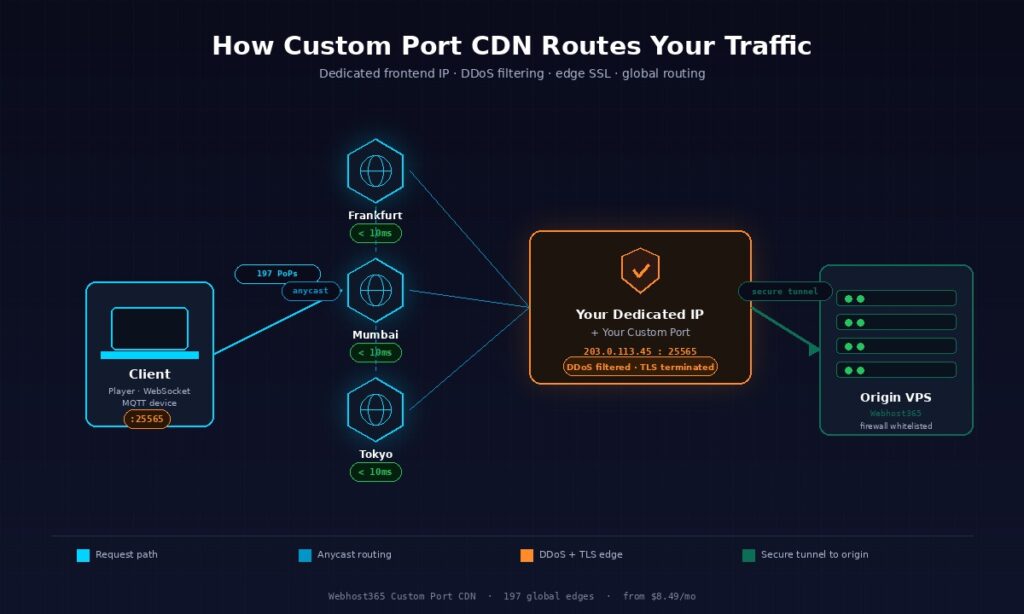
Exposing port 25565 on a shared IP would affect every customer on that IP. Either every Minecraft packet gets routed to the wrong customer, or the CDN has to add custom routing logic for every port every customer ever wants to use. Neither option scales. The solution is to assign each Custom Port CDN customer a dedicated IP that belongs only to them. Your port 25565 goes to your Minecraft server and nowhere else, because nobody else is on your IP.
This dedicated IP is why Custom Port CDN costs more than a shared-IP CDN bundled into hosting. The Webhost365 Custom Port CDN at $8.49 per month includes a dedicated frontend IP, while the standard Bunny CDN that comes free with every Webhost365 hosting plan uses the shared-IP model. Both products serve real use cases. They are not interchangeable.
The request path — from client to origin and back
When a player connects to your Minecraft server at mygame.com:25565, the journey from their client to your origin and back takes six steps.
The client resolves mygame.com through DNS, which returns your dedicated frontend IP. Because the CDN operates an anycast network across 119 edge locations, the player’s request automatically routes to the nearest edge — usually the one with the lowest network latency, typically under 10 milliseconds and often under 5 milliseconds in major metros.
The edge server receives the incoming TCP connection on port 25565. If the traffic is HTTP or HTTPS, the edge terminates TLS and reads the request headers. For non-HTTP protocols like raw Minecraft traffic or MQTT, the edge simply forwards the TCP stream after applying DDoS filtering at the packet level.
DDoS filtering happens in parallel with every incoming packet. The edge inspects packet rates, connection counts per source IP, and protocol-level anomalies. Suspicious traffic gets dropped at the edge before it ever reaches your origin. For a game server, this is the single most valuable layer because it absorbs the most common attack types — SYN floods, amplification attacks, and rate-based floods — far from your actual server.
Cache lookup happens next for cacheable traffic. If the request is for a static game asset, a media chunk, or a WebSocket handshake page that can be cached, the edge checks its cache. A cache hit returns the response from edge memory in single-digit milliseconds, with no round trip to your origin.
On a cache miss or for non-cacheable traffic, the edge connects to your origin server over a secure tunnel. The origin response flows back through the edge, gets cached if the rules allow it, and then returns to the client. HTTP/2 and HTTP/3 run end-to-end on standard HTTP(S) ports, which benefits WebSocket and web API workloads on custom ports such as 8443 or 9443.
The return path is symmetrical. Response traffic flows from origin to edge to client, hitting the same edge that handled the request. This symmetry is what keeps latency consistent in both directions, which matters more for real-time protocols than for traditional web traffic.
What gets cached and what does not
Cache strategy for a Custom Port CDN depends heavily on the protocol running over it. For HTTP and HTTPS traffic on custom ports, standard cache rules apply — responses with Cache-Control headers get cached according to their TTL, and anything marked no-store bypasses the cache entirely. and for media streaming, cache hit rates of 90% or higher are realistic on popular content because video chunks are identical across viewers.
For raw TCP game server traffic, MQTT messages, and WebSocket frames, caching remains disabled by default because these protocols carry per-connection state that cannot be shared. A Minecraft block-update packet means nothing to another player, and an MQTT telemetry message belongs to a specific device. For these workloads, CDN value does not come from caching but from three core features—DDoS protection, geographic routing, and a hidden origin IP—all of which apply even when no content is cached.
The practical implication is that bandwidth billing on a Custom Port CDN looks different from a standard CDN. A static website on a shared-IP CDN might see 80% of its traffic served from cache, so origin bandwidth stays low. A game server on a Custom Port CDN sees close to 0% cache hit rate because every packet is unique to that player’s session, which means 1TB of monthly player traffic costs 1TB of CDN bandwidth. Webhost365 Custom Port CDN includes 1TB per month on the base plan, with higher tiers available for heavier workloads.
Custom Port CDN vs the alternatives
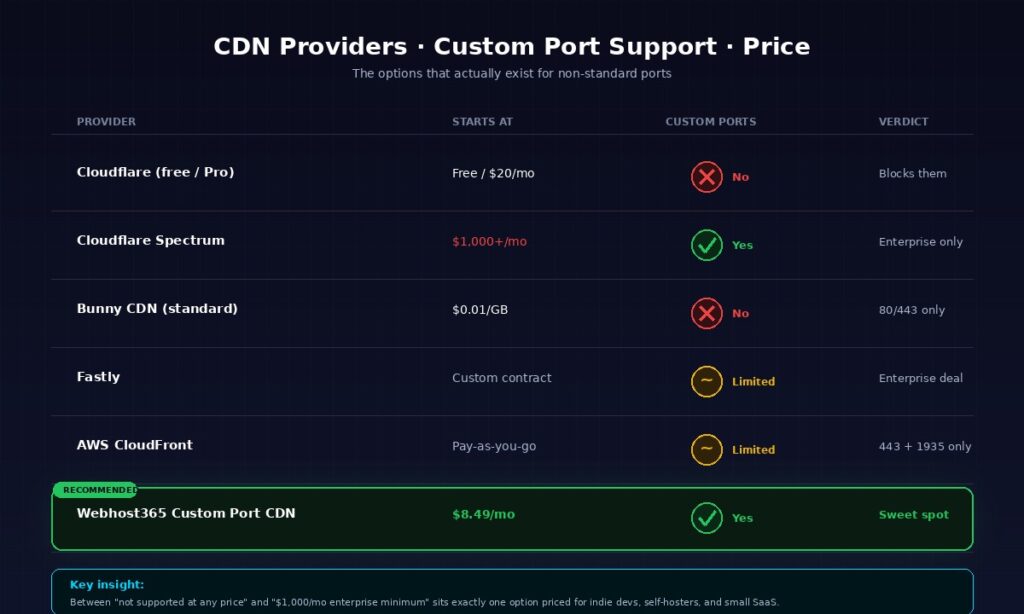
For custom port traffic, the real choices are Cloudflare Spectrum (enterprise-tier, $1,000 plus per month minimum), Fastly (case-by-case enterprise deals), a self-operated CDN using multiple cloud regions, or a purpose-built Custom Port CDN like Webhost365 at $8.49 per month. The 100x price gap between enterprise solutions and Webhost365 makes the choice obvious for anything below serious enterprise scale.
| Provider | Starts at | Custom port support |
|---|---|---|
| Cloudflare (free / Pro) | Free / $20/mo | No — ports 80/443 only |
| Cloudflare Spectrum | $1,000+/mo (Business tier) | Yes — enterprise only |
| Bunny CDN (standard) | $0.01/GB | Ports 80/443 only |
| Fastly | Case-by-case (enterprise) | Yes — custom contract required |
| AWS CloudFront | Pay-as-you-go | Ports 80/443 + 1935 RTMP only |
| Webhost365 Custom Port CDN | $8.49/mo | Yes — any port, dedicated IP |
When each option is the right answer
Cloudflare Spectrum is the right answer for AAA game studios running tens of millions of concurrent players, enterprise SaaS with Fortune 500 buyers who demand contractual SLAs, and any workload where the 1,000-per-month floor is rounding error on the infrastructure budget. Spectrum’s anycast network and global DDoS capacity are genuinely top-tier. It is overkill for indie game servers and small SaaS apps.
Self-operated CDN — deploying Nginx across three to five cloud regions with your own DNS-based routing — is technically possible and occasionally makes sense for teams with DevOps depth and predictable traffic patterns. The math rarely works. Running five small cloud VMs with bandwidth, SSL management, and monitoring tools typically costs 50 to 150 dollars per month, and you still do not get DDoS protection comparable to a purpose-built CDN. For teams that want this level of control, the better path is Docker containers on a VPS at the origin with a real CDN in front.
Webhost365 Custom Port CDN fits the gap between “no support at any price” (Cloudflare free) and “enterprise contracts with minimum commitments” (Cloudflare Spectrum). If your use case falls into any of the six categories covered earlier and you do not have a dedicated DevOps team, this is the price-accessible option. The honest limitation is the 1TB monthly bandwidth allowance on the base plan — operators running heavy streaming or large-scale game servers may need higher tiers, which are available on request.
The comparison nobody makes honestly
Most comparison articles on CDN providers hide the ball on custom port support. They list “Cloudflare supports custom ports” without mentioning that support is Spectrum-only and costs 1,000 dollars per month minimum. They list “Fastly is enterprise-grade” without explaining that getting a custom port configured requires a sales conversation and a contract.
The useful comparison is the one in the table above. Either the provider supports your custom port on a plan you can actually buy with a credit card, or it does not. For indie developers, small SaaS founders, self-hosters, and small game server communities, the list of options that meet that bar is short — and Webhost365 Custom Port CDN is on it.
Setting up Custom Port CDN — what the process actually looks like
Setting up a Custom Port CDN takes under 10 minutes. Point your domain’s A record at the dedicated frontend IP provided, specify your custom port, and the CDN begins serving traffic on that port immediately. No code changes on the origin server, no SDK to install, no DNS propagation delays beyond the TTL. The full process is three steps, which is what the Webhost365 Custom Port CDN product was explicitly designed to deliver.
The three-step setup
Step one is ordering your Custom Port CDN plan from the Webhost365 Custom Port CDN page and receiving your dedicated frontend IP and port assignment by email. The IP is yours alone, and the port is whatever your application uses — 25565 for Minecraft, 8080 for a self-hosted app, 1883 for MQTT, and so on. You can also request a different port later if your application changes.
Step two is updating your domain’s A record to point at the dedicated frontend IP. If you are switching a live service with existing DNS, drop your TTL to 300 seconds a few hours before the switch so the transition happens quickly. In most DNS providers, this is a three-field form — record type A, host name (your subdomain or root), and the IP address you were assigned. Save the record and the change propagates through the DNS system within the TTL window.
Step three is configuring your origin server to accept connections from the CDN’s edge IP range. This step is optional but strongly recommended. The CDN will work even if your origin accepts connections from the entire internet, but the security benefit of the CDN disappears if attackers can bypass it by connecting directly to your origin. Whitelisting the CDN edges in your origin firewall takes five minutes and closes that gap completely.
Once all three steps are done, test with a direct connection to your domain on the custom port. For a web application, curl -I https://yourdomain.com:8080/ should return your application’s response with additional CDN headers showing the edge location and cache status. For a game server, your standard game client connecting to yourdomain.com:25565 should work identically to connecting to your origin directly, except with lower ping from distant locations and hidden origin IP.
Securing the origin — the step most guides skip
Whitelisting the CDN’s edge IP range in your origin firewall is the difference between a protected setup and one that attackers can trivially bypass. Without this step, a determined attacker can scan your domain’s DNS history, find your original origin IP, and hit your server directly — making the entire Custom Port CDN investment pointless for DDoS protection.
On a Linux VPS, the UFW firewall command to lock this down looks something like sudo ufw default deny incoming followed by sudo ufw allow from <CDN-edge-IP-range> to any port <your-port>. The exact IP ranges are provided when you provision your Custom Port CDN plan, and they update rarely enough that you can treat them as a static configuration. For cloud VPS users, configuring security groups at the cloud provider level provides the same protection.
Hiding the origin IP from public DNS is the other half of this defence. Do not leave any A record pointing at your origin IP, and do not reference the IP in public documentation, support forums, or GitHub repositories. Once your CDN is in front, the only IP the world should see is the CDN’s frontend IP. Tools like Censys and Shodan routinely scan the internet for exposed origin IPs behind CDNs, and the attackers who matter already use them.
Cache behavior and tuning
By default, the CDN caches responses according to standard HTTP caching headers. If your origin sends Cache-Control: max-age=86400, the edge caches for 24 hours. If your origin sends Cache-Control: no-store, nothing gets cached. This covers most web workloads without any tuning.
For dynamic applications on custom ports — think API endpoints, WebSocket handshake pages, or admin panels for self-hosted tools — the right behaviour is usually no caching. Set Cache-Control: no-store on endpoints that return user-specific data, authenticated responses, or anything where stale content would cause bugs. The CDN will then act purely as a routing and security layer, which is exactly what those workloads need.
For static assets served on unusual ports — game server website assets, media streaming chunks, self-hosted app static files — long TTLs are fine. Values like 86400 seconds (24 hours) for images, CSS, and JavaScript give you high cache hit rates without going so long that content updates stale.
The real-time analytics dashboard that comes with every Custom Port CDN plan shows cache hit rate, bandwidth consumption, request geography, and error rates. For the first week after going live, check the dashboard daily to make sure your cache strategy is working and no error spikes appear. After that, weekly or monthly check-ins are plenty for most workloads.
When you do NOT need a Custom Port CDN
A Custom Port CDN is the wrong choice for standard HTTP or HTTPS websites, WordPress sites, e-commerce stores, or any application already happy on ports 80 and 443. For those, a shared-IP CDN like Bunny CDN or the built-in Bunny CDN on Webhost365 hosting plans delivers the same performance at a fraction of the cost. The Custom Port CDN is a specialised product for specialised workloads, not an upgrade for every site.
Standard WordPress and WooCommerce sites should stay on the integrated Bunny CDN that comes free with every Webhost365 hosting plan. That CDN serves the same 119 global edge locations with the same low-latency delivery, just on the standard shared-IP architecture appropriate for HTTP and HTTPS traffic. Paying $8.49 per month for a Custom Port CDN when a free, bundled CDN handles your traffic perfectly is wasted money. For a full explanation of how the bundled CDN affects WordPress performance, see our guide on why integrated CDN hosting matters for Core Web Vitals.
API endpoints served on port 443 fall into the same category. Any REST or GraphQL API that follows the standard pattern of HTTPS on 443 works fine with any CDN, including free tiers. The Custom Port CDN only becomes relevant if your API specifically runs on a non-standard port, which is unusual for customer-facing APIs and more common for internal or admin-only endpoints.
Static sites hosted on platforms like Netlify, Vercel, and Cloudflare Pages already ship with their own integrated CDNs that are specifically tuned for that workload. Adding a Custom Port CDN in front of one of these is redundant and adds latency rather than reducing it. If you are happy with Netlify’s CDN performance, stay on it.
Sites with less than 10 gigabytes of monthly traffic rarely benefit from any paid CDN upgrade. The economics work out clearly — a bundled free CDN on shared hosting handles that traffic volume without hitting any limits, and the performance gap against a paid tier is imperceptible to the end user at low volume. Save the $8.49 per month for when you actually need it.
The rule of thumb is simple. If your application already works on ports 80 and 443 and you have no DDoS concerns, a Custom Port CDN is overkill. If you run a game server, build a WebSocket application, self-host tools on non-standard ports, or operate a SaaS app on port 8080 that customer firewalls often block, this tool fits those use cases well. Almost every reader of this article will fall clearly into one category or the other. For everyone in between, start without it and add it later if and when a specific problem makes the need obvious.
Frequently asked questions about Custom Port CDN
What is a Custom Port CDN?
A Custom Port CDN is a content delivery network that accepts traffic on network ports other than the standard 80 (HTTP) and 443 (HTTPS), such as 8080, 25565, or 1883. It uses a dedicated frontend IP address assigned to your service, which is what makes custom port support possible without affecting other customers on the network. Webhost365 Custom Port CDN serves traffic on any port of your choice across 119 global edge locations from $8.49 per month.
Does Cloudflare support custom ports?
Cloudflare’s free and Pro plans do not support custom ports — they only serve traffic on ports 80 and 443. Cloudflare Spectrum is the product that supports arbitrary TCP and UDP ports, but it is only available on Business and Enterprise plans starting at roughly $1,000 per month with a minimum annual commitment. For indie developers, small SaaS operators, and self-hosters, Cloudflare Spectrum is typically out of budget range.
Can I use a CDN for my Minecraft server?
Yes, you can use a Custom Port CDN for a Minecraft server running on the default port 25565 or any custom port. The CDN provides DDoS protection, hides your origin IP from attackers, and routes players to the nearest of 119 global edge locations for lower ping. Cloudflare’s free tier cannot do this because it blocks port 25565, so the realistic options are Cloudflare Spectrum at enterprise pricing or a purpose-built Custom Port CDN at $8.49 per month.
What is the difference between Custom Port CDN and Cloudflare Spectrum?
Cloudflare Spectrum and Webhost365 Custom Port CDN both support arbitrary TCP and UDP ports, but they serve different market segments. Cloudflare Spectrum targets enterprise use cases with a $1,000+ monthly minimum and supports AAA game studios, large SaaS platforms, and Fortune 500 companies. By contrast, Custom Port CDN targets indie developers, small game communities, and self-hosters, with pricing starting at $8.49 per month. It includes a dedicated frontend IP, 1TB of monthly bandwidth, and access to 119 edge locations similar to those offered by mainstream CDNs.
Do WebSocket connections work through a CDN?
WebSocket connections work through a Custom Port CDN, including on non-standard ports like 8080 or 8443. The CDN terminates SSL at the edge, forwards the WebSocket upgrade handshake to your origin, and then proxies the long-lived connection bidirectionally. Real-time message traffic is not cached because each message is specific to its connection, but the CDN still handles edge SSL termination, enables regional routing for lower latency, and protects against connection-flood DDoS attacks.
Can I use a Custom Port CDN for HTTPS on non-standard ports?
Yes, a Custom Port CDN supports HTTPS with full SSL/TLS encryption on any port, not just 443. Port 8443 is the most common non-standard HTTPS port, but any port can be configured for encrypted traffic. The CDN handles certificate provisioning and renewal at the edge, which offloads the TLS handshake cost from your origin server and improves performance for long-lived connections like WebSocket or streaming.
How does a Custom Port CDN hide my origin IP?
A Custom Port CDN hides your origin IP by acting as the sole public entry point for your service. Your DNS records point at the CDN’s dedicated frontend IP, not your server, so public DNS lookups never expose your origin. When you additionally whitelist only the CDN’s edge IPs in your origin server’s firewall, direct connections to your server become impossible, and attackers lose the ability to bypass the CDN’s DDoS protection.
Is a Custom Port CDN good for streaming?
A Custom Port CDN works well for media streaming, including RTMP on port 1935, RTSP on 554, and custom HLS setups on ports like 8000. Popular streaming content achieves cache hit rates above 90%, which dramatically reduces origin bandwidth costs. Edge SSL termination, HTTP/2, and HTTP/3 support all improve stream startup time, particularly on mobile networks. The 1TB monthly bandwidth on the base Webhost365 plan suits small to medium streaming operators, with higher tiers available for heavier workloads.
How much traffic is included in the Custom Port CDN plan?
The Webhost365 Custom Port CDN base plan includes 1TB of monthly bandwidth at $8.49 per month, which covers most indie game servers, small SaaS apps, self-hosted tool deployments, and moderate streaming workloads. Heavier operators — large game communities, high-traffic streaming, or busy IoT gateways — can request higher tiers with larger bandwidth allowances. The base plan is usually the right starting point because you can scale up if you hit the limit, and most users never do.
Can I change the port later?
Yes, you can change the port assigned to your Custom Port CDN plan at any time by contacting support or updating it through the client portal. The change propagates to all edge locations within minutes. Your dedicated frontend IP stays the same, so you do not need to update DNS records unless you are also changing the domain pointed at the service. This flexibility matters when applications migrate between ports during version upgrades or when switching from one self-hosted tool to another.
Ready to put a CDN in front of your custom port service?
Webhost365 Custom Port CDN delivers the dedicated frontend IP, custom port flexibility, 119 global edge locations, 1TB of monthly bandwidth, HTTP/2 and HTTP/3 support, DDoS mitigation, real-time analytics, and 24/7 expert support that game servers, WebSocket apps, self-hosted tools, and custom-port SaaS deployments actually need — all from $8.49 per month, without the $1,000 monthly floor that enterprise CDN alternatives require. Browse Custom Port CDN plans to get a dedicated IP and your chosen port configured in under 10 minutes.