
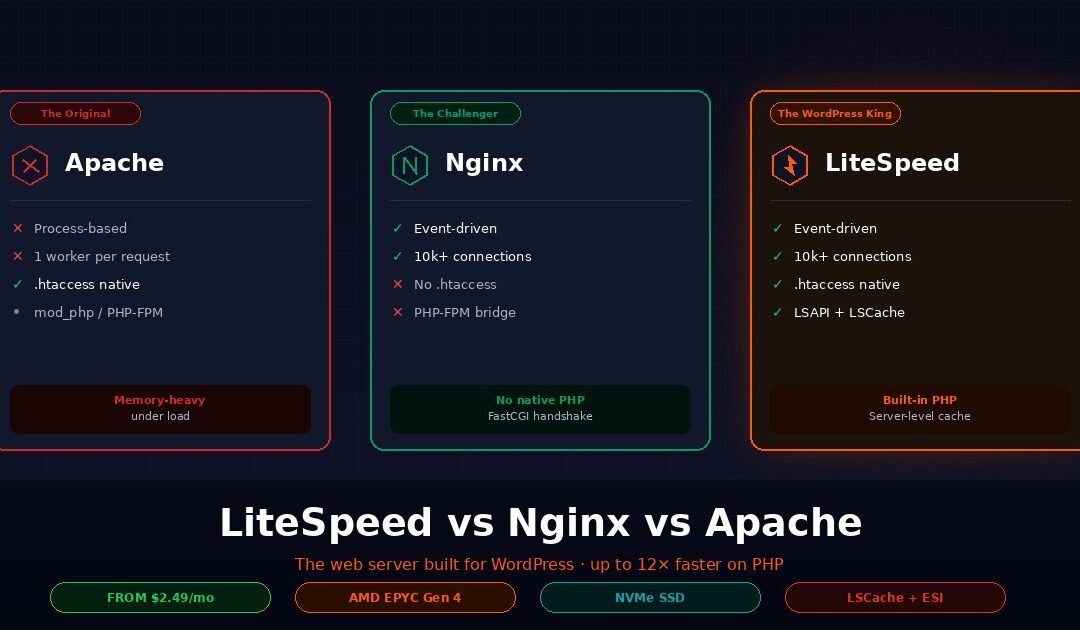
LiteSpeed Web Server (LSWS) is a commercial web server that reads Apache configuration files natively but uses an event-driven architecture like Nginx. It serves dynamic PHP pages faster than both, largely because of its built-in LSCache engine and the LSAPI protocol that keeps PHP processes warm between requests. Webhost365 WordPress Hosting runs on LiteSpeed Enterprise with LSCache and NVMe SSD from $2.49 per month, which is the same stack that a $15-per-month managed WordPress host uses at six times the price.
This guide explains how LiteSpeed actually works, how it compares to Nginx and Apache on real WordPress workloads, what LSCache does that makes LiteSpeed worth the switch, and the difference between LiteSpeed Enterprise and the free OpenLiteSpeed. You will finish with a clear decision framework for whether your site should be on LiteSpeed hosting or not. The honest answer is that most WordPress and WooCommerce sites should be. Most static sites and Node.js apps should not.
What is LiteSpeed Web Server?
LiteSpeed Web Server, often abbreviated LSWS, is a commercial web server software developed by LiteSpeed Technologies since 2003. It is a drop-in Apache replacement that reads .htaccess files and mod_rewrite rules natively, but uses an event-driven, asynchronous architecture like Nginx for massive concurrency with low memory overhead.
The unusual thing about LiteSpeed is that it does not force you to choose between Apache’s compatibility and Nginx’s speed. It ships with both. Your existing .htaccess rules work without modification. Your WordPress rewrite rules, your WooCommerce redirects, your cache exclusion patterns, and your security directives all transfer directly. At the same time, LiteSpeed handles thousands of concurrent connections per worker process, which is the scalability profile that Nginx is famous for.
A commercial product with a free sibling
LiteSpeed Technologies releases the web server in two editions. LiteSpeed Enterprise is the commercial product that hosting providers license and deploy on shared hosting, VPS, and dedicated servers. It has no worker limits, supports every feature in the LiteSpeed ecosystem, and integrates with cPanel, WHM, and Plesk control panels out of the box.
OpenLiteSpeed is the free open-source sibling, released under the GPLv3 license. It shares the core event-driven engine but caps at eight worker processes, uses a web-based configuration UI instead of native .htaccess parsing, and lacks Edge Side Includes (ESI) support. For self-hosters on a VPS or developers experimenting with the stack, OpenLiteSpeed is a genuine free alternative. For anyone running a production WordPress site on shared or managed hosting, the Enterprise edition is the one you will actually encounter.
Built for PHP, from the ground up
What separates LiteSpeed from Apache and Nginx at a fundamental level is the PHP handler. Apache uses mod_php (deprecated in modern versions) or PHP-FPM over FastCGI. Nginx has no native PHP support at all and must hand every request off to a separate PHP-FPM socket. LiteSpeed has LSAPI, a PHP handler built directly into the server core that keeps PHP processes warm and ready to execute between requests.
This matters because PHP is how WordPress, WooCommerce, Magento, Drupal, and most of the commercial web runs. A web server that handles PHP in one optimised pipeline — instead of bridging to an external process — has a structural advantage on exactly the workloads that pay most hosting bills.
The feature list
LiteSpeed Enterprise ships with LSCache (a server-level page cache engine), LSAPI for PHP, native HTTP/3 and QUIC support, a built-in Web Application Firewall that works at the binary level, ModSecurity compatibility without the usual performance penalty, anti-DDoS mechanisms, WordPress brute-force protection, and integration with QUIC.cloud for edge CDN caching. Every item in that list is either missing from Nginx and Apache or available only through third-party modules that add latency and configuration overhead.
How LiteSpeed is different from Apache and Nginx
Apache uses process-based architecture that spawns a new worker for every connection. Nginx uses event-driven architecture that handles thousands of connections per worker but cannot speak PHP natively. LiteSpeed combines Nginx’s event-driven efficiency with Apache’s .htaccess compatibility, and adds a PHP handler that is faster than both. The three web servers are not interchangeable, and the tradeoffs are worth understanding before you pick a hosting stack.
Apache — the process-based original
Apache HTTP Server was released in 1995 and still powers roughly a third of active websites. It uses a process-based architecture, which in its traditional prefork mode means one operating system process per active connection. If 100 users hit your site at the same time, Apache spawns 100 worker processes, each consuming memory and CPU cycles.
The strengths of Apache are real. It has the largest module ecosystem of any web server. also It supports .htaccess files that let site owners override configuration per directory, which is the foundation of cPanel shared hosting. It handles dynamic content natively through PHP modules and has matured over three decades of production deployment.
The weaknesses show up under load. Memory consumption climbs linearly with concurrent connections. A server running Apache prefork might support 200 concurrent connections before memory pressure becomes an issue. The same hardware running LiteSpeed or Nginx can handle 10,000 or more. Modern Apache deployments use PHP-FPM over FastCGI instead of the deprecated mod_php, and the event MPM mode improves the worker model somewhat, but the architectural ceiling remains.
Nginx — the event-driven challenger
Nginx was released in 2004 to solve the C10k problem — handling 10,000 concurrent connections on a single server. It uses an event-driven, non-blocking I/O model where a small number of worker processes each handle thousands of connections simultaneously through an event loop. The memory footprint per connection is a fraction of Apache’s.
For static files, reverse proxying, load balancing, and serving as an API gateway, Nginx is exceptional. Its configuration syntax is strict and centralized, which is both a feature and a drawback depending on who is maintaining the server. Nginx is the most common choice for high-traffic Node.js, Python, Go, and Rust applications, where it sits in front of application servers and handles the network layer.
The weakness for WordPress hosts is PHP. Nginx cannot execute PHP natively and must pass every dynamic request to PHP-FPM through a FastCGI socket. This adds a small but measurable latency to every uncached WordPress request. For a WooCommerce store with hundreds of database queries per page, the FastCGI handshake cost accumulates. Nginx also does not read .htaccess files, so every rewrite rule and access control must be converted to Nginx syntax and placed in centralized config files.
LiteSpeed — event-driven, Apache-compatible, native PHP
LiteSpeed takes the event-driven worker model from Nginx and adds .htaccess parsing from Apache. A small number of workers handle massive concurrency, but your existing Apache configuration keeps working without translation. For hosting providers running cPanel or WHM, this is the single biggest operational advantage — they can move from Apache to LiteSpeed without rewriting a single customer’s site.
The second advantage is LSAPI. Instead of bridging to PHP-FPM over a socket, LiteSpeed integrates the PHP handler directly into the server core. PHP processes stay warm between requests, which eliminates the FastCGI handshake cost that Nginx pays on every dynamic hit. On WordPress, this shows up as lower time-to-first-byte on uncached pages and substantially higher throughput under concurrent load.
The third advantage is that LiteSpeed handles the full request lifecycle — connection acceptance, URL routing, .htaccess evaluation, PHP execution, response caching, and content delivery — in one optimised pipeline. HTTP/3 and QUIC support are built into the server core, not bolted on as add-on modules. For PHP workloads, and especially for WordPress and WooCommerce, the combined effect is that LiteSpeed is simply the right tool for the job.
Benchmarks — how much faster is LiteSpeed?
On WordPress and WooCommerce workloads, LiteSpeed Enterprise with LSCache typically delivers 8 to 12 times the throughput of Nginx with a generic PHP cache, and 50 to 80 times Apache prefork under concurrency. Static file serving is roughly tied between LiteSpeed and Nginx, with both significantly outperforming Apache. The numbers vary with hardware, tuning, and workload profile, but the ranking is consistent across independent benchmarks.
| Workload | Winner | Typical advantage |
|---|---|---|
| Static files (CSS, JS, images) | LiteSpeed & Nginx (tied) | 4–5× faster than Apache prefork |
| Uncached PHP (WordPress dynamic) | LiteSpeed | 2–3× faster than Nginx + PHP-FPM |
| Cached WordPress (LSCache vs plugin) | LiteSpeed | TTFB under 50ms consistently |
| WooCommerce (high-concurrency) | LiteSpeed | 12× more requests/sec than Nginx |
| Memory per 1000 connections | LiteSpeed | Roughly half the memory of Nginx |
| Raw HTTP/3 throughput | LiteSpeed | 2× Nginx with QUIC, native implementation |
Where the numbers come from
LiteSpeed Technologies publishes its own benchmarks on controlled test hardware, and those numbers are the most favourable to LiteSpeed. Independent benchmarks from MassiveGRID, RunCloud, WPBeginner, and Hostinger confirm the direction of the results but show smaller gaps — typically 2 to 5 times Nginx on dynamic WordPress rather than 12 times. The truth sits somewhere between the vendor benchmarks and the independent tests, and both agree that LiteSpeed with LSCache wins on PHP workloads by a meaningful margin.
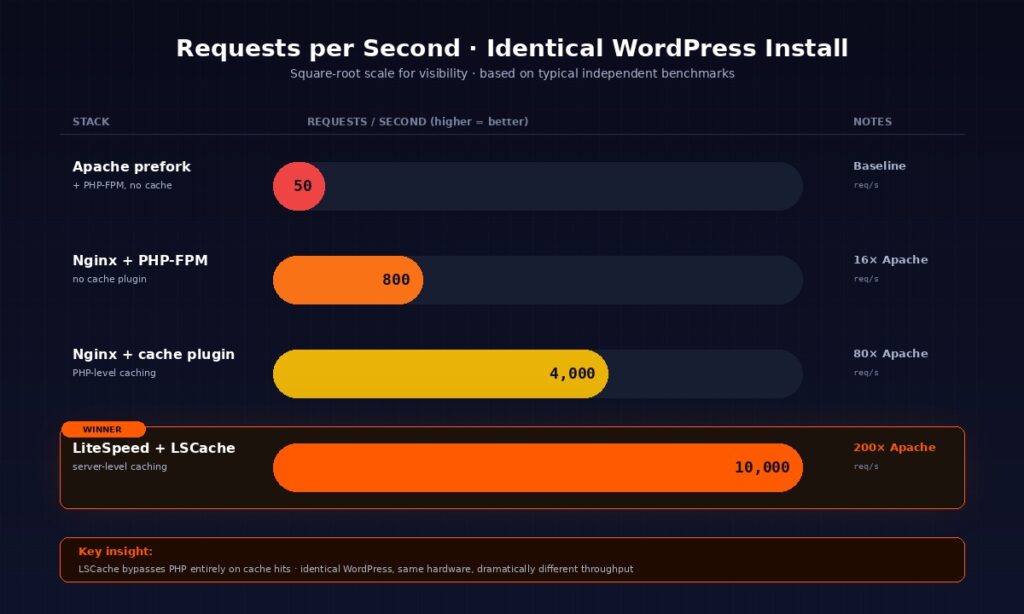
The real-world win for most WordPress sites is not peak throughput. It is TTFB consistency under load. A site that serves a cached homepage in 30 milliseconds at 100 concurrent users and 35 milliseconds at 10,000 concurrent users has a fundamentally different user experience than a site that serves in 400 milliseconds at low load and 4 seconds at peak. LiteSpeed’s architecture keeps the curve flat. That flatness is what Core Web Vitals reward and what page speed tools like GTmetrix and PageSpeed Insights actually measure.
Where LiteSpeed does not win
LiteSpeed is optimised for PHP. On Node.js, Python, Go, or Rust workloads, Nginx reverse-proxying to the application server is still the industry standard, and LiteSpeed does not beat it. For pure microservice architectures, API gateways, or WebSocket-heavy applications, Nginx remains the right choice. LiteSpeed is also a commercial product, so for self-hosted projects on a Linux VPS where licensing cost matters, OpenLiteSpeed or Nginx are legitimate alternatives depending on the workload.
The honest framing is that LiteSpeed wins decisively on WordPress, WooCommerce, Magento, and any PHP CMS. On everything else, the competition is closer and sometimes the other direction.
LSCache — the feature that makes LiteSpeed worth it
LSCache is a server-level page cache built into LiteSpeed that stores fully-rendered HTML pages in memory. Unlike a PHP-based cache plugin, LSCache intercepts requests before they reach the PHP interpreter, which means cached pages are delivered in under 50 milliseconds regardless of how heavy the WordPress theme or plugin stack is. For most WordPress sites, LSCache is the single biggest reason to switch to LiteSpeed hosting.
How LSCache works
In a standard WordPress stack, even with a caching plugin installed, every request goes through PHP first. The web server hands the request to PHP-FPM, PHP loads the WordPress core and the active caching plugin, and the plugin then decides whether to serve a pre-generated HTML file from disk or regenerate the page. This process is faster than no cache at all, but it still requires spawning a PHP process for every single request, which is expensive in both CPU cycles and RAM.
LSCache changes the flow entirely. When a cacheable page is requested, LiteSpeed checks its cache memory before it ever thinks about spawning a PHP process. If the page is cached, LSWS serves it directly from memory, and the request never touches the PHP interpreter at all. The result is a time-to-first-byte under 50 milliseconds, often under 30 milliseconds, regardless of how many plugins your WordPress install runs or how bloated your theme is. The free LiteSpeed Cache plugin for WordPress handles the communication between your WordPress install and the server, telling LiteSpeed which pages to cache, for how long, and when to invalidate them.
Tag-based purging — the feature that matters more than raw speed
Most caching plugins handle cache invalidation by nuking the entire cache every time you edit a post. The cache hit rate drops to zero, every page regenerates on the next visit, and your server load spikes until the cache rebuilds. For a site that edits content regularly, the average cache hit rate can be surprisingly low.
LSCache uses a tag-based purging system that is fundamentally different. When you edit post 123, the LSCache plugin tells the server to purge only the pages tagged with post-123, which includes the post page itself, the homepage where it appears in a recent-posts widget, and the category or tag archives where it is listed. Every other cached page stays intact. The surgical precision keeps the cache hit rate high even on active sites, which is the actual reason experienced WordPress editors prefer LiteSpeed hosting once they have used it.
ESI for logged-in users
WordPress sites with logged-in users — membership sites, WooCommerce stores with active carts, learning platforms, customer portals — have a classic caching problem. You cannot cache a page that shows “Hello, Bharat” in the header because the next visitor would see that same greeting. Most WordPress hosts solve this by disabling caching entirely for logged-in users, which means your highest-value visitors get your slowest pages.
LiteSpeed Enterprise solves this with Edge Side Includes, or ESI. ESI lets LSCache serve a fully cached page but “punch a hole” in the dynamic parts. The page body, the product listing, the blog posts — all served from cache. The greeting, the mini-cart, the user avatar — rendered dynamically through a tiny PHP call that affects only the ESI block. The rest of the page stays in the cache, fast and consistent. ESI is the feature that makes LiteSpeed essential for WooCommerce stores and membership sites, and it is one of the capabilities that only the Enterprise edition supports.
What LSCache is not
LSCache is not a CDN. It stores cached pages on the origin server, which means a visitor in Mumbai still makes a transatlantic round trip to your Frankfurt data centre before getting the cached response. LSCache pairs naturally with a CDN to close that gap — the CDN caches at 197 global edges, LSCache handles the origin. For how CDNs work and why they matter alongside server-level caching, see our guide on what a CDN is.
LSCache is also not magic. A WordPress site with 40 plugins and a bloated theme will still have a slow admin panel and slow uncached requests. LSCache only helps on pages that can be cached, and it cannot fix bad code. What it does fix, completely and measurably, is the problem of PHP overhead on cached page delivery.
The free LiteSpeed Cache plugin installed on a non-LiteSpeed host gives you the optimization features — image optimization, CSS/JS minification, lazy loading, database cleanup — but none of the server-level caching. That piece genuinely requires a LiteSpeed server. If you are running the LSCache plugin on Nginx or Apache and wondering why the caching settings have no effect, that is why.
LiteSpeed Enterprise vs OpenLiteSpeed — which should you care about?
LiteSpeed Enterprise is the commercial product licensed by hosting providers. OpenLiteSpeed is the free open-source version. Both share the core event-driven engine, but Enterprise has no worker limits, supports ESI, reads .htaccess natively, and ships with the full LSCache module. OpenLiteSpeed caps at eight workers, uses a web-based config UI instead of .htaccess, and lacks ESI.
| Feature | LiteSpeed Enterprise | OpenLiteSpeed |
|---|---|---|
| Price | Commercial (licensed by hosts) | Free (open source) |
| Worker cap | Unlimited | 8 workers max |
| .htaccess support | Native | Requires manual rewrite in config |
| ESI support | Yes | No |
| WHM / cPanel integration | Yes | No |
| LSCache module | Full (tag purging, ESI, crawler) | Basic |
| Best for | Shared hosting, managed WordPress | Self-hosters, VPS users, tinkerers |
Which one you are actually using
Most readers will use Enterprise whether they realise it or not. Every major cPanel host that advertises LiteSpeed uses the Enterprise edition, because LiteSpeed Technologies licenses this version for commercial hosting. If your WordPress host has a control panel and says “LiteSpeed” on the feature list, it is Enterprise.
OpenLiteSpeed is the version you would install yourself on a VPS. The eight-worker cap is genuinely fine for single WordPress sites serving under roughly 5,000 concurrent visitors, which is higher than most sites will ever see. The missing .htaccess parsing is a real adjustment — WordPress rewrite rules need to be applied through the OpenLiteSpeed web admin instead of the familiar .htaccess file. For a developer setting up their own WordPress environment on a Linux VPS, OpenLiteSpeed is a legitimate free option that gets you most of the LSCache benefit.
The ESI distinction is the one that matters
If you run a WooCommerce store, a membership site, an LMS, or any WordPress site with meaningful logged-in-user traffic, the Enterprise edition is not optional. ESI is the feature that keeps those pages cached. Without ESI, OpenLiteSpeed will serve your logged-in users uncached, which defeats the purpose of being on LiteSpeed in the first place.
Webhost365 WordPress Hosting runs LiteSpeed Enterprise with the full LSCache module including ESI, on every plan from $2.49 per month. This is the configuration that makes the server-level caching story actually work end to end.
Should you actually switch to LiteSpeed hosting?
LiteSpeed is worth switching to if you run WordPress or WooCommerce, care about Core Web Vitals and mobile TTFB, or expect traffic spikes. It is not worth switching for static HTML sites, non-PHP applications like Node.js or Python, or WordPress sites that get fewer than 500 visits per day and already load fast. The decision is mostly binary once you know which bucket your site is in.
Switch to LiteSpeed if
You run WordPress, WooCommerce, Magento, Drupal, or any PHP CMS. LiteSpeed Web Server is built for this exact workload, and it outperforms NGINX with a generic cache plugin by a margin large enough to notice even without running benchmarks.
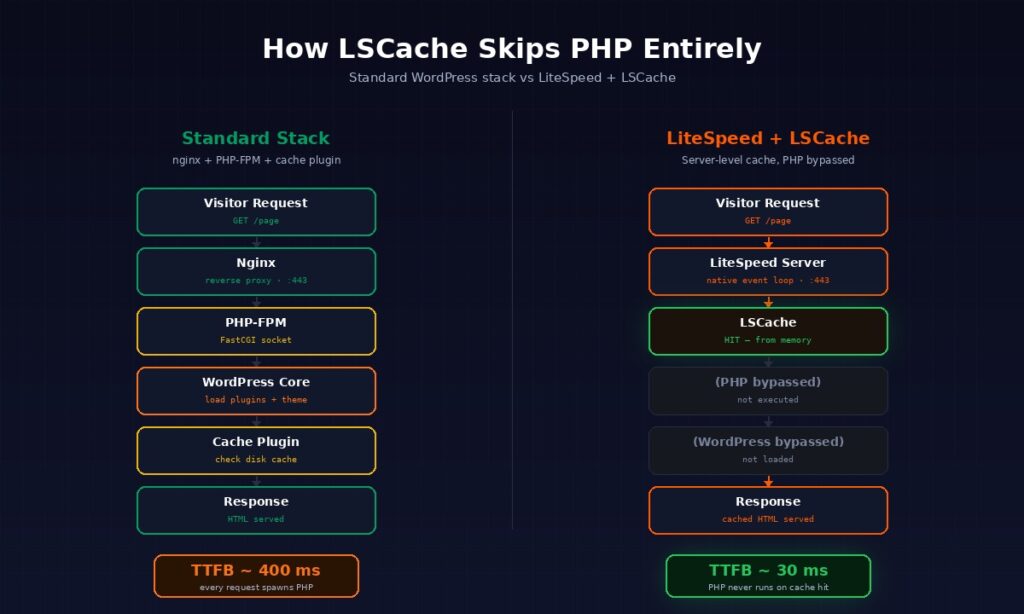
Your site handles traffic spikes from sales, press mentions, newsletter sends, or viral content. LSCache serves spike traffic from memory without saturating the PHP pool, which is the failure mode that takes most WordPress sites offline during their biggest moments.
Your Google PageSpeed Insights or Core Web Vitals scores are hurting your rankings. Server-level caching drops TTFB to under 50 milliseconds on cached pages, which directly improves the Largest Contentful Paint and Interaction to Next Paint metrics Google ranks on.
You have a global audience. LiteSpeed’s native HTTP/3 and QUIC support deliver measurably better performance on mobile networks and long-distance connections, particularly when paired with Bunny CDN at the edge.
You run logged-in-user sites. Membership platforms, WooCommerce stores with active carts, LMS platforms, and customer portals all benefit enormously from ESI, which caches the static parts of logged-in pages while keeping the personal elements dynamic. This is the single killer feature for operators who have tried everything else and given up on caching for logged-in users.
You are comparing entry-level WordPress hosting plans and want the one with the fastest stack. The presence of LiteSpeed Enterprise at $2.49 per month is the same technology that managed WordPress hosts like WP Engine and Kinsta charge $25 to $35 per month for, minus the markup.
Do not bother with LiteSpeed if
Your site is static HTML with no PHP. A static site on Nginx or even Apache will serve just as fast as the same site on LiteSpeed, because the PHP advantage is the one that separates them and static sites do not use PHP.
You run Node.js, Python, Go, or .NET applications. Nginx as a reverse proxy in front of your application server is the industry standard for these stacks, the documentation ecosystem assumes Nginx, and LiteSpeed offers no meaningful advantage on non-PHP workloads. For deployments like these, a Linux VPS running Docker with Nginx or Caddy is the right architecture.
Your site gets under 500 visits per day and loads in under two seconds already. The difference between a 30-millisecond cached LiteSpeed response and a 120-millisecond cached Nginx response is real, but the end user cannot perceive it at low traffic, and switching hosts for that gap is not worth the migration effort.
You need features that only Nginx or specific Apache modules provide. Examples include advanced stream processing, specific rate-limiting modules, or legacy Apache modules with no LiteSpeed equivalent. These cases are rare, but they exist.
You are happy with your current hosting and have no performance complaints. The best hosting migration is the one you never need to do.
How to check if your current host runs LiteSpeed
The easiest check is the HTTP response header. Open your site in a browser, open the developer tools (right-click and Inspect, or press F12), switch to the Network tab, and reload the page. Click the first resource in the list, usually the HTML document, and look at the Response Headers section. A server: LiteSpeed header means your host runs LiteSpeed. server: Apache or server: nginx means they do not.
There is a subtler trap worth calling out. Many WordPress hosts advertise “LiteSpeed Cache plugin included” on their feature lists. That does not mean they run LiteSpeed server. The LSCache plugin is a free WordPress plugin that works as an interface to a LiteSpeed server. Without a LiteSpeed server behind it, the plugin’s caching features are inert — you get the optimization features like image compression and minification, but not the server-level caching that makes LiteSpeed actually fast. If you are evaluating a WordPress host, check the response header, not the feature list.
LiteSpeed and Webhost365 — the full stack
Webhost365 WordPress Hosting runs LiteSpeed Enterprise with the full LSCache module, including ESI support, on every plan from $2.49 per month. That is the same web server technology that managed WordPress hosts charge $15 to $30 per month for, at a fraction of the price and with no renewal hikes.
The stack below LiteSpeed matters just as much as the web server. NVMe SSD storage on AMD EPYC Gen 4 processors keeps cache misses fast and LSAPI PHP execution consistently low-latency. LSAPI benefits disproportionately from high single-threaded CPU performance, which is exactly what AMD EPYC Gen 4 delivers at the entry price point. For a deeper look at why NVMe matters for WordPress databases and cache I/O, see our guide on NVMe SSD and website speed.
Bunny CDN is integrated at the platform level across 197 global edge locations. LiteSpeed handles origin caching with LSCache. Bunny handles edge caching for static assets and geography-based delivery. The two layers complement each other — LiteSpeed eliminates PHP overhead, Bunny eliminates the origin round trip. The combined effect is sub-second load times globally on WordPress sites, measured by GTmetrix and Google PageSpeed Insights consistently above 90.
Every WordPress Hosting plan also includes automatic daily backups with 30-day retention, free auto-renewing SSL certificates, free website migration, HTTP/3 and QUIC support, L3-L7 DDoS protection at the CDN edge, automated malware scanning and removal, staging environments for safe updates, and the Softaculous installer for one-click WordPress deployment. The combination is what a production WordPress site actually needs, packaged at an honest price. For a broader comparison of WordPress hosting options, see our guide to the best hosting for WordPress.
The short version is that LiteSpeed is not a premium feature on Webhost365. It is the default, on every plan, from the cheapest tier up. That is the entire point of the platform.
Frequently asked questions about LiteSpeed Web Server
What is LiteSpeed Web Server in simple terms?
LiteSpeed Web Server is a commercial web server software that combines Apache’s compatibility with Nginx-style speed. It reads your existing Apache configuration files without any changes, handles thousands of concurrent connections per worker like Nginx, and includes a built-in page cache (LSCache) that makes WordPress sites dramatically faster. LiteSpeed Technologies developed it and released it in 2003. The company offers both a paid Enterprise edition and a free OpenLiteSpeed edition.
Is LiteSpeed faster than Nginx?
LiteSpeed is faster than Nginx on dynamic PHP workloads like WordPress and WooCommerce, typically by two to twelve times depending on the test. The advantage comes from LSAPI, which handles PHP natively inside the server, and LSCache, which serves cached pages from memory without touching PHP at all. For static files, reverse-proxy workloads, or non-PHP applications like Node.js and Python, Nginx is equal to or better than LiteSpeed and remains the industry standard.
Is LiteSpeed free?
LiteSpeed comes in two editions. LiteSpeed Enterprise is a commercial product that hosting providers license to include in their plans, so end users access it through their hosting package rather than paying directly. OpenLiteSpeed is fully free and open source under the GPLv3 license, and you can install it yourself on a VPS, but it has an eight-worker cap and lacks some advanced features like ESI.
Is OpenLiteSpeed the same as LiteSpeed?
OpenLiteSpeed shares the core event-driven engine with LiteSpeed Enterprise but is not identical. The Enterprise edition has no worker cap, supports ESI for logged-in user caching, reads .htaccess files natively, and integrates with cPanel and WHM. OpenLiteSpeed has an eight-worker limit, no ESI, uses a web-based admin UI for configuration, and lacks control panel integration. For self-hosters, OpenLiteSpeed is a solid free choice. For production WordPress or WooCommerce sites, the Enterprise edition is the one you want.
Do I need to change my code to switch from Apache to LiteSpeed?
No, LiteSpeed is a drop-in Apache replacement. It reads .htaccess files natively, supports mod_rewrite rules and Apache directives, and handles your existing configuration without modification. Most migrations from Apache to LiteSpeed involve zero code changes on the WordPress side. The LiteSpeed Cache plugin replaces your previous caching plugin, but your themes, custom plugins, rewrite rules, and site structure all transfer directly.
Does LiteSpeed work with WordPress out of the box?
Yes, LiteSpeed works with WordPress out of the box and offers significantly better performance than Apache or Nginx on WordPress workloads. To get the full benefit of server-level caching, you install the free LiteSpeed Cache plugin from the WordPress plugin directory. The plugin communicates with the LiteSpeed server and tells it which pages to cache, for how long, and when to invalidate them. Default settings are appropriate for most WordPress sites, so setup is essentially one-click.
Can I use the LSCache plugin without a LiteSpeed server?
You can install and activate the LSCache plugin on any WordPress site, but the server-level caching will not work unless you are on a LiteSpeed server or using QUIC.cloud CDN. On non-LiteSpeed hosts, you still get the optimization features like image compression, CSS and JS minification, lazy loading, and database cleanup. The actual page caching — which is the main reason to use LSCache — requires a LiteSpeed server to function.
What is LSAPI and why does it matter?
LSAPI is LiteSpeed’s native PHP handler, short for LiteSpeed Server Application Programming Interface. It connects the web server directly to PHP inside one process pipeline, keeping PHP processes warm between requests instead of spawning and terminating them for each hit. The result is lower per-request overhead than Nginx with PHP-FPM or Apache with mod_php, which translates into faster time-to-first-byte on dynamic WordPress pages and significantly higher throughput under concurrent load.
Does LiteSpeed support HTTP/3 and QUIC?
Yes, LiteSpeed has native HTTP/3 and QUIC support built directly into the server core, not bolted on through modules. HTTP/3 uses QUIC over UDP instead of TCP, which reduces latency on mobile networks and unstable connections, improves TLS handshake speed, and delivers measurably faster page loads for global audiences. LiteSpeed was one of the first production web servers to implement HTTP/3, and its implementation is considered one of the more mature available today.
How do I know if my hosting uses LiteSpeed?
Open your site in a browser, press F12 to open the developer tools, switch to the Network tab, and reload the page. Click the first resource in the list, which is usually the HTML document, and find the Response Headers section. If you see server: LiteSpeed, your host runs LiteSpeed. If you see server: Apache or server: nginx, they do not. Be aware that many hosts advertise “LiteSpeed Cache plugin included” on their feature lists, which does not mean they run LiteSpeed server — only the response header tells you for certain.
Ready to switch to LiteSpeed hosting?
Webhost365 WordPress Hosting runs LiteSpeed Enterprise with the full LSCache module, NVMe SSD storage, AMD EPYC Gen 4 processors, and Bunny CDN across 197 global edge locations — the same production stack that managed WordPress hosts charge $15 to $30 per month for, starting at $2.49 per month with no renewal price hike. Every plan includes free migration with zero downtime, free auto-renewing SSL, daily backups with 30-day retention, and 24/7 expert support. Browse WordPress Hosting plans or compare against our other hosting tiers to find the right fit for your site.