
Free web hosting gives you server space, a control panel, and basic tools to publish a website without paying anything. The tradeoff is real and most reviews gloss over it: the majority of free plans in 2026 come with storage under 5 GB, bandwidth caps that choke the moment your site gets any meaningful traffic, no CDN, forced advertising plastered on your pages, subdomain-only addresses that look unprofessional, and suspension policies that can take your site offline with little warning. Some free hosts still run spinning hard drives. Others restrict you to outdated PHP versions or block custom domain SSL unless you upgrade to a paid tier.
That said, free hosting is not universally bad. A few providers in 2026 offer genuinely usable free plans with modern infrastructure, and for the right use case, starting at zero cost is a perfectly rational decision. The key is knowing exactly what you are getting, what you are giving up, and where the hidden catches are buried.
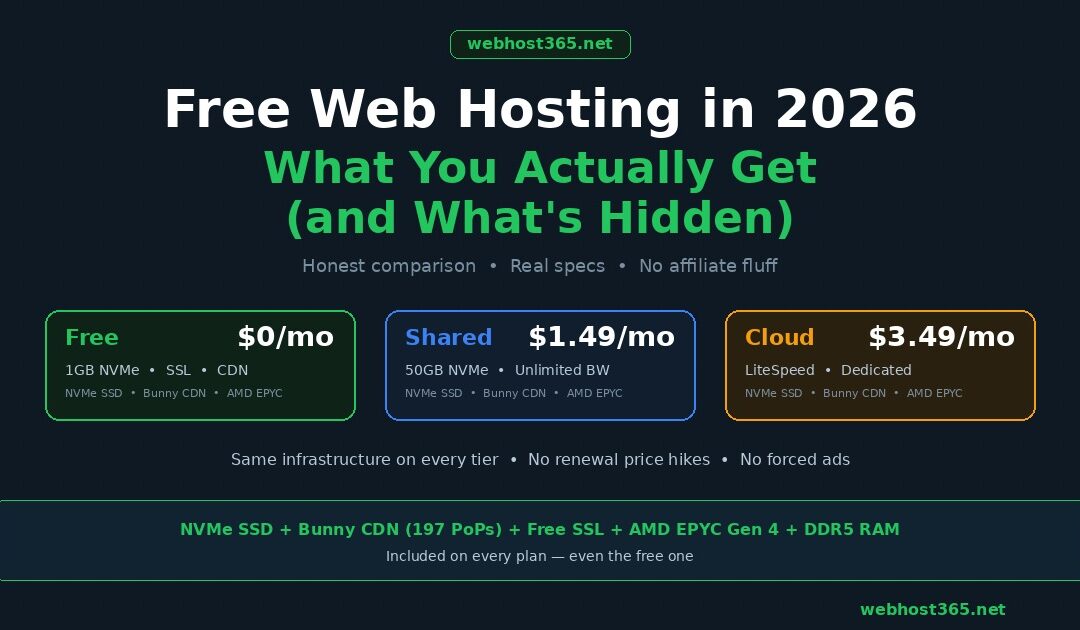
Webhost365 offers a permanent $0 free tier with 1 GB NVMe SSD storage, 1 GB monthly bandwidth, one MySQL database, free auto-renewing SSL, Bunny CDN with 197 global edge locations, and no forced advertisements. It runs on the same AMD EPYC Gen 4 processors and DDR5 RAM as every paid plan on the platform. No credit card is required to sign up.
This guide does what most free hosting reviews do not. It starts with what free hosting hides from you, then compares what each provider actually includes using real specifications rather than marketing claims, gives you a clear framework for deciding whether free hosting fits your project, and shows you the exact point where spending $1.49 per month eliminates every limitation free hosting imposes. Whether you are a student building your first portfolio, a developer testing a CMS, or a small business owner evaluating your options, you will leave this guide knowing exactly what free hosting can and cannot do for you in 2026.
What “free hosting” actually means in 2026
Free web hosting is a service where a provider gives you server space, a control panel, and basic website tools at no monetary cost. The provider covers its expenses through advertising on your site, aggressive upselling to paid plans, heavily shared infrastructure with strict resource limits, or a combination of all three. Understanding how the provider makes money tells you exactly where the catches will be.
There are three distinct types of “free” hosting, and they work very differently.
The first type is a genuinely free forever plan. You sign up, you get a hosting account, and you keep it indefinitely as long as you stay within the resource limits and comply with the terms of service. Webhost365, InfinityFree, and FreeHosting.com fall into this category. There is no trial period and no credit card on file. The provider profits when a percentage of free users eventually upgrade to paid plans as their sites grow. This is the most honest model because the incentive is aligned: the provider wants your site to succeed so you spend more later.
The second type is a free trial with automatic billing. Providers like Squarespace and some traditional hosts offer 7 to 30 days of free access, after which your card is charged automatically. This is not free hosting. It is a paid service with a trial period. If you forget to cancel, you pay. If you build your site during the trial and decide not to continue, you lose everything. Read the billing terms before you enter any payment details.
The third type is a freemium platform with heavy restrictions designed to push you toward upgrading. Wix and WordPress.com are the most prominent examples. You can build and host a site for free, but your site displays the provider’s branding and advertisements, you cannot use a custom domain without paying, and critical features like analytics and e-commerce require a premium subscription. The free tier is a permanent demo mode, not a complete hosting service.
The free hosting landscape has also shrunk significantly. 000webhost, once the most popular free hosting provider, was shut down by its parent company Hostinger in early 2024. Hostinger’s own free tier was discontinued around the same time. Users who relied on either service had to migrate to paid plans or find alternative providers with little notice. This is not ancient history. It happened less than two years ago and affected millions of websites. The lesson is straightforward: free hosting on a provider that treats it as a temporary marketing promotion rather than a permanent product tier is always at risk of disappearing.
What remains in 2026 falls into two categories. Traditional free hosting providers like Webhost365, InfinityFree, and FreeHosting.com offer PHP, MySQL, and WordPress support on standard hosting infrastructure. Developer-focused platforms like GitHub Pages, Cloudflare Pages, and Netlify offer free hosting exclusively for static sites, with no PHP, no server-side processing, and no traditional databases. Both categories are legitimate, but they serve completely different use cases, and choosing the wrong one is a common mistake that wastes weeks of setup time.
What free hosting plans actually include (the real specs)
Most free hosting plans in 2026 provide between 500 MB and 5 GB of storage, 1 to 10 GB of monthly bandwidth, PHP support, one MySQL database, and a subdomain. Beyond these basics, the feature set varies dramatically between providers, and the differences that matter most are the ones that rarely appear in marketing copy.
Here is what each major free hosting provider actually offers, compared on the specifications that affect your website’s speed, security, and reliability.
| Feature | Webhost365 Free | InfinityFree | FreeHosting.com | GitHub Pages | Cloudflare Pages |
|---|---|---|---|---|---|
| Storage | 1 GB NVMe SSD | 5 GB | 10 GB | 1 GB | 500 builds/month |
| Bandwidth | 1 GB/month | ~5 GB/month | ~1 GB/month | 100 GB/month | Unlimited |
| Storage type | NVMe SSD | HDD/SSD mix | HDD | SSD | Edge (CDN-based) |
| Custom domain | Yes | Yes | Yes | Yes | Yes |
| Free SSL | Yes (auto-renewing) | Yes (shared) | No | Yes | Yes |
| CDN included | Bunny CDN, 197 PoPs | No | No | Fastly CDN | Cloudflare global |
| Forced ads | No | No | No | No | No |
| WordPress support | Yes (one-click) | Yes (one-click) | Yes | No (static only) | No (static only) |
| PHP support | Yes | Yes | Yes | No | No |
| MySQL databases | 1 | Unlimited | 1 | None | D1 (limited) |
| Email hosting | Yes | No | Yes | No | No |
| SSH access | No | No | No | Yes (via Git) | No |
| Control panel | DirectAdmin | VistaPanel | Custom | Git workflow | Dashboard |
| Inode limit | Published terms | 30,000 | Unclear | None | None |
| Suspension policy | Clear terms published | 24hr zero traffic = review | Unclear | None | None |
| Processor | AMD EPYC Gen 4 | Undisclosed | Undisclosed | N/A | N/A |
| Best for | WordPress, PHP sites, portfolios | PHP testing, learning | Basic PHP sites | Static sites, docs, portfolios | JAMstack, static sites |
The table reveals a split that most free hosting reviews fail to address. GitHub Pages and Cloudflare Pages are excellent platforms with generous bandwidth and global CDN, but they only host static files. No PHP, no WordPress, no server-side databases, no dynamic content. If your site runs on WordPress, WooCommerce, Laravel, or any PHP-based CMS, these platforms are not an option regardless of how attractive their bandwidth numbers look.
For anyone who needs WordPress or a dynamic site at zero cost, the practical comparison narrows to Webhost365, InfinityFree, and FreeHosting.com. Among these three, the infrastructure differences are significant.
InfinityFree offers the most raw storage at 5 GB, but it runs on undisclosed hardware, caps inodes at 30,000 (which limits how many files your site can contain), provides no CDN, and reviews its accounts for suspension if they receive zero traffic for 24 hours. If you install WordPress with a theme and a handful of plugins, the 30,000 inode limit can become a constraint faster than the 5 GB storage limit.
FreeHosting.com provides 10 GB of storage, the most generous allocation on this list, but it runs on traditional hard drives, does not include SSL on the free tier, has no CDN, and its suspension policy is not clearly documented. The absence of SSL alone is a problem in 2026. Browsers display security warnings on non-HTTPS sites, Google penalises them in search rankings, and visitors are increasingly trained to distrust sites without the padlock icon.
Webhost365’s free tier has the smallest storage allocation at 1 GB, but it runs on NVMe SSD with 0.02ms latency, includes Bunny CDN with 197 global edge locations, provides free auto-renewing SSL on custom domains, and runs on AMD EPYC Gen 4 processors with DDR5 RAM. The 1 GB storage is sufficient for a lightweight WordPress site, a portfolio, a landing page, or a small blog with optimised images. For sites that need more space, the upgrade path to General Hosting at $1.49 per month provides 50 GB of NVMe storage on the same infrastructure with no migration required.
The bottom line is that storage size is the easiest number to compare but the least useful predictor of real-world performance. A 10 GB site on a spinning hard drive with no CDN and no SSL will load slower, rank lower, and feel less trustworthy than a 1 GB site on NVMe with Bunny CDN and HTTPS enabled. The specifications that actually matter for your visitors are storage type, CDN availability, SSL support, and suspension reliability. Storage size only matters once you have exceeded it.
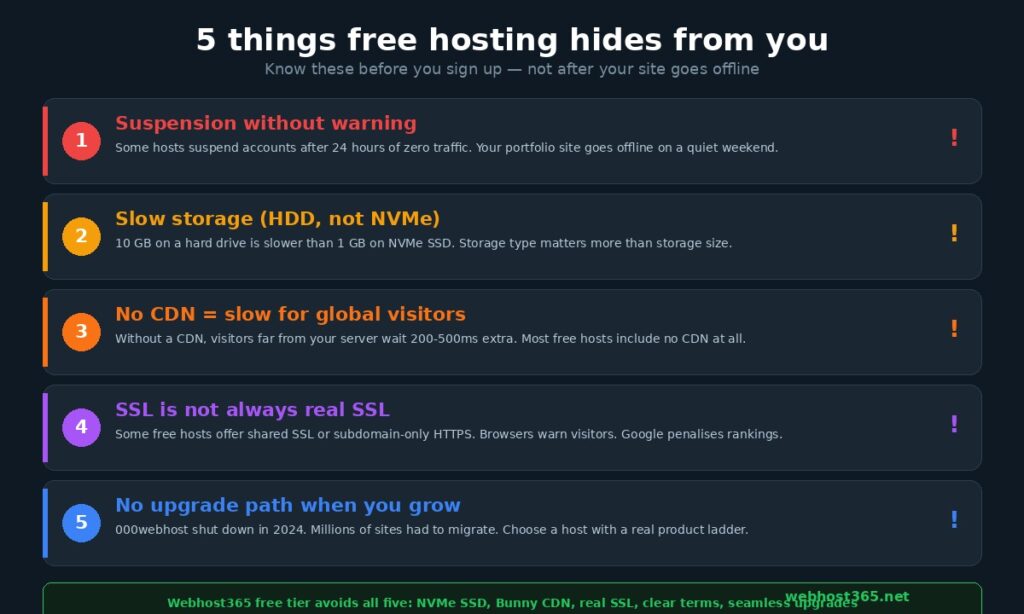
The 5 things free hosting hides from you
Free hosting providers are transparent about what they give you. They are far less transparent about what they take away, restrict, or change without notice. These five hidden catches affect every free hosting user eventually, and discovering them after you have built and published your site is significantly more painful than knowing about them before you start.
1. Your site can be suspended or deleted without warning
Every free hosting provider reserves the right to suspend or terminate your account for violating their terms of service. That is standard. What is not standard, and what most users do not read before signing up, is how aggressively some providers enforce inactivity and resource usage policies.
InfinityFree flags accounts for review if they receive zero traffic within a 24-hour window. For a personal portfolio site that gets a handful of visitors per week, this means your site could be flagged on any quiet day. FreeHosting.com does not clearly publish its suspension criteria, which means you discover the policy when your site goes offline and you receive an email asking you to upgrade. Some free providers delete account data 30 days after suspension, giving you a narrow window to recover your files.
Webhost365 publishes its free tier terms clearly at webhost365.net/free-products-terms/, including specific resource limits and the conditions under which accounts may be reviewed. Knowing the rules before you start is the difference between a manageable limitation and a surprise that costs you your site.
The practical safeguard is simple regardless of which provider you choose: maintain your own backups. Export your database weekly, download your site files to your local computer, and never treat any free hosting account as your only copy of anything. Free hosting should be your live server, not your backup.
2. Storage type matters more than storage size
This is the specification most free hosting reviews ignore entirely, because storage size is easy to compare and storage type requires explaining. But the difference between a hard drive and an NVMe SSD affects your website speed more directly than almost any other infrastructure variable.
A free hosting plan with 10 GB of storage on a traditional hard drive delivers data at approximately 130 MB/s with a latency of 5 to 10 milliseconds per request. A free plan with 1 GB on NVMe SSD delivers data at up to 7,000 MB/s with a latency of 0.02 milliseconds. When your WordPress site generates 30 database queries to load a single page, each query is affected by that latency. The HDD-hosted site spends 150 to 300 milliseconds waiting for the storage drive alone. The NVMe-hosted site spends 0.6 milliseconds on the same queries. That is a 250x difference in storage wait time, and your visitors feel it in every page load.
Most free hosting providers do not disclose what type of storage they use. If the provider does not mention NVMe or SSD specifically, assume it is running on the cheapest hardware available. For a deeper explanation of why storage type matters for web hosting and how NVMe compares to SATA SSD and HDD, see our complete guide on what is NVMe SSD and why it makes your website faster.
3. No CDN means your site is slow for everyone except local visitors
A CDN (Content Delivery Network) caches your website’s static assets on servers distributed around the world, so visitors receive content from a location close to them rather than from a single origin server that might be thousands of kilometres away. Without a CDN, every visitor makes the full round trip to your origin server regardless of where they are.
The impact is measurable. A visitor in Mumbai loading a page from a server in Frankfurt experiences 150 to 250 milliseconds of network latency before a single byte of content arrives. Add that to server processing time and you are looking at a Time to First Byte (TTFB) of 400 to 600 milliseconds or more. With a CDN, the same visitor receives cached assets from an edge server in India and the TTFB drops to under 100 milliseconds.
Among traditional free hosting providers (excluding developer-focused static platforms), Webhost365 is the only one that includes a CDN on the free tier. Bunny CDN with 197 global edge locations is active on every Webhost365 plan, including the $0 tier, with no configuration required. InfinityFree, FreeHosting.com, and the majority of free hosting providers offer no CDN at all. You can add a free Cloudflare CDN manually to most hosting accounts, but this requires DNS configuration that many beginners find intimidating, and Cloudflare’s free tier does not include image optimisation or advanced caching rules.
4. SSL is not always truly free
Every modern browser displays a “Not Secure” warning for sites that do not use HTTPS. Google has confirmed that HTTPS is a ranking signal. Visitors are increasingly trained to avoid sites without the padlock icon. In 2026, SSL is not optional for any website that expects to be taken seriously.
Most free hosting providers claim to include “free SSL,” but the implementation varies. Some providers offer shared SSL where your URL becomes something like your-site.provider-ssl.com rather than https://your-site.com. This technically encrypts the connection but does nothing for your brand credibility. Others provide free SSL only on their subdomain (yoursite.freehost.com) and charge for SSL on custom domains. A few providers, including FreeHosting.com, do not include SSL at all on the free tier.
Webhost365’s free tier includes genuine auto-renewing Let’s Encrypt SSL on custom domains at no cost. Your site loads as https://yourdomain.com with a valid certificate that renews automatically. This is the same SSL implementation used on every paid Webhost365 plan, and it is the standard your visitors and Google expect.
5. The upgrade path might not exist
This is the catch that hurts the most because it strikes when your site is succeeding. Your free hosting plan works fine for six months. Traffic grows, you add content, your site outgrows the free tier’s limitations. You are ready to pay for more resources. And then you discover that your free host does not offer a paid plan that makes sense, or worse, the provider discontinues the free tier entirely and gives you 30 days to move your entire site elsewhere.
This is not a theoretical risk. 000webhost was one of the most popular free hosting providers in the world before Hostinger shut it down in early 2024. Millions of users had to find new homes for their websites. Some lost data. Many lost time rebuilding on unfamiliar platforms. The providers that survived, like InfinityFree, offer paid plans through a separate brand (InfinityFree’s premium service is actually iFastNet), which means your “upgrade” involves migrating to a different platform.
The safest approach is to start free on a provider where the free tier is part of a genuine product ladder. On Webhost365, upgrading from the free tier to General Hosting at $1.49 per month or Cloud Hosting at $3.49 per month keeps your files, database, domain, and configuration on the same infrastructure. There is no migration, no DNS downtime, and no rebuilding. Your site simply gets more resources. The renewal price stays the same in year two, year three, and every year after that.
Free hosting vs $1.49 per month: the real cost-benefit analysis
The gap between free hosting and the cheapest paid hosting is $1.49 per month. That is less than the cost of a single cup of tea, less than a bus fare, less than the cheapest item on any restaurant menu anywhere. The gap in features, performance, and reliability between those two tiers is enormous.
Here is what that $1.49 actually buys you compared to both a typical free hosting plan and Webhost365’s own free tier.
| Feature | Free hosting (typical) | Webhost365 Free ($0) | Webhost365 Shared ($1.49/mo) |
|---|---|---|---|
| Storage | 1–5 GB (HDD or mixed) | 1 GB NVMe SSD | 50 GB NVMe SSD |
| Bandwidth | 1–5 GB per month | 1 GB per month | Unlimited |
| Websites hosted | 1 | 1 | 1 (Starter) to unlimited |
| Custom domain | Sometimes | Yes | Yes + free domain on annual plan |
| SSL certificate | Shared or none | Free auto-renewing SSL | Free auto-renewing SSL |
| CDN | None | Bunny CDN, 197 PoPs | Bunny CDN, 197 PoPs |
| Email hosting | Rarely | Yes | Yes |
| Databases | 0–1 | 1 MySQL | Unlimited MySQL |
| Forced ads | Often | No | No |
| Softaculous installer | No | Yes | Yes |
| Support | Forum or none | 24/7 | 24/7 priority |
| Processor | Undisclosed | AMD EPYC Gen 4 | AMD EPYC Gen 4 |
| RAM type | Undisclosed | DDR5 | DDR5 |
| Suspension risk | High | Low (clear terms) | None |
| Renewal price hike | N/A | N/A | None — same price forever |
| Best for | Testing, throwaway experiments | Lightweight sites, learning, portfolios | Real business sites, blogs, growing projects |
The numbers tell the story, but three specific differences deserve closer attention.
The storage jump from 1 GB to 50 GB changes what you can realistically build. A fresh WordPress installation with a default theme consumes approximately 100 MB. Add WooCommerce, a handful of plugins, a contact form, and 20 blog posts with images, and you are at 400 to 600 MB. On a 1 GB free plan, you are already running at 50 to 60 percent capacity with a modest site that has barely started growing. On 50 GB, that same site has room for years of content, thousands of product images, and extensive media libraries without ever thinking about storage constraints.
The bandwidth difference is even more decisive. One GB of monthly bandwidth sounds reasonable until you calculate what it actually means. A typical WordPress page weighs 2 to 3 MB including images, CSS, JavaScript, and fonts. At 2.5 MB per page load, 1 GB of bandwidth allows approximately 400 page views per month. That is roughly 13 visitors per day if each person views a single page. If a blog post gets shared on social media and receives 200 visitors in one afternoon, you have consumed half your monthly bandwidth in a few hours. On the $1.49 plan, bandwidth is unlimited. Your site handles 200 visitors or 20,000 visitors in the same month without throttling, overage charges, or suspension.
The unlimited databases unlock capabilities that are impossible on a single database. A single MySQL database works fine for one WordPress installation, but the moment you want to run a staging copy of your site, install a second application, or separate your blog database from your contact form submissions, you need additional databases. On a free plan, you reorganise your entire site architecture around a single database constraint. On the paid plan, you create as many databases as your project requires.
The annual cost of the $1.49 plan is $17.88. That is the total yearly cost for 50 GB NVMe storage, unlimited bandwidth, unlimited databases, a free domain, Bunny CDN, free SSL, email hosting, and 24/7 support. On Webhost365, that price stays the same at renewal. There is no introductory discount that triples after the first year. The $1.49 you pay in month one is the $1.49 you pay in month twenty-four.
For any project that you want other people to actually visit, read, use, or buy from, the $1.49 plan eliminates every meaningful limitation that free hosting imposes. Free hosting is a starting line for testing and learning. The paid plan is where real websites live. And the distance between them is the smallest hosting expense in the entire industry.
View General Hosting Plans — from $1.49/mo | Compare All Plans
When free hosting is the right choice
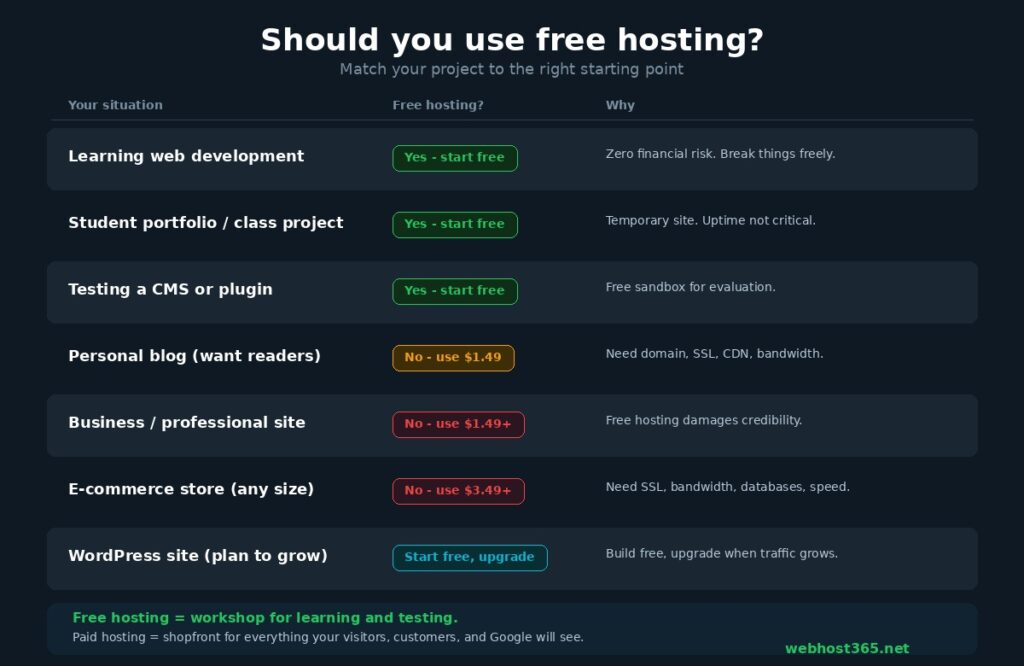
Free hosting makes sense for exactly five situations. If your project fits one of these, start at zero cost without hesitation. If it does not, the limitations will cost you more in time and frustration than $1.49 per month ever would.
| Your situation | Use free hosting? | Why |
|---|---|---|
| Learning web development | Yes | You need a live server to practise on, not a production environment. Breaking things is the point. Zero financial risk means you experiment freely without worrying about wasting money on hosting you might not use next month. |
| Student portfolio or class project | Yes | The site is temporary, low-traffic, and does not need to impress anyone with its loading speed. A free plan with SSL and a custom domain is more than sufficient for a project that lives for one semester. |
| Testing a CMS, theme, or plugin before committing | Yes | You want to install WordPress, try a theme, test whether a plugin conflicts with your setup, or evaluate a framework before you build a real site on it. A free hosting account is a sandbox you can destroy and recreate without consequence. |
| Personal blog you want people to actually read | No — use the $1.49 plan | The moment you care whether visitors return, you need reliable uptime, unlimited bandwidth for traffic spikes, a custom domain with proper SSL, and enough storage to grow. A blog on a free plan that goes offline during a traffic spike or displays a suspension notice loses readers permanently. |
| Business or professional website | No — use the $1.49+ plan | A business website on a free subdomain with possible forced ads, shared SSL, and suspension risk actively damages your credibility. Your hosting cost is invisible to customers. Your site speed, uptime, and professionalism are not. Spending $1.49 per month to avoid looking unreliable is the most obvious investment any business can make. |
| E-commerce store of any size | No — use the $3.49+ plan | Online stores need dedicated resources, multiple databases, reliable SSL for payment processing, CDN for global delivery speed, and bandwidth that does not cap during a product launch. Free hosting cannot provide any of these at the level e-commerce demands. Cloud hosting starting at $3.49 per month with LiteSpeed caching and Bunny CDN is the minimum viable infrastructure for a store that processes real transactions. |
| WordPress site you expect to grow | Start free, upgrade when ready | This is the one scenario where starting free and planning to upgrade is a genuinely smart strategy, provided your free host offers a seamless upgrade path. Install WordPress on Webhost365’s free tier, build your site, publish your first posts, and learn the platform without spending anything. When your traffic grows beyond what 1 GB of bandwidth comfortably handles, upgrade to General Hosting at $1.49 or Cloud Hosting at $3.49 without migrating a single file. Your database, content, domain, and configuration stay exactly where they are. |
Two patterns in that table are worth highlighting explicitly.
The common thread across every “yes” scenario is that the site is temporary, experimental, or low-stakes. The person building it does not depend on it for income, reputation, or audience growth. Free hosting is a workshop, not a shopfront. It is the place where you learn, test, and prototype. The moment the site matters to anyone other than you, it belongs on paid hosting.
The common thread across every “no” scenario is that the cost of free hosting’s limitations exceeds the cost of the cheapest paid plan. A business site that loads slowly because of HDD storage and no CDN loses potential customers. A blog that goes offline during a traffic spike loses readers who will never return. An e-commerce store that hits a bandwidth cap during a product launch loses sales in real time. In every case, the damage from free hosting’s constraints costs more than $1.49 per month in lost opportunity, and the frustrating part is that the damage is invisible. You never see the visitors who bounced, the customers who left, or the readers who found a faster site instead.
The decision framework is not about whether free hosting works. It works fine for what it is designed to do. The decision is about whether what it is designed to do matches what you need. For learning and testing, start free. For everything else, compare the paid plans and pick the tier that matches your project.
How to get started with Webhost365 free hosting
Webhost365 offers a permanent free hosting tier with 1 GB NVMe SSD storage, 1 GB monthly bandwidth, one MySQL database, free auto-renewing SSL, Bunny CDN with 197 global edge locations, and no forced advertisements. It runs on the same AMD EPYC Gen 4 processors and DDR5 RAM as every paid plan on the platform. No credit card is required to create an account.
Setting up takes less than five minutes.
Sign up at webhost365.net/free-hosting/ using your email address. There is no payment form, no trial period countdown, and no automatic billing. You receive a hosting account immediately after verification.
Connect your domain. If you already own a domain, point its nameservers to Webhost365 and the system detects it automatically. If you do not own a domain yet, you can use the free subdomain provided with your account to start building immediately and connect a custom domain later. SSL activates automatically once your domain is connected, so your site loads over HTTPS from the first visit.
Install your application. The control panel includes Softaculous, a one-click installer that sets up WordPress, Joomla, Drupal, and dozens of other applications in under a minute. If you prefer to build manually, upload your HTML, CSS, and PHP files through the file manager or FTP. Your MySQL database is ready to use from the moment your account is created.
Publish and optimise. Once your site is live, Bunny CDN begins caching your static assets globally without any configuration on your part. Keep your site lightweight for the best experience on the free tier. Compress images before uploading, use a caching plugin if you are running WordPress, and avoid installing more plugins than you actually need. A lean WordPress site with optimised images fits comfortably within 1 GB of storage and serves hundreds of monthly visitors within the 1 GB bandwidth allocation.
When your site outgrows the free tier, the upgrade path is seamless. You do not migrate to a different server, re-upload your files, or reconfigure your domain. You upgrade your plan within the same control panel and your site instantly gains access to more resources. General Hosting at $1.49 per month gives you 50 GB NVMe storage, unlimited bandwidth, unlimited databases, a free domain on annual plans, and priority support. Cloud Hosting at $3.49 per month adds LiteSpeed with LSCache, dedicated resources, and the complete managed speed stack described in our guide on how to speed up your WordPress site. The pricing stays the same at renewal on every tier, so the plan you choose today costs the same in year three as it does in month one.
Start building your website today
Free hosting is a legitimate starting point for the right project. The key is choosing a provider where “free” means genuinely free, with no forced ads, no hidden catches, no bait-and-switch pricing when you upgrade, and where the infrastructure behind the free tier is the same modern hardware that powers the paid plans.
On Webhost365, every tier from $0 to VPS runs on NVMe SSD with AMD EPYC Gen 4 processors, DDR5 RAM, and Bunny CDN. The only difference between tiers is how much of that infrastructure is allocated to your account. Start free, grow at your own pace, and upgrade when your project demands more resources. No migration, no surprises, no renewal price hikes.
Start Free — $0/mo | General Hosting — from $1.49/mo | Cloud Hosting — from $3.49/mo | WordPress Hosting | Compare All Plans
Frequently asked questions
Is free web hosting really free?
Yes, several providers offer genuinely free hosting plans with no credit card required and no automatic billing. Webhost365, InfinityFree, and FreeHosting.com all provide permanent free tiers that you can use indefinitely without paying anything. However, free hosting always comes with limitations that directly affect what you can build. Storage is typically restricted to 1 to 5 GB, bandwidth caps at 1 to 5 GB per month, databases are limited to one, and features like SSH access and advanced caching are reserved for paid plans. The provider covers its costs through the natural upgrade path: a percentage of free users eventually outgrow the free tier and move to paid plans. The important distinction is between providers that offer genuinely free forever plans and those that offer free trials with automatic billing after 7 to 30 days. Read the terms before you sign up, and if a provider asks for your credit card to activate a “free” plan, it is a trial, not free hosting.
Can I host WordPress on free hosting?
Yes, if the free plan supports PHP and at least one MySQL database. Webhost365’s free tier and InfinityFree both offer one-click WordPress installation through their control panels. A fresh WordPress installation requires approximately 100 MB of storage and runs comfortably on a single MySQL database, which fits within every traditional free hosting plan. The limitations you will hit are storage and bandwidth. A WordPress site with a theme, five plugins, and 15 blog posts with compressed images typically reaches 300 to 500 MB. On a 1 GB free plan, that leaves room for moderate growth. On a 5 GB plan, you have more breathing room for media. Bandwidth is the tighter constraint: a WordPress page averaging 2.5 MB per load consumes 1 GB of bandwidth in roughly 400 page views per month. Developer-focused platforms like GitHub Pages and Cloudflare Pages do not support WordPress because they only host static files with no PHP or database processing. If WordPress is your goal, choose a traditional hosting provider with PHP and MySQL, start building on the free tier, and plan to upgrade to WordPress-optimised hosting when your traffic outgrows the free bandwidth allocation.
Will free hosting hurt my Google rankings?
It can, and in three specific ways. First, server response speed directly affects your Core Web Vitals scores, which Google uses as ranking signals. Free hosting on a hard drive with no CDN produces a Time to First Byte (TTFB) of 500 milliseconds or more for international visitors, which pushes your Largest Contentful Paint well beyond the 2.5-second threshold Google considers “good.” Free hosting on NVMe SSD with a CDN, like Webhost365’s free tier with Bunny CDN, avoids this problem entirely. Second, using a provider’s subdomain instead of a custom domain limits your site’s perceived authority in Google’s eyes. A custom domain builds brand recognition and accumulates domain authority over time. A subdomain on someone else’s domain does neither. Third, if your free host forces advertisements on your pages, those ads increase page weight, introduce layout shift, and add third-party scripts that slow rendering. All three factors degrade your Core Web Vitals scores. The short answer is that free hosting does not automatically hurt your rankings, but free hosting without NVMe storage, without a CDN, without custom domain SSL, and with forced ads will measurably damage your ability to rank.
What happens if my free hosting provider shuts down?
You lose your website unless you have backups stored elsewhere. This is not a hypothetical risk. 000webhost was one of the most widely used free hosting services in the world before Hostinger discontinued it in early 2024. Users who did not have independent backups lost their sites entirely. Users who had backups faced the burden of migrating to a new provider, reconfiguring their domains, and rebuilding anything that depended on the old hosting environment. The safeguard is straightforward: always maintain offline copies of your website files and database exports regardless of which hosting provider you use, free or paid. Export your WordPress database weekly using phpMyAdmin or a backup plugin, download your wp-content folder monthly, and store both on your local computer or a cloud storage service. Beyond backups, the best protection against provider shutdowns is choosing a host where the free tier is part of a stable product range rather than a temporary marketing promotion. Providers that offer a clear upgrade path from free to paid plans have a business incentive to keep the free tier running because it feeds their paid customer pipeline.
Should I use free hosting for a business website?
No. A business website represents your company to every potential customer, partner, and investor who searches for you online. Free hosting introduces risks that are incompatible with that responsibility. A subdomain address like yourbusiness.freehost.com signals that the business is either not established enough or not willing to invest in its own web presence. Forced ads on your pages promote other brands alongside yours, diluting your message and looking unprofessional. Suspension policies that can take your site offline without notice create a reliability risk that no business should accept. Bandwidth caps that throttle your site during peak traffic mean that the moment your marketing is working, your website stops working. The cost of avoiding all of these problems is $1.49 per month on Webhost365, which includes a free custom domain, NVMe SSD storage, Bunny CDN, unlimited bandwidth, free SSL, professional email hosting, and 24/7 support. That is $17.88 per year for a website that loads fast, stays online, and represents your business professionally. There is no business scenario where the savings from free hosting outweigh the credibility cost.
Does Webhost365 free hosting include a CDN?
Yes. Webhost365 is the only free hosting provider that includes Bunny CDN with 197 global edge locations on its $0 tier. This means your website’s static assets, including images, CSS files, JavaScript, and fonts, are automatically cached and delivered from the edge server closest to each visitor, regardless of where your origin server is located. A visitor in Tokyo, a visitor in London, and a visitor in São Paulo all receive your cached content from nearby servers rather than making the full trip to the origin. This reduces latency from hundreds of milliseconds to single-digit milliseconds for cached resources, directly improving your page load speed and Core Web Vitals scores. Most free hosting providers do not include any CDN. Even many paid hosting plans charge $5 to $15 per month for CDN access as a separate add-on. On Webhost365, Bunny CDN activates automatically on every plan including the free tier with zero configuration required. For a detailed explanation of how CDNs work and why edge caching matters for website speed, see our complete guide on what is a CDN.