
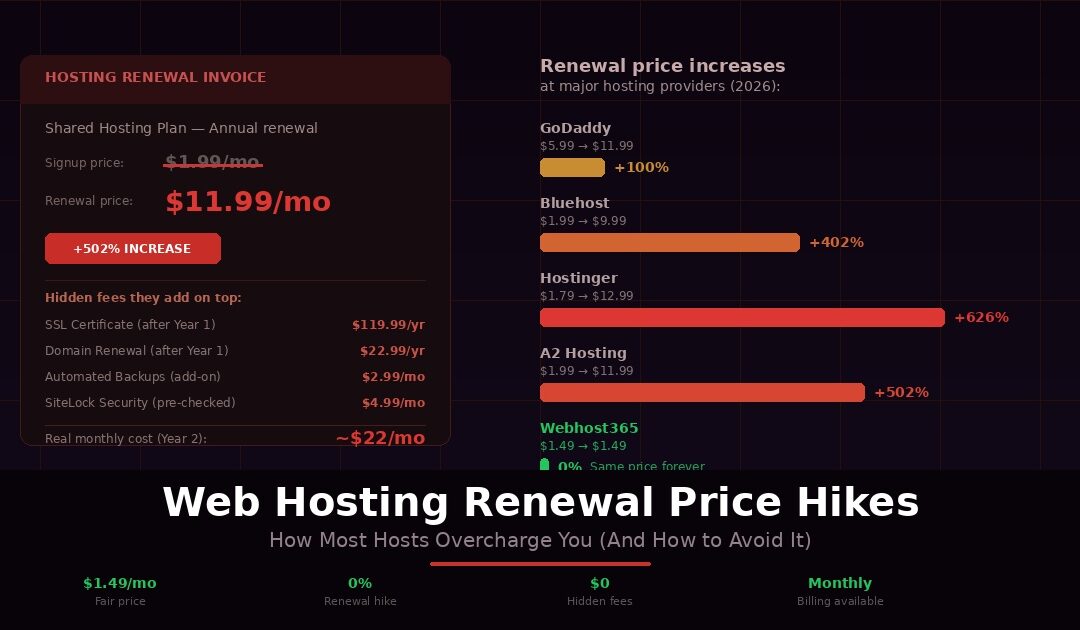
You signed up for hosting at $2.99 per month. The price looked great, the setup was easy, and you moved on with building your website. Twelve months later, an email lands in your inbox. Your renewal invoice says $11.99 per month. No warning during signup. No reminder that the price would change. Just a credit card charge four times higher than what you originally agreed to pay.
You are not imagining it. You are not misremembering the original price. And you are not the only one dealing with this. The majority of hosting companies operate on a pricing model designed to do exactly this: attract you with an artificially low introductory rate, lock you into a long-term contract, and then quietly raise the price to 2x, 3x, or even 5x the original amount when the first term ends. Every provider turns on auto-renewal by default, so the inflated charge hits your card before you even realise the term has ended.
This is not a fringe tactic used by a few shady providers. It is the standard pricing model at GoDaddy, Bluehost, Hostinger, HostGator, SiteGround, A2 Hosting, and nearly every major hosting brand in the industry. The introductory price is a loss leader. The renewal price is where they make their money. And the bet they are making is simple: once your website goes live, your email runs through their system, and your domain points to their servers, you will pay the higher price because switching feels like too much work.
This article exposes exactly how this pricing model works, shows you the real renewal rates from the biggest hosting providers with actual numbers and percentage increases, reveals the hidden fees they stack on top of the renewal hike, and gives you a clear, actionable strategy for avoiding the trap entirely. Whether you are about to buy hosting for the first time or you just received a renewal invoice that made your stomach drop, this is everything you need to know to stop overpaying.
How the Hosting Bait-and-Switch Works
The pricing model behind hosting renewal hikes is not complicated. It is a straightforward bait-and-switch, and once you understand the mechanics, you will see it everywhere.
It starts with the advertised price. You search for web hosting and see plans listed at $1.99 per month, $2.95 per month, $3.99 per month. These numbers are plastered across homepages, comparison sites, and Google ads. They look affordable. They are designed to look affordable. But buried in the fine print, usually in smaller text beneath the price or in a footnote you have to hover over, is a detail that changes everything: this price requires a 12, 24, 36, or even 48-month upfront commitment. You are not paying $1.99 per month. You are paying $1.99 per month multiplied by 36 months, billed upfront as a single charge. The price on the homepage is the promotional rate, not the regular rate.
When that initial term ends, your plan automatically renews at the regular rate. There is no second promotional period. There is no gradual increase. The price jumps immediately, often doubling, tripling, or increasing by as much as 500 to 600 percent. And because virtually every hosting platform enables auto-renewal by default, the new charge hits your credit card or PayPal account without you actively approving it. By the time you notice the charge on your statement, the provider has already processed the renewal.
The hosting companies know exactly what happens next. Your website is live. Your domain DNS points to their servers. Your email accounts run through their infrastructure. Your files, databases, and backups all sit on their platform. Migrating to a different host means researching alternatives, signing up somewhere new, transferring your files, re-pointing your domain, testing everything, and hoping nothing breaks during the transition. For most website owners, especially non-technical ones, that feels like more trouble than just paying the higher renewal price. And that is precisely what the hosting company is counting on.
Customer inertia is the business model. The introductory price gets you in the door. The switching cost keeps you paying the inflated renewal rate year after year. The longer the initial commitment you signed up for, the more entrenched you feel by the time the renewal arrives. This is not a few bad actors exploiting a loophole. This is the dominant pricing strategy across the entire hosting industry, used by companies worth billions of dollars, serving tens of millions of customers who all pay more than the signup page promised they would.
The Real Renewal Prices: What the Big Hosts Actually Charge
Vague warnings about renewal hikes are easy to dismiss. Real numbers are not. Here is what four of the largest hosting providers actually charge at signup versus what they charge when your first term ends. These prices are pulled directly from each provider’s current pricing pages and checkout flows as of 2026.
GoDaddy
GoDaddy’s shared hosting Economy plan advertises a starting price of $5.99 per month. That rate requires a 36-month commitment, meaning you pay roughly $215 upfront for three years. When that term ends, the same plan renews at $11.99 per month. That is a 100% increase. But the hosting price is only the beginning. GoDaddy’s SSL certificate is free for the first year on the Economy plan, then jumps to $119.99 per year if you want to keep it. Your “free” domain renews at $22.99 per year. And the checkout process spans 7 to 8 pages with over 10 upsell prompts for add-ons like SiteLock, CodeGuard, and professional email. If you do not actively uncheck each one, they land on your invoice.
Bluehost
Bluehost’s Starter shared hosting plan starts at $1.99 per month if you commit to 36 months upfront. When that term expires, the renewal rate jumps to $9.99 per month. That is a 402% increase. If you choose the 12-month term instead, you pay $4.99 per month to start, and it renews at $11.99 per month, a 140% increase. Email hosting is included as a one-month free trial, then costs $2.99 per month. Malware scanning is basic on the Starter plan, and removal requires a paid upgrade. Automated daily backups are not included on the entry tier either, only weekly backups, unless you purchase the CodeGuard add-on.
Hostinger
Hostinger’s Premium shared hosting plan advertises a price of $1.79 per month, which is among the lowest in the industry. But that price requires a 48-month upfront commitment. You are paying for four years in advance to get that rate. When the term ends, the renewal price is $12.99 per month. That is a 626% increase. Even the Business shared plan, which starts at $2.69 per month, follows the same pattern with a steep jump at renewal. The low number that gets you through the door and the number you actually pay long-term are entirely different figures.
A2 Hosting (Now Hosting.com)
A2 Hosting, which now operates under the Hosting.com brand after being acquired by World Host Group, offers a Starter plan at $1.99 per month for the first year. Total first-year cost: $23.88. When that year ends, the plan renews at $11.99 per month, bringing your second-year cost to $143.88. That is a 502% increase from year one to year two. Customers who signed up expecting long-term affordability found themselves facing drastically higher bills after the acquisition, with little warning and no option to lock in their original rate.
Here is how these providers compare side by side:
| Provider | Signup Price | Renewal Price | Increase | Term Required |
|---|---|---|---|---|
| GoDaddy | $5.99/mo | $11.99/mo | 100% | 36 months |
| Bluehost | $1.99/mo | $9.99/mo | 402% | 36 months |
| Hostinger | $1.79/mo | $12.99/mo | 626% | 48 months |
| A2/Hosting.com | $1.99/mo | $11.99/mo | 502% | 12 months |
| Webhost365 | $1.49/mo | $1.49/mo | 0% | Monthly |
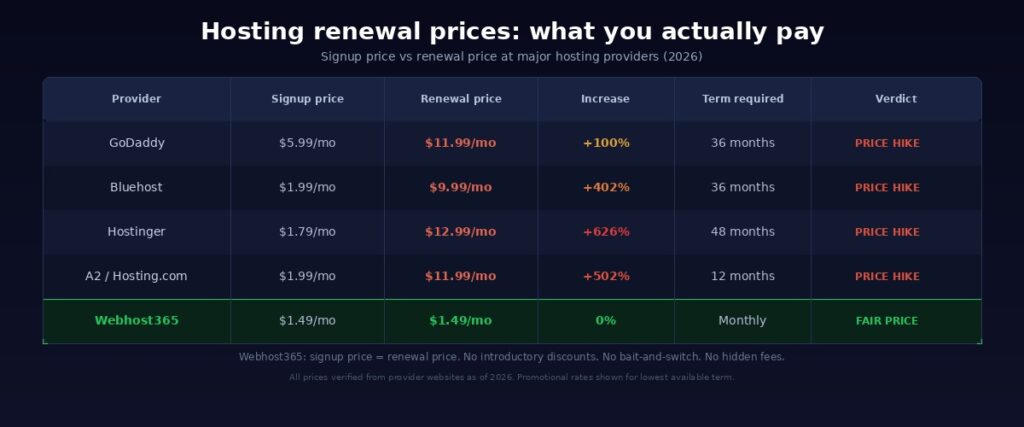
The last row is not a typo. On Webhost365, the price you pay at signup is the price you pay at renewal. There is no introductory discount because there is no inflated regular rate behind it. The $1.49 per month shared hosting plan renews at $1.49 per month. The $3.49 per month cloud hosting plan renews at $3.49 per month. Monthly billing is available on every plan, so you are never forced into a multi-year commitment to access a fair price. You can see exactly how this compares to every major hosting provider, feature by feature.
The Hidden Fees They Stack On Top
Renewal hikes are the most visible way hosting companies overcharge you. But they are not the only way. On top of the inflated renewal rate, most providers layer additional fees for features that should be included in any modern hosting plan. Individually, each charge looks small. Together, they can push your real monthly cost to $20 or $30 per month on a plan that was advertised at $1.99.
SSL Certificates
Every website needs SSL in 2026. Google flags sites without it as “Not Secure” in Chrome, and the lack of HTTPS can hurt your search rankings. Most hosting providers advertise “free SSL” prominently on their pricing pages. What they do not make equally clear is that the free SSL is often limited to the first year, or only available on higher-tier plans. GoDaddy’s Economy shared hosting plan includes SSL free for the first year. After that, it costs $119.99 per year. That single charge nearly doubles the effective cost of the hosting plan itself. On Webhost365, free auto-renewing SSL is included on every plan, including the $1.49 shared tier and the free hosting plan. There is no first-year expiration and no paid upgrade required. Your SSL renews automatically, forever, at no cost.
Domain Name Renewals
The “free domain” offer is a staple of hosting marketing. Nearly every provider includes a domain name free for the first year when you sign up on an annual or longer plan. What they count on is that you will not notice when the renewal hits. Domain renewals typically cost $15 to $22 per year depending on the TLD and the registrar, but some hosting providers mark up the renewal well above market rate because they know you are unlikely to transfer your domain elsewhere. It is another line item that quietly inflates your total hosting cost starting in year two.
Backups
Automated daily backups should be a baseline feature on any hosting plan. If something goes wrong, a plugin update breaks your site, a file gets accidentally deleted, or a security incident occurs, your most recent backup is your safety net. Yet many major hosts either do not include automated backups on their entry plans or charge separately for them. GoDaddy only offers manual backups on shared hosting. Bluehost includes weekly backups on the Starter plan, not daily, and charges for the CodeGuard add-on if you want daily automated backups. On Webhost365, automated daily backups with 30-day retention are included on every paid plan. No add-on, no upgrade, no extra charge.
Migration Fees
Switching from your current host to a new one should be straightforward. But some providers make it expensive specifically to discourage you from leaving. GoDaddy charges $99 or more for website migration. Some hosts offer one free migration but charge for additional sites. Others provide migration tools but leave you to handle the technical process yourself. On Webhost365, migration from any hosting provider is completely free on all paid plans. The support team handles the full transfer of files, databases, email accounts, and DNS configuration, with zero downtime and zero data loss. There is no limit on the number of sites they will migrate for you.
Pre-Checked Add-Ons at Checkout
This is the most frustrating tactic because it relies on you not paying close enough attention during a process you want to finish quickly. Many hosting providers pre-select add-on services during checkout. SiteLock security scans, CodeGuard backup protection, domain privacy, SEO toolkits, professional email, and malware removal packages are commonly pre-checked in the cart. If you click through to payment without carefully unchecking each one, they are added to your bill. GoDaddy’s checkout process is particularly aggressive, spanning 7 to 8 pages with upsell prompts on each screen. Bluehost similarly recommends paid add-ons at checkout that are easy to miss. On Webhost365, there are no pre-checked add-ons at checkout. No upsell pages, no surprise line items, no extras silently added to your cart. The price you see on the plans page is the price you pay at checkout, and it is the price you pay at every renewal after that.
When you stack renewal hikes, SSL fees, backup charges, migration costs, and checkout add-ons together, the true cost of that $1.99 per month “deal” can easily reach $20 to $30 per month by the second year. The introductory price was never the real price. It was the hook.
Why Transparent Pricing Matters More Than the Cheapest First-Year Price
It is tempting to sort hosting providers by price, pick the cheapest one, and move on. Every comparison site ranks hosts this way. Every Google ad leads with the lowest monthly number the provider can justify putting on the page. But the cheapest first-year price and the cheapest hosting are not the same thing. In most cases, they are not even close.
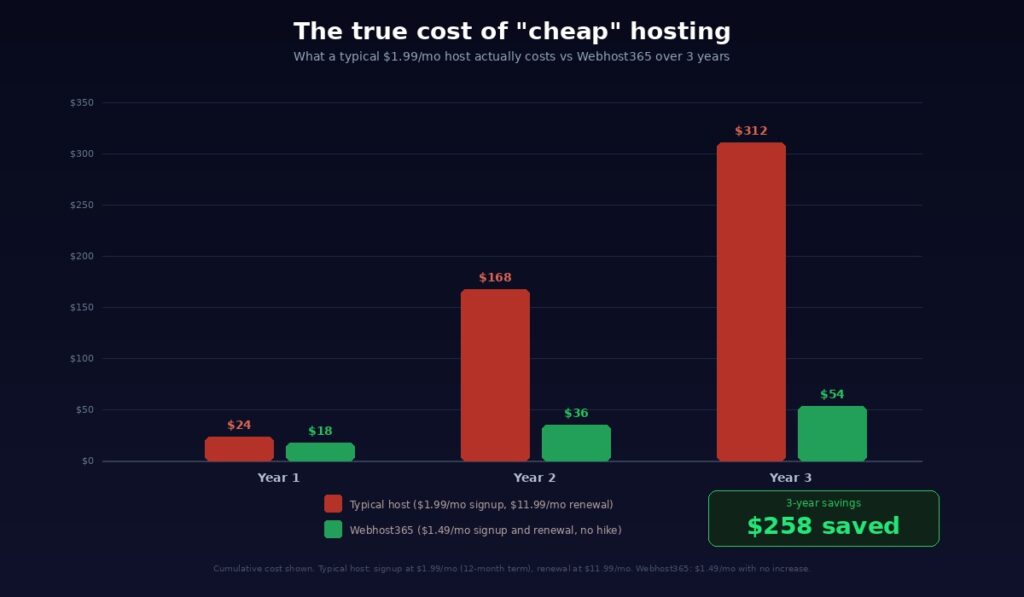
The number that actually matters is your total cost of ownership over two to three years. That is the window most website owners operate in before they either outgrow their plan, switch providers, or decide the hosting is working and they will keep it long-term. When you calculate the total cost over that period, the providers with the lowest introductory prices frequently end up being the most expensive. A host advertising $1.99 per month that renews at $11.99 per month costs $311.76 over three years. A host charging $1.49 per month with no renewal increase costs $53.64 over the same period. The plan that looked cheaper on day one costs nearly six times more over three years. The math is not even close.
Transparent pricing means one simple thing: the price you pay today is the price you pay at renewal. No asterisks. No footnotes. No “introductory rate” language buried in the terms of service. No fine print explaining that the advertised price only applies to the first term of a 36-month commitment. The number on the pricing page is the number on your invoice, this month, next month, and every month after that.
This matters for more than just your wallet. If you run a business, predictable costs let you budget accurately without building in a buffer for hosting surprises. If you are a freelancer managing client sites, you can quote hosting costs with confidence knowing the price will not change when you are midway through a project. If you are a blogger or small business owner watching every dollar, you should not have to set calendar reminders and negotiate retention discounts just to avoid being overcharged for a service you already paid for.
You should also be able to pay monthly without being punished for it. Most hosting companies only offer their low promotional prices on 36 or 48-month commitments. If you want to pay month to month, the price doubles or triples, effectively penalising you for not locking yourself in. That defeats the entire purpose of affordable hosting.
This is why Webhost365 was built on a fundamentally different pricing model. The signup price equals the renewal price on every plan. The shared hosting plan at $1.49 per month renews at $1.49 per month. The cloud hosting plan at $3.49 per month renews at $3.49 per month. The WordPress hosting plan and the business hosting plan follow the same rule. Monthly billing is available on every plan without a price penalty. And every plan includes features that other hosts sell as paid extras: Bunny CDN with 197 edge locations, free SSL, automated daily backups, free domain on annual plans, free migration, and 24/7 support. There are no pre-checked add-ons at checkout. What you see on the plans page is what you pay. Today, at renewal, and every month after that.
How to Avoid the Renewal Trap (7 Actionable Tips)
Whether you are shopping for your first hosting plan or approaching a renewal on your current one, these seven steps will protect you from paying more than you should.
1. Always Check the Renewal Price Before Signing Up
The number on the homepage is the promotional rate. Your real price is the renewal rate. Before you enter your payment details, find the renewal price. It is usually listed in the terms of service, the FAQ section, or in small text near the advertised price. Some providers show it briefly during checkout if you look closely. If you cannot find the renewal rate anywhere on the site, that is a red flag. Any provider confident in their pricing will show it clearly. If they are hiding it, they know it will change your decision.
2. Calculate Total Cost Over 3 Years, Not Monthly
Stop comparing monthly prices. Start comparing total cost over 36 months. A plan at $1.99 per month that renews at $11.99 per month costs $23.88 for year one and $143.88 for each year after. Over three years, that is $311.64. A plan at $1.49 per month with no renewal hike costs $17.88 per year, every year. Over three years, that is $53.64. The plan that looked 50 cents cheaper per month on day one ends up costing $257 more over three years. Always run the three-year number before you buy.
3. Uncheck Every Add-On at Checkout
Go through every page of the checkout process carefully. Look for pre-checked boxes next to SiteLock, CodeGuard, domain privacy, SEO tools, email hosting, and any other add-on that you did not select as part of your plan. If the hosting company pre-checked it, they added it, not you. Uncheck everything you did not specifically choose. If a feature is essential, like SSL or backups, the plan price should already include it. If the host charges extra for it, you are already being nickelled. Consider whether a provider that includes SSL, backups, CDN, and migration in every plan would be a better fit.
4. Set a Renewal Calendar Reminder
The moment you sign up for hosting, open your calendar and set a reminder for 30 to 45 days before your term expires. This gives you enough time to review your renewal rate, compare it with alternatives, initiate a migration if needed, and avoid being auto-renewed at the inflated price. Do this immediately after signup, not when the renewal email arrives. By the time most hosts send a renewal notice, auto-renewal has already been processed or the window to act is uncomfortably short.
5. Disable Auto-Renewal Immediately After Signup
Almost every hosting provider enables auto-renewal by default. This means when your term ends, the renewal charge is processed automatically at the full regular rate, no confirmation required. Log into your hosting account as soon as you have finished setting up your site and disable auto-renewal in your billing settings. This forces the provider to notify you before charging, and it puts you back in control of what you pay and when. You can always renew manually if the pricing still makes sense. But the decision should be yours, not automatic.
6. Negotiate or Ask for a Retention Discount
If your renewal is approaching and you are not ready to switch providers, contact support and ask for a retention discount. Tell them you are considering moving to a different host because the renewal rate is significantly higher than what you originally paid. This does not work every time, but many providers have unpublished retention offers specifically designed for customers who threaten to leave. You might get 20 to 50 percent off the renewal rate, which at least softens the blow while you evaluate your long-term options. The worst they can say is no, and a 10-minute chat could save you a meaningful amount.
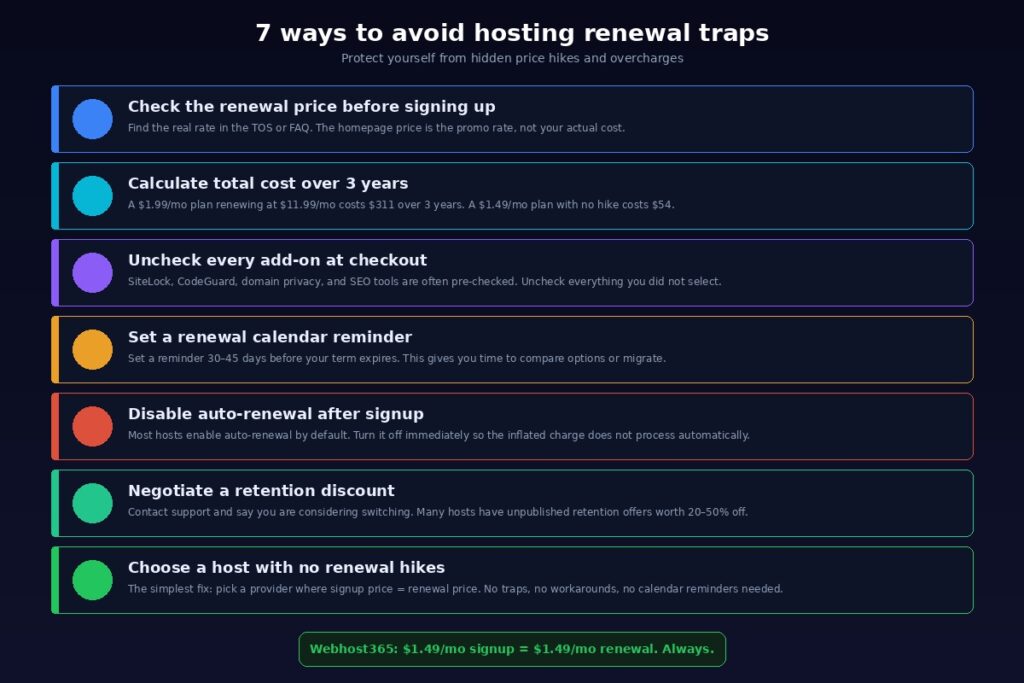
7. Choose a Host With No Renewal Hikes in the First Place
Every tip above is a workaround for a broken pricing model. The simplest way to avoid the renewal trap is to never enter it. Choose a hosting provider where the signup price matches the renewal price, where monthly billing comes without a price penalty, and where every plan includes essential features like CDN, SSL, backups, and migration rather than selling them as extras. Webhost365 operates this way on every plan, from shared hosting at $1.49 per month to cloud hosting at $3.49 per month. No introductory discounts, no renewal surprises, no checkout tricks. You can compare every plan and see the exact price you will pay today, at renewal, and every month after that.
What to Do If You Already Got Hit With a Renewal Hike
If you are reading this article because a renewal invoice already landed in your inbox at two or three times what you were paying, here is exactly what to do. Do not panic, and do not immediately pay the inflated amount.
First, check your grace period. Most hosting providers do not delete your site the moment your term expires. There is typically a 15 to 30-day grace period during which your site stays live and your files remain on the server even if you have not renewed. Some providers extend this to 45 days before moving your account to a suspended state, and even then your data is usually retained for an additional period before permanent deletion. Check your provider’s specific policy in their terms of service or ask their support team directly. You have more time than the urgent-sounding renewal emails suggest.
Second, contact your current host and ask for a discount. Call or open a live chat and tell them directly that you are considering switching to another provider because the renewal rate is significantly higher than your original price. Many hosts have retention teams with the authority to offer discounts that are not publicly available. They might offer you 20 to 50 percent off the renewal rate, a partial extension at the old rate, or a one-time credit. This approach does not guarantee results, but it works frequently enough that it is always worth the conversation before you make any other decision.
Third, compare the real cost of staying versus switching. Take your current renewal rate and multiply it by 12. That is your cost for the next year if you stay. Now look at what an alternative provider charges, including renewal, and run the same calculation. On Webhost365, shared hosting at $1.49 per month with no renewal increase costs $17.88 per year. If your current host is charging you $11.99 per month at renewal, that is $143.88 per year. Switching saves you $126 per year, every year, for as long as you keep your site online. The math makes the decision for you.
Fourth, if you decide to switch, take advantage of free migration. The technical effort of moving your site is the biggest reason people stay with overpriced hosting. But on most modern platforms, migration is handled entirely by the new host’s support team. On Webhost365, migration from any provider is free on every paid plan. The team transfers your files, databases, email accounts, and DNS configuration with zero downtime. You do not need to touch a command line, export a database, or re-upload a single file. You sign up, submit a migration request, and the team handles everything.
Fifth, consider transferring your domain separately. Your domain name does not have to stay with your hosting provider. If your current host is charging an inflated domain renewal price, you can transfer the domain to a dedicated registrar or to your new host at a standard market rate. Domain transfers typically cost the equivalent of one year’s renewal and extend your registration by a year from the current expiration date. Separating your domain from your hosting also gives you more flexibility in the future, because you can switch hosting providers without worrying about the old account holding your domain hostage.
The key takeaway is this: switching hosts is far easier and far cheaper than most people think. The hosting industry counts on the perception that migration is risky, technical, and time-consuming. In reality, it is a support ticket and a few hours of waiting. The cost of staying on an overpriced renewal is almost always higher than the effort of leaving.
Stop Paying More Than You Should
The hosting industry has spent years normalising a pricing model that depends on your inattention. Low introductory rates get you through the door. Steep renewal hikes keep the revenue flowing. Hidden fees for SSL, backups, migration, and checkout add-ons push your real cost far beyond what the homepage advertised. And the entire system relies on one assumption: that switching feels harder than paying.
Now you know exactly how the model works, what the biggest providers actually charge at renewal, where they bury the hidden fees, and what to do whether you are shopping for your first plan or trying to escape an overpriced renewal. The information asymmetry that these companies depend on no longer applies to you.
Webhost365 exists because we believe hosting should not work this way. Your signup price is your forever price. There are no introductory discounts because there are no inflated renewal rates behind them. Every plan includes Bunny CDN with 197 global edge locations, free auto-renewing SSL, automated daily backups, free domain on annual plans, free migration from any host, and 24/7 expert support. No pre-checked add-ons at checkout. No upsell pages. No surprise line items on your invoice. The price on the plans page is the price you pay today, at renewal, and every month after that.
View Hosting Plans — from $1.49/mo | Compare Us to Other Hosts | Start Free — $0/mo | Cloud Hosting — from $3.49/mo
Frequently Asked Questions
Why do hosting companies raise prices at renewal?
Hosting companies use low introductory prices as a customer acquisition strategy. The promotional rate works as a loss leader to get you through the door and your website running on their platform. Once your site goes live, your domain points to their servers, and your email runs through their infrastructure, switching to another provider feels inconvenient. They raise the price to the regular rate at renewal, counting on the fact that most customers will absorb the increase rather than deal with the perceived hassle of migrating. This model is not limited to a few providers. It is the standard pricing approach at GoDaddy, Bluehost, Hostinger, HostGator, SiteGround, A2 Hosting, and the majority of large hosting companies.
How much do hosting prices increase at renewal?
Renewal increases typically range from 100% to over 600% depending on the provider and the plan. GoDaddy’s shared hosting doubles from $5.99 to $11.99 per month at renewal. Bluehost’s Starter plan jumps from $1.99 to $9.99 per month, a 402% increase. Hostinger’s Premium shared plan goes from $1.79 to $12.99 per month, a 626% increase. A2 Hosting’s Starter plan rises from $1.99 to $11.99 per month, a 502% increase. On Webhost365, the renewal price is identical to the signup price on every plan. The $1.49 shared plan renews at $1.49. The $3.49 cloud plan renews at $3.49. Zero increase, no exceptions.
Can I avoid hosting renewal price hikes?
Yes. You have several options. You can negotiate a retention discount with your current host by contacting support and mentioning that you are considering switching providers. You can set calendar reminders 30 to 45 days before your term expires so you have time to compare alternatives before auto-renewal processes. You can disable auto-renewal in your account settings immediately after signing up so the inflated charge does not hit your card automatically. Or you can avoid the problem entirely by choosing a provider that does not use introductory pricing. Webhost365 charges the same price at signup and renewal on every plan, with monthly billing available and no multi-year commitment required to access a fair rate.
Is it hard to switch hosting providers?
No. Switching hosts is far simpler than most people expect, and the perception that migration is risky or technical is exactly what overpriced providers rely on to keep you paying inflated renewals. On modern hosting platforms, migration is handled by the new provider’s support team. On Webhost365, migration from any host is completely free on all paid plans. The engineering team transfers your files, databases, email accounts, SSL certificates, and DNS configuration with zero downtime and zero data loss. You do not need technical knowledge. You submit a request, and the team handles everything. Most migrations are completed within 24 hours.
Are there hosting companies that do not raise prices at renewal?
Yes, though they are uncommon. The majority of the hosting industry relies on the introductory pricing model, which makes transparent providers the exception rather than the rule. Webhost365 is one of the few hosting companies where the signup price equals the renewal price on every plan. Shared hosting stays at $1.49 per month. Cloud hosting stays at $3.49 per month. WordPress hosting and business hosting follow the same principle. There are no introductory discounts, no promotional rates, and no asterisks. You can verify this directly on the plans page and in the hosting comparison where Webhost365 pricing is shown side by side with GoDaddy, Bluehost, Hostinger, and DreamHost.
Beyond the renewal hike itself, there are five common hidden fees to watch for. SSL certificate charges after the first free year, which can cost $79 to $119 per year on providers like GoDaddy. Domain name renewal markups above market rate, typically hitting in year two after the “free” first year expires. Backup service fees for automated daily backups, which many hosts either do not include on entry plans or sell as a paid add-on. Website migration fees, which can cost $99 or more on some providers. And pre-checked add-ons at checkout, including SiteLock, CodeGuard, domain privacy, and SEO toolkits, which the hosting company drops into your cart by default and bills to your account unless you actively uncheck them. On Webhost365, every plan includes SSL, daily backups, Bunny CDN, migration, and professional email at no extra cost, and the checkout never adds pre-checked extras to your cart.