
You are about to buy hosting and the options are already overwhelming. Shared hosting, cloud hosting, VPS, dedicated servers, managed WordPress hosting — every provider has five or more plans with names that sound impressive but explain nothing. Do you need the $1.49 plan or the $8.49 one? Will the cheap option slow your site down? Will the expensive option be overkill for what you are building?
Here is the truth most hosting companies will not tell you: the majority of website owners do not need the most expensive plan. But picking the cheapest one without understanding what you are giving up can cost you in page speed, reliability, and lost visitors. The difference between shared hosting and cloud hosting is not just about price. It is about how your server resources are allocated, how your site handles traffic, and how consistently your pages load for visitors around the world.
This guide breaks down exactly how shared hosting and cloud hosting work, compares them head-to-head on performance, security, scalability, and cost, and gives you a straightforward decision framework so you walk away knowing which option fits your website. Not in theory, not “it depends” — but based on what you are actually building and where you want it to go. Whether you are launching your first blog, scaling an online store, or managing client websites, the right hosting choice starts here.
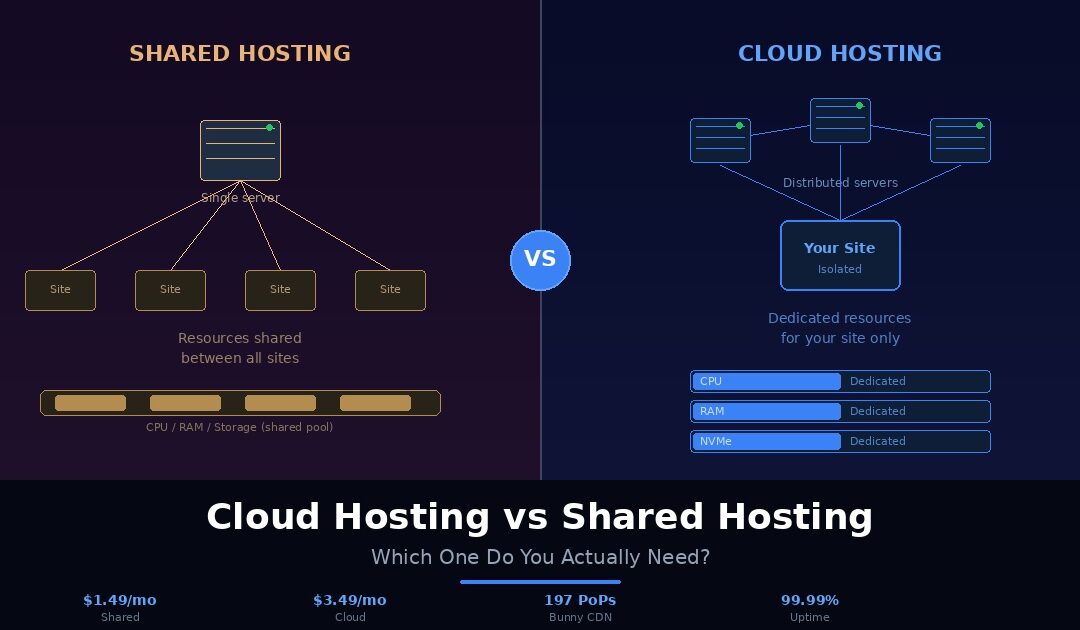
Shared hosting is the most common and most affordable type of web hosting. It works by placing multiple websites on a single physical server, where they all share the same CPU, RAM, storage, and bandwidth. The hosting provider manages the server, handles maintenance, installs security updates, and gives you a control panel to manage your site without ever touching the server’s backend.
Think of shared hosting like renting an apartment in a building. You have your own space, your own front door, and your own furniture inside. But you share the plumbing, electricity, elevator, and parking lot with every other tenant in the building. Most of the time, this works perfectly fine. But if your neighbour on the third floor decides to throw a massive party and maxes out the building’s electricity, your lights might flicker too. That is the trade-off with shared hosting. Your site’s performance can occasionally be affected by what other websites on the same server are doing.
Despite that trade-off, shared hosting is an excellent fit for a wide range of websites. If you are launching a personal blog, a portfolio, a small business informational site, or any project with modest traffic, shared hosting gives you everything you need at a fraction of the cost of other hosting types. You get a control panel for managing files and databases, one-click installers for WordPress and other platforms, email hosting, and technical support, all without needing any server administration knowledge.
Shared hosting has also evolved significantly in recent years. Entry-level plans are no longer the sluggish, bare-bones offerings they were five years ago. On Webhost365, for example, the general hosting plan starts at $1.49 per month and includes NVMe SSD storage, built-in Bunny CDN with 197 edge locations, free SSL, a free domain on annual plans, and 24/7 support. These are features that used to be exclusive to premium tiers, and they make modern shared hosting far more capable than its reputation suggests.
What Is Cloud Hosting?
Cloud hosting takes a fundamentally different approach to how your website’s resources are allocated. Instead of sharing a pool of CPU, RAM, and storage with dozens or hundreds of other websites, cloud hosting gives you dedicated resources that belong exclusively to your site. No other website on the server can dip into your allocation, regardless of how much traffic they receive or how many resources they consume.
The apartment analogy still works here, but the setup is different. Cloud hosting is like renting your own apartment with guaranteed utilities. You have dedicated electricity, dedicated water pressure, and dedicated bandwidth. Even if every other unit in the building throws a party on the same Saturday night, your power stays on, your water runs at full pressure, and your internet does not slow down. Your resources are isolated and reserved for you alone.
On a technical level, cloud hosting runs your website on a virtual server with specific CPU cores, a defined amount of RAM, and a set allocation of NVMe storage assigned to your account. This isolation means your site’s performance stays consistent regardless of what is happening elsewhere on the infrastructure. When traffic spikes hit, whether from a product launch, a social media mention, or a seasonal surge, your dedicated resources handle the load without competing against other websites for processing power.
Cloud hosting is the natural fit for websites that have outgrown shared hosting’s limitations. If you run a WooCommerce store, a membership site, a SaaS application, or any project with dynamic content and growing traffic, cloud hosting gives you the stability and headroom to perform reliably under pressure. It is also the right choice if your Core Web Vitals are struggling on shared hosting, because dedicated server resources directly improve TTFB and LCP scores.
The cost is higher than shared hosting, but the gap is often much smaller than people expect. On Webhost365, cloud hosting starts at $3.49 per month and includes a dedicated AMD EPYC Gen4 CPU core, 1GB DDR5 RAM, 20GB NVMe SSD, unlimited bandwidth, Bunny CDN with 197 edge locations, free SSL, and a free domain on annual plans. That is only $2 more per month than the shared plan, and the performance difference is substantial.
Now that you understand how each hosting type works, let us compare them directly across the six metrics that matter most when choosing a hosting plan. No vague generalisations here. Each comparison has a clear winner.
Performance and Speed
Shared hosting delivers acceptable performance for low-traffic websites, but speed can fluctuate depending on what other sites on the server are doing at any given moment. If a neighbouring site receives a sudden traffic spike or runs a resource-heavy process, your site’s response time can increase temporarily. For a blog with a few hundred daily visitors, you will rarely notice this. For a site handling thousands of sessions or running dynamic ecommerce pages, the inconsistency becomes a problem.
Cloud hosting eliminates this variable entirely. With dedicated CPU cores and RAM, your site’s performance stays flat and predictable regardless of server activity. Database queries run faster, admin panels respond quicker, and page load times remain consistent whether you have 10 visitors or 10,000 visitors online simultaneously. If raw, consistent speed matters to your business, cloud hosting wins this comparison decisively.
Winner: Cloud hosting
Scalability
Shared hosting comes with fixed resource limits. You get a set amount of storage, a set number of databases, and a shared pool of processing power. If your site outgrows those limits, your only option is to upgrade to a higher plan or migrate to a different hosting type entirely. That migration takes time, coordination with support, and sometimes brief downtime.
Cloud hosting is built for growth. Need more CPU or RAM to handle a traffic surge? Resources can be scaled up without migrating your site to a different server. When the surge passes, you scale back down. This flexibility is critical for ecommerce stores during holiday seasons, media sites that occasionally go viral, and any business where traffic is unpredictable. You pay for what you need, when you need it, without rebuilding your hosting setup.
Winner: Cloud hosting
Security
Both hosting types can be secure, but the architecture gives cloud hosting a structural advantage. On shared hosting, multiple websites exist on the same server environment. While reputable hosts implement account-level isolation to prevent cross-contamination, the shared nature of the server means a vulnerability in one site could theoretically create risk for others. This is rare on well-managed platforms, but the possibility exists.
Cloud hosting provides stronger isolation by design. Your dedicated virtual environment means your files, databases, and processes run independently from every other account on the infrastructure. This separation makes it harder for a compromised neighbour to affect your site.
That said, the hosting provider’s security stack matters more than the hosting type itself. On Webhost365, both shared and cloud plans include free auto-renewing SSL, L3 through L7 DDoS protection, automated malware scanning and removal, and daily backups. The security fundamentals are identical across both tiers. Cloud hosting simply adds an extra layer of resource isolation on top.
Winner: Cloud hosting (slight edge)
Uptime and Reliability
Shared hosting runs on a single physical server. If that server experiences a hardware failure, a software crash, or a data centre issue, every website on it goes offline until the problem is resolved. Good hosting providers minimise this risk with redundant hardware, proactive monitoring, and fast response times, but the single-server dependency remains.
Cloud hosting distributes your site’s operation across a more resilient infrastructure. If one component fails, traffic can be rerouted and resources reallocated without taking your site offline. This distributed approach is inherently more resilient than a single-server setup. For business-critical websites where every minute of downtime costs revenue or credibility, cloud hosting provides meaningfully better reliability.
Winner: Cloud hosting
Ease of Use
This is where the gap disappears. A decade ago, cloud hosting required technical knowledge to configure and manage. You needed to understand server provisioning, command-line tools, and manual software installation. That is no longer the case on modern platforms.
On Webhost365, both shared and cloud hosting plans use the same control panel, the same one-click Softaculous installer for WordPress and 400+ other applications, the same file manager, and the same email management tools. Setting up a WordPress site on the $3.49 cloud plan is identical to setting it up on the $1.49 shared plan. There is no additional complexity, no learning curve, and no server administration required. If you can manage a shared hosting account, you can manage a cloud hosting account.
Winner: Tie
Pricing
Shared hosting is the most affordable hosting type available. Plans across the industry start as low as $1 to $5 per month, making it the obvious choice for budget-conscious website owners. Cloud hosting costs more, with industry-wide entry prices ranging from $5 to $20 per month depending on the provider.
But here is what most comparison articles fail to mention: the actual price gap depends entirely on the provider, and on many platforms the difference is far smaller than the industry averages suggest. On Webhost365, shared hosting starts at $1.49 per month and cloud hosting starts at $3.49 per month. That is a $2 per month difference for dedicated CPU, dedicated RAM, double the storage, and stronger resource isolation. Both plans include Bunny CDN, free SSL, free domain, NVMe SSD, and 24/7 support. And unlike most competitors, your renewal price is the same as your signup price. No surprise hikes after the first term.
Winner: Shared hosting on raw price. Cloud hosting on value per dollar.
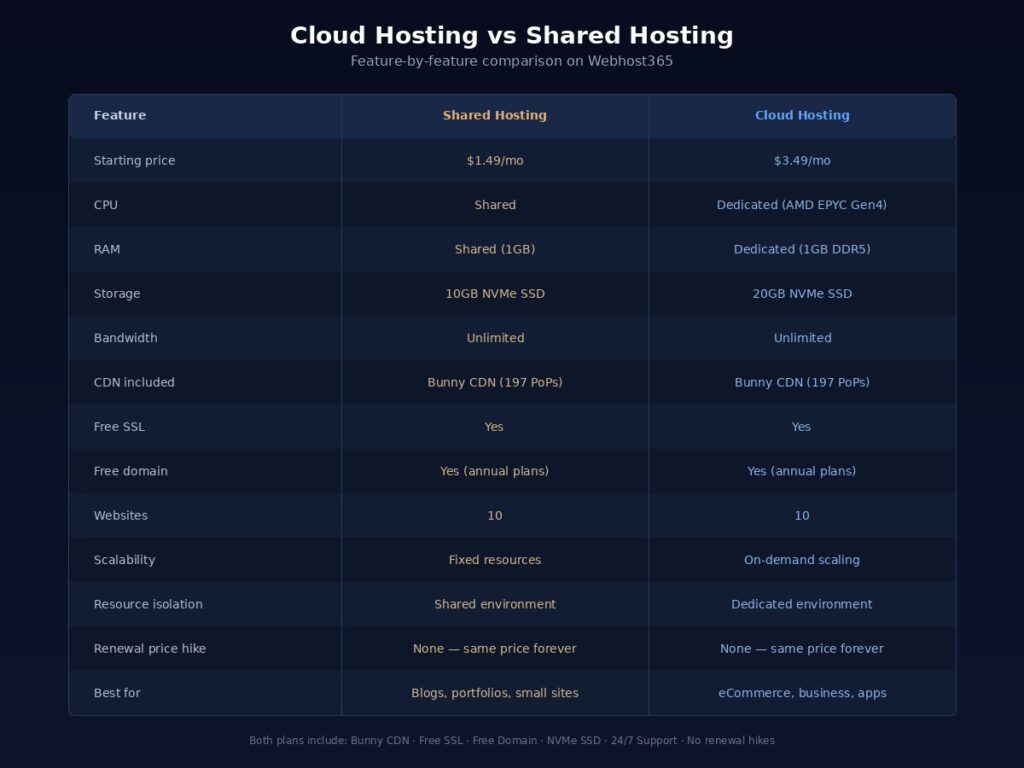
Here is how the two stack up side by side with actual Webhost365 plan specs:
| Feature | Shared Hosting | Cloud Hosting |
|---|---|---|
| Starting price | $1.49/mo | $3.49/mo |
| CPU | Shared | Dedicated (1 Core AMD EPYC Gen4) |
| RAM | Shared (1GB) | Dedicated (1GB DDR5) |
| Storage | 10GB NVMe SSD | 20GB NVMe SSD |
| Bandwidth | Unlimited | Unlimited |
| CDN included | Bunny CDN (197 PoPs) | Bunny CDN (197 PoPs) |
| Free SSL | Yes | Yes |
| Free domain | Yes (annual plans) | Yes (annual plans) |
| Websites | 10 | 10 |
| Scalability | Fixed resources | On-demand scaling |
| Resource isolation | Shared environment | Dedicated environment |
| Best for | Blogs, portfolios, small sites | eCommerce, growing businesses, apps |
You can compare all available hosting plans on Webhost365 to see the full range of options across both shared and cloud tiers.
Shared hosting gets dismissed too quickly in most comparison articles. The reality is that it remains the right choice for millions of websites, and choosing it does not mean you are settling for an inferior product. It means you are matching your hosting to your actual needs instead of overpaying for resources you will not use.
Shared hosting is the right fit if you are launching your first website and still learning how everything works. The managed environment, simple control panel, and one-click installers let you focus on building your site instead of managing server infrastructure. There is no faster or easier path from zero to a live website.
It is also the right choice if you run a personal blog, a portfolio, a resume site, a small business informational site, or any project where traffic stays under 10,000 monthly visitors. These sites do not need dedicated CPU cores or isolated RAM. They need reliable uptime, fast enough page loads, SSL security, and a hosting provider that does not disappear when something goes wrong. Shared hosting delivers all of that at a price point that makes sense for the scale of the project.
If budget is your primary constraint, shared hosting is the clear winner. Whether you are a student building a class project, a freelancer putting up a portfolio, or a small business owner who needs a web presence without a significant monthly expense, shared hosting keeps your costs minimal while still giving you a legitimate, professional hosting environment.
The key is choosing a shared hosting provider that does not cut corners on the features that actually affect your visitors. On Webhost365, the general hosting plan at $1.49 per month includes NVMe SSD storage, Bunny CDN with 197 global edge locations, free SSL, daily backups, and 24/7 expert support. Your visitors get sub-second load times globally, your site stays secure, and your data is backed up every day. That is not a compromised experience. That is modern shared hosting done right.
If you want to test the platform before spending anything at all, Webhost365 offers a free hosting plan with 1GB SSD storage, free SSL, PHP 8.x support, and a DirectAdmin control panel. It is enough to launch a small site, learn the platform, and decide if you want to upgrade later with zero risk.
When Cloud Hosting Is the Better Option
There comes a point where shared hosting no longer matches what your website demands. That point is not always obvious, but the symptoms are consistent. Pages load slower than they used to. Your admin panel feels sluggish. Google Search Console flags Core Web Vitals issues that were not there six months ago. Checkout pages timeout during a promotion. If any of this sounds familiar, you have outgrown shared hosting and cloud hosting is where you need to be.
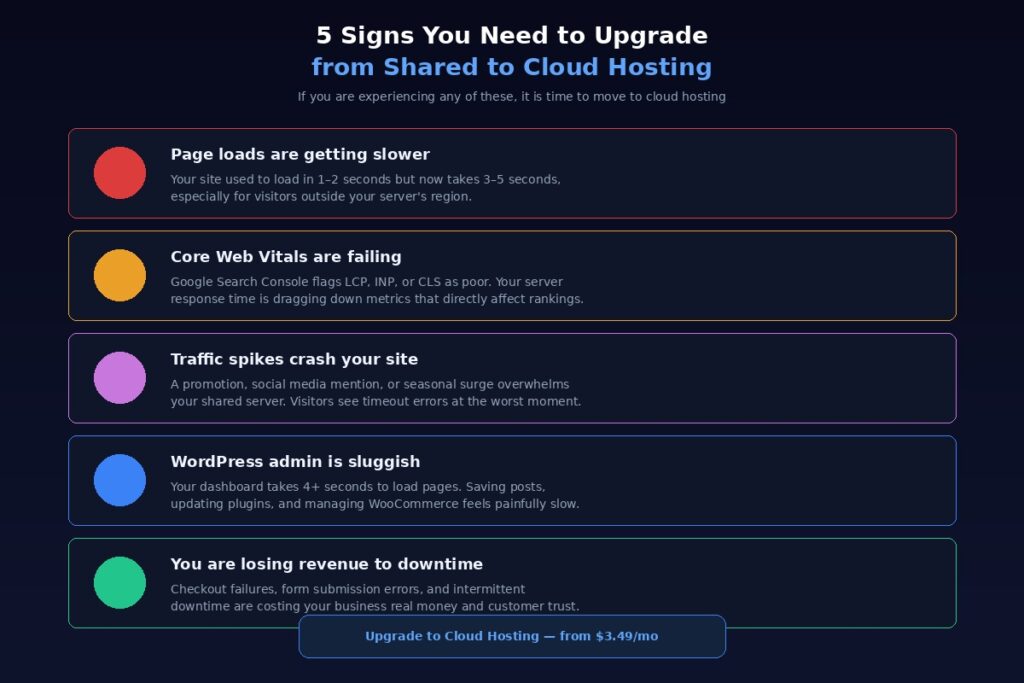
Cloud hosting is the better option if your site receives 10,000 or more monthly visitors and that number is climbing. At this traffic level, the shared resource pool starts showing its limits. Dedicated CPU and RAM ensure your server response times stay flat as visitor counts rise, which directly protects your search rankings and user experience.
It is the right choice if you run a WooCommerce store, a SaaS product, a membership site, or any application that relies on frequent database queries and server-side processing. Every product page load, every cart update, every checkout transaction puts demand on your server. On shared hosting, that demand competes with other sites for processing power. On cloud hosting, every cycle of CPU and every megabyte of RAM is reserved for your operations alone.
Cloud hosting also makes sense if your traffic is unpredictable. A product launch, a feature in a newsletter, a social media post that gains unexpected traction — these moments can double or triple your normal traffic within hours. Shared hosting has no mechanism to absorb that surge. Cloud hosting handles it because resources can scale to meet demand without your site slowing down or going offline at the worst possible moment.
If you manage multiple client websites as a freelancer or agency, cloud hosting gives you the consistency your clients expect. One client’s traffic spike will not degrade performance for another client’s site because each account operates within its own dedicated resource allocation.
The cost of upgrading is often the concern that keeps people on shared hosting longer than they should be. But the gap is smaller than most people assume. On Webhost365, cloud hosting starts at $3.49 per month with a dedicated AMD EPYC Gen4 CPU core, 1GB DDR5 RAM, 20GB NVMe SSD, unlimited bandwidth, and Bunny CDN included. That is the price of a single coffee per month to eliminate the performance ceiling that shared hosting puts on your growth. If your site is making money or your business depends on it being fast and reliable, that $2 monthly difference pays for itself many times over.
The One Thing Most Comparisons Miss: CDN
Every cloud hosting vs shared hosting article you will find online compares the same things. CPU, RAM, storage, bandwidth, price, uptime. Those metrics matter, but they all describe what happens on the server. None of them address what happens between the server and your visitor. And that gap is where most of your page load time actually lives.
A server in Dallas can have the fastest NVMe storage and the most powerful AMD EPYC processor on the market. If a visitor in Berlin requests your homepage, the data still has to travel over 9,000 kilometres across undersea cables and through dozens of network hops before the first byte arrives. That physical distance adds hundreds of milliseconds of latency, and no amount of server-side performance can eliminate it. This is true whether you are on shared hosting or cloud hosting.
A CDN solves this problem by caching your content on edge servers distributed around the world and serving each visitor from the location nearest to them. A visitor in Berlin gets your page from Frankfurt. A visitor in Mumbai gets it from an edge server in India. A visitor in Tokyo loads from a local node in Japan. The result is sub-second load times across every continent, regardless of where your origin server sits.
Here is why this matters in the shared vs cloud hosting conversation: on most hosting providers, CDN is either not included at all or sold as a paid add-on costing $5 to $15 per month. If you are on a competitor’s $3 shared plan and you add their CDN for $10 per month, you are now paying $13 per month for shared hosting. At that price, you could have been on a cloud plan with better resources. The hidden cost of CDN completely reshapes the pricing comparison that most articles present.
On Webhost365, this problem does not exist. Both shared hosting and cloud hosting include Bunny CDN with 197 edge locations at no extra cost. There is no CDN add-on to buy, no plugin to configure, no DNS records to change. Your site is served through the CDN from the moment it goes live. This means even the $1.49 shared plan delivers global performance that most competitors cannot match on plans costing three to five times more. And it means the comparison between shared and cloud on Webhost365 is purely about server resources and isolation, not about whether you can afford fast global delivery.
If you want to understand CDN in depth, including how it works, what it delivers, and how it impacts your SEO, read our complete guide on what is a CDN. For a deeper look at how CDN directly affects your Google rankings through Core Web Vitals, see our article on how integrated CDN hosting impacts Core Web Vitals.
How to Decide: A Simple Decision Framework
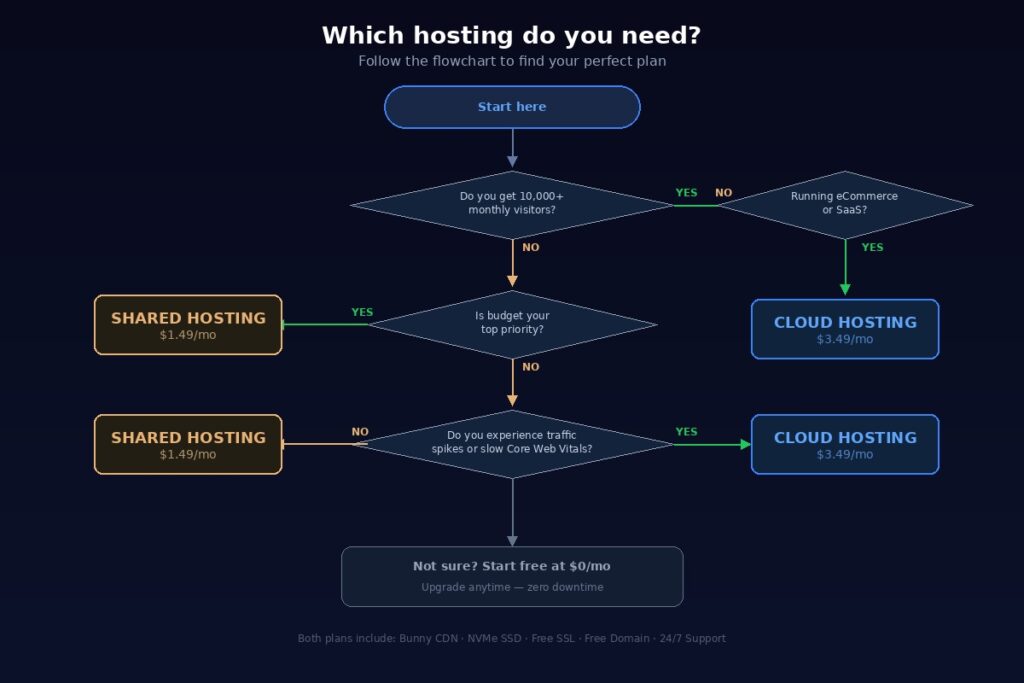
You have read the comparisons, you understand the trade-offs, and you know what each hosting type does well. Now let us make the decision simple. Answer the questions below based on what you are building right now, not what you might need two years from now. You can always upgrade later.
Choose shared hosting if:
Your website is new and you are still building or launching it. You run a personal blog, portfolio, resume site, or small informational website. Your monthly traffic is under 10,000 visitors. You do not process payments or handle sensitive customer data on your site. Keeping costs as low as possible is your top priority right now. You want the simplest possible setup with zero server management.
If this describes your situation, shared hosting at $1.49 per month gives you everything you need without paying for resources you will not use.
Choose cloud hosting if:
Your site already receives 10,000 or more monthly visitors, or traffic is growing steadily. You run a WooCommerce store, a SaaS application, a membership site, or a client-facing business site. You experience periodic traffic spikes from promotions, product launches, or seasonal demand. Your Core Web Vitals scores are inconsistent or failing on your current hosting. You need dedicated resources that no other website can touch. You manage multiple sites and need reliable, predictable performance across all of them.
If this sounds like your situation, cloud hosting at $3.49 per month gives you dedicated AMD EPYC CPU, DDR5 RAM, double the NVMe storage, and full resource isolation for just $2 more per month.
Not sure yet?
Start with the free hosting plan. It costs nothing, includes 1GB SSD storage, free SSL, and a full control panel. Build your site, learn the platform, and see how your traffic develops. When you are ready, upgrade to shared or cloud hosting with a single support request. Migration between plans on Webhost365 is free, handled by the support team, and completed with zero downtime. You do not have to get the decision perfect on day one. You just have to get started.
Yes, and it is far easier than most people think.
The most common path for website owners is to start on shared hosting, grow their site, and upgrade to cloud hosting when the need arises. This is not a workaround or a compromise. It is the smartest approach. You keep your costs low while your site is small, and you invest in more powerful hosting only when your traffic and revenue justify it.
The concern most people have is that switching hosting plans means rebuilding their site, changing their domain settings, or dealing with hours of downtime while files transfer between servers. On a poorly managed platform, that can be true. On Webhost365, it is not.
When you upgrade from shared hosting to cloud hosting, the support team handles the entire migration for you. Your files, databases, email accounts, SSL certificates, and DNS configuration all transfer seamlessly. Your domain stays the same. Your site stays online throughout the process. There is no downtime, no data loss, and no charge for the migration. You submit a support request, the engineering team moves everything over, and your site is running on dedicated cloud resources without you touching a single file.
This also works in reverse. If you start on cloud hosting and realise shared hosting meets your needs, you can downgrade just as easily. And if you want to test the platform before committing to any paid plan, the free hosting tier lets you build and launch a site at zero cost, then upgrade to shared or cloud whenever you are ready.
The takeaway is simple: do not overthink the initial choice. Pick the plan that fits your site today, and know that upgrading tomorrow is a painless, free, zero-downtime process. You can compare all available plans side by side to see exactly what each tier offers before you decide.
Choose the Right Plan for Your Website
You now have a clear picture of how shared hosting and cloud hosting differ, where each one excels, and which one fits specific types of websites. The decision comes down to two questions: what is your site doing today, and how fast is it growing?
If your site is small, new, or personal, shared hosting gives you everything you need at the lowest possible cost. If your site is handling real traffic, processing transactions, or powering a growing business, cloud hosting gives you the dedicated resources and stability to perform without compromise. Both options on Webhost365 include Bunny CDN with 197 global edge locations, NVMe SSD storage, free SSL, free domain on annual plans, daily backups, and 24/7 expert support. And on both tiers, your renewal price is the same as your signup price. No surprise hikes after the first term. Ever.
The only wrong choice is staying on hosting that does not keep up with what your visitors and your business need. Whether that means starting at $1.49 or $3.49, your site deserves fast, reliable, globally distributed hosting from day one.
View Shared Hosting Plans — from $1.49/mo | View Cloud Hosting Plans — from $3.49/mo | Compare All Plans | Start Free — $0/mo
Frequently Asked Questions
Yes, cloud hosting delivers more consistent speed because your CPU and RAM are dedicated exclusively to your site. On shared hosting, performance can fluctuate when other sites on the server consume more resources than usual. That said, for global speed, your CDN matters more than your hosting type. A shared hosting plan with a CDN will load faster for international visitors than a cloud hosting plan without one. On Webhost365, both shared and cloud plans include Bunny CDN with 197 edge locations, so both deliver fast load times worldwide. The difference between the two comes down to server-side consistency, not global delivery speed.
Yes, shared hosting is safe for WordPress when the provider includes proper security infrastructure. On Webhost365, shared plans include free auto-renewing SSL, L3 through L7 DDoS protection at the CDN edge, automated malware scanning and removal, and daily backups with 30-day retention. These features protect your WordPress site from the most common threats without requiring any security plugins or manual configuration. If your site handles sensitive user data, processes payments, or stores personal information, cloud hosting adds an extra layer of protection through dedicated resource isolation, which prevents any other account on the server from interacting with your environment.
You can run a small WooCommerce store on shared hosting without issues. If your store has a modest product catalogue and handles a low to moderate volume of orders, shared hosting provides enough resources to keep things running smoothly. However, as your catalogue grows and order volume increases, WooCommerce puts significant demand on your database. Every product page load, every cart update, every checkout transaction generates database queries that need processing power. On shared hosting, those queries compete with other sites for CPU time. On cloud hosting, dedicated CPU and RAM handle WooCommerce’s database load consistently, even during peak shopping periods. If your store is generating revenue, cloud hosting is worth the $2 per month difference for the reliability alone.
What is the difference between cloud hosting and VPS?
Cloud hosting and VPS are similar in that both provide dedicated resources allocated to your account. The main difference is the underlying infrastructure. A traditional VPS runs on a single physical server. If that server has a hardware failure, your VPS goes down with it. Cloud hosting distributes resources across a more resilient infrastructure, providing better redundancy and failover capability. On Webhost365, cloud hosting plans also include Bunny CDN integration for global content delivery, which traditional VPS plans typically do not include. If you need full root access and complete server control, a Linux VPS is the right choice. If you want dedicated resources with managed simplicity and built-in CDN, cloud hosting is the better path.
On Webhost365, shared hosting starts at $1.49 per month and cloud hosting starts at $3.49 per month. The $2 monthly difference gets you a dedicated AMD EPYC Gen4 CPU core, 1GB DDR5 RAM, 20GB NVMe SSD storage instead of 10GB, and full resource isolation from other accounts. Both plans include identical features for everything else: Bunny CDN with 197 edge locations, free SSL, free domain on annual plans, unlimited bandwidth, daily backups, and 24/7 support. Critically, both plans renew at the same price you signed up at. There are no introductory discounts that double or triple at renewal, which is a practice most competitors like GoDaddy, Hostinger, and Bluehost rely on. You can compare all plans side by side to see exactly how Webhost365 stacks up against other providers.
Upgrade when you start noticing consistent symptoms that shared hosting cannot resolve. The clearest signals are page load times that have gradually increased over the past few months, Core Web Vitals scores flagged as orange or red in Google Search Console, timeout errors during traffic spikes or promotional events, a sluggish WordPress admin panel that takes several seconds to load pages, and checkout or form submission failures under moderate traffic. If your site is growing past 10,000 monthly visitors, adding ecommerce functionality, or becoming a primary revenue source for your business, those are strong indicators that dedicated cloud resources will make a measurable difference. On Webhost365, upgrading from shared to cloud is free, handled by the support team, and completed with zero downtime.