
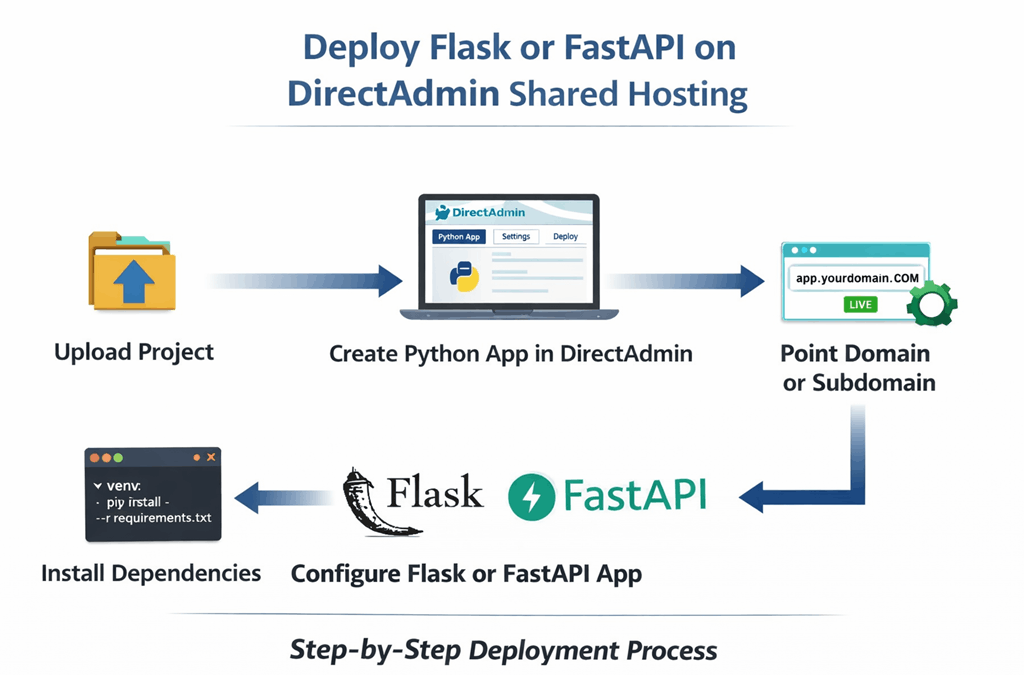
Deploying Flask or FastAPI on DirectAdmin shared hosting is possible when your hosting environment supports Python applications, virtual environments, and a WSGI/ASGI entry point. This setup is ideal for lightweight APIs, dashboards, microservices, and small web apps that do not require full VPS control.
If you have already deployed Django, the process for Flask or FastAPI is very similar. If not, you may also want to read:
- Deploy Django on DirectAdmin Shared Hosting
- How to Deploy a Python App
- Linux VPS vs Cloud Hosting
These related guides help you understand when shared hosting is enough and when moving to a VPS becomes necessary.
Flask is a lightweight Python web framework that is easy to deploy and works well in shared hosting environments. FastAPI is designed for building high-performance APIs and also works on DirectAdmin setups when configured correctly.
Both frameworks can run on shared hosting if:
- Python support is available
- virtual environments are allowed
- WSGI/ASGI entry file can be configured
- dependencies can be installed locally
- the app does not require background workers
This guide will walk you through uploading your Flask or FastAPI project, creating the Python app inside DirectAdmin, installing dependencies, configuring the entry point, and launching your app.
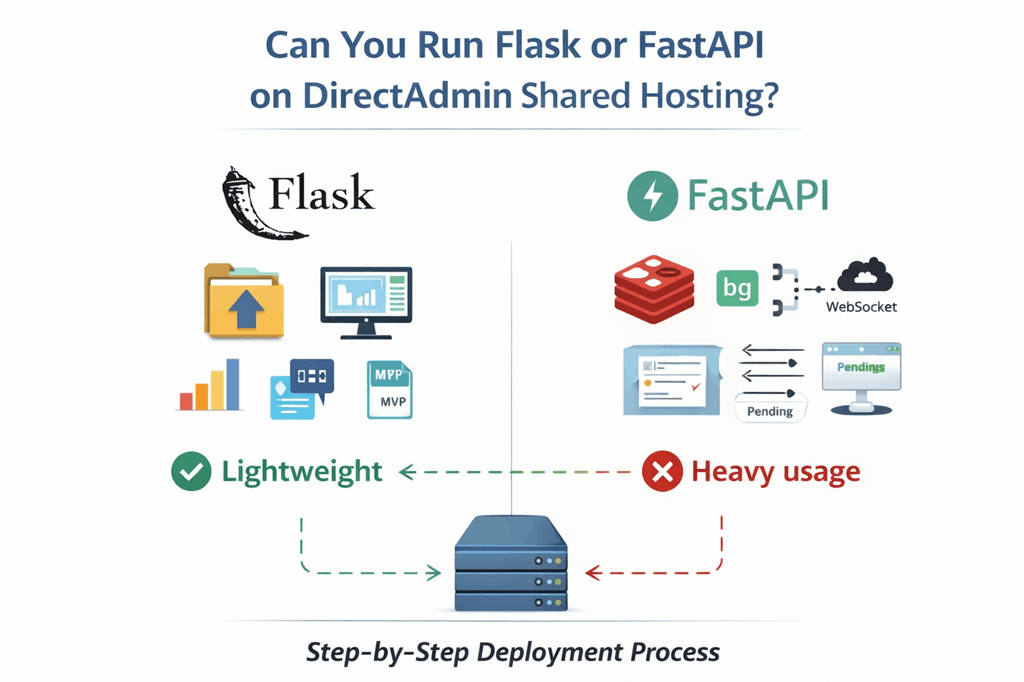
Yes, Flask and FastAPI can run on DirectAdmin shared hosting if your hosting account supports Python applications. Many DirectAdmin environments provide Python selector or application manager support that allows you to deploy Python apps without full server access.
Shared hosting works best for:
- lightweight Flask apps
- small FastAPI APIs
- dashboards
- admin tools
- internal applications
- MVP projects
Shared hosting may not be suitable if your app requires:
- background workers
- Celery queues
- Redis
- WebSocket servers
- heavy API traffic
- async workers running continuously
If your app needs those features, consider moving to Cloud Hosting or a VPS environment instead.
Requirements Before You Start
Before deploying Flask or FastAPI on DirectAdmin, make sure you have:
- DirectAdmin hosting with Python support
- domain or subdomain configured
- Flask or FastAPI project ready
- requirements.txt file
- SSH access (recommended)
- virtual environment support
Recommended project structure
Flask project:
myflaskapp/
├── app.py
├── requirements.txt
├── templates/
├── static/
└── venv/
FastAPI project:
myfastapi/
├── main.py
├── requirements.txt
├── routers/
├── models/
└── venv/
Your entry file should define an app object which will be used by the WSGI or ASGI runner.
Example Flask entry:
from flask import Flaskapp = Flask(__name__)@app.route("/")
def home():
    return "Flask app running"
Example FastAPI entry:
from fastapi import FastAPIapp = FastAPI()@app.get("/")
def home():
    return {"status": "FastAPI running"}
These simple examples confirm that your application is ready for deployment.
Step 1: Upload Flask or FastAPI Project
The first step is to upload your Flask or FastAPI project to your DirectAdmin hosting account. You can upload the files using:
- DirectAdmin File Manager
- FTP or SFTP
- Git clone (if SSH is available)
- SCP upload from local machine
Before uploading, make sure your project includes:
- main application file (
app.pyormain.py) requirements.txt- templates folder (if used)
- static folder (if used)
- configuration files
Example Flask project structure
flaskapp/
├── app.py
├── requirements.txt
├── templates/
│   └── index.html
├── static/
│   └── style.css
└── config.py
Example FastAPI project structure
fastapiapp/
├── main.py
├── requirements.txt
├── routers/
├── models/
├── schemas/
└── config.py
Upload using DirectAdmin File Manager
Upload your project to a clean directory. A recommended structure is:
/home/username/domains/yourdomain.com/
├── public_html/
├── flaskapp/
└── logs/
Avoid placing the application directly inside public_html. Keeping it separate helps with cleaner deployments and security.
Upload using SCP
If SSH access is available, you can upload your project quickly:
scp -r flaskapp username@yourdomain.com:/home/username/domains/yourdomain.com/For FastAPI:
scp -r fastapiapp username@yourdomain.com:/home/username/domains/yourdomain.com/Upload using Git
If your hosting supports Git:
cd /home/username/domains/yourdomain.com/
git clone https://github.com/yourrepo/flaskapp.git
or
git clone https://github.com/yourrepo/fastapiapp.gitAfter uploading, confirm your files exist:
ls -laMake sure your main entry file is present:
For Flask:
app.pyFor FastAPI:
main.pyThis file must expose the application object named app.
Step 2: Create Python App in DirectAdmin
Now create the Python application inside DirectAdmin.
Navigate to:
DirectAdmin → Advanced Features → Python App
Click Create Application
You will need to configure:
- Python version
- application root
- application URL
- startup file
- application entry
Example configuration:
Python version:
3.11Application root:
/home/username/domains/yourdomain.com/flaskappApplication URL:
https://app.yourdomain.comStartup file:
passenger_wsgi.pyEntry point:
appCreate WSGI entry file
Create this file inside your project:
passenger_wsgi.pyFlask example:
import sys
import osproject_home = "/home/username/domains/yourdomain.com/flaskapp"
if project_home not in sys.path:
    sys.path.insert(0, project_home)from app import app as application
FastAPI example:
import sys
import osproject_home = "/home/username/domains/yourdomain.com/fastapiapp"
if project_home not in sys.path:
    sys.path.insert(0, project_home)from main import app as application
This tells DirectAdmin how to start your Flask or FastAPI application.
After saving the file, reload the Python application from DirectAdmin panel.
Step 3: Create Virtual Environment
Next create a Python virtual environment for your application.
Navigate to your app directory:
cd /home/username/domains/yourdomain.com/flaskappCreate virtual environment:
python3 -m venv venvActivate it:
source venv/bin/activateUpgrade pip:
pip install --upgrade pipFor Flask install:
pip install flaskFor FastAPI install:
pip install fastapi uvicornInstall requirements file:
pip install -r requirements.txtVerify installation:
python -c "import flask"or
python -c "import fastapi"If no error appears, dependencies are installed correctly.
Deactivate environment when finished:
deactivateStep 4: Configure Flask Application
Before launching your Flask application on DirectAdmin shared hosting, make sure your app is properly configured for production.
A basic Flask application should expose an app object. Your main file should look like this:
from flask import Flaskapp = Flask(__name__)@app.route("/")
def home():
    return "Flask running on DirectAdmin"
If your project uses templates:
from flask import Flask, render_templateapp = Flask(__name__)@app.route("/")
def home():
    return render_template("index.html")
If your app uses environment variables:
import os
from flask import Flaskapp = Flask(__name__)app.config["SECRET_KEY"] = os.environ.get("SECRET_KEY", "change-this-secret")@app.route("/")
def home():
    return "Flask app running"
Production configuration
Disable debug mode in production:
app.debug = FalseIf using config class:
class Config:
    DEBUG = False
    SECRET_KEY = "strong-secret-key"app.config.from_object(Config)
Make sure your main file exports:
appThis is required for DirectAdmin to load the application.
WSGI compatibility check
Your passenger_wsgi.py file should load the Flask app correctly:
import sys
import osproject_home = "/home/username/domains/yourdomain.com/flaskapp"
if project_home not in sys.path:
    sys.path.insert(0, project_home)from app import app as application
If your Flask file is named differently, update:
from yourfilename import app as applicationStatic files in Flask
If your Flask app uses static files:
Project structure:
flaskapp/
├── app.py
├── static/
│   └── style.css
├── templates/
│   └── index.html
Flask automatically serves static files from:
/static/Example HTML:
<link rel="stylesheet" href="/static/style.css">Test Flask locally before restart
Run:
python app.pyOr:
flask runIf it works locally, reload the Python app in DirectAdmin.
Step 5: Configure FastAPI Application
FastAPI apps must expose an app object.
Basic FastAPI example:
from fastapi import FastAPIapp = FastAPI()@app.get("/")
def home():
    return {"status": "FastAPI running"}
FastAPI with routers
from fastapi import FastAPI
from routers import usersapp = FastAPI()app.include_router(users.router)
FastAPI entry file
Your main file should be:
main.pyand contain:
app = FastAPI()WSGI adapter for FastAPI
DirectAdmin often uses WSGI, so you may need an adapter:
from fastapi import FastAPI
from fastapi.middleware.wsgi import WSGIMiddlewareapp = FastAPI()@app.get("/")
def home():
    return {"status": "FastAPI running"}
Your passenger_wsgi.py:
import sys
import osproject_home = "/home/username/domains/yourdomain.com/fastapiapp"
if project_home not in sys.path:
    sys.path.insert(0, project_home)from main import app as application
Install FastAPI dependencies
pip install fastapi
pip install uvicorn
If using requirements:
pip install -r requirements.txtTest FastAPI locally
uvicorn main:app --reloadOpen:
http://127.0.0.1:8000If working, restart Python app in DirectAdmin.
Step 6: Install Dependencies
Always install dependencies inside the virtual environment.
Activate environment:
source venv/bin/activateInstall requirements:
pip install -r requirements.txtIf missing packages appear:
Flask:
pip install flaskFastAPI:
pip install fastapi uvicornOptional production packages:
pip install gunicornVerify installed packages:
pip listFreeze dependencies:
pip freeze > requirements.txtDeactivate environment:
deactivateStep 7: Point Domain or Subdomain
Create a subdomain inside DirectAdmin:
Example:
app.yourdomain.comDNS record:
Type: A
Name: app
Value: your-server-ip
TTL: Auto
Verify DNS:
ping app.yourdomain.comor
dig app.yourdomain.comSet application URL in DirectAdmin:
https://app.yourdomain.comReload Python app after saving.
Step 8: Restart Python App
After configuration, restart your Python application.
From DirectAdmin panel:
Click Restart App
Or via SSH:
touch passenger_wsgi.pyThis forces the app to reload.
Check logs if needed:
tail -f logs/error.logTest Your Flask or FastAPI App
Open your domain:
https://app.yourdomain.comVerify:
- homepage loads
- API routes work
- static files load
- no 500 errors
- no module errors
Test Flask route:
https://app.yourdomain.com/Test FastAPI route:
https://app.yourdomain.com/docsIf Swagger loads, FastAPI is running correctly.
Common Errors and Fixes
Even when Flask or FastAPI is set up correctly, some deployment issues can still appear on DirectAdmin shared hosting. Here are the most common problems and how to fix them.
Internal Server Error
If the site shows a 500 error, the problem is usually one of these:
- wrong application path
- missing dependency
- wrong startup file
- Python app not restarted
- syntax error in your code
Check your logs first:
tail -f ~/logs/error.logAlso verify that your passenger_wsgi.py file is correct and points to the right application file.
Module Not Found Error
This happens when a required package is not installed in the virtual environment.
Activate your environment:
source venv/bin/activateThen install dependencies again:
pip install -r requirements.txtYou can also test imports directly:
For Flask:
python -c "import flask"For FastAPI:
python -c "import fastapi"If an error appears, the package is still missing.
App Loads but CSS or Images Are Broken
This usually means your static files are not in the correct location.
For Flask, make sure your project includes:
static/
templates/
And reference static files correctly in your templates.
Example:
<link rel="stylesheet" href="/static/style.css">If you are using FastAPI with static files, you may need to mount them explicitly in your app.
Example:
from fastapi import FastAPI
from fastapi.staticfiles import StaticFilesapp = FastAPI()
app.mount("/static", StaticFiles(directory="static"), name="static")
Application Does Not Restart After Changes
Sometimes DirectAdmin does not reload the Python app automatically after code changes.
Force a reload with:
touch passenger_wsgi.pyThen refresh the site.
Wrong Entry Point
Your application must expose the correct variable name.
For Flask:
app = Flask(__name__)For FastAPI:
app = FastAPI()If DirectAdmin expects application, then your passenger_wsgi.py file should map it properly.
Example:
from app import app as applicationOr:
from main import app as applicationFastAPI Docs Page Does Not Open
If /docs does not load, the FastAPI app may not be starting properly.
Check:
main.pyexistsapp = FastAPI()exists- dependencies are installed
- Python app restarted after changes
Test locally first if possible:
uvicorn main:app --reloadPermission Errors
If files cannot be read or app cannot access directories, correct permissions may be needed.
Example:
chmod -R 755 /home/username/domains/yourdomain.com/fastapiappAvoid using unsafe permissions unless needed for temporary testing.
Both Flask and FastAPI can run on DirectAdmin shared hosting, but they serve slightly different needs.
| Feature | Flask | FastAPI |
|---|---|---|
| Learning curve | Easier | Slightly higher |
| Best for | simple apps, dashboards, websites | APIs, async services, modern backend apps |
| Shared hosting compatibility | Very good | Good, but can need more care |
| Performance | Good | Better for API-heavy apps |
| Async support | Limited | Built-in |
| Beginner-friendly | Yes | Moderate |
Choose Flask if
- you want simplicity
- you are building a small web app
- you need templates and basic routes
- you want the easiest deployment path
Choose FastAPI if
- you are building APIs
- you want automatic docs
- you need better performance
- you want async support
- your app is more backend-focused
For lightweight shared hosting, Flask is usually easier. For API-focused apps, FastAPI is often the better framework.
When to Move to VPS Instead
Shared hosting is a good starting point, but it has limits.
You should move to a VPS or cloud environment if your Flask or FastAPI app needs:
- background tasks
- Celery workers
- Redis
- Docker
- full server control
- custom system packages
- higher traffic handling
- predictable performance
- long-running processes
If your project starts growing, shared hosting can become restrictive. That is the point where moving to a stronger hosting setup becomes the better option.
Helpful internal links for the upgrade path:
- Python Hosting
- Cloud Hosting
- Linux VPS vs Cloud Hosting
- How to Deploy a Python App
- How to Deploy Django on DirectAdmin Shared Hosting
Final Thoughts
Deploying Flask or FastAPI on DirectAdmin shared hosting is a practical option for lightweight Python apps, dashboards, APIs, internal tools, and small projects.
The process is straightforward when your hosting supports Python applications:
- upload your project
- create the Python app
- create a virtual environment
- install dependencies
- configure the entry point
- connect your domain
- restart the app
- test everything carefully
Flask is usually the easier option for shared hosting beginners, while FastAPI is a strong choice for modern API development.
If your application stays small and simple, shared hosting can be enough. If it grows, needs more power, or requires background processing, moving to a VPS is the natural next step.
FAQ
Yes, Flask can run on DirectAdmin shared hosting if the account supports Python applications and virtual environments.
Yes, FastAPI can run on DirectAdmin shared hosting, but the setup may need more care depending on how the hosting environment handles Python apps.
Do I need SSH access?
SSH is not always required, but it makes deployment, package installation, troubleshooting, and updates much easier.
Do I need Gunicorn?
Not always. Some DirectAdmin environments handle Python apps through Passenger or another built-in application runner.
Yes, in most cases Flask is easier to deploy on shared hosting because it is simpler and more commonly used in basic Python hosting setups.
Yes, lightweight APIs can be hosted there, especially with Flask or FastAPI, as long as the traffic and server requirements remain modest.
What if my app gets more traffic later?
If your app grows, move to a VPS or cloud environment for better performance, flexibility, and scalability.
What is the best next step after deployment?
After deployment, test all routes, secure the app, monitor logs, and make sure your environment is ready for real usage.