
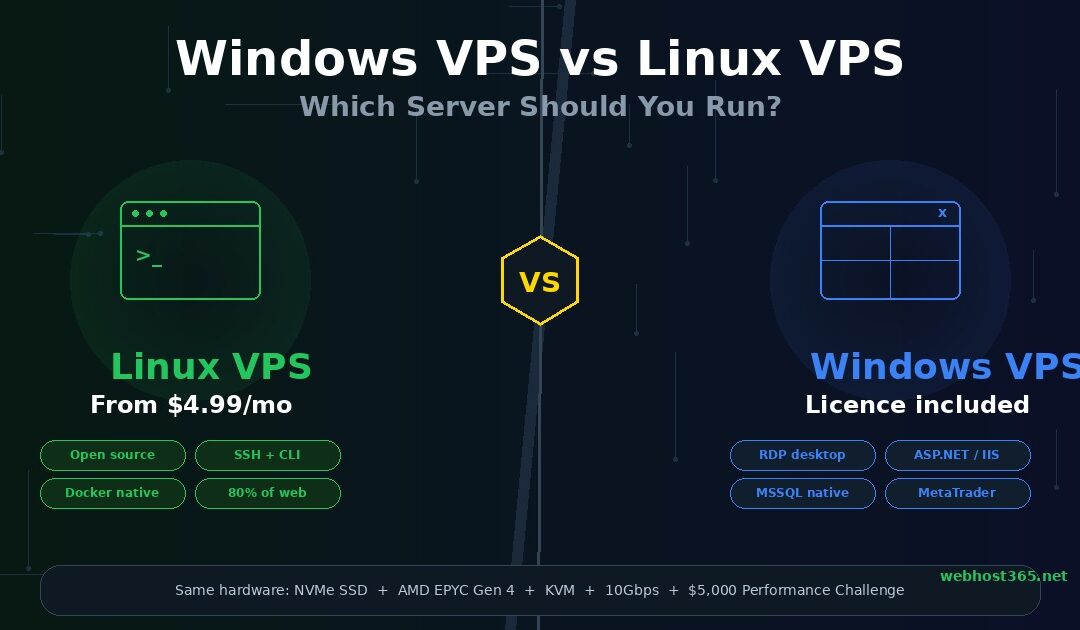
If your application requires Microsoft technologies — ASP.NET, MSSQL, Exchange, Active Directory, or Remote Desktop Protocol — you need a Windows VPS. For everything else — PHP, Python, Node.js, Ruby, Docker, WordPress, and the vast majority of open-source web applications — a Linux VPS delivers better performance at a lower cost. That is the decision in one sentence, and for roughly 80% of VPS buyers, it is the only sentence they need.
The longer answer involves understanding what each operating system actually does well, where each one falls short, what you are paying for when you choose Windows over Linux, and which specific use cases genuinely require one over the other. The distinction is not about which operating system is “better.” It is about which one runs the software your project depends on. Choosing Linux for an ASP.NET application wastes your time on compatibility workarounds. Choosing Windows for a WordPress site wastes your money on licensing fees for an operating system your application does not need.
Both options on Webhost365 run on identical hardware. Linux VPS and Windows VPS share the same NVMe SSD storage with 0.02ms latency, AMD EPYC Gen 4 processors with boost speeds up to 3.8 GHz, KVM virtualisation for full hardware isolation, and 10Gbps networking. The $5,000 BOV Performance Challenge backs every VPS plan regardless of operating system. Linux VPS starts at $4.99 per month. Windows VPS plans include the same hardware plus the Microsoft Windows Server licence.
This guide compares the two across the dimensions that actually affect your decision: what software each OS supports, what each one costs and why, how they differ in resource consumption and management, and a 12-scenario decision framework that maps your specific project to the right operating system. Whether you are deploying a Django API, running MetaTrader for forex trading, hosting a WordPress network, or setting up a remote Windows desktop, you will leave this guide knowing exactly which VPS to order.
The fundamental difference (and why it matters for your project)
Linux VPS runs on an open-source operating system where the OS itself is free, managed primarily through the command line, and optimised for server workloads with minimal resource overhead. Windows VPS runs on Microsoft Windows Server, includes a graphical desktop interface, supports Microsoft-proprietary software, and requires a commercial licence that adds to the monthly cost. Everything else — the performance differences, the cost gap, the management experience, the software compatibility — flows from this fundamental split.
Linux is not a single operating system. It is a kernel that powers dozens of distributions, each tailored for different use cases. Ubuntu and Debian are the most popular for web hosting and general server workloads. AlmaLinux and Rocky Linux are enterprise-focused replacements for the now-discontinued CentOS. Fedora tracks the latest features and packages. When you order a Linux VPS, you choose a distribution during setup, and the provider installs it on your virtual machine. The distribution determines your package manager, default software, and update cycle, but the underlying Linux kernel and command-line management experience are consistent across all of them.
Windows VPS runs Microsoft Windows Server, currently available in 2022 and 2025 editions. Unlike Linux distributions, Windows Server is a single product line from a single vendor. It includes a full graphical desktop environment by default, Remote Desktop Protocol (RDP) for connecting to that desktop from any device, IIS (Internet Information Services) for hosting web applications, and native integration with the entire Microsoft ecosystem including Active Directory, SQL Server, Exchange, and the .NET framework.
The resource overhead difference is where the choice begins to affect your wallet and your performance. A Linux server running Ubuntu or Debian with no graphical interface consumes approximately 300 to 500 MB of RAM just for the operating system and its background services. The remaining memory is available for your applications. A Windows Server installation with the standard desktop experience consumes 1.5 to 2 GB of RAM before you install or run anything.
On a 4 GB VPS, this difference is dramatic. Linux leaves roughly 3.5 GB available for your WordPress site, your database, your Python application, or your Docker containers. Windows leaves approximately 2 GB. You are paying for 4 GB of RAM but your applications can only use half of it because the operating system is consuming the rest. At higher memory tiers the gap becomes proportionally smaller, but on entry-level and mid-range VPS plans where every gigabyte matters, Linux delivers measurably more usable capacity per dollar.
The licensing cost reinforces this gap. Linux distributions are free. Ubuntu, Debian, AlmaLinux, Rocky Linux — you pay nothing for the operating system. Your VPS bill is purely for the hardware resources: CPU, RAM, storage, and bandwidth. Windows Server requires a licence from Microsoft, and that licence cost is passed through to you by the hosting provider. Depending on the edition and the provider, this adds $10 to $25 per month on top of the hardware cost. Over a year, that licensing component adds $120 to $300 to your total cost for identical hardware specifications.
The management experience is the other major divide. Linux VPS is managed through SSH, a command-line interface where you type commands to install software, configure services, edit files, and monitor processes. There is no graphical desktop by default. Everything happens through text commands. For developers and system administrators, this is faster, more scriptable, and more automatable than any graphical interface. For people accustomed to clicking through a Windows desktop, it requires learning a new way of working.
Windows VPS is managed through RDP, Remote Desktop Protocol, which gives you a full graphical desktop identical to the one you use on a Windows PC. You click icons, open applications, drag files, and configure settings through familiar Windows dialogs. For anyone already comfortable with Windows, there is essentially no learning curve. You connect to your VPS and it looks and feels like your own computer, except it is running in a data centre on enterprise hardware with a fixed IP address and 24/7 uptime.
Neither approach is better in the abstract. SSH is better for automation, scripting, and managing servers at scale. RDP is better for running graphical applications, providing remote desktops to non-technical users, and managing Windows-specific software that has no command-line interface. The right management style follows from the right operating system, which follows from the right software stack, which follows from the right project. Everything starts with what you are building.
When to choose Linux VPS
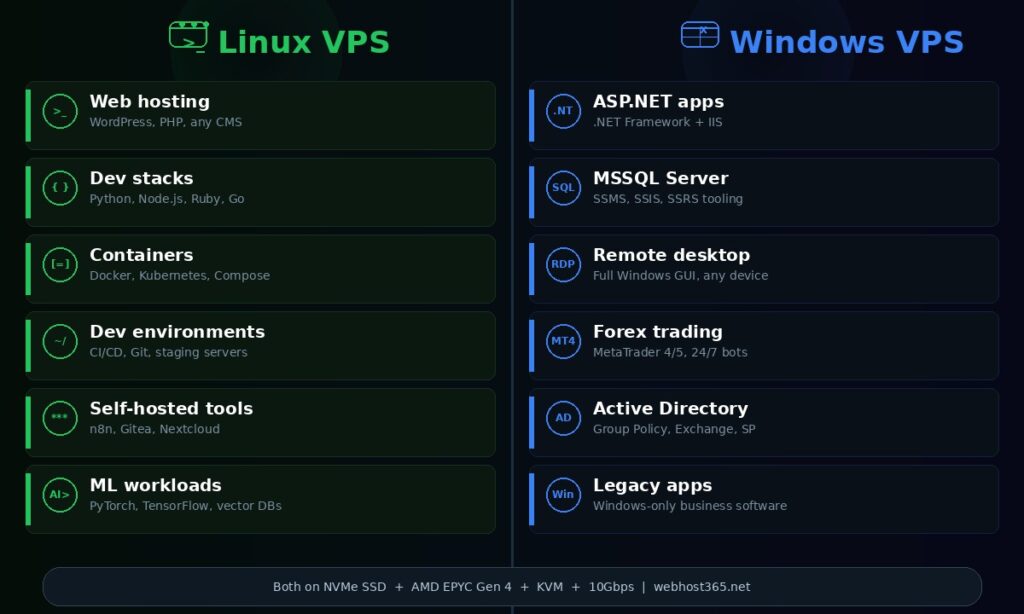
Linux VPS is the right choice for web hosting, open-source applications, containerised workloads, and development environments. It runs the majority of the internet — over 80% of web servers worldwide use Linux — because it is faster, lighter, cheaper, and more flexible than Windows for server workloads. If your project uses open-source technologies, Linux is not just a reasonable choice. It is the only choice that makes sense.
Web hosting (WordPress, PHP, any CMS)
WordPress, Joomla, Drupal, Magento, WooCommerce, Laravel, and every PHP-based application runs natively on Linux. The standard hosting stack for these applications is LAMP (Linux, Apache, MySQL, PHP) or LEMP (Linux, Nginx, MySQL, PHP). Every hosting tutorial, every deployment guide, every community forum answer assumes you are running Linux. Installing WordPress on a Linux VPS takes three commands: install the web server, create a database, and download WordPress. Installing WordPress on a Windows VPS requires configuring IIS, installing a Windows-compatible PHP build, troubleshooting path issues, and navigating a support ecosystem where almost nobody has tested your exact configuration.
If you are currently running a website on shared or cloud hosting and considering a VPS upgrade for more resources and control, Linux VPS is the natural step up. The software stack is identical to what your managed hosting was already running behind the scenes. For a detailed comparison of when a VPS makes more sense than cloud hosting, see our guide on Linux VPS vs cloud hosting.
Python, Node.js, Ruby, and Go applications
The developer tooling ecosystem for these languages is built around Linux. Django and Flask deploy with Gunicorn behind Nginx. Express and Fastify run under PM2 with Nginx as a reverse proxy. Rails runs with Puma. Go compiles to native Linux binaries. The package managers, virtual environments, process managers, and deployment scripts for all of these languages assume a Linux environment.
Running a Python application on a Linux VPS means installing your dependencies with pip inside a virtual environment, configuring Gunicorn as your WSGI server, and pointing Nginx at it. The entire deployment follows a well-documented, battle-tested path that millions of developers have used before you. Running the same Python application on Windows VPS means adapting every step of that path for a different operating system, often with sparse documentation and fewer community answers for the Windows-specific issues you will encounter.
The same applies to Node.js deployments. PM2, the most popular Node.js process manager, works on Windows but is developed and tested primarily on Linux. Nginx, the most common reverse proxy for Node.js applications, is a Linux-native tool. Every production Node.js tutorial assumes Linux. Choosing Windows VPS for a Node.js application adds friction at every stage of deployment and maintenance without providing any benefit in return.
Docker and containerised workloads
Docker was built for Linux. The container runtime, the image format, the networking model, and the orchestration layer all assume a Linux kernel. When you run a Docker container, you are running a process isolated by Linux kernel features — namespaces, cgroups, and overlay filesystems. These features exist because Docker was designed around them.
Docker Desktop does run on Windows, and Windows Server supports Windows containers. But production container deployments are overwhelmingly Linux-based. Docker Compose files, Kubernetes manifests, Helm charts, and CI/CD pipelines all assume Linux containers. If you are building a containerised application or running Docker Compose workloads on a VPS, Linux is the only operating system that gives you a native, production-grade container environment without compatibility layers or performance overhead.
Development and staging environments
Developers use Linux VPS as remote development environments, CI/CD runners, Git hosting servers, and staging environments for testing before production deployment. The command-line-first nature of Linux makes it ideal for automation. SSH access lets you work from any device. Shell scripts, cron jobs, and configuration management tools like Ansible automate repetitive tasks. Git operations are native and fast.
A Linux VPS at $4.99 per month gives a developer a persistent, always-on server with a fixed IP address, root access, and the ability to install any toolchain, runtime, or database without restrictions. It functions as a personal cloud that you fully control. Many freelance developers and small teams use a single Linux VPS as their development server, staging environment, and lightweight production host simultaneously, with each project running in its own directory or Docker container.
Self-hosted tools and automation
The self-hosted software ecosystem is almost entirely Linux-based. n8n, Gitea, Nextcloud, Plausible Analytics, Uptime Kuma, Mattermost, Vaultwarden, Freshrss, and hundreds of other self-hosted applications publish Docker images and installation guides that assume Linux. Most do not provide Windows installation instructions at all, and those that do treat Windows as a secondary, less-tested platform.
If you are self-hosting any open-source tool — whether for workflow automation, code hosting, file storage, analytics, or communication — Linux VPS is the only practical choice. The installation will be simpler, the documentation will be relevant, the community support will be available, and the application will run in the environment it was designed and tested for.
On Webhost365, Linux VPS plans start at $4.99 per month with 2 AMD EPYC cores, 4 GB DDR5 RAM, 25 GB NVMe SSD storage, 8 TB bandwidth, and a 10 Gbps network connection. That is enough to run a WordPress site, a Python API, a Docker Compose stack with three or four services, or a self-hosted automation platform comfortably. Every plan includes KVM virtualisation for full isolation, root SSH access, a VPS control panel with console access and firewall management, and 24/7 support.
When to choose Windows VPS
Windows VPS is the right choice when your application specifically requires Microsoft technologies that do not run on Linux, or when you need a remote Windows desktop accessible from any device. This is a narrower set of use cases than Linux, but for the projects that fall into it, Windows is not just preferable — it is the only option that works.
ASP.NET and .NET Framework applications
The .NET Framework is Microsoft’s original application development platform, and it runs exclusively on Windows Server. Applications built with ASP.NET Web Forms, ASP.NET MVC on the full .NET Framework, and Windows Communication Foundation (WCF) services require IIS on Windows Server. There is no Linux runtime for the .NET Framework and there never will be. If you maintain or deploy a legacy .NET Framework application, Windows VPS is not a preference. It is a hard requirement.
The newer .NET platform — .NET Core, .NET 5, .NET 6, .NET 7, and .NET 8 — is cross-platform and runs on both Windows and Linux. If your application targets these modern .NET versions, you have a genuine choice. Linux VPS will cost less and consume fewer resources. Windows VPS will provide a more familiar development and debugging experience for teams already embedded in the Microsoft ecosystem. For new .NET projects with no legacy dependencies, Linux is the pragmatic default. For teams migrating gradually from .NET Framework to modern .NET while maintaining both codebases in parallel, Windows VPS keeps both generations running on the same server.
Microsoft SQL Server (MSSQL)
SQL Server is technically available on Linux, and Microsoft has invested in making it work. But the surrounding tooling ecosystem remains Windows-centric. SQL Server Management Studio (SSMS), the primary GUI for managing SQL Server, is a Windows-only application. SQL Server Integration Services (SSIS) for ETL pipelines runs only on Windows. SQL Server Reporting Services (SSRS) for report generation runs only on Windows. If your database workflow involves any of these tools, running SQL Server on Linux creates friction because your management tools cannot run on the same machine as your database.
For teams that interact with SQL Server primarily through application code and SQL queries rather than through GUI management tools, running SQL Server on Linux is viable and saves on licensing costs. For teams that depend on SSMS, SSIS, or SSRS as part of their daily workflow, Windows VPS keeps the database and its management tools on the same operating system without remote tool configurations or separate management workstations.
Remote Desktop (RDP) for desktop applications
This is one of the most common reasons people purchase a Windows VPS and the use case that most comparison guides barely mention. A Windows VPS with RDP gives you a full Windows desktop running in a data centre, accessible from any device with an internet connection. You connect through the Remote Desktop client — available on Windows, Mac, iOS, Android, and Linux — and you see a standard Windows desktop where you can install and run any Windows application as if it were your own computer.
The use cases are broader than most people realise.
Forex and stock trading is the largest single RDP use case. MetaTrader 4 and MetaTrader 5 are Windows-only applications. Traders run them on a Windows VPS because the VPS provides 24/7 uptime, a fixed low-latency connection to trading servers, and independence from their local computer’s power supply and internet stability. A trading bot running on a Windows VPS continues executing trades while the trader’s laptop is closed, their home internet is down, or they are travelling with no reliable connection. The VPS never sleeps, never loses power, and maintains a consistent network path to the broker’s servers.
Remote access to Windows-only business software is the second major use case. Accounting packages, ERP systems, industry-specific applications, and legacy business tools that only run on Windows can be installed on a VPS and accessed from any device. A small business with five employees using a Windows-only accounting application can run it on a single Windows VPS and give each employee remote desktop access rather than installing and licensing the software on five separate computers.
Always-on automation is the third use case. Bots, scrapers, scheduled tasks, and background processes that require a Windows environment can run continuously on a VPS without depending on someone’s desktop computer being powered on and connected. A social media scheduling tool that only has a Windows client, a data collection script that uses a Windows-only API library, or a batch processing job that runs overnight — all of these benefit from a VPS that never shuts down.
Remote workstations for distributed teams round out the RDP use cases. Instead of shipping expensive laptops to remote employees, some businesses provision Windows VPS instances and give each employee RDP access. The employee connects from any device — including a cheap Chromebook or tablet — and works in a full Windows environment with controlled software, consistent configuration, and centralised data that never leaves the data centre.
Active Directory and enterprise integration
Businesses running Active Directory for user management, Group Policy for device configuration, Exchange Server for email, or SharePoint for document management need Windows Server. These are Microsoft-proprietary technologies with no Linux equivalents. Open-source alternatives exist for some functions (OpenLDAP for directory services, Samba for file sharing), but they do not replicate the full feature set and tight integration that Microsoft environments depend on. If your organisation’s infrastructure is built around the Microsoft ecosystem, your VPS needs to speak the same language.
Legacy Windows applications
Some applications were built for Windows Server 2012, 2016, or 2019 and cannot be easily rewritten or migrated. The business logic is complex, the original developers have moved on, and the cost of rewriting exceeds the cost of running the application on supported Windows infrastructure for the foreseeable future. This is not a theoretical scenario. Thousands of businesses run mission-critical applications on Windows Server that were built a decade ago and will continue running for another decade. Windows VPS keeps these applications alive on modern hardware with current security patches and predictable performance, without requiring the expensive and risky rewrite that everyone agrees should happen but nobody has the budget to start.
Webhost365 Windows VPS runs on the same NVMe SSD and AMD EPYC Gen 4 infrastructure as the Linux VPS range. You get full administrator access, RDP enabled by default, a VPS control panel for managing your server, and the ability to install any Windows-compatible software without restrictions. The $5,000 BOV Performance Challenge applies to Windows VPS plans just as it does to Linux.
Cost comparison: what you actually pay
Linux VPS is cheaper than Windows VPS because the operating system is free. The difference is not marginal. Microsoft licensing adds $10 to $25 per month to every Windows VPS plan, and that cost compounds significantly over the lifetime of the server. Understanding where the money goes helps you decide whether the premium is justified for your specific project.
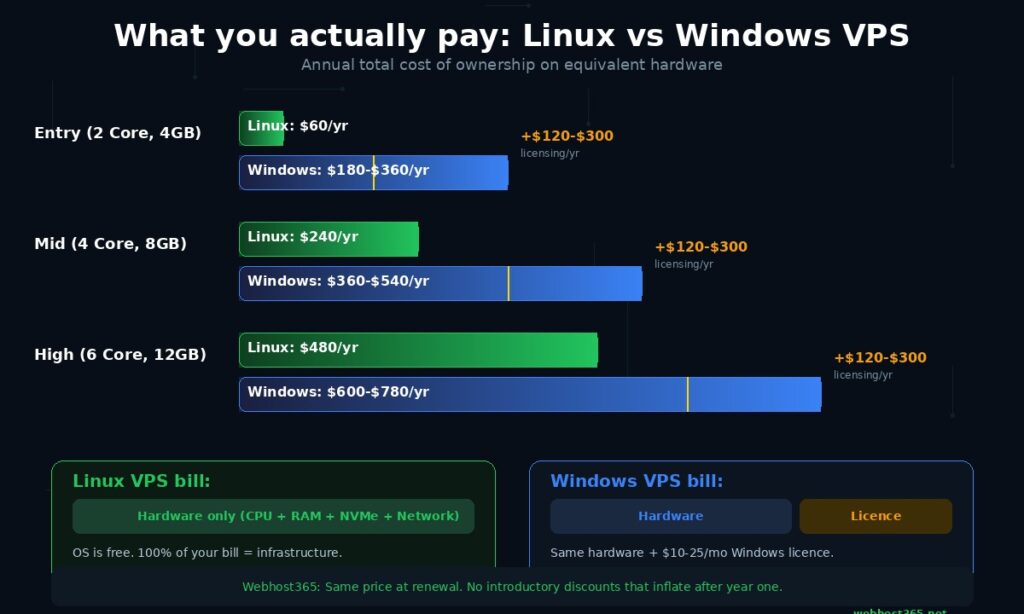
A Linux VPS bill has one component: hardware resources. You pay for CPU cores, RAM, NVMe storage, bandwidth, and network speed. The operating system — Ubuntu, Debian, AlmaLinux, Rocky Linux, or any other distribution — costs nothing. The entire monthly fee goes toward the infrastructure your applications actually use.
A Windows VPS bill has two components: the same hardware resources plus a Microsoft Windows Server licence. The licence is not optional. Microsoft requires it for every Windows Server installation, and the hosting provider passes that cost through to you. The licence fee varies by provider and by Windows Server edition, but it typically adds $10 to $25 per month on top of what the equivalent Linux VPS would cost.
Here is what that looks like on Webhost365’s Linux VPS plans.
Linux VPS pricing (Webhost365):
| Plan | Specs | Price |
|---|---|---|
| t3.nano | 2 Core AMD EPYC, 4GB RAM, 25GB NVMe | $4.99/mo |
| t3.small | 3 Core AMD EPYC, 6GB RAM, 55GB NVMe | $9.99/mo |
| c4.medium | 4 Core AMD EPYC, 8GB RAM, 80GB NVMe | $19.99/mo |
| c4.large | 6 Core AMD EPYC, 12GB RAM, 160GB NVMe | $39.99/mo |
Every Linux plan includes KVM virtualisation, 8TB bandwidth, 10Gbps networking, root SSH access, and the $5,000 BOV Performance Challenge. The prices shown are the prices you pay — at signup and at every renewal. There is no introductory discount that increases after the first term.
Windows VPS plans include the same NVMe SSD and AMD EPYC hardware as the Linux plans above, plus the Microsoft Windows Server licence. The licensing component adds to the base price. Exact Windows VPS pricing is available on the product page and varies by plan tier.
The annual total cost of ownership makes the licensing gap more visible.
Annual cost comparison:
| Plan tier | Linux VPS (annual) | Windows VPS (annual, estimated) |
|---|---|---|
| Entry (2 core, 4GB) | $59.88 | $180–$360 |
| Mid (4 core, 8GB) | $239.88 | $360–$540 |
| High (6 core, 12GB) | $479.88 | $600–$780 |
At the entry tier, the licensing cost can double or triple the annual expense. At higher tiers, the licensing becomes a smaller percentage of the total because the hardware cost makes up a larger share. A $20 per month licensing fee on top of a $4.99 Linux plan is a 400% premium. The same $20 on top of a $39.99 plan is a 50% premium. This is why the cost argument against Windows VPS is strongest at entry-level plans and weakest at higher tiers where the hardware cost dominates.
Three points of context matter when interpreting these numbers.
First, the cost difference only matters when both operating systems can run your application equally well. If your project requires Windows — because it runs ASP.NET Framework, depends on MSSQL with SSMS, or needs RDP for MetaTrader — the licensing cost is not optional. It is a fixed business expense, and comparing it to a Linux VPS that cannot run your application is meaningless. You would not compare the price of a bicycle to a truck when your job requires hauling cargo. The right question is not “is Windows VPS more expensive?” It is “does my project require what Windows provides?”
Second, the resource overhead compounds the cost gap. On a 4GB Linux VPS, your applications get roughly 3.5GB of usable RAM. On a 4GB Windows VPS, the operating system and GUI consume approximately 2GB, leaving 2GB for your applications. To get the same 3.5GB of usable application memory on Windows, you need a 6GB plan. You are paying more per month and getting a higher-tier plan to achieve the same usable capacity that Linux delivers on a lower tier. This is not a flaw in Windows. It is the inherent cost of a full graphical operating system running alongside your applications.
Third, Webhost365 VPS pricing stays the same at renewal. Many providers advertise a low introductory VPS rate that increases 50 to 100 percent after the first year. When you calculate total cost of ownership, use the renewal rate, not the signup rate. A Linux VPS advertised at $4.99 that renews at $9.99 costs $90 in the first year and $120 in every subsequent year. A Webhost365 Linux VPS at $4.99 costs $59.88 every year. Over three years, the consistent pricing saves more than the initial discount appeared to offer.
The bottom line on cost: choose the operating system your application needs, then compare pricing across providers for that operating system. Choosing Linux to save $15 per month when your application requires Windows will cost you far more in wasted time, compatibility workarounds, and degraded functionality than the licensing fee ever would. Choosing Windows when your application runs perfectly on Linux is an unnecessary expense that compounds every month for the life of the server.
Linux VPS — from $4.99/mo | Windows VPS | Compare All Plans
What are you building? (the decision framework)
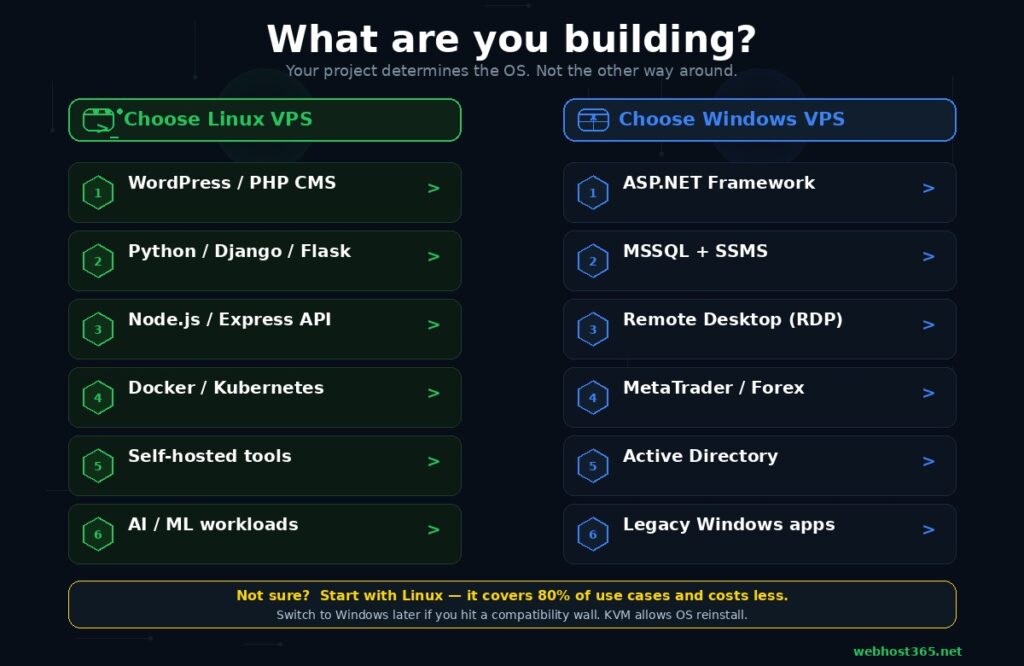
The choice between Windows VPS and Linux VPS depends on one question: what software does your project run? If you can answer that, the operating system choice follows automatically. This framework maps twelve common project types to the correct VPS operating system so you can skip the theoretical comparisons and go straight to the answer.
WordPress or any PHP-based CMS
| Choose | Linux VPS |
| Why | PHP runs natively on Linux. The entire WordPress ecosystem — themes, plugins, tutorials, hosting stacks — assumes Linux. Running WordPress on Windows VPS adds licensing cost and compatibility friction with zero performance benefit. |
Python app (Django, Flask, FastAPI)
| Choose | Linux VPS |
| Why | Python tooling is Linux-native. Virtual environments, pip, Gunicorn, Uvicorn, and Nginx all expect a Linux environment. Deployment guides, community answers, and production best practices assume Linux. |
Node.js or Express API / application
| Choose | Linux VPS |
| Why | Node.js deploys natively on Linux with PM2 for process management and Nginx as a reverse proxy. The npm ecosystem, deployment tooling, and monitoring solutions are built around Linux servers. |
Docker containers or Kubernetes
| Choose | Linux VPS |
| Why | Docker was built for Linux. The container runtime uses Linux kernel features. Production container deployments, Docker Compose files, and Kubernetes manifests assume Linux. Windows containers exist but represent less than 5% of production deployments. |
ASP.NET Framework legacy application
| Choose | Windows VPS |
| Why | The .NET Framework runs exclusively on Windows Server with IIS. There is no Linux runtime and no workaround. This is a hard requirement, not a preference. |
ASP.NET Core or .NET 6+ application
| Choose | Either — Linux preferred for cost savings |
| Why | Modern .NET is cross-platform. It runs on both Windows and Linux without modification. Linux saves $10-25/month in licensing and uses fewer resources. Choose Windows only if you also need Windows-specific tooling like SSMS or if your team’s deployment workflow is built around IIS and Windows Server management. |
Microsoft SQL Server (heavy SSMS/SSIS use)
| Choose | Windows VPS |
| Why | SQL Server itself runs on Linux, but SQL Server Management Studio, Integration Services, and Reporting Services are Windows-only. If your database workflow depends on these GUI tools, Windows VPS keeps everything on one machine. If you manage SQL Server purely through code and SQL queries, Linux works and costs less. |
Remote Desktop (RDP) access
| Choose | Windows VPS |
| Why | Windows provides built-in RDP with a full graphical desktop. You connect and see a standard Windows environment where you install and run any Windows application. Linux can run XRDP or VNC, but the experience is significantly less polished and cannot run Windows software. If you need a remote Windows desktop, you need Windows VPS. |
MetaTrader / forex trading bots
| Choose | Windows VPS |
| Why | MetaTrader 4 and MetaTrader 5 are Windows-only applications. Running them on Linux through Wine or compatibility layers introduces instability in an environment where a missed trade execution costs real money. Traders use Windows VPS for 24/7 uptime, low-latency broker connections, and independence from their local hardware. |
Self-hosted tools (n8n, Gitea, Nextcloud)
| Choose | Linux VPS |
| Why | The self-hosted software ecosystem publishes Docker images and installation guides for Linux. Most tools do not provide Windows installation instructions. If they do, Windows is a secondary and less-tested platform. |
AI / ML inference and vector databases
| Choose | Linux VPS |
| Why | PyTorch, TensorFlow, CUDA toolkits, Hugging Face libraries, and vector databases like Milvus and Weaviate are developed and tested on Linux. ML deployment guides, model serving frameworks, and GPU drivers assume Linux. Running ML workloads on Windows VPS adds complexity without any benefit. |
Active Directory / Exchange / SharePoint
| Choose | Windows VPS |
| Why | These are Microsoft-proprietary technologies with no Linux alternative that replicates the full feature set. If your organisation’s user management, email, or document infrastructure depends on any of these, Windows Server is required. |
If your project does not appear in the list above, apply a simple rule. Check whether every piece of software your project depends on runs on Linux. If yes, choose Linux — it costs less, uses fewer resources, and has broader community support. If any critical dependency requires Windows, choose Windows — the licensing cost is justified by avoiding compatibility problems that would cost you more in time and frustration.
If your project appears in both columns — for example, a .NET 6 API with a PostgreSQL database and some SSMS usage — Linux is the tiebreaker for new projects. Modern .NET runs natively on Linux, PostgreSQL is Linux-native, and you can connect to SSMS from a separate Windows workstation rather than running it on the server. The licensing savings and resource efficiency of Linux justify the minor inconvenience of managing your database GUI from a different machine.
One final note: if you are not sure whether you need a VPS at all, you might not. Many projects that people deploy on a VPS would run equally well on cloud hosting at $3.49 per month with managed LiteSpeed, automatic caching, and Bunny CDN — without any server management. A VPS gives you root access and full control. Cloud hosting gives you managed performance. If you do not specifically need root access, Docker, custom software installations, or non-web workloads, cloud hosting vs VPS is the comparison to make before choosing an operating system.
Can you switch later?
Yes. On Webhost365, both Linux VPS and Windows VPS plans use KVM virtualisation, which means the operating system is a software layer installed on top of virtualised hardware. The hardware allocation — your CPU cores, RAM, NVMe storage, bandwidth, and IP address — belongs to your VPS plan, not to your operating system. Switching from Linux to Windows or from Windows to Linux is an OS reinstallation, not a server migration.
The process is straightforward. You request an OS change through the VPS control panel or by contacting support. The provider wipes the current operating system and installs the new one on the same virtual machine. Your VPS plan, pricing, IP address, and billing cycle remain unchanged. The only thing that changes is the software running on the machine.
What you lose in the switch is everything on the server. Every file, every database, every configuration, every application you installed. An OS reinstallation is a clean slate. There is no way to preserve your data through the process because the filesystem structures of Linux and Windows are fundamentally incompatible. A Linux ext4 partition cannot be read by Windows, and a Windows NTFS partition cannot be mounted as a Linux root filesystem. The switch is a fresh start, not a conversion.
This is why external backups matter regardless of which operating system you choose. Before any OS change, download your application files, export your databases, and save your configuration notes to your local machine or a cloud storage service. After the reinstallation, you upload your data to the new environment and reconfigure your applications. The data survives. The server environment is rebuilt.
The practical migration complexity depends on the direction. Switching from Linux to Windows is relatively straightforward if your application supports both platforms. You install the Windows equivalents of your services, upload your application files, import your database, and configure the new environment. The application logic stays the same. Only the server configuration changes.
Switching from Windows to Linux is harder if your application uses Windows-specific technologies. An ASP.NET Framework application cannot simply be moved to Linux because the runtime does not exist there. A MetaTrader installation cannot be moved because the software is Windows-only. If your reason for switching is to save on licensing costs, you first need to confirm that every piece of software on your Windows server has a Linux-compatible equivalent. If even one critical dependency is Windows-only, the switch is not viable without rewriting that component.
The recommendation for anyone genuinely unsure is simple: start with Linux. It covers the widest range of use cases, costs less, uses fewer resources, and has the largest community for troubleshooting. If you discover after deploying that you need a Windows-specific technology, switch at that point. The cost of one OS reinstallation and a few hours of reconfiguration is far less than the cost of paying Windows licensing fees for months or years on a server that never needed Windows in the first place. The worst-case scenario of starting with Linux and switching is a one-time inconvenience. The worst-case scenario of starting with Windows unnecessarily is an ongoing monthly expense that never needed to exist.
Choose your VPS operating system
The decision is not about which operating system is better. It is about which one runs the software your project depends on. Linux runs 80% of the internet’s web servers because the majority of web applications, developer tools, and server software are built for it. Windows runs the Microsoft ecosystem because nothing else can. Both operating systems on Webhost365 run on the same enterprise hardware: NVMe SSD storage on AMD EPYC Gen 4 processors with KVM virtualisation, 10Gbps networking, and the $5,000 BOV Performance Challenge backing every plan.
If your project runs PHP, Python, Node.js, Ruby, Docker, or any open-source stack, start with Linux VPS at $4.99 per month. If your project requires ASP.NET Framework, MSSQL with Windows tooling, RDP, MetaTrader, or Active Directory, start with Windows VPS. If you are not sure, start with Linux. You can always switch.
Linux VPS 365 — from $4.99/mo | Windows VPS 365 | Cloud Hosting — from $3.49/mo | Compare All Plans
Frequently asked questions
Is Linux VPS faster than Windows VPS?
On equivalent hardware, Linux VPS delivers more usable performance because the operating system itself consumes fewer resources. A Linux server running Ubuntu or Debian uses approximately 300 to 500 MB of RAM for the OS and background services. Windows Server with the standard desktop experience consumes 1.5 to 2 GB before your applications use any resources. On a 4 GB VPS, Linux leaves roughly 3.5 GB for your applications while Windows leaves approximately 2 GB. This means a WordPress site, a Python API, or a Docker stack running on a 4 GB Linux VPS has access to nearly double the application memory compared to the same software on a 4 GB Windows VPS. The raw CPU and storage performance is identical on Webhost365 because both operating systems run on the same NVMe SSD and AMD EPYC Gen 4 hardware. The performance difference comes entirely from how much of that hardware the operating system leaves available for your workload.
Do I need Windows VPS for WordPress?
No. WordPress is a PHP application built for the Linux hosting stack. The standard WordPress environment — Linux, Nginx or Apache, MySQL or MariaDB, and PHP — is what WordPress.org recommends, what every major managed WordPress host uses, and what over 95% of WordPress installations run on worldwide. Running WordPress on Windows VPS requires configuring IIS with a Windows-compatible PHP build, which adds licensing cost, increases resource consumption, reduces available community support, and provides no performance advantage. If WordPress is your primary application, Linux VPS is the correct choice. If you do not need root access or custom server software, managed cloud hosting with LiteSpeed caching and Bunny CDN is even simpler and starts at $3.49 per month.
Is Windows VPS more secure than Linux?
Neither operating system is inherently more or less secure. Security depends on configuration, patching discipline, and administration practices, not on the OS brand. Linux has a smaller default attack surface because it runs without a graphical interface and starts fewer services out of the box. Windows Server includes more active components by default — the desktop environment, RDP, IIS, and various background services — which creates more potential entry points that require deliberate hardening. Linux benefits from faster community-driven security patches for open-source components. Windows benefits from Microsoft’s integrated security tools including Defender and BitLocker. Both require regular updates, firewall configuration, strong authentication, and access control. The most secure VPS is the one that is properly configured and consistently maintained, regardless of which operating system it runs.
Can I run Remote Desktop (RDP) on a Linux VPS?
Technically yes, but practically Windows VPS is the right choice for RDP. Linux can run XRDP or VNC to provide a graphical remote desktop, but the experience is noticeably less responsive than native Windows RDP. More importantly, Windows applications will not run on a Linux desktop regardless of whether it has a graphical interface. If your goal is to access a Windows environment remotely — for MetaTrader, Windows-only business software, remote workstations, or always-on desktop automation — Windows VPS with native RDP is the only practical option. If you need remote access to a server purely for administration, configuration, and deployment tasks, Linux SSH provides faster, lighter, more scriptable, and more automatable access than any graphical remote desktop.
Which VPS operating system is better for beginners?
It depends on what you are building and how you prefer to work. If you are comfortable with the command line or willing to learn it, Linux VPS is the better starting point. It costs less, uses resources more efficiently, has vastly more tutorials and community documentation for server tasks, and runs the majority of web applications without compatibility concerns. The learning curve is real but well-supported — Ubuntu alone has thousands of beginner-friendly guides for every common server task. If you need a Windows environment specifically and are already comfortable with the Windows desktop, Windows VPS provides a familiar interface you can manage through RDP without learning any Linux commands. For web hosting specifically — WordPress sites, PHP applications, or any standard website — Linux is the recommended starting point for beginners because the entire hosting ecosystem is built around it and the community support for new users is unmatched.
Does Webhost365 offer both Windows and Linux VPS?
Yes. Webhost365 offers Linux VPS starting at $4.99 per month and Windows VPS with pricing that includes the Microsoft Windows Server licence. Both run on identical underlying hardware: NVMe SSD storage with 0.02ms latency, AMD EPYC Gen 4 processors at up to 3.8 GHz, DDR5 RAM, KVM virtualisation for full resource isolation, 10Gbps networking, and 8TB bandwidth. Both include full root or administrator access, a VPS management control panel with console access and firewall configuration, and 24/7 support. The $5,000 BOV Performance Challenge applies to every VPS plan regardless of operating system. The only differences between the two are the operating system installed, the management interface (SSH for Linux, RDP for Windows), and the licensing cost that Microsoft requires for Windows Server. The hardware, the network, and the performance guarantee are the same.