
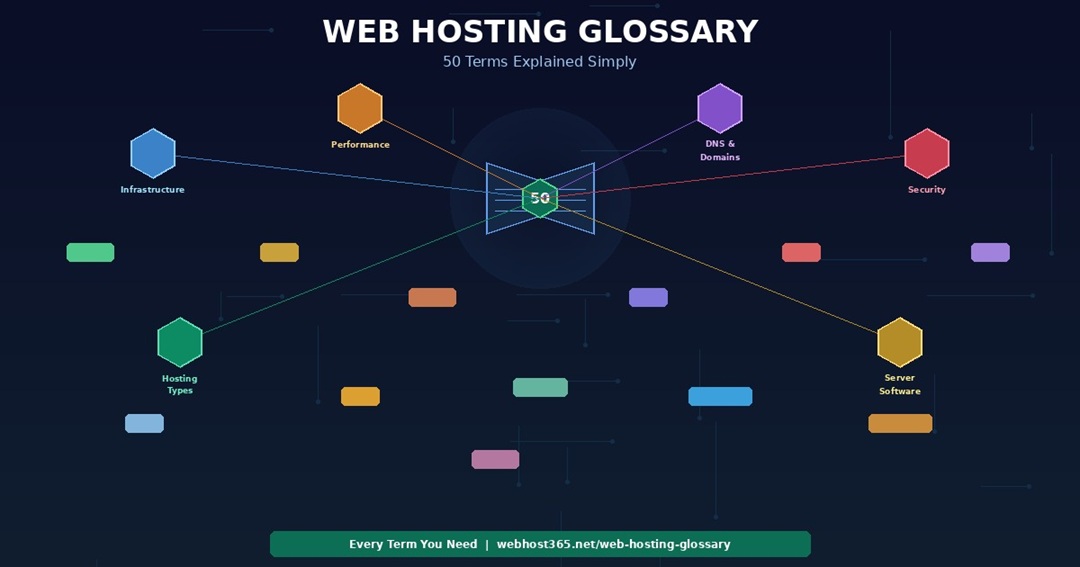
Web Hosting Glossary: 50 Terms Explained Simply
This web hosting glossary explains every term you will encounter when choosing, managing, or troubleshooting a website. Each definition is written in plain language with specific numbers and real-world context, so you understand not just what a term means but why it matters for your site’s speed, security, and cost.
Terms are grouped by category — infrastructure, performance metrics, DNS and domains, security, hosting types, and server software. Where a term has a dedicated article on this blog, the definition links to it for deeper reading. Whether you are comparing hosting plans, diagnosing a slow page, or decoding a support ticket from your hosting provider, this web hosting glossary gives you the vocabulary to make informed decisions.
Alphabetical index
A A Record · AMD EPYC · Apache B Bandwidth · Bare Metal Server C Cache · CDN · CLS · Core Web Vitals · cPanel · CPU · Cron Job D Data Centre · DDoS · DDR5 RAM · Dedicated Server · DNS · DNS Propagation · Docker · Domain Name · Domain Registrar E Edge Location F FCP · Firewall · Free Hosting · FTP H HDD · HTTPS I INP · IOPS K KVM L Latency ·
LCP · Let’s Encrypt · LiteSpeed · LSCache M Malware · Managed Hosting · MX Record · MySQL N Nameserver · Nginx · NVMe SSD · Node.js O OPcache P Page Speed · PHP · phpMyAdmin · Python R RAM · Reseller Hosting S SATA SSD · Server · Shared Hosting · Softaculous · SSD · SSH · SSL/TLS T TLD · TTFB · Two-Factor Authentication U Uptime V VPS W WHOIS · WordPress Hosting
Infrastructure terms
These terms describe the physical and virtual hardware that powers your web hosting. The hardware underneath your hosting plan determines your site’s baseline speed — the performance floor that no software optimisation can lower.
AMD EPYC
AMD EPYC is a server processor family designed for data centre workloads. EPYC Gen 4 processors support PCIe 5.0 for maximum NVMe SSD throughput, DDR5 memory for faster data access, and clock speeds up to 4.2 GHz for single-threaded PHP performance. In practical terms, EPYC processors handle WordPress database queries and PHP execution faster than older-generation server CPUs. Webhost365 runs AMD EPYC Gen 4 on every hosting plan.
Bandwidth
Bandwidth is the amount of data your hosting account can transfer to visitors over a given period, typically measured monthly in gigabytes or terabytes. Every page load, image download, and file request consumes bandwidth. A typical WordPress page transfers 1 to 3 MB per visit. Consequently, a site with 10,000 monthly visitors uses approximately 10 to 30 GB of bandwidth. Most modern hosting plans offer “unmetered” bandwidth, meaning there is no hard cap — although extremely high usage may trigger a fair use review.
Bare Metal Server
A bare metal server is a dedicated physical machine allocated entirely to one customer with no virtualisation layer between the hardware and the operating system. Unlike VPS or cloud hosting, you get 100% of the server’s CPU, RAM, and storage with no shared resources and no hypervisor overhead. Bare metal is the most expensive hosting tier and is typically used for high-performance applications, large databases, or workloads that require direct hardware access.
CPU (vCPU)
A CPU (Central Processing Unit) is the server’s processor that executes code, handles database queries, and processes visitor requests. In hosting, resources are typically allocated as vCPUs — virtual CPU cores. More vCPUs handle more simultaneous operations. A simple WordPress site uses 1 to 2 vCPUs. A busy WooCommerce store or API endpoint benefits from 4 or more. Your PHP execution speed, database query processing, and overall server responsiveness all depend on CPU allocation and clock speed.
Data Centre
A data centre is the physical facility that houses the servers your website runs on. Its geographic location directly affects latency for nearby visitors. A server in Frankfurt responds faster to visitors in Europe than to visitors in Australia. However, a CDN eliminates this geographic penalty by caching content on edge servers worldwide, making your data centre location less critical for global audiences.
DDR5 RAM
DDR5 is the latest generation of server memory, offering higher bandwidth and greater capacity than DDR4. For hosting workloads, DDR5 means faster data transfer between the processor and memory, which improves database query processing and PHP execution. The difference is most noticeable on database-heavy applications like WordPress with WooCommerce, where the server constantly reads and writes data between RAM and storage. Webhost365 servers use DDR5 RAM alongside AMD EPYC Gen 4 processors.
Disk Space / Storage
Disk space is the total storage available for your website files, databases, email, and logs. A typical WordPress site uses 1 to 5 GB. An e-commerce store with product images may use 5 to 20 GB. The amount matters, but the type matters more — 10 GB on NVMe SSD is vastly faster than 100 GB on HDD. When comparing hosting plans, check both the storage amount and whether it specifies NVMe, SATA SSD, or HDD.
HDD (Hard Disk Drive)
An HDD is a traditional storage device with spinning magnetic platters and a mechanical read/write head. HDD latency is 5 to 10 milliseconds per read operation — the slowest storage option available in hosting. A WordPress page with 40 database queries waits 200 to 400 milliseconds just for storage access on HDD. In contrast, NVMe SSD handles the same queries in under 1 millisecond. Any hosting plan that does not specify SSD or NVMe likely runs on HDD.
IOPS (Input/Output Operations Per Second)
IOPS measures how many read and write operations a storage device processes per second. HDD delivers 80 to 200 IOPS. SATA SSD delivers approximately 90,000 IOPS. NVMe SSD delivers over 1,000,000 IOPS. Higher IOPS means the server handles more simultaneous database queries, file reads, and caching operations without bottlenecking. For WordPress sites on shared hosting where dozens of accounts share the same storage, high IOPS prevents one busy site from slowing down everyone else.
KVM (Kernel-based Virtual Machine)
KVM is a virtualisation technology built into the Linux kernel that creates isolated virtual machines on a physical server. In VPS hosting, KVM ensures your virtual server has dedicated CPU, RAM, and storage that cannot be consumed by other accounts on the same physical machine. KVM provides stronger isolation than container-based virtualisation like OpenVZ, which shares the kernel between accounts. Webhost365 VPS plans use KVM for full resource isolation.
NVMe SSD
NVMe (Non-Volatile Memory Express) is a storage protocol that connects SSDs directly to the CPU via the PCIe bus, bypassing the older SATA interface entirely. latency is 0.02 milliseconds per read — five times faster than SATA SSD and 250 times faster than HDD. For hosting, NVMe determines your database query speed, which directly affects your Time to First Byte. A WordPress page with 40 queries responds in under 1 millisecond of storage time on NVMe versus 4 milliseconds on SATA or 200 to 400 milliseconds on HDD. Webhost365 runs NVMe SSD on every plan. For a complete technical explanation, see our guide on what NVMe SSD is and why it makes your website faster.
RAM (Memory)
RAM (Random Access Memory) is the temporary working memory your server uses while processing requests. Active database queries, PHP code execution, cached pages, and running processes all consume RAM. More RAM means your server handles more simultaneous visitors and larger datasets without swapping to disk. A basic WordPress site operates comfortably with 1 to 2 GB of shared RAM. A busy WooCommerce store benefits from 4 GB or more. VPS plans offer dedicated RAM allocations that other accounts cannot consume.
SATA SSD
SATA SSD is a solid-state drive that connects to the server via the SATA interface. It is dramatically faster than HDD (0.1ms latency versus 5 to 10ms), but five times slower than NVMe SSD (0.1ms versus 0.02ms). Many hosting providers advertise “SSD storage” without specifying whether it is SATA or NVMe. If a plan says “SSD” without the word “NVMe,” assume SATA. The difference matters — a WordPress database with 40 queries per page takes approximately 4ms on SATA versus 0.8ms on NVMe.
Server
A server is the physical or virtual computer that stores your website files, runs your database, executes your application code, and delivers pages to visitors. In shared hosting, your site runs on a server alongside other accounts. VPS hosting, your site runs in an isolated virtual server with dedicated resources. In dedicated hosting, your site has an entire physical server. The server’s hardware — CPU, RAM, storage type, and network connection — determines the baseline speed of everything your website does.
SSD (Solid State Drive)
SSD is a generic term covering both SATA SSD and NVMe SSD. Both are dramatically faster than HDD because they have no moving parts and access data electronically rather than mechanically. However, the performance gap between SATA SSD and NVMe SSD is significant — NVMe is five times faster for the random I/O operations that databases depend on. When evaluating a hosting plan, “SSD” is not specific enough. Look for “NVMe SSD” to confirm you are getting the fastest storage type available.
Performance and speed terms
These terms describe how your website’s speed is measured, what affects it, and how hosting infrastructure connects to the metrics Google uses for search rankings. Understanding these definitions helps you interpret speed test results and identify whether a performance issue comes from your site or from your hosting.
Cache / Caching
Caching stores pre-rendered copies of your pages so the server does not rebuild them from scratch on every request. There are two distinct levels. Plugin-level caching (WP Super Cache, W3 Total Cache) works inside WordPress — PHP still initialises and the plugin checks for a cached copy. Server-level caching (LiteSpeed LSCache) works in front of WordPress — the web server serves the cached page before PHP even starts. Server-level caching is 3 to 10 times faster. On Webhost365 WordPress and Cloud plans, LiteSpeed with LSCache provides server-level caching by default.
CDN (Content Delivery Network)
A CDN is a global network of servers that cache your website’s static content — images, CSS, JavaScript, and fonts — on edge locations distributed around the world. Instead of every visitor downloading content from your origin server, each visitor receives cached files from the nearest edge location. This reduces latency from 150 to 300 milliseconds (without CDN) to single-digit milliseconds (with CDN) for static assets. Webhost365 includes Bunny CDN with 197 global edge locations free on every plan. For a complete explanation, see our guide on what a CDN is and how it works.
CLS (Cumulative Layout Shift)
CLS is one of Google’s three Core Web Vitals metrics. It measures visual stability — how much the page content shifts around as it loads. A CLS score below 0.1 is rated “good” by Google. Layout shifts happen when images load without defined dimensions, fonts swap in with different sizes, or ads inject themselves into the page after the content renders. Unlike LCP and INP, CLS is primarily determined by your site’s code and design rather than by your hosting infrastructure.
Core Web Vitals
Core Web Vitals are three performance metrics Google uses as search ranking signals: Largest Contentful Paint (LCP), Interaction to Next Paint (INP), and Cumulative Layout Shift (CLS). LCP measures how fast your main content loads — under 2.5 seconds is “good.” INP measures how responsive your page is to interactions — under 200 milliseconds is “good.” CLS measures visual stability — under 0.1 is “good.” Your hosting infrastructure directly affects LCP through TTFB and INP through server-side processing speed.
Edge Location / PoP (Point of Presence)
An edge location is a server in a CDN network positioned geographically close to visitors. When a visitor loads your site, static assets are served from the nearest edge location rather than travelling to your origin server. More edge locations mean faster content delivery across more regions. Bunny CDN, included on all Webhost365 plans, operates 197 PoPs globally — meaning your content is cached within single-digit milliseconds of virtually any visitor worldwide.
FCP (First Contentful Paint)
FCP measures the time from when a visitor requests your page to when the first piece of visible content — text, image, or background colour — appears on screen. it is not a Core Web Vital, but it contributes to perceived speed. A fast FCP tells the visitor that the page is loading, even before the main content (measured by LCP) fully appears. Hosting infrastructure affects FCP through TTFB — the server must respond before any content can begin painting.
INP (Interaction to Next Paint)
INP is a Core Web Vital that measures your page’s responsiveness to user interactions — clicks, taps, and keyboard input. Google considers an INP under 200 milliseconds as “good.” INP is primarily affected by JavaScript execution on the visitor’s device, but server-side processing also contributes. When a user submits a form, adds a product to a cart, or triggers a search, the server must process the request and return a response. Faster server hardware (AMD EPYC processors, NVMe storage) reduces the server-side portion of INP.
Latency
Latency is the time delay for data to travel between two points on a network, typically measured in milliseconds. Geographic distance is the primary factor — data travelling from Frankfurt to Sydney takes 150 to 250 milliseconds one way. A CDN reduces latency by serving content from edge locations near the visitor instead of from the origin server. In hosting context, low-latency storage (NVMe at 0.02ms) and low-latency network connections produce faster server response times.
LCP (Largest Contentful Paint)
LCP is the Core Web Vital that measures how quickly the largest visible content element — usually a hero image, heading, or text block — becomes visible on screen. Google considers an LCP under 2.5 seconds as “good.” LCP is the metric most directly affected by hosting infrastructure. Your server’s TTFB sets the starting point, and everything after (image loading, CSS rendering, font display) adds time on top. A TTFB of 500ms on HDD hosting means your LCP starts at 500ms before any content renders. A TTFB of 80ms on NVMe starts your LCP at 80ms — a 420-millisecond head start.
LiteSpeed
LiteSpeed is a web server that replaces Apache for serving websites. It is 2 to 4 times faster than Apache for PHP workloads because it processes PHP more efficiently and includes built-in server-level caching via LSCache. Unlike Apache-based caching (which requires WordPress plugins that run inside PHP), LiteSpeed caches pages at the server level and serves them before PHP initialises. Webhost365 WordPress and Cloud plans run LiteSpeed by default. For a detailed comparison, see our guide on best hosting for WordPress.
LSCache (LiteSpeed Cache)
LSCache is the built-in caching engine of the LiteSpeed web server. It caches entire pages at the server level — before PHP executes, before WordPress loads, before any plugin runs. Cached pages respond in 10 to 30 milliseconds compared to 80 to 200 milliseconds with plugin-based caching on Apache. LSCache integrates with a free WordPress plugin that provides cache management, image optimisation, and CSS/JS minification from within the WordPress dashboard while the actual caching happens at the server level.
OPcache
OPcache is a PHP extension that caches compiled PHP bytecode in memory so the server does not recompile your PHP files on every request. Without OPcache, the server reads, parses, and compiles every PHP file for every page load. With OPcache, compiled code is stored in memory and reused. The performance improvement is 20 to 40 percent for PHP execution time. OPcache is enabled by default on most modern hosting environments and works alongside LiteSpeed or Apache without additional configuration.
Page Speed
Page speed is a general term describing how fast a web page loads and becomes interactive for the visitor. It is not a single metric but a combination of factors: server response time (TTFB), content loading (LCP), interactivity (INP), and visual stability (CLS). Page speed depends on two layers — your hosting infrastructure (storage, caching, CDN, server hardware) and your site optimisation (image compression, code minification, plugin count, font loading). For a complete diagnostic, see our guide on why websites load slowly and how to fix each cause.
TTFB (Time to First Byte)
TTFB measures how many milliseconds pass between a visitor requesting your page and the server sending the first byte of the response. It is the speed metric most directly determined by your hosting infrastructure. NVMe SSD hosting with server-level caching delivers TTFB of 10 to 30 milliseconds on cached pages and 80 to 200 milliseconds on uncached pages. HDD hosting without caching produces TTFB of 500 to 1,200 milliseconds. TTFB is the floor underneath every other speed metric — your LCP, FCP, and total page load time cannot be faster than your TTFB. For a deeper explanation, see our article on why your website is slow.
DNS and domain terms
These terms describe how domain names work, how visitors find your website, and what changes when you migrate between hosting providers. Understanding DNS terminology is particularly important during website migration, when incorrect DNS settings are the most common cause of downtime.
A Record
An A record is a DNS entry that points your domain name to a specific server IP address. When someone types yourdomain.com into a browser, DNS servers look up the A record to find the IP address of the server hosting your website. During migration, updating the A record to your new server’s IP is the step that redirects visitors from the old host to the new one. Each domain typically has one A record for the root domain and a CNAME record for the www subdomain.
CNAME Record
A CNAME (Canonical Name) record is a DNS entry that points one domain or subdomain to another domain name rather than to an IP address. The most common use is pointing www.yourdomain.com to yourdomain.com, so both versions reach the same website. CNAMEs are also used for subdomains — blog.yourdomain.com can CNAME to your hosting server or a separate platform. Unlike A records, CNAMEs cannot be used on the root domain itself on most DNS providers.
DNS (Domain Name System)
DNS is the system that translates human-readable domain names (yourdomain.com) into the numerical IP addresses (123.456.789.0) that servers use to communicate. Think of it as the internet’s phone book — you look up a name and get the number. Every time someone visits your website, their browser queries DNS servers to find your hosting server’s IP address. its settings are managed at your domain registrar and determine which server handles your website, email, and subdomains.
DNS Propagation
DNS propagation is the 2 to 48 hour period after you change DNS records during which the update spreads across global DNS servers. During propagation, some visitors reach the old server and some reach the new server, depending on which DNS server their internet provider queries. This is why zero-downtime migration requires having identical, working copies of your site on both servers during the transition. You can check propagation progress at whatsmydns.net. For a full walkthrough, see our guide on how to migrate your website without downtime.
Domain Name
A domain name is the human-readable address visitors type to reach your website — yourbusiness.com, myblog.org, or shopname.store. Domain names are purchased from domain registrars for an annual fee, typically $10 to $15 per year for .com domains. Your domain name is separate from your hosting — you can point the same domain to different hosting providers by changing DNS records. Webhost365 includes a free domain on annual hosting plans.
Domain Registrar
A domain registrar is the company where you purchase and manage your domain name. Common registrars include GoDaddy, Namecheap, Cloudflare Registrar, and Google Domains. Your registrar controls your DNS settings, domain renewal, and domain transfer options. Importantly, your registrar and your hosting provider can be different companies — your domain lives at the registrar while your website lives on your hosting server, connected by DNS records.
MX Record
An MX (Mail Exchange) record is a DNS entry that tells the internet where to deliver email for your domain. MX records point to your mail server, which may or may not be the same server as your website. If your email runs through your web hosting (you@yourdomain.com via cPanel webmail), MX records point to your hosting server. If you use Google Workspace or Microsoft 365, MX records point to their mail servers. During hosting migration, only change MX records if your email is moving to the new host — leave them unchanged if you use external email.
Nameserver (NS)
Nameservers are DNS servers that store and serve the DNS records for your domain. When you register a domain, your registrar assigns its default nameservers. You can change nameservers to point to your hosting provider’s DNS, to Cloudflare, or to any DNS provider. Pointing nameservers to your hosting provider means all DNS management (A records, CNAME, MX) happens through your hosting control panel. Keeping nameservers at your registrar means you manage DNS at the registrar while hosting runs separately.
TLD (Top-Level Domain)
A TLD is the extension at the end of a domain name — .com, .net, .org, .io, .store, .dev. The TLD you choose affects perception but not hosting or SEO performance. Google does not rank .com domains higher than .io domains. However, .com remains the most recognisable and trusted TLD for businesses. Newer TLDs like .store, .app, and .dev are increasingly common for specific industries. Your TLD choice does not affect hosting compatibility — any domain works with any hosting provider.
WHOIS
WHOIS is a public database that contains registration information for domain names — the registrant’s name, email, registrar, registration date, and nameservers. You can look up WHOIS information for any domain at lookup.icann.org. Most registrars offer WHOIS privacy protection that replaces your personal information with the registrar’s details, preventing your name and email from being publicly visible. WHOIS lookups are useful during migration for confirming which registrar manages your domain.
Security terms
These terms describe the technologies and threats that affect your website’s security. Every hosting plan should include SSL and basic server-level security by default — additional security layers like firewalls and malware scanning add protection for higher-risk sites.
DDoS (Distributed Denial of Service)
A DDoS attack floods your server with massive amounts of fake traffic from thousands of sources simultaneously, overwhelming the server’s resources until legitimate visitors cannot access your site. DDoS mitigation happens at the network level through traffic filtering, rate limiting, and CDN-based absorption. A CDN like Bunny CDN provides a natural layer of DDoS protection because attack traffic is distributed across edge servers rather than concentrated on your origin server.
Firewall (WAF)
A WAF (Web Application Firewall) filters incoming HTTP traffic and blocks malicious requests before they reach your website. It protects against SQL injection, cross-site scripting, brute force login attempts, and other common web attacks. WAFs can be server-level (built into your hosting), plugin-level (WordPress plugins like Wordfence), or CDN-level (Cloudflare, Bunny CDN). Server-level and CDN-level firewalls are more effective because they block malicious traffic before it consumes your server’s resources.
HTTPS
HTTPS (Hypertext Transfer Protocol Secure) is the encrypted version of HTTP. It means data travelling between the visitor’s browser and your server is encrypted using SSL/TLS, preventing interception by third parties. Browsers display a padlock icon for HTTPS sites and a “Not Secure” warning for HTTP sites. Google uses HTTPS as a ranking signal. In 2026, HTTPS is a non-negotiable requirement for any website — especially those handling contact forms, login credentials, or payment information.
Let’s Encrypt
Let’s Encrypt is a nonprofit certificate authority that provides free SSL/TLS certificates with automatic issuance and renewal. Before Let’s Encrypt launched in 2015, SSL certificates cost $50 to $200 per year. Today, there is no legitimate reason for a hosting provider to charge for SSL. Webhost365 uses Let’s Encrypt to auto-provision and auto-renew SSL certificates on every hosting plan — including the free tier — with no manual configuration required.
Malware
Malware is malicious software that gets injected into your website, typically through outdated plugins, weak passwords, or vulnerable themes. it can redirect visitors to spam sites, steal form data, inject hidden links, or use your server to send spam email. Prevention is more effective than removal — keep WordPress core, themes, and plugins updated, use strong passwords with two-factor authentication, and choose hosting with server-level security protections. If your site is compromised, most malware can be removed by restoring from a clean backup.
SSL/TLS Certificate
An SSL (Secure Sockets Layer) or TLS (Transport Layer Security) certificate enables HTTPS encryption on your website. The certificate verifies your domain’s identity and encrypts all data transmitted between the visitor and your server. There are three validation levels: Domain Validation (DV, automated, free via Let’s Encrypt), Organisation Validation (OV, verifies business identity), and Extended Validation (EV, extensive verification, displays company name). DV certificates from Let’s Encrypt provide the same encryption strength as paid certificates and are sufficient for the vast majority of websites.
Two-Factor Authentication (2FA)
Two-factor authentication adds a second verification step when logging into your hosting account, WordPress dashboard, or email. After entering your password, you also enter a temporary code from an authenticator app on your phone. Even if someone steals your password, they cannot log in without the code from your physical device. Enable 2FA on your hosting control panel, WordPress admin, domain registrar, and email accounts. It is the single most effective security measure against unauthorised access.
Hosting type terms
These terms describe the different categories of web hosting, from the cheapest shared plans to dedicated physical servers. The right hosting type depends on your site’s traffic, resource needs, and technical requirements. Every Webhost365 hosting type runs on the same NVMe SSD and Bunny CDN infrastructure — the tiers differ in resource allocation and control, not in infrastructure quality.
Cloud Hosting
Cloud hosting provides dedicated CPU, RAM, and storage on virtualised infrastructure that can scale resources on demand. Unlike shared hosting, your resources are reserved exclusively for your account and cannot be consumed by neighbouring sites. Cloud hosting is the right choice for database-heavy applications, e-commerce stores, and sites with traffic spikes that shared hosting cannot absorb. Webhost365 Cloud Hosting starts at $3.49 per month with LiteSpeed, NVMe SSD, and Bunny CDN. For a detailed comparison with shared hosting, see our guide on cloud hosting versus shared hosting.
Dedicated Server
A dedicated server is an entire physical machine allocated to a single customer. You get 100% of the CPU, RAM, storage, and network bandwidth with no virtualisation layer and no shared resources. Dedicated servers offer maximum performance and control but cost significantly more than cloud or VPS hosting — typically $80 to $300 or more per month. They are used for high-traffic websites, large databases, compliance-sensitive applications, and workloads that require specific hardware configurations.
Free Hosting
Free hosting provides basic web hosting at zero cost, typically with resource limits on storage, bandwidth, and features. Some free hosting providers monetise through ads displayed on your site or by selling your data. On Webhost365, the free tier includes 1 GB NVMe SSD, Bunny CDN, free SSL, and one-click WordPress install with no ads, no credit card, and no data selling. Free hosting is ideal for testing ideas, learning web development, and staging sites before committing to a paid plan.
Managed Hosting
Managed hosting means the hosting provider handles server maintenance tasks including software updates, security patching, backups, monitoring, and performance optimisation. In the WordPress context, “managed WordPress hosting” typically adds automatic WordPress core and plugin updates, staging environments, and a WordPress-specific dashboard. The server hardware is often identical to the provider’s cheaper shared plans — the “management” is software automation rather than better infrastructure. Managed hosting is worthwhile if you want someone else handling maintenance. It is not a guarantee of better speed — that depends on NVMe, LiteSpeed, and CDN. For a deeper analysis, see our article on best hosting for WordPress.
Reseller Hosting
Reseller hosting is a hosting account that you subdivide and sell to your own clients under your own brand. You purchase a reseller plan from a hosting provider, create individual hosting accounts within it, and charge your clients whatever you choose. Reseller hosting is used by web designers, digital agencies, and freelancers who want to offer hosting as part of their service package. For a complete guide to starting a reseller hosting business, including an alternative affiliate model, see our reseller hosting guide.
Shared hosting places multiple websites on a single physical server, sharing CPU, RAM, and storage resources. It is the most affordable hosting type because server costs are divided among many accounts. Shared hosting works well for personal blogs, portfolios, small business brochure sites, and any website with light to moderate traffic. The tradeoff is that neighbouring accounts can temporarily affect your performance during their traffic spikes. Webhost365 General Hosting starts at $1.49 per month on NVMe SSD with Bunny CDN — infrastructure that compensates for the shared environment by delivering fast storage and global content delivery on every request.
VPS (Virtual Private Server)
A VPS is a virtualised server with dedicated CPU, RAM, and storage, isolated from other accounts using KVM or similar virtualisation technology. Unlike shared hosting, your resources are guaranteed and cannot be consumed by neighbours. Unlike dedicated hosting, you share the physical hardware but your virtual environment is completely isolated. VPS provides root access for installing custom software, running Docker containers, configuring your own web server, and deploying applications that shared hosting cannot support. Webhost365 Linux VPS starts at $4.99 per month on NVMe SSD. For a comparison with cloud hosting, see our guide on Linux VPS versus cloud hosting.
WordPress Hosting
WordPress hosting is a hosting plan optimised specifically for WordPress at the server level. Genuine WordPress optimisation means LiteSpeed with server-level caching (not just Apache with a caching plugin), NVMe SSD for fast database queries, PHP 8.2+ preconfigured with WordPress-appropriate memory limits, and one-click WordPress installation via Softaculous.
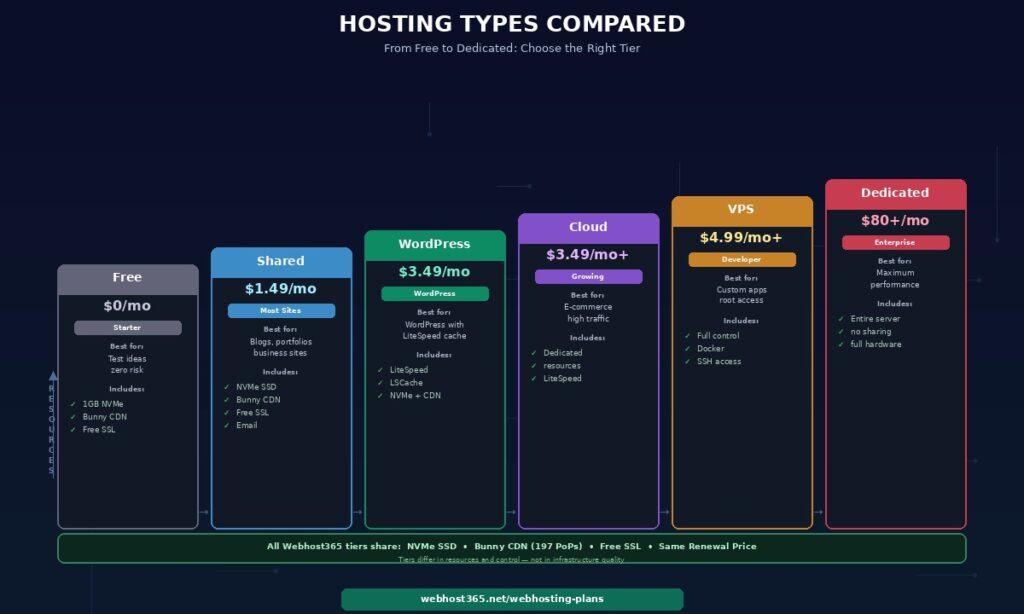
Many hosts sell regular shared hosting as “WordPress hosting” at a premium price — the server hardware is identical to their cheapest shared plan. Webhost365 WordPress Hosting starts at $3.49 per month with LiteSpeed, LSCache, NVMe SSD, and Bunny CDN. For a complete comparison, see our guide on best hosting for WordPress.
Server software and technology terms
These terms describe the software that runs on hosting servers — web servers, programming languages, databases, control panels, and tools. Understanding these terms helps you evaluate whether a hosting plan supports the technology your website or application requires.
Apache
Apache is the most widely used web server software in the world. It serves web pages to visitors by processing HTTP requests. Apache is reliable and highly configurable, but for PHP-based applications like WordPress, it is slower than LiteSpeed because it handles caching at the plugin level rather than the server level. Apache with a WordPress caching plugin serves cached pages in 80 to 200 milliseconds. LiteSpeed with LSCache serves the same pages in 10 to 30 milliseconds.
cPanel
cPanel is a web-based control panel for managing your hosting account. It provides a graphical interface for file management, database administration (via phpMyAdmin), email account creation, DNS configuration, SSL management, and one-click application installation (via Softaculous). cPanel is the most common control panel in shared hosting and is designed for users who prefer a visual interface over command-line server management.
Cron Job
A cron job is a scheduled task that runs automatically on your server at specified intervals — every minute, every hour, daily, weekly, or on a custom schedule. Cron jobs are used for automated backups, database cleanup, sending scheduled emails, updating cached data, and any repetitive server task. In WordPress, WP-Cron handles scheduled tasks like publishing future-dated posts and checking for plugin updates. On VPS hosting, you configure cron jobs directly via the server’s crontab.
Docker
Docker is a containerisation platform that packages applications with all their dependencies into portable containers. Each container runs in isolation and includes everything the application needs — code, runtime, libraries, and system tools. Docker simplifies deployment because a container that works on your development machine works identically on your VPS. It is widely used for deploying web applications, APIs, databases, and AI workloads on VPS hosting.
FTP / SFTP
FTP (File Transfer Protocol) and SFTP (Secure File Transfer Protocol) are methods for uploading and downloading files between your computer and your hosting server. SFTP encrypts the file transfer, while FTP does not — always use SFTP when available. FTP/SFTP clients like FileZilla connect to your server using credentials provided by your hosting provider. During website migration, FTP is used to download your site files from the old host and upload them to the new one.
MySQL / MariaDB
MySQL is the database system that stores all dynamic content on your website — WordPress posts, pages, comments, user accounts, product data, and settings. MariaDB is a community-developed fork of MySQL that is fully compatible and often slightly faster. WordPress, WooCommerce, Joomla, Drupal, and most PHP-based CMS platforms use MySQL or MariaDB. Your database performance depends heavily on storage speed — NVMe SSD processes database queries five times faster than SATA SSD and 250 times faster than HDD.
Nginx
Nginx (pronounced “engine-x”) is a web server and reverse proxy known for efficient static file serving and low resource consumption under high traffic. it handles concurrent connections more efficiently than Apache in high-traffic scenarios. It is often used as a reverse proxy in front of application servers — receiving visitor requests, serving cached content or static files directly, and forwarding dynamic requests to PHP, Node.js, or Python backends.
Node.js
Node.js is a JavaScript runtime that allows you to run JavaScript on the server side, outside of a web browser. It is used for building real-time applications, APIs, chat systems, and full-stack JavaScript projects. Node.js applications require VPS or cloud hosting with SSH access and the ability to run persistent background processes. For a deployment walkthrough, see our guide on how to deploy a Node.js application.
PHP
PHP is the programming language that powers WordPress, WooCommerce, Joomla, Drupal, Laravel, and the majority of content management systems on the web. Every WordPress page load executes PHP code to assemble the page from your database and template files. PHP version directly affects performance — PHP 8.2 is 20 to 30 percent faster than PHP 7.4 for WordPress workloads. Always run the latest stable PHP version your plugins support. Webhost365 supports current PHP versions with one-click switching on all plans.
phpMyAdmin
phpMyAdmin is a web-based interface for managing MySQL and MariaDB databases. It allows you to browse tables, run SQL queries, import and export database files, and manage user permissions — all through your browser without command-line access. During website migration, phpMyAdmin is the tool you use to export your database from the old host and import it to the new host. It is included in cPanel on most shared hosting plans.
Python
Python is a programming language used for web applications, APIs, data processing, machine learning, and automation. Frameworks like Django, Flask, and FastAPI make Python a popular choice for web backends and AI-powered applications. Python applications require VPS or cloud hosting with SSH access and the ability to install dependencies. For a deployment guide, see our article on how to deploy a Python application.
Softaculous
Softaculous is a one-click application installer available in most cPanel-based hosting environments. It provides automated installation of WordPress, Joomla, Drupal, PrestaShop, and over 400 other web applications. Instead of manually downloading WordPress, creating a database, and configuring wp-config.php, Softaculous handles the entire setup in under a minute. Webhost365 includes Softaculous on all shared, cloud, and WordPress hosting plans.
SSH (Secure Shell)
SSH is an encrypted protocol for command-line access to your server. Unlike FTP which only transfers files, SSH gives you full terminal access to run commands, install software, manage services, edit configuration files, and troubleshoot issues directly on the server. SSH access is standard on VPS plans and available on some shared hosting plans. For VPS hosting, SSH is the primary method of server management — essential for deploying applications, running Docker, and configuring server software.
Uptime
Uptime is the percentage of time your hosting server is accessible and serving your website to visitors. An uptime of 99.9% means your server is down for a maximum of 8.7 hours per year. An uptime of 99.99% means a maximum of 52 minutes per year. Hosting providers typically guarantee uptime in their Service Level Agreement (SLA). When evaluating uptime claims, check whether the SLA includes compensation for downtime exceeding the guarantee — and whether the guarantee covers scheduled maintenance or only unplanned outages.
Choose hosting you understand
Understanding web hosting terminology puts you in control of your hosting decisions. You know what to look for on a pricing page, what questions to ask support, and what matters for your site’s speed and security versus what is marketing noise.
Every Webhost365 plan includes the terms that matter most: NVMe SSD for fast storage, Bunny CDN for global content delivery, free SSL via Let’s Encrypt for security, LiteSpeed with LSCache on WordPress and Cloud plans for server-level caching, and transparent pricing with no renewal surprises.
General Hosting — from $1.49/mo | WordPress Hosting — from $3.49/mo | Cloud Hosting — from $3.49/mo | Linux VPS — from $4.99/mo | Free Hosting — $0/mo | Compare All Plans
Frequently asked questions
What hosting terms should I look for when comparing plans?
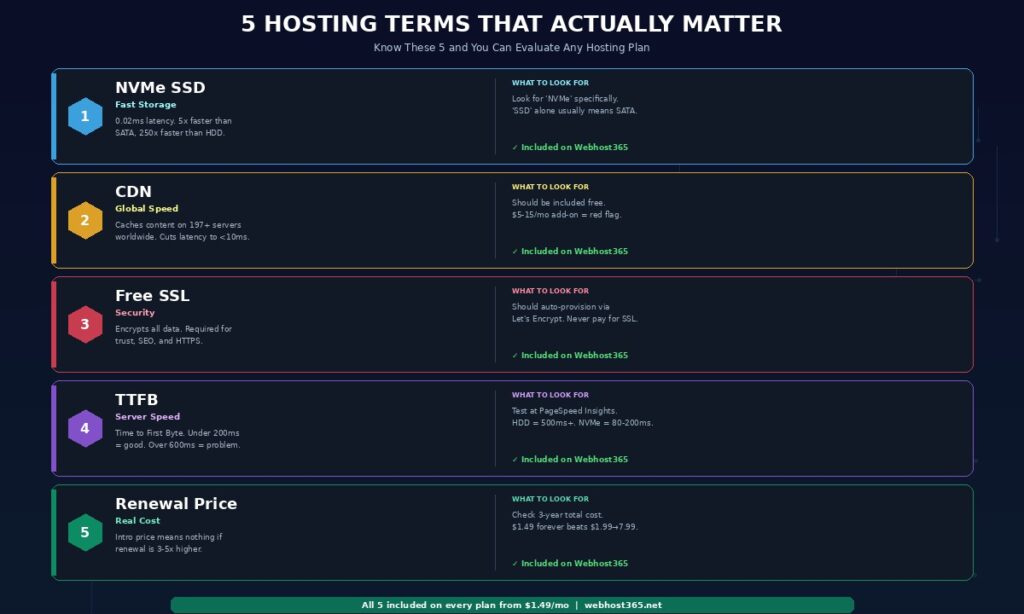
Focus on five terms when comparing hosting plans. First, NVMe SSD — not just “SSD,” which often means slower SATA. Second, CDN included — not as a paid add-on. Third, free SSL — not a $10 to $50 annual charge. Fourth, the renewal price — not just the introductory rate. Fifth, the web server type — LiteSpeed with server-level caching is faster than Apache with plugin-based caching for WordPress sites. These five factors determine your site’s speed, security, and real cost more than any other specifications on a hosting plan page. If a plan includes all five, the infrastructure is solid regardless of price tier.
Shared hosting puts multiple websites on one server sharing CPU, RAM, and storage. It is the cheapest option and works well for personal sites, blogs, and small business websites with moderate traffic. VPS (Virtual Private Server) gives you a dedicated, isolated portion of a server with guaranteed resources and root access. VPS is for developers, custom applications, Docker deployments, or sites that need more resources and control than shared hosting provides. On Webhost365, shared hosting starts at $1.49 per month and VPS starts at $4.99 per month — both run on NVMe SSD with Bunny CDN included.
What is the difference between NVMe and regular SSD?
“Regular SSD” typically means SATA SSD, which connects to the server via the older SATA interface at 0.1 millisecond latency per read operation. NVMe SSD connects via the PCIe bus at 0.02 millisecond latency — five times faster for the random read operations that database queries depend on. For a WordPress site making 40 database queries per page load, NVMe completes all queries in under 1 millisecond while SATA takes approximately 4 milliseconds and HDD takes 200 to 400 milliseconds. That difference is directly measurable in your TTFB and reflected in your Google Core Web Vitals scores. When a hosting plan says “SSD” without specifying NVMe, assume it is SATA.
Do I need to understand all these hosting terms?
No. Most website owners need to understand five terms to make good hosting decisions: NVMe SSD (fast storage), CDN (global speed), SSL (security), TTFB (server response time), and the difference between shared hosting and cloud hosting (resource allocation). These five terms cover the factors that actually affect your site’s performance and cost. The remaining terms in this glossary serve as reference material for when you encounter unfamiliar terminology in hosting comparisons, support conversations, speed test results, or technical documentation.
What is TTFB and why does it matter?
TTFB stands for Time to First Byte. It measures how many milliseconds pass between a visitor requesting your page and the server sending the first byte of the response. TTFB is determined by your storage speed (NVMe versus HDD), server processing capability (LiteSpeed versus Apache), and caching configuration (server-level versus plugin-level). A good TTFB is under 200 milliseconds for cached pages. NVMe hosting with LiteSpeed caching achieves 10 to 30 milliseconds. HDD hosting without caching often exceeds 500 to 1,200 milliseconds. TTFB matters because it is the foundation of your page speed — every other loading metric sits on top of it, and your Largest Contentful Paint cannot be faster than your TTFB.
What does “managed hosting” actually mean?
Managed hosting means the hosting provider handles server maintenance tasks such as software updates, security patching, automated backups, and performance monitoring. In the WordPress context, “managed WordPress hosting” typically adds automatic WordPress core and plugin updates, one-click staging environments, and a WordPress-specific control panel. However, the server hardware underneath managed plans is often identical to the provider’s cheapest shared hosting — the management layer is software automation, not better infrastructure. Free WordPress plugins replicate every managed feature: UpdraftPlus for backups, built-in auto-updates for WordPress core, WP Staging for staging environments, and Wordfence for security scanning. Managed hosting is worthwhile if you want someone else handling maintenance tasks. It does not guarantee faster performance — speed depends on NVMe storage, LiteSpeed caching, and CDN inclusion, none of which are related to the management layer.