
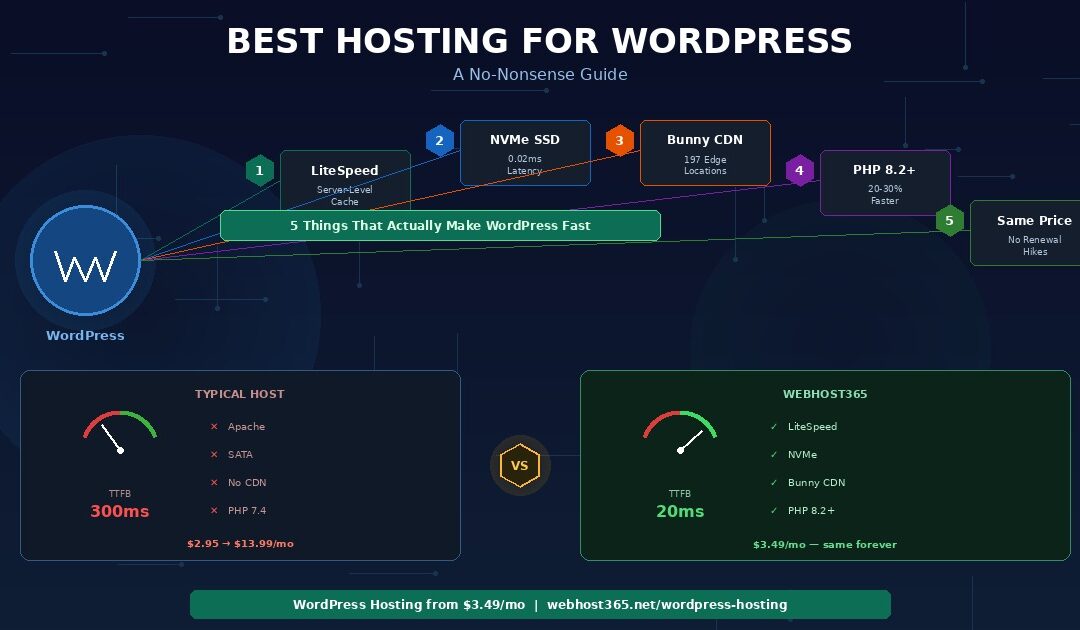
The best hosting for WordPress runs LiteSpeed with server-level caching, stores your files on NVMe SSD, includes a global CDN at no extra cost, supports PHP 8.2 or higher, and charges the same price at renewal as it does at signup. That combination makes WordPress fast at the server level — before you install a single optimisation plugin or compress a single image. Most “best WordPress hosting” guides rank providers by affiliate commission rather than by infrastructure quality.
They recommend “managed WordPress hosting” at $15 to $30 per month for sites that perform identically on a $3 to $5 plan with the right server stack. This guide explains the five server-level factors that determine WordPress speed, exposes what “managed WordPress hosting” actually delivers versus what it markets itself as, and recommends the right tier for your specific type of WordPress site. Webhost365 WordPress hosting starts at $3.49 per month with LiteSpeed, LSCache, NVMe SSD, Bunny CDN with 197 edge locations, PHP 8.2+, and pricing that never increases at renewal.
The 5 things that make WordPress hosting fast
Every host claims to be “optimised for WordPress.” Only five server-level factors actually determine whether your WordPress site loads in 1 second or 4 seconds. Everything else — staging environments, one-click installers, WordPress dashboards — is convenience. Convenience is nice. Speed is what your visitors, your revenue, and your Google ranking depend on.
1. LiteSpeed with server-level caching
This is the single biggest factor separating fast WordPress hosting from slow WordPress hosting, and almost no “best WordPress hosting” article explains it.
WordPress is a PHP application backed by a MySQL database. Every time a visitor loads a page, the server executes PHP code, runs 20 to 50 database queries, assembles the HTML, and sends the result to the browser. Caching stores a pre-rendered copy of that page so subsequent visitors receive it instantly without repeating all that work.
Here is where the critical distinction comes in. There are two fundamentally different ways to cache WordPress pages, and they are not equal.
Plugin-level caching (Apache/Nginx servers): A WordPress caching plugin — WP Super Cache, W3 Total Cache, or similar — intercepts the request after PHP has already started executing. The server loads Apache or Nginx, initialises PHP, boots WordPress, loads your active plugins, and then the caching plugin checks whether a cached copy exists. If it does, the plugin serves it. The entire PHP startup process still runs on every single request, even cached ones. Typical cached page response: 80 to 200 milliseconds.
Server-level caching (LiteSpeed with LSCache): LiteSpeed intercepts the request before PHP even starts. The web server itself checks its cache, finds the pre-rendered page, and serves it directly. PHP does not initialise. WordPress does not load. No plugins execute. The response happens at the web server layer, bypassing the entire application stack. Typical cached page response: 10 to 30 milliseconds.
That difference — 10ms versus 100ms+ — compounds across every page load, every visitor, and every crawler that hits your site. For uncached pages (first visits, logged-in users, dynamic WooCommerce cart pages), LiteSpeed processes PHP 2 to 4 times faster than Apache on identical hardware.
No caching plugin can replicate what LiteSpeed does at the server level. A plugin sitting inside WordPress cannot bypass WordPress. Webhost365 WordPress and Cloud hosting plans run LiteSpeed with LSCache built into the server — no plugin configuration required, no performance ceiling from the application layer.
2. NVMe SSD storage
WordPress makes 20 to 50 database queries on every page load. Each query reads data from storage. The speed of that storage directly determines your Time to First Byte (TTFB) — the metric that measures how quickly your server responds before any visible content begins loading.
Three types of storage exist in the hosting market today. HDD (hard disk drive) has 5 to 10 milliseconds of latency per read operation. SATA SSD brings that down to 0.1 milliseconds. NVMe SSD drops it to 0.02 milliseconds — five times faster than SATA and 250 times faster than HDD.
Put those numbers in context. A WordPress page with 40 database queries spends 200 to 400 milliseconds waiting for HDD storage. The same page spends 4 milliseconds waiting for SATA SSD. On NVMe, it spends 0.8 milliseconds. That gap is pure server-side delay that no front-end optimisation can reduce. Compressing images, minifying CSS, and deferring JavaScript — none of those touch database read latency.
WordPress itself requires PHP 7.4+ and MySQL 5.7+ at minimum. But the official requirements say nothing about storage type because that is a hosting infrastructure decision, not a software requirement. Hosts running SATA SSD technically meet every WordPress requirement. They are still 5 times slower than NVMe for every database operation your site performs. Webhost365 runs NVMe SSD on every plan — from the free tier to VPS.
3. A global CDN
A typical WordPress page loads 15 to 40 individual assets: stylesheets, JavaScript files, images, fonts, and favicons. Without a CDN, every one of those assets travels from your hosting server to the visitor’s browser, regardless of geographic distance. A visitor in Mumbai loading a page from a server in Frankfurt waits 150 to 250 milliseconds of network latency per request before a single byte arrives.
WordPress sites benefit from a CDN more than most websites because they are inherently asset-heavy. Themes load multiple CSS and JavaScript files. Plugins add their own scripts. Media libraries fill pages with images. WooCommerce product pages often include 5 to 15 product images each. Every asset multiplied by network latency adds up fast.
With Bunny CDN and its 197 global edge locations, those assets are cached on servers distributed worldwide. The same visitor in Mumbai receives cached files from a nearby edge location in single-digit milliseconds instead of waiting for a round trip to Frankfurt. Static assets — which make up 80 to 90 percent of a typical WordPress page’s total download size — load near-instantly from the closest node.
Most hosting providers either exclude CDN entirely or charge $5 to $15 per month as a paid add-on. Over three years, a $10 monthly CDN fee adds $360 to your hosting cost — often more than the hosting itself. Webhost365 includes Bunny CDN free on every plan, with zero configuration and no DNS changes. Your CDN activates the moment your WordPress site goes live.
4. PHP 8.2 or higher
WordPress is written in PHP. Every page load, every admin action, every WooCommerce checkout executes PHP code. The version of PHP running on your server directly affects how fast that code executes.
PHP 8.2 is 20 to 30 percent faster than PHP 7.4 for typical WordPress workloads. Memory management is more efficient, the JIT compiler optimises frequently-used code paths, and internal functions process data faster. On a page that takes 300 milliseconds to generate under PHP 7.4, switching to PHP 8.2 reduces generation time to 210 to 240 milliseconds — with zero changes to your site.
Many hosting providers still default to PHP 7.4 and do not update the version unless the customer manually switches it in their control panel. Some older hosts run PHP 7.2 or even 7.0, which are no longer receiving security patches. Check your PHP version in your hosting panel. If it shows anything below 8.2, switch immediately. Most modern WordPress themes and plugins are fully compatible with PHP 8.2 and 8.3.
Webhost365 supports the latest stable PHP versions on all plans. Switching is a one-click operation in your control panel, and the change takes effect within minutes.
5. Honest renewal pricing
“WordPress hosting” plans carry some of the highest markup in the hosting industry. The word “WordPress” in a plan name signals willingness to pay more, and providers price accordingly. A typical competitor’s WordPress hosting plan advertises $2.95 per month as the introductory rate. The renewal price — buried in the terms of service — is $13.99 per month.
Here is what that looks like over three years.
| Year 1 | Years 2–3 | 3-Year Total | |
|---|---|---|---|
| Typical “WordPress host” ($2.95 intro → $13.99 renewal) | $35.40 | $335.76 | $371.16 |
| Webhost365 WordPress Hosting ($3.49, same at renewal) | $41.88 | $83.76 | $125.64 |
The typical WordPress host costs nearly three times more over three years — and often runs on worse infrastructure. No LiteSpeed, no CDN included, SATA SSD instead of NVMe. You pay more for less because the plan name includes “WordPress.”
Webhost365 charges the same $3.49 at renewal as it does at signup. No introductory tricks, no year-two surprises. For a detailed breakdown of how renewal pricing inflates hosting costs across the industry, see our complete analysis of web hosting renewal price hikes.
“Managed WordPress hosting” — what it actually means versus what they sell you
Managed WordPress hosting is one of the most profitable upsells in the hosting industry. The term sounds premium. The pricing reinforces that perception — $15 to $30 per month compared to $3 to $5 for regular shared hosting. But the gap between what managed WordPress hosting delivers and what it costs is wider than most buyers realise. Understanding the three tiers of WordPress hosting saves you $100 to $300 per year without sacrificing any performance.
This is the baseline. Standard shared hosting where you install WordPress yourself through a one-click installer like Softaculous. The server runs Apache or Nginx. You handle updates, backups, security, and performance tuning on your own. Pricing typically starts at $2 to $5 per month introductory, rising to $8 to $15 at renewal.
What you actually get is WordPress installed on a generic server. Nothing about the server configuration is WordPress-specific. The same hardware and software stack serves a static HTML site, a Joomla installation, or a custom PHP application. Apache runs as the web server on most of these plans, which means caching happens at the plugin level inside WordPress rather than at the server level in front of it.
For a simple five-page brochure site with low traffic, this tier works adequately — provided the server uses NVMe SSD and includes a CDN. Without those two infrastructure basics, even a simple site loads slowly for visitors outside your server’s region.
“Managed WordPress hosting” — the industry’s favourite upsell
Here is where the pricing jumps and the marketing gets creative. Managed WordPress hosting typically costs $15 to $30 per month. The headline features include automatic WordPress core and plugin updates, daily backups with one-click restore, a staging environment for testing changes, a WordPress-specific control panel, and sometimes malware scanning or a web application firewall.
Every one of those features sounds valuable. None of them require special server hardware.
Automatic updates are built into WordPress core since version 5.6. Daily backups are handled by the free UpdraftPlus plugin or the free tier of BlogVault. Staging environments are created by the free WP Staging plugin. Malware scanning is available through Wordfence’s free plan. A WordPress-specific dashboard is a cosmetic layer on top of the same cPanel or Plesk that shared hosting uses.
The server underneath managed WordPress hosting is usually identical to the provider’s $3 per month shared plan. Same CPU allocation, same storage hardware, same web server software. The “management” layer is software automation — scripts that run updates and backups on a schedule. Automation that free plugins replicate without difficulty.
Ask any managed WordPress provider a direct question: does your managed plan run on different server hardware than your shared plan? In most cases, the answer is no. You are paying $15 to $30 per month for a convenience layer that costs the provider almost nothing to operate. The margins on managed WordPress hosting are among the highest in the industry.
Performance WordPress hosting — what actually moves the needle
The third tier is hosting where the WordPress optimisation lives in the infrastructure, not in a dashboard skin. This means LiteSpeed as the web server instead of Apache, with server-level caching that bypasses PHP entirely for cached requests. NVMe SSD storage instead of SATA, cutting database query latency by a factor of five. A global CDN integrated by default rather than sold as an add-on. PHP 8.2+ with OPcache pre-configured for WordPress memory limits and execution settings.
These are hardware and software decisions that affect every request your WordPress site handles. They cannot be replicated by a plugin, a dashboard, or an automation script. A caching plugin cannot make Apache behave like LiteSpeed. A backup scheduler cannot turn SATA into NVMe. A staging tool cannot add 197 CDN edge locations.
This is what Webhost365 WordPress hosting provides at $3.49 per month. LiteSpeed with LSCache at the server level. NVMe SSD on every plan. Bunny CDN with 197 edge locations included free. PHP 8.2+ with one-click version switching. And pricing that stays at $3.49 when your plan renews — not $13.99, not $19.99, not $29.99.
The infrastructure of a $25 managed WordPress plan at a fraction of the price, without the marketing markup. If you want automatic backups and staging on top of that, install UpdraftPlus and WP Staging for free. Total cost: $3.49 per month with better server-level performance than most hosts charging five to eight times more.
The WordPress speed stack — how the 5 factors compound
The five factors above do not simply add up. They compound. Each one removes a different bottleneck in the request chain, and removing all five produces a result that is exponentially faster than removing just one or two.
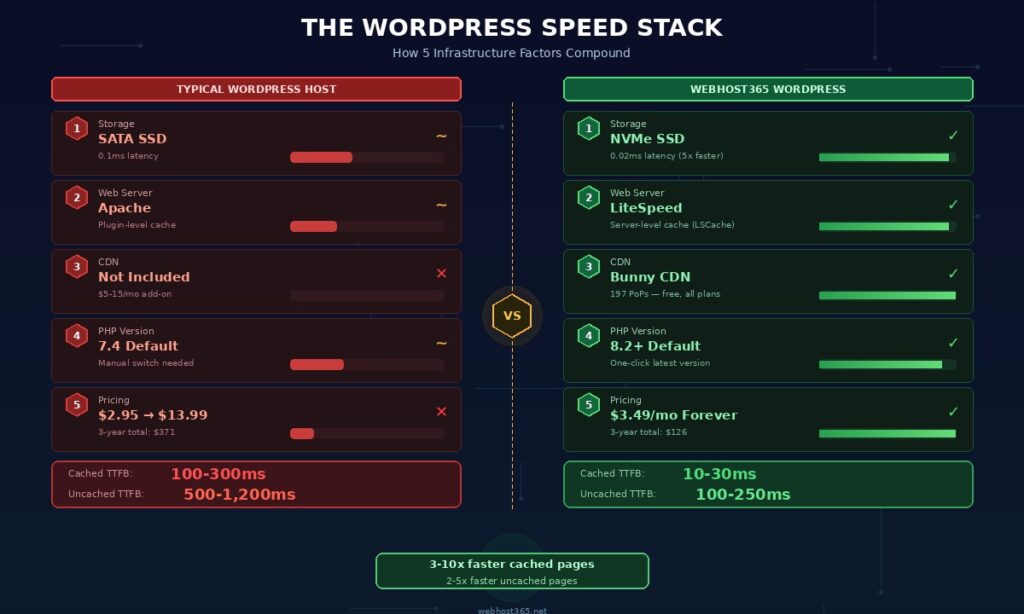
A site with NVMe storage but Apache and no CDN is faster than HDD hosting, but it still hits ceilings that LiteSpeed and a CDN would eliminate. A site with LiteSpeed but SATA storage still waits five times longer for every database query than it needs to.
Here is what the full stack looks like side by side.
| WordPress speed factor | Typical host | Webhost365 |
|---|---|---|
| Storage | SATA SSD (0.1ms latency) | NVMe SSD (0.02ms latency) |
| Web server | Apache (plugin-level cache) | LiteSpeed (server-level cache) |
| CDN | None included ($5–15/mo add-on) | Bunny CDN, 197 PoPs (free) |
| PHP version | 7.4 default (manual switch) | 8.2+ default (one-click latest) |
| Renewal price | $2.95 intro → $13.99/mo | $3.49/mo — same forever |
| Cached page TTFB | 100–300ms | 10–30ms |
| Uncached page TTFB | 500–1,200ms | 100–250ms |
The bottom two rows tell the full story. Cached pages — the majority of requests on a well-configured WordPress site — respond in 10 to 30 milliseconds on the Webhost365 stack versus 100 to 300 milliseconds on a typical host. That is a 3x to 10x difference on every page load for every visitor.
Uncached pages show the gap even more clearly. Dynamic requests — first visits, logged-in dashboard sessions, WooCommerce cart interactions — cannot be served from cache. They require PHP execution, database queries, and HTML assembly on every request. On NVMe with LiteSpeed and PHP 8.2, uncached pages respond in 100 to 250 milliseconds. On SATA with Apache and PHP 7.4, the same pages take 500 to 1,200 milliseconds. That difference is visible to visitors and measurable in your Core Web Vitals scores.
Why this matters for Google rankings
Google uses Largest Contentful Paint as a ranking signal. LCP measures how quickly your main content becomes visible, and server response time is the first component of that measurement. A TTFB of 500ms means your LCP cannot possibly be faster than 500ms — before images load, before CSS renders, before JavaScript executes. Starting with a 100ms TTFB gives your page a 400-millisecond head start that compounds through the entire rendering pipeline.
Fast infrastructure does not replace front-end optimisation. Compressing images, limiting plugins, and deferring JavaScript still matter. But those optimisations build on top of your infrastructure baseline. The best-optimised WordPress site on Apache with SATA storage and no CDN will always be slower than a moderately optimised site on LiteSpeed with NVMe and Bunny CDN. Infrastructure sets the floor. Optimisation determines how far above that floor you can go. For a complete walkthrough of every front-end optimisation that builds on this foundation, see our guide on how to speed up your WordPress site.
Which WordPress hosting tier do you need?
Your WordPress site type determines the right hosting tier. A personal blog with 500 monthly visitors does not need the same resources as a WooCommerce store processing 200 orders per day. Overpaying for resources you do not use wastes money. Underpaying for resources your site demands costs you customers and search rankings.
Personal blog or portfolio site
| Recommended | General Hosting — $1.49/mo |
| Why | A blog with a handful of posts, a portfolio showcasing your work, or a personal project site generates light traffic and minimal database load. NVMe SSD keeps your queries fast, Bunny CDN delivers your images globally, and free SSL secures the connection. Professional email on your domain is included. You do not need LiteSpeed caching for a site that serves a few hundred visitors per month. |
Business brochure site (5–20 pages)
| Recommended | General Hosting — $1.49/mo |
| Why | A local business site with service pages, a contact form, a location map, and a photo gallery is mostly static content. Once a caching plugin stores the rendered pages, the server barely works on repeat visits. NVMe storage and Bunny CDN handle this workload comfortably at $1.49. Save the budget for marketing your site rather than overprovisioning your hosting. |
Active blog with 10,000+ monthly visitors
| Recommended | WordPress Hosting — $3.49/mo |
| Why | Higher traffic means more concurrent requests and more frequent cache refreshes. LiteSpeed with LSCache handles traffic spikes that would slow down an Apache server with plugin-based caching. Content sites get shared on social media, linked from aggregators, and indexed aggressively by search crawlers — all creating bursts that require server-level caching to absorb without degradation. Dedicated resources prevent neighbouring accounts from stealing your CPU during peak moments. |
WooCommerce store (under 100 products)
| Recommended | WordPress Hosting — $3.49/mo |
| Why | WooCommerce is the most database-intensive WordPress plugin. Every product page, cart update, and checkout step triggers multiple database queries. Cart and checkout pages are dynamic and cannot be fully cached — they change with every visitor’s session. LiteSpeed’s PHP processing speed and NVMe’s database latency directly determine how fast your checkout feels. Slow checkout costs you abandoned carts. Cloud hosting at the same $3.49 starting price provides the dedicated resources that prevent slowdowns during sale events. |
Large WooCommerce store (100+ products, higher traffic)
| Recommended | Cloud Hosting — from $3.49/mo |
| Why | Larger product catalogues with filtering, customer accounts, wishlists, and dynamic pricing generate heavy concurrent database load. Inventory syncs, order processing, and payment gateway callbacks all compete for server resources. Cloud hosting with higher resource allocations handles hundreds of simultaneous shoppers during product launches and seasonal sales without the response time degradation that shared environments experience under load. If your store generates revenue, the cost difference between $3.49 and a slightly higher cloud tier is trivial compared to one hour of downtime during a promotion. |
WordPress multisite or agency managing multiple installations
| Recommended | Linux VPS — from $4.99/mo |
| Why | Running WordPress multisite or managing five to ten client installations requires root access for custom Nginx or LiteSpeed configurations, per-site PHP pools, and isolated database users. A VPS gives you full control over your server stack, the ability to run WP-CLI for bulk management, and Docker support for containerised environments. For a detailed comparison of when VPS makes more sense than managed hosting, see our guide on Linux VPS vs cloud hosting. |
WordPress testing, staging, or learning
| Recommended | Free Hosting — $0/mo |
| Why | Building a WordPress site to test a theme, learn plugin development, or stage a redesign before pushing it live does not require paid hosting. The Webhost365 free tier includes 1 GB NVMe SSD, Bunny CDN, free SSL, and one-click WordPress install at zero cost with no credit card. When you are ready to go live, upgrade within the same platform — your files, database, and configuration stay exactly where they are. No migration, no DNS changes, no downtime. For a full comparison of free hosting options and their limitations, see our guide on free web hosting. |
Every tier on Webhost365 shares the same infrastructure foundation. NVMe SSD storage, Bunny CDN with 197 edge locations, free auto-renewing SSL, professional email, 24/7 support, and pricing that never changes at renewal. The tiers differ in resource allocation — CPU, RAM, and caching engine — not in infrastructure quality. Upgrading from $1.49 General Hosting to $3.49 WordPress Hosting adds LiteSpeed with LSCache and dedicated resources. It does not unlock features that should have been included from the start.
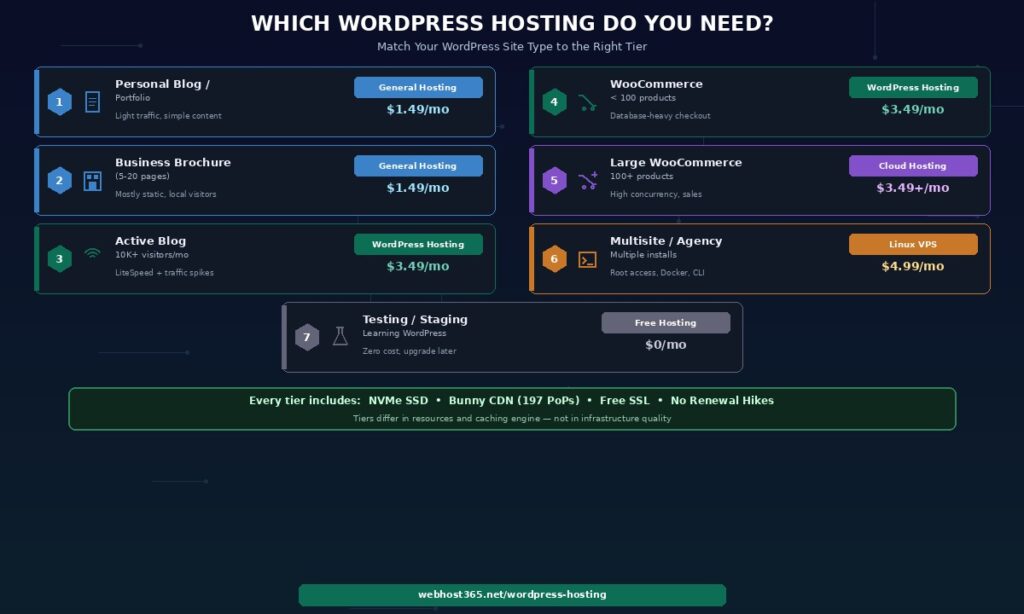
That distinction matters. Many providers gate their most impactful features behind expensive tiers. CDN on the premium plan only. LiteSpeed caching reserved for $20+ managed plans. Daily backups at the business tier. On Webhost365, the infrastructure that makes WordPress fast is identical across every plan. Choose your tier based on what your site needs — not based on which plan unlocks the features your visitors depend on.
Your WordPress site deserves faster hosting
WordPress powers approximately 43 percent of all websites globally. The hosting underneath it determines whether your site loads in 1 second or 4 seconds, whether Google rewards it with higher rankings or penalises it for slow Core Web Vitals, and whether your visitors stay on the page or bounce to a competitor.
Choose hosting built for WordPress performance — LiteSpeed with server-level caching, NVMe SSD for fast database queries, a global CDN for fast asset delivery, and current PHP for fast code execution. Not hosting that puts the WordPress name on a shared plan and charges a premium for convenience plugins you can install for free.
WordPress Hosting — from $3.49/mo | General Hosting — from $1.49/mo | Cloud Hosting — from $3.49/mo | Linux VPS — from $4.99/mo | Free Hosting — $0/mo | Compare All Plans
Frequently asked questions
What makes WordPress hosting different from regular hosting?
True WordPress-optimised hosting differs from regular shared hosting at the server level, not the dashboard level. The key differences are the web server software (LiteSpeed with server-level caching versus Apache with plugin-based caching), storage type (NVMe SSD for fast database queries versus SATA or HDD), and pre-configured PHP settings optimised for WordPress memory and execution limits. Most providers that sell “WordPress hosting” are offering regular shared hosting with a one-click installer and a higher price tag. The server hardware and software stack is identical to their cheapest shared plan. Genuine WordPress optimisation means the server responds to WordPress requests faster at the hardware and software level before any plugin, theme, or content optimisation on your end. Look for LiteSpeed, NVMe, and an included CDN — those three infrastructure factors affect your WordPress speed more than any dashboard feature ever will.
Is managed WordPress hosting worth the extra cost?
For most WordPress sites, no. Managed WordPress hosting typically costs $15 to $30 per month and includes automatic updates, daily backups, staging environments, and a WordPress-specific dashboard. Every one of those features is available for free through WordPress itself or through free plugins. WordPress has built-in automatic updates since version 5.6. UpdraftPlus provides free automated backups with one-click restore. WP Staging creates staging environments at no cost. Wordfence handles malware scanning on its free plan. The only scenario where managed hosting justifies the premium is a revenue-critical site where you need guaranteed support response times, proactive security monitoring, and someone else to handle WordPress core compatibility issues after updates. For a blog, portfolio, small business site, or small WooCommerce store, the $15 to $30 monthly premium buys convenience features you can replicate for free on a $3.49 plan with better server-level infrastructure.
Does WordPress hosting affect my Google ranking?
Yes. Google uses Core Web Vitals as ranking signals, and your hosting infrastructure directly affects two of the three metrics. Largest Contentful Paint depends on how quickly your server delivers the main content — determined by storage speed, caching architecture, and CDN availability. Interaction to Next Paint is affected by server-side processing speed for dynamic content like search results, filtered product pages, and comment submissions. A WordPress site on LiteSpeed with NVMe hosting and a CDN will have measurably better Core Web Vitals than the same site on Apache with SATA hosting and no CDN. Better Core Web Vitals translate directly to better rankings and more organic traffic. If you invest in SEO, content marketing, or Google Ads to bring visitors to your WordPress site, your hosting infrastructure needs to support that investment by delivering the page speed Google rewards.
Yes, and for simple sites it works well. WordPress runs on any hosting that supports PHP and MySQL, which includes every shared hosting plan on the market today. A five-page business site with light traffic performs acceptably on shared hosting with NVMe SSD and a CDN. Where regular shared hosting falls short is when your site has database-heavy features like WooCommerce, membership plugins, or dynamic content generation. High traffic volumes above 10,000 monthly visitors also push shared hosting to its limits. At that point, WordPress-specific hosting with LiteSpeed and dedicated resources makes a measurable difference in page load times and Core Web Vitals scores. On Webhost365, General Hosting at $1.49 handles simple WordPress sites comfortably, while WordPress Hosting at $3.49 adds LiteSpeed with LSCache for sites that need server-level caching performance.
How fast should a WordPress site load?
A well-optimised WordPress site on proper infrastructure should achieve a Largest Contentful Paint under 2.5 seconds, a Time to First Byte under 200 milliseconds on cached pages, and a total page weight under 2 MB. These targets are achievable on NVMe hosting with LiteSpeed caching and a CDN, combined with image compression to WebP format, minimal plugins, and deferred JavaScript loading. If your WordPress site currently loads in 4 or more seconds, the most likely causes are unoptimised images, too many plugins, no server-side caching, or slow hosting hardware. Our guide on how to speed up WordPress covers every front-end optimisation step. This article covers the hosting infrastructure that makes those optimisations effective. Start with the infrastructure, then optimise the front end. Both layers working together is what produces sub-2-second load times.
Should I use WordPress.com or self-hosted WordPress?
For any serious website — business, blog, portfolio, or store — self-hosted WordPress on your own hosting is the better choice. WordPress.com is a hosted platform that restricts which themes and plugins you can install, limits customisation options, displays ads on free and lower-tier plans, and charges $25 to $45 per month for features that are free on self-hosted WordPress. Custom plugins, Google Analytics integration, and WooCommerce all require WordPress.com’s most expensive plans.
Self-hosted WordPress from WordPress.org is free, open-source, and gives you full control over every aspect of your site. Install any theme, any plugin, and any custom code without platform restrictions. The total cost of self-hosted WordPress on Webhost365 — including hosting, free domain on annual plans, SSL, CDN with 197 edge locations, and professional email — starts at $3.49 per month with no restrictions and no content ownership concerns. WordPress.com at comparable functionality costs $25 or more per month with fewer customisation options.