
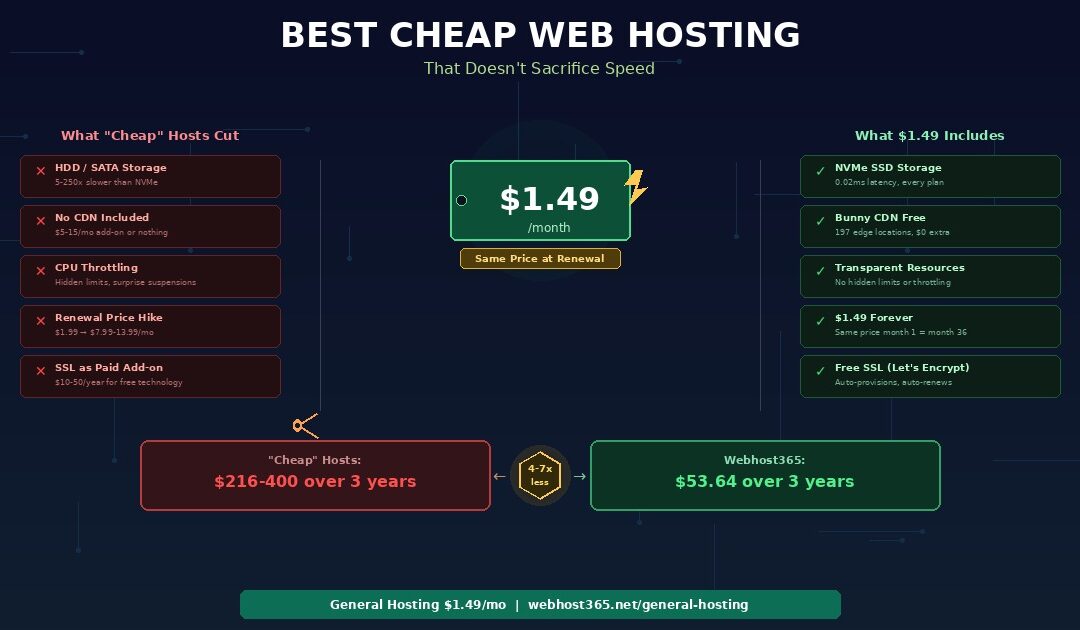
The best cheap web hosting includes NVMe SSD storage, a global CDN, free SSL, professional email, and the same price at renewal as at signup — all for under $2 per month. That benchmark eliminates most hosts on “cheapest hosting” lists, because the majority hit low introductory prices by removing infrastructure that directly affects your site’s speed, security, and Google ranking.
A $1.99 per month plan on HDD storage with no CDN, SSL as a paid add-on, and a renewal rate of $7.99 is not cheap web hosting. It is slow hosting with a low introductory price and a hidden long-term cost. In contrast, genuinely affordable hosting means a low price AND complete infrastructure — with no surprises when the plan renews.
Most “best cheap hosting” comparisons rank providers by affiliate commission rather than by what the plan actually includes. They show the introductory rate in a large font and bury the renewal price in a footnote. As a result, readers sign up for “$1.99 hosting” that costs $216 over three years while missing better options at a lower real cost.
This guide explains the five things cheap hosting providers remove to hit low prices, defines what budget hosting should actually include in 2026, and compares what your money buys at different providers dollar for dollar. Webhost365 General Hosting starts at $1.49 per month with NVMe SSD on every plan, Bunny CDN with 197 global edge locations included free, auto-renewing SSL via Let’s Encrypt, professional email on your domain, and a renewal price that never changes. The three-year total cost is $53.64.
The 5 things cheap hosting providers cut to reach low prices
Hosting providers do not magically make cheap web hosting cheaper. They make it cheaper by removing things. Specifically, they remove the infrastructure components that cost them money to operate — and those components are exactly the ones that determine whether your site loads fast or slow. Understanding what gets cut reveals why most “cheap” hosting is actually slow hosting sold at a temporary low price.
1. Cheap hosts use HDD or SATA instead of NVMe storage
NVMe SSD costs more per gigabyte than SATA SSD, which in turn costs more than traditional HDD. Consequently, the cheapest way to offer “unlimited storage” on a hosting plan is to use the cheapest storage hardware available. Many budget hosts still run on SATA SSD or even spinning HDD drives, because the cost savings per server are significant when multiplied across thousands of accounts.
The speed difference, however, is enormous. HDD storage has 5 to 10 milliseconds of latency per read operation. SATA SSD reduces that to 0.1 milliseconds. NVMe SSD drops it to 0.02 milliseconds — five times faster than SATA and 250 times faster than HDD.
Put those numbers in context for a WordPress site. A typical page triggers 20 to 50 database queries. Each query reads from storage. On HDD, those queries spend 200 to 400 milliseconds waiting for the disk. SATA, approximately 4 milliseconds. On NVMe, under 1 millisecond. That latency directly determines your Time to First Byte — the speed metric that forms the floor underneath everything else. No plugin, no image compression, and no code optimisation can reduce storage latency. It is hardware-determined.
If a cheap hosting plan does not specify “NVMe,” assume it runs on SATA or HDD. Webhost365 runs NVMe SSD on every plan, including the $1.49 tier, because storage speed is not a premium feature. It is a baseline requirement.
2. Cheap hosts exclude CDN or sell it as an add-on
A CDN is the single most impactful speed feature for any visitor who is not physically near your server. Without one, every request travels from the visitor’s browser to your data centre and back, regardless of geographic distance. A visitor in Mumbai loading a page from a server in Frankfurt adds 150 to 300 milliseconds of network latency before a single byte of content arrives.
Most cheap hosting providers handle CDN in one of two ways. Either they exclude it entirely and leave you to configure a third-party CDN yourself, or they offer it as a paid add-on at $5 to $15 per month. Over three years, a $10 monthly CDN add-on costs $360 — far more than the hosting itself. As a result, the “cheap” hosting plan becomes expensive the moment you add the infrastructure your site actually needs.
Webhost365 includes Bunny CDN with 197 edge locations free on every plan, including the $1.49 General Hosting tier. Your CDN activates automatically when your site goes live. There is no configuration, no DNS changes, and no monthly fee. A visitor in Mumbai receives cached content from a nearby edge location in single-digit milliseconds instead of waiting for a round trip to your origin server.
Budget hosting plans often list “unlimited bandwidth” and “unlimited websites” on their pricing page while simultaneously restricting CPU time to 5 to 10 percent of a core and allocating 512 MB to 1 GB of RAM. These limits are buried in the acceptable use policy or terms of service — not displayed alongside the price.
The practical effect shows up during traffic spikes. When your site receives a burst of visitors from a social media share, a newsletter link, or a search engine crawler, it briefly needs more CPU and RAM than usual. On a plan with hidden resource caps, the server throttles your site’s processing or temporarily suspends your account. To the visitor, this looks like a slow-loading or completely unavailable website. To you, it looks like unexplained downtime that resolves on its own after traffic subsides.
Furthermore, some cheap hosts use “fair use” policies that allow them to throttle or suspend accounts at their discretion, with no specific numeric threshold. You cannot plan around a limit you cannot see. Webhost365 provides transparent resource allocation with clearly stated CPU and RAM specifications on every plan. You know exactly what your account can handle before you sign up.
4. Cheap hosts use introductory pricing that multiplies at renewal
This is the most significant hidden cost in cheap web hosting. The $1.99 or $2.99 per month price displayed on the pricing page is an introductory rate that applies only to the first billing term — typically 12 or 36 months. When the plan renews, the price jumps to $7.99, $9.99, or even $13.99 per month.
Here is what that looks like over three years of actual hosting costs.
| Hosting plan | Intro price | Renewal price | 3-year total |
|---|---|---|---|
| “Cheap” Host A ($1.99 intro) | $1.99/mo | $7.99/mo | $215.64 |
| “Cheap” Host B ($2.99 intro) | $2.99/mo | $9.99/mo | $275.64 |
| “Cheap” Host C ($2.49 intro) | $2.49/mo | $11.99/mo | $317.52 |
| Webhost365 ($1.49 — same forever) | $1.49/mo | $1.49/mo | $53.64 |
The “$1.99 per month” host costs $216 over three years. Webhost365 at $1.49 per month costs $54. The host that appears more expensive on the pricing page is actually four times cheaper in reality. The hosts advertising the lowest introductory prices often deliver the highest long-term costs — while simultaneously running on slower hardware without a CDN.
For a detailed breakdown of how renewal pricing works across the industry and why providers use introductory rates, see our complete analysis of web hosting renewal price hikes.
5. Cheap hosts skip free SSL or restrict it to higher tiers
SSL encryption — the difference between http:// and https:// in your address bar — is not optional in 2026. Browsers display “Not Secure” warnings on non-HTTPS pages. Google penalises sites without SSL in search rankings. Visitors will not enter personal information, payment details, or even contact form data on an insecure page.

Let’s Encrypt makes SSL certificates free for hosting providers to issue and renew automatically. The infrastructure cost to providers is effectively zero. Despite this, some cheap hosting plans still charge $10 to $50 per year for SSL, or they restrict automatic SSL provisioning to premium tiers while offering only manual installation on budget plans.
On Webhost365, free auto-renewing SSL via Let’s Encrypt activates automatically on every plan — including the $1.49 tier and the free tier. There is no setup, no annual renewal fee, and no risk of your certificate expiring because you forgot to renew it manually. Any hosting provider charging for SSL in 2026 is monetising something that costs them nothing to provide.
What cheap web hosting should include in 2026
Five years ago, NVMe SSD and a global CDN were premium features reserved for hosting plans costing $15 or more per month. In 2026, these technologies are commodity infrastructure. The hardware costs have dropped. The software is open-source. Hosting providers who still charge extra for NVMe, CDN, or SSL are not covering their costs — they are padding their margins by selling standard infrastructure as premium add-ons.
Here is the baseline that any cheap web hosting plan should meet in 2026, regardless of price.
NVMe SSD storage — not just “SSD”
When a hosting plan says “SSD storage” without specifying the type, it almost always means SATA SSD. SATA is five times slower than NVMe for the random read operations that databases depend on. The word “SSD” on a pricing page is technically accurate but deliberately vague. Ask your host directly: is your storage NVMe or SATA? If the answer is anything other than NVMe, your database queries are slower than they need to be. Webhost365 specifies NVMe SSD on every plan because the distinction matters for every page load.
A global CDN included at no extra cost
A CDN should be a standard feature, not a $5 to $15 monthly add-on. Bunny CDN costs hosting providers a fraction of a cent per gigabyte to include. Passing that cost to the customer as a $10 monthly charge is a 50x markup on the actual expense. Webhost365 includes Bunny CDN with 197 edge locations on every plan — from the $0 free tier to VPS — because global content delivery is infrastructure, not a luxury.
Free auto-renewing SSL via Let’s Encrypt
Let’s Encrypt issues and renews SSL certificates at zero cost to hosting providers. The process is fully automated. Any provider charging $10 to $50 per year for something that costs them nothing to provision is treating a security essential as a revenue line. On Webhost365, Let’s Encrypt SSL auto-provisions and auto-renews on every plan with no manual setup.
Professional email on your domain
Sending business emails from a Gmail or Yahoo address undermines the credibility that a professional website builds. Email hosting on your own domain — you@yourbusiness.com — costs providers virtually nothing to include alongside web hosting. It should be standard on every plan, including the cheapest tier.
The same price at renewal as at signup
If the renewal price differs from the signup price, the signup price is a marketing number designed to win your click. The renewal price is the real price. Evaluating cheap web hosting by intro price alone is like judging a car loan by the first monthly payment while ignoring the interest rate. Webhost365 charges $1.49 in month one and $1.49 in month thirty-six. There is no introductory period, no renewal surprise, and no reason to budget for a price that changes.
Your hosting plan should state exactly how much CPU time and RAM your account receives. Hidden “fair use” policies that allow the provider to throttle or suspend your site at their discretion are not resource limits — they are blank cheques that the provider cashes at your expense during your busiest traffic moments.
Cheap hosting compared — what your money actually buys
The price on a hosting plan page tells you nothing about the infrastructure behind it. Two plans at the same price point can deliver vastly different speed, reliability, and long-term value. The only way to compare cheap web hosting honestly is to look at what each plan includes at its stable price — not its introductory marketing rate.
| Feature | Typical $2–3 “cheap” host | Webhost365 $1.49/mo |
|---|---|---|
| Storage type | SATA SSD or HDD | NVMe SSD |
| CDN included | No ($5–15/mo add-on) | Yes — Bunny CDN, 197 PoPs, free |
| SSL included | Sometimes (paid on some plans) | Yes — Let’s Encrypt, auto-renewing |
| Professional email | Usually yes | Yes — included |
| Renewal price | $7.99–13.99/mo | $1.49/mo (same forever) |
| 3-year total cost | $216–400+ | $53.64 |
| CDN edge locations | 0 (no CDN) | 197 (Bunny CDN) |
| CPU/RAM policy | Hidden limits + throttling | Transparent allocation |
The $1.49 plan includes more infrastructure than competing plans at two to three times the introductory price. Furthermore, the competing plans cost four to seven times more over three years due to renewal markups — while delivering slower storage, no CDN, and potentially no free SSL.
Why the cheapest price delivers the best infrastructure
This comparison seems counterintuitive until you understand the business model difference. Hosts that spend heavily on television advertising, affiliate commissions, and brand sponsorships need high renewal margins to recover those marketing costs. They acquire customers cheaply with introductory rates and make their profit on renewal markups and paid add-ons.
Webhost365 does not spend on television ads or affiliate bidding wars. Consequently, the pricing does not need to subsidise a marketing machine. The $1.49 price is sustainable from day one because the business model does not depend on renewal markups to fund customer acquisition. Lower marketing overhead translates directly into lower hosting prices — without removing the infrastructure that makes hosting actually work.
Price and value are not the same thing. The cheapest real cost comes from the plan with the most included at the lowest stable price — not from the plan with the most aggressive introductory discount.
How cheap hosting affects your Google ranking
Google uses Core Web Vitals as ranking signals. Two of the three metrics — Largest Contentful Paint and Interaction to Next Paint — are directly affected by your hosting infrastructure. As a result, cheap web hosting on slow hardware does not just load slowly for your visitors. It ranks lower in Google search results, which means fewer people find your site in the first place.
Slow storage produces slow TTFB and worse LCP scores
Time to First Byte measures how quickly your server sends the first byte of content to the visitor’s browser. TTFB is the floor underneath your Largest Contentful Paint score — your LCP cannot be faster than your TTFB, because content cannot appear before the server begins sending it.
HDD hosting produces TTFB of 500 to 1,200 milliseconds. SATA SSD hosting reduces that to 200 to 400 milliseconds. NVMe hosting delivers 80 to 200 milliseconds. Google’s LCP threshold for “good” Core Web Vitals is 2.5 seconds. If your server consumes 500 or more milliseconds of that budget on TTFB alone, hitting the 2.5-second target becomes nearly impossible once you add image loading, CSS rendering, and JavaScript execution on top.
No CDN means high latency for distant visitors
A typical web page loads 20 to 40 individual assets — stylesheets, scripts, images, and fonts. Without a CDN, every asset travels from your server to the visitor. For someone 5,000 kilometres away, each request adds 150 to 300 milliseconds of network latency. Those milliseconds compound across dozens of assets into seconds of additional delay.
With Bunny CDN’s 197 edge locations, static assets load from the nearest node in single-digit milliseconds regardless of the visitor’s location. The speed difference is directly measurable in your Core Web Vitals scores and visible in your Google Search Console performance reports.
The real cost of “saving” $1–2 per month on hosting
Consider this scenario. Your site ranks on page one of Google for a keyword that brings 500 monthly visitors. Slow cheap hosting — HDD storage, no CDN, poor Core Web Vitals — drops your ranking to page two. Page two results receive roughly 1% of clicks compared to page one’s 30%. Your 500 monthly visitors become 15.
If even 2% of those visitors convert — buy something, fill out a contact form, book an appointment — you lose 10 conversions per month because of a hosting decision that saved $1.50. The hosting “savings” cost you far more in lost business than you saved on the monthly bill.
A $1.49 plan on NVMe with Bunny CDN delivers the same Core Web Vitals scores as plans costing $10 to $15, because the speed comes from the infrastructure, not the price tag. Cheap web hosting that includes fast infrastructure is not just affordable — it is the cheapest marketing investment you can make. For a full diagnostic of every factor that affects your website speed, see our guide on why websites load slowly and how to fix each cause.
When cheap hosting is enough versus when to upgrade
Cheap shared hosting at $1.49 per month handles the majority of websites on the internet. NVMe SSD and Bunny CDN compensate for the shared environment by delivering fast storage and global content delivery on every request. However, some sites eventually outgrow shared hosting and benefit from dedicated resources or server-level caching.
Personal blog, portfolio, or brochure site
| Recommended | General Hosting — $1.49/mo |
| Why | Light traffic and simple pages. NVMe SSD handles your database queries fast. Bunny CDN delivers your images globally. Free SSL secures the connection. Professional email completes the package. You do not need more than this for a site with a few hundred to a few thousand monthly visitors and mostly static content. |
Small business site with contact forms and local SEO
| Recommended | General Hosting — $1.49/mo |
| Why | A local business site with service pages, a Google Maps embed, a contact form, and a photo gallery is mostly static after the initial page render. Once a caching plugin stores the rendered HTML, the server barely works on repeat visits. Save the budget for Google Business Profile optimisation and local advertising rather than overprovisioning your hosting. |
WordPress blog with 5,000–10,000+ monthly visitors
| Recommended | WordPress Hosting — $3.49/mo |
| Why | Higher traffic means more concurrent database queries and more frequent cache refreshes. LiteSpeed with LSCache handles traffic spikes that would slow down shared hosting with plugin-based caching. The upgrade from $1.49 to $3.49 adds server-level caching and dedicated resources — a meaningful performance jump for sites with steady traffic. For a complete guide to WordPress-specific hosting, see our WordPress hosting guide. |
WooCommerce store or membership site
| Recommended | Cloud Hosting — from $3.49/mo |
| Why | E-commerce and membership sites run database-heavy operations on every page load. Product filtering, cart updates, checkout processing, and member authentication all trigger multiple queries simultaneously. Dedicated cloud resources prevent neighbouring accounts from affecting your checkout speed during peak traffic. If your store processes transactions, the difference between $1.49 and $3.49 is trivial compared to the revenue impact of a slow checkout. For a detailed comparison of cloud hosting versus shared hosting, see our complete guide. |
Custom application, Docker, or root access needed
| Recommended | Linux VPS — from $4.99/mo |
| Why | If you need to install custom software, run background processes, configure your own web server, or deploy Docker containers, a VPS gives you full root access on NVMe SSD infrastructure. The jump from shared to VPS is about control, not just resources. |
Testing an idea before spending anything
| Recommended | Free Hosting — $0/mo |
| Why | Validate your idea with a real website before committing any money. The Webhost365 free tier includes 1 GB NVMe SSD, Bunny CDN, free SSL, and one-click WordPress install. When the idea proves itself, upgrade to $1.49 General Hosting within the same platform — no migration, no DNS changes, no downtime. For a complete comparison of free hosting options, see our detailed guide. |
The important detail across every tier is what stays consistent. Every Webhost365 plan — from free to VPS — includes NVMe SSD, Bunny CDN with 197 edge locations, free SSL, and no renewal price increases. You choose a tier based on the resources your site needs, not based on which plan unlocks features that should be included everywhere.
The cheapest hosting is the one that includes everything
The cheapest web hosting is not the plan with the lowest number on the pricing page. It is the plan with the lowest total cost that includes everything your site needs to load fast, rank well in Google, and stay secure — without paid add-ons, without renewal surprises, and without hidden throttling.

Webhost365 General Hosting at $1.49 per month includes NVMe SSD, Bunny CDN with 197 edge locations, free auto-renewing SSL, professional email, AMD EPYC Gen 4 processors, DDR5 RAM, and a renewal price that never changes. Over three years, that totals $53.64 — with better infrastructure than competitors charging $216 to $400 for the same period on slower hardware without a CDN.
If you are currently on cheap hosting that is slow, expensive at renewal, or missing infrastructure your site needs, migrating to faster hosting takes a few hours and the speed improvement lasts forever.
General Hosting — $1.49/mo | Free Hosting — $0/mo | WordPress Hosting — from $3.49/mo | Cloud Hosting — from $3.49/mo | Compare All Plans
Frequently asked questions
What is the cheapest web hosting that is actually fast?
The cheapest web hosting that delivers genuine speed is Webhost365 General Hosting at $1.49 per month. It includes NVMe SSD storage, Bunny CDN with 197 global edge locations, free auto-renewing SSL, and professional email — all at a price that stays the same when your plan renews. Over three years, this costs $53.64 total. By comparison, hosts that advertise $1.99 to $2.99 per month introductory pricing typically renew at $7.99 to $13.99, producing three-year totals of $216 to $400 while often running on slower SATA SSD or HDD storage without a CDN. The cheapest fast hosting is not the plan with the lowest introductory rate. It is the plan with the lowest stable price that includes the infrastructure your site needs to load quickly for every visitor.
Is cheap hosting bad for SEO?
Cheap web hosting is bad for SEO only when it runs on slow infrastructure. Google uses Core Web Vitals — including Largest Contentful Paint and Interaction to Next Paint — as ranking signals. Hosting on HDD storage with no CDN produces slow TTFB and poor LCP scores, which directly reduce your search visibility. However, cheap hosting on NVMe SSD with a global CDN produces the same fast Core Web Vitals scores as hosting costing five to ten times more. The price of your hosting does not affect SEO. The speed of your hosting does. Consequently, a $1.49 plan on NVMe with Bunny CDN can outperform a $9.99 plan on SATA without a CDN in Google search results, because Google rewards the faster page, not the more expensive plan.
Why do cheap hosting providers raise their prices at renewal?
Introductory pricing is a customer acquisition strategy. Hosting providers spend $50 to $100 in marketing costs to acquire each new customer through advertising, affiliate commissions, and promotions. They recover this investment by charging a low introductory rate to win the signup, then raising the price to $7.99 to $13.99 per month when the plan renews. By the time the renewal price hits, most customers have built their site, configured their email, and established their domain on the platform — making migration feel like too much effort. As a result, they pay the higher rate. The introductory price is a marketing expense the provider absorbs temporarily. The renewal price is the actual cost of the hosting service plus profit margin. Webhost365 does not use introductory pricing because the $1.49 price is sustainable without renewal markups — there is no inflated marketing budget to recover.
Do I need a CDN if my hosting is already cheap?
If your visitors are in more than one city or country, yes. A CDN caches your static content — images, CSS, JavaScript, and fonts — on servers distributed worldwide. Without one, every asset travels from your hosting server to the visitor’s browser, regardless of distance. For someone 5,000 kilometres away, each request adds 150 to 300 milliseconds of network latency. With Bunny CDN’s 197 edge locations, the same visitor receives cached content from a nearby server in single-digit milliseconds. Most cheap hosting providers exclude CDN entirely or charge $5 to $15 per month for it. Over three years, a $10 monthly CDN add-on adds $360 to your hosting cost. That single add-on costs nearly seven times more than Webhost365’s entire three-year hosting cost of $53.64 — which already includes Bunny CDN free on every plan.
Can I host WordPress on cheap web hosting?
Yes, and it works well for most WordPress sites. WordPress requires PHP and MySQL, which every shared hosting plan supports. A WordPress brochure site, blog, or portfolio with up to a few thousand monthly visitors runs comfortably on General Hosting at $1.49 per month. NVMe SSD handles database queries fast, and Bunny CDN delivers your images and assets globally. For WordPress sites with heavier database load — WooCommerce stores, membership sites, or blogs with 10,000 or more monthly visitors — WordPress Hosting at $3.49 per month adds LiteSpeed with server-level caching for significantly faster dynamic page generation. The upgrade to $3.49 is worthwhile when your site’s database operations become the performance bottleneck rather than storage speed or network latency. For a complete guide, see our article on best hosting for WordPress.
Is free hosting better than cheap hosting?
Free hosting works well for testing ideas, learning web development, and building a site before committing any money. Webhost365’s free tier includes 1 GB NVMe SSD, Bunny CDN, free SSL, and one-click WordPress install at zero cost with no credit card required. However, the free tier has resource limits that make it unsuitable for production websites with steady traffic, multiple email accounts, or e-commerce functionality. The upgrade path from free to $1.49 per month General Hosting is seamless — your files, database, and configuration stay on the same platform with no migration required. Start free to validate your idea. Move to $1.49 when your site is ready for real visitors and you need professional email, more storage, and higher resource allocations. Both tiers run on the same NVMe and CDN infrastructure, so the speed remains consistent as you scale.