
The best web hosting for a small business is the one that loads your site fast for every visitor, stays online around the clock, includes SSL and CDN without charging extra, provides professional email on your domain, and costs the same at renewal as it does at signup. Most hosting providers fail on that last point. They advertise $2 to $3 per month introductory pricing that quietly increases to $10 to $18 per month when your plan renews after the first term. Over three years, a host that advertises $2.99 per month but renews at $9.99 costs $275. That is not cheap hosting. That is expensive hosting with a temporary discount.
Most “best web hosting” lists do not tell you this because they rank providers by affiliate commission, not by what actually helps your business. They compare server specifications that mean nothing to someone running a restaurant, a consulting firm, or an online store. They recommend the same three or four providers in the same order across dozens of nearly identical articles, and the order correlates suspiciously well with which provider pays the highest referral fee.
This guide takes a different approach. It covers the eight things that genuinely affect whether your business website helps you get customers or quietly drives them away. It shows you the real cost of hosting over three years instead of just the signup price. And it gives you a clear framework for matching your specific type of business to the right hosting tier so you do not overpay for features you do not need or underpay for infrastructure your site depends on.
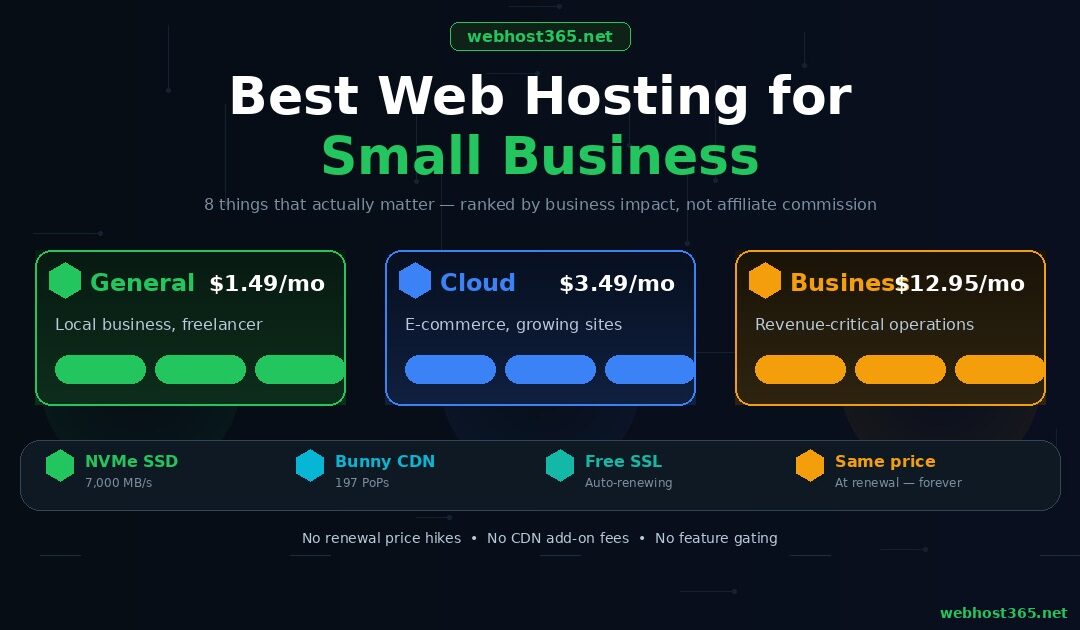
Webhost365 starts at $1.49 per month for shared hosting with NVMe SSD storage that delivers data at up to 7,000 MB/s, Bunny CDN with 197 global edge locations included free on every plan, auto-renewing SSL via Let’s Encrypt, professional email on your custom domain, one-click WordPress installation, and 24/7 expert support. The $1.49 you pay in month one is the $1.49 you pay in month twenty-four. No introductory discount. No renewal surprise. No CDN add-on fee. The infrastructure that most providers reserve for their $10 to $15 premium tiers — NVMe storage, global CDN, LiteSpeed caching on cloud plans — is the default configuration on every Webhost365 plan because cutting corners on infrastructure to offer a lower price that you increase later is not a business model worth building on.
The 8 things that actually matter for small business hosting
Hosting companies advertise dozens of features. Only eight of them directly affect whether your business website helps you get customers or drives them away. Everything else is either a baseline expectation that every host should meet or a technical detail that makes no difference to your visitors, your search rankings, or your revenue.
1. Page speed (your visitors will not wait)
Over half of mobile visitors abandon a website that takes more than three seconds to load. That is not an opinion. That is research published by Google based on data from millions of page loads. For a small business, every abandoned visit is a potential customer who found your competitor instead.
Your hosting infrastructure determines the baseline speed of your website before any design or optimisation work you do on the site itself. Three hosting-level factors control this baseline. Storage speed determines how fast the server retrieves your files and database records. Server processing power determines how quickly your pages are generated. And caching determines how often the server needs to generate pages from scratch versus serving a stored copy.
NVMe SSD storage retrieves data at up to 7,000 MB/s with a latency of 0.02 milliseconds. Standard SATA SSD operates at 550 MB/s with 0.1 milliseconds latency. Traditional hard drives crawl at 130 MB/s with 5 to 10 milliseconds latency. If your hosting provider does not specifically state they use NVMe, assume you are on the slowest option. The difference is not theoretical. A WordPress site generating 40 database queries per page load spends 0.8 milliseconds waiting for NVMe storage and 4 milliseconds waiting for SATA. That gap widens with every concurrent visitor.
Webhost365 runs NVMe SSD on every plan, including the $1.49 tier. There is no “upgrade to SSD” checkbox because there is no non-SSD option.
2. CDN (your site needs to be fast everywhere, not just near the server)
Your hosting server sits in one physical location. When a visitor in the same city loads your page, it feels instant. When a visitor in another country loads the same page, the data travels thousands of kilometres and the delay is noticeable. For a small business with customers across a state, a country, or multiple countries, this geographic penalty is the single largest factor affecting perceived speed.
A CDN (Content Delivery Network) solves this by caching your site’s static content — images, CSS, JavaScript, and fonts — on servers distributed around the world. When a visitor in Sydney loads your page, they receive cached content from a server in Australia rather than waiting for it to arrive from a server in Frankfurt or Virginia. The result is faster load times for every visitor regardless of their location.
Most hosting providers do not include a CDN. They expect you to configure Cloudflare separately (which requires DNS changes most business owners find intimidating) or they charge $5 to $15 per month for CDN as a paid add-on. Over three years, a $10 per month CDN add-on costs $360 — more than the hosting itself.
Webhost365 includes Bunny CDN with 197 global edge locations on every plan at no extra cost and zero configuration. Your site is cached globally from the moment it goes live. A $1.49 per month Webhost365 plan with Bunny CDN delivers faster real-world speed for a visitor in Mumbai than a $10 per month competitor plan without CDN, because no amount of server optimisation compensates for 8,000 kilometres of network distance.
3. Uptime (every minute down costs you money)
When your website is down, customers who try to visit see an error page. They do not bookmark you and come back later. They go to a competitor whose site is working. If they found you through a Google ad you are paying for, you lose both the click cost and the sale. If Google’s crawlers visit during downtime, your search ranking can be affected.
A 99.9% uptime guarantee means your site can be down for up to 8.7 hours per year and the provider still meets their SLA. For a business that generates even modest revenue through its website, 8.7 hours of downtime has a real cost. A 99.99% guarantee reduces that to 52 minutes per year.
Look for hosting providers that publish transparent uptime data, not just an SLA number in their terms of service. Webhost365 guarantees 99.99% uptime backed by redundant infrastructure, proactive monitoring, and multiple layers of failover. The $5,000 BOV Performance Challenge is a public commitment that goes beyond standard SLA promises.
4. SSL certificate (not optional for any business)
Every modern web browser displays a “Not Secure” warning in the address bar for websites that do not use HTTPS. Google has confirmed that HTTPS is a ranking signal. And no customer will enter their email address, phone number, or payment details on a site without the padlock icon. For a business website, SSL is not a feature. It is a requirement.
Free SSL through Let’s Encrypt should be included on every hosting plan. Auto-renewal is essential because an expired SSL certificate creates the same “Not Secure” warning as no certificate at all, and a business owner should not need to remember to manually renew a security certificate every 90 days.
Some hosting providers include SSL only on premium plans or charge $10 to $50 per year for a certificate. Others offer “free SSL” only on their subdomain, not on your custom domain. Verify that your hosting includes free, auto-renewing SSL on your own domain before you sign up. Webhost365 includes auto-renewing Let’s Encrypt SSL on every plan, including the free tier.
5. Professional email (yourname@yourbusiness.com)
Sending business emails from a gmail.com or yahoo.com address tells customers that you either cannot afford or did not bother to set up a professional email. It is a small detail that disproportionately affects how people perceive your credibility. A customer deciding between two service providers — one emailing from sarah@sarahsdesign.com and one from sarahsdesign2024@gmail.com — will trust the first one more, consciously or not.
Your hosting should include email hosting on your custom domain at no extra cost. This means you can create addresses like info@yourbusiness.com, support@yourbusiness.com, and sales@yourbusiness.com without paying for a separate email service. Webhost365 includes professional email on every plan.
6. Honest pricing (what you pay in year 2 matters more than year 1)
This is the factor that separates hosting providers who want your business long-term from providers who want your signup commission and count on you not noticing the renewal price.
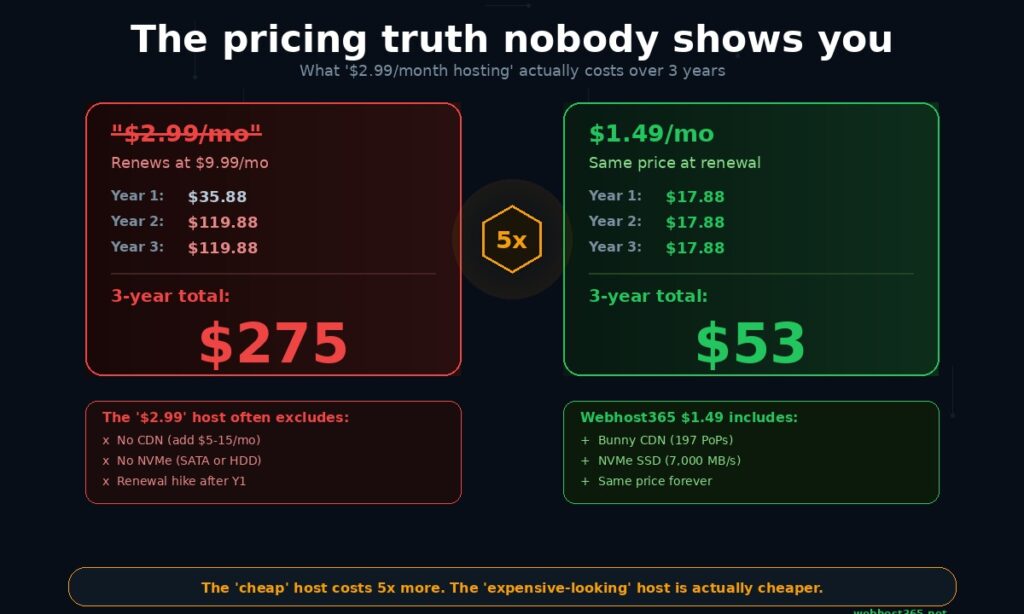
The industry standard practice works like this. A provider advertises $2.99 per month hosting. You sign up for a 12-month term and pay $35.88 for the first year. When your plan renews, the price is $9.99 per month — $119.88 per year. Some providers renew at $14.99 or even $17.99. The introductory rate was a loss-leader designed to get your site built on their platform, knowing that migrating to a different host is painful enough that most customers accept the higher renewal price rather than deal with moving.
Here is what that pattern costs over three years.
“$2.99/month” host (typical renewal at $9.99):
| Period | Monthly rate | Annual cost |
|---|---|---|
| Year 1 (introductory) | $2.99/month | $35.88 |
| Year 2 (renewal) | $9.99/month | $119.88 |
| Year 3 (renewal) | $9.99/month | $119.88 |
3-year total: $275.64
Webhost365 at $1.49/month (same price at renewal):
| Period | Monthly rate | Annual cost |
|---|---|---|
| Year 1 | $1.49/month | $17.88 |
| Year 2 | $1.49/month | $17.88 |
| Year 3 | $1.49/month | $17.88 |
3-year total: $53.64
The provider that advertises a lower price costs five times more over three years. And unlike the “$2.99” host, the Webhost365 plan includes NVMe SSD storage, Bunny CDN with 197 edge locations, free SSL, and professional email at that $1.49 price. There is no upgrade tier required to unlock these features.
For a detailed breakdown of how renewal pricing works across the hosting industry, including which providers hike prices and by how much, read our complete article on web hosting renewal price hikes and how to avoid them.
7. Core Web Vitals (hosting affects your Google ranking)
Google uses a set of page experience metrics called Core Web Vitals as ranking signals. Three metrics matter. Largest Contentful Paint (LCP) measures how quickly the main content of your page becomes visible. Interaction to Next Paint (INP) measures how quickly your site responds when someone clicks or taps. Cumulative Layout Shift (CLS) measures visual stability as the page loads.
Your hosting directly affects LCP and INP. LCP depends on server response time, which is determined by your storage speed (NVMe vs HDD), your server’s processing power, and whether a CDN delivers cached content from a nearby edge server. INP depends on how quickly the server processes interaction-triggered requests, which is a function of CPU speed and available resources.
A business website on slow hosting with no CDN will have measurably worse Core Web Vitals than the same website on NVMe hosting with Bunny CDN. Worse Core Web Vitals means lower search rankings. Lower rankings means fewer customers finding you through Google. The connection between hosting quality and business revenue runs directly through Google’s ranking algorithm, and it is not theoretical — it is documented by Google’s own search team.
If you are investing in SEO, content marketing, or Google Ads to drive customers to your website, your hosting infrastructure needs to support that investment. Paying for marketing that sends visitors to a slow site is like paying for a billboard that directs people to a locked door.
8. Scalability (your hosting should grow with your business)
A business that succeeds online will outgrow its initial hosting plan. Traffic increases, product catalogues expand, customer databases grow, and page load times climb as the server handles more concurrent requests. When that happens, you need to upgrade to a plan with more resources.
If your hosting provider only offers shared hosting, your upgrade path is to migrate to a different provider entirely. That means moving files, exporting and importing databases, reconfiguring DNS, setting up SSL on a new platform, and testing everything before switching live. It takes hours, it risks downtime, and it often requires hiring a developer if you are not technical.
The better approach is choosing a provider that offers a complete upgrade path within the same platform. On Webhost365, the path runs from free hosting for pre-revenue testing, through $1.49 shared hosting for early-stage businesses, to $3.49 cloud hosting for growing sites that need dedicated resources and LiteSpeed caching, to business hosting for revenue-critical operations, to VPS for applications that need root access and full control. Every step up happens within the same infrastructure. Your files, database, domain, and configuration stay where they are. You upgrade your plan and your site gets more resources immediately.
For a comparison of when cloud hosting makes more sense than shared hosting, see our guide on cloud hosting vs shared hosting. For the step beyond cloud hosting, see Linux VPS vs cloud hosting.
Which hosting tier does YOUR business need?
The right hosting tier depends on what your business website does, how much traffic it handles, and whether it processes transactions. A five-page brochure site for a local plumber does not need the same infrastructure as a 500-product WooCommerce store. Paying for resources you do not use wastes money. Paying for fewer resources than your site demands costs you customers. Here is how to match your business to the right tier.
Local service business (bakery, salon, dentist, plumber, accountant)
| Recommended | General Hosting — $1.49/mo |
| Why | Your site is 5 to 15 pages with a contact form, location map, service descriptions, and maybe a photo gallery. Traffic is light to moderate, mostly local, and your visitors are looking for your phone number, address, or hours. NVMe SSD, Bunny CDN, free SSL, and professional email handle this comfortably. You do not need dedicated resources or advanced caching because your pages are simple and your traffic is predictable. |
Freelancer or consultant (designer, copywriter, coach, photographer)
| Recommended | General Hosting — $1.49/mo |
| Why | Your site is a portfolio, a blog, or a landing page that showcases your work and generates leads through a contact form or booking link. Storage needs are modest. Bandwidth is low. Professional email on your domain (yourname@yourbusiness.com) is included and adds the credibility that a Gmail address cannot. If you run a WordPress blog alongside your portfolio, the NVMe storage keeps your database queries fast even as your post count grows. |
Small e-commerce store (under 100 products)
| Recommended | Cloud Hosting — $3.49/mo |
| Why | The moment your website processes payments, the performance bar rises. Every product page, cart update, and checkout step triggers database queries. If those queries are slow, your checkout feels sluggish and customers abandon their cart. Cloud hosting provides dedicated resources so your site’s performance is not affected by other accounts on the same server. LiteSpeed with LSCache pre-renders your product pages so repeat visitors get near-instant load times. Bunny CDN ensures your product images load fast for customers everywhere, not just near your server. |
Growing blog or content site (1,000+ monthly visitors)
| Recommended | Cloud Hosting — $3.49/mo |
| Why | Content sites experience traffic spikes that shared hosting struggles with. A blog post gets shared on social media, a news site links to your article, or a Google algorithm update sends a burst of organic traffic. On shared hosting, spikes like these can slow your site because you share resources with other accounts. Cloud hosting with dedicated resources and LiteSpeed caching absorbs traffic spikes without your readers noticing. If your blog generates revenue through ads or affiliate links, slow page loads during a traffic spike cost you money at the exact moment your content is performing best. |
Medium to large e-commerce store (100+ products, higher traffic)
| Recommended | Business Hosting — $12.95/mo |
| Why | Larger stores with product filtering, inventory management, customer accounts, wishlists, and dynamic pricing generate heavy database load. Business hosting provides stronger resource isolation, priority support for revenue-critical issues, and the infrastructure headroom to handle hundreds of concurrent shoppers during a sale or product launch without degradation. If your website goes down during a Black Friday campaign, the lost revenue in a single hour can exceed a year of hosting costs. |
SaaS application or custom web app
| Recommended | Linux VPS — from $4.99/mo |
| Why | If you are running a custom application built with Django, Node.js, Rails, or any framework that requires root access, custom server configuration, Docker, or background processes, a VPS gives you the control that managed hosting cannot. You install your own stack, configure your own services, and manage your own deployment pipeline. For a comparison of when VPS makes sense versus cloud hosting, see our guide on Linux VPS vs cloud hosting. |
Pre-revenue startup (testing an idea before investing)
| Recommended | Free Hosting — $0/mo |
| Why | You have a business idea and want to validate it with a real website before spending anything. Webhost365’s free tier gives you 1 GB NVMe SSD, Bunny CDN, free SSL, and WordPress one-click install at zero cost with no credit card required. Build your minimum viable site, test your messaging, see if customers respond. When the idea proves itself, upgrade to paid hosting within the same platform with no migration. For a detailed comparison of free hosting options, see our guide on free web hosting and what’s hidden. |
The important detail across every tier in that framework is what stays consistent. Every Webhost365 plan — from the $0 free tier to $12.95 business hosting — includes NVMe SSD storage, Bunny CDN with 197 global edge locations, free auto-renewing SSL, professional email, 24/7 support, and no renewal price increases. The tiers differ in resource allocation, not in infrastructure quality. Upgrading from $1.49 to $3.49 gives your site more CPU, more RAM, and LiteSpeed caching. It does not unlock features that should have been included from the start.
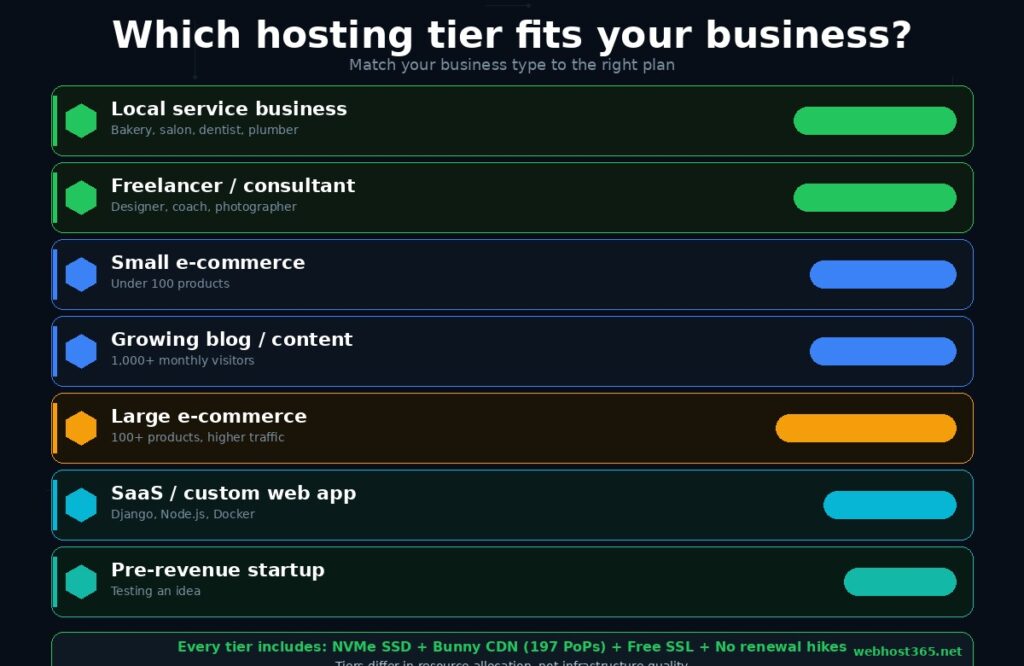
That distinction matters because many hosting providers gate their best features behind expensive plans. CDN on the premium tier only. Daily backups on the business plan only. Priority support reserved for customers paying $15 or more per month. On Webhost365, the infrastructure foundation is the same on every plan. You choose a tier based on how much resource your site needs, not based on which plan unlocks the features your business depends on.
General Hosting — from $1.49/mo | Cloud Hosting — from $3.49/mo | Business Hosting — from $12.95/mo | Free Hosting — $0/mo | Compare All Plans
What Webhost365 includes on every small business plan
Every Webhost365 hosting plan — from the $0 free tier to Business Hosting at $12.95 — includes the infrastructure features that most providers reserve for premium plans or charge as paid add-ons. This is not a marketing claim. It is the default configuration of the platform.
NVMe SSD storage runs on every plan. Your website files and database sit on storage that delivers data at up to 7,000 MB/s with 0.02 milliseconds latency. There is no “upgrade to SSD” option because there is no non-NVMe tier. The $1.49 shared plan and the $12.95 business plan use the same storage technology.
Bunny CDN with 197 global edge locations activates automatically on every plan with zero configuration. Your site’s images, CSS, JavaScript, and fonts are cached on servers spanning six continents. A visitor in London, a visitor in Tokyo, and a visitor in São Paulo all receive content from a nearby edge server rather than making the full trip to the origin. Most hosting providers charge $5 to $15 per month for CDN access. Over three years, that add-on costs $180 to $540. On Webhost365, the CDN is free. The three-year CDN saving alone exceeds the entire three-year cost of the hosting plan at $1.49 per month.
Free auto-renewing SSL via Let’s Encrypt secures every site with HTTPS from day one. The certificate installs automatically when you connect your domain and renews automatically before it expires. You never see a browser warning, and your visitors always see the padlock icon.
Professional email on your custom domain is included on every plan. Create info@yourbusiness.com, sales@yourbusiness.com, and as many addresses as your plan allows. Access through webmail, Outlook, Apple Mail, Gmail, or any email client that supports IMAP or POP3.
AMD EPYC Gen 4 processors with boost speeds up to 4.2 GHz and DDR5 RAM power every server. This is the same enterprise-grade hardware that cloud providers and data centres use for high-performance computing workloads. On Webhost365, it runs your small business website.
One-click WordPress installation through Softaculous gets your site live in under a minute. Choose from hundreds of other applications — Joomla, Drupal, Magento, WooCommerce, and more — and install them the same way. No command line, no file uploads, no manual database configuration.
Twenty-four seven expert support is available through live chat, email, and ticket system. Support is handled by hosting engineers, not scripted chatbots. Whether your question is about DNS configuration, email setup, SSL troubleshooting, or site migration, a knowledgeable person responds.
No renewal price increases. The price on the plans page is the price you pay in month one, month twelve, and month thirty-six. There is no introductory discount that doubles or triples after the first year. This is the single most important pricing detail in the hosting industry, and most providers make it the hardest detail to find.
The $5,000 BOV Performance Challenge is Webhost365’s public guarantee that its infrastructure outperforms comparable providers on equivalent plan specifications. That confidence exists because when every plan runs on NVMe SSD with AMD EPYC Gen 4 and Bunny CDN, the performance gap is large enough to back with real money.
A free domain is included on annual plans. Register a .com, .net, .co, or .in during checkout and start building your online presence without a separate domain purchase.
The combined value of these inclusions on the $1.49 plan is worth understanding in context. If you bought NVMe hosting, a CDN, SSL, and professional email separately from different providers, you would spend $15 to $25 per month. Webhost365 bundles all of it for $1.49 because the platform was designed with these features as defaults, not as upsells.
Choose the right hosting for your business
Your hosting is the foundation your business website sits on. A fast, reliable, honestly-priced foundation means customers find you through Google, trust you when they arrive, and convert because the experience is smooth. A slow, expensive, surprise-pricing foundation works against everything else you invest in your marketing, your design, and your content.
Every Webhost365 plan includes the infrastructure that matters — NVMe SSD, global CDN, free SSL, professional email, and consistent pricing that never increases at renewal. The only question is which tier matches your business today and leaves room for where your business is heading.
Most small businesses start with General Hosting at $1.49 per month and have everything they need from day one. Businesses with e-commerce stores, higher traffic, or revenue-critical operations step up to Cloud Hosting at $3.49 or Business Hosting at $12.95 for dedicated resources and priority support. Pre-revenue startups start at $0 on the free tier and upgrade when the business proves itself.
Start where your business is. Scale when your business grows. Pay the same price every year.
General Hosting — from $1.49/mo | Cloud Hosting — from $3.49/mo | Business Hosting — from $12.95/mo | WordPress Hosting | Free Hosting — $0/mo | Compare All Plans
Frequently asked questions
How much should a small business pay for web hosting?
A small business website needs reliable hosting with SSL, CDN, professional email, and enough storage and bandwidth to handle your traffic without slowdowns. On Webhost365, that costs $1.49 per month for standard shared hosting or $3.49 per month for cloud hosting with dedicated resources and LiteSpeed caching. Be cautious of providers advertising $2 to $3 per month introductory pricing that renews at $10 to $18 per month after the first year. The real cost of hosting is what you pay in year two and beyond, not the signup rate. Over three years, a provider that advertises $2.99 but renews at $9.99 costs $275.64. Webhost365 at $1.49 per month with no renewal increase costs $53.64 for the same period — with NVMe SSD, Bunny CDN, free SSL, and professional email included at that price. The cheapest hosting is not the one with the lowest introductory rate. It is the one that includes everything you need without add-on fees or surprise renewals.
Does web hosting affect my Google ranking?
Yes. Google uses a set of metrics called Core Web Vitals as ranking signals. Largest Contentful Paint measures how quickly your main content becomes visible. Interaction to Next Paint measures how quickly your site responds to clicks and taps. Both metrics are directly affected by your hosting infrastructure. Server response time, which depends on storage speed and server processing power, determines how fast your page begins loading. A CDN determines how quickly static content reaches visitors in different locations. A business website on NVMe SSD hosting with a global CDN will have measurably better Core Web Vitals than the same site on HDD hosting without a CDN, which directly translates to higher search visibility for the queries your potential customers are typing into Google. If you are investing in SEO, content marketing, or Google Ads to bring customers to your site, your hosting infrastructure needs to support that investment by delivering the page speed Google rewards.
Do I need a CDN for my small business website?
If your customers are in more than one city, yes. A CDN caches your website’s static content on servers distributed around the world so every visitor receives content from a nearby location rather than waiting for it to travel from your hosting server. Without a CDN, a visitor in Mumbai loading a page from a server in Frankfurt experiences 150 to 250 milliseconds of network latency before any content arrives. With Bunny CDN’s 197 global edge locations, the same visitor gets cached content from a nearby server in single-digit milliseconds. The speed difference is visible on every page load and measurable in your Core Web Vitals scores. Most hosting providers charge $5 to $15 per month for CDN access as a paid add-on. Over three years, a $10 per month CDN fee adds $360 to your hosting cost. Webhost365 includes Bunny CDN free on every plan, including the $1.49 tier, with zero configuration required. Your CDN activates the moment your site goes live.
Is cheap hosting good enough for a business website?
It depends entirely on what “cheap” includes. A $1.49 per month plan that runs on NVMe SSD storage, includes a global CDN with 197 edge locations, provides free SSL, professional email, 24/7 support, and never increases in price at renewal is not cutting corners. It is efficient pricing on a platform designed to include these features by default rather than sell them as add-ons. A $2.99 per month plan that runs on HDD storage, includes no CDN, charges extra for SSL, and renews at $9.99 is cheap at signup and expensive everywhere else. The right way to evaluate hosting is not by the monthly price but by what is included at that price and what the price becomes after the first term. A business website needs fast storage, global content delivery, SSL encryption, and stable pricing. If a plan includes all four at $1.49, it is better value than a plan that includes none of them at $2.99. Judge by the infrastructure, not the introductory rate.
Should I use WordPress for my small business website?
For most small businesses, yes. WordPress powers approximately 43% of all websites globally according to W3Techs, and has the largest ecosystem of themes, plugins, and developer support of any content management system. It handles everything from a five-page brochure site for a local service business to a full e-commerce store with WooCommerce, a blog that drives organic traffic, and a membership site with gated content. The software is free and open-source, installs in one click on any hosting plan that supports PHP and MySQL, and has enough themes and templates that a business owner with no coding experience can build a professional site in an afternoon. The main alternative to WordPress for small businesses is a website builder like Wix or Squarespace, which are simpler but less flexible, more expensive at scale, and lock your content into a proprietary platform you cannot move. WordPress on your own hosting gives you full ownership of your site, full control over its design and functionality, and the freedom to move to any host at any time.
Can I start with free hosting and upgrade later?
Yes, if you choose a provider where the free tier runs on the same platform as the paid plans. On Webhost365, upgrading from the free tier to General Hosting at $1.49 or Cloud Hosting at $3.49 is a plan change within the same control panel. Your files, database, domain configuration, email accounts, and SSL certificate stay exactly where they are. There is no migration, no DNS reconfiguration, no downtime, and no risk of something breaking during the move. This makes the free tier a genuine starting point for pre-revenue startups that want to build a real website, test their market, and validate their business idea before committing any money to hosting. The key is choosing a provider where “free to paid” is an upgrade button, not a migration project. If the free tier is on separate infrastructure from the paid plans, upgrading means rebuilding your site on a new platform, which is the opposite of seamless. For a detailed comparison of free hosting providers and their limitations, see our complete guide on free web hosting in 2026.