
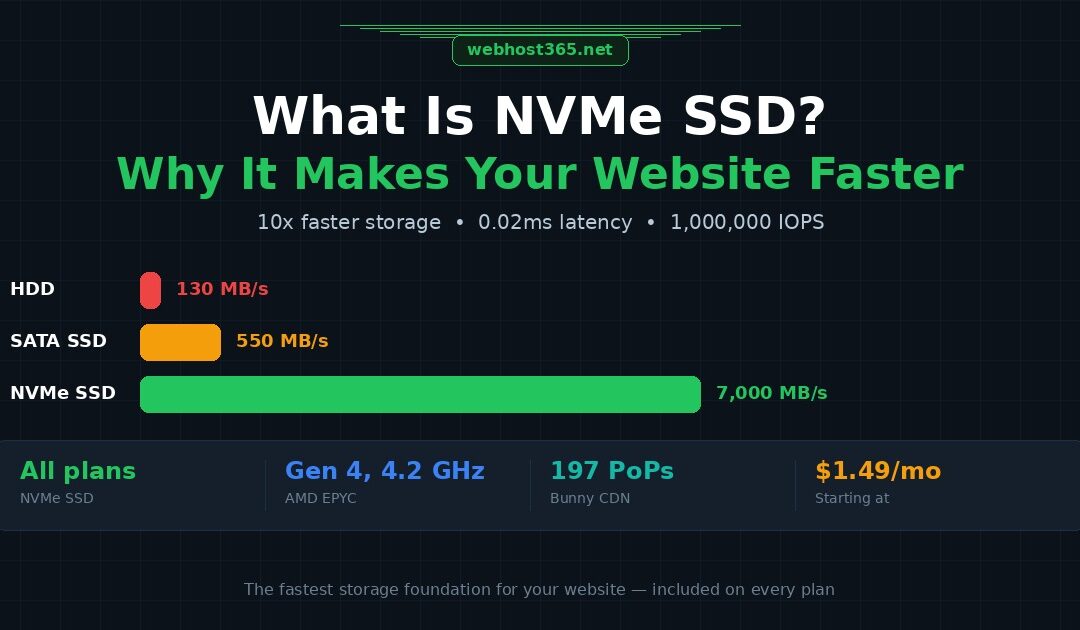
NVMe SSD (Non-Volatile Memory Express Solid State Drive) is a storage technology that connects directly to your server’s CPU through the PCIe bus, bypassing the older SATA interface that traditional SSDs use. This direct connection allows NVMe drives to transfer data at speeds up to 7,000 MB/s, roughly 10 to 12 times faster than a standard SATA SSD at 550 MB/s and over 50 times faster than a traditional spinning hard drive at 130 MB/s.
But raw transfer speed is not the real advantage. The real advantage is parallelism. NVMe supports 65,535 simultaneous command queues, each capable of handling 65,536 commands. A SATA SSD supports exactly one queue with 32 commands. When your web server is handling 50 visitors at the same time, each requesting different pages, database records, and assets, the storage drive needs to process hundreds of small read requests simultaneously. NVMe handles this without breaking a sweat. SATA queues those requests and processes them one batch at a time.
For web hosting, this translates into measurably lower Time to First Byte (TTFB), faster database queries, and better Core Web Vitals scores. A WordPress page that generates 40 database queries loads noticeably faster when each query completes in 0.02 milliseconds on NVMe instead of 0.1 milliseconds on SATA SSD. That difference compounds across every page load, every visitor, every hour of the day.
Every hosting plan on Webhost365 runs exclusively on NVMe SSD storage paired with AMD EPYC Gen 4 processors and DDR5 RAM. From the $1.49 shared hosting plan to the Linux VPS at $4.99, the storage foundation is identical. This guide explains how NVMe works under the hood, how it compares to SATA SSD and HDD in real hosting scenarios, whether your specific website actually benefits from it, and how NVMe combines with CDN and caching to create the fastest possible hosting stack.
How NVMe actually works (the 60-second version)
NVMe is a storage protocol designed specifically for flash memory. Unlike SATA, which was originally built in 2003 for spinning hard drives and later adapted for SSDs, NVMe was engineered from the ground up to take advantage of how flash storage actually reads and writes data.
The difference starts at the physical connection. A SATA SSD connects to the motherboard through the SATA interface, which acts as a middleman between the drive and the CPU. The data has to travel through a SATA controller, follow the AHCI (Advanced Host Controller Interface) protocol, and wait in a single command queue before the CPU can process it. This path made sense when hard drives had a mechanical read head that could only be in one place at a time. It makes no sense for flash memory, which can access any data location instantly.
NVMe eliminates the middleman. It connects the SSD directly to the CPU through PCIe lanes, the same high-speed bus that graphics cards and network adapters use. There is no SATA controller in the path. There is no legacy protocol adding overhead. The CPU talks directly to the storage drive with minimal latency.
The parallelism gap is where the performance difference becomes dramatic. SATA’s AHCI protocol supports one command queue with a depth of 32 commands. That means the drive can work on at most 32 operations before it has to wait for the CPU to send more. NVMe supports 65,535 command queues, each with a depth of 65,536 commands. In practical terms, a SATA SSD processes I/O requests like a single checkout lane at a supermarket. NVMe opens 65,000 checkout lanes simultaneously.
The simplest way to think about it: SATA is a single-lane road connecting your storage to your CPU, with a traffic light at every intersection. NVMe is a direct motorway with tens of thousands of lanes and no traffic lights. The data on both drives is stored in the same type of flash memory chips. The difference is entirely in how fast that data can get from the drive to the CPU and back.
One more detail worth understanding is the “non-volatile” part of the name. Non-volatile means the drive retains your data even when the power is off, unlike RAM which loses everything the moment the server shuts down. Your website files, databases, emails, and application code are stored permanently on the NVMe drive and loaded into RAM only when actively needed. This combination of permanent storage speed and direct CPU access is what makes NVMe the current standard for high-performance hosting infrastructure.
NVMe vs SATA SSD vs HDD: the real numbers
NVMe is approximately 10x faster than SATA SSD for sequential reads and up to 50x faster for random I/O operations, which are the operations that matter most for web hosting. Here is how the three storage technologies compare across every metric that affects your website.
| Specification | HDD | SATA SSD | NVMe SSD |
|---|---|---|---|
| Sequential read speed | ~130 MB/s | ~550 MB/s | ~7,000 MB/s |
| Sequential write speed | ~120 MB/s | ~520 MB/s | ~5,000 MB/s |
| Random read IOPS (4K) | ~100 | ~90,000 | ~1,000,000 |
| Random write IOPS (4K) | ~80 | ~70,000 | ~800,000 |
| Average latency | 5–10 ms | 0.1 ms | 0.02 ms |
| Interface | SATA III (6 Gbps) | SATA III (6 Gbps) | PCIe Gen 4 (64 Gbps) |
| Command queues | 1 (depth: 32) | 1 (depth: 32) | 65,535 (depth: 65,536) |
| Power consumption | 6–8W | 2–3W | 5–8W |
| Moving parts | Yes (spinning platters) | None | None |
| Failure rate (AFR) | 2–5% | <0.5% | <0.3% |
| Typical hosting use | Legacy/budget | Mid-range plans | Performance hosting |
The sequential read and write numbers that hosting providers love to advertise are the least important metric for your website. Sequential operations happen when the server reads one large continuous file from start to finish, like loading a 500MB database backup. That is not what happens when someone visits your website.
What actually happens during a page load is hundreds of small, random read requests firing simultaneously. The server needs to fetch a PHP file from one location on the drive, a CSS stylesheet from another, three image files from scattered locations, and the results of 30 database queries that each pull tiny fragments of data from different parts of the database file. Every single one of these is a random I/O operation.
This is where the gap between NVMe and SATA SSD becomes enormous. SATA SSD handles roughly 90,000 random read operations per second. NVMe handles over 1,000,000. That is not a marginal improvement. That is an 11x difference in the exact type of operation your web server performs thousands of times per minute.
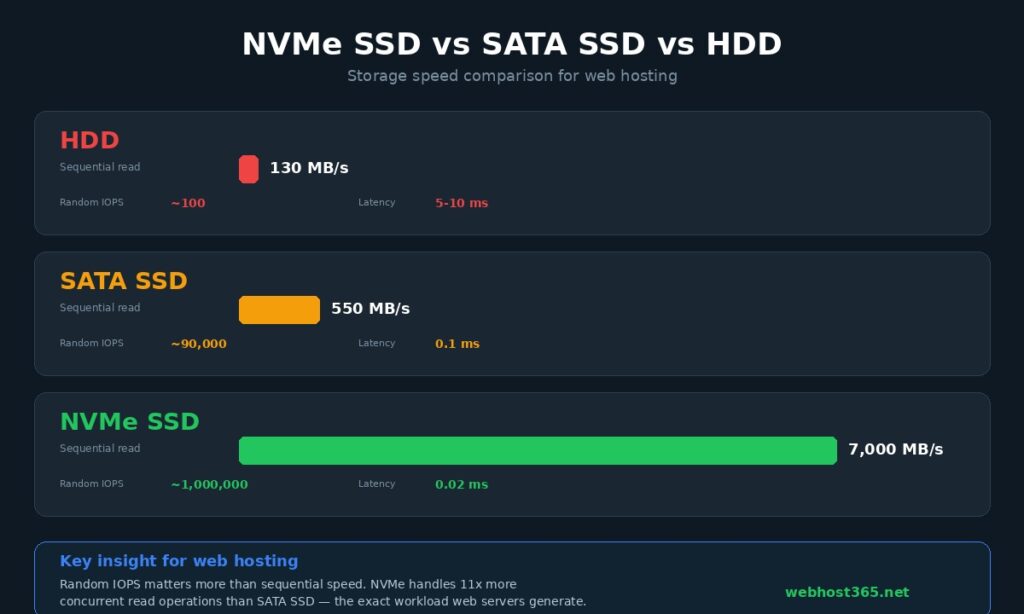
Latency tells the same story. When your server asks the storage drive for a piece of data, SATA SSD delivers it in approximately 0.1 milliseconds. NVMe delivers it in 0.02 milliseconds. Five times faster per individual request. On a single database query, that 0.08ms difference is invisible. But a WordPress page with WooCommerce running typically generates 40 to 60 database queries per page load. Multiply 0.08ms by 50 queries and you save 4 milliseconds of pure storage wait time on every single page view. Scale that across 10,000 daily visitors and the cumulative performance difference becomes significant, both for user experience and for the Core Web Vitals scores that Google uses as a ranking signal.
The HDD comparison is included for context, but if your hosting provider is still running hard drives in 2026, switching providers should be your first priority. The 5 to 10 millisecond latency of a spinning disk means a 50-query WordPress page spends 250 to 500 milliseconds just waiting for the storage drive before any processing even begins. That alone can push your Largest Contentful Paint well beyond the 2.5-second threshold that Google considers “good.”
What NVMe means for your website speed
NVMe storage directly reduces your website’s Time to First Byte (TTFB) and improves Core Web Vitals scores because it eliminates the storage bottleneck that slows down every page request. But the size of that improvement depends entirely on what your website is doing behind the scenes.
Database-heavy sites (WordPress, WooCommerce, Magento)
Every WordPress page load triggers a chain of database queries. A simple blog post with a sidebar, navigation menu, and footer widget generates 20 to 30 queries. Add WooCommerce with product listings, dynamic pricing, cart state, and inventory checks, and that number climbs to 50 or 60 queries per page. Magento stores with layered navigation and configurable products routinely exceed 100 queries on category pages.
Each query requires the database engine to read data from the storage drive. On SATA SSD, each random read takes approximately 0.1 milliseconds. On NVMe, the same read completes in 0.02 milliseconds. Across 50 queries, that is a saving of 4 milliseconds in pure storage wait time. That might sound small in isolation, but storage latency is only one component of the total response time. When you reduce it by 80%, the database engine spends more of its cycle doing actual computation and less time waiting for data, which improves throughput under load.
The real difference shows up during traffic spikes. When 200 visitors hit your WooCommerce store at the same time during a product launch or marketing campaign, each visitor triggers their own set of 50+ queries. SATA’s single command queue with 32 slots deep starts creating a backlog. Requests queue up, wait times increase, and page load times balloon. NVMe’s 65,535 queues handle the same load without congestion. Your checkout page loads in the same time whether you have 10 visitors or 200.
If you are running WordPress or WooCommerce, NVMe is not a nice-to-have. It is the single infrastructure upgrade that most directly impacts your page speed under real-world conditions. For a complete guide to WordPress-specific optimisations that complement NVMe storage, see our article on how to speed up your WordPress site.
Dynamic applications (Node.js, Python, Django, Flask)
Server-side applications spend a significant portion of their response cycle reading from disk. A Django application serving a dashboard page needs to load template files, query the database, read configuration, and sometimes access cached session data from disk-backed storage. A Node.js API endpoint returning JSON might look simple on the surface, but behind every response is a chain of file reads and database lookups.
NVMe reduces the latency of every single one of those operations. For an API that needs to respond in under 100 milliseconds to feel instant, shaving 4 to 8 milliseconds off storage access time represents a 4 to 8 percent improvement in total response time. That percentage grows as request complexity increases. A Python application running data analysis, reading CSV files, and writing results to disk will see even larger gains because the I/O operations are larger and more frequent.
The concurrency advantage matters here as well. A Node.js server handling 500 concurrent API requests is making thousands of simultaneous file and database reads. NVMe’s parallel queue architecture is built precisely for this pattern. If you are deploying a Node.js application or running a Python app in production, NVMe storage ensures that your disk is never the bottleneck holding back your application’s throughput.
Static sites and simple blogs
Here is the honest answer that most hosting providers will not give you: if your website is a five-page brochure site built with plain HTML and CSS, or a lightweight blog with caching enabled and fewer than 500 monthly visitors, you will not notice a meaningful speed difference between SATA SSD and NVMe in everyday use.
The reason is straightforward. A well-cached static site serves most requests from memory or from the caching layer, not from the storage drive. Once your page is cached, the server barely touches the disk at all. The storage speed becomes irrelevant because the disk is not involved in serving the response.
That said, NVMe still helps in two specific situations even for small static sites. First, when the cache is cold. Every time your server restarts, your caching plugin rebuilds, or a new page is requested for the first time, the server reads from disk. NVMe makes those cold-cache responses noticeably faster. Second, during unexpected traffic spikes. If a blog post gets shared on social media and suddenly receives 5,000 visitors in an hour, the cache may not hold every variant of every page, and the server falls back to disk reads. NVMe handles that fallback gracefully where SATA would start queuing.
The good news is that you do not need to pay extra for NVMe on Webhost365. Every plan from general hosting at $1.49 per month to cloud hosting at $3.49 already runs on NVMe SSD. There is no “NVMe upgrade” fee because there is no non-NVMe tier. You get the fastest storage available regardless of what you are building.
The complete speed stack: NVMe + CDN + caching
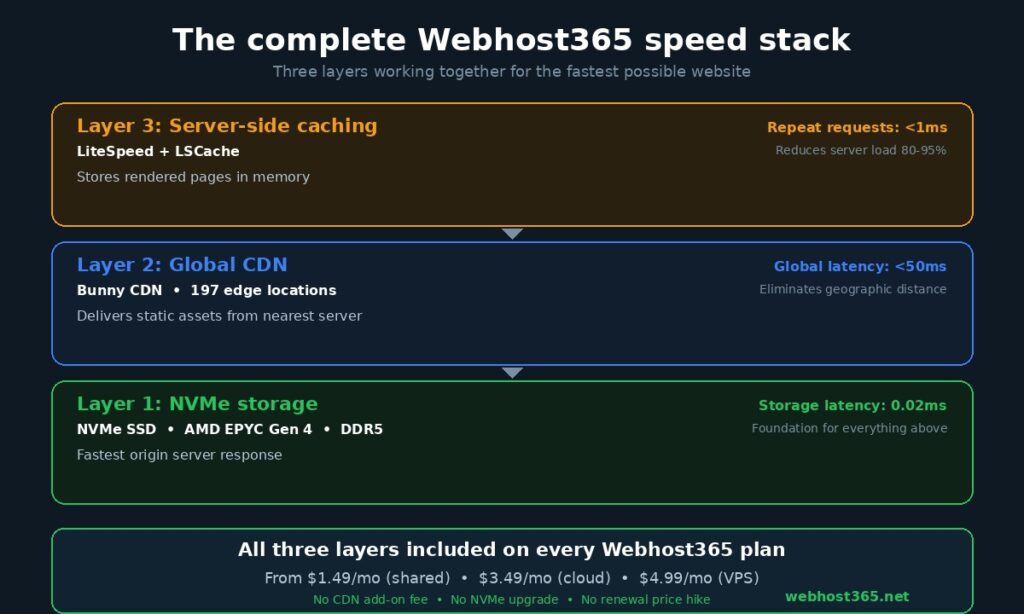
NVMe speeds up your origin server. A CDN speeds up global delivery. Caching reduces how often either one needs to work. All three together produce the fastest possible website, and most hosting providers only give you one of the three.
Think of it as three layers, each solving a different speed problem.
The foundation layer is NVMe storage. When a visitor requests a page that is not already cached, the server needs to read files from disk, run database queries, and assemble the response. NVMe ensures that this origin response happens as fast as physically possible. It reduces your TTFB from the server side, which is the time between a visitor’s browser sending a request and receiving the first byte of the response. No amount of CDN or caching can compensate for a slow origin server, because every cached asset had to be generated from the origin at least once, and every cache eventually expires and needs refreshing.
The middle layer is the CDN. Once your server has assembled a page or asset, it needs to travel across the internet to reach the visitor’s browser. A visitor in Sydney requesting a page from a server in Frankfurt is separated by 16,000 kilometres of network infrastructure. Without a CDN, every request travels that full distance. With Bunny CDN and its 197 global edge locations, your static assets are cached on servers close to every major population centre. The Sydney visitor gets your CSS, JavaScript, images, and fonts from an edge server in Australia, not from Frankfurt. The result is dramatically lower latency for global visitors. For a deeper explanation of how content delivery networks work and why edge caching matters, read our complete guide on what is a CDN.
The top layer is server-side caching. On Webhost365 cloud and WordPress hosting plans, LiteSpeed Cache stores fully rendered pages in memory so the server does not need to touch the disk or run database queries for repeat requests. A visitor who loads your homepage triggers the full generation cycle once. Every subsequent visitor who loads that same page receives the cached version directly from memory in under a millisecond, with no database queries and no disk reads at all. This reduces server load by 80 to 95 percent on most WordPress sites.
Here is what makes this three-layer stack powerful: each layer covers the weakness of the others. NVMe cannot help with geographic distance, but the CDN handles that. The CDN cannot speed up the origin response for dynamic or uncached content, but NVMe handles that. Caching cannot help on the first request or during cache rebuilds, but NVMe makes those cold requests fast. And caching reduces how often the CDN needs to pull fresh content from the origin, which reduces origin server load even further.
Most hosting providers offer NVMe storage but charge $5 to $15 per month extra for a CDN. Some include a CDN but run SATA SSD storage on their budget plans. Very few include LiteSpeed caching, and those that do often reserve it for premium tiers. On Webhost365, every plan from $1.49 shared hosting to $4.99 VPS includes NVMe SSD storage and Bunny CDN at no additional cost. Cloud and WordPress plans add LiteSpeed with LSCache. There is no “speed add-on” because the complete speed stack is the default configuration, not an upsell.
The practical result is measurable. A WordPress site on Webhost365 with LiteSpeed Cache enabled, Bunny CDN active, and NVMe storage underneath typically achieves a TTFB under 200 milliseconds for cached pages regardless of visitor location, and under 400 milliseconds for uncached dynamic pages. That combination puts your Core Web Vitals in the green zone without requiring a single performance plugin or manual server configuration.
NVMe across different hosting types
NVMe storage is available in shared hosting, cloud hosting, VPS, and dedicated servers, but the performance advantage you experience depends on how much of the stack you control and how the provider allocates resources across accounts.
On shared hosting, multiple accounts share the same physical NVMe drive. Your website’s files and database sit on the same storage hardware as dozens or hundreds of other websites. This means you benefit from NVMe’s low latency and high IOPS, but you share that capacity with other tenants on the server.
In practice, this is still significantly faster than a competitor’s shared hosting running on SATA SSD. Even when the NVMe drive is handling I/O requests from 100 different accounts simultaneously, its 65,535 parallel command queues and million-plus IOPS ensure that no single account is waiting in a storage queue. On a SATA drive with a single command queue, those same 100 accounts would create noticeable I/O contention during peak hours, resulting in slower page loads for everyone.
Shared NVMe hosting is the right fit for personal blogs, portfolios, small business brochure sites, and early-stage projects that do not yet generate heavy traffic. On Webhost365, general hosting starts at $1.49 per month with NVMe SSD, AMD EPYC Gen 4 processors, free SSL, and Bunny CDN included. That combination delivers performance that matches or exceeds what most providers offer on their $5 to $10 plans.
NVMe in cloud hosting
Cloud hosting changes the equation because your account receives dedicated resource allocations. Your CPU cores, RAM, and storage I/O are reserved for your website alone, not shared with other tenants. This means you get the full benefit of NVMe speed without contention from neighbouring accounts.
The performance advantage compounds when cloud hosting also includes server-level caching and a CDN. On Webhost365, cloud hosting plans starting at $3.49 per month combine dedicated NVMe storage with LiteSpeed web server, LSCache for server-side page caching, and Bunny CDN for global content delivery. This is the complete managed speed stack described in the previous section, configured and optimised by the hosting provider so you do not need to tune anything yourself.
Cloud NVMe hosting is the right fit for WordPress sites with growing traffic, WooCommerce stores processing orders, business websites that need consistent performance, and any project where page speed directly impacts revenue or conversions. If you are weighing cloud hosting against shared hosting, our comparison guide on cloud hosting vs shared hosting breaks down the differences across every dimension including performance, scalability, and cost.
NVMe in VPS hosting
A VPS gives you a dedicated virtual server with root access, your own operating system, and full control over every layer of the software stack. The NVMe storage allocated to your VPS is exclusively yours. No other account on the physical server can consume your storage IOPS or bandwidth.
This is where NVMe’s performance ceiling becomes accessible. On shared and cloud hosting, the provider manages the filesystem, database engine, and caching layer. On a VPS, you choose the filesystem (ext4, XFS, ZFS), tune the database engine’s buffer pool and query cache, configure the I/O scheduler, and decide exactly how your application interacts with the storage layer. For experienced administrators, this level of control allows you to extract maximum performance from the NVMe hardware.
VPS with NVMe is the right fit for custom applications that need root access, Docker containers, self-hosted tools like n8n automation, game servers, CI/CD pipelines, database servers, and any workload that does not fit inside a managed hosting control panel. Webhost365 Linux VPS starts at $4.99 per month with KVM virtualisation, NVMe SSD, AMD EPYC Gen 4 processors, DDR5 RAM, 10Gbps network, and a $5,000 performance challenge backing every plan. For a detailed comparison of when VPS makes more sense than cloud hosting, see our guide on Linux VPS vs cloud hosting.
NVMe for AI and ML workloads
This is a use case that most hosting providers have not caught up with yet, but it is growing rapidly. Running AI and machine learning workloads on a VPS requires storage that can handle large sequential reads and extremely high random I/O, often simultaneously.
Loading a machine learning model into memory is a sequential read operation. A 4GB language model or image classifier needs to be read from disk into RAM before the application can serve any inference requests. On SATA SSD, loading 4GB takes approximately 7 seconds. On NVMe, the same file loads in under 1 second. For applications that need to cold-start quickly or swap between models, this difference is the gap between a usable service and a frustrating one.
Vector databases are the second major bottleneck. Tools like Milvus, Weaviate, Qdrant, and ChromaDB store and search through millions of high-dimensional embedding vectors. Every similarity search triggers thousands of random read operations across the index. NVMe’s million-plus IOPS and 0.02ms latency are not just nice to have for vector search. They are the minimum requirement for acceptable query performance at any meaningful scale.
Training data pipelines also benefit. If you are fine-tuning a model or running batch processing jobs that read through large datasets, NVMe ensures the GPU or CPU is never sitting idle waiting for the next batch of data to load from disk. The storage feed keeps pace with the compute, which means your training job completes faster and your VPS billing hours are lower.
Webhost365 VPS plans with NVMe SSD, AMD EPYC Gen 4 processors, and DDR5 RAM provide a solid foundation for lightweight AI inference, vector database hosting, automation pipelines, and data processing workloads. For heavier training jobs that require GPU acceleration, a bare metal server or cloud GPU instance is more appropriate, but the NVMe VPS serves well as an inference endpoint, data preprocessing server, or development environment for AI projects.
Do you actually need NVMe hosting?
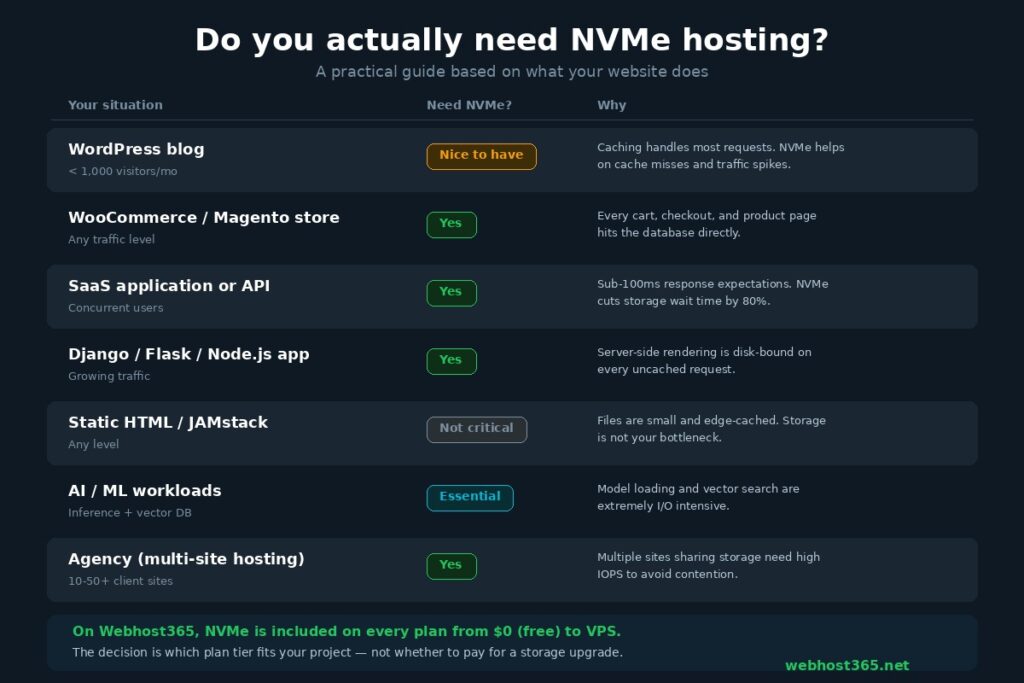
If your website has a database, serves more than a few hundred visitors per day, or runs any server-side application, NVMe storage will measurably improve your performance. If your site is a single static HTML page with 10 visitors a month, any storage type will do. The honest answer falls somewhere in between for most people, and it depends on what your website actually does.
Here is a straightforward framework.
| Your situation | Do you need NVMe? | Why |
|---|---|---|
| WordPress blog, under 1,000 visitors per month | Nice to have | Caching handles most requests. NVMe helps during cache rebuilds and traffic spikes, but you will not notice a difference in daily use. |
| WooCommerce or Magento store, any traffic level | Yes | Every product page, cart update, checkout step, and inventory check hits the database. NVMe keeps your store responsive during peak shopping hours. |
| SaaS application or API | Yes | Users expect sub-100ms responses. NVMe’s low latency directly reduces your API response time under concurrent load. |
| Django, Flask, Node.js, or Rails application | Yes | Server-side rendering is disk-bound on every uncached request. NVMe ensures your application’s throughput scales with your traffic. |
| Static HTML or JAMstack site | Not critical | Your files are small, cached at the edge, and rarely read from origin. Storage speed is not your bottleneck. |
| AI or ML workloads (inference, vector DB, pipelines) | Essential | Model loading, vector similarity search, and training data reads are extremely I/O intensive. SATA SSD creates a hard ceiling on performance. |
| Agency hosting multiple client sites | Yes | Ten or twenty sites sharing a single storage drive need high IOPS to avoid I/O contention. NVMe’s parallel queues prevent one busy site from slowing down the others. |
| Email-only hosting | Not critical | Email delivery and retrieval are not latency-sensitive at small to medium volumes. SATA SSD handles email workloads without any meaningful bottleneck. |
Two additional considerations that the table does not capture.
First, traffic patterns matter more than average traffic numbers. A blog that receives 500 visitors spread evenly across the day puts minimal load on storage. The same blog receiving 500 visitors in a 30-minute burst after a social media share generates concentrated I/O demand that exposes the difference between NVMe and SATA. If your traffic is unpredictable or comes in spikes, NVMe gives you a safety margin that SATA does not.
Second, your hosting stack matters. NVMe delivers its greatest benefit when the rest of the stack can keep up. Pairing NVMe storage with a slow PHP version, an unoptimised database, or a bloated WordPress theme with 40 plugins is like putting racing tyres on a car with a broken engine. The storage is no longer the bottleneck, but something else is. The best results come when NVMe is part of a complete performance stack, which is why the Webhost365 speed stack combines NVMe with AMD EPYC processors, DDR5 RAM, LiteSpeed, and Bunny CDN rather than relying on storage speed alone.
The broader point is this: in 2026, NVMe is no longer a premium upgrade. It is the baseline standard for any hosting provider that takes performance seriously. The question is not whether you should pay extra for NVMe. The question is why any provider would still sell you SATA SSD and call it modern hosting. On Webhost365, NVMe is included on every plan from $0 (free tier) to VPS, so the decision framework above helps you choose the right plan tier, not whether to pay for a storage upgrade.
How Webhost365 uses NVMe across every plan
Every Webhost365 hosting plan runs on NVMe SSD storage paired with AMD EPYC Gen 4 processors, DDR5 RAM, and Bunny CDN with 197 global edge locations. There is no tiered storage system where budget plans get SATA and premium plans get NVMe. The hardware foundation is identical across every tier.
Here is how that compares to what most hosting providers offer.
| Feature | Webhost365 | Typical competitor |
|---|---|---|
| Storage type | NVMe SSD on all plans | SATA SSD on budget plans, NVMe on premium only |
| Processor | AMD EPYC Gen 4, up to 4.2 GHz | Intel Xeon or older EPYC Gen 2–3 |
| RAM type | DDR5 | DDR4 |
| Built-in CDN | Bunny CDN, 197 PoPs, included free | None, or paid add-on at $5–15 per month |
| Starting price (shared) | $1.49 per month | $2.99–5.99 per month |
| Starting price (VPS) | $4.99 per month | $6.99–12.99 per month |
| Renewal price | Same as signup price, forever | 50–300% increase after first term |
| Free SSL | Yes, all plans including free tier | Usually yes |
| Free domain (annual plans) | Yes | Sometimes |
| LiteSpeed + LSCache | Cloud and WordPress plans | Premium plans only, or not available |
| Performance guarantee | $5,000 BOV Challenge | None |
Three details in that table deserve closer attention.
The CDN inclusion changes the value calculation entirely. Most hosting providers sell NVMe storage on a $4.99 plan but do not include a CDN. You then add Cloudflare Pro at $20 per month or a standalone CDN at $5 to $15 per month to get global delivery speeds. On Webhost365, Bunny CDN is included at no extra cost on every plan. A Webhost365 shared hosting plan at $1.49 per month with NVMe and Bunny CDN delivers faster real-world performance for a visitor in Tokyo than a competitor’s $10 NVMe plan without a CDN, because origin server speed means nothing if the content has to travel 9,000 kilometres unaccelerated.
The renewal pricing matters more than most buyers realise. A competitor advertising NVMe hosting at $2.99 per month for the first term that renews at $9.99 is not actually $2.99 hosting. It is $9.99 hosting with a first-term discount. Webhost365 charges the same price at renewal as at signup. The price on the plans page is the price you pay in year one, year two, and every year after that. For a detailed breakdown of how renewal pricing works across the industry and why it costs more than most people expect, read our article on web hosting renewal price hikes.
The $5,000 BOV Performance Challenge is Webhost365’s public commitment to infrastructure quality. If a comparable hosting provider can demonstrate faster server performance on equivalent plan specifications, Webhost365 pays $5,000. That challenge exists because when your entire platform runs on NVMe SSD with AMD EPYC Gen 4 and DDR5 RAM, the performance gap is large enough to back with real money.
Choose your NVMe hosting plan
Your storage is the foundation of your website’s speed. NVMe provides the fastest foundation available today, and when paired with AMD EPYC processors, DDR5 RAM, and Bunny CDN with 197 global edge locations, it delivers consistent, measurable performance that you can see in your Core Web Vitals scores, your server response times, and your visitors’ experience.
Every Webhost365 plan includes NVMe SSD storage. There is no upgrade fee, no premium tier requirement, and no renewal price increase. Pick the plan that matches your project and your storage works at full speed from day one.
General Hosting — from $1.49/mo | Cloud Hosting — from $3.49/mo | WordPress Hosting | Linux VPS — from $4.99/mo | Compare All Plans | Start Free — $0/mo
Frequently asked questions
Is NVMe faster than SSD?
NVMe is a type of SSD, but it uses a fundamentally different interface to communicate with the CPU. Traditional SSDs connect through the SATA interface, which was designed in 2003 for spinning hard drives and caps out at 550 MB/s. NVMe SSDs connect through the PCIe bus at speeds up to 7,000 MB/s. More importantly for web hosting, NVMe supports 65,535 parallel command queues compared to SATA’s single queue with 32 command slots. In practical hosting terms, this means NVMe handles hundreds of simultaneous read and write requests without queuing delays, reducing database query latency from approximately 0.1 milliseconds on SATA to 0.02 milliseconds on NVMe. That difference compounds across every page load on a dynamic website, making NVMe measurably faster for any workload that involves concurrent disk access.
Does NVMe hosting actually make websites faster?
Yes, for any website that relies on server-side processing or database queries. NVMe reduces Time to First Byte (TTFB) because the server retrieves files and query results faster from the storage drive. A WordPress site typically generates 20 to 50 database queries per page load, and each query benefits from NVMe’s lower latency. A WooCommerce store running checkout calculations and inventory checks can generate 60 or more queries per page, making the cumulative improvement even more significant. Static sites with aggressive caching see less direct benefit because the caching layer serves most requests from memory rather than from disk. The biggest measurable gains come from database-driven CMS platforms, e-commerce stores, SaaS applications, and API endpoints where every request involves multiple disk operations under concurrent visitor load.
Is NVMe worth it for a small blog?
For a small blog with light traffic and caching enabled, the day-to-day speed difference between SATA SSD and NVMe is minimal. Most requests are served from the cache without touching the disk at all. However, NVMe provides a meaningful safety margin in two situations: during traffic spikes when the cache cannot hold every page variant, and during cache rebuilds when the server falls back to reading directly from the storage drive. Both situations happen more often than most bloggers realise, particularly after publishing new content or receiving a burst of social media traffic. Since Webhost365 includes NVMe on every plan starting at $1.49 per month, there is no cost tradeoff involved. You get NVMe speed on the most affordable tier without paying extra for a storage upgrade.
What is the difference between NVMe and PCIe?
PCIe (Peripheral Component Interconnect Express) is the physical interface, the actual connector and data lanes built into the server’s motherboard. NVMe (Non-Volatile Memory Express) is the protocol, the set of rules that governs how the storage drive communicates with the CPU over those PCIe lanes. Think of PCIe as a motorway and NVMe as the traffic management system that lets vehicles travel at maximum speed with no bottlenecks. Earlier SSDs used the AHCI protocol over PCIe or SATA connections, but AHCI was designed for spinning hard drives with a single read head that could only access one location at a time. NVMe was built from scratch for flash memory, supporting 65,535 parallel queues instead of one, which removes the protocol-level bottleneck entirely and allows the drive to operate at the full speed the PCIe lanes can deliver.
Can NVMe help my website rank better on Google?
Indirectly but measurably, yes. Google uses Core Web Vitals as ranking signals, including Largest Contentful Paint (LCP), Interaction to Next Paint (INP), and Cumulative Layout Shift (CLS). NVMe directly improves LCP by reducing server response time, which means the browser receives content faster and starts rendering sooner. Faster server response also contributes to better INP scores because the server can process interaction-triggered requests more quickly. NVMe alone will not fix a slow site with unoptimised images, render-blocking JavaScript, or a bloated theme, but it removes the infrastructure bottleneck that sits underneath every other optimisation. When combined with a CDN like Bunny CDN for global delivery speed and server-side caching to reduce origin load, NVMe-powered hosting gives you the infrastructure foundation that supports consistently strong Core Web Vitals scores across all three metrics.
Do all hosting providers use NVMe?
No. Many budget hosting providers still use SATA SSDs on their lower-tier plans and reserve NVMe for premium or VPS tiers. Some advertise NVMe in their marketing but run a mixed storage configuration where only the operating system sits on NVMe while customer data lives on SATA drives. Others offer NVMe but charge it as an upgrade, adding $3 to $10 per month on top of the base plan price. Webhost365 uses NVMe SSD on every plan across the entire product range, from the free hosting tier through shared, cloud, WordPress, business, and VPS hosting. There is no mixed storage, no SATA fallback, and no NVMe surcharge. The infrastructure decision was made at the platform level, not at the pricing tier level, because NVMe’s performance benefit applies to every website regardless of how much the customer pays per month.