
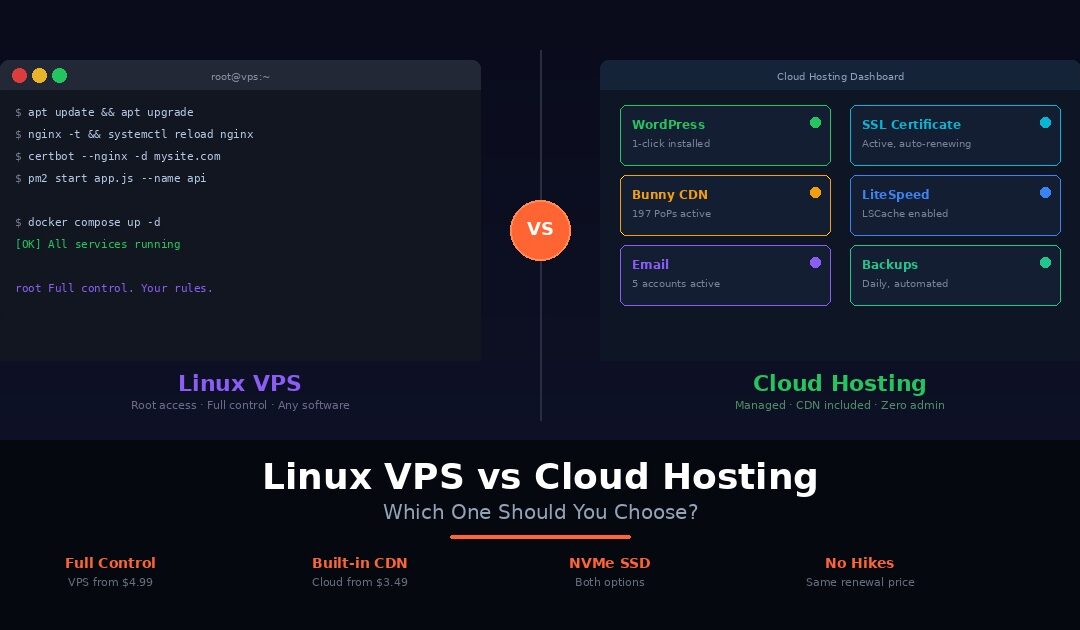
You have outgrown shared hosting. Your site is slower than it should be, your resources are capped, and your hosting panel shows CPU throttling during traffic spikes. The obvious next step is to upgrade. But upgrade to what? we will cover Linux VPS vs cloud hosting here.
A Linux VPS gives you a dedicated virtual server with root access and full control over the entire software stack. You install what you want, configure it how you want, and manage it yourself. Cloud hosting gives you managed infrastructure with built-in caching, automatic SSL, integrated CDN, and no server administration. The provider handles the stack. You handle your website.
Both are significantly faster than shared hosting. Both provide dedicated resources. Both cost more than the $1.49 plan you started on. And the right choice depends entirely on what you are building, how technical your team is, and how much time you want to spend managing infrastructure versus building your product.
Most comparison articles explain the architecture of VPS and cloud hosting in abstract terms and then leave you to figure out which one fits. This guide does the opposite. We compare Linux VPS and cloud hosting across six dimensions that actually affect your daily experience: performance, control, scalability, security, ease of use, and cost. After that, we cover five specific scenarios where VPS is the clear winner and five where cloud hosting makes more sense. You will know exactly which one to choose before you finish reading.
If you are coming from shared hosting and want to understand that transition first, our guide on cloud hosting vs shared hosting covers that decision in detail.
What Is a Linux VPS?
A VPS, or Virtual Private Server, is a virtualised server created on a physical machine using hypervisor technology. Think of it as renting an apartment in a large building. Your space is completely private with its own walls, locks, and utilities. But the building itself is shared with other tenants. Each tenant’s apartment is isolated. What happens in one unit does not affect the others.
In practical terms, a Linux VPS gives you a dedicated slice of a physical server with guaranteed resources. If your plan includes 4 CPU cores and 8GB of RAM, those resources belong exclusively to your server. No other user on the physical machine can access or consume them. This isolation is what separates VPS from shared hosting, where hundreds of accounts compete for the same pool of CPU and memory.
What you get with a Linux VPS
The defining feature is root access. You have full administrative control over the operating system. You choose your Linux distribution — Ubuntu, Debian, AlmaLinux, Rocky Linux, or any other supported OS. You install your own web server, whether that is Nginx, Apache, LiteSpeed, or something else entirely. You configure firewalls, set up databases, install custom software, run Docker containers, and manage every layer of the stack from the kernel up.
This level of control is powerful. It is also a responsibility. You manage software updates, security patches, SSL certificates, backups, and troubleshooting. If something breaks at midnight, you are the one who fixes it.
What a typical Linux VPS includes
A quality Linux VPS provides dedicated CPU cores and RAM, NVMe SSD storage for fast disk I/O, full root and SSH access, a dedicated IP address, and high-speed network connectivity. The hardware determines your performance ceiling. The software configuration — which you control — determines how close you get to that ceiling.
On Webhost365 Linux VPS, plans start at $4.99 per month for 2 AMD cores at 3.8GHz, 4GB RAM, 25GB NVMe SSD, 8TB bandwidth, and a 10Gbps network connection. Six additional tiers scale up to 16 cores, 64GB RAM, and 1.2TB NVMe storage. Webhost365 is so confident in the infrastructure that they offer a $5,000 performance challenge: find a faster VPS at the same price, and they pay you.
What Is Cloud Hosting?
Cloud hosting runs your website on a managed infrastructure platform where the hosting provider handles the server configuration, security, caching, and performance optimisation for you. If a Linux VPS is like renting an apartment where you handle your own renovations and repairs, cloud hosting is like renting a fully managed office space. The building management takes care of electricity, internet, security, and cleaning. You walk in and focus on your work.
With cloud hosting, you do not interact with the server at the operating system level. There is no SSH terminal, no root access, and no need to install or configure web server software. Instead, you manage your website through a control panel like cPanel. You upload files, create databases, configure email accounts, manage DNS, and install applications through a visual interface. The hosting provider handles everything underneath: the web server, PHP configuration, caching layers, SSL certificates, and security hardening.
What cloud hosting typically includes
A well-equipped cloud hosting plan provides dedicated CPU and RAM allocated to your account, NVMe SSD storage, a pre-configured web server optimised for performance, server-level caching, automatic SSL certificates, a hosting control panel, one-click application installers, and managed email. The key difference from a VPS is that all of this is set up and maintained by the provider. You benefit from the performance without managing the stack.
What makes Webhost365 cloud hosting different
On Webhost365 Cloud Hosting, plans start at $3.49 per month and include AMD EPYC Gen4 processors, NVMe SSD storage, LiteSpeed web server with server-level LSCache, unlimited bandwidth, free auto-renewing SSL, cPanel control panel, Softaculous one-click installer, and free email.
The standout feature is Bunny CDN with 197 global edge locations included on every plan at no extra cost. Your images, CSS, JavaScript, and fonts are cached and delivered from the nearest edge server worldwide. For a visitor in Mumbai accessing a site hosted in the US, static assets load from a local edge server in milliseconds instead of travelling across the globe. Most VPS plans, including Webhost365 VPS, do not include CDN because VPS users typically configure their own. Cloud hosting includes it by default because the goal is managed performance with zero configuration overhead.
For a deeper look at how CDN integration affects real-world performance, read our article on how integrated CDNs improve Core Web Vitals.
Head-to-Head Comparison
Here is how Linux VPS and cloud hosting compare across the six factors that matter most when choosing between them.
Performance
Both options deliver strong performance when backed by quality hardware. The difference is who handles the optimisation.
On a VPS, you get guaranteed dedicated resources. If your plan includes 4 cores and 8GB RAM, that is exactly what runs your workload. No sharing, no throttling, no surprises. However, raw resources alone do not determine speed. You choose the web server, configure caching, tune MySQL, and optimise PHP settings yourself. A well-configured VPS can be extremely fast. A poorly configured one can be slower than the shared hosting you left behind.
Cloud hosting allocates dedicated resources within a managed environment. The provider has already configured the web server, enabled caching, and tuned PHP for optimal performance. On Webhost365 cloud hosting, LiteSpeed with LSCache serves cached pages without touching PHP at all. That server-level optimisation runs from the moment your site goes live.
For WordPress and standard PHP applications, cloud hosting with LiteSpeed and built-in CDN often outperforms a self-managed VPS simply because the stack is pre-optimised by engineers who do this full-time. For custom applications where you control every layer, a well-tuned VPS can outperform cloud hosting because you eliminate overhead that your specific workload does not need.
Both Webhost365 options run on AMD EPYC processors with NVMe SSD. The hardware foundation is identical. The difference is who manages the software on top of it.
Control and Customisation
VPS wins decisively here. Full root access means you can install any software, run any programming language, configure any web server, set custom firewall rules, and modify kernel parameters. Docker containers, Redis, Elasticsearch, custom Python environments, game servers, mail servers, VPN services — if it runs on Linux, it runs on a VPS.
Cloud hosting provides control through a hosting panel. You manage files, databases, email, DNS, SSL, and application installations through cPanel. You can configure PHP versions, set up cron jobs, and manage .htaccess rules. What you cannot do is install custom software at the OS level, change the web server, or run non-standard services.
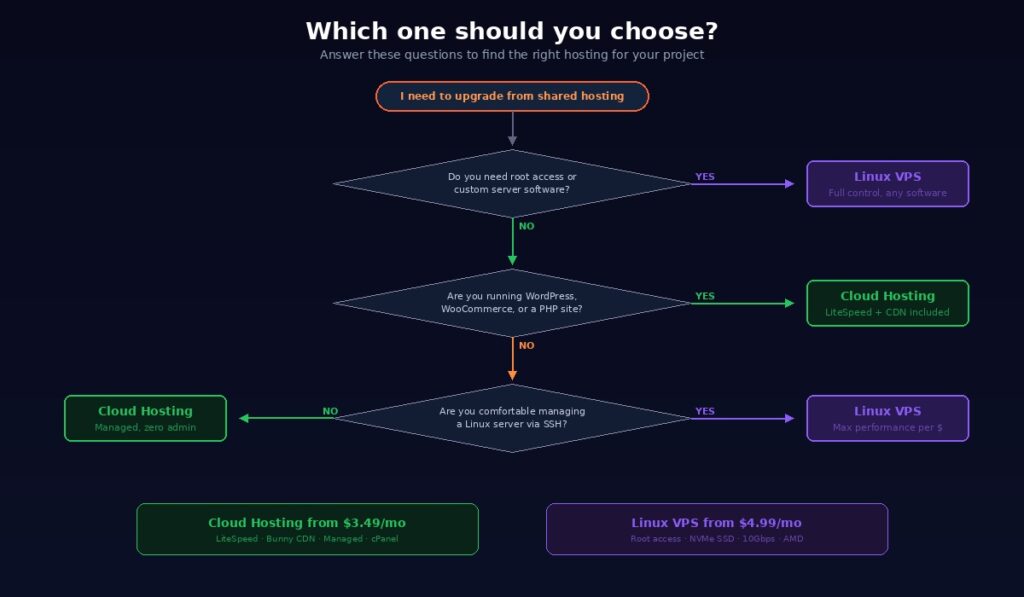
The question is whether you need OS-level access. If your project requires Docker, Redis, Elasticsearch, a custom Node.js deployment, or any software that needs root installation, VPS is the only option. If your project runs WordPress, WooCommerce, or standard PHP applications, cloud hosting provides all the control you need without the administration overhead.
Scalability
Cloud hosting scales more easily. Upgrading means changing your plan through the control panel. Your files, databases, email accounts, and configurations carry over automatically. No migration, no downtime, no reconfiguration. If your traffic doubles next month, a plan upgrade takes minutes.
VPS scaling is more involved. Moving to a larger tier means provisioning a new server and migrating your data and configuration to it. You get precise control over what resources you add, but the process requires more effort and planning.
On Webhost365, cloud hosting scales from $3.49 per month through to Business Hosting at $12.95 per month within the same managed platform. VPS scales from $4.99 per month to $319 per month across eight tiers ranging from 2 cores with 4GB RAM up to 16 cores with 64GB RAM. For workloads that outgrow cloud hosting entirely, the VPS upgrade path provides dramatically more resources with full control over how they are used.
Security
Both options are significantly more secure than shared hosting because your resources and environment are isolated from other users. The difference is who manages that security.
On a VPS, you control the firewall, SSH access, fail2ban configuration, software updates, and security patches. This granular control is more secure if you know what you are doing. You decide exactly which ports are open, which services are running, and how authentication works. On the other hand, a VPS with open ports, unpatched software, and default SSH credentials is less secure than managed hosting. The security is only as strong as your administration.
On cloud hosting, the provider manages security at the platform level. Firewalls, malware scanning, automatic updates, and DDoS protection are handled for you. You do not need to remember to patch a vulnerability or close an unused port. The trade-off is less granular control over security configuration.
Ask yourself one question: is your team equipped to manage server security consistently? If yes, VPS gives you tighter control. If no, managed cloud hosting provides stronger security by default because professionals handle it around the clock. On Webhost365, both options include DDoS protection on AMD EPYC infrastructure with hardware-level security features.
Ease of Use
Cloud hosting is dramatically easier. You get a visual control panel, one-click WordPress installation, managed email, automatic SSL, and pre-configured caching. Everything works from the moment you log in. No command line, no configuration files, no troubleshooting cryptic error messages in terminal output.
VPS requires Linux command line knowledge. You install your own web server, configure virtual hosts, set up SSL with Certbot, manage databases through the terminal, and troubleshoot issues via SSH. This is familiar and comfortable for experienced developers. It is a steep learning curve for everyone else.
For non-technical small business owners, freelancers managing client sites, and anyone who wants to focus on their website rather than their server, cloud hosting removes the infrastructure burden entirely. A well-managed cloud hosting plan that runs without intervention is always better than a VPS that is misconfigured because the user lacked the expertise to set it up properly.
Cost
Cloud hosting starts lower. Webhost365 cloud hosting begins at $3.49 per month. Linux VPS starts at $4.99 per month. However, the comparison is not straightforward because the two products include different things.
Cloud hosting includes managed services, LiteSpeed caching, Bunny CDN, automatic SSL, cPanel, email hosting, and 24/7 infrastructure management. With a VPS, you get raw resources and full control. Adding a CDN, control panel, and managed services on top of a VPS costs extra in both money and time.
VPS becomes more cost-effective at higher resource tiers. A VPS with 4 cores, 8GB RAM, and 80GB NVMe costs $19.99 per month. Equivalent managed resources from most competitors cost $30 to $50 per month.
The hidden cost of VPS is your time. If you spend two hours per month managing, updating, and troubleshooting your server and your time is worth $50 per hour, that is $100 per month in invisible overhead on top of the hosting fee. Cloud hosting eliminates that cost entirely.
For budget-conscious projects that do not need root access, cloud hosting delivers better total value. For resource-intensive projects where maximum performance per dollar matters, VPS provides more raw power at lower cost — provided you have the skills to manage it. Both Webhost365 options have transparent pricing with no renewal hikes.
Comparison Table: Linux VPS vs Cloud Hosting Side by Side
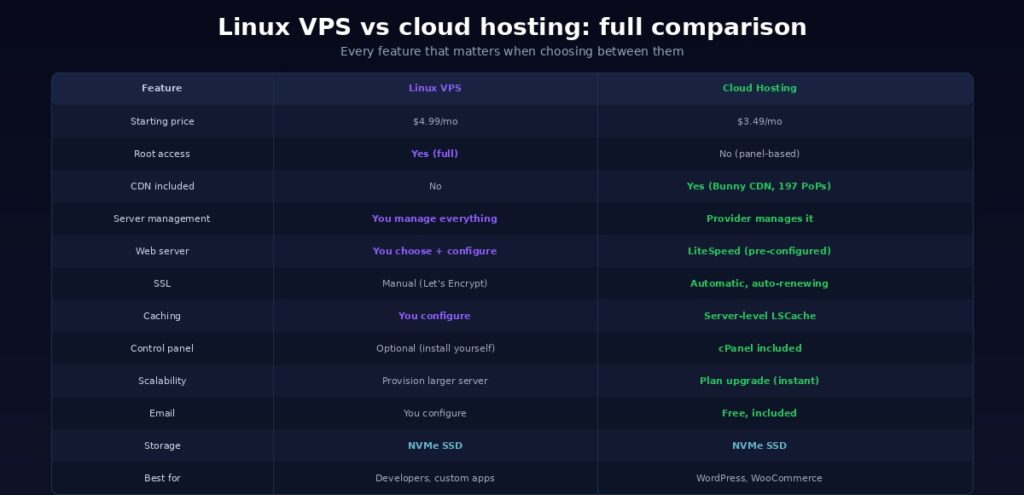
Choosing between VPS and cloud hosting is easier when you can see every difference in one view. Here is how the two options compare across the features that affect your daily experience.
| Feature | Linux VPS | Cloud Hosting |
|---|---|---|
| Starting price | $4.99/mo | $3.49/mo |
| Root access | Yes (full) | No (panel-based) |
| CDN included | No | Yes (Bunny CDN, 197 PoPs) |
| Server management | You manage everything | Provider manages infrastructure |
| Web server | You choose and configure | LiteSpeed (pre-configured) |
| SSL | Manual (Let’s Encrypt) | Automatic, auto-renewing |
| Caching | You configure | Server-level LSCache |
| Control panel | Optional (install yourself) | cPanel included |
| Scalability | Provision larger server | Plan upgrade (instant) |
| You configure | Free, included | |
| CPU | AMD 3.8GHz (dedicated) | AMD EPYC Gen4 (dedicated) |
| Storage | NVMe SSD | NVMe SSD |
| Bandwidth | 8TB | Unlimited |
| Best for | Developers, custom apps | Websites, WordPress, WooCommerce |
The pattern is clear. VPS gives you more control and raw power. Cloud hosting gives you more managed features and convenience. The hardware foundation is the same on both: AMD processors and NVMe SSD storage. The difference is what sits on top of that hardware and who manages it.
For a complete breakdown of every hosting tier Webhost365 offers, compare all plans side by side.
When to Choose Linux VPS
VPS is the right answer when your project demands capabilities that managed hosting cannot provide. Here are five specific scenarios where a Linux VPS is the clear winner.
You need root access for custom software
If your project requires Docker containers, Redis caching, Elasticsearch, custom Python or Django environments, or any software that needs OS-level installation, VPS is the only option. Cloud hosting control panels do not provide this level of access. If you are deploying a Node.js app with PM2, Nginx, and custom dependencies, a VPS gives you the freedom to configure the entire stack exactly how your application needs it. The same applies to Go, Rust, Java, or any runtime that requires direct server access.
You want maximum performance per dollar
At higher resource tiers, VPS delivers significantly more raw computing power per dollar than managed cloud hosting. A Webhost365 VPS with 4 cores, 8GB RAM, and 80GB NVMe costs $19.99 per month. Equivalent managed resources from most cloud hosting providers cost $30 to $50 per month. If you have the skills to optimise the stack yourself, VPS lets you get more from every dollar.
You are running multiple services on one server
A VPS can host your website, database server, mail server, background workers, and scheduled tasks on a single machine. You control exactly how resources are distributed between them. Need 60% of RAM for your database and 40% for your web server? You configure that. Cloud hosting typically runs one type of workload per plan, and resource allocation is managed by the provider rather than by you.
You need a non-web application
Not every project is a website. Game servers, VPN endpoints, CI/CD build pipelines, data processing scripts, API backends, and automation runners all require a server environment but do not use standard web hosting architecture. A VPS gives you a blank Linux server where you run whatever your project demands. Cloud hosting is built specifically for websites and web applications.
You have the skills and time to manage a server
If you are comfortable with Linux administration, enjoy fine-tuning server configurations, and have the time to maintain security updates and software patches, VPS rewards you with the most flexibility and control available short of dedicated hardware. You decide every detail: which packages are installed, which services are running, how logs are rotated, and how backups are handled. For projects that eventually need even more power than a VPS provides, Webhost365 bare metal servers offer full physical server access with no virtualisation overhead.
When to Choose Cloud Hosting
Cloud hosting is the right answer when you want production-grade performance without the overhead of server administration. Here are five specific scenarios where managed cloud hosting makes more sense than a VPS.
You are running WordPress or WooCommerce
WordPress thrives on a pre-optimised stack. Cloud hosting with LiteSpeed web server, server-level LSCache, and built-in Bunny CDN delivers faster WordPress performance out of the box than most self-managed VPS setups. The caching is configured. The CDN is active. PHP is tuned for WordPress workloads. SSL is automatic. You install WordPress in one click and start building. On a VPS, achieving the same result means installing and configuring Nginx or LiteSpeed, setting up PHP-FPM, configuring a caching layer, obtaining SSL certificates, and adding a CDN separately. For a complete breakdown of what makes WordPress fast, read our guide on how to speed up your WordPress site.
You do not want to manage a server
If the phrase “configure Nginx reverse proxy” makes you uncomfortable, cloud hosting removes that entire layer from your life. The provider handles the web server, PHP configuration, caching, SSL renewal, security patches, and CDN. You manage your website through a visual control panel. Upload files, create email accounts, install applications, and configure domains without ever opening a terminal. Your time goes toward your business instead of your server.
You need built-in CDN for global visitors
If your customers, readers, or users are spread across multiple countries, CDN is not optional. It is the difference between a two-second load time and a five-second load time for visitors far from your server. Webhost365 cloud hosting includes Bunny CDN with 197 global edge locations on every plan. Your static assets are cached and served from the nearest location worldwide with zero configuration and no extra cost. On a VPS, setting up a CDN means signing up for a separate service, configuring DNS records, managing cache rules, and paying an additional monthly fee. Cloud hosting eliminates all of that.
If you are currently on shared hosting and need more resources, cloud hosting is the smoothest upgrade path. The control panel interface is familiar. The management overhead is zero. Your workflow stays the same. The only thing that changes is the performance underneath. You get dedicated CPU and RAM, faster NVMe storage, server-level caching, and CDN, all without learning a new set of tools or adopting a new way of working.
You are a freelancer managing client sites
Client sites need reliable hosting that runs without constant attention. When a client calls about their site being slow or down, you need the problem to be fixable through a control panel, not through SSH troubleshooting at 2am. Cloud hosting with managed infrastructure, automatic SSL, built-in CDN, and 24/7 expert support means you can host client projects confidently. You spend your time on design and development, not server maintenance. And with transparent pricing that never increases at renewal, you can quote hosting costs to clients without worrying about surprise price jumps twelve months later.
Can You Switch Between Them Later?
Yes, and this is an important point that most comparison articles skip. Choosing between VPS and cloud hosting is not a permanent, irreversible decision. Your needs today may not be your needs in twelve months. The right hosting choice is the one that fits your current situation, with a clear upgrade path when your situation changes.
Starting on cloud hosting and upgrading to VPS later is the most common path. You get managed performance, built-in CDN, and zero server administration while your project grows. When your needs evolve and you require root access, custom software, or more granular resource control, migrating to a VPS is straightforward. Your website, databases, and content transfer to the new environment with support assistance.
The reverse path works too. Some developers start on a VPS because they assume they need full control, then realise they spend more time managing the server than building their product. Moving to managed cloud hosting reclaims that time without sacrificing performance.
On Webhost365, both cloud hosting and Linux VPS run on the same AMD EPYC infrastructure with NVMe SSD. The migration path between them is clean because the underlying hardware is identical. Only the management layer changes.
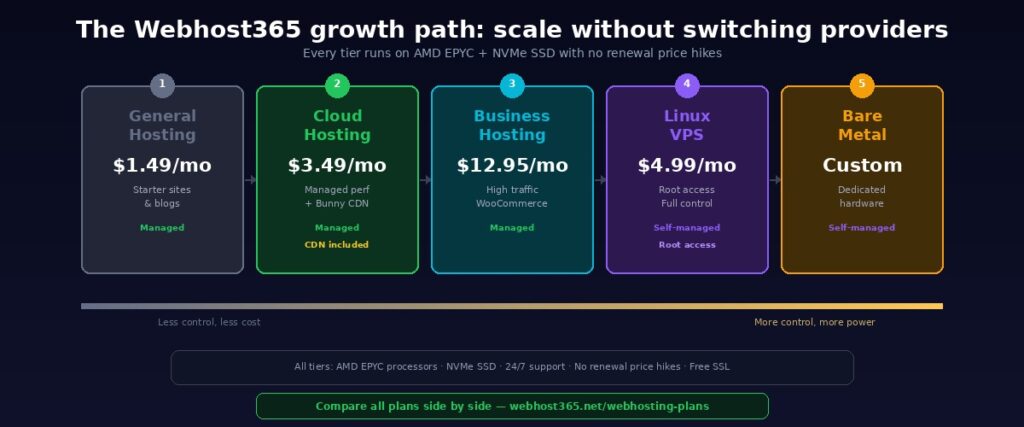
The full Webhost365 growth path
Your hosting can grow alongside your business without ever switching providers:
General Hosting at $1.49 per month covers starter sites and personal projects. Cloud Hosting at $3.49 per month adds dedicated resources, LiteSpeed caching, and Bunny CDN for managed performance. Business Hosting at $12.95 per month provides high-traffic capacity for demanding WooCommerce stores and agency sites. Linux VPS starting at $4.99 per month gives developers full root access and dedicated resources scaling up to 16 cores and 64GB RAM. Bare Metal provides an entire physical server with no virtualisation overhead for enterprise workloads.
Every tier runs on the same infrastructure backbone. Upgrading carries your data forward. The support team assists with migration at no extra cost. And every plan across the entire range has no renewal price hikes. The price you sign up at is the price you pay permanently, regardless of which tier you are on.
Compare all plans side by side to see exactly where your project fits today and where it can grow tomorrow.
Choose the Right Hosting for Your Project
Linux VPS and cloud hosting solve different problems. VPS gives developers full root access, maximum resource control, and the freedom to run any software on a dedicated virtual server. Cloud hosting gives site owners managed performance, built-in CDN, and zero server administration. Neither is universally better. The right choice depends on your project, your skills, and your priorities.
If you need root access and full control, Webhost365 Linux VPS starts at $4.99 per month with AMD 3.8GHz processors, NVMe SSD, 10Gbps network, and a $5,000 performance challenge backing every plan.
If you need managed speed with built-in CDN, Webhost365 Cloud Hosting starts at $3.49 per month with LiteSpeed, LSCache, Bunny CDN with 197 global edge locations, automatic SSL, and one-click WordPress installation.
Both include NVMe SSD storage on AMD EPYC infrastructure. Both include 24/7 expert support. Both have transparent pricing that never increases at renewal. And both connect to the same growth path so you can upgrade without switching providers.
Linux VPS — from $4.99/mo | Cloud Hosting — from $3.49/mo | Compare All Plans | See How We Compare
Frequently Asked Questions
Is VPS faster than cloud hosting?
Not necessarily. Performance depends on the hardware and software configuration, not the hosting category. A VPS with 4 cores and 8GB RAM on NVMe SSD is powerful, but a cloud hosting plan with LiteSpeed caching and built-in CDN can deliver faster page loads for websites because the entire stack is pre-optimised. For custom applications where you control every layer, a well-configured VPS can outperform managed hosting by eliminating overhead your specific workload does not need. On Webhost365, both options run on AMD EPYC processors with NVMe SSD. The hardware foundation is identical. The difference is who tunes the software on top of it.
Do I need a VPS for WordPress?
No. WordPress runs better on managed cloud hosting for most users. The hosting provider handles caching, CDN, SSL, and PHP optimisation so you do not have to. On Webhost365 cloud hosting, WordPress installs in one click and runs on LiteSpeed with Bunny CDN included from day one. A VPS only makes sense for WordPress if you need to run custom server software alongside your site, manage dozens of WordPress installations on a single server, or require OS-level access for specific plugins or workflows. For everyone else, cloud hosting delivers faster WordPress performance with less effort. Our WordPress speed guide covers the full optimisation picture.
Can I upgrade from cloud hosting to VPS later?
Yes. Starting on cloud hosting and migrating to a VPS when you need more control is a common and sensible path. Many projects begin on managed hosting because speed and simplicity matter most in the early stages. When the project grows and you need root access, custom software, or higher resource allocations, VPS is the natural next step. On Webhost365, both options run on the same AMD EPYC infrastructure with NVMe SSD. The support team handles migration at no extra cost with zero downtime.
Does Webhost365 VPS include CDN?
No. Webhost365 Linux VPS plans provide raw server resources with full root access. CDN is not included because VPS users typically configure their own CDN or use the server for non-web workloads where CDN is irrelevant. If you need built-in CDN for a website with global visitors, Webhost365 cloud hosting includes Bunny CDN with 197 edge locations on every plan at no extra cost and zero configuration.