
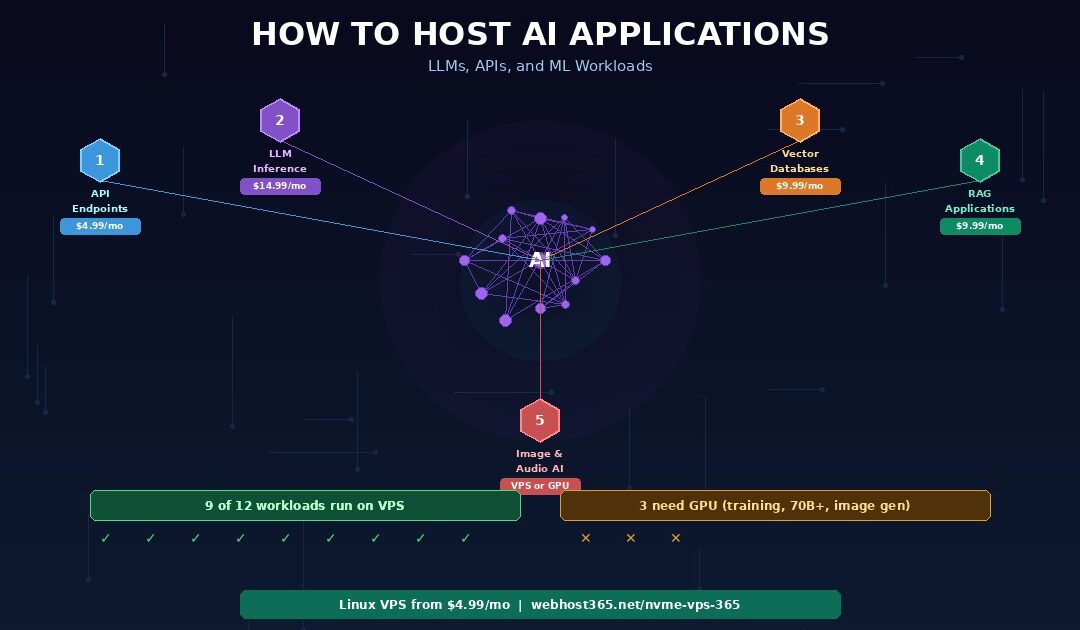
Not every AI application needs a GPU cluster or a $500 per month cloud bill. Many common AI workloads — small language models, vector databases, AI API endpoints, image classifiers, NLP pipelines, and retrieval-augmented generation systems — run efficiently on CPU-based VPS hosting with enough RAM and fast NVMe storage. The industry narrative that AI requires GPUs is true for training large models and running 70B+ parameter inference. It is not true for deploying a 7B parameter chatbot with Ollama, serving a FastAPI endpoint that calls a local model, running a ChromaDB vector database for semantic search, or hosting a RAG application that retrieves context from your own documents.
This guide classifies AI workloads by what they actually need from your hosting — CPU cores, RAM, storage speed, and GPU. Five categories cover the full spectrum from lightweight API proxies to heavy model inference. For each category, you will see the exact hosting tier that handles the workload, the minimum server specifications, and the monthly cost. If you are building AI-powered features into your product, self-hosting a chatbot, or running inference on a small model, a Webhost365 Linux VPS with NVMe SSD, AMD EPYC Gen 4 processors, and root access handles these workloads at a fraction of cloud GPU pricing.
5 types of AI workloads and what they need from your hosting
AI applications fall into five categories based on their computational demands. Understanding which category your project falls into determines whether you need a $5 VPS, a $20 VPS, or a $200 GPU server. Most developers overestimate what their AI workload requires because the loudest voices in the AI space are building foundation models that genuinely need massive compute. Your application probably does not.
1. AI API endpoints and proxy services
What it is: A web service that receives requests, calls an AI model — either locally hosted or through a third-party API like OpenAI or Anthropic — processes the response, and returns it to the caller. This covers chatbot backends, content generation APIs, AI-powered search features, and any SaaS product that wraps AI functionality behind your own API.
What it needs from your server: If you are proxying requests to an external AI API, the hosting requirements are minimal. Your server receives a request, assembles a prompt, sends it to OpenAI or Anthropic, waits for the response, and forwards it to your user. The bottleneck is network latency to the upstream API, not your server’s processing power. One to two vCPUs and 2 GB of RAM handle thousands of proxied requests per day without stress.
If your endpoint does meaningful pre-processing or post-processing — chunking documents before sending them to an embedding API, filtering or reformatting model responses, maintaining conversation history in a local database — the CPU and RAM requirements increase slightly. Two vCPUs with 4 GB of RAM covers these heavier proxy patterns comfortably.
Why VPS works: API endpoints are I/O-bound rather than compute-bound. Your server spends most of its time waiting for upstream responses, not crunching numbers. NVMe storage speeds up request logging, conversation history retrieval, and cached response lookups. AMD EPYC processors handle the text processing and JSON serialisation efficiently. Frameworks like FastAPI and Express serve these workloads with low overhead.
Recommended plan: Linux VPS from $4.99/mo for pure proxies, $9.99/mo for endpoints with heavier pre/post-processing.
2. Small LLM inference with Ollama
What it is: Running a language model locally on your server for text generation, summarisation, classification, or conversation. Models in the 1B to 7B parameter range — Llama 3.1 8B, Mistral 7B, Phi-3 Mini, Gemma 2B — run on CPU without GPU acceleration when loaded in quantised format.
What it needs from your server: RAM is the primary constraint. The entire model loads into memory, and inference happens in RAM. A quantised model requires roughly 1 GB of RAM per billion parameters at Q4 quantisation. Phi-3 Mini (3.8B) needs approximately 2 to 4 GB. Llama 3.1 8B quantised to Q4_K_M needs approximately 4 to 6 GB. Add 2 GB for the operating system, web server, and application code.
CPU matters for inference speed. More cores and higher clock speeds produce faster token generation. AMD EPYC Gen 4 processors with AVX2 instruction support are particularly well-suited for quantised model inference. Expect 5 to 15 tokens per second on a 4-vCPU server running a 7B model — fast enough for chatbot conversations and content generation where real-time streaming is not critical.
Storage speed affects model loading. Ollama loads models from disk into RAM on startup or on first request. A 4 GB quantised model file loads in under 1 second on NVMe, approximately 3 to 4 seconds on SATA SSD, and 8 or more seconds on HDD. For applications that switch between models or restart frequently, NVMe eliminates noticeable cold-start delays.
Why VPS works: Self-hosting eliminates per-token API costs entirely. If your application generates thousands of responses per day, the fixed monthly VPS cost replaces an API bill that scales linearly with usage. A developer paying $150 per month for OpenAI API calls on a moderate-volume chatbot can self-host a 7B model on a $14.99 VPS with no usage limits. The quality tradeoff is real — a 7B model is less capable than GPT-4o — but for focused tasks with good prompts and contextual grounding, the gap is often acceptable.
Recommended plan: Linux VPS $9.99–19.99/mo depending on model size. 8 GB RAM minimum for 7B models, 4 GB for 3B models.
3. Vector databases and semantic search
What it is: Storing and querying high-dimensional vector embeddings for similarity search. Vector databases power retrieval-augmented generation, recommendation engines, semantic document search, image similarity, and knowledge base systems. Instead of matching keywords like traditional search, they find content with similar meaning.
What it needs from your server: RAM is the primary constraint again. Vector databases keep their indexes in memory for fast retrieval. The storage requirement scales with collection size and embedding dimensions. Using OpenAI’s text-embedding-3-small at 1536 dimensions as a benchmark: 100,000 embeddings require approximately 600 MB of RAM, 500,000 embeddings need approximately 3 GB, and 1 million embeddings need approximately 6 GB.
NVMe storage handles persistence and index rebuilding. Vector databases write embeddings to disk for durability and reload indexes on restart. A 500,000-vector collection loads in under 2 seconds on NVMe versus 15 to 20 seconds on HDD. CPU handles distance calculations during queries — cosine similarity, dot product, or Euclidean distance across thousands of vectors per search.
Why VPS works: Vector databases are RAM-bound and storage-bound, not GPU-bound. ChromaDB, Qdrant, Weaviate, and pgvector all run on CPU and deliver sub-100-millisecond query times for collections under 1 million vectors when the server has adequate RAM. These are the same tools that production RAG applications use at scale — just deployed on your own infrastructure instead of a managed cloud service at 10x the price.
Recommended plan: Linux VPS $4.99–14.99/mo depending on collection size. 4 GB RAM handles up to 500K vectors comfortably. 8 to 16 GB for larger collections.
4. RAG applications (retrieval-augmented generation)
What it is: An architecture that retrieves relevant context from your own documents or data, injects it into a prompt, and sends the augmented prompt to a language model for a grounded response. RAG is the most practical architecture for AI applications that need domain-specific knowledge — customer support bots trained on your documentation, internal knowledge bases, legal document analysis, and product Q&A systems.
What it needs from your server: RAG combines multiple components, each with its own requirements. The retrieval pipeline needs a vector database (RAM-dependent as described above), an embedding model or API for converting queries into vectors, and a document ingestion process for chunking and embedding your source material. The generation component needs either an API connection to an external LLM or a locally hosted small model.
A typical RAG stack looks like this: your documents are chunked and embedded during ingestion, then stored in ChromaDB or Qdrant. When a user asks a question, the query is embedded, the vector database returns the most relevant document chunks, those chunks are injected into a prompt template, and the assembled prompt is sent to either an external API or a local Ollama model for response generation.
Why VPS works: RAG separates retrieval from generation. The retrieval pipeline — document ingestion, embedding, vector storage, similarity search — runs entirely on CPU and is well-suited to VPS hosting. If you use an external LLM for the generation step, the VPS only handles retrieval and prompt assembly, which requires modest CPU and RAM. Pair it with a local 7B model for generation, and the entire system runs self-contained on a single VPS with no external API dependencies.
Recommended plan: Linux VPS $9.99/mo for RAG with external LLM. $14.99–19.99/mo for RAG with local model inference. The NVMe storage on every Webhost365 VPS plan ensures fast vector index loading and model file access.
5. Image and audio processing
What it is: AI-powered tasks involving non-text media. This category spans a wide range — from lightweight image classification and audio transcription to heavyweight image generation and real-time video processing. The hosting requirements vary dramatically within this single category.
Light workloads that run on VPS: Image classification with compact models like MobileNet or EfficientNet-Lite (50 to 100 MB model files, sub-second inference on CPU). Audio transcription with Whisper’s tiny, base, or small models (39 MB to 244 MB, processing a 1-minute audio clip in 10 to 30 seconds on CPU). Text-to-speech with Coqui TTS or Piper for generating spoken audio from text. All of these run on 2 to 4 vCPUs with 4 to 8 GB of RAM.
Heavy workloads that need GPU: Image generation with Stable Diffusion requires 8 to 12 GB of VRAM minimum. Large Whisper models (medium and large) are painfully slow on CPU — minutes per minute of audio instead of seconds. Real-time video processing with AI models and high-throughput image generation at scale both demand dedicated GPU infrastructure.
The practical divider: If your AI media task processes requests asynchronously — the user submits a file, your server processes it, the result appears in 5 to 30 seconds — CPU-based VPS handles it at a fraction of GPU pricing. Only real-time processing or high-throughput generation genuinely requires GPU hardware.
Recommended plan: Linux VPS $9.99–14.99/mo for light image/audio workloads. GPU cloud ($0.50–2/hr) for heavy generation tasks.
What runs on VPS versus what needs GPU
The most expensive mistake in AI hosting is paying for GPU when CPU handles the workload. The second most expensive mistake is forcing a GPU-dependent task onto CPU and getting unusable response times. This matrix classifies twelve common AI workloads so you can match your project to the right infrastructure without guessing.
| AI workload | Runs on VPS? | Minimum VPS spec |
|---|---|---|
| API proxy to OpenAI / Anthropic | Yes — easily | 1 vCPU, 2 GB RAM ($4.99/mo) |
| Chatbot with 1–3B model (Phi-3, Gemma 2B) | Yes | 2 vCPU, 4 GB RAM ($9.99/mo) |
| Chatbot with 7B model (Llama 3.1, Mistral 7B) | Yes — slower inference | 4 vCPU, 16 GB RAM ($14.99–19.99/mo) |
| Vector database under 500K vectors | Yes — easily | 2 vCPU, 4–8 GB RAM ($9.99/mo) |
| RAG with external LLM for generation | Yes — easily | 2 vCPU, 4–8 GB RAM ($9.99/mo) |
| RAG with local 7B model | Yes — slower generation | 4 vCPU, 16 GB RAM ($14.99–19.99/mo) |
| Image classification (MobileNet, EfficientNet) | Yes | 2 vCPU, 4 GB RAM ($9.99/mo) |
| Audio transcription (Whisper tiny/small) | Yes | 2 vCPU, 4 GB RAM ($9.99/mo) |
| Text-to-speech (Coqui TTS, Piper) | Yes | 2 vCPU, 4 GB RAM ($9.99/mo) |
| Image generation (Stable Diffusion) | No — needs GPU | GPU cloud ($0.50–2/hr) |
| 70B+ LLM inference | No — needs GPU | GPU cloud ($1–4/hr) |
| Model training and fine-tuning | No — needs GPU | GPU cloud ($1–10/hr) |
Nine of the twelve workloads run on CPU-based VPS hosting. The three that require GPU — image generation, large model inference, and model training — share a common characteristic: they perform massive parallel matrix operations that GPUs are specifically designed to accelerate. Everything else is either I/O-bound (API proxies, vector search), RAM-bound (model loading, embedding storage), or involves models small enough that CPU inference produces acceptable response times.
If your AI project falls into the first nine rows, a Webhost365 Linux VPS at $4.99 to $19.99 per month replaces cloud GPU bills that often exceed $100 to $500 per month. The three GPU-dependent workloads require specialised infrastructure from providers like Lambda, RunPod, or major cloud platforms — but those workloads represent a small fraction of what most developers are actually building.
How to read this matrix for your project
Start with what your application does, not with what hardware sounds impressive. A customer support chatbot that answers questions using your documentation is a RAG application with either an external LLM or a local 7B model — both VPS-viable. A product recommendation engine that finds similar items based on descriptions is a vector database application — VPS-viable at $9.99. An API that generates marketing copy is either a proxy to an external LLM ($4.99 VPS) or a local 7B model ($14.99 VPS).
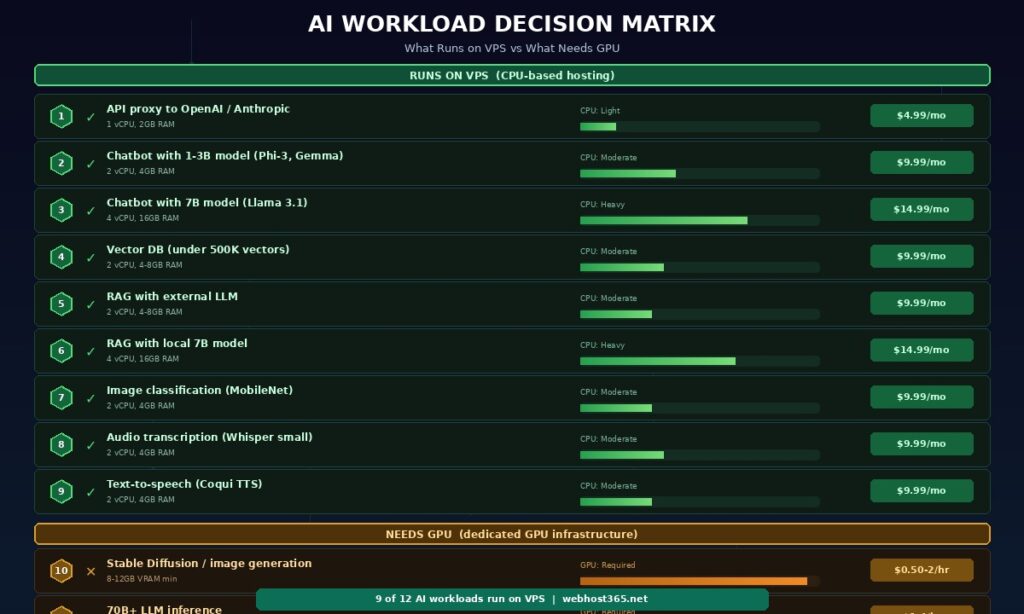
The only reason to pay for GPU is if your application generates images, runs models larger than 13B parameters interactively, or trains models from scratch. If none of those describe your project, you do not need GPU.
Deploy an AI chatbot on a VPS — step by step
This walkthrough deploys a complete AI chatbot backend on a Webhost365 Linux VPS using Ollama for local model inference and FastAPI for the API layer. The finished system accepts chat messages via HTTP, generates responses with a locally running language model, and serves them through an SSL-secured API endpoint. Total monthly cost: $14.99 to $19.99 with no per-request charges.
Choose your VPS plan and model
Match your model size to your available RAM. The rule of thumb is straightforward: a quantised model at Q4 precision requires roughly 1 GB of RAM per billion parameters. A 3B model like Phi-3 Mini needs 2 to 4 GB. A 7B model like Llama 3.1 or Mistral 7B needs 4 to 8 GB. Choose a VPS plan with at least double your model’s RAM requirement to leave headroom for the operating system, your web server, and application code.
For this walkthrough, we use a Webhost365 Linux VPS with 4 vCPU and 16 GB RAM running Ubuntu 22.04. NVMe storage ensures model files load into RAM in under a second on cold start. The AMD EPYC Gen 4 processor provides AVX2 instruction support, which quantised inference engines like llama.cpp use for faster token generation.
Install Ollama and pull a model
SSH into your VPS and install Ollama with the one-line installer:
curl -fsSL https://ollama.com/install.sh | shPull a quantised model. For a balance of quality and speed on CPU, Llama 3.1 8B at Q4_K_M quantisation is a strong starting point:
ollama pull llama3.1:8bTest the model locally to confirm it loads and responds:
ollama run llama3.1:8b "Summarise what a CDN does in two sentences."The first run takes a few seconds while the model loads from NVMe into RAM. Subsequent requests respond immediately because Ollama keeps the model resident in memory. Expect 5 to 15 tokens per second on a 4-vCPU server — visible as a smooth streaming response rather than an instant block of text.
If RAM is tight, use a smaller model. Phi-3 Mini (3.8B) or Gemma 2B deliver faster inference with a smaller memory footprint, at the cost of some capability compared to 7B models. For focused tasks like classification, extraction, or FAQ answering with RAG context, smaller models often perform as well as larger ones.
Build the API layer with FastAPI
Create a FastAPI application that receives chat requests and streams responses from Ollama. Install the dependencies:
pip install fastapi uvicorn httpxThe core application connects to Ollama’s local API, forwards the user’s message, and streams the response back:
python
from fastapi import FastAPI
from fastapi.responses import StreamingResponse
import httpx

app = FastAPI()

@app.post("/chat")
async def chat(request: dict):
    async def generate():
        async with httpx.AsyncClient() as client:
            async with client.stream(
                "POST", "http://localhost:11434/api/generate",
                json={"model": "llama3.1:8b",
                      "prompt": request["message"]},
                timeout=120
            ) as response:
                async for chunk in response.aiter_text():
                    yield chunk
    return StreamingResponse(generate())
Run the server with uvicorn:
uvicorn app:app --host 0.0.0.0 --port 8000This creates an API endpoint at port 8000 that accepts POST requests with a JSON body containing a message field. The response streams back as the model generates tokens, giving users a real-time typing effect rather than waiting for the complete response. Add input validation, conversation history, system prompts, and error handling for production use. For a complete Python deployment reference including virtual environments and process management, see our guide on deploying Python applications.
Containerise with Docker and add Nginx
Wrap the application in Docker for reproducibility and add Nginx as a reverse proxy with SSL. Create a docker-compose.yml that orchestrates three services:
yaml
services:
  ollama:
    image: ollama/ollama
    volumes:
      - ollama_data:/root/.ollama
    deploy:
      resources:
        limits:
          memory: 12G

  api:
    build: .
    depends_on:
      - ollama
    environment:
      - OLLAMA_HOST=http://ollama:11434

  nginx:
    image: nginx:alpine
    ports:
      - "443:443"
      - "80:80"
    volumes:
      - ./nginx.conf:/etc/nginx/nginx.conf
      - /etc/letsencrypt:/etc/letsencrypt
    depends_on:
      - api
volumes:
  ollama_data:
Nginx handles SSL termination using a free Let’s Encrypt certificate, rate limiting to prevent abuse, and reverse proxying to the FastAPI service. The Ollama container manages model storage and inference separately from your application code, making updates and model swaps straightforward.
Install Docker and Docker Compose on your VPS, generate your SSL certificate with certbot, and start the stack:
docker compose up -dYour AI chatbot API is now accessible at https://yourdomain.com/chat with SSL encryption, rate limiting, and automatic container restart on failure. The entire deployment is defined in two files — docker-compose.yml and your FastAPI application — making it reproducible across any VPS.
Optimise for production
Keep the model resident in memory by setting the Ollama environment variable OLLAMA_KEEP_ALIVE=-1. Without this, Ollama unloads the model after a period of inactivity, and the next request triggers a cold-start reload from disk. NVMe makes this reload fast (under 1 second for a 4 GB model), but eliminating it entirely provides consistent sub-second response initiation.
Configure uvicorn workers based on your vCPU count. For a 4-vCPU server running a model that consumes most of the CPU during inference, 2 workers is the practical maximum. More workers than vCPUs creates contention that slows every request.
Set up a systemd service or Docker restart policy (restart: always in docker-compose.yml) so the entire stack recovers automatically from crashes or server reboots. Add API key authentication or token-based middleware to prevent unauthorised usage — an unprotected AI endpoint on the public internet will attract automated abuse within days.
Monitor RAM usage. If your model plus application consistently exceeds 85 percent of available RAM, the operating system will start swapping to disk. NVMe makes swap significantly less painful than HDD — but RAM is always faster than any storage. If you see swap usage climbing, upgrade to a VPS plan with more RAM rather than relying on swap as a permanent workaround.
Self-hosting versus API calls — the cost breakeven
The decision between self-hosting a model and paying for API calls comes down to usage volume. Below a certain threshold, external APIs are cheaper because you pay nothing when idle. Above that threshold, self-hosting saves money every month because your VPS cost stays flat regardless of how many requests you process.
| Monthly usage | OpenAI API cost (est.) | Self-hosted 7B on VPS |
|---|---|---|
| 1,000 requests (light) | ~$5–15 | $14.99/mo (API cheaper) |
| 5,000 requests (moderate) | ~$25–75 | $14.99/mo (breakeven zone) |
| 20,000 requests (heavy) | ~$100–300 | $14.99/mo (VPS 7–20x cheaper) |
| 100,000 requests (high volume) | ~$500–1,500 | $19.99/mo (VPS 25–75x cheaper) |
The cost estimates assume typical request sizes of 500 to 1,000 input tokens and 200 to 500 output tokens using GPT-4o pricing. Actual costs vary by provider, model, and prompt length.
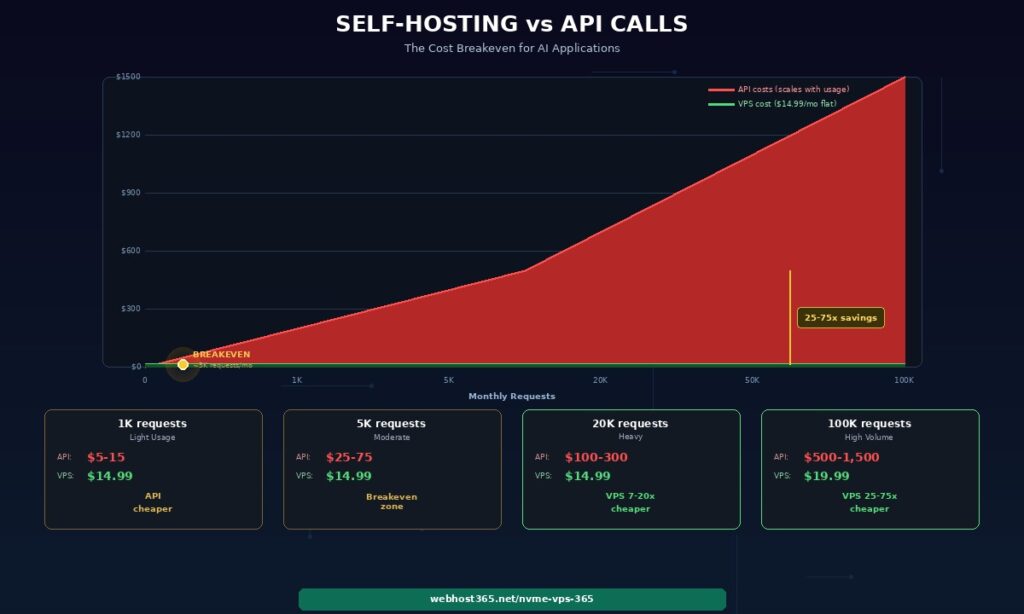
The crossover happens around 3,000 to 5,000 requests per month. Below that, pay-per-use APIs cost less than a dedicated VPS. Above it, the flat VPS cost becomes increasingly advantageous. At 20,000 requests — a moderate-traffic chatbot serving a few hundred daily users — self-hosting costs 7 to 20 times less than API calls. At 100,000 requests, the savings reach 25 to 75 times.
The quality tradeoff
The table above compares costs, not capabilities. GPT-4o is meaningfully more capable than a 7B open-source model for complex reasoning, creative writing, and nuanced multi-step tasks. Self-hosted models cannot match frontier model quality across the board.
However, the gap narrows dramatically for specific, well-defined tasks. Customer support using RAG context from your documentation. Text classification into predefined categories. Data extraction from structured inputs. Summarisation of documents within a specific domain. For these use cases, a well-prompted 7B model with relevant context injected via RAG produces results that are often indistinguishable from a frontier model’s output — at a fixed monthly cost instead of a bill that scales with every conversation.
The practical approach for most production systems is a hybrid. Route high-volume, well-defined tasks to your self-hosted model. Route complex, edge-case, or creative queries to an external API. This combination keeps your monthly costs predictable while maintaining quality where it matters most.
Why NVMe matters for AI workloads
Two specific bottlenecks in AI applications are directly determined by your storage speed, and no amount of CPU or RAM can compensate for slow disk.
Model loading from disk to RAM
Every time Ollama starts, switches models, or recovers from a restart, it reads the entire model file from storage into memory. A 4 GB quantised model — typical for a 7B parameter model at Q4 — loads in 0.8 seconds on NVMe. The same file takes 3 to 4 seconds on SATA SSD and 8 or more seconds on HDD.
That difference matters for cold starts when a user hits your API after the model has been unloaded from memory. It matters for model switching when your application uses different models for different tasks. It matters after server restarts during updates or recovery. On HDD, every one of those events creates a multi-second delay before your application can respond. On NVMe, the delay is barely noticeable.
Vector database index loading
ChromaDB and Qdrant write their vector indexes to disk for persistence and reload them into memory on startup. A collection of 500,000 vectors with 1536 dimensions occupies approximately 3 GB on disk. Loading that index takes under 2 seconds on NVMe, approximately 6 seconds on SATA, and 15 to 20 seconds on HDD.
For applications that restart regularly — container redeployments, scaling events, crash recovery — NVMe turns a 20-second outage into a 2-second blip. Combined with Docker’s automatic restart policies, your AI application recovers from failures faster than most users notice.
Webhost365 runs NVMe SSD on every VPS plan starting at $4.99 per month. For AI workloads specifically, this is not a luxury feature. It is the difference between responsive cold starts and multi-second delays that make your application feel broken.
Linux VPS — from $4.99/mo | Cloud Hosting — from $3.49/mo | Compare All Plans
Frequently asked questions
Can I run an LLM on a VPS without a GPU?
Yes, for models up to approximately 7 billion parameters. Ollama and llama.cpp support CPU-only inference using quantised models that compress the weights while retaining most of the model’s quality. A 7B model quantised to Q4_K_M format requires approximately 4 to 8 GB of RAM and generates text at 5 to 15 tokens per second on a modern CPU with AVX2 support like AMD EPYC Gen 4. This speed is fast enough for chatbot conversations, content generation, summarisation, and text classification where users can tolerate a 2 to 10 second response time.
Larger models in the 13B to 30B range are technically possible on CPU with sufficient RAM, but inference speeds drop below 1 to 3 tokens per second, making them impractical for interactive applications. For 7B and smaller models, a Webhost365 Linux VPS with 8 to 16 GB RAM handles inference at a fixed monthly cost of $14.99 to $19.99 regardless of how many requests you process.
What is the cheapest way to host an AI chatbot?
The cheapest approach depends on your conversation volume. For fewer than 1,000 conversations per month, proxying requests through an external API like OpenAI or Anthropic on a basic VPS or cloud hosting plan ($3.49 to $4.99 per month) is the most cost-effective option. You pay only for the API tokens you consume, and the VPS handles request routing and your application logic. For higher volumes, self-hosting a small model with Ollama eliminates per-request costs entirely. A complete chatbot stack — Ollama running a 7B model, FastAPI for the API layer, Nginx for SSL and rate limiting, and a simple web frontend — runs on a Webhost365 Linux VPS from $14.99 per month with no usage caps and no third-party dependencies. The tradeoff is response quality: a 7B model handles focused tasks with good prompts and RAG context well, but it is less capable than GPT-4o for open-ended reasoning.
How much RAM do I need to run an AI model?
The RAM requirement depends on model size and quantisation level. A quantised model at Q4 precision requires roughly 1 GB of RAM per billion parameters. Gemma 2B needs 1.5 to 3 GB. Phi-3 Mini at 3.8B needs 2 to 4 GB. Llama 3.1 8B needs 4 to 8 GB. Mistral 7B needs 4 to 6 GB. These figures cover the model weights only — add 1 to 2 GB for the operating system, web server, and your application code. If your application also runs a vector database alongside the model, add the vector database’s requirements (approximately 600 MB per 100,000 embeddings at 1536 dimensions) to the model’s RAM. On a Webhost365 VPS, 8 GB RAM comfortably runs a 7B quantised model alongside FastAPI and Nginx. Choose 16 GB if you plan to run a vector database and a 7B model simultaneously.
Is self-hosted AI as good as using OpenAI or Anthropic APIs?
For general-purpose reasoning, creative writing, and complex multi-step analysis, frontier models like GPT-4o and Claude are significantly more capable than 7B open-source alternatives. Self-hosted models cannot match their breadth of knowledge or reasoning depth. However, for specific and well-defined tasks — customer support grounded in your documentation, text classification into known categories, data extraction from structured inputs, document summarisation within a particular domain — a well-prompted 7B model with RAG context produces results that are often functionally equivalent to a frontier model’s output. The practical strategy for most production systems is a hybrid approach. Route high-volume, predictable tasks to your self-hosted model where the fixed VPS cost provides dramatic savings. Route complex edge cases and creative requests to an external API where the per-token cost is justified by the quality difference. This combination keeps costs predictable while preserving quality for the requests that need it.
What is RAG and do I need a GPU for it?
RAG stands for Retrieval-Augmented Generation. It retrieves relevant context from your documents or data, adds that context to a prompt, and sends the augmented prompt to a language model for a response grounded in your specific information. The retrieval pipeline — document ingestion, embedding generation, vector storage in ChromaDB or Qdrant, and similarity search — runs entirely on CPU with no GPU requirement.
The generation component uses either a self-hosted model on CPU (a 7B model on VPS for $14.99 to $19.99 per month) or an external API call to GPT-4o or Claude (VPS cost from $4.99 per month plus per-token API fees). A complete RAG system with a vector database and external LLM runs on a Webhost365 VPS from $9.99 per month. Adding local inference with Ollama increases the requirement to $14.99 to $19.99 but removes all per-query charges. RAG is the most VPS-friendly AI architecture because it separates the cheap retrieval step from the expensive generation step, letting you optimise costs independently.
Can I fine-tune a model on a VPS?
Full fine-tuning of a language model requires GPU hardware and is not practical on a CPU-based VPS. The matrix multiplication operations involved in backpropagation across billions of parameters need the parallel processing that GPUs provide. However, two lighter alternatives achieve similar customisation results on CPU. First, prompt engineering combined with RAG context handles most customisation needs without any training step — you provide domain-specific knowledge at inference time rather than embedding it in model weights.
This approach is faster to iterate, easier to update, and requires no training infrastructure. Second, LoRA (Low-Rank Adaptation) training for very small models in the 1 to 3B range is technically possible on CPU but extremely slow — measured in hours or days rather than the minutes it takes on GPU. For most practical purposes, RAG with good prompt templates achieves better and more maintainable results than fine-tuning a small model. Reserve GPU-based fine-tuning for specialised tasks where your model needs to learn entirely new patterns or behaviours that cannot be provided through context alone.